



Luka Mrkić
Head of BD
Insights, strategies, and real-world playbooks on AI-powered marketing.
JUN 25, 2026
AI Workflow Automation: The Operator's Playbook for Growth Teams in 2026
TL;DR
- AI workflow automation chains a trigger, one or more AI reasoning steps, and a routed output into a single process that runs without a person babysitting each step.
- The highest-leverage place to start is the brain layer: a shared knowledge and decision layer the AI reads from before it acts, so every workflow uses the same facts, voice, and rules.
- Most teams fail by automating a task before they have given the AI a reliable place to think from, which produces fast, confident, wrong output at scale.
- A workflow is working when you can measure time saved, error rate, and how often a human has to step in, and all three move in the right direction over a few weeks.
- The build pattern is tool-agnostic: any orchestrator, any model, any data store can run it, so pick on fit and switching cost, and design the knowledge layer first.
If you are evaluating who should build this for your team, this guide gives you both the blueprint to build it yourself and the standards to judge the work if you hire it out.
What AI workflow automation actually is
AI workflow automation is a process where software triggers on an event, passes the work to an AI model that reasons over it, and routes a finished result to the right place, with a human reviewing only the steps that genuinely need judgment. The trigger can be a new lead, a finished sales call, a published competitor page, or a calendar event. The AI step reads context, makes a decision or drafts an output, and the routing step files it, sends it, or flags it for review.
The difference from older rule-based automation is the reasoning step. A classic automation moves data between apps on fixed rules. An AI workflow reads messy input, applies judgment, and produces something new: a drafted reply, a scored lead, a summarized brief. That single change is what lets automation reach the work that used to require a person.
Why AI workflow automation needs its own playbook
A workflow that involves a model thinking is harder to get right than a workflow that moves rows between tools. The model needs the right context to reason well, the output needs a quality bar, and someone needs to own what happens when the model is unsure. Treating an AI workflow like a Zapier zap with a smarter middle step is the fastest way to ship confident, wrong output at scale.
If you are interested in building AI systems and automation like this for your team, book a call here.
Start with the brain layer first
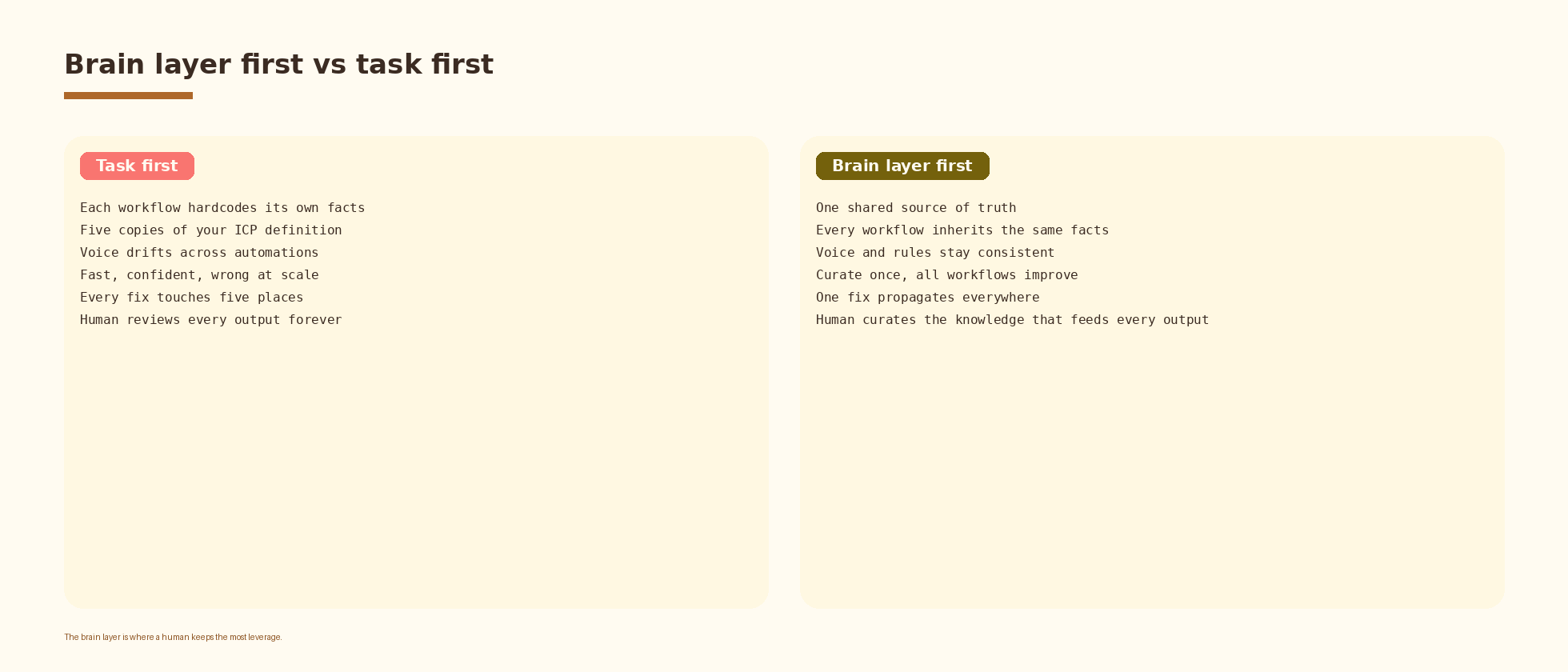
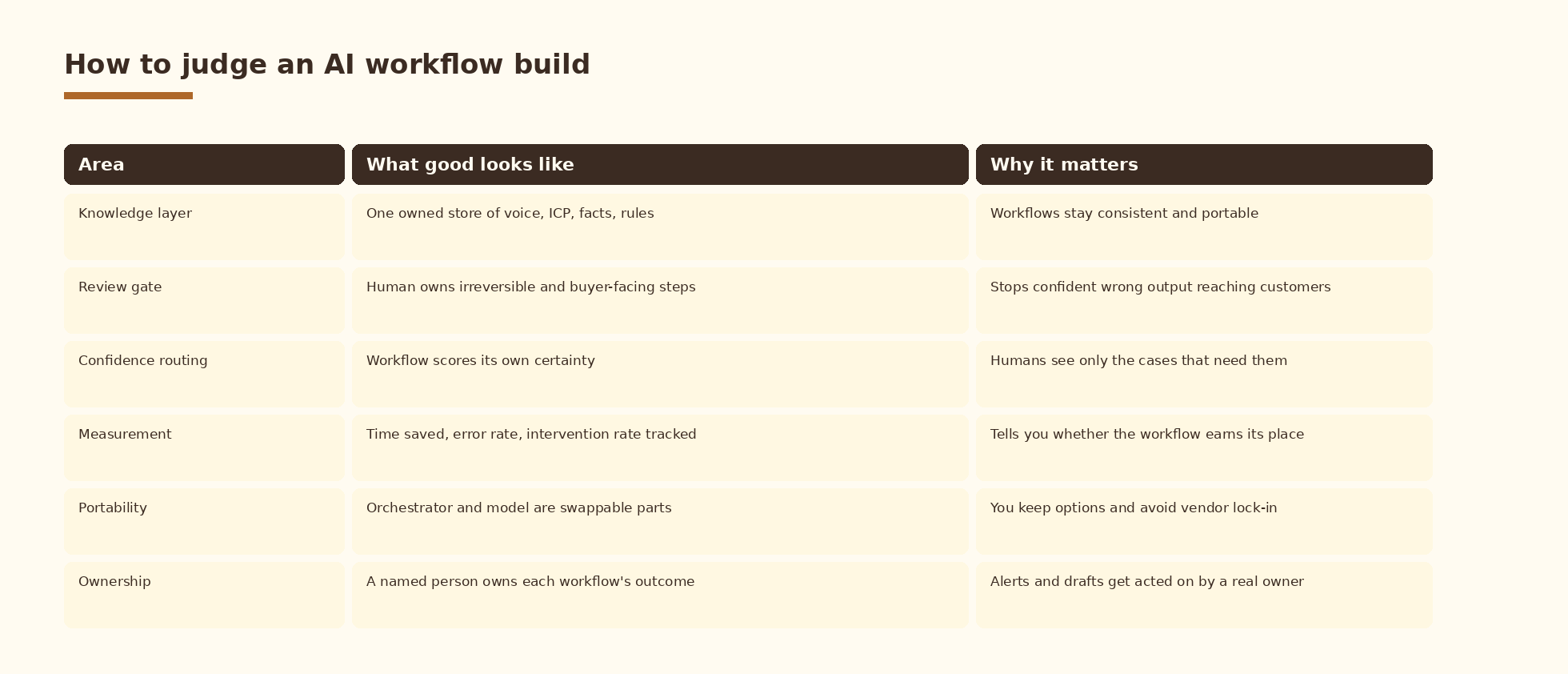
The instinct is to pick a painful task and automate it. The better first move is to build the shared knowledge and decision layer the workflow reasons from. This is a shared knowledge and decision layer: your brand voice, your ICP definition, your product facts, your pricing rules, your dos and donts, all in one place the AI reads before it acts.
When the knowledge layer comes first, every workflow you build afterward inherits the same facts, the same voice, and the same rules. A content workflow and a sales workflow both pull from one source of truth, so they stay consistent. When the knowledge layer comes last, each workflow hardcodes its own version of the truth, they drift apart, and you maintain five copies of your ICP definition across five automations.
The brain layer is also where a human keeps the most leverage. You curate the knowledge once, and every downstream workflow gets better. That is a far better use of human time than reviewing every individual output forever.
The architecture of an AI workflow
Every reliable AI workflow has the same five parts. A trigger starts it. A context step pulls the right facts from the knowledge layer. An AI reasoning step does the thinking. A routing step decides where the output goes. A review gate catches the cases the workflow flags as uncertain.
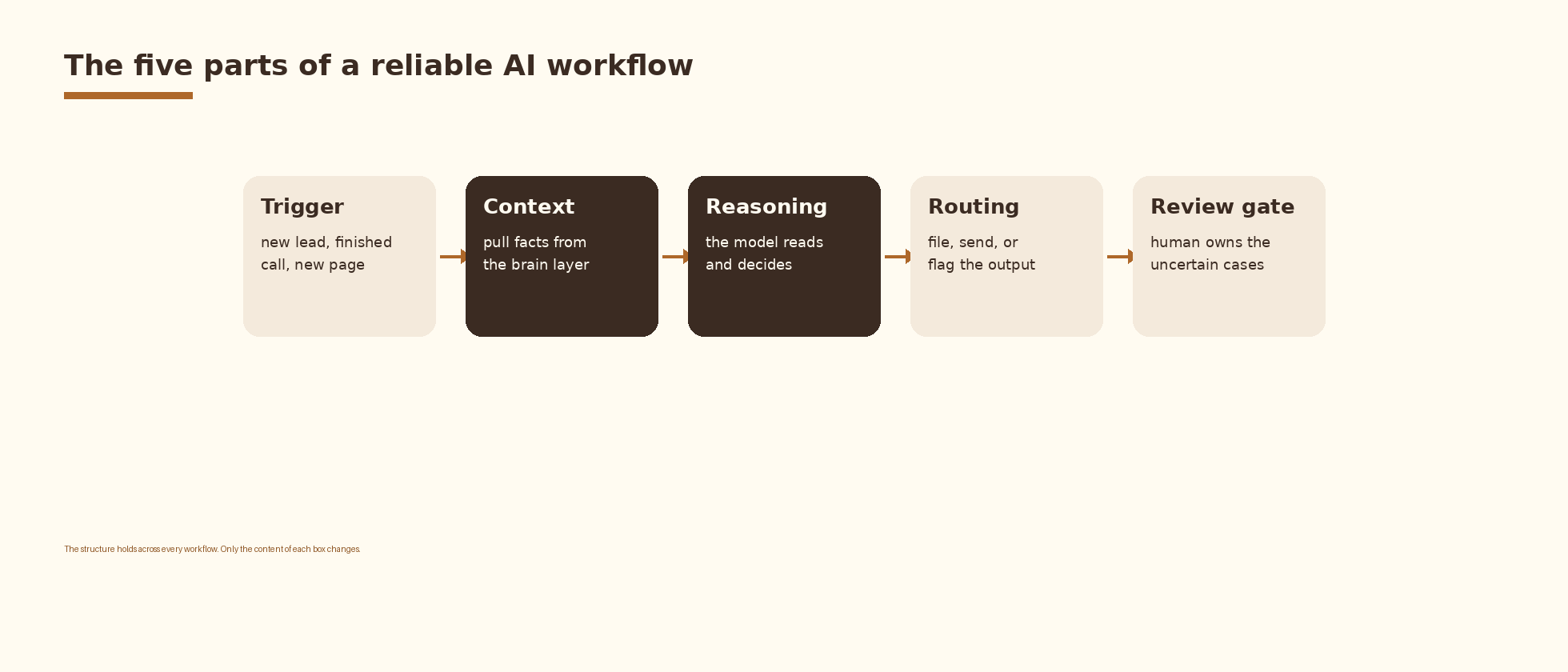
The shape stays the same whether you are scoring a lead, drafting a proposal, or summarizing a competitor move. The content of each box changes while the structure holds. Once a team has built two or three workflows on this pattern, the fourth takes a fraction of the time because the knowledge layer and the review habits already exist.
If you want this set up cleanly inside your stack with logging, retries, and a feedback loop into a CRM, that is the kind of work we ship at Espressio.
Where humans stay in the loop
A good AI workflow does not remove the human. It moves the human to the decisions that need judgment and away from the work that does not. The review gate is where this happens. The workflow handles the volume, drafts the output, and scores its own confidence. The human approves the high-stakes cases, edits the close calls, and ignores the routine passes.
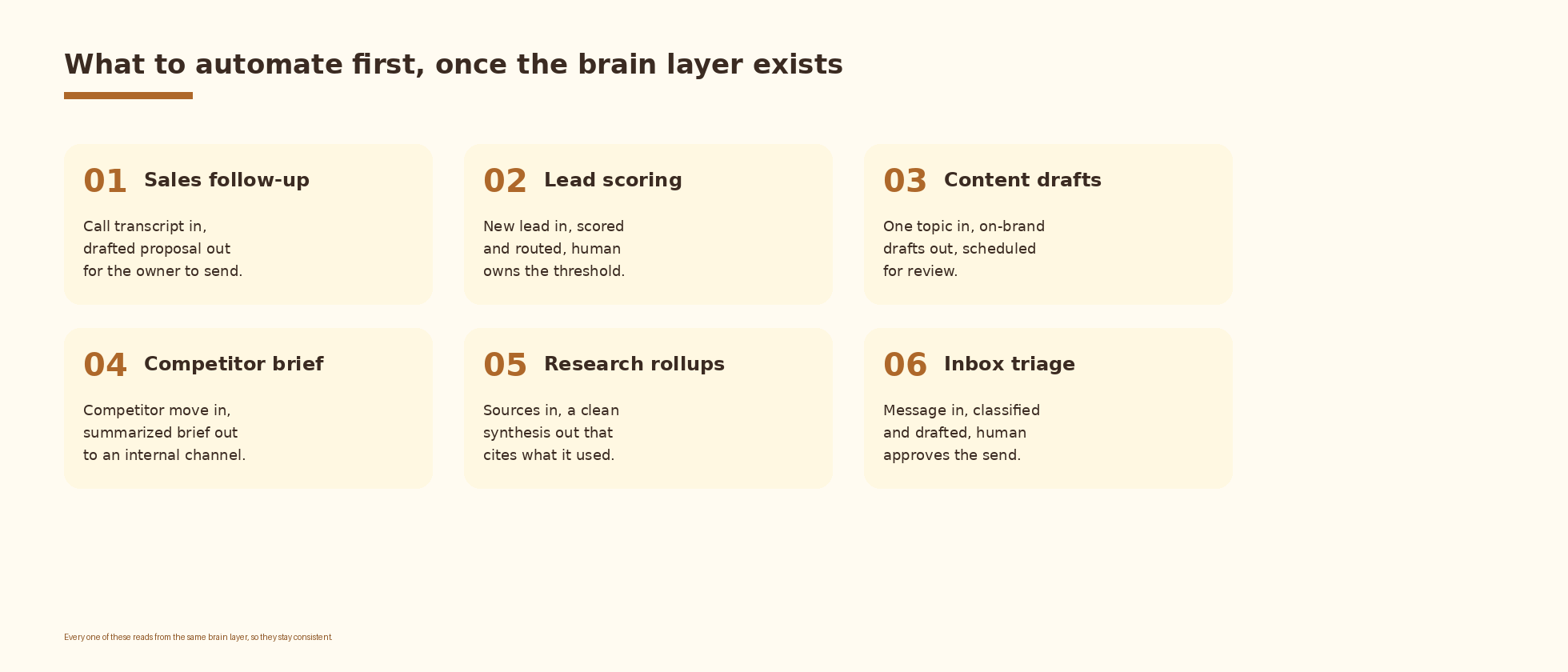
The rule of thumb: automate the drafting, keep the human on the sending when the output is buyer-facing or irreversible. A proposal drafts a follow-up proposal for the account owner to send. A scored lead routes automatically while a human owns the threshold. A competitor brief publishes to an internal channel where a person decides what to act on.
Common mistakes when building AI workflows
Teams repeat the same handful of errors. The list below covers the ones that cost the most time to undo.
- Automating a task before building the knowledge layer it should reason from.
- Sending AI output straight to a customer with no review gate on the irreversible steps.
- Hardcoding facts into each workflow so five automations carry five copies of the truth.
- Measuring nothing, so nobody can tell whether the workflow saved time or created cleanup.
- Routing everything to a human for review, which recreates the bottleneck the workflow was meant to remove.
- Picking the tool first and forcing the workflow to fit it.
How to know your AI workflow is working
A workflow earns its place when three numbers move together over a few weeks. Track time saved per run against the manual baseline. Track the error rate, meaning how often the output needed a correction before it could be used. Track the human intervention rate, meaning how often a person had to step in on something the workflow was supposed to handle.
Watch how they move as you tighten the knowledge layer and the prompts. A healthy workflow shows time saved rising, error rate falling, and intervention rate settling at a level you chose on purpose. If intervention stays high, the knowledge layer is usually the thing to fix, because the model is reasoning from incomplete facts.
Choosing tools without locking yourself in
The market splits into orchestrators that wire the steps together, models that do the reasoning, and data stores that hold the knowledge layer. The build pattern in this guide runs on any combination. That is the point. Pick on fit and switching cost, keep the knowledge layer in a store you control, and treat the orchestrator and the model as parts you can swap.
A team that designs the workflow around the pattern keeps its options open. A team that designs around one vendor’s features inherits that vendor’s limits and pricing. Keep the architecture portable and the knowledge layer yours.
FAQ
What is AI workflow automation?
It is a process where a trigger starts the work, an AI model reasons over the input using your context, and the result is routed to the right place, with a human reviewing only the steps that need judgment. It reaches work that older rule-based automation could not, because the middle step can read messy input and produce something new.
What should a company automate first?
Build the knowledge layer first, then automate the highest-volume repetitive task that reads from it. The knowledge layer is your brand voice, ICP, product facts, and rules in one place the AI reads before it acts. Starting there means every later workflow inherits the same source of truth.
What is an example of an AI workflow automation?
A finished sales call triggers the workflow, the AI reads the transcript and your product facts from the knowledge layer, it drafts a follow-up proposal, and the draft routes to the account owner to review and send. The volume work is automated while the buyer-facing send stays with a human.
Do I need a specific tool to build this?
No. The pattern is tool-agnostic. Any orchestrator, any capable model, and any data store can run it. Choose based on fit with your existing stack and how easily you could switch later, and keep the knowledge layer in a store you own.
How do I know if it is actually working?
Measure time saved per run, the error rate before output is usable, and how often a human has to intervene. A workflow is working when time saved rises and error rate falls while the intervention rate settles where you chose it to be.
What to do next
- Write down the one knowledge layer your team keeps re-explaining: brand voice, ICP, product facts, or pricing rules. Put it in one place.
- Pick the highest-volume repetitive task that would read from that knowledge layer.
- Map the five parts: trigger, context, reasoning, routing, review gate.
- Decide which step is irreversible and put the human review gate there.
- Ship it, measure time saved, error rate, and intervention rate, and tighten the knowledge layer until the numbers settle.
If you want AI systems like this designed and shipped cleanly inside your growth stack, let’s talk.
Related Espressio guides



