



Luka Mrkić
Head of BD
Insights, strategies, and real-world playbooks on AI-powered marketing.
MAY 22, 2026
How to Build an AI-Powered ICP Scoring Model in HubSpot
TL;DR
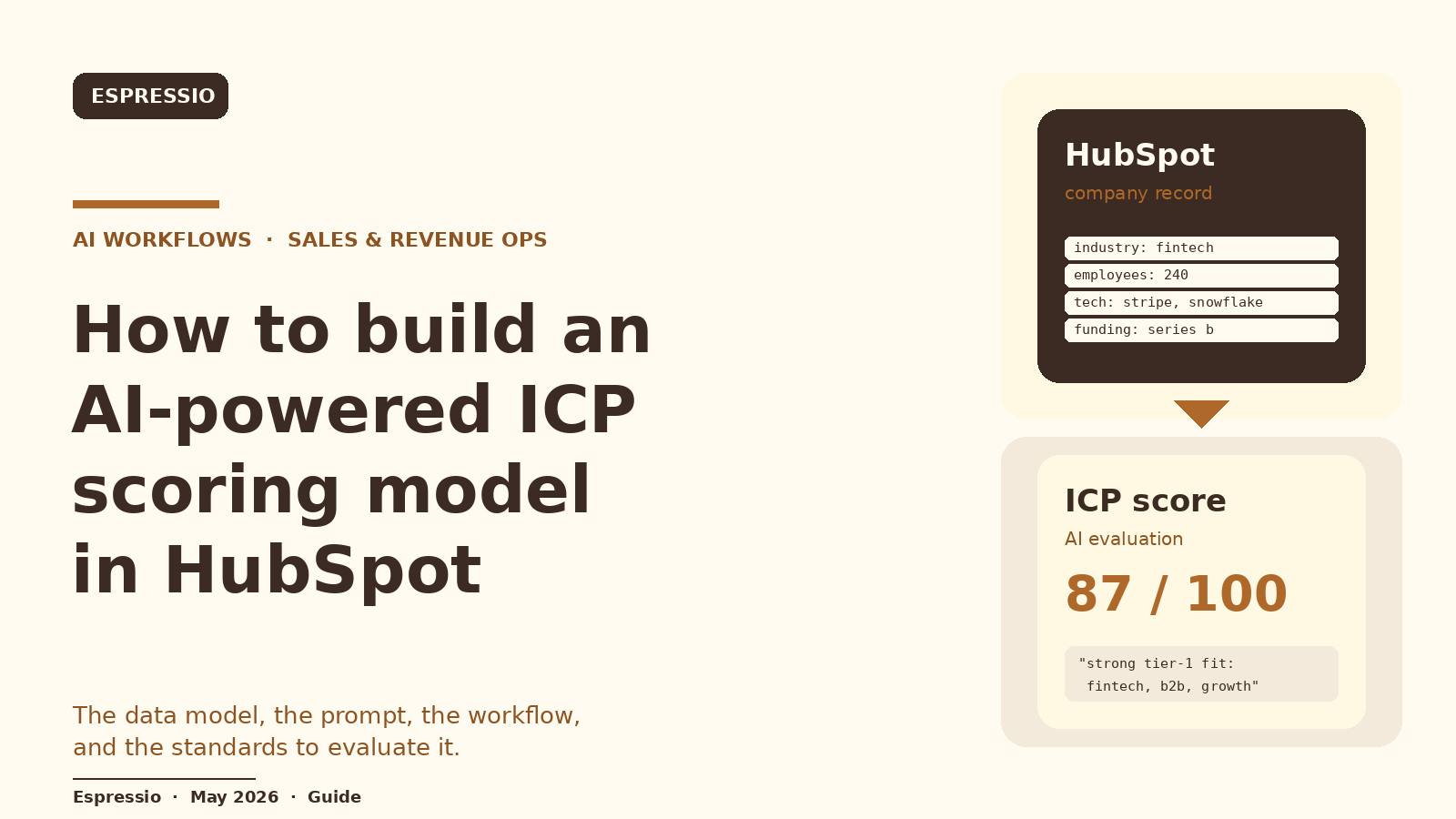
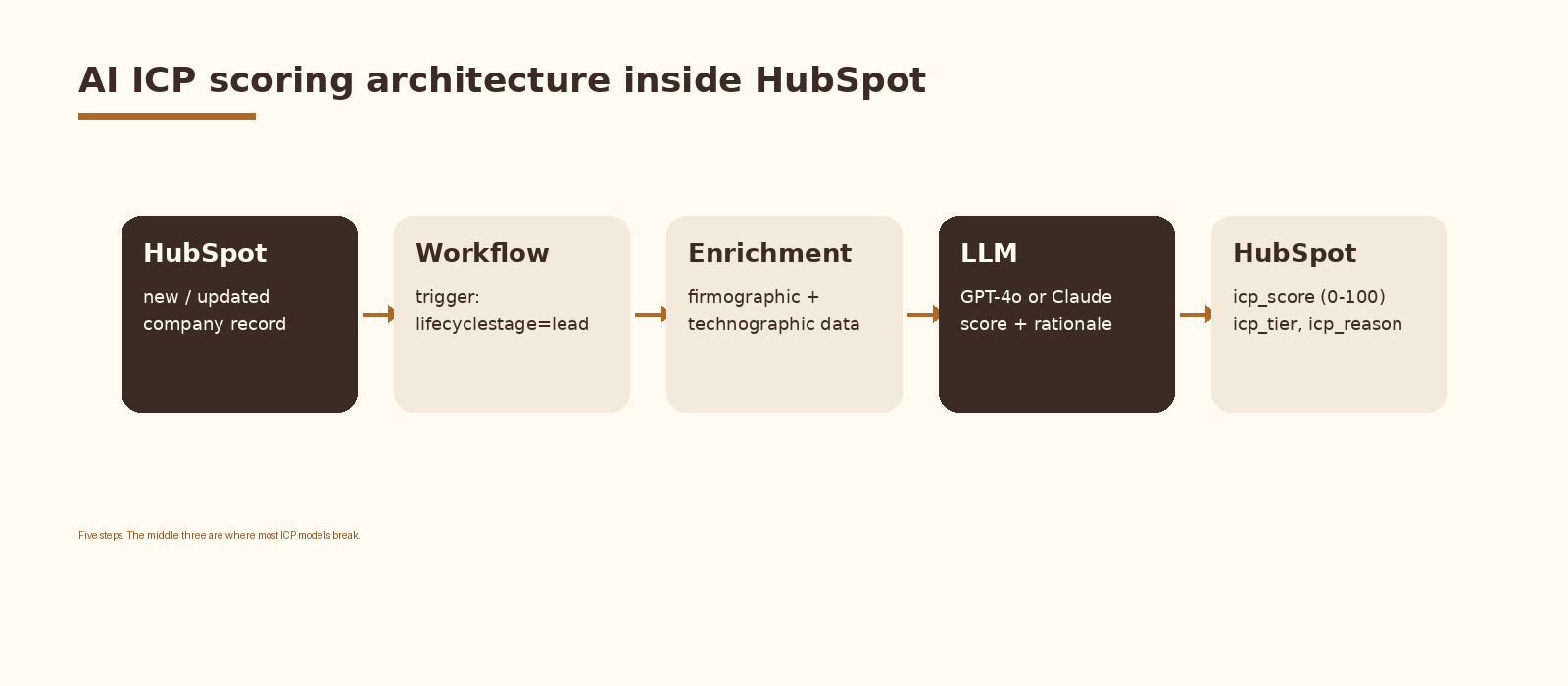
An AI-powered ICP scoring model in HubSpot reads each company record, scores fit on a 0 to 100 scale, writes a tier and a short rationale back to the record, and routes the company through a HubSpot workflow. The model is an LLM (GPT-4o or Claude 3.5 Sonnet) wrapped in a stable prompt with a clear rubric and a JSON output schema. The data layer is firmographic, technographic, and signal data already in HubSpot or enriched by a tool like Clay. The workflow layer is a standard HubSpot workflow with a webhook step or a HubSpot operations-hub custom code action.
Build time is a few hours for a working prototype, a week for something production grade with overrides, audits, and back-testing against closed-won data.
If you are evaluating who should build this for your team, this guide gives you both the technical blueprint and the standards to evaluate the work.
What an AI ICP scoring model actually is
An ICP scoring model assigns every account in your CRM a fit score against your ideal customer profile. Traditional ICP scoring is rules-based: add 10 points for industry, 15 points for size, 5 for region. It works until the rules sprawl, fight each other, and stop reflecting how deals actually close.
An AI ICP scoring model replaces the rule tree with an LLM call. The model reads the company’s fields, compares them to your written ICP definition, and returns a score, a tier, and a one-line reason a rep can read in five seconds. The output writes back into HubSpot as custom properties, so the score is queryable and the rest of the CRM behaves normally around it.
Three things move when this is wired up correctly: routing speed, sales time spent on tier-1 accounts, and the feedback loop between marketing and sales on what fit actually looks like.
What you need before you start
- A HubSpot account on a tier that supports workflows on the company object (Sales or Marketing Hub Professional or higher).
- Permission to create custom properties on the company object and to create workflows. Most ops or admin users have this by default.
- An OpenAI API key or an Anthropic API key with billing enabled. GPT-4o and Claude 3.5 Sonnet both work; pick one and stay on it.
- A written ICP definition. Two to four paragraphs covering industry, size, geography, tech stack hints, buying signals, and explicit disqualifiers. If you do not have this written down, write it before you build anything else. The model is only as good as this document.
- Optional but recommended: a list of 50 closed-won deals and 50 closed-lost deals from the last 12 months. You will use these to back-test the model before turning it loose on new records.
- Optional: a data enrichment provider for fields HubSpot does not have natively. Clay is a clean fit here because it can call your LLM inline and write fields back to HubSpot in the same waterfall.
Step 1: Define the data the model sees
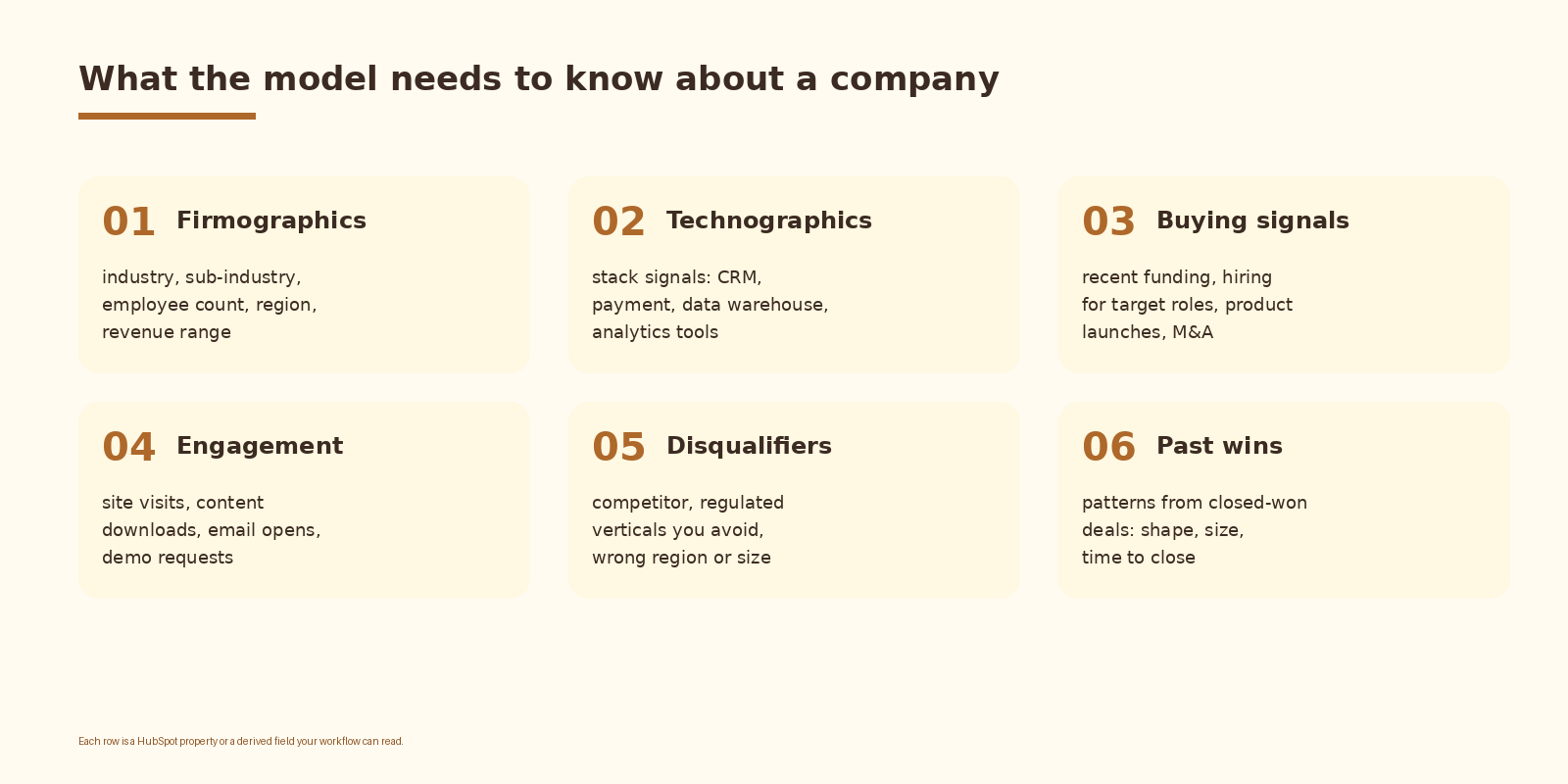
The model can only score what it can read. The data layer is the first place ICP models break, and the fix is unglamorous: write down the fields, confirm they are populated, and only then move to the prompt.
Practical rules:
- Use existing HubSpot company properties wherever possible. Industry, annual revenue, number of employees, country, and lifecyclestage are usually already there.
- Add custom properties for the fields you actually score on but do not have. Typical additions:
tech_stack,funding_stage,last_funding_date,target_persona_count,primary_signal. - Fill the empty fields before you scale the model. An LLM asked to score on missing data will hallucinate confident garbage. Either enrich the data or instruct the model to return a low-confidence flag when the inputs are sparse.
- Document what each property means in plain English. The same definition goes into the system prompt so the model and your team are reading the same field the same way.
HubSpot’s own properties API and the company object schema are documented in the HubSpot developer docs and are the right reference when you start adding custom fields. Treat the company object as the source of truth and write the AI score back to it, not to a side table.
Step 2: Write the scoring prompt
The prompt is the model. A clean prompt with a clear rubric and a strict output schema produces stable scores across thousands of runs. A loose prompt produces a number that changes every time you ask.
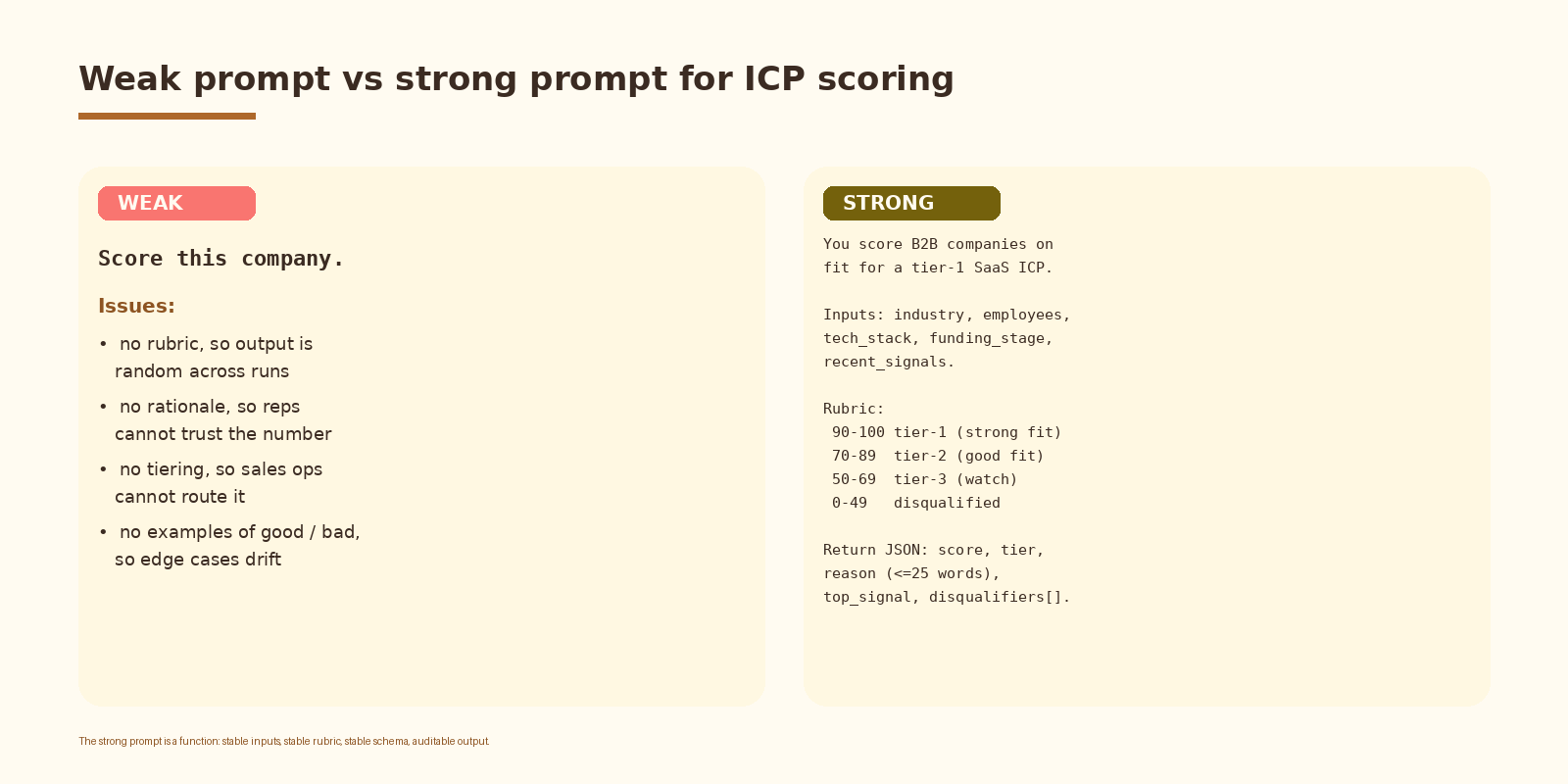
A working prompt has six parts:
- Role and task: one sentence stating that the model scores B2B companies on fit for your ICP.
- ICP definition: your written ICP, copied in verbatim.
- Inputs: the field names the model will receive, in the order they will arrive.
- Rubric: the score bands (for example 90 to 100 tier-1, 70 to 89 tier-2, 50 to 69 tier-3, 0 to 49 disqualified) with a one-line description of what qualifies for each.
- Output schema: a strict JSON schema with
score,tier,reason,top_signal, anddisqualifiersfields. Tell the model to return only this JSON. - Examples: two or three worked examples covering an obvious tier-1, an obvious disqualification, and one ambiguous case. These anchor the rubric.
Keep the reason field under 25 words. A rep needs to read it during a call. Anything longer gets ignored and the score loses its trust.
If you want this set up cleanly inside your stack with logging, retries, and a feedback loop into a CRM, that is the kind of work we ship at Espressio.
Step 3: Wire the HubSpot workflow
HubSpot workflows on the company object are the right home for this. The trigger fires when a company is created or when a property changes, the workflow calls the model, and the response writes back to custom properties.
Two common implementations:
- Workflow plus webhook (simplest): use a webhook action that POSTs the company’s fields to a small endpoint you control (a serverless function or a Make.com scenario). The endpoint calls the LLM and writes back via the HubSpot API.
- Workflow plus operations-hub custom code action (most direct): the custom code action calls the LLM directly with a Node.js or Python snippet, parses the JSON response, and returns the score, tier, and reason as outputs that the workflow then writes to properties.
A minimal Python version of the custom code action looks like this:
import os, json, requests

def main(event):
    company = event["inputFields"]
    prompt = build_prompt(company)        # your ICP system prompt + company fields
    resp = requests.post(
        "https://api.openai.com/v1/chat/completions",
        headers={"Authorization": f"Bearer {os.environ['OPENAI_API_KEY']}"},
        json={
            "model": "gpt-4o",
            "messages": [
                {"role": "system", "content": SYSTEM_PROMPT},
                {"role": "user",   "content": prompt},
            ],
            "temperature": 0.2,
            "response_format": {"type": "json_object"},
        },
        timeout=20,
    )
    data = json.loads(resp.json()["choices"][0]["message"]["content"])
    return {
        "outputFields": {
            "icp_score":  data["score"],
            "icp_tier":   data["tier"],
            "icp_reason": data["reason"],
        }
    }
Temperature stays low (0.1 to 0.3) for scoring. You want deterministic numbers, not creative ones.
Step 4: Route on the score
A score nobody acts on is decoration. The same HubSpot workflow that calls the model should branch on the tier and do something useful:
- Tier-1: assign to a named AE or SDR queue, send an internal Slack alert, set lifecyclestage to sales-qualified-lead.
- Tier-2: enroll in a nurture sequence, set a task for the SDR to review within 48 hours.
- Tier-3: tag for marketing nurture only, do not assign sales capacity.
- Disqualified: set lifecyclestage accordingly and stop further sales outreach. Keep the company in the database for future re-scoring if their situation changes.
Rescore on a schedule. A nightly or weekly workflow that re-runs the scoring on companies whose properties have changed in the last seven days catches the cases where a tier-3 becomes a tier-1 after a funding round or a hiring spike.
Step 5: Back-test before you trust it
Before this model touches live routing, run it against history. Take your closed-won deals from the last 12 months, your closed-lost deals, and a sample of disqualified leads. Score all of them with the new model and look at the distribution.
What you want to see:
- Closed-won deals concentrate in tier-1 and tier-2. If they are spread evenly across tiers, the rubric is wrong.
- Disqualified leads concentrate below 50. If any disqualified company scores above 70, read the reason and find the bug.
- Closed-lost deals look more like a mix. Lost deals are not bad-fit deals, they are deals that did not close for reasons the ICP does not see (timing, budget, internal politics).
If the distribution is wrong, the prompt and the rubric are the first place to look. The model is rarely the problem; the definition usually is.
How to evaluate an AI ICP scoring model
Whether you build this yourself or hire someone, these are the standards. A model that fails any of them is not production-ready.
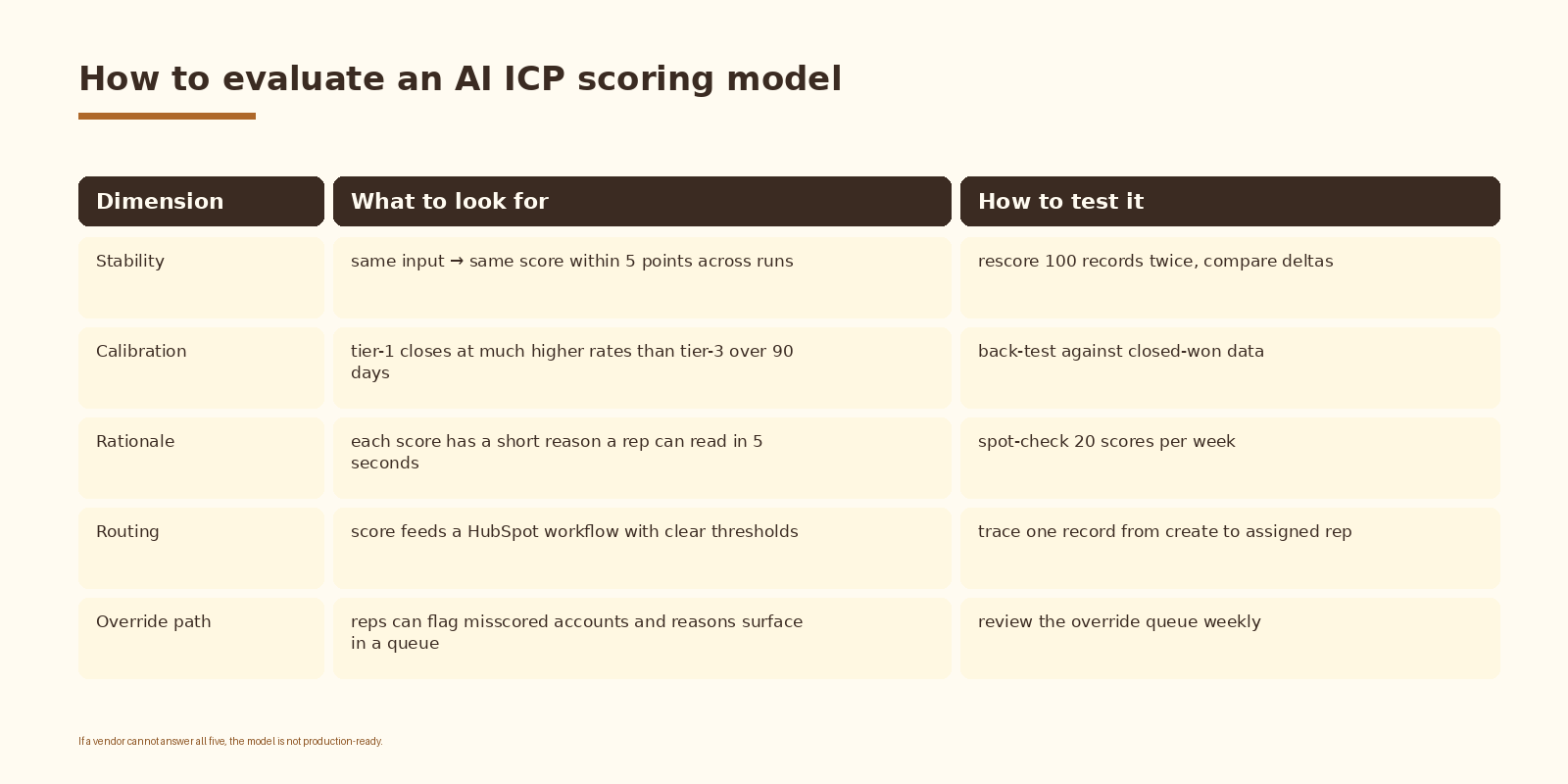
Two more checks people forget:
- Cost per score should sit under $0.01 at GPT-4o or Claude 3.5 Sonnet prices for a normal-sized prompt. If it is higher, the prompt is bloated or the model is being called multiple times per record.
- Latency from workflow trigger to property write should stay under 10 seconds for routing to feel real-time. If it drifts above 30 seconds, debug the webhook or the model call, not the workflow.
Common mistakes (and how to avoid them)
- Building the model before writing the ICP. The scoring is a function of the ICP definition. If you cannot write two paragraphs describing your ideal customer, no LLM will guess it for you.
- Scoring on missing data. If half your company records have empty industry or empty employee count, fix enrichment first. Score quality drops in proportion to input sparsity.
- High temperature. A scoring model with temperature 0.7 will return different numbers for the same record on different days. Reps notice and stop trusting the score within a week.
- Skipping the rationale. A score without a reason is unauditable. Always return a short reason and write it back to HubSpot.
- Letting the model invent disqualifiers. If you do not list your disqualifiers in the prompt, the model will make them up. List them explicitly.
- No override path. Reps will see misscored accounts. They need a one-click way to flag the score so it shows up in a review queue. Without it, trust erodes.
- Rebuilding the wheel for enrichment. HubSpot has native firmographic enrichment via Breeze Intelligence on some tiers, and Clay or Apollo can fill the rest. Use them before writing custom scrapers.
How to know it is working
Track these in HubSpot reports:
- Tier-1 win rate compared to tier-2 and tier-3 win rates. The point of scoring is that tier-1 closes meaningfully better.
- Time-to-first-touch on tier-1 accounts. Routing on a real-time score should pull this down sharply.
- Pipeline value by tier. Tier-1 should produce most of the pipeline dollar value relative to its share of accounts.
- Override volume and override reasons. A healthy model has overrides on under 10% of tier-1 and tier-2 scores. If overrides spike, retune the prompt.
- Rescoring deltas week over week. Stable accounts should stay within 5 points across runs. Large swings without new data are a model-stability problem.
Set a 30-day and a 90-day review on the calendar. The 30-day review catches obvious bugs in the prompt and the routing. The 90-day review compares win rates by tier and tells you whether the model is actually moving revenue.
Frequently Asked Questions
How is this different from HubSpot’s predictive lead scoring?
HubSpot’s native predictive scoring is statistical: it learns from your historical contact data and weighs properties to predict conversion. It is good for engagement scoring on contacts. An AI ICP scoring model on the company object is rubric-based, transparent, and editable: you write the ICP and the rubric, the model applies them, and the reason is human-readable. The two coexist well. Use predictive scoring for contact engagement, AI ICP scoring for account fit.
Should I use GPT-4o or Claude 3.5 Sonnet for ICP scoring?
Both work. GPT-4o is slightly cheaper per call and has native JSON mode, which makes the output schema enforcement cleaner. Claude 3.5 Sonnet tends to write tighter rationale lines and is stronger at following long ICP definitions verbatim. Pick one, stay on it for at least a quarter, and only switch if you have a concrete reason.
Do I need Clay or another enrichment tool?
Only if your HubSpot data is sparse on the fields your ICP cares about. If industry, size, and region are filled in on 90% of records, you can start without enrichment and add it later. If those fields are mostly empty, fix enrichment before building the model. The model cannot score what it cannot see.
How often should the model rescore companies?
A standard pattern: score on company creation, then rescore on a weekly schedule for any company whose properties changed in the last seven days. Funding events, hiring spikes, and stack changes are the signals that move a score, so re-running weekly catches them without burning budget.
What does this cost to run?
At GPT-4o or Claude 3.5 Sonnet prices, a single scoring call on a typical company record costs well under one cent. 10,000 company records scored once a week sits around a few dollars of model spend per month. The cost driver is enrichment, not the model itself.
Can the model explain its score to a rep?
Yes, that is the whole point of returning a short reason field. The rep opens the company record, sees a tier-1 score of 87 with a reason that says “fintech, series-b funded last quarter, Snowflake and Stripe in stack, hiring senior data roles”, and acts on it. If the reason is empty or vague, the prompt needs more constraint.
How do I keep the score from drifting over time?
Three controls. Keep temperature low. Pin the model version (do not let it silently upgrade). Re-run the back-test once a quarter against the latest closed-won deals and tweak the rubric if the distribution drifts. Treat the prompt like code: version it, review changes, and write down why each change was made.
What to do next
- Write your ICP in two to four paragraphs if you do not already have it.
- Audit which of those ICP fields are filled in on your HubSpot company records.
- Add the missing custom properties:
icp_score,icp_tier,icp_reason, plus any input fields you need. - Draft the scoring prompt with rubric, schema, and two or three worked examples.
- Build the HubSpot workflow with a custom code action or webhook, point it at the LLM, and write the results back to properties.
- Back-test against 50 closed-won and 50 closed-lost deals before turning it loose.
- Add routing rules on the score, set a 30-day and 90-day review, and ship.
If you want this set up for your team end to end, with a clean ICP definition, HubSpot workflow, model integration, back-test, and override queue wired in, let’s talk.
Related Espressio guides
- Clay AI SDR Agent: How to Build a Self-Driving Outbound System
- How to Build a LangChain Lead Qualification Agent
- Claude + HubSpot: Automating Sales Follow-Up the Right Way
- Claude + Salesforce: AI Proposal Generation for B2B Sales
- What Does an AI Automation Agency Actually Do?
- How to Get Started with AI Automation



