



Luka Mrkić
Head of BD
Insights, strategies, and real-world playbooks on AI-powered marketing.
MAY 21, 2026
Instantly.ai + ChatGPT: AI Email Sequences Guide
TL;DR
- Connect Instantly.ai to ChatGPT (the OpenAI API) through a middleware layer - Make.com, Zapier, or a short script.
- The middleware pulls each lead’s data, sends it to GPT-4o for a personalized first line or full email, then writes the output back into a custom variable on the lead in Instantly.
- The sequence renders
{{ai_first_line}}per recipient at send time. - Setup takes 30 to 60 minutes and typically lifts reply rates by 30 to 80 percent over generic copy.
- If you are evaluating who should build this for your team, the rest of this guide gives you both the technical blueprint and the standards to evaluate the work.
What this integration actually does
Instantly.ai sends cold email at scale with deliverability built in: sending account rotation, warmup, inbox rotation. ChatGPT writes copy that feels written for one recipient. Integrating them means every lead receives a sentence (or an entire email) generated for them before Instantly sends it.
Four things happen, in this order:
- A trigger pulls lead data out of Instantly, or pushes it in with enrichment already attached.
- GPT-4o receives that data plus a prompt and returns personalized copy.
- The output is written back to a custom variable on the lead in Instantly.
- The campaign sequence uses
{{custom_variable}}in the email body. Instantly renders per lead at send time.
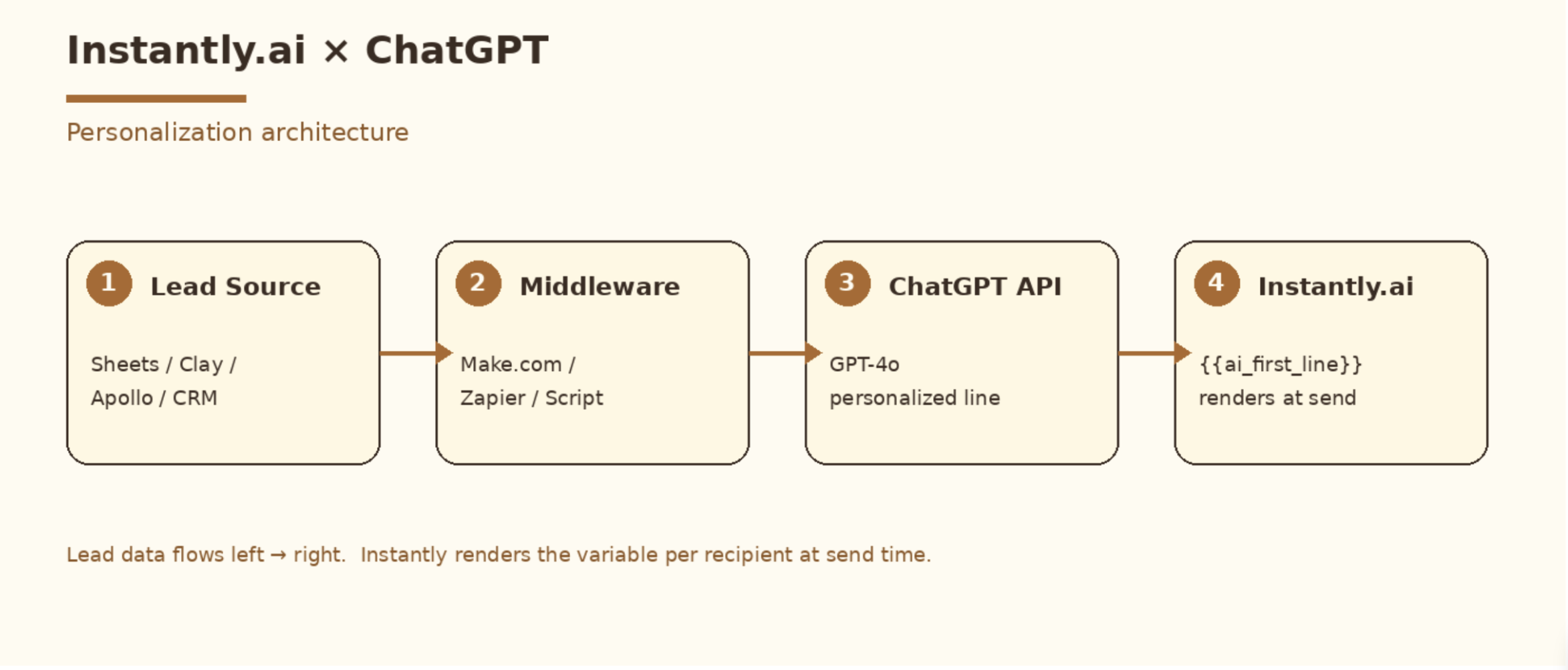
That covers the architecture. The remaining decision is which tool runs steps one through three.
What you need before you start
- An Instantly.ai account on the Growth plan or higher (API access is plan gated).
- An OpenAI API key with billing enabled. GPT-4o is the right model for batch personalization at around $0.005 per line.
- A list of leads with enrichment data attached. At minimum: company name, role, and one specific signal such as recent funding, a hiring page, podcast appearance, LinkedIn post, or tech stack change. Specific input data produces specific output. This is the single biggest determinant of reply rate.
- For enrichment, Clay handles this category well. Its waterfalls let you stack data providers and trigger custom GPT calls inline. If you already use Apollo or Findymail, those work fine too.
- One of: a Zapier or Make.com account, or basic Python/Node skills if you want to skip middleware.
Method 1: No-code with Make.com (recommended for most users)
Make.com handles this cleanly. Fewer steps than Zapier, cheaper at volume, and the JSON handling for the Instantly API is flexible.
Step 1: Create the Instantly custom variable
In Instantly, open your lead list and add a custom field called ai_first_line. This is the placeholder your sequence will reference. You can add more such as ai_subject and ai_ps. Instantly supports arbitrary custom fields per lead.
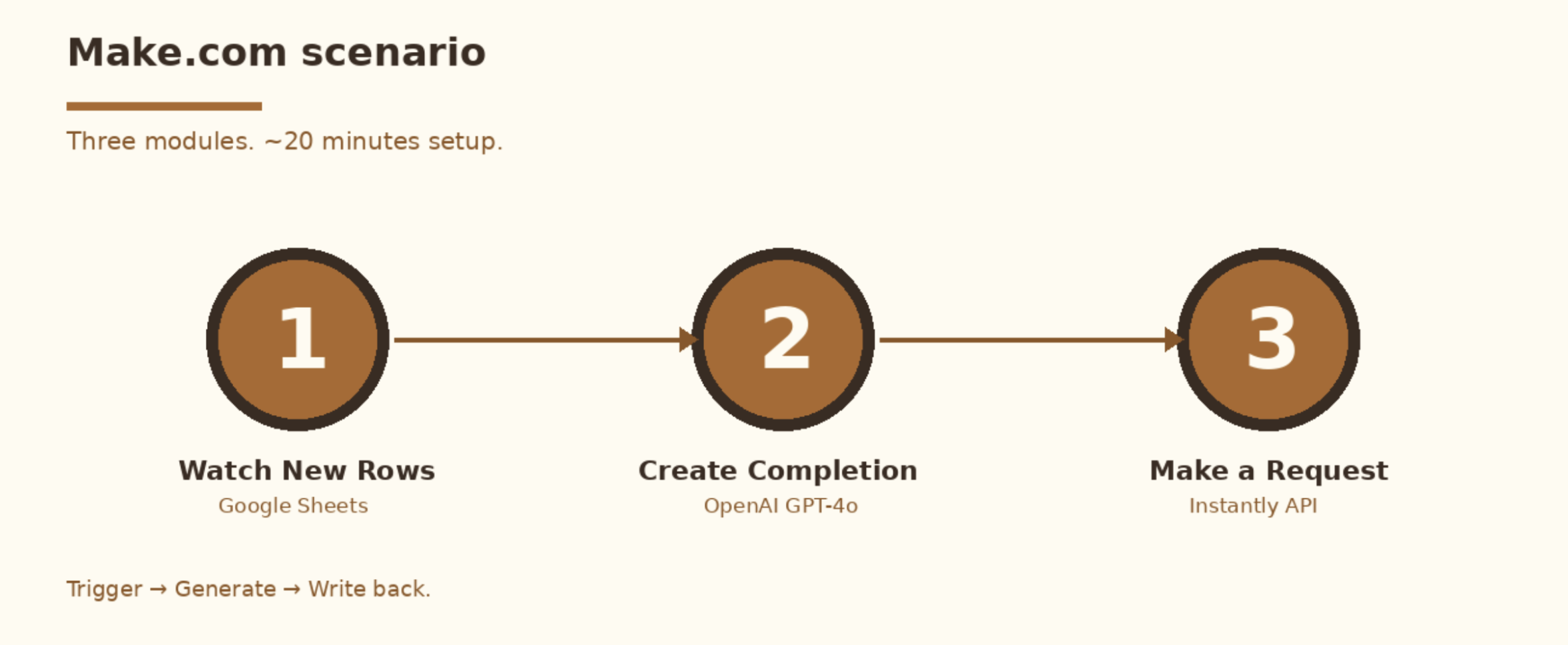
Step 2: Build the Make scenario
Create a new scenario with these modules:
- Trigger: Google Sheets “Watch New Rows” or a webhook from your enrichment tool (Clay works well here).
- OpenAI “Create a Chat Completion” with model
gpt-4oand temperature 0.7. - HTTP “Make a Request” to
https://api.instantly.ai/api/v2/leads, POST with Bearer auth. The body includescustom_variables.ai_first_lineset to the OpenAI output.
System prompt for the OpenAI module:
You write one-sentence cold email openers that reference a specific, recent
fact about the prospect. Maximum 20 words. No flattery. Avoid the phrases
"I noticed," "I came across," and "I see." Start with the fact itself.
Lowercase casual tone.
Instantly API body:
{
  "campaign": "YOUR_CAMPAIGN_ID",
  "email": "{{lead_email}}",
  "first_name": "{{first_name}}",
  "company_name": "{{company}}",
  "custom_variables": {
    "ai_first_line": "{{OpenAI_output}}"
  }
}
Step 3: Reference the variable in your sequence
In your Instantly campaign body:
hey {{firstName}},

{{ai_first_line}}

quick one. we help {{role-relevant value prop}}.

worth a 15 min look next week?

[you]
When Instantly sends, every recipient receives their own opener. Everything after the variable stays static.
Step 4: Test on 10 leads before scaling
Run the scenario on a tiny segment first. Open the resulting Instantly leads and read the rendered emails in the campaign preview. If two out of ten openers feel off, the issue lives in your prompt or your enrichment data. Tune those before pushing 5,000 leads through.
Method 2: Custom GPT and manual export (good for under 500 leads)
For volumes under a few hundred emails per week, the API round trip adds friction with little payoff. A Custom GPT in ChatGPT covers this use case:
- In ChatGPT, create a Custom GPT with the system prompt from Method 1.
- Paste your CSV (50 to 100 leads at a time) and ask: “Generate one opener per row, return as CSV with email and ai_first_line columns.”
- Download the CSV. Import to Instantly as a lead list. Instantly auto-maps custom columns to custom variables.
- Reference
{{ai_first_line}}in your sequence.
Trade off: there is no automation. You re-run the prompt every time you add leads. The upside is zero API spend on the Instantly side and the chance to eyeball every line before it ships.
Method 3: Direct Python script (best for engineering teams or 10K+ leads)
At serious volume, middleware adds latency and cost. A 50-line Python script runs faster and gives you full control over retries, prompt versioning, and logging.
import openai, requests, csv, time

openai.api_key = "sk-..."
INSTANTLY_KEY = "..."
CAMPAIGN_ID = "..."

SYSTEM = """You write one-sentence cold email openers referencing a specific
recent fact about the prospect. Max 20 words. Avoid 'I noticed', no flattery.
Lowercase casual tone. Start with the fact itself."""

with open("leads.csv") as f:
    for row in csv.DictReader(f):
        resp = openai.chat.completions.create(
            model="gpt-4o",
            messages=[
                {"role": "system", "content": SYSTEM},
                {"role": "user", "content":
                    f"Prospect: {row['first_name']} at {row['company']}. "
                    f"Role: {row['title']}. Signal: {row['signal']}."}
            ],
            temperature=0.7,
        )
        opener = resp.choices[0].message.content.strip()

        requests.post(
            "https://api.instantly.ai/api/v2/leads",
            headers={"Authorization": f"Bearer {INSTANTLY_KEY}"},
            json={
                "campaign": CAMPAIGN_ID,
                "email": row["email"],
                "first_name": row["first_name"],
                "company_name": row["company"],
                "custom_variables": {"ai_first_line": opener},
            },
        )
        time.sleep(0.3)  # stay under OpenAI rate limits
Prompt engineering: the part most guides skip
Wiring the integration is the easy part. The prompt determines whether the email earns a reply or lands in spam.
Three rules that consistently work:
- Forbid the tells. Add explicit “do not use” lines for the phrases “I noticed,” “I came across,” “I hope this email finds you well,” “I was browsing,” and “saw your post about.” GPT defaults to these. Ban them.
- Force specificity. Tell the model to reference the fact itself. The phrase “saw you raised a Series B” stays generic. The phrase “the $40M Series B last month for the AI agent platform” lands as specific. Make sure the signal you feed in is specific enough that the output can be too.
- Constrain length. GPT tends to over-explain. Cap at 20 words for openers and 60 for full short emails. Length is the strongest predictor of perceived spam.
A weak prompt:
Write a personalized cold email opener for {{first_name}} at {{company}}.A strong prompt:
Write a single-sentence cold email opener under 20 words. Reference the recent
signal directly. Avoid the phrases "I noticed" and "I saw." Lowercase, casual,
no flattery, no questions. Prospect: {{first_name}}, {{title}} at {{company}}.
Signal: {{signal}}.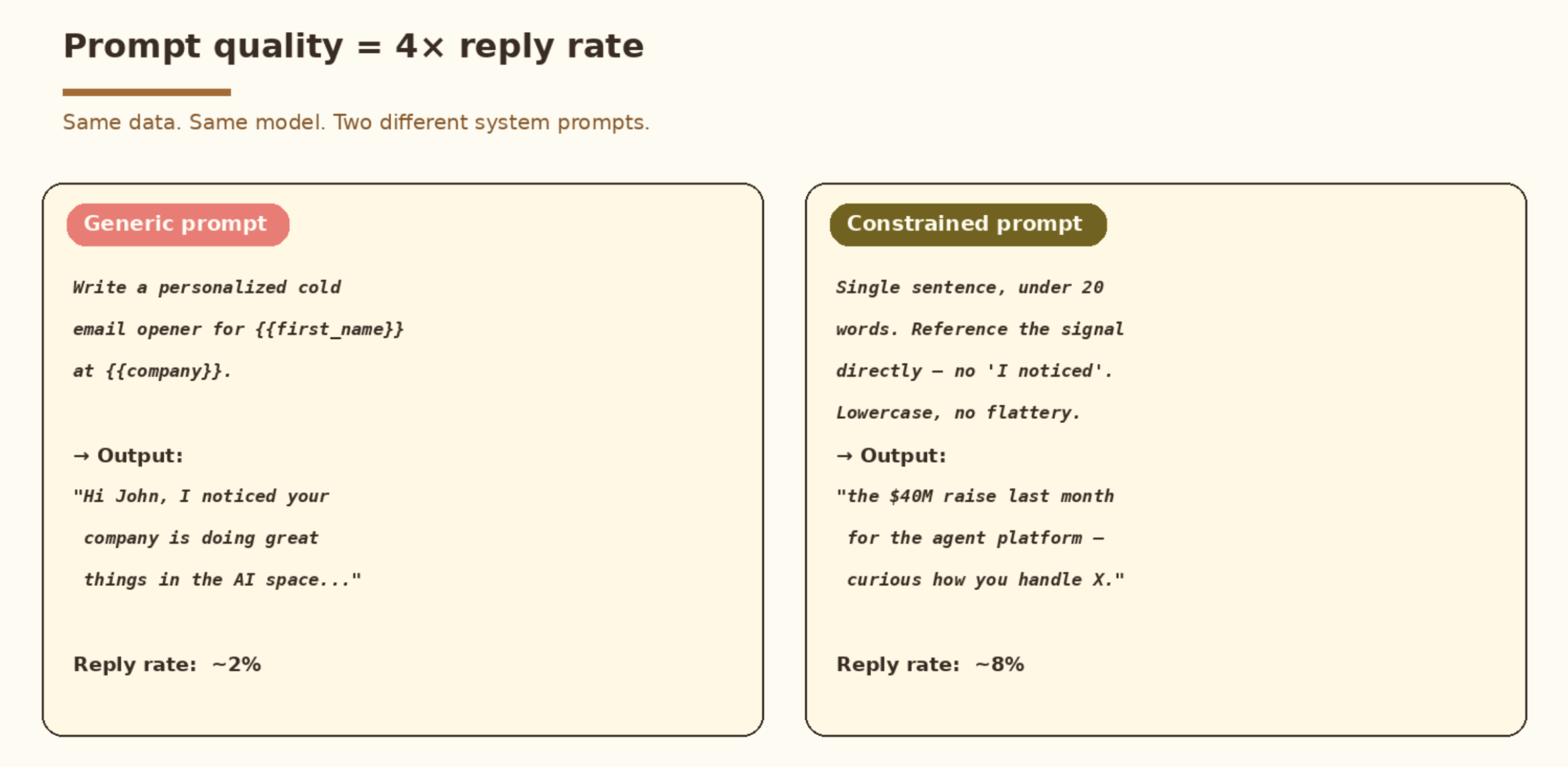
The reply rates land around 2 percent with the weak version and 8 percent with the strong one.
Cost at scale
At GPT-4o pricing of roughly $0.005 per line:
- 1,000 leads/month: about $5 in OpenAI spend, around 3,000 Make.com ops (Core plan, $9/mo).
- 10,000 leads/month: about $50 in OpenAI spend, around 30,000 Make.com ops (Pro plan, $16/mo).
- 100,000 leads/month: about $500 in OpenAI spend. At this volume, the direct API approach in Method 3 wins on cost and latency.
A manual VA research line typically costs around $0.20. The unit economics favor the AI workflow by roughly 40x at any volume, provided the prompt and enrichment are dialed in.
Common mistakes (and how to avoid them)
- Generating openers for leads with no signal. GPT will hallucinate a flattering generic line. Filter leads without enrichment data before hitting the API.
- Using GPT-3.5 to save money. Reply rates drop. The $45/month saved on 10K leads is small change against a halved response rate.
- Skipping the in-app preview. The Instantly campaign preview renders actual variable substitution. Always test 10 sends manually before scaling.
- Personalizing the wrong part. A clever opener cannot fix a weak offer. If the value proposition is unclear, AI personalization papers over a hole in the boat.
- Skipping warmup. Even perfect copy gets filtered if your sending account is cold. Instantly’s warmup runs 2 to 4 weeks before scaled sending.
- Using one “AI” opener pattern across the whole list. If every email starts with “the recent funding round caught my attention,” it stops looking personalized. Vary the prompt across segments.
How to know it is working
Track these in Instantly’s analytics:
- Reply rate is the metric that matters. Target 5%+ for cold lists. Aim for 8%+ when your ICP and offer are tight.
- Positive reply rate is tagged separately by Instantly. Personalization should move this disproportionately.
- Bounce rate should stay under 3%. Unrelated to personalization, and it kills deliverability fast.
- First-line A/B testing. Instantly supports variant testing. Run an AI-personalized opener against a static control on identical lists. The lift shows up within 500 sends.
If you want us to set this up for your team end to end - with Clay enrichment, prompt tuning, and a CRM feedback loop wired in - let’s chat.
Frequently asked questions
Does Instantly.ai have built-in AI personalization?
Yes. Instantly has a native feature called Magic AI that generates personalized lines using prospect data. It works for basic use cases. ChatGPT integration adds value when you want custom prompts, specific tone control, or proprietary enrichment signals that the native tool does not see.
Can I use ChatGPT to write entire email sequences inside Instantly?
Yes, with care. Personalizing the opener (a single variable) is high ROI. Generating the whole body via AI tends to produce bland middles. The pattern that works well: AI opener, human-written value prop, optional AI P.S. line.
What is the best model for cold email personalization in 2026?
GPT-4o for the cost and quality balance. Claude 3.5 Sonnet writes slightly more natural prose, costs more, and takes more work to wire via the OpenAI-native integrations in Make and Zapier. GPT-4o-mini is fine for openers on a tight budget. Avoid it for full emails.
Will Instantly.ai’s API rate limit my personalization workflow?
Instantly’s API limits are generous and sit well above what most workflows need. OpenAI’s rate limits are the likely bottleneck. For batches of 10K+ leads, add a 0.3 second sleep between calls. For non-urgent generation, the OpenAI batch API cuts cost by about 50 percent.
Can I integrate ChatGPT with Instantly without Zapier or Make?
Yes. Direct API calls work from Python, Node, or any HTTP client. See Method 3. Middleware is optional convenience.
How do I keep the AI output from sounding like AI?
Three controls. First, ban the AI tells in the system prompt with explicit phrasing rules. Second, cap length aggressively. Third, feed specific enrichment data. If the input is generic, no model can make the output specific. Vary the prompt across segments to avoid pattern repetition across recipients.
What is the difference between Instantly’s custom variables and merge tags?
Merge tags such as {{firstName}} come from the lead’s core fields. Custom variables are arbitrary key-value pairs you can write to any lead via API or CSV import. Personalization output from ChatGPT goes into custom variables.
What to do next
- Add
ai_first_lineas a custom variable in your Instantly lead list. - Build the Make.com scenario from Method 1 (about 30 minutes).
- Test on 10 leads. Read the rendered output.
- Tune the prompt until 8 out of 10 lines feel right.
- Scale.
The integration is the easy part. Reply rate becomes a function of prompt quality and enrichment quality. Those are the right places to spend your time.
For the enrichment layer that feeds this pipeline, the Clay + Apollo lead enrichment guide covers the waterfall setup, signal scoring, and fallback stack that makes the personalization actually land. For Claude-based openers instead of GPT-4o, the Clay + Claude cold outreach guide uses the same Instantly integration with Anthropic’s API.



