



Luka Mrkić
Head of BD
Insights, strategies, and real-world playbooks on AI-powered marketing.
MAY 22, 2026
How to Automate Lead Research with Perplexity AI and n8n
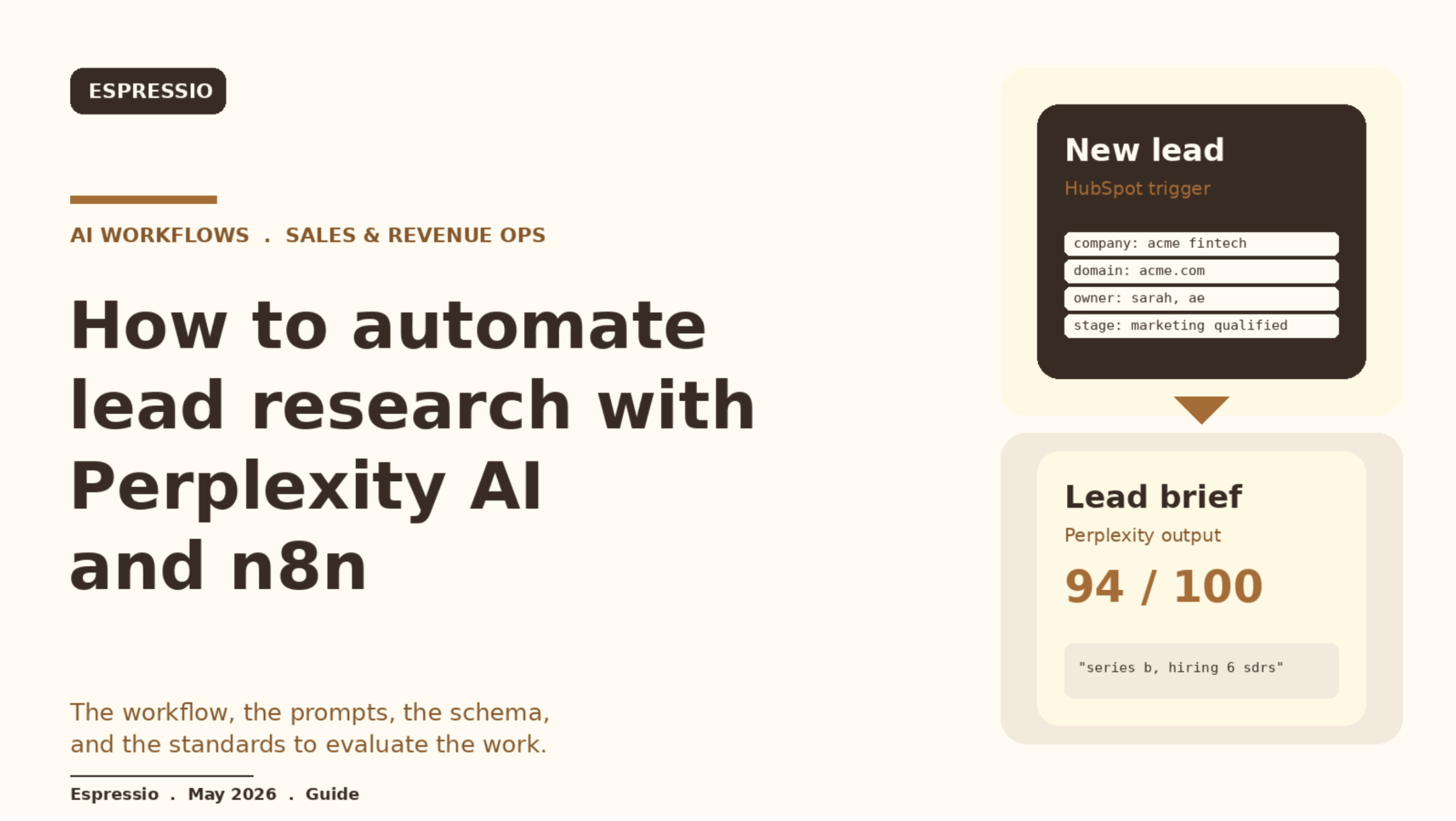
TL;DR
- Replace the first fifteen minutes of every call prep with a small n8n workflow that calls Perplexity for fresh, source-cited research.
- The workflow validates the result against a JSON schema and writes the brief back into your CRM.
- Runs on new lead creation, on a nightly refresh, or on demand from a Slack command.
- Total moving parts: an n8n trigger, a prompt builder, a Perplexity HTTP call, a parser with a validator, and a write-back step.
- If you are evaluating who should build this for your team, this guide gives you both the technical blueprint and the standards to evaluate the work.
Why Perplexity is the right model for lead research
Lead research has one job: turn a company name and a domain into a short, factual brief that an account executive can read in thirty seconds and use in the next call. The model has to be good at three things: searching the live web, citing sources, and refusing to invent details when sources disagree or do not exist.
Perplexity is built around that loop. The sonar-pro model returns answers with source URLs in the response, supports domain filters, supports a recency filter, and exposes a structured output mode. That combination is uncommon. Most general-purpose models will produce a confident lead brief from training data alone, which is exactly the failure mode you want to avoid.
We default to Perplexity sonar-pro for the research step and use Claude or GPT only when we need an additional reasoning pass over the raw brief. Sonar-pro for the research, a reasoning model for the rewrite, never the other way around.
The architecture
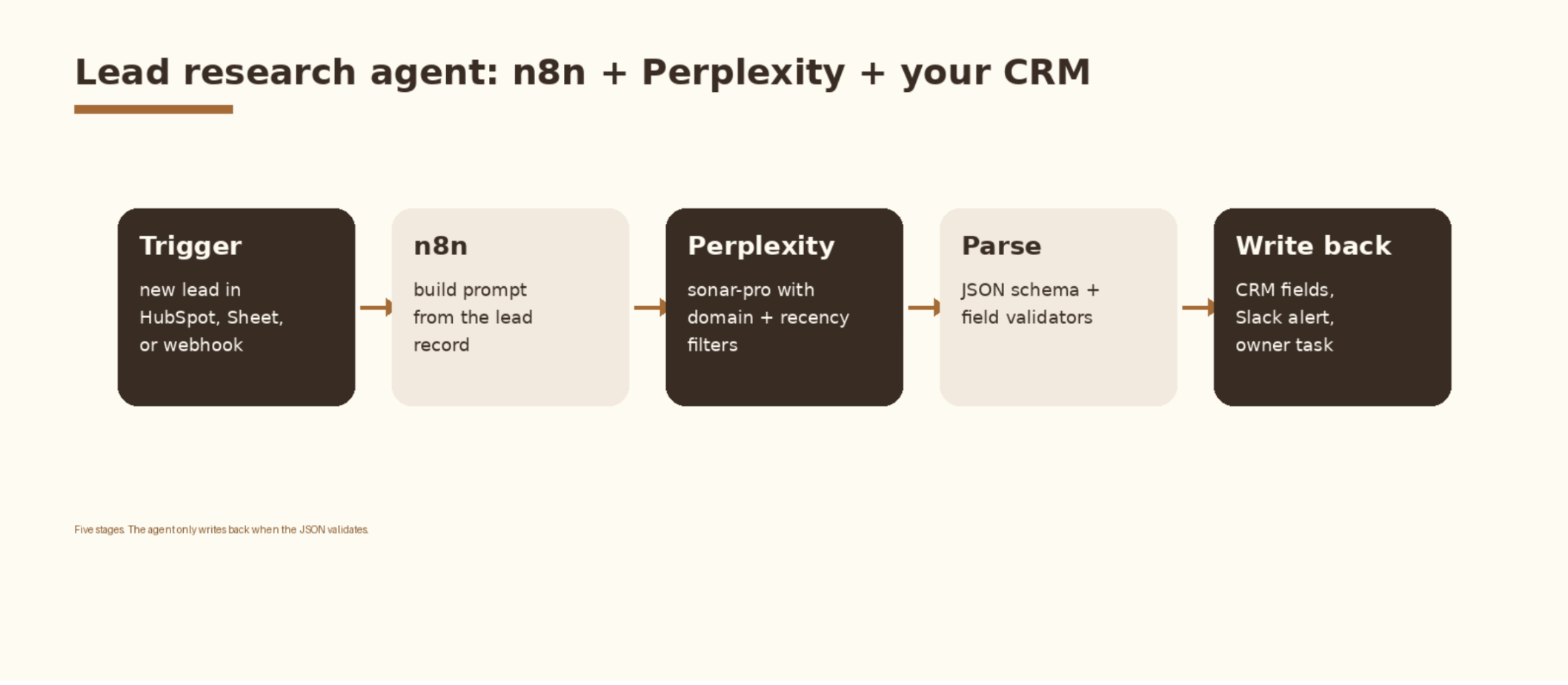
The workflow has five stages and one principle: nothing is written back to the CRM until the JSON validates. A bad response loops to a retry node with a tighter prompt, then to a human queue if it fails twice. This keeps the CRM clean and turns the agent into something the sales team can trust.
- Trigger. New lead in HubSpot or Salesforce, a row added to a Google Sheet, or a webhook from a form. The trigger payload must include company name and primary domain at minimum.
- Prompt builder. An n8n Function or Set node that interpolates the lead into a research prompt with a JSON schema attached.
- Perplexity call. HTTP Request node to
api.perplexity.aiwith sonar-pro, a system prompt, a user prompt, optional domain filters, and a recency filter. - Parser and validator. A Function node that parses the model output, checks required fields, and returns
ok: trueorok: falsewith a reason. - Write-back. Update the CRM record, post to a Slack channel, and create a task for the lead owner.
The six data points every brief should fill
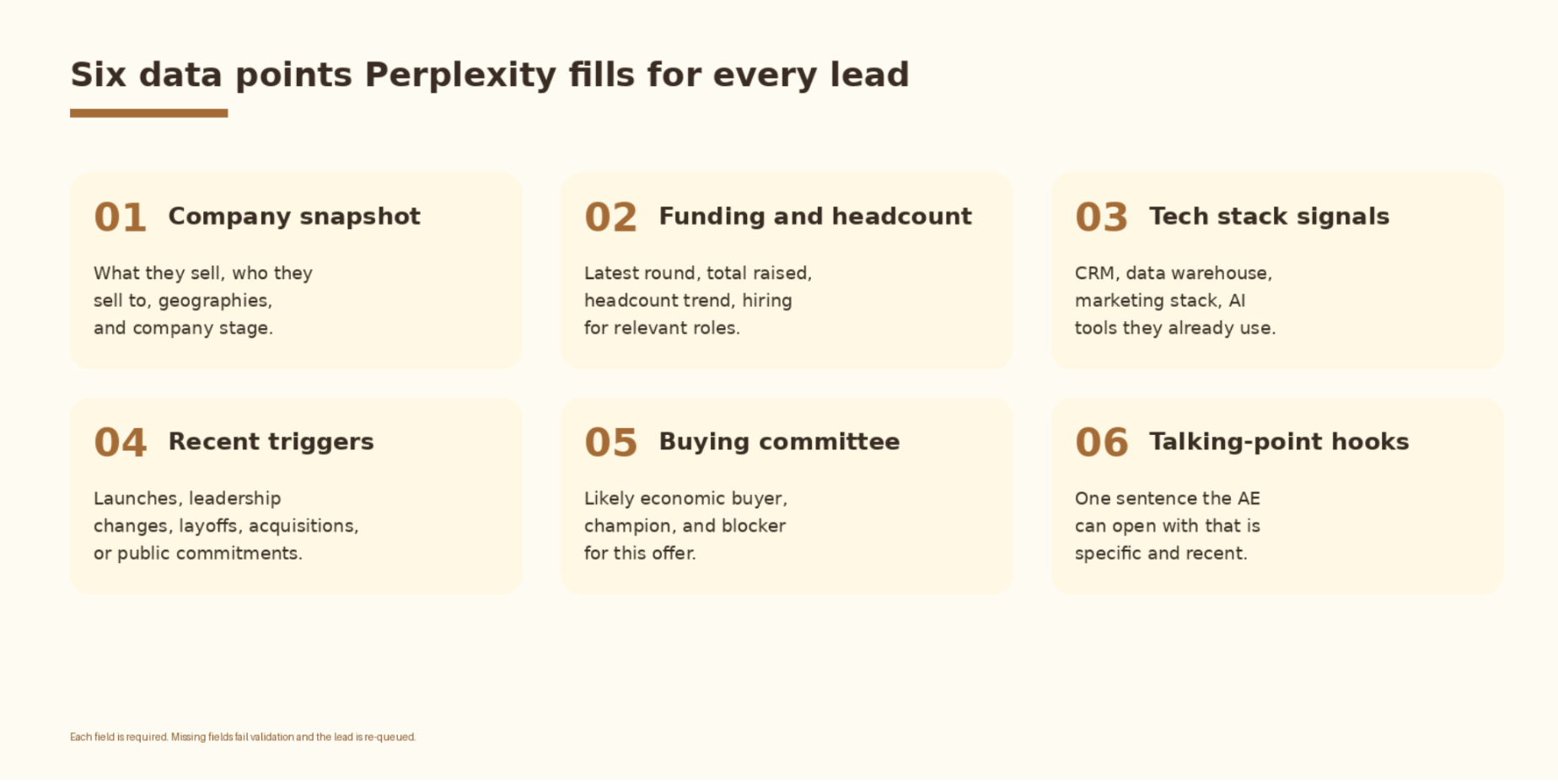
Pick the fields once and freeze them. The agent gets dramatically better when the schema is fixed and the model knows exactly what shape to return. The six below cover the standard B2B opening call: who they are, can they pay, are they ready, who decides, and what to open with.
- Company snapshot: what they sell, who they sell to, geographies, and company stage.
- Funding and headcount: latest round, total raised, headcount trend, and whether they are hiring for relevant roles.
- Tech stack signals: CRM, data warehouse, marketing stack, and AI tools they already use.
- Recent triggers: launches, leadership changes, layoffs, acquisitions, and public commitments in the last twelve months.
- Buying committee: likely economic buyer, champion, and blocker for this offer.
- Talking-point hook: one sentence the account executive can open with that is specific and recent.
The prompt
The prompt is the contract between your business and the model. Treat it that way. Version it in git, store it in a single n8n credential or environment variable, and change it deliberately. Here is the system prompt we use as a starting point:
You are a B2B research analyst. For the company in the input, return ONLY a JSON object
that matches the provided schema. Every factual claim must include a source URL drawn from
the search results. If a field is unknown, return the string "unknown" for that field.
Do not invent funding, headcount, or news. Prefer primary sources: the company website,
press releases, SEC filings, Crunchbase, LinkedIn company pages, and official job boards.
Date every claim about funding, headcount, and news with a YYYY-MM value drawn from the
source. Do not summarize content farms or AI-generated summaries.
And the user prompt template, with n8n expression syntax for the lead fields:
Company: {{ $json.company }}
Domain: {{ $json.domain }}
Country: {{ $json.country }}

Return a JSON object with this exact schema:

{
  "company_snapshot": {"what_they_sell": "", "icp": "", "geographies": "", "stage": "", "sources": []},
  "funding_and_headcount": {"latest_round": "", "total_raised": "", "headcount": "", "hiring_trend": "", "sources": []},
  "tech_stack_signals": {"crm": "", "data_warehouse": "", "marketing_stack": "", "ai_tools": "", "sources": []},
  "recent_triggers": [{"date": "YYYY-MM", "event": "", "source": ""}],
  "buying_committee": {"economic_buyer": "", "champion": "", "blocker": "", "sources": []},
  "talking_point": "",
  "confidence": 0
}

Set confidence to an integer 0 to 100 reflecting how well-sourced the brief is. Return JSON only.
Two details matter more than they look. First, the instruction to return unknown when a field cannot be sourced. Without it, Perplexity will fill in plausible values from older training data. Second, the rule to date every funding, headcount, and news claim to YYYY-MM. That single rule lets you spot stale claims at a glance during QA.
Calling Perplexity from n8n
Use the HTTP Request node. POST to https://api.perplexity.ai/chat/completions with the Authorization header set to Bearer plus your API key from an n8n credential. The body should set model to sonar-pro, messages to the system and user prompts above, and the search_domain_filter to a list of trusted sources for your industry - for example crunchbase.com, linkedin.com, sec.gov, and the company’s own domain. Set search_recency_filter to month for funding and news fields, and use response_format with a JSON schema to lock the output shape.
If you want this set up cleanly inside your stack with logging, retries, and a feedback loop into a CRM, let’s chat.
Validating the output
The parser is short, but it is the most important node in the workflow. It turns a probabilistic model into a deterministic data source. Drop this into a Function node directly after the Perplexity call:
// n8n Function node: validate the Perplexity output before write-back
const out = $input.first().json;

const required = [
  "company_snapshot", "funding_and_headcount", "tech_stack_signals",
  "recent_triggers", "buying_committee", "talking_point", "confidence"
];

for (const k of required) {
  if (!(k in out)) {
    return [{ json: { ok: false, reason: `missing field: ${k}`, raw: out } }];
  }
}

if (typeof out.confidence !== "number" || out.confidence < 60) {
  return [{ json: { ok: false, reason: "low confidence", raw: out } }];
}

if (!out.talking_point || out.talking_point.length < 20) {
  return [{ json: { ok: false, reason: "talking_point too short", raw: out } }];
}

return [{ json: { ok: true, brief: out } }];
Pair the function with a JSON schema reference so anyone editing the workflow knows what good looks like:
{
  "type": "object",
  "required": ["company_snapshot", "funding_and_headcount", "tech_stack_signals",
               "recent_triggers", "buying_committee", "talking_point", "confidence"],
  "properties": {
    "company_snapshot": {"type": "object"},
    "funding_and_headcount": {"type": "object"},
    "tech_stack_signals": {"type": "object"},
    "recent_triggers": {"type": "array", "minItems": 0},
    "buying_committee": {"type": "object"},
    "talking_point": {"type": "string", "minLength": 20},
    "confidence": {"type": "integer", "minimum": 0, "maximum": 100}
  }
}
When ok is false, route the lead to a retry path that re-runs Perplexity with a tighter prompt that names the missing field. If the retry also fails, route to a human queue. Do not write a partial brief to the CRM.
Manual SDR research vs the agent
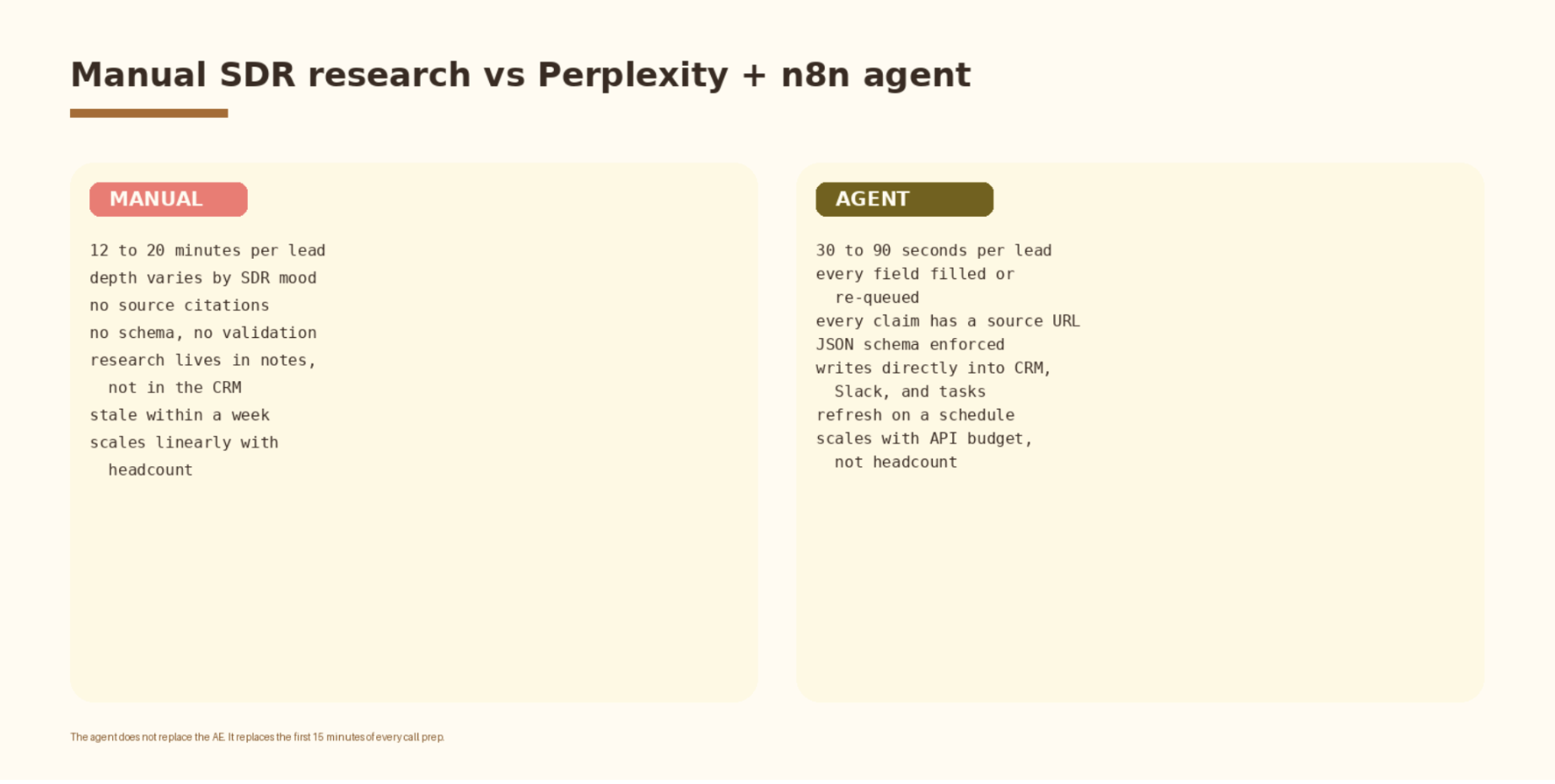
The agent does not replace the account executive. It replaces the first fifteen minutes of every call prep and gives the team a consistent floor of research quality. The conversation in the meeting still belongs to the human. The point of the agent is to make sure that conversation never starts cold.
How to evaluate a lead research agent before you trust it
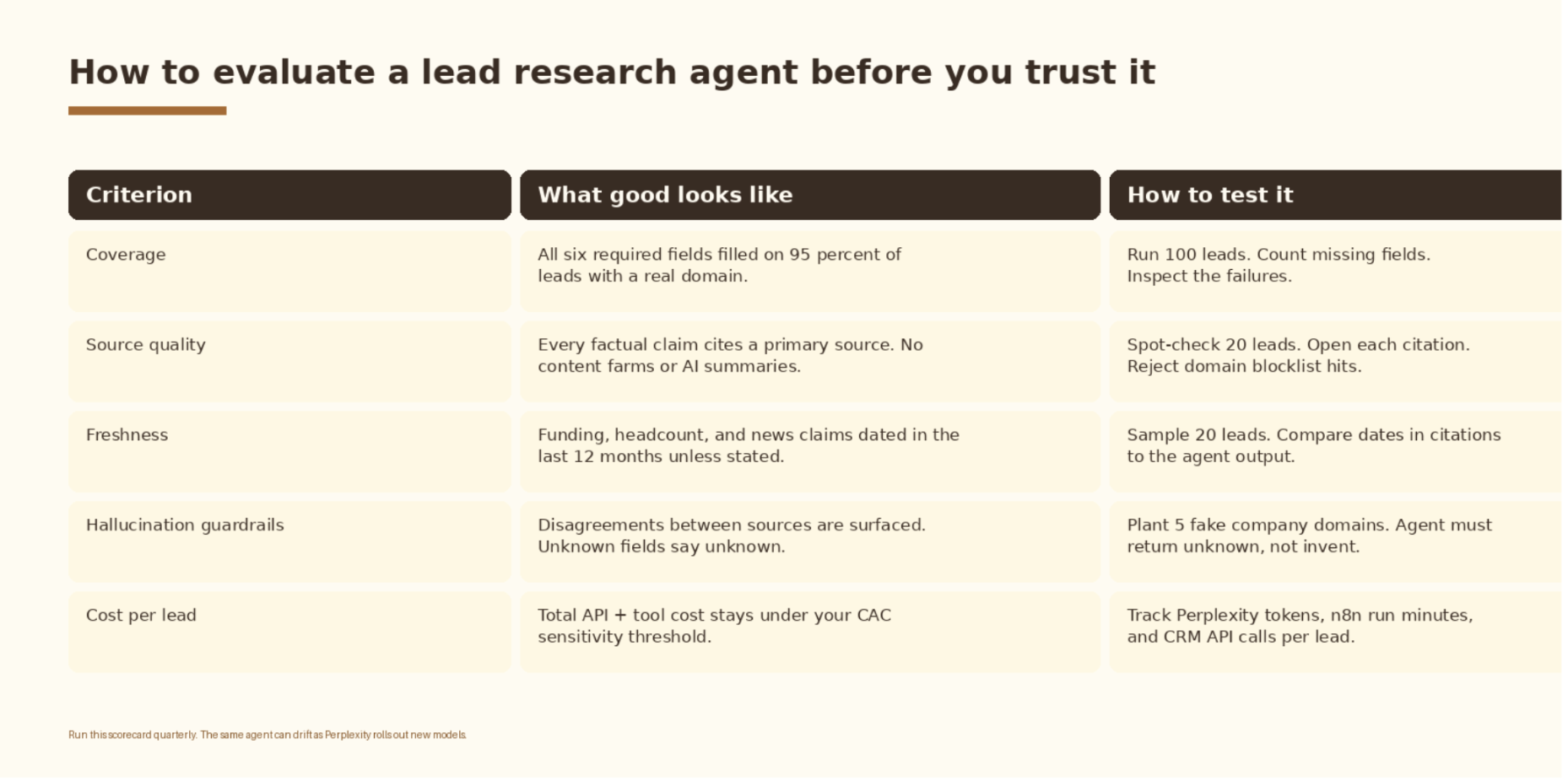
Run this scorecard before you give the agent write access to the CRM, and again every quarter. Perplexity ships new model versions on a regular cadence and the same prompt can drift. The scorecard is the difference between an agent that quietly degrades and one you actually trust.
Two more checks:
- Cost per score should sit under $0.05 per lead for a normal-sized brief. If it is higher, check for token bloat in the prompt or duplicate API calls per record.
- Latency from trigger to CRM write should stay under 15 seconds for the workflow to feel real-time to the SDR. If it drifts above 30 seconds, debug the Perplexity call timeout first.
Common mistakes
- Giving the agent write access on day one. Start with the brief landing in a Slack channel for human review. Move to CRM write-back only after the scorecard passes for two weeks.
- Skipping the JSON schema. Without a fixed schema, the model will return inconsistent shapes and your write-back node will fail in silent ways.
- Trusting a high confidence score. Confidence is the model’s self-rating. Validate against your scorecard. Treat the model’s confidence as a hint.
- Running the agent on every CRM update. Trigger on new leads and on a scheduled refresh. Otherwise you will burn API credit on records that have not changed.
- Ignoring the recency filter. Funding rounds older than twelve months are not triggers. Filter at the API level, then re-filter in the parser.
- Letting the prompt drift across team members. Store one prompt in one place and treat it like production code.
How to know it is working
Pick three metrics and watch them weekly. Treat them as signals, not as targets. The right baseline depends on your industry, list quality, and how thorough your team was before the agent existed.
- Coverage rate. Percentage of leads where all six fields are filled with sourced values. Watch this move as you tighten the prompt.
- Validation pass rate. Percentage of Perplexity responses that pass the parser on the first try. Drops here are the early signal that a model update has changed behaviour.
- Account executive adoption. Percentage of calls where the AE references the brief. Ask the AEs directly. Briefs that no one reads are worse than no briefs.
- Cost per lead. Total Perplexity tokens, n8n run minutes, and CRM API calls divided by leads researched. Track the trend over time.
If you want us to build this for your team, let’s chat.
Frequently asked questions
Do I need n8n specifically, or will Zapier or Make work?
Any of them will work. n8n is the most flexible for the parser and retry logic because the Function node runs real JavaScript. Make and Zapier can do this with their code modules, but the iteration loop is slower. If your team already lives in Zapier or Make, stay there. If you are starting fresh, n8n self-hosted gives you the most control.
Why use Perplexity here when GPT and Claude both have web search?
GPT and Claude both have search, but Perplexity is the only one of the three where search is the default behaviour and source citations are part of the response object. For research-first tasks where you want the model to refuse to answer without sources, Perplexity is the simpler primitive.
How do I keep the agent from hallucinating funding rounds?
Three controls in combination. Set search_domain_filter to primary sources. Set search_recency_filter to month for the funding and news fields. Require the parser to reject any funding claim without a source URL and a YYYY-MM date. Plant five fake company domains in your test set and confirm the agent returns unknown.
What does this cost to run?
Perplexity sonar-pro is billed per million tokens and per search. A single lead brief is typically a few thousand tokens of input and output, plus a handful of searches. n8n self-hosted is free at the infrastructure level. The dominant cost is Perplexity. Run the scorecard on a sample of 100 leads to get your real cost per lead before you scale.
Should this replace my SDR team?
No. It replaces the research floor under the SDR team. The SDRs get more time to actually talk to people, write the personalized opener, and book the meeting. The agent is a force multiplier on the team you already have.
What to do next
- Pick the trigger. New HubSpot or Salesforce lead is the most common starting point.
- Freeze the six fields. Write the JSON schema before you write the prompt.
- Build the prompt and version it in git.
- Stand up the n8n workflow. Wire trigger, prompt builder, Perplexity call, parser, and Slack output. Skip CRM write-back for the first two weeks.
- Run the scorecard on 100 real leads. Fix coverage and source quality before you move on.
- Turn on CRM write-back behind a feature flag. Watch validation pass rate daily for the first month.
For the broader Perplexity context, the Perplexity AI guide covers model selection, API setup, and use-case fit. For the competitive intelligence version of this same pattern, the n8n + Perplexity competitive intel agent guide runs the same architecture against market signals instead of lead data. For the enrichment layer that feeds this pipeline, the Clay AI SDR agent guide covers waterfall setup and signal sourcing. Once leads are researched and scored, the HubSpot AI ICP scoring guide covers routing them by fit tier.



