



Luka Mrkić
Head of BD
Insights, strategies, and real-world playbooks on AI-powered marketing.
MAY 8, 2026
How to Build an AI SDR Agent with Clay and GPT-5
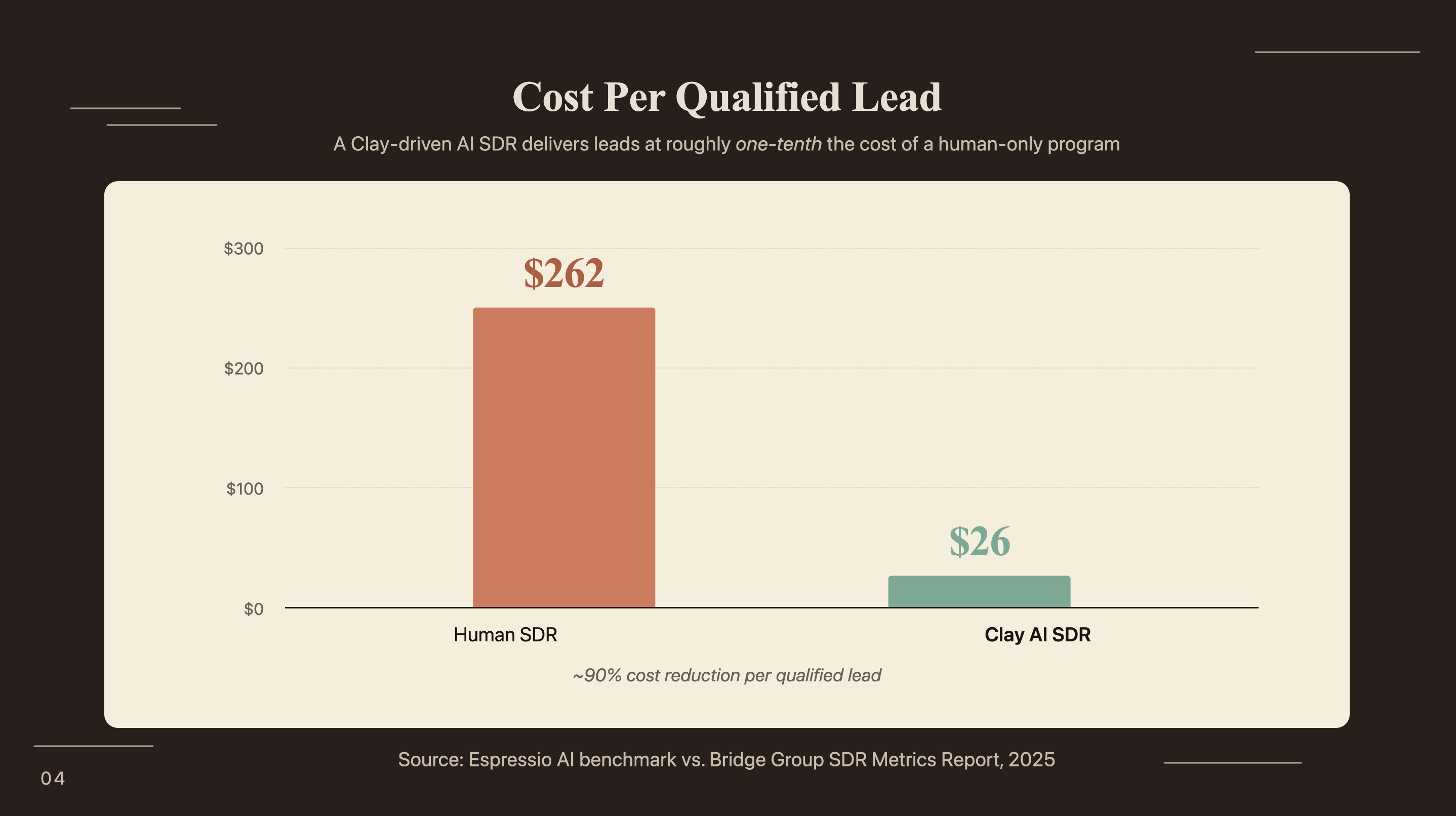
Human SDRs average $262 in fully loaded cost per qualified lead. A Clay AI SDR workflow running GPT-5 delivers the same result at roughly $26 (SurFox, 2026). That’s a 90% cost reduction, and most overviews stop there.
The harder part is building something that holds up in production. Most teams hit the same friction points: Claygent columns returning inconsistent output, GPT-5 prompts producing generic first lines despite rich enrichment data, and a CRM handoff that breaks on field mapping. This tutorial walks the build from ICP table through to booked calendar, including the failure modes other guides skip entirely.
By the end, you’ll have a working 4-stage pipeline: import your ICP list, enrich each contact with Claygent, generate personalized outreach copy with GPT-5, and push finished sequences to your sequencer and CRM automatically.
Key Takeaways
- Human SDRs cost $98K-$173K/year fully loaded; a Clay AI SDR running GPT-5 costs $6K-$24K annually with far greater outreach volume (Martal Group / SurFox, 2026).
- Signal-based personalization, the core of a Clay + GPT-5 workflow, yields 15-25% reply rates vs. 1-3% with no personalization (Autobound, 2026).
- Sellers who partner with AI are 3.7x more likely to hit quota (Gartner, 2026).
What is an AI SDR agent and what does Clay + GPT-5 handle?
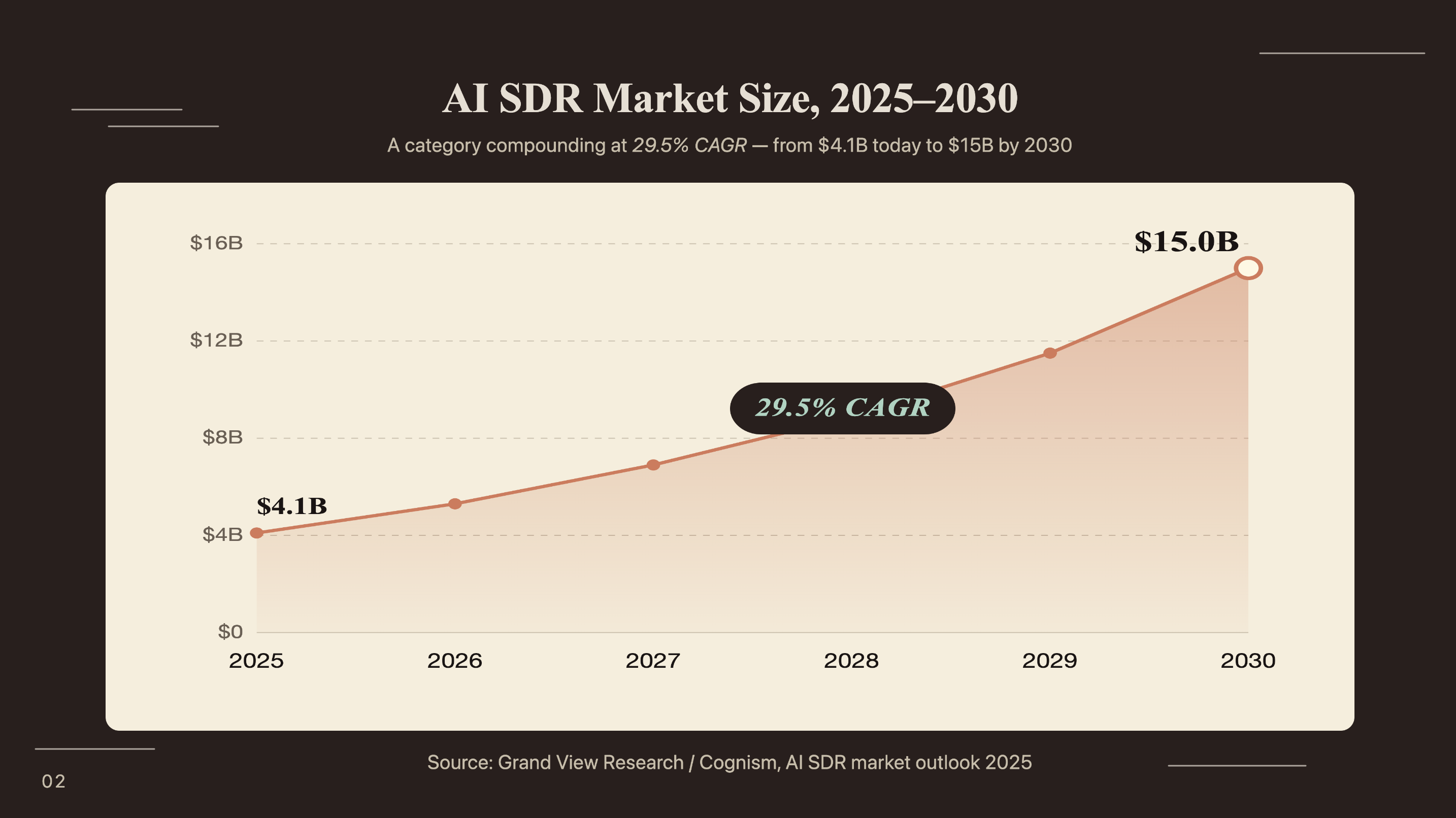
The AI SDR market is growing from $4.12B in 2025 to $15.01B by 2030 at a 29.5% CAGR (Research and Markets, October 2025). An AI SDR agent handles the three tasks that consume most of a human SDR’s week: researching prospects, personalizing outreach copy, and sequencing follow-ups, with no human action required per contact.
Clay handles the data layer. It ingests your ICP list, pulls enrichment from dozens of sources (Crunchbase, LinkedIn, BuiltWith, and more), and runs Claygent on each row. Claygent is Clay’s built-in AI agent that fires research prompts against every contact record, using GPT-5 as its reasoning engine. The output is a structured data payload per contact: company pain points, recent signals like a funding round or key hire, and a confidence score for each enrichment result.
GPT-5 handles the copy layer. Once Claygent has enriched a row, a separate prompt column injects that enrichment data into your outreach template. GPT-5 generates a personalized first line, subject line, and email body. The finished output moves to your sequencer automatically via a native integration.
30% of Clay customers use Claygent daily, generating 500,000 research and outreach tasks per day (OpenAI, 2024). That scale confirms production-grade capability across real GTM teams.
How does the Clay + GPT-5 AI SDR pipeline work?
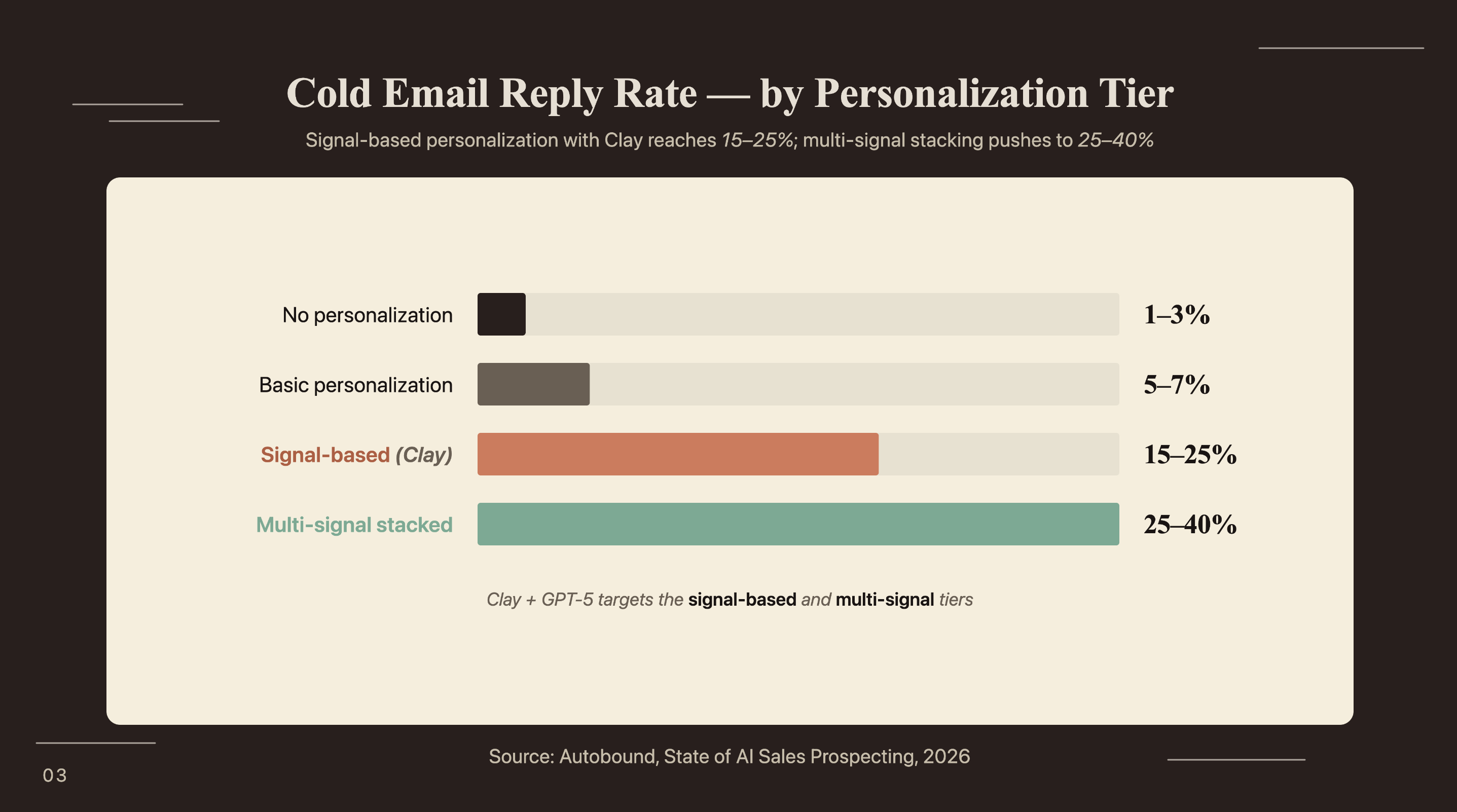
Signal-based personalization, the output of a properly configured Clay + GPT-5 workflow, yields 15-25% reply rates compared to 1-3% with no personalization (Autobound, State of AI Sales Prospecting, 2026). The difference comes from four sequential stages that feed each other automatically, with no human action between them.
Stage 1: ICP list. You source your prospect list from LinkedIn Sales Navigator (CSV export), Apollo, an Apify scraper, or a direct upload. Clay accepts any structured data with a name, company, and LinkedIn URL at minimum. The quality of this input determines everything downstream: weak contacts produce weak personalization regardless of what GPT-5 can do.
Stage 2: Claygent enrichment. For each row, Claygent fires a chain of research tasks: company LinkedIn page analysis, funding history from Crunchbase, headcount trends, tech stack from BuiltWith, and recent signals like a job change or press mention. Each enrichment runs as a separate column, with a confidence score assigned per result. Low-confidence rows get flagged rather than passed through silently.
Stage 3: GPT-5 personalization. A prompt column takes the enriched data from Stage 2 and generates outreach copy. GPT-5 reads the enrichment payload and returns a first line, subject line, and email body tailored to that specific contact’s signals. This is where most of the prompt engineering work lives.
Stage 4: Outreach handoff. When a row completes and confidence exceeds your threshold, Clay pushes the contact to Smartlead, Instantly, or Lemlist via native integration, or creates a CRM record in Salesforce or HubSpot with the generated copy ready for a sequence trigger.
Sellers who partner with AI are 3.7x more likely to hit quota (Gartner, 2026). For teams that want to surface the highest-signal prospects before they hit Stage 1, the n8n and Perplexity competitive intel agent shows how to build automated competitive intelligence feeds that identify prospect trigger events in real time.
How do you build your ICP table and enrichment columns in Clay?
AI could increase sales leads by more than 50% while reducing sales costs by up to 60% (McKinsey, 2023). That potential compounds or collapses entirely on list quality. A weak ICP import degrades every downstream step: Claygent enriches what it’s given, and GPT-5 personalizes based on what Claygent finds.
Step 1: Import your contact list. Create a new table in Clay. Import via LinkedIn Sales Navigator CSV export (filter to your ICP criteria before exporting), Apollo, or Clay’s native LinkedIn scraper. At minimum, each row needs: first name, last name, company name, and LinkedIn URL. Company domain speeds up enrichment; include it whenever available.
Step 2: Add standard enrichment columns. Start with the columns that produce the highest personalization signal: company LinkedIn page (recent posts and headcount trend), funding round and investor list from Crunchbase, and tech stack from BuiltWith or Clearbit. Each is a native Clay enrichment source: add the column, map the input field, and Clay runs it across the full table.
Step 3: Configure your Claygent research columns. Add a Claygent column with a research prompt along these lines: “Based on [Company]‘s LinkedIn page, recent funding, and tech stack, what is their most likely top-of-mind operational challenge in [ICP category]?” Claygent runs GPT-5 against each row and returns structured text. Add a second column for recent signals: “Has [Company] posted about hiring, product launches, or geographic expansion in the last 90 days? If yes, summarize in two sentences.” These two Claygent outputs feed directly into your GPT-5 personalization prompt.
Step 4: Add a quality-control gate. Set a formula column that flags any row where Claygent confidence is below 0.7, or where the pain-point column returned null or a generic error string. Flagged rows hold for manual review and don’t advance to the personalization stage until the enrichment is clean.
Claygent rate limit errors typically hit around rows 200-300 on a first table run. Set batch size to 50 rows with a 30-second delay between batches to stay within Clay’s default API rate limits. Running 500 rows at once against Claygent produces a mix of completed rows, timeouts, and nulls, and you won’t know which is which without auditing the output column after the fact. Run small, verify output quality, then scale.
81% of sales teams have implemented or are actively experimenting with AI (Salesforce via Cirrus Insight, 2025). The teams getting consistent results treat the ICP table build with the same care as a data hygiene project, then layer Claygent and GPT-5 on top. Bad input data means bad personalization at any model.
How do you write GPT-5 prompts for personalized outreach?
GPT-5 produces approximately 45% fewer factual errors than GPT-4o in web-enabled research contexts (OpenAI, May 2025). For SDR workflows, that accuracy difference matters most during Claygent enrichment. GPT-5 hallucinates less when summarizing a company’s LinkedIn activity or describing a recent funding round, which means the data feeding your outreach prompt is more reliable before it ever reaches the copy stage.
Effective Clay outreach prompts have four components. First, a persona instruction that sets the voice and constraints:
You are a senior sales development representative at [Your Company].
Write concise, specific cold email copy. Use the prospect's industry
vocabulary. Avoid clichés. Never fabricate details not in the data below.
Second, prospect data injection using Clay’s variable syntax:
Company: {{company_name}}
Contact title: {{contact_title}}
Recent signal: {{recent_signal_claygent}}
Pain point: {{pain_point_claygent}}
Tech stack: {{tech_stack}}
Third, a strict output format constraint. This is where most first-time builders fail. GPT-5 will produce well-written copy that violates your sequencer’s character limits or drifts from the persona you defined unless you constrain it explicitly:
Return exactly three labeled items, each on its own line:
SUBJECT: [max 8 words, no trailing punctuation]
FIRST_LINE: [one sentence, max 18 words, references exactly one signal from the data]
BODY: [3 sentences max, ends with a soft question CTA]
Fourth, one inline example output. A single strong example reduces variance more than three paragraphs of additional instructions. GPT-5 pattern-matches on examples well.
Run the prompt against 10 test contacts before scaling. Check for three things: does the first line reference an actual signal, or does it read as generic? Did GPT-5 correctly interpret the Claygent enrichment? Did the structured output parse cleanly? Two or three iteration rounds typically brings output to production quality.
Most Clay tutorials describe the scheduled table refresh, where Clay re-runs enrichment and personalization on a daily or weekly cadence. What they don’t cover is webhook-triggered Claygent. When an inbound lead submits a form, a webhook can trigger Clay to enrich and personalize that specific contact in real time, pushing a personalized first email in under 60 seconds of form submission. Human SDR teams average 42 to 47 hours before first contact with a new inbound lead (SurFox, 2026). Responding within 5 minutes improves lead qualification odds 21 times over (MIT/InsideSales.com via SurFox). The webhook setup adds about an hour to the build, and it’s where the biggest lift in the whole pipeline actually lives.
For teams that want to score enriched leads before they enter a sequence, automated lead scoring with LangChain shows how to add a qualification layer between Clay enrichment and outreach trigger.
How do you connect Clay to your CRM and sequencing tool?
69% of sellers using AI report shorter sales cycles, averaging about one week less per deal (LinkedIn State of Sales via Cirrus Insight, 2025). Most of that time savings comes from the handoff: contacts move from enriched and personalized to active sequence without a human touching each record individually.
Clay to Smartlead or Instantly. Both have native Clay integrations. Set a row trigger: when the confidence score column exceeds 0.75 and the BODY output column is not null, push the row to your selected sequence. The native integration maps Clay columns to sequencer contact fields automatically. Tag contacts by ICP sub-segment in a Clay formula column if you’re running different message tracks for different audiences.
Clay to Salesforce or HubSpot. Use Clay’s native CRM push or an HTTP action block. The HTTP action is more flexible: you configure the exact API call, map Clay column names to CRM API field names, and set push conditions. The most common setup error is field name mismatch: Clay column names use spaces and lowercase (company pain point) while Salesforce field names use underscores and custom suffixes (company_pain_point__c). Map them explicitly before your first table push, and test with a single row before running the full table.
Clay to Slack. Route reply notifications from your sequencer back to Clay via webhook, then forward to Slack with the contact’s name, company, and the specific signal that drove the outreach. Your SDR gets a Slack alert when a prospect replies, with the context they need to respond, no CRM lookup required before the call.
64% of sales reps save 1 to 5 hours per week with AI automation in their workflow (HubSpot via Cirrus Insight, 2024).
Clay AI SDR vs. Human SDR: A Cost and ROI Comparison
Human SDRs average $262 in fully loaded cost per qualified lead; a Clay AI SDR workflow delivers comparable qualified leads at roughly $26 (SurFox, 2026). The cost components for a Clay AI SDR stack break down as: Clay subscription ($149 to $800 per month depending on enrichment credits), GPT-5 API usage ($0.0025 to $0.015 per 1K tokens), and a sequencing tool like Smartlead or Instantly ($97 to $300 per month). Annual total: $6K to $24K for a team processing 500 to 1,000 contacts monthly through the full pipeline.
Compare that to a fully loaded human SDR: base salary plus benefits plus tools plus ramp time puts most US roles at $98K to $173K annually (Martal Group via SurFox, 2026). The human SDR caps out at 50 to 80 personalized contacts per day. A Clay AI SDR processes 1,000 or more with no throughput ceiling.
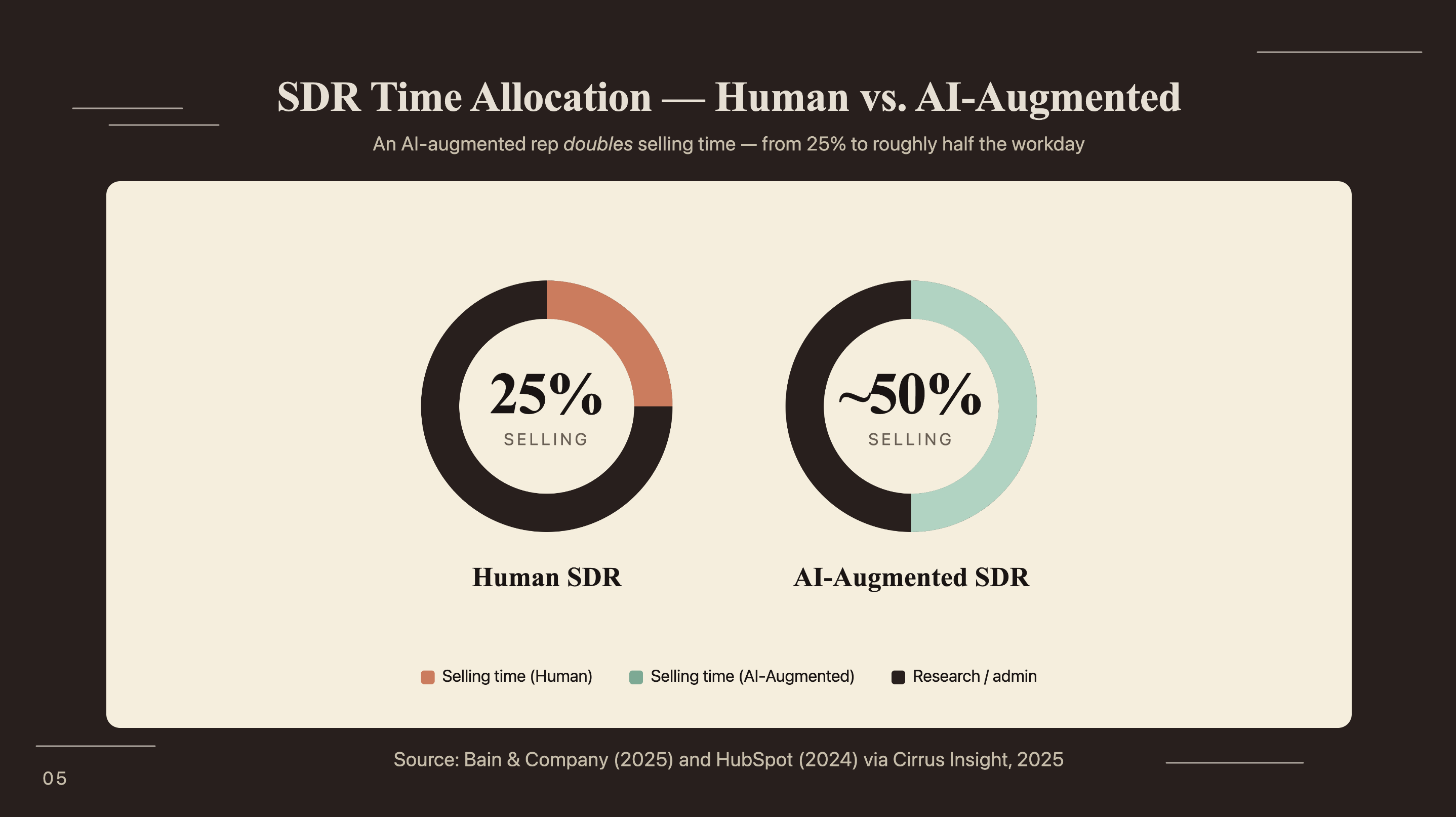
The teams that see the worst outcomes from Clay AI SDR treat it as a human SDR replacement. That Gartner finding describes sellers who partner with AI, meaning the human stays in the loop for calls, objection handling, and relationship development. Clay handles volume at scale; your SDR handles judgment at the deal level. Getting that division of labor clear before building avoids a painful reconfiguration after the first month of data comes in.
If you’re looking to integrate AI into your outbound sales workflows, get in touch with us and we’ll map out where automation adds the most value for your team.
Frequently Asked Questions
What is Claygent and how does it use GPT-5?
Claygent is Clay’s built-in AI agent that executes multi-step prospect research and outreach tasks on each table row. It runs on GPT-5 and Clay-tuned models built for GTM research. 30% of Clay customers use it daily, generating 500,000 research and outreach tasks per day (OpenAI, 2024).
How long does it take to build a Clay AI SDR agent?
Setting up a basic Clay AI SDR takes 4 to 8 hours: ICP table creation, Claygent enrichment column config, GPT-5 first-line prompt, and sequencer integration. Prompt tuning adds another 2 to 4 hours on a 10 to 25 contact test cohort. Scale after you’ve confirmed reply rates on the small batch.
What reply rate can I expect from a Clay + GPT-5 outreach workflow?
Signal-based personalization, the output of a Clay + GPT-5 workflow, yields 15 to 25% reply rates vs. 1 to 3% with no personalization and 5 to 9% with basic personalization (Autobound, 2026). Results vary by ICP, sequence length, and signal quality. Run a 50-contact test batch before scaling.
Can a Clay AI SDR replace a human SDR entirely?
Sellers who partner with AI are 3.7x more likely to hit quota (Gartner, 2026), but partner is the key word. Clay handles research, personalization, and first-touch sequencing at scale. Human SDRs own discovery calls, objection handling, and relationship work: the stages where judgment drives conversion more than throughput does.
What CRMs does Clay integrate with natively?
Clay integrates natively with Salesforce, HubSpot, and Pipedrive, pushing enriched contact and company data to CRM records via native sync or HTTP actions. For tools without a native integration, the HTTP action block handles any CRM or sequencer with a REST API. Check column name mapping against CRM field names before your first push.
Conclusion
The economics of a Clay AI SDR are clear. The pipeline costs $6K to $24K per year and processes 1,000 or more contacts daily, while a fully loaded human SDR runs $98K to $173K annually and caps at 50 to 80 contacts. The math works because Clay handles research, personalization, and first-touch sequencing at volume. Your human SDR handles discovery calls, objection handling, and the deal work that requires judgment.
Start with 50 contacts. Build one ICP table, configure two Claygent enrichment columns, write one GPT-5 prompt, and push to your sequencer. Check reply rates after one week before scaling. A small batch tells you more than any planning session.
For scoring enriched leads before they enter your sequence, the LangChain lead qualification guide shows how to add a qualification layer between Clay enrichment and outreach trigger.



