Luka Mrkić
Head of BD
Insights, strategies, and real-world playbooks on AI-powered marketing.
MAY 8, 2026
AutoGen Multi-Agent Content Pipeline: A 2026 Python Tutorial
Content teams aren’t bottlenecked on ideas. They’re bottlenecked on production volume. A single writer produces 3-5 posts per week. A 4-agent AutoGen pipeline produces the same output in a day, at $0.05-0.08 per article.
Research and summarization is the top agent use case, cited by 58% of AI practitioners (LangChain State of AI Agents, December 2025), and content pipelines sit at the center of that demand. Most tutorials skip the hard part: wiring up agents that actually collaborate, with a critic catching systematic errors before anything ships.
You’ll end this tutorial with a ResearcherAgent that pulls live sources, a WriterAgent that drafts to spec, a CriticAgent running the reflection pattern, and a PublisherAgent that outputs publish-ready markdown. All of it in AutoGen v0.4 code. Every code block uses the current autogen-agentchat API, not the deprecated 0.2 ConversableAgent interface that most existing tutorials still reference.
Key takeaways
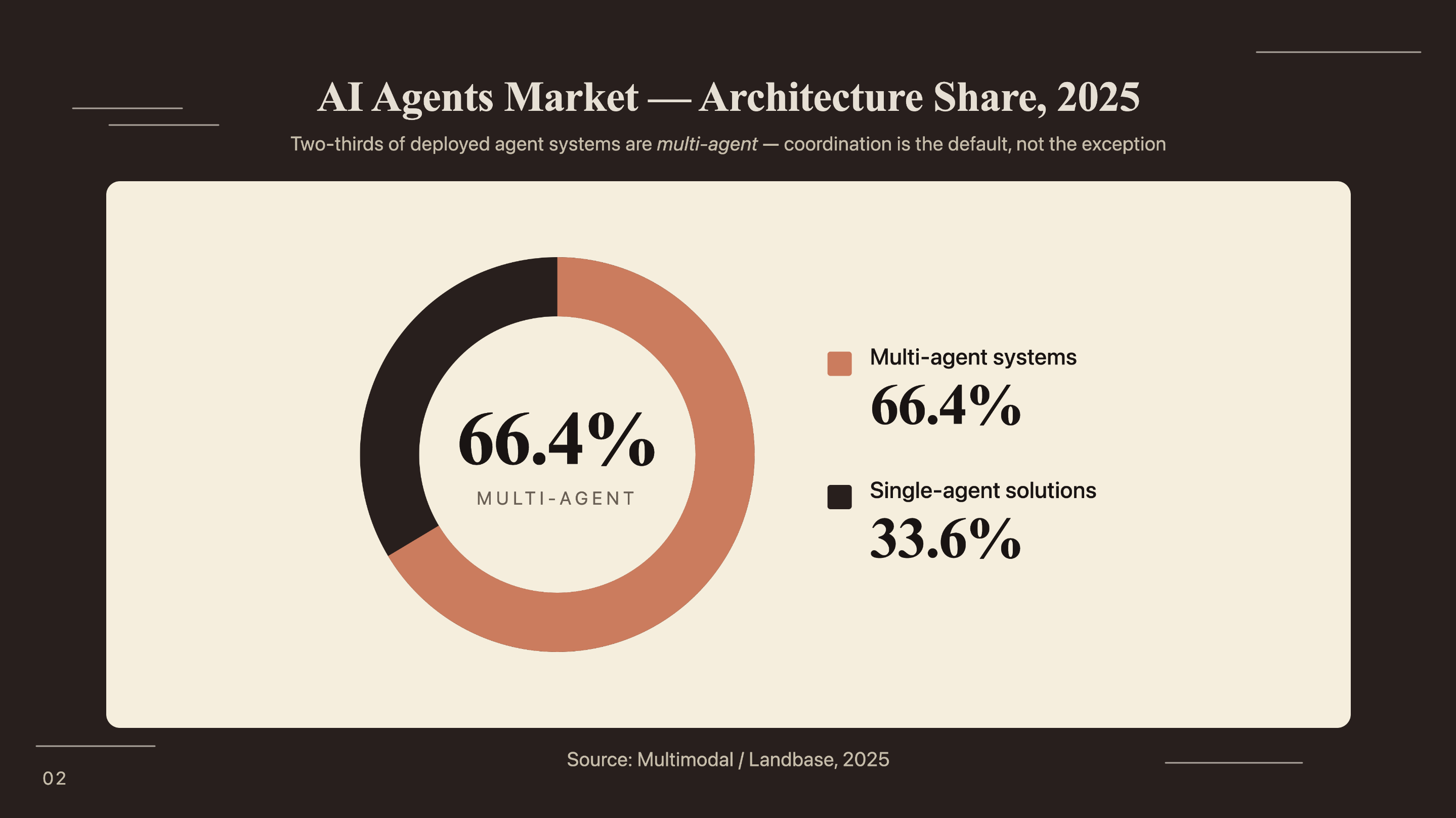
- 66.4% of the AI agents market runs coordinated multi-agent architectures, not single-agent solutions (Multimodal, 2025).
- The reflection pattern - a CriticAgent evaluating WriterAgent output before publication - is the highest-leverage quality control mechanism in a content pipeline.
- AutoGen v0.4 uses
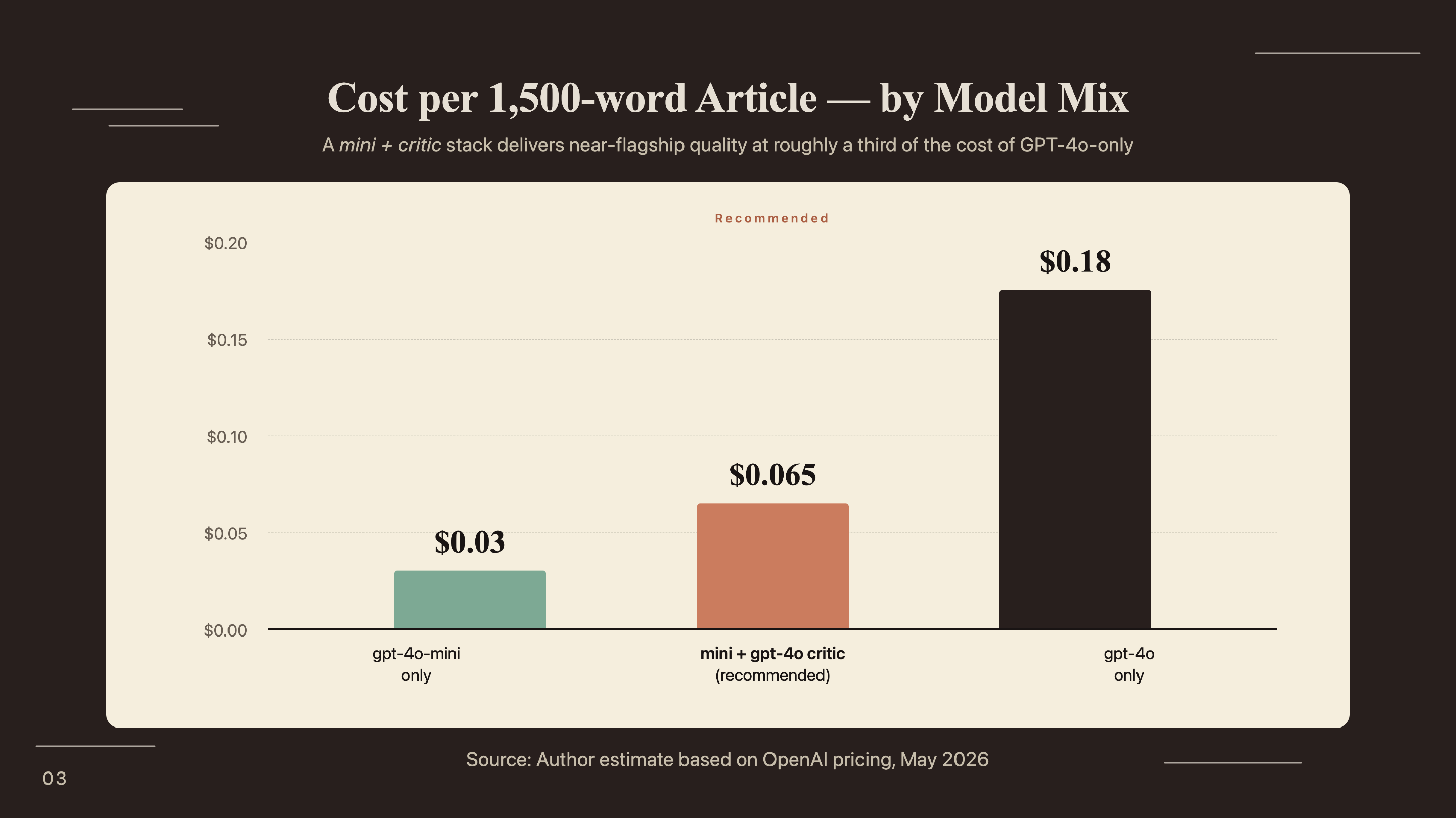
AssistantAgent,RoundRobinGroupChat, andSelectorGroupChat. The deprecated v0.2 API (ConversableAgent,initiate_chat) won’t work with these patterns.- A mixed model approach (gpt-4o-mini for research and writing, gpt-4o for critique only) costs approximately $0.065 per 1,500-word article.
- AutoGen merged with Semantic Kernel into the Microsoft Agent Framework in October 2025. The
autogen-agentchatpackage is the stable entry point for new builders in 2026.
What is a multi-agent content pipeline and why does AutoGen fit?
66.4% of the AI agents market already runs on coordinated multi-agent systems rather than single-agent solutions (Multimodal / Landbase, 2025). The shift happened because single LLM calls have a structural ceiling: they can’t self-correct, can’t specialize, and lose coherence as context grows. A pipeline with four dedicated agents avoids all three problems.
The single-agent ceiling
Ask a single model to research, write, critique, and format a post in one prompt and you get mediocre output across all four tasks. The model doesn’t know which part of its output to prioritize because every task shares the same context window. Sources from the research phase contaminate the tone judgment during editing. Quality degrades as input length grows.
Multi-agent systems solve this through division of cognitive labor. The ResearcherAgent handles web search and source compilation; the WriterAgent takes that structured brief and turns it into prose. From there, the CriticAgent evaluates the draft with a fresh context window, scoring accuracy and structure without being anchored to the writer’s phrasing. The PublisherAgent then applies critic feedback and handles output formatting. Each agent is good at one thing and bad at nothing else.
Why AutoGen v0.4 specifically
AutoGen’s async, event-driven architecture lets agents run tool calls (web search, CMS API writes) without blocking the pipeline. That matters for content workflows where the ResearcherAgent might take 5-10 seconds per source query.
The v0.4 API introduced two group chat orchestration patterns worth knowing. RoundRobinGroupChat rotates through agents in a fixed sequence: researcher, then writer, then critic, then publisher. SelectorGroupChat uses an LLM to pick the next speaker, enabling conditional routing: an SEO agent that fires only when the meta description is missing is one example.
One context note that most tutorials omit: Microsoft merged AutoGen with Semantic Kernel into the Microsoft Agent Framework in October 2025. The autogen-agentchat package is the stable entry point for new builders. There’s a migration path to the full Agent Framework for enterprise scale, but for a content pipeline, autogen-agentchat is the right starting point.
How do you design the agent roles for a content pipeline?
Agent role design determines output quality more than any individual model choice. The four-agent architecture below has a clear separation of concerns: each agent has one job, specific input expectations, and defined termination behavior.
The four core agents
ResearcherAgent owns web search. It takes a content topic as input and produces a structured research brief: 5-8 sources with URLs, key statistics, and a summary of themes. It uses the Tavily API as its primary tool because Tavily returns structured results better suited for downstream LLM consumption than raw search snippets.
WriterAgent receives the research brief and produces a full markdown draft. Its system prompt specifies word count, required heading structure, and brand voice constraints. The writer never searches the web. It works only from what the researcher provides, which prevents mid-draft source contamination.
The CriticAgent implements the reflection pattern. It receives the draft and returns structured JSON feedback: a quality score, specific accuracy issues, structure problems, and a short list of priority fixes. It never rewrites. The critic’s job is diagnosis only. A critic that rewrites gets anchored to the original text and misses systemic problems. That’s exactly the failure mode the pattern is designed to prevent.
The reflection pattern is the single highest-leverage addition to any content pipeline. A writer-only pipeline produces drafts that are wrong in the same ways, repeatedly: vague transitions, unsupported claims, headings that don’t match the brief. A critic with a scoring rubric catches all three, consistently, at roughly $0.01-0.02 per critique run.
The PublisherAgent applies the critic’s priority fixes, adds YAML frontmatter, and writes the final file to disk or calls a CMS API. It sees the original draft, the critic’s JSON feedback, and the output format specification. It applies changes and formats. No creative generation.
When to add a 5th agent
An optional SEOAgent fires after the WriterAgent when keyword density or meta description requirements aren’t met. The SelectorGroupChat pattern enables this conditional routing - the orchestrator’s LLM decides whether to invoke the SEOAgent based on a quick evaluation of the draft.
Four to six agents is the practical ceiling. Beyond that, context overhead grows and debugging multi-turn conversations gets hard. Add a 5th agent only when a specific quality failure in your pipeline justifies the complexity.
How do you set up AutoGen v0.4 for a content pipeline?
79% of organizations report some level of agentic AI adoption (PwC AI Agent Survey, 2025), but outdated tutorials that still reference the v0.2 API create needless setup friction. This section uses the current autogen-agentchat API exclusively.
Environment setup and dependencies
Python 3.11 or higher is required. Create a virtual environment before installing.
python -m venv autogen-pipeline
source autogen-pipeline/bin/activate  # Windows: autogen-pipeline\Scripts\activate

pip install autogen-agentchat autogen-ext[openai] tavily-python python-dotenv
Create a .env file in your project root:
OPENAI_API_KEY=sk-...
TAVILY_API_KEY=tvly-...
Configuring the model client
Use gpt-4o-mini for the ResearcherAgent and WriterAgent (cost-efficient for high-volume tasks) and gpt-4o for the CriticAgent (reasoning quality matters more than speed for evaluation). This split costs approximately $0.065 per 1,500-word article versus $0.18 for an all-gpt-4o configuration.
import asyncio
import os
from autogen_agentchat.agents import AssistantAgent
from autogen_agentchat.teams import RoundRobinGroupChat
from autogen_agentchat.conditions import TextMentionTermination, MaxMessageTermination
from autogen_ext.models.openai import OpenAIChatCompletionClient
from autogen_core.tools import FunctionTool
from dotenv import load_dotenv

load_dotenv()

# Cost-efficient model for research and writing
mini_model = OpenAIChatCompletionClient(
    model="gpt-4o-mini",
    api_key=os.getenv("OPENAI_API_KEY"),
)

# Higher-reasoning model for critique only
critic_model = OpenAIChatCompletionClient(
    model="gpt-4o",
    api_key=os.getenv("OPENAI_API_KEY"),
)| Agent | Model | Avg input tokens | Avg output tokens | Est. cost/run |
|---|---|---|---|---|
| ResearcherAgent | gpt-4o-mini | ~800 | ~600 | ~$0.0002 |
| WriterAgent | gpt-4o-mini | ~2,000 | ~2,200 | ~$0.0006 |
| CriticAgent | gpt-4o | ~3,000 | ~400 | ~$0.037 |
| PublisherAgent | gpt-4o-mini | ~3,500 | ~2,400 | ~$0.024 |
| Total | mixed | ~$0.062 |
How do you build and connect the four content agents?
57.3% of AI practitioners now have agents running in production, up from 51% the prior year (LangChain State of Agent Engineering, December 2025). The code below shows what a production-grade content pipeline looks like in AutoGen v0.4.
ResearcherAgent with web search
from tavily import TavilyClient

tavily_client = TavilyClient(api_key=os.getenv("TAVILY_API_KEY"))

def search_web(query: str) -> str:
    """Search the web and return structured source summaries."""
    results = tavily_client.search(
        query=query,
        max_results=6,
        search_depth="advanced"
    )
    formatted = []
    for r in results["results"]:
        formatted.append(
            f"Source: {r['url']}\n"
            f"Title: {r['title']}\n"
            f"Content: {r['content'][:500]}\n"
        )
    return "\n---\n".join(formatted)

search_tool = FunctionTool(
    search_web,
    description="Search the web for current information and sources on a given topic."
)

researcher = AssistantAgent(
    name="ResearcherAgent",
    model_client=mini_model,
    tools=[search_tool],
    system_message="""You are a research specialist for B2B marketing content.
Given a topic, search for 5-8 authoritative sources with current data (2025-2026 preferred).
Output a structured research brief:
- 5-8 source citations with URLs and key statistics
- Summary of main themes and angles
- 2-3 recommended content angles based on gaps in existing coverage
End your message with exactly: RESEARCH COMPLETE""",
)
WriterAgent and CriticAgent
writer = AssistantAgent(
    name="WriterAgent",
    model_client=mini_model,
    system_message="""You are a B2B content writer specializing in technical marketing.
Given a research brief, write a complete blog post:
- Minimum 1,500 words
- H2 headings for main sections (question format: "How does X work?")
- Each H2 section opens with a specific statistic from the research
- Conversational but authoritative tone — no academic hedging
- No filler phrases ("it is important to note", "in today's landscape")
End your message with exactly: DRAFT COMPLETE""",
)

critic = AssistantAgent(
    name="CriticAgent",
    model_client=critic_model,
    system_message="""You are an editorial critic. Evaluate the draft and return ONLY valid JSON:
{
  "quality_score": <integer 0-100>,
  "accuracy_issues": ["list any factual problems or unsupported claims"],
  "structure_issues": ["list heading, flow, or length problems"],
  "voice_issues": ["list tone or style problems"],
  "priority_fixes": ["top 3 specific, actionable improvements"]
}
Do NOT rewrite the content. Return only the JSON object.
End your message with exactly: CRITIQUE COMPLETE""",
)
PublisherAgent and orchestration
publisher = AssistantAgent(
    name="PublisherAgent",
    model_client=mini_model,
    system_message="""You are a publishing specialist. You receive:
1. An original draft
2. A JSON critique with priority fixes

Apply the priority fixes from the critique.
Then add YAML frontmatter with title, description (150-160 chars), date, and tags.
Output the complete, publish-ready markdown document.
End your message with exactly: PUBLISH COMPLETE""",
)

# Assemble the pipeline
termination = (
    TextMentionTermination("PUBLISH COMPLETE")
    | MaxMessageTermination(max_messages=20)
)

team = RoundRobinGroupChat(
    participants=[researcher, writer, critic, publisher],
    termination_condition=termination,
)
How do you run the pipeline and interpret the output?
66% of agentic AI adopters report increased productivity and 57% report measurable cost savings (PwC AI Agent Survey, 2025). Running your first pipeline reveals both the benefit and the common failure points.
Running the pipeline end-to-end
async def run_content_pipeline(topic: str) -> None:
    task = (
        f"Create a 1,500-word blog post on: {topic}. "
        f"Target audience: B2B marketing managers. "
        f"Include at least 3 statistics with sources."
    )
    result = await team.run(task=task)

    for message in result.messages:
        print(f"\n{'='*60}")
        print(f"Agent: {message.source}")
        print(f"{'='*60}")
        content = message.content
        print(content[:600] + "..." if len(content) > 600 else content)

asyncio.run(run_content_pipeline(
    "How B2B SaaS teams use AI agents for competitive intelligence"
))
Sample console output (truncated, annotated by agent):
============================================================
Agent: ResearcherAgent
============================================================
Research Brief: AI Agents for Competitive Intelligence

Source: https://www.salesforce.com/news/...
Title: State of Sales Report 2025
Content: 81% of sales teams now use AI for competitive research...
---
[5 additional sources with URLs and key data points]

Recommended angles:
1. Real-time monitoring vs. quarterly competitive reviews
2. CRM integration for in-context competitive insights
RESEARCH COMPLETE

============================================================
Agent: WriterAgent
============================================================
## How AI Agents Are Replacing Manual Competitive Research

81% of sales teams now use AI for competitive research (Salesforce, 2025)...
[~1,600 words of draft content across 6 H2 sections]
DRAFT COMPLETE

============================================================
Agent: CriticAgent
============================================================
{
  "quality_score": 74,
  "accuracy_issues": ["Gartner 40% claim needs direct URL citation"],
  "structure_issues": ["Section 3 is 420 words — split at 'Another factor'"],
  "voice_issues": ["Paragraph 2 uses passive voice throughout"],
  "priority_fixes": [
    "Add Gartner source URL to the 40% adoption claim",
    "Split section 3 into two separate H2s",
    "Rewrite paragraph 2 with an active subject"
  ]
}
CRITIQUE COMPLETE

============================================================
Agent: PublisherAgent
============================================================
---
title: "How AI Agents Are Replacing Manual Competitive Research"
description: "81% of sales teams use AI for competitive research..."
[Complete publish-ready markdown with frontmatter applied]
PUBLISH COMPLETE
Common failure modes and fixes
WriterAgent ignoring critic feedback. Happens when the critic JSON is malformed or the publisher doesn’t receive both the draft and the critique in its context window. Fix: verify the full conversation history is passed to the PublisherAgent’s context, not just the most recent message.
ResearcherAgent returning no results. Tavily occasionally fails on niche queries. Add a retry wrapper with a broader fallback query. If the specific search returns fewer than 3 results, retry with the topic alone.
A third failure mode: the pipeline never terminates. Always pair TextMentionTermination with a MaxMessageTermination backstop. Without it, a stalled pipeline runs indefinitely. The | operator combines both conditions:
termination = (
    TextMentionTermination("PUBLISH COMPLETE")
    | MaxMessageTermination(max_messages=20)
)
What does this AutoGen pipeline cost and how fast does it run?
No existing AutoGen tutorial publishes actual cost numbers for content pipelines. At pipeline scale, the mixed model approach runs at $0.05-0.08 per 1,500-word article. Latency runs 45-90 seconds per execution on gpt-4o-mini with Tavily search; source queries account for most of that.
| Scale | Articles/day | Est. daily cost | Est. monthly cost |
|---|---|---|---|
| Small | 5 | ~$0.33 | ~$10 |
| Medium | 20 | ~$1.30 | ~$39 |
| High | 50 | ~$3.25 | ~$98 |
| Enterprise | 200 | ~$13.00 | ~$390 |
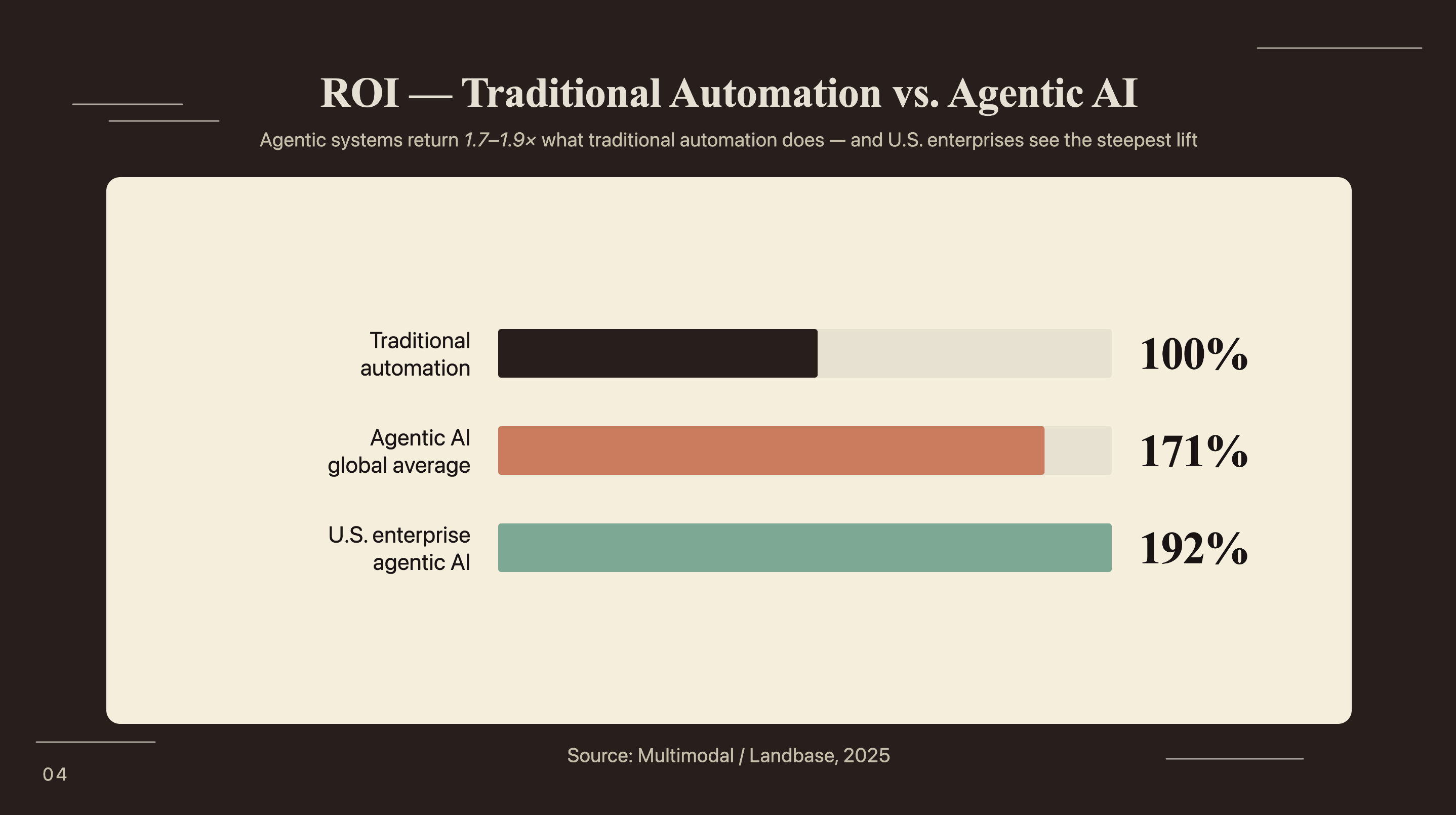
Companies deploying agentic AI report 171% average return on investment (Multimodal / Landbase, 2025). At $0.065 per article versus a human-written article cost of $80-150, the ROI calculation resolves quickly. U.S. enterprise deployments report 192% average ROI, nearly double the return of traditional automation.
How does AutoGen compare to CrewAI and LangGraph for content work?
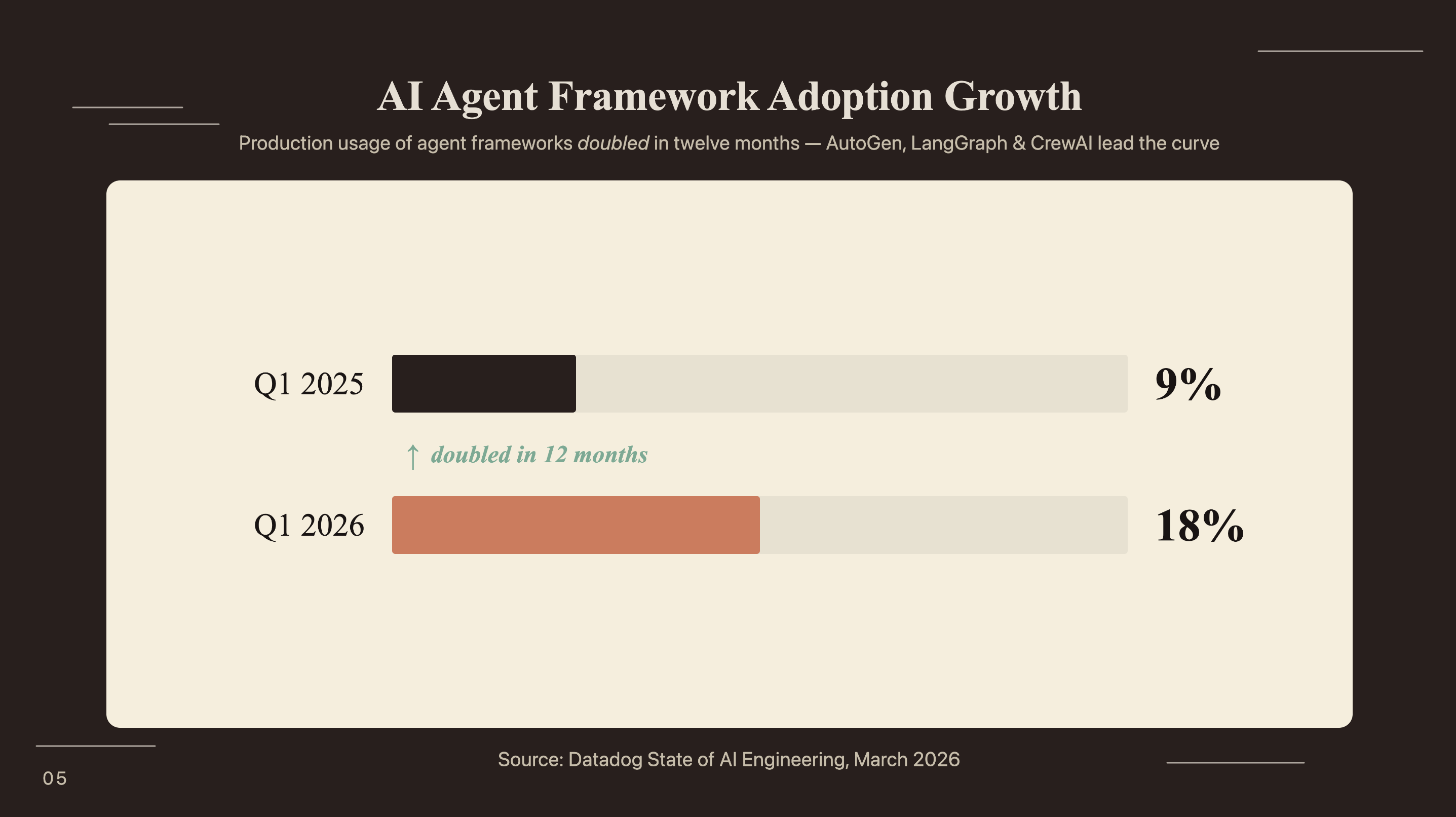
AI agent framework adoption doubled from 9% of organizations in Q1 2025 to 18% in Q1 2026 (Datadog State of AI Engineering, March 2026). Choosing between AutoGen, CrewAI, and LangGraph for a content pipeline isn’t academic - each makes a different tradeoff.
Framework comparison for content workflows
| Dimension | AutoGen | CrewAI | LangGraph |
|---|---|---|---|
| Orchestration model | Conversational group chat | Role-based crew with tasks | Graph-based state machine |
| Setup complexity | Moderate (async patterns) | Low (YAML or Python config) | High (explicit graph definition) |
| Reflection pattern | First-class, natural | Possible but manual | Requires explicit loop node |
| Conditional routing | SelectorGroupChat (LLM-based) | Flows feature (conditional) | Graph edges with conditions |
| Marketing team readability | Developer-focused | Operator-readable | Developer-focused |
For a content pipeline that needs iterative quality loops, AutoGen’s conversational architecture fits better than LangGraph’s explicit graph model. The reflection pattern is natural in a group chat context; the critic responds to the writer the way a human editor would. For the role-based model’s advantages when non-engineers need to read agent configurations, building a CrewAI content research agent covers that pattern. When complex branching with human approval nodes matters more than conversational quality loops, LangChain lead qualification agent shows LangGraph at its strongest.
When to combine AutoGen with n8n or Zapier
AutoGen handles the intelligence layer. n8n or Zapier handles the integration layer: scheduling pipeline runs, routing output to your CMS, sending Slack notifications when articles complete, logging results to a spreadsheet.
A practical pattern: trigger the AutoGen pipeline from an n8n schedule node, receive the output markdown via a webhook or file system watch, and push it to your CMS using an HTTP request node. AutoGen doesn’t need to know anything about your publishing infrastructure - it produces a file, and n8n routes it. The n8n and Perplexity competitive intelligence agent shows a concrete example of a scheduled AI workflow running end-to-end with live source retrieval - the orchestration layer pattern maps directly to what you’d build here.
Frequently Asked Questions
Is AutoGen still actively maintained in 2026?
Yes. AutoGen entered a maintenance phase after merging with Semantic Kernel into the Microsoft Agent Framework in October 2025. The autogen-agentchat package receives security updates and is stable for production builds, with a documented migration path to the Agent Framework for enterprise scale. New builders in 2026 can build on it safely.
Can I use local models (Ollama) instead of OpenAI?
Yes. Replace OpenAIChatCompletionClient with OllamaChatCompletionClient from autogen-ext[ollama]. Local models work well for the ResearcherAgent and WriterAgent. For the CriticAgent, a stronger cloud model produces better structured feedback - reasoning quality matters most at the evaluation stage, which is where cost savings have the least value.
How many agents is too many for a content pipeline?
Four to six is the practical sweet spot. Beyond six agents, context window overhead grows fast and debugging multi-turn conversations gets difficult. Datadog found 59% of agentic AI requests make only a single tool call - keep the pipeline lean and add agents only when a specific quality failure justifies the additional complexity.
What is the difference between RoundRobinGroupChat and SelectorGroupChat?
RoundRobinGroupChat rotates through agents in a fixed sequence: researcher, writer, critic, publisher. Deterministic and easy to debug. SelectorGroupChat uses an LLM to choose the next speaker, which enables conditional routing - an SEO agent that fires only when the meta description is missing, for example. Use RoundRobin for predictable four-stage pipelines; use Selector when you need optional agents that activate on content conditions.
Can this pipeline publish directly to WordPress or a headless CMS?
Yes. Add an HTTP tool to the PublisherAgent’s tool list that calls your CMS REST API. WordPress exposes /wp-json/wp/v2/posts, Ghost has its own Admin API, and headless CMS platforms like Contentful and Sanity have similar REST or GraphQL endpoints. The PublisherAgent applies final edits and posts in one step - no separate publishing workflow required.
If you’re looking to integrate AI into your content production workflows, get in touch with us and we’ll map out where automation adds the most value for your team.
Conclusion
The 4-agent pipeline solves the quality problem single-agent content generation can’t: specialized roles with clear inputs and outputs, plus a critic that catches the errors the writer makes consistently. The reflection loop is what makes the output usable, not just fast.
AI agent framework adoption doubled in one year, from 9% to 18% of organizations (Datadog, March 2026). Building this pipeline now means having production infrastructure in place before content volume requirements outpace what manual processes can handle. At $0.05-0.08 per article, cost has stopped being the barrier. Pipeline design is what remains.