



Luka Mrkić
Head of BD
Insights, strategies, and real-world playbooks on AI-powered marketing.
MAY 7, 2026
Build an AI Competitive Intel Agent with n8n and Perplexity
58% of competitive intelligence professionals say they can’t gather competitor data quickly enough, and those are people whose full job is CI (Crayon, 2024). For sales teams doing it part-time, between deals, the gap is worse.
The pattern is familiar. A rep finds out mid-call that the competitor dropped pricing last week. The battlecard they’re working from references a feature the other company killed in Q1. At Monday standup, the VP asks whether anyone tracked a competitor’s funding announcement from Friday. The answer is usually no.
Perplexity’s Sonar API queries live web content with LLM reasoning and returns structured, citable output in seconds. Connect it to an n8n workflow on a schedule and you get automated weekly competitive briefs delivered to Slack or email, with no manual research required.
This tutorial builds that system from scratch: Schedule Trigger, Perplexity HTTP Request, output formatter, and delivery node. Total build time is 20 to 30 minutes. Total monthly cost for 10 competitors is under $12.
Key Takeaways
- 58% of CI professionals can’t gather competitor data on time (Crayon, 2024). This n8n + Sonar workflow runs it automatically on a schedule, at $1-$6/month for 10 competitors.
- Four nodes: Schedule Trigger, HTTP Request (Perplexity Sonar), Code formatter, Slack delivery.
- Use Sonar base for weekly monitoring; upgrade to Sonar Pro only for multi-source synthesis or deeper source citations.
Why is competitive intelligence so hard to automate?
68% of deals at B2B software companies involve direct head-to-head competition, and the average competitive selling readiness score sits at 3.8 out of 10 (Crayon, 2025). The gap between how often reps face competitors and how prepared they are to handle it costs win rates that show up in every quarterly review.
Three failure modes explain why teams haven’t fixed this yet.
Manual research is slow and inconsistent. Someone opens a browser, runs searches across a competitor’s pricing page, G2 profile, LinkedIn job board, and recent press coverage. Forty-five minutes later they have notes that are already partially outdated. Multiply that by 8 competitors and a weekly cadence and you’ve created a job no one actually does.
Google Alerts return unstructured noise. The alerts arrive as email digests with no categorization, no field structure, and no signal about whether a pricing change is more significant than a blog post. Most reps stop opening them within a few weeks.
Dedicated CI platforms start at $500 to $2,000 per month. The competitive intelligence tools market sits at $710 million in 2025 and is projected to reach $4.03 billion by 2034 at a 21.17% CAGR (Fortune Business Insights, 2025). Those prices won’t drop. For a team monitoring 10 to 15 competitors and needing structured weekly briefs, building beats buying.
The n8n + Perplexity approach sits between manual research and enterprise platforms: automated, structured, and cheap.
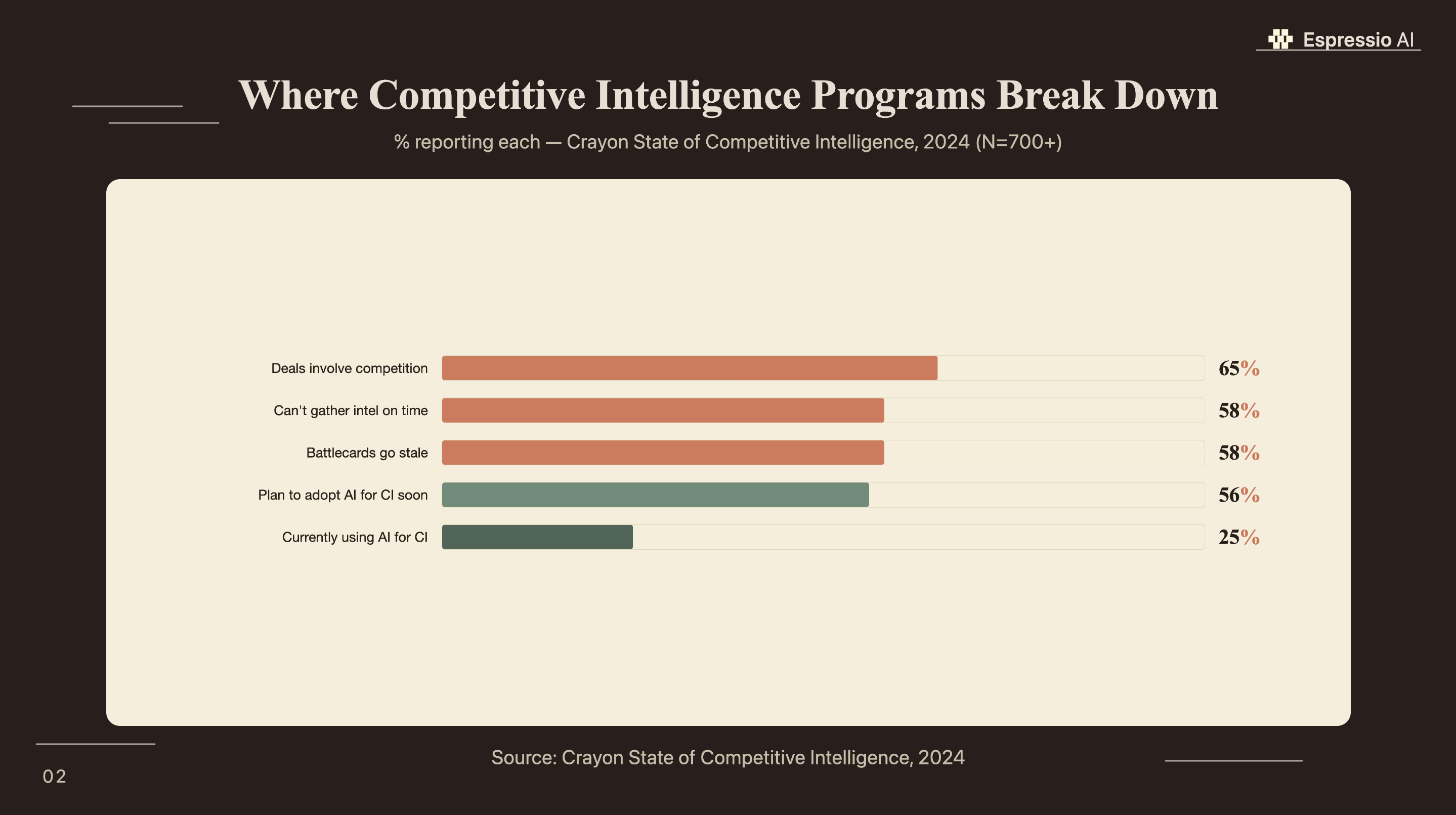
According to the same survey, 56% of CI teams plan to add AI soon. The workflow in this tutorial is where most of them will land.
Which Perplexity Sonar model should you use for competitive intelligence?
Perplexity processed 780 million search queries per month as of May 2025, a 239% increase from mid-2024 (TechCrunch, 2025). Sonar Pro leads the Search Arena evaluation, outperforming models from Google, OpenAI, and Anthropic (Perplexity, 2025). For CI workflows, the key advantage is real-time web access: Sonar fetches and synthesizes live page content, not training data.
Most articles about CI automation treat Perplexity as a faster search layer. The actual value is different. When you call the Claude API or GPT-4 directly and ask about a competitor, the model reasons over its training data, which has a cutoff. Sonar fetches live web pages before responding. That means a Sonar query run on Monday morning can catch a pricing page update that went live on Sunday night. That’s the freshness gap that makes automated CI viable, and it’s why general-purpose LLM APIs don’t replace it.
Perplexity offers three Sonar tiers, and the choice affects both cost and output quality:
| Use case | Model | Cost per 1K requests |
|---|---|---|
| Weekly pricing, feature, hiring scans | Sonar base | $5-$12 |
| Multi-source synthesis, review site analysis | Sonar Pro | $6-$14 + tokens |
| Quarterly deep competitive teardowns | Sonar Deep Research | ~$0.41/query |
For this tutorial, Sonar base handles all seven competitive monitoring categories in the system prompt. Sonar Pro makes sense only when you’re synthesizing analyst coverage across 10+ sources per query. Deep Research is priced for on-demand, not automated scheduled runs.
How does the n8n + Perplexity workflow architecture work?
n8n reached around 200,000 active users by early 2025, with roughly 75% of customers building AI-powered workflows inside the platform (TechCrunch, 2025). The competitive intelligence agent runs five nodes in sequence, once per week, with no manual intervention required.
The workflow:
- Schedule Trigger: runs every Monday at 8:00 AM on a cron expression (
0 8 * * 1). Add a manual trigger as a parallel start for on-demand runs. - Split In Batches: loops through your competitor list, which lives in a Google Sheet or a hardcoded JSON array in the workflow. One batch per competitor.
- HTTP Request (Perplexity Sonar): calls the Sonar API with your system prompt. Returns a structured JSON object with fields for pricing changes, feature releases, hiring signals, and coverage.
- Code Node: parses
$json.choices[0].message.content, handles JSON parse errors, and formats the output into a Slack Block Kit message. - Slack Node: posts the formatted brief to your
#competitive-intelchannel. Optionally triggers a priority alert ifpricing_change: true.
A decision branch sits between the Code Node and the Slack Node: if the parsed JSON contains a pricing change flag set to true, the workflow posts an immediate priority alert to a separate channel. Everything else goes into the weekly digest.
On self-hosted vs. cloud: if your workflow passes competitor names and product details through Perplexity’s API, that data touches Perplexity’s servers. For most teams monitoring public competitor websites, that’s fine. If your competitive intelligence includes internal product roadmaps or sales battle notes, keep the workflow self-hosted.
For teams building research agents in Python rather than a visual workflow tool, the CrewAI research agent guide covers a comparable multi-node pipeline using Python agents instead of n8n nodes.
How do you configure the nodes step by step?
The full workflow takes 20 to 30 minutes to configure in n8n for anyone comfortable with HTTP Request nodes. You need two credentials: a Perplexity API key (from Perplexity API console) and a Slack bot token.
Node 1: Schedule Trigger
Set the trigger mode to “Cron” and enter 0 8 * * 1 for every Monday at 8:00 AM. Add a second “Manual Trigger” node as an alternative entry point. You’ll use it constantly during testing.
Node 2: Split In Batches
Connect your competitor list. The simplest setup: a hardcoded JSON array in the workflow.
[
  { "name": "Acme Corp", "domain": "acmecorp.com" },
  { "name": "Rival Inc", "domain": "rivalinc.com" }
]
For a team that updates competitors frequently, pull from a Google Sheets row instead. The “Google Sheets” node in n8n reads row data directly.
Node 3: HTTP Request (Perplexity Sonar API)
- URL:
https://api.perplexity.ai/chat/completions - Method: POST
- Authentication: Generic Credential Type → Header Auth → Name:
Authorization, Value:Bearer YOUR_API_KEY - Body (JSON):
{
  "model": "sonar",
  "search_recency_filter": "week",
  "messages": [
    {
      "role": "system",
      "content": "You are a competitive intelligence analyst. For the competitor provided, search for any changes in the past 7 days to: pricing, product features, marketing messaging, job postings (volume and roles), press coverage, and G2 or Capterra reviews. Return a structured JSON object with these keys: competitor_name (string), pricing_change (boolean), feature_release (string or null), messaging_shift (string or null), hiring_signal (string or null), coverage_summary (string, max 100 words), sources (array of URLs). Return only valid JSON, no prose."
    },
    {
      "role": "user",
      "content": "Competitor: {{ $json.name }} | Domain: {{ $json.domain }}"
    }
  ]
}
The search_recency_filter: "week" parameter tells Sonar to prioritize results from the past 7 days. This is the key setting that keeps the briefs current.
Node 4: Code Node
const raw = $json.choices[0].message.content;

let parsed;
try {
  parsed = JSON.parse(raw);
} catch (e) {
  parsed = {
    competitor_name: "Unknown",
    pricing_change: false,
    feature_release: null,
    messaging_shift: null,
    hiring_signal: null,
    coverage_summary: raw.slice(0, 300),
    sources: [],
    parse_error: true
  };
}

return [{ json: parsed }];
The try/catch is non-negotiable. Sonar occasionally returns narrative text when it can’t find structured data. Without the fallback, the workflow errors and skips the competitor entirely.
Node 5: Slack Node
Set “Resource” to “Message” and “Operation” to “Post”. Use the Slack channel ID for #competitive-intel. For the message text:
*{{ $json.competitor_name }}* — Weekly Brief ({{ $now.format('MMM D, YYYY') }})
{{ $json.pricing_change ? '💰 *Pricing change detected*' : '— No pricing change' }}
{{ $json.feature_release ? '🚀 ' + $json.feature_release : '' }}
{{ $json.messaging_shift ? '📣 ' + $json.messaging_shift : '' }}
{{ $json.hiring_signal ? '👥 ' + $json.hiring_signal : '' }}
📰 {{ $json.coverage_summary }}
The first time we ran this for a client, the agent caught a competitor’s stealth pricing tier change that had gone live on a Friday evening. It was live on their pricing page for five days before the weekly run surfaced it. The sales team had been in three calls with prospects who’d seen the new pricing, without knowing it existed. After the agent flagged it on Monday morning, they updated the battlecard that afternoon and used the new positioning in a close call the same day.
What does the competitive brief output actually look like?
The structured output transforms raw Perplexity responses into a scannable Slack message that a sales rep can act on in under 90 seconds without clicking through to sources. Each brief covers one competitor and covers the fields that matter to reps in live deals.
A formatted output in Slack looks like this:
Acme Corp — Weekly Brief (May 5, 2026)
💰 Pricing change: YES — Starter plan dropped from $79 to $59/mo
🚀 Feature release: Launched AI report generation (announced April 30)
📣 Messaging: New tagline "Built for speed" on homepage hero
👥 Hiring: 4 new SDR postings in EMEA (expansion signal)
📰 Coverage: Featured in TechCrunch (May 2) — Series B announcement
Sources: [pricing page] [product blog] [LinkedIn] [TechCrunch]
Every field is binary or one-line. A rep scans it in seconds and decides whether to flag it in an open deal, update a battlecard, or file it. There’s no narrative summary to skim, no hedged language, no “it appears that.”
The weekly brief surfaces signals. Reps determine which are actionable and handle any deeper teardowns separately.
Storing the output for trend tracking. After Slack delivery, pipe the JSON output to a Google Sheet with a timestamp column. After 12 weeks, you have a trend view: which competitor changes pricing most frequently, which one is consistently expanding headcount into new regions, which one’s messaging has drifted toward a different ICP. That longitudinal view isn’t available from a weekly brief alone.
Teams that use this workflow alongside a lead qualification agent can route competitor signal data directly into the qualification context: if a lead mentions a competitor by name, the agent surfaces that competitor’s most recent Sonar brief as part of the qualification context.
What does it cost to monitor 10 competitors weekly?
At Perplexity’s current Sonar pricing, monitoring 10 competitors with one weekly query each on the base model costs under $1 per month in API fees (Perplexity, 2026). Sonar Pro runs $2.50 to $5.50 per month for the same setup, with higher per-request and token costs for deeper results.
The math:
- 10 competitors × 1 query/week × 4 weeks = 40 queries/month
- Sonar base request cost: 40 × ($0.005-$0.012) = $0.20-$0.48
- Token cost (approx. 1,000 tokens per query at $1/1M tokens): ~$0.04 additional
- Total, Sonar base: $0.24-$0.52/month
- Total, Sonar Pro: $2.50-$5.50/month
- n8n cloud: free tier covers this volume; self-hosted runs on existing infrastructure
Across client deployments, the actual monthly Sonar API cost for a 10-competitor setup has ranged from $1.20 to $3.80, depending on the verbosity of the system prompt and whether clients opt for Sonar Pro on specific competitors. The workflows run longest have averaged $1.85/month over 90 days on the base model.
The contrast with enterprise CI platforms is worth stating plainly. Crayon, Klue, and Battlecard.ai start at $500 to $2,000 per month. For a team that needs structured weekly briefs and a Slack delivery, this build is 99% cheaper. What it doesn’t do: real-time win/loss analysis, integration with call recording tools, or automated battlecard publishing. Those features justify the enterprise price for teams that need them.
What are the most common failure points and how do you handle them?
Three failure modes account for nearly all production issues in this workflow: JSON parse errors from Sonar, scheduling drift over time, and stale results when a competitor has had a quiet week. None are hard to fix once you know they’re coming.
JSON parse failure. Sonar occasionally returns a narrative answer instead of a JSON object, especially when a competitor query returns no relevant results. The Code Node try/catch handles this by falling back to plain text with a ⚠️ Unstructured response prefix in the Slack message. The raw content still gets delivered, with the rep notified that it needs manual review. Add this as a format validation step: check typeof parsed === 'object' before returning.
Scheduling drift. Interval-based triggers in n8n drift over time as executions accumulate small delays. After six months, a “weekly” trigger can shift by hours. Set the trigger to a fixed cron expression (0 8 * * 1) rather than an interval. This runs at a defined time regardless of execution history.
Stale results from search_recency_filter: "week". If a competitor made no public changes in the past 7 days, Sonar may return sparse or empty results. Add a fallback: if coverage_summary is null or under 20 characters, set search_recency_filter: "month" and retry. Flag the output with [Low-activity week - expanded to 30-day window] so the team knows the brief covers a wider window.
Slack delivery failures are easy to miss because the workflow errors silently when a channel is archived or a bot token expires. Add an n8n error trigger node that posts to a fallback channel (#ops-alerts) whenever any execution fails, and check the n8n execution log every Monday after the scheduled run.
Rate limiting on the Sonar API is rarely an issue for scheduled workflows at this volume. If you’re testing with burst requests during setup, add a 2-second “Wait” node between batches to avoid any edge-case throttling.
If you’re looking to integrate AI into your competitive intelligence workflows, get in touch with us and we’ll map out where automation adds the most value for your team.
Frequently Asked Questions
Is the Perplexity Sonar API free?
Sonar has no free tier. The base model costs $5-$12 per 1,000 requests plus token charges (Perplexity, 2026). For 40 weekly CI queries, total monthly spend on the base model is $1-$3. Perplexity offers credits on signup, which covers initial setup and testing without out-of-pocket cost.
Do I need to know how to code to build this in n8n?
Most of the workflow needs no code. n8n’s Schedule Trigger, HTTP Request, and Slack nodes configure through the visual interface. The Code Node, which parses Sonar’s JSON response, requires about 10 lines of JavaScript, though that’s optional if plain-text delivery works for your team. n8n reached around 200,000 active users with roughly 75% building AI workflows (TechCrunch, 2025).
How is this different from setting up Google Alerts?
Google Alerts monitors keyword mentions in Google’s crawl index, which lags 1-7 days, and returns unstructured email digests. This workflow queries Perplexity Sonar, which indexes live web content and returns structured JSON with specific fields for pricing changes, feature releases, and hiring signals. The output lands in Slack in a format a rep can review in under 90 seconds.
Can I use this workflow for more than competitor monitoring?
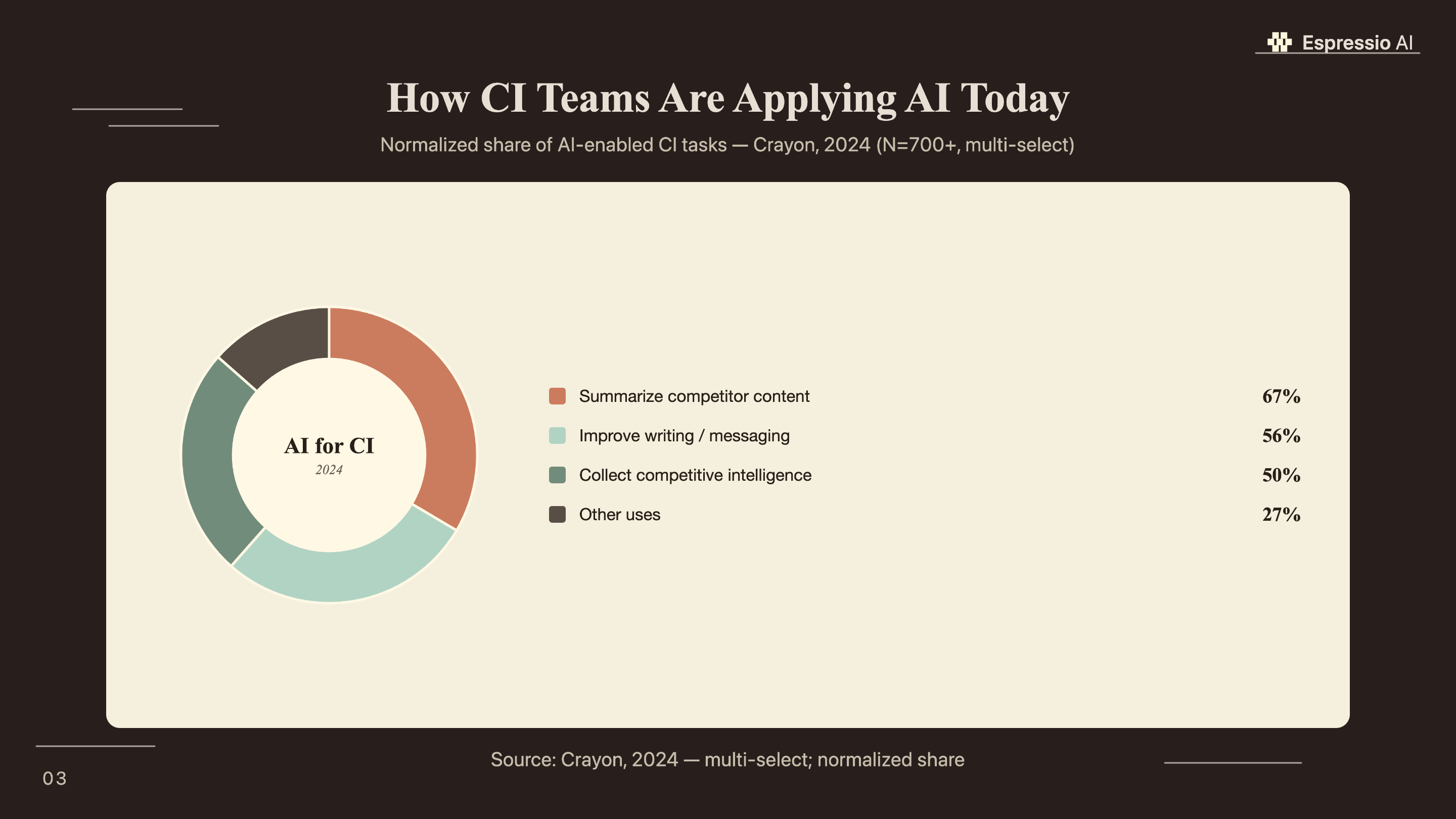
Yes. The same architecture works for prospect account monitoring, industry news summaries, and customer signal tracking. Swap the competitor list for target accounts, update the system prompt, and the workflow runs identically. According to the Crayon survey, 67% of CI professionals already use AI to summarize web content; this workflow extends that pattern to any research function.
Conclusion
The workflow in this tutorial runs five nodes, costs under $6 per month for 10 competitors, and delivers structured briefs to Slack every Monday morning without anyone touching a browser. The value is speed: Sonar catches a pricing change the evening it goes live, not five days later when a rep hears about it from a prospect.
Three things determine whether this works in practice. First, get the system prompt right before going live: test it manually against each competitor and verify the JSON output is consistent. Second, set up the error trigger node so you know immediately when an execution fails. Third, build the Google Sheets log from day one, even if you don’t look at it for weeks. The trend data is where the deeper insights come from.
For teams wanting to extend this into a full AI sales and marketing operating system, how we built an AI operating system in 18 months covers the architecture that surrounds individual agents like this one. And if you’re building the qualification layer that this competitive data feeds into, building an AI lead qualification agent with LangChain shows how BANT scoring and CRM routing connect to a research pipeline at this level.



