



Luka Mrkić
Head of BD
Insights, strategies, and real-world playbooks on AI-powered marketing.
MAY 20, 2026
How to Build an AI Lead Enrichment Pipeline with Clay and Apollo
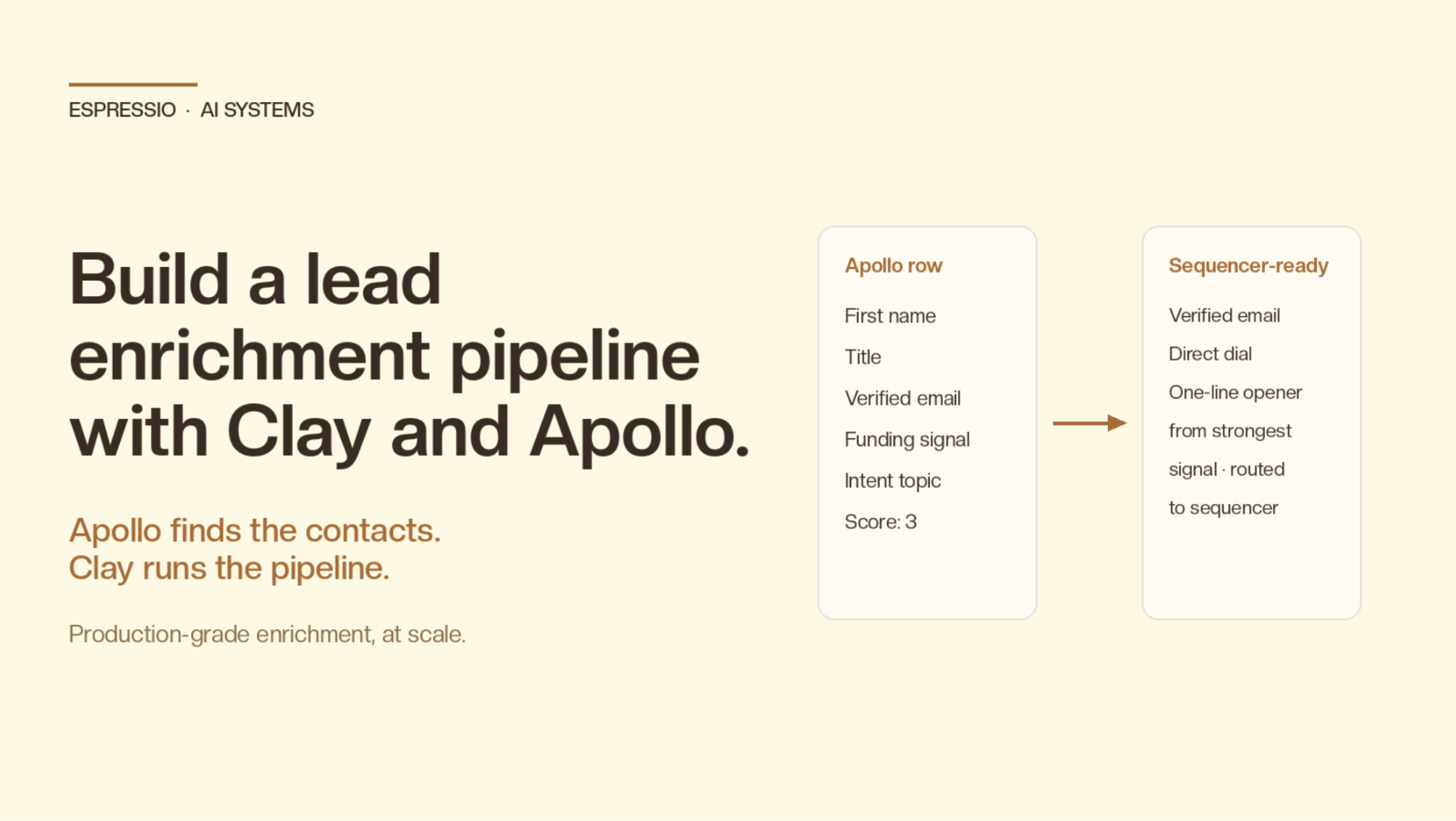
B2B sales teams sit on lists they can’t use. The CSV says “Director of Ops at Acme” and stops there. No email, no phone, no LinkedIn, no recent signal, no reason to reach out today. Apollo gives you a 275M-contact database to fill those gaps. Clay gives you the orchestration layer to chain enrichments, fall back when one source fails, and let an AI agent write the part a human used to.
Together they replace the manual research that drains your SDR week and the hand-built Python scripts that break every time an API changes.
This guide walks through a production-grade pipeline: how the two tools split the work, the exact table and waterfall to build, the Apollo enrichments worth running, the AI scoring and routing layer on top, and the operational guardrails that keep cost and deliverability healthy at scale.
Key Takeaways
- Apollo is the data source: 275M contacts, verified emails, phone numbers, intent, job changes, tech stack
- Clay is the pipeline: tables, waterfalls, conditional logic, AI columns, and clean handoff to your CRM or sequencer
- The right architecture is a waterfall, not a single lookup. Try Apollo first, fall back to LinkedIn scrape, then to web search, then skip the row. One source is never enough
- An AI scoring column before enrichment cuts spend 40-60% by skipping rows with no usable signal
- Budget roughly $0.08-$0.25 per fully enriched, scored, AI-personalized contact at 1,000+ rows/month
- The pipeline is only as good as the trigger that feeds it. Build around buying signals (job posts, funding, tool changes), not static title lists
What an AI lead enrichment pipeline actually is
A lead enrichment pipeline is a repeatable system that takes a thin input (name + company, or even just a domain) and produces a sales-ready record: verified contact details, role context, company context, a recent buying signal, a qualification score, and a written-for-this-person opener.
The “AI” part isn’t the enrichment itself. Most enrichment is database lookups. The AI sits at three points: reading messy enrichment outputs and normalizing them, scoring the row against your ICP, and writing the first sentence of the email.
You can do this without AI. You’ll spend three times the budget on tokens you don’t need, and your reply rate will be worse because nobody read the row before it went out.
Why Clay + Apollo, not Apollo alone
Apollo on its own is a great database and a competent sequencer. It struggles when you need to do anything between find and send: combine signals from multiple sources, apply conditional logic (“if no email from Apollo, try Hunter”), pass enriched data into an LLM, or push to a non-Apollo tool. That’s where most teams hit the wall and either accept lower-quality lists or write Python.
Clay is built for exactly that middle layer. The native Apollo integration lets you run Apollo’s people and company enrichments as columns in a Clay table, then chain them with 100+ other data sources and AI columns. You keep Apollo’s data quality. You add orchestration, fallbacks, AI judgment, and clean handoff to wherever your team actually works.
Clay and Apollo published a joint workflow guide covering this exact pattern.
The split most teams settle on: Apollo for contact data and intent, Clay for pipeline logic and AI, your sequencer (Smartlead, Instantly, Apollo itself, HubSpot) for sending.
The pipeline at a glance
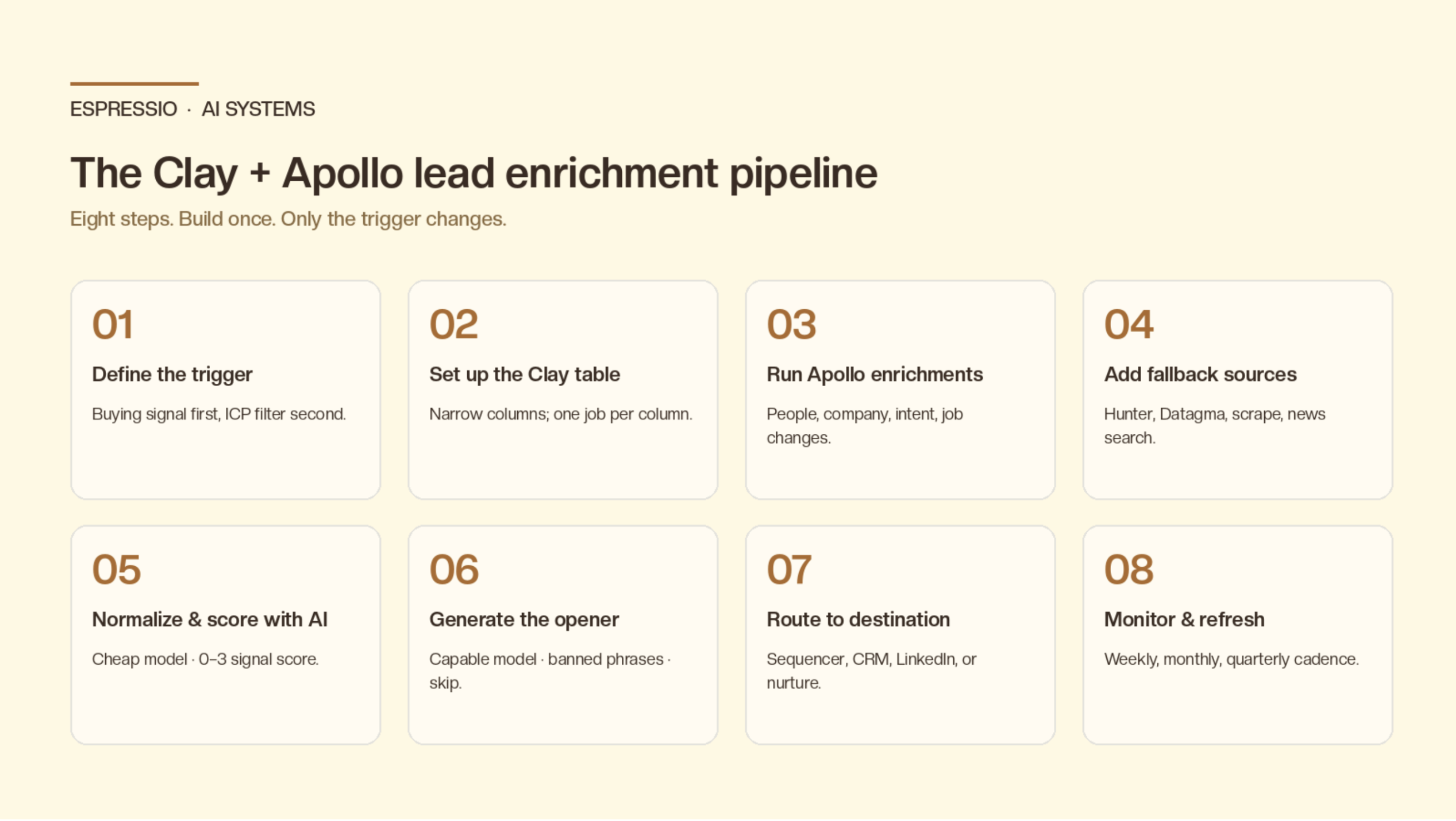
Eight steps. Build it once; the only thing that changes month to month is the input list at the top.
- Define the trigger and ICP filter
- Set up the Clay table
- Run the Apollo enrichment waterfall
- Add fallback sources for missing data
- Normalize and score with an AI column
- Generate the personalized opener
- Route to the right destination
- Monitor, refresh, and recycle
Step 1: Define the trigger and ICP filter
Skip the “everyone who matches the title” list. The highest-converting enrichment pipelines start with a buying signal and use the ICP filter to narrow it, not the other way around. Examples that work:
- Companies that posted a job for a role your tool affects in the last 14 days
- Accounts in Apollo’s intent data showing surge for relevant topics
- Companies that just raised funding in your vertical (Apollo funding filter)
- Accounts using a competitor’s tool (BuiltWith / Wappalyzer in Clay)
- Job-change alerts for buyer personas (Apollo job-change tracking)
The signal becomes the first sentence of your outreach, the input to your AI score, and your filter for prioritization. A list without a signal is just contacts.
Step 2: Set up the Clay table
Keep the table narrow. Enrichment quality drops fast when you feed an AI 40 columns of noise.
Recommended column order:
- Identity: Full name, First name, Company, Domain, LinkedIn URL, Title
- Signal: the trigger that put them on the list, plus a timestamp
- Apollo enrichments: see step 3
- Fallback enrichments: see step 4
- Normalization columns: AI-cleaned title, company description, signal context
- Signal score: 0-3 formula or AI column
- Opener: Claude / GPT AI column
- Quality flag: second AI column gating the send
- Destination: Send, Hold, or Skip
Add columns one waterfall step at a time. It’s tempting to wire everything at once; you’ll spend the next week debugging why one of seventeen columns is empty on every row.
Step 3: Run the Apollo enrichment waterfall
In Clay, “Apollo” isn’t a single column. It’s a set of actions you call in sequence. The high-value ones for a B2B SaaS or services pipeline:
- Find a person by name + company (Apollo’s people-enrichment endpoint)
- Verified email + email status (valid, risky, catch-all)
- Direct dial / mobile (premium credit on Apollo)
- Company enrichment: industry, employee count, revenue, technographics, recent funding
- Job-change events: when a target persona moves company
- Intent topics: which buying-stage topics the account is searching
Configure each as its own Clay column so you can see exactly where a row fails. If Apollo doesn’t have a verified email, you want that visible before you ever spend an LLM token on the row.
A reasonable Apollo budget per row: 3-5 enrichments. More than that and you’re paying for data you won’t read.
Step 4: Add fallback sources for missing data
Apollo’s coverage is strong but not universal. The waterfall pattern: try Apollo first, fall back to a second source, fall back to a third, then skip. In Clay this is a chain of “Run only when previous column is empty” conditionals.
A clean fallback stack:
- Email: Apollo → Hunter → Datagma → Clearbit
- LinkedIn URL: Apollo → Clay’s “Find LinkedIn profile” → Google search
- LinkedIn profile content: Clay’s “Scrape LinkedIn profile” on the URL from above
- Company context: Apollo company enrichment → Clay’s “Scrape website” on domain + /about + /blog/latest
- Recent news: Apollo news events → Clay’s “Search news” by company name, last 60 days
Cap the fallback at three sources per field. The fourth one rarely improves your hit rate by more than 2-3 percentage points and adds latency and cost on every row.
Step 5: Normalize and score with an AI column
Raw enrichment output is messy. Apollo job titles are inconsistent (“VP Sales” vs. “Vice President of Sales”), company descriptions are sometimes the boilerplate from the company’s footer, intent topics arrive as unranked tag lists. Before you pay tokens on an opener, run one cheap AI column that:
- Normalizes the title to one of your ICP role buckets
- Summarizes the company in one sentence using the enriched data
- Picks the single strongest signal from everything available
- Returns a 0-3 signal score
Use Haiku, GPT-4o-mini, or another cheap model here. The prompt:
You are scoring a B2B prospect row for outbound.

Inputs:
- Title: {{title}}
- Apollo title: {{apollo_title}}
- Company description: {{company_description}}
- Recent news: {{recent_news}}
- Apollo intent topics: {{intent_topics}}
- Funding events: {{funding_events}}
- Job posts (last 14d): {{job_posts}}

Return JSON with:
- role_bucket: one of [Founder/CEO, RevOps, Sales Leader, Marketing Leader, Eng Leader, Other]
- company_one_liner: 1 sentence, max 20 words
- strongest_signal: 1 sentence describing the single best reason to reach out NOW
- signal_score: integer 0-3
  3 = strong (recent funding + relevant intent + matching role)
  2 = decent (one strong signal, e.g. job post in last 14d)
  1 = ICP match, no fresh signal
  0 = no usable signal or no role match

Only use information present in the inputs. Do not invent.
Filter the next step on signal_score >= 2. This single rule typically cuts downstream AI spend 40-60% and removes the rows where the opener would have been generic filler anyway.
Step 6: Generate the personalized opener
Now run the more capable model (Claude Sonnet or whatever your team has standardized on) to write the first sentence. Same prompt pattern that works in our Clay + Claude cold outreach personalization workflow: hard rules, banned phrases, explicit permission to skip when the signal is thin.
The key Apollo-specific addition: feed the model the single strongest signal picked by the scoring column, not the entire enrichment dump. Models write better when they’re given a thesis, not raw data.
You are writing the first sentence of a cold email to {{first_name}},
{{role_bucket}} at {{company}} ({{company_one_liner}}).

The single most relevant signal:
{{strongest_signal}}

Write ONE sentence (max 25 words) that proves you actually read the
signal above. It must reference a specific, verifiable detail.

Hard rules:
- Do not use the words "impressive", "love what you're doing",
  "noticed", "saw that", "hope this finds you well".
- Do not start with the person's name.
- Do not invent facts. If the signal is generic, output exactly: SKIP.

Output: just the sentence, or SKIP. No preamble.
Run a second AI column as a quality gate (1-5 score), filter on ≥ 4, and send only the rows that pass. This is the same two-column pattern from our cold outreach guide and it catches the 10-15% of openers that slip through with subtle AI-voice issues.
Step 7: Route to the right destination
Clay pushes cleanly to Apollo’s sequencer, Smartlead, Instantly, Lemlist, Salesloft, Outreach, HubSpot, and most CRMs. The right destination depends on the row, not the campaign:
- High signal + verified email + matching role → outbound sequencer
- Job change + existing CRM contact → re-engagement task in HubSpot or Salesforce
- Intent topic + no email → LinkedIn-only sequence (Sales Nav)
- Score 1 or 2 with stale signal → nurture list, recheck in 90 days
- Score 0 → suppression list, do not re-enrich
Build this routing as a single Clay formula column outputting a destination string, then one Clay push action per destination. The discipline matters: pipelines that dump everything into one sequence are why your reply rate quietly drops as the list scales.
Step 8: Monitor, refresh, and recycle
A lead enrichment pipeline isn’t a one-time build. Apollo data ages fast. Job titles change, emails bounce, companies pivot. The maintenance loop that keeps it healthy:
- Weekly: re-run Apollo job-change tracking on existing CRM contacts; route changes to the right rep
- Monthly: refresh enrichment on anyone in nurture status; recheck signal score
- Quarterly: audit hit rates per fallback source; drop sources whose coverage dropped below your threshold
- Always-on: feed reply data back into the signal-score model, so you learn which signals actually drive replies on your offer, not in general benchmarks
This is where most teams under-invest. The pipeline pays back the most in months 3-6 because by then you have enough reply data to retrain your scoring. Without that loop, you’re running the same instincts that built the first version forever.
What good looks like
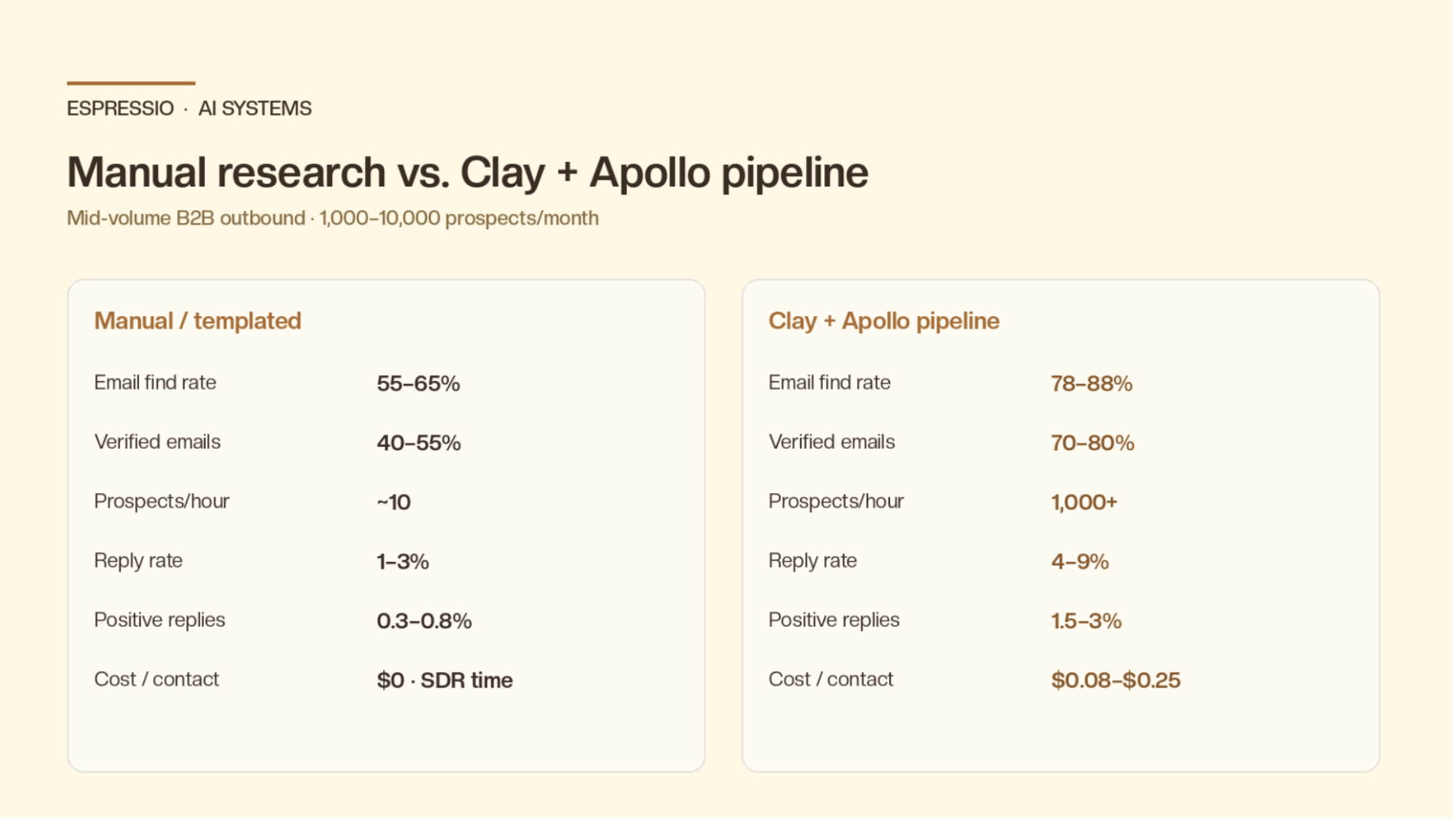
Realistic benchmarks for a B2B SaaS or services team running this pipeline end-to-end on 1,000-10,000 prospects per month:
- Email find rate moves from 55-65% (Apollo alone) to 78-88% (Apollo + fallbacks)
- Verified-email share of the file lands at 70-80% (vs. 40-55% on a raw scrape)
- Cost per fully enriched, scored, AI-personalized contact lands at $0.08-$0.25
- Prospects researched per hour goes from ~10 (manual SDR research) to 1,000+
- Reply rate lifts from 1-3% (templated) to 4-9% when scoring + personalization are both in place
- Positive reply rate lifts from 0.3-0.8% to 1.5-3%
Your numbers depend on offer-market fit and inbox health more than on which exact tools you wire together. Apollo + Clay is the architecture; the offer still has to be worth replying to.
Where teams get this wrong
- Skipping the scoring column. Going straight from enrichment to opener generation burns tokens on rows the AI can’t write a good sentence for. The score-then-write pattern is the single biggest cost lever.
- No fallbacks. Treating Apollo as a single source instead of the first source in a waterfall. Hit rate plateaus around 60%.
- One sequencer for every row. Routing everything through one outbound sequence ignores the fact that 30% of the list belongs in nurture and 10% belongs in LinkedIn-only.
- Re-enriching the same row weekly. Apollo credits are real money. Set a refresh cadence per status; don’t re-run enrichment on rows that didn’t change.
- Treating Clay as a CRM. It’s a pipeline tool. Push clean rows out; don’t manage the relationship inside it.
- Personalizing without a signal. If the row has no fresh signal, skip the prospect. The bar for “fresh” should be your bar, not the AI’s.
Cost: what you’ll actually spend
Pricing as of mid-2026, for a team running ~5,000 prospects per month through a full pipeline:
- Apollo: Professional tier starts at $59/user/month with usage-based credits for enrichment beyond included limits; see Apollo’s pricing page for current tiers
- Clay: typically $349-$800/month at this volume depending on credits; see Clay’s pricing page
- LLM cost: ~1-3 cents per row on Claude Sonnet for the opener pass at current Anthropic pricing, under 1 cent for the scoring pass on a cheap model
- Fallback enrichments (Hunter, Datagma, Clearbit, etc.): $50-$200/month combined
Total landed cost: roughly $1,000-$1,800/month for a mid-volume pipeline. That’s less than 5% of one fully loaded SDR salary and produces 10-20x the research volume.
Compliance: don’t skip this
The pipeline runs cleanly inside US and UK cold-B2B norms if you respect the basics.
CAN-SPAM (US) requires a valid physical address and a working unsubscribe in every commercial email. GDPR (EU) requires a lawful basis. For cold B2B, that’s usually legitimate interest plus a clear opt-out.
Don’t email EU consumers cold. Honor opt-outs immediately. Apollo and Clay both expose a suppression list, so use them.
Enrichment itself is generally permitted for B2B contact data from public/professional sources, but the legal picture varies by jurisdiction. If you’re scaling into the EU or UK, get product counsel to sign off on your data sources and retention policy before you scale, not after.
Bring it together
The full stack, one more time:
- Signal-based trigger, not a static ICP list
- Narrow Clay table with one column per enrichment step
- Apollo as primary data source: people, company, intent, job changes
- Fallback waterfalls on email, LinkedIn, and company context
- Cheap AI scoring column before any expensive AI call
- Capable AI opener with banned phrases and skip permission
- Quality-gate AI column filtering on ≥ 4
- Conditional routing: sequencer, CRM task, LinkedIn, nurture, suppress
- Weekly job-change check, monthly refresh, quarterly source audit
Built like this, the pipeline runs in the background and gets sharper as your reply data feeds back in. Your team stops doing research and starts deciding what to do with the research.
If you want us to build this pipeline for your team, let’s chat.
Frequently asked questions
Do I need Clay if I already pay for Apollo?
Yes, if you want to do anything between find-and-send. Apollo alone is great for database lookups and basic sequencing. Clay is where you add fallback logic, AI columns, multi-source enrichment, and routing to non-Apollo destinations. Teams that try to run the full pipeline inside Apollo usually end up with a thinner pipeline and lower reply rates.
Can I run the pipeline in reverse, starting in Clay, push to Apollo for sending?
That’s the most common setup. Build and enrich in Clay, push qualified rows into Apollo (or Smartlead, Instantly, etc.) for sequencing. Apollo’s sequencer is fine; you just want the data quality and AI work to happen upstream of it.
What’s the minimum list size where this is worth setting up?
About 500 prospects per month. Below that, hand-enrichment is faster than building the pipeline. Above 2,000/month, automation is the only economically rational option.
How do I avoid re-enriching the same contact every month?
Add a last_enriched timestamp column in Clay and a formula column that only runs enrichment when the row is new or more than N days old. For active CRM contacts, run only job-change tracking weekly and full enrichment quarterly. For nurture rows, refresh on a 90-day cadence.
Will Apollo data alone tell me who to email this week?
Sometimes. Apollo intent and job-change signals are strong starting points, but pairing them with at least one other signal source (job posts via Clay, news search, technographics) typically lifts reply rate noticeably because the same intent topic in two sources is a much stronger trigger than either alone.
How does this compare to building it in n8n or LangChain?
You can build the same pipeline in n8n with Perplexity for the research step, or in LangChain with a stateful qualification agent. Both work, both give you more control, both take materially longer to ship. Clay + Apollo is the right answer when you want production volume next month. Custom code is the right answer when your enrichment logic is unique enough that no off-the-shelf table covers it.
Should I use Apollo’s native AI features instead of a Clay AI column?
Apollo’s built-in AI features have closed the gap and are fine for simple openers tied to Apollo enrichment data. The Clay AI column wins when you need to combine signals across multiple sources, swap models, or run a two-column scoring + opener pattern. If you’re already paying for both, the Clay AI column is the more flexible place to do the writing.



