



Luka Mrkić
Head of BD
Insights, strategies, and real-world playbooks on AI-powered marketing.
MAY 5, 2026
How to Use Claude with LinkedIn Sales Navigator
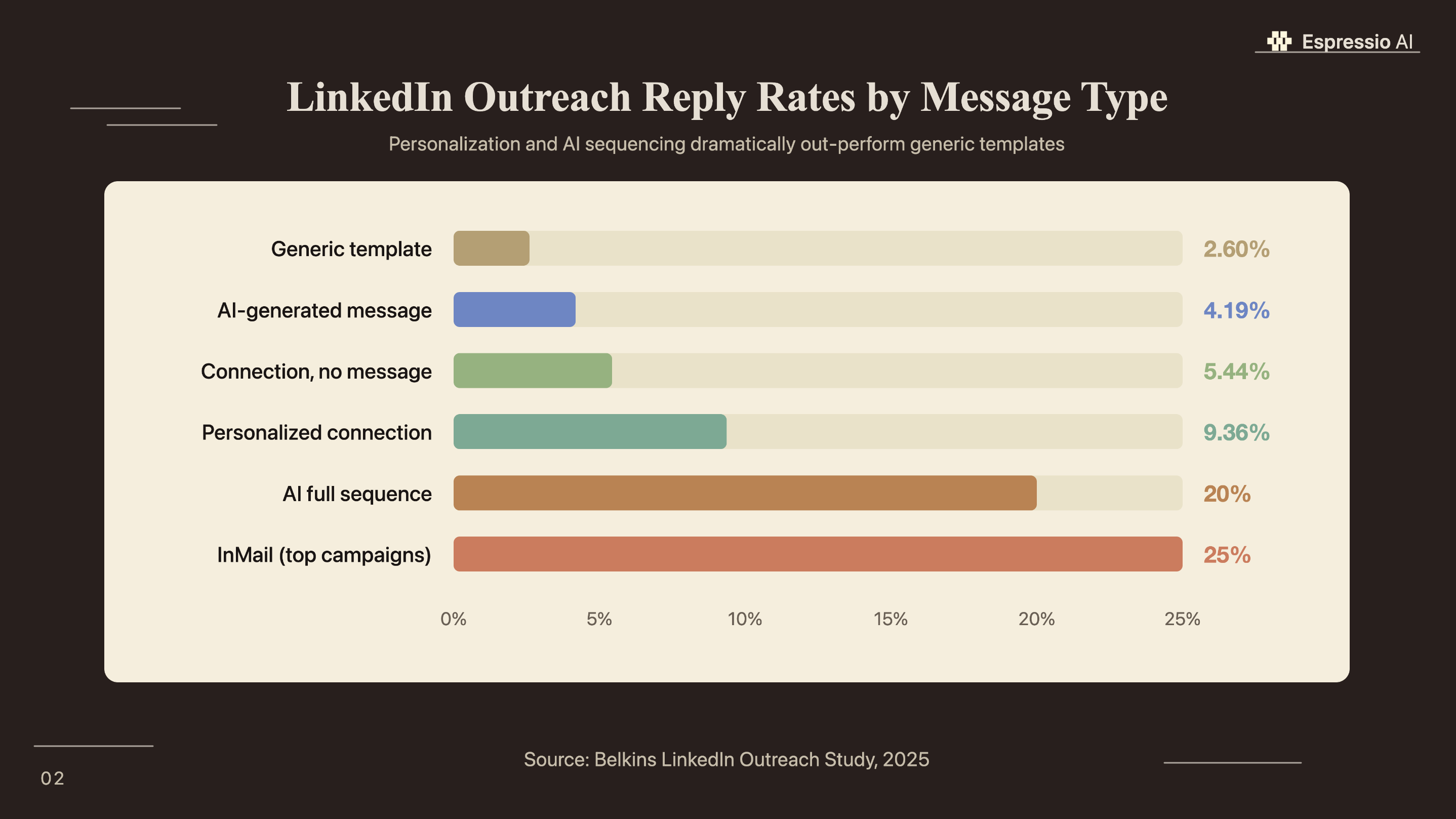
AI-generated LinkedIn messages achieve a 4.19% reply rate vs. 2.60% without AI, a 61% lift across 20 million outreach attempts (Belkins LinkedIn Outreach Study, 2025). That figure assumes no Sales Navigator data. Feed Sales Navigator’s buyer intent signals, job change alerts, and account IQ summaries to Claude and the gap widens further.
Most sales teams use Sales Navigator for the data and write messages manually. The two tools don’t talk to each other, and that gap costs reply rates. Four integration methods exist, ranging from a five-minute manual copy-paste workflow to a fully automated n8n pipeline. The right one depends on team size and technical capacity, not on how sophisticated the outreach needs to be.
This guide covers all four methods, a decision framework for choosing between them, prompt templates for each Sales Navigator signal type, and the compliance rules that apply across every approach.
Key Takeaways
- AI-generated LinkedIn messages achieve a 4.19% reply rate vs. 2.60% without AI, a 61% lift (Belkins LinkedIn Outreach Study, 2025). Claude adds personalization at the profile level, not just first-name substitution.
- Four integration methods exist: manual copy-paste (no setup), Claude Code computer use, MCP server, and n8n pipeline. Most sales teams should start with manual and upgrade to MCP once volume justifies it.
- LinkedIn allows 100 connection requests per week; practitioners recommend capping at 20-30 to avoid restriction. Claude handles personalization; the sending pace stays a human decision.
Why connect Claude to LinkedIn Sales Navigator for outreach?
78% of social sellers outsell peers who don’t use social media (LinkedIn Social Selling Research, 2024), and sales reps using AI are 3.7 times more likely to hit quota (Gartner, 2024). These figures point to quota performance, not incremental efficiency. The gap between AI-assisted and manual outreach is wide enough to determine whether a rep finishes the quarter above or below their number.
Sales Navigator provides structured lead data: job changes, buyer intent signals, account IQ summaries, shared connections, and published posts. Claude provides the language layer, reading that structured data and producing a message a real person would actually reply to. Most outreach tools stop at first-name substitution. The personalization that actually moves reply rates runs at the profile level.
Personalized connection requests with a message achieve a 9.36% reply rate vs. 5.44% without one (Belkins, 2025). The difference between a generic template and a message tied to a specific signal is larger than the difference between no message and a generic one. Claude makes that level of personalization viable at the volume a modern SDR team requires.
According to Belkins’ 2025 LinkedIn Outreach Study (based on 20 million outreach attempts), AI-generated messages achieve a 4.19% reply rate vs. 2.60% for non-AI outreach. Personalized connection requests with a message hit 9.36% vs. 5.44% for requests sent without one. The quality of Sales Navigator signals fed to Claude determines where on that range each campaign lands.
Once Claude qualifies and enriches a lead on LinkedIn, it pairs naturally with Claude and HubSpot for AI sales follow-up to route that lead into the right pipeline stage automatically.
Which integration method is right for your team?
Sales reps spend only 28% of their working week actually selling; the other 72% goes to research, data entry, and CRM updates (Salesforce State of Sales, 2024). The right integration method is the one that removes the most of that friction given your team’s technical capacity. Sales Navigator delivers 312% ROI over three years (Forrester TEI, 2023); the integration method determines how much of that ROI actually reaches the pipeline.
Four methods exist, each suited to a different team profile. They vary in technical effort, personalization depth, and daily scale.
| Method | Technical Effort | Personalization | Daily Scale | Cost |
|---|---|---|---|---|
| Manual (copy-paste) | None | High | 5-15 leads | API only (~$0.05/lead) |
| Claude Code computer use | Medium | Very high | 20-50 leads | Claude Max + API |
| MCP server (globodai/Composio) | Medium | Very high | 50-100 leads | API + MCP setup |
| n8n pipeline (Apify + Claude API) | High | High | 100+ leads | API + n8n + Apify |
Most sales teams should start with the manual method. It requires a Claude.ai account, a Sales Navigator profile page, and five minutes per lead. Once volume consistently exceeds what one rep can handle in an hour, the MCP server approach adds browser automation without a custom development investment.
The n8n pipeline suits high-volume teams who need a hands-free flow: Apify scrapes Sales Navigator leads, n8n structures the data, the Claude API generates the message, and the output queues for rep review before anything reaches a prospect’s inbox. It requires the most setup and ongoing maintenance.
Unlike most Claude integration workflows, Zapier has no native LinkedIn Sales Navigator integration. The four methods above are the available paths for this specific workflow.
Sales reps spend only 28% of their week on actual selling, with the remaining 72% consumed by research and administrative work (Salesforce State of Sales, 2024). LinkedIn Sales Navigator delivers 312% ROI over three years when used effectively (Forrester TEI, 2023). The integration method that removes the most non-selling admin (while keeping a human in the message-review loop) produces the fastest ROI for most teams.
How do you use Claude with Sales Navigator manually?
The manual method requires no technical setup. Any Sales Navigator plan and a Claude.ai account (or API key) are sufficient. Sales Navigator users save 65 hours annually through the platform’s AI-powered features (LinkedIn, 2024); pairing Claude with that workflow raises the output quality of each lead touchpoint. Once a prompt template is locked in for a specific signal type, sales reps generate 10-15 personalized messages in under 20 minutes.
The process has four steps:
- Open a lead’s Sales Navigator profile. Identify two or three personalization signals: a recent job change, a published post, a shared connection, or a company news item.
- Copy the relevant data points: name, title, company, and the specific signal.
- Open Claude. Paste your master prompt template with the data filled in.
- Review the output, adjust any detail that only a human could verify, and send.
Prompt templates for the three highest-converting Sales Navigator signals:
Job change trigger:
“You are a B2B sales rep at [Company]. Write a 60-word LinkedIn connection request for [Name], who just joined [Company] as [Title]. Reference their transition from [Previous Company]. Our solution helps [ICP pain point]. Tone: warm and specific, no jargon. End with a question.”
Content engagement trigger:
“You are a B2B sales rep at [Company]. [Name] recently published a post about [Topic]. Write a 60-word connection request referencing that specific post, connecting it to how we help [ICP]. Tone: genuine curiosity.”
Buyer intent trigger (Sales Navigator Advanced Plus):
“You are a B2B sales rep at [Company]. [Company Name] is showing in-market signals for [category]. Write a 70-word InMail to [Name], [Title], referencing their company’s active research and how we’ve helped similar companies. Tone: consultative.”
In Espressio’s work with agency clients transitioning from template-based LinkedIn outreach to Claude-assisted personalization, the most consistent finding is that prompt specificity drives reply rate more than message length. Teams that give Claude two or three concrete signal inputs consistently outperform those that describe the lead in general terms. That difference shows up in the first week of testing.
Teams routing Sales Navigator leads through a morning brief before their outreach window can pair this workflow with Claude’s Slack integration to deliver enriched lead summaries to the team channel before each rep’s prospecting session.
How do you set up the Claude MCP server for Sales Navigator?
The globodai-group MCP server exposes 7 tools that give Claude direct read access to Sales Navigator: lead search with filters, profile retrieval, list management, and InMail drafting, all accessible from a Claude Desktop session (github.com/globodai-group/mcp-linkedin-sales-navigator). By 2027, 95% of seller research workflows will begin with AI, up from fewer than 20% in 2024 (Gartner, 2025). Setup takes 30 to 60 minutes.
The server runs on Playwright browser automation inside a real authenticated Chrome session. That approach matters for compliance: it behaves like a human session, with genuine page dwell and variable navigation timing, rather than a scraping bot making rapid sequential calls.
Setup steps:
- Install Node.js and the MCP server package from the globodai-group GitHub repo.
- Add the server config to Claude Desktop’s
claude_desktop_config.json. - Authenticate using your existing Chrome profile or session cookie file. No password is stored.
- In Claude Desktop, confirm all 7 tools appear in the tool list.
- Run a test search: “Find 10 VPs of Marketing at SaaS companies in London with 50-200 employees.”
- Ask Claude to draft a personalized connection request for each result.
For teams that prefer managed authentication, Composio’s LinkedIn MCP toolkit handles OAuth directly and is compatible with Claude Code, with no manual cookie setup required.
The part most compliance guides skip: LinkedIn’s restriction engine is behavioral, not just numerical. Activity bursts of 100 actions in 60 minutes, identical timing intervals between sends, and zero profile dwell time are the actual triggers, not the count reaching exactly 100. A human sales session involves pausing to read profiles, clicking around the account, and varying the time between actions. Any automation approach that mimics that behavior is substantially safer than one that fires rapid sequential calls, regardless of whether it stays under the published limits.
For teams building a full AI content agent stack, the Sales Navigator MCP layer is the top-of-funnel signal source that feeds the rest of the pipeline.
What Sales Navigator data gives Claude the best personalization?
Personalized connection requests with a message achieve a 9.36% reply rate vs. 5.44% without one (Belkins, 2025). That ceiling depends almost entirely on the quality of the input signals. Sales Navigator exposes seven signal types that Claude can convert into outreach hooks.
| Signal | What Sales Navigator Shows | Claude Prompt Angle |
|---|---|---|
| Job change (within 90 days) | “Changed roles at [Company]“ | Reference the transition; connect their new priorities to your solution |
| Published post | Post title or snippet | Engage with the specific idea they shared, not the topic in general |
| Buyer Intent (Advanced Plus) | Account in-market signals | Name the category they’re evaluating; lead with social proof |
| Shared connection | Mutual contact name | A warm bridge to an otherwise cold message |
| Company growth signals | Hiring alerts, recent news | Reference the growth event as the reason for reaching out now |
| Account IQ summary | AI-generated account brief | Feed the full brief to Claude as system context before drafting any account messages |
| G2/Capterra intent (integration required) | In-market signals from 90M+ buyers | Highest-priority trigger for InMail targeting active software evaluators |
G2’s Buyer Intent integration surfaces in-market leads from 90 million-plus software buyers annually (G2, 2024). A company actively comparing software in your category right now is the highest-quality signal Claude can receive. An InMail sent during active evaluation converts at a higher rate than standard cold outreach.
Sales Navigator’s Account IQ feature deserves attention for account-based sales. Feed the full Account IQ summary to Claude as system context before generating any messages for contacts at that account. Claude reads the AI-generated account brief and tailors every subsequent message to that account’s specific context, priorities, and recent news rather than relying on generic ICP assumptions.
Once a lead responds and moves into an active opportunity, automating Salesforce proposals with Claude closes the loop from first touch to client-ready proposal.
What are the LinkedIn compliance rules for Claude-assisted outreach?
LinkedIn’s terms prohibit automated scraping and bulk unsolicited messaging. AI-assisted message writing is explicitly permitted — the distinction is between generating content and automating the act of sending (LinkedIn User Agreement, 2025). Knowing where that line sits before deploying any of the four integration methods avoids account restriction.
Safe volumes that practitioners confirm work without triggering restriction:
- Connection requests: LinkedIn’s published limit is 100 per week. Most practitioners recommend 20-30 per week to stay clear of behavioral flags. The limit exists in the UI; the enforcement uses session behavior as its primary signal.
- InMails: Governed by plan allocation. The Core plan provides 50 per month; Advanced plans provide more. Unused credits roll over on most plan tiers.
- Profile views: High volumes in short windows trigger flags. Spacing them across the workday rather than batching in a single session reduces risk.
Claude’s role in every compliant setup is the same: generate the content, not the click. The compliance risk comes from tools that handle both (writing and sending) with no human review between them. Keeping those as separate layers is the practical equivalent of LinkedIn’s legal distinction between AI-assisted writing and automated sending.
Safe practice across all four methods:
- Keep Claude in the generation layer; keep a human in the send layer
- Review every message before it leaves your inbox
- Build natural spacing into any automated workflow (minimum two to four minutes between profile visits)
- Avoid tools that send automatically without human review
How does Claude-generated outreach data flow back to your CRM?
83% of sales teams using AI saw revenue growth in the past year, compared to 66% without AI (Salesforce State of Sales, 2024). The differentiator is what happens to enriched lead data after Claude generates the outreach. Routing that data back to your CRM closes the gap between LinkedIn activity and pipeline visibility.
Three CRM paths for the enriched Claude output:
HubSpot: Claude writes a contact note with the enriched profile summary and tier classification. An n8n HTTP action posts it to the HubSpot contact record automatically. For the full HubSpot integration workflow, the Claude and HubSpot guide covers five integration paths and ready-to-copy templates.
For Salesforce teams, the same approach works via the Salesforce MCP server or an n8n Salesforce node. The structured Claude output (lead summary, tier, outreach timestamp) maps to Salesforce Lead or Contact fields with no custom code.
Airtable: Teams using Airtable as their lead tracker can configure Claude and Airtable for lead tracking so that n8n appends Claude’s enriched summary as a new row alongside existing lead data.
For high-volume teams, the full automated pipeline runs: Apify scrapes Sales Navigator leads, n8n structures the profile data, the Claude API generates a personalized message and enrichment notes, and n8n routes the message queue to reps for review and logs every outcome to the CRM. Every step includes human review before anything reaches a prospect’s inbox.
If you’re looking to integrate AI into your sales outreach workflows, get in touch with us and we’ll map out where automation adds the most value for your team.
Frequently asked questions
Does LinkedIn Sales Navigator have an API?
Yes, but access is restricted to approved LinkedIn Partner Program members. The application and approval process is required; it’s not available to individual users or most sales teams. The API covers CRM sync and display widgets, not lead search or message sending. Most teams use browser automation tools such as Claude Code or MCP servers instead. (LinkedIn Developer Portal, 2025.)
Can Claude write LinkedIn messages automatically?
Claude can generate highly personalized LinkedIn messages, but LinkedIn’s terms distinguish between AI-assisted writing (permitted) and automated sending (restricted). Claude handles the generation layer; a human should review and send each message. The combination of Claude-quality personalization with human-paced sending produces reply rates well above industry averages without terms-of-service risk. AI-generated messages achieve a 4.19% reply rate vs. 2.60% without AI (Belkins, 2025).
Does Zapier support LinkedIn Sales Navigator?
No. As of 2026, Zapier has no native LinkedIn Sales Navigator integration with triggers or actions. Teams can work around this by exporting lead lists as CSVs and triggering Zapier from a file drop, or by using intermediary tools such as SalesRobot. For native Sales Navigator automation, the MCP server or n8n pipeline approaches are more capable. (Source: zapier.com/apps/linkedin-sales-navigator, 2025.)
How many LinkedIn connection requests can I send per week?
LinkedIn’s published limit is 100 connection requests per week. Practitioners recommend keeping to 20-30 per week to avoid restriction flags. Enforcement is behavioral: LinkedIn monitors session patterns, activity timing, and volume spikes rather than counting to exactly 100. Spacing sends throughout the day and varying timing between actions reduces flag risk significantly. (Source: LinkedIn User Agreement, 2025; practitioner guidance from Belkins and MarketBetter.)
What is the best Sales Navigator plan for Claude integration?
The Core plan ($119.99/month) is sufficient for the manual and MCP approaches. Advanced Plus (custom enterprise pricing; contact LinkedIn for a quote) adds Buyer Intent signals, CRM sync, and G2 integration: the data signals that unlock the highest-performing Claude personalization prompts. For teams primarily using Claude for connection request personalization, Core is enough. For account-based outreach at scale, Advanced Plus data significantly improves output quality. (Source: LinkedIn Sales Navigator pricing, 2026.)
Conclusion
Sales Navigator holds the data. Claude converts it into language that earns a reply. The manual copy-paste method works today with no setup; the MCP server handles the volume once your team’s daily output exceeds what manual review can process in an hour.
Key actions to take this week:
- Start with the manual method: zero setup, immediate results on your next 10 leads
- Lock in one prompt template per Sales Navigator signal type before scaling
- Feed the richest signals first: job changes, buyer intent, and published posts produce the highest reply rates
- Keep Claude in the generation layer and a human in the send layer for every message
- Route enriched lead data back to HubSpot or Salesforce to close the CRM loop and track pipeline attribution
For agencies managing this workflow across a full client book, how Lunar Strategy built an AI operating system in 18 months covers how AI tools layer across departments and client accounts at scale.



