



Luka Mrkić
Head of BD
Insights, strategies, and real-world playbooks on AI-powered marketing.
MAY 4, 2026
How to Connect Claude to Zapier for AI Marketing Automation
AI-related tasks on Zapier grew 760% over two years (Zapier AI in Business Report, Nov 2025). Marketers are leading that growth, and for good reason: the platforms they already use (HubSpot, Gmail, Slack, Airtable, Notion) are all available in Zapier, and Claude can handle the language layer those platforms have always been missing.
Most guides to AI marketing automation assume you have a developer available to write API wrappers and manage credentials. This one doesn’t. Zapier has a native Claude integration that takes about 10 minutes to set up, requires no code, and opens every app in Zapier’s 9,000-app library to AI-driven automation.
Setup, model selection, five high-return marketing workflows, and real API cost math are all covered below.
Key Takeaways
- Zapier connects Claude to 9,000+ apps with no code required. An Anthropic API key and a Zapier Professional plan ($19.99/month) are all you need to start (Zapier, 2025).
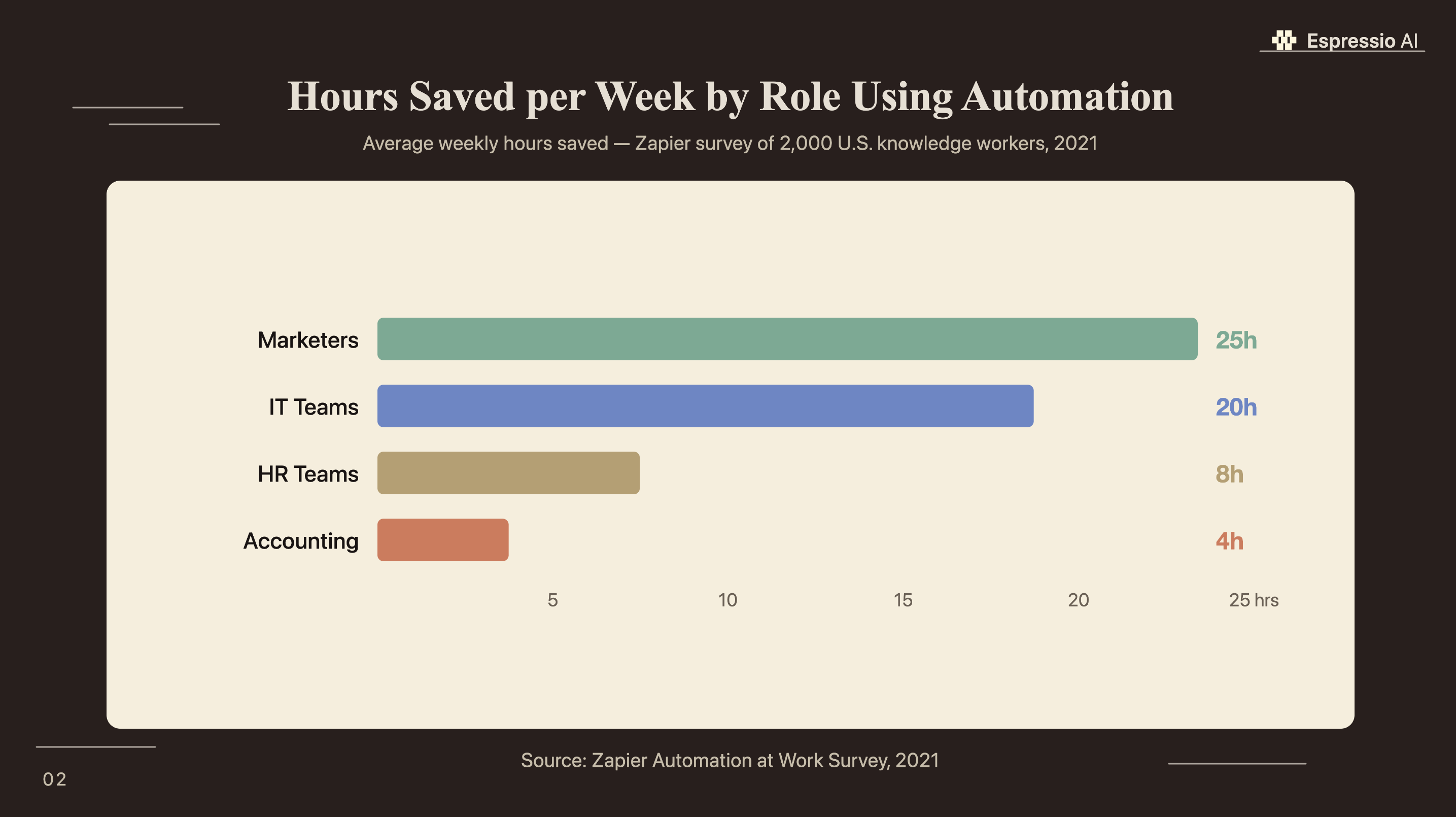
- Marketers save an average of 25 hours per week using automation tools, more than any other professional role (Zapier, 2021). Claude adds the language layer that makes those automations context-aware.
- Two connection methods exist: standard Zaps (defined trigger-action chains) and Zapier MCP (launched April 2025, for multi-step agentic tasks). Most marketing teams start with Zaps.
Why connect Claude to Zapier for marketing automation?
Marketers save an average of 25 hours per week using automation tools, the highest time savings of any role surveyed, and 86% plan to implement automation software in their next role (Zapier, 2021). The missing piece in most marketing stacks has been language. Rule-based automation routes a form submission to a CRM and triggers a confirmation email. It can’t read the form, assess the lead’s intent, draft a personalized reply, or classify the opportunity tier. Claude handles that layer.
Zapier connects Claude to the tools your marketing team already uses. You define when Claude runs (a trigger event in Gmail, HubSpot, Typeform, or any of 9,000+ apps) and write the prompt that tells it what to do. The output lands wherever your workflow needs it: a Slack message, a CRM note, a draft email, a spreadsheet row.
The result is automation that reacts to content, not just data. A new contact doesn’t get tagged and queued. Claude reads the company, the message, and the context, then writes something specific to that person.
For teams already running AI content agent workflows for content production, the Zapier layer handles distribution and response: routing outputs to the right tool, triggering follow-up sequences, and keeping CRM records current without manual updates.
Adding Claude to Zapier replaces rule-based text handling with AI that reads, interprets, and generates context-specific content inside those same workflows.
What do you need before connecting Claude to Zapier?
Two things are required: an Anthropic API key and a Zapier account on the Professional plan or above. Zapier’s free tier doesn’t support multi-step Zaps, which most Claude workflows use, so the free account won’t get you far. The Professional plan runs $19.99/month and includes 750 tasks.
Getting your Anthropic API key: Go to console.anthropic.com, create an account, navigate to API Keys, and generate a new key. Set a monthly usage limit while you’re there ($5 is enough for hundreds of test Zaps). Copy the key; you’ll paste it once into Zapier’s Claude connection screen.
Zapier plan requirements: Professional ($19.99/month, 750 tasks) works for solo marketers and small teams. Team ($69/month) adds shared Zap ownership and permission controls for multi-user workflows.
Claude model selection inside Zapier: Zapier’s native integration supports all current Claude models. The choice matters for cost and output quality:
Claude Haiku is fastest and cheapest, suited for high-volume tasks like lead enrichment and social post drafts. Claude Sonnet sits in the middle on quality and cost; it’s the better pick for email drafts and content briefs where output quality affects conversion. Claude Opus costs roughly 18x more per run than Haiku, and there’s almost no marketing automation use case where that premium pays off.
How do you build your first Claude Zap?
Zapier’s 9,000+ app library includes a native Anthropic (Claude) action, meaning no API wrappers, no code, and no developer time is needed (Zapier, 2025). Five steps take you from a blank Zap to a live workflow.
Step 1: Create your trigger. In Zapier, click “Create Zap.” Choose the app that kicks off your workflow. For a lead enrichment Zap, this is typically HubSpot (new contact created), Typeform (new submission), or Google Sheets (new row added). Select the specific trigger event and connect your account.
Step 2: Add the Claude action. Click the + to add an action step. Search for “Anthropic (Claude).” Select “Send Message” and connect your Anthropic account by pasting your API key.
Step 3: Configure the prompt. Select your model. Write your system prompt (this is where output quality is determined). In the user message field, map in the trigger data: the lead’s name, company, form response, or whatever context Claude needs.
Step 4: Add your output action. Add another action step for where Claude’s response should go: a Slack notification, a HubSpot note, a Gmail draft, a new Airtable row. Map Claude’s output text into that action’s fields.
Step 5: Test and turn on. Run the Zap with a live sample. If the output reads correctly, turn it on.
The system prompt is where most first builds go wrong. A prompt like “summarize this lead” produces generic output. A specific prompt produces output you’d actually use: “You are a B2B sales researcher. Given the contact’s name, company, and form message below, write a two-sentence lead summary and assign a tier: Hot (decision-maker with explicit intent), Warm (research phase, fits ICP), or Cold. Format: [Tier]: [Summary].” The more specific the prompt, the less revision the output needs.
For teams using Claude in Slack for marketing briefs, adding Zapier as the trigger layer means Slack briefs fire automatically when a form submission, CRM update, or calendar event occurs, with no manual handoff.
What is Zapier MCP and when should you use it instead of a Zap?
Zapier launched MCP (Model Context Protocol) support in April 2025, connecting Claude to 9,000+ apps and 30,000+ actions within a single agentic session (Zapier, 2025). Standard Zaps and MCP solve different problems, and choosing the wrong one for a workflow adds friction rather than removing it.
Standard Zaps are trigger-action chains you define in advance. Every step is predetermined: when event X happens, Claude runs with prompt Y, and the output goes to action Z. Zaps are reliable, predictable, and straightforward to debug. They’re the right tool for repeatable tasks with a consistent input-output structure.
Zapier MCP gives Claude a toolbox of actions it can choose based on context. A task like “check if we’ve contacted this lead before, find their LinkedIn role, draft a personalized email, and log the attempt in HubSpot” would require four Zap steps if defined as a Zap. As an MCP task, Claude handles the sequencing and decisions.
| Standard Zaps | Zapier MCP | |
|---|---|---|
| Setup method | Zapier canvas (visual) | Claude Desktop or MCP client |
| Required skills | None | Basic configuration |
| Workflow type | Fixed trigger-action chain | Agentic, multi-step decisions |
| Best for | Repeatable tasks, high volume | Complex tasks with conditional logic |
| Task cost model | Per action step | Per LLM inference call |
| Claude version | All models | Claude 3.5+ recommended |
Most marketing teams don’t need MCP yet. The 80% of marketing automation use cases (email drafting, lead enrichment, social post generation, notification routing) fit cleanly into standard Zaps. MCP makes sense once your Zap library is built out and you’re hitting the limits of fixed-step logic. Build Zaps first, revisit MCP when the workflow requires judgment across multiple data sources rather than just execution of a defined process.
Zapier MCP, launched April 2025, allows Claude to take multiple sequential actions across apps in a single session: reading a CRM record, drafting a follow-up, and logging the outcome without a human defining each step (Zapier, 2025). For most marketing teams, standard Zaps cover 80% of use cases; MCP fits workflows that require conditional judgment rather than fixed steps.
What are the best Claude + Zapier workflows for marketing?
Generative AI adoption in marketing and sales more than doubled between 2023 and early 2024, with organizations reporting both cost reductions and revenue increases in the functions where it deployed (McKinsey State of AI, Mar 2024). These five workflows produce the most consistent returns for marketing teams running Claude inside Zapier.
1. Lead enrichment and tiering. Connect HubSpot or Salesforce as the trigger on new contact created. Claude receives the contact’s company, role, and form message, then writes a two-sentence research summary and assigns a tier: Hot, Warm, or Cold. That output writes back directly to the contact record, saving three to eight minutes of manual research per lead.
2. Email draft from form submission. Trigger on new Typeform or JotForm entries. The prompt gives Claude the form responses and instructs it to write a first-draft reply in the company’s voice, matched to the specific service or product mentioned. A Gmail draft lands in the assigned rep’s inbox ready for a quick review before sending. Most teams see draft-to-send time drop from 15 minutes to under two.
3. Social post generation from published content. An RSS feed trigger fires when a blog post goes live. Claude reads the title and excerpt, then produces three variants: a LinkedIn paragraph, a Twitter/X thread opener, and a short one-liner. Drafts route to Buffer or a Notion publishing database. Teams running Claude and Airtable for content workflows can drop them directly into their production calendar.
4. Competitive alert digest. Set up Google Alerts for competitor names or key product terms and use those alerts as your trigger. Claude reads each alert headline and snippet, classifies it (product launch, pricing change, or negative press), and writes a two-sentence summary. A weekly digest posts to Slack #competitive-intel, structured and consistent, with no manual news monitoring required.
5. Weekly content brief generation. Run this one on a weekly schedule: Monday at 8am. Claude reads topic data from a planning spreadsheet and writes a 150-word brief per planned topic, covering target audience, key angle, and three supporting points. New rows append to the Claude and Notion content calendar or the Claude and Airtable content table, so briefs are ready before the team starts the week.
For sales teams, the lead enrichment workflow pairs directly with Claude and HubSpot for sales follow-up, creating a full pipeline from inbound lead to qualified outreach without a rep touching the research step.
What does Claude + Zapier actually cost?
Zapier’s AI task volume grew 760% over two years (Zapier AI in Business Report, Nov 2025). The teams driving that growth have figured out what most pricing guides skip: the Anthropic API cost is usually the smaller number. Zapier’s plan cost is the main variable.
Zapier plan costs: Professional ($19.99/month, 750 tasks), Team ($69/month, shared Zap ownership and multi-user access). A task is one completed action step: a three-step Zap uses two tasks per run (triggers don’t count against the limit).
On the Anthropic side, Claude charges per token. For a typical lead enrichment prompt (350 input tokens plus 300 output tokens per run):
Running 200 lead enrichment Zap runs per month through each Claude model, using 350 input and 300 output tokens per run (based on Anthropic’s published API pricing as of May 2026):
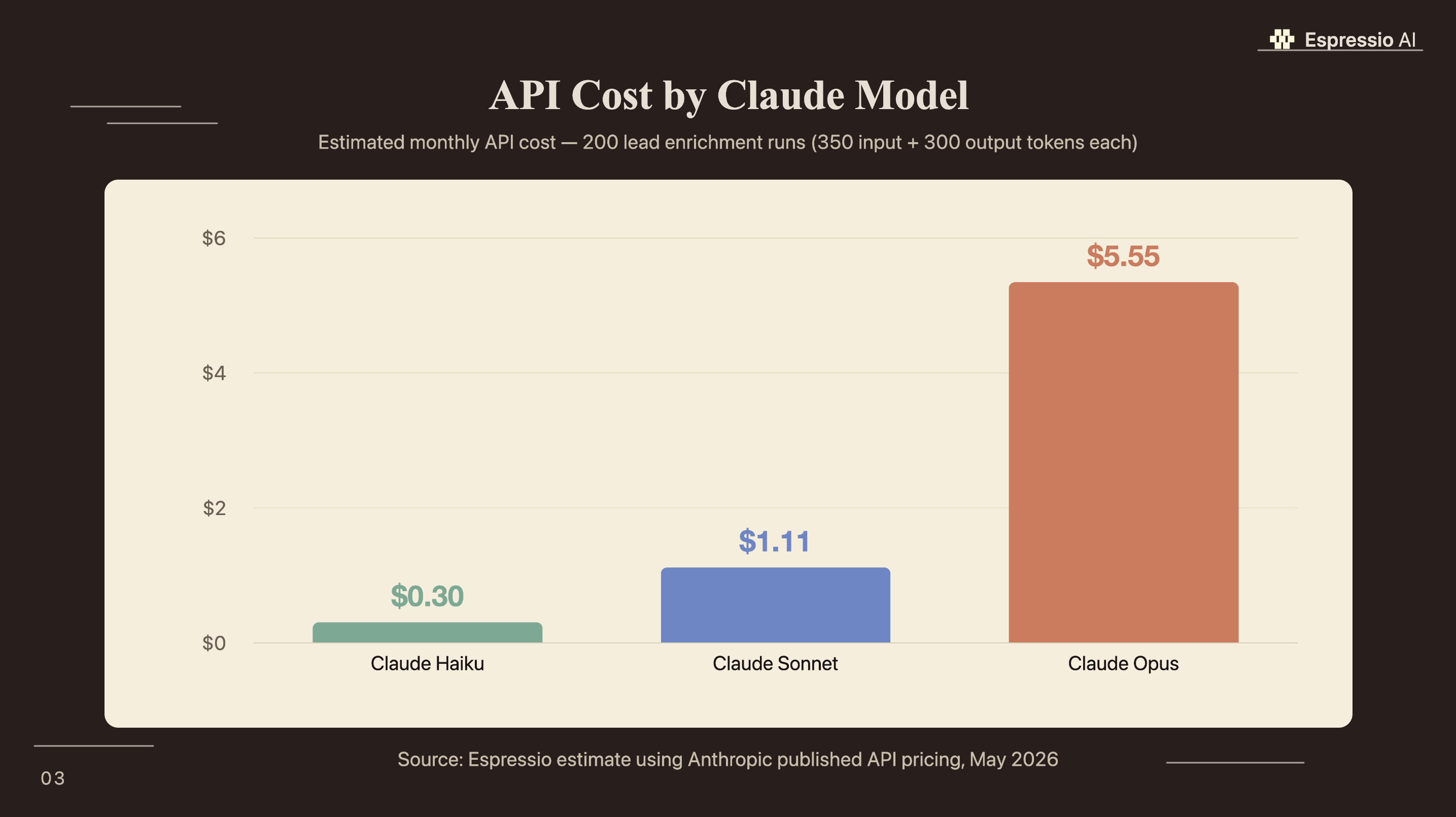
For most marketing Zaps, Haiku is the practical starting point. At $0.30/month in API costs for 200 lead enrichments, the API line on your bill is negligible compared to the Zapier plan cost. Sonnet makes sense for email drafts where output quality directly affects conversion. The extra $0.81/month is worth it when a better first draft saves a rep 15 minutes. Opus serves almost no marketing automation use case where the cost premium is justified.
If you’re looking to integrate AI into your marketing automation workflows, get in touch with us and we’ll map out where automation adds the most value for your team.
Frequently Asked Questions
Does Zapier integrate with Claude AI?
Yes. Zapier has a native Anthropic (Claude) integration supporting all current models: Haiku, Sonnet, and Opus. No API wrapper or custom code is required. The integration connects Claude to all 9,000+ apps in Zapier’s library (Zapier, 2025). Most marketing teams have a working Zap running within 10 minutes of setup.
Do I need an Anthropic API key to use Claude in Zapier?
Yes. An Anthropic API key from console.anthropic.com is required. You paste it once into Zapier’s Claude connection screen and Zapier stores it. Setting a monthly usage limit during setup is recommended — $5 covers hundreds of test Zaps. For most marketing workflows, monthly API costs run under $2 using Claude Haiku.
What is Zapier MCP and how is it different from a regular Zap?
Standard Zaps are fixed trigger-action chains you define in advance. Zapier MCP, launched April 2025, lets Claude decide which actions to take based on context, enabling multi-step workflows where the next step depends on what Claude finds in the data (nocode.mba, 2025). Zaps work for 80% of marketing automation use cases; MCP fits complex conditional workflows.
Can I use Claude in Zapier without coding skills?
Yes. Zapier’s native Claude integration requires no code. The only technical step is pasting an Anthropic API key. System prompt and workflow logic are configured through Zapier’s visual canvas. Among knowledge workers who use automation tools, 86% of marketers say they will implement automation software in their next role (Zapier, 2021), and this integration is built for that non-technical audience.
What marketing tasks can Claude automate through Zapier?
Claude handles any task requiring reading, judgment, or content generation. The highest-return marketing Zaps are lead enrichment and tier classification, email drafting from form submissions, social post generation from published content, competitive alert summaries, and weekly content brief creation. Marketers save 25 hours per week on average using automation tools (Zapier, 2021).
Conclusion
Zapier’s Claude integration gives marketing teams a direct path from a business event to an AI-generated output, with no developer in the loop. An API key, a Professional plan, and 10 minutes to build the first Zap cover everything you need to start.
The practical entry point: pick one high-volume manual task (lead research, draft emails, or social post creation) and build a Zap for it first. Get the system prompt specific, test it with real data, turn it on.
- Start with lead enrichment or email drafting: high volume, immediate ROI, low prompt complexity to get right
- Use Claude Haiku for volume tasks, Sonnet when output quality affects conversion
- Revisit Zapier MCP once your Zap library covers the repeatable workflows and you need conditional multi-step logic
For teams building Claude into their broader marketing operations beyond individual Zaps, how Lunar Strategy built an AI operating system in 18 months covers how agencies structure AI tools across departments at scale.



