



Luka Mrkić
Head of BD
Insights, strategies, and real-world playbooks on AI-powered marketing.
APR 30, 2026
How to Build an AI Content Calendar in Notion with Claude
65% of content marketers say producing material consistently is their biggest challenge (Optimizely, 2024). Most of them plan that content in Notion. Most of them still fill the calendar by hand — opening the database on Monday morning, typing titles, picking formats, estimating publish dates, one row at a time.
That workflow works. At 8 posts a month it’s fine. At 20 it becomes a half-day job before you’ve written a single word. The problem isn’t Notion. The problem is that Notion doesn’t know what you need to publish next, and filling it in requires a person who does.
Claude does. Notion’s official MCP server connects the two directly, giving Claude read and write access to your content calendar database. You write one prompt; Claude fills a month of entries in under 5 minutes. This guide builds the whole system from scratch: the MCP connection, the database schema, and the three prompts that do the actual work.
If you’re already automating marketing briefs with Claude and Slack, this picks up where that workflow ends — turning approved brief topics into a scheduled content calendar.
Key Takeaways
- Notion hit 100M users in August 2024; Claude connects to it in 15 minutes via the official Notion MCP server (Notion, 2024).
- Marketers using AI write long-form posts in under 1 hour versus 2–3 hours without it (Semrush, 2024).
- The MCP connection lets Claude read and write to any Notion database directly; no Zapier, no n8n, no webhook setup required.
Why do content teams rely on Notion for editorial planning?
Notion passed 100 million users in August 2024, with over 50% of Fortune 500 companies now using the platform for operations including content planning (Notion, 2024). By end of 2025, more than half of Notion’s ARR came from AI-enabled customers, confirming that teams using Notion for editorial planning are already running AI alongside it.
The advantage over spreadsheets is structural. A Notion content database gives each article its own row with typed properties: status as a select field, publish date as a date field, author as a person field. You can switch between a table view for bulk editing, a calendar view for scheduling, and a Kanban view for status tracking. Filters let writers see only their assigned pieces; editors see everything due this week. Google Sheets can approximate this, but the relational structure is where Notion wins.
That structure is also what makes Claude useful here. Claude needs consistent, typed fields to read and write reliably. A freeform document gives Claude no anchor points. A database with a Status field set to “idea,” “briefed,” “drafted,” or “published” tells Claude exactly what to do next with each row.
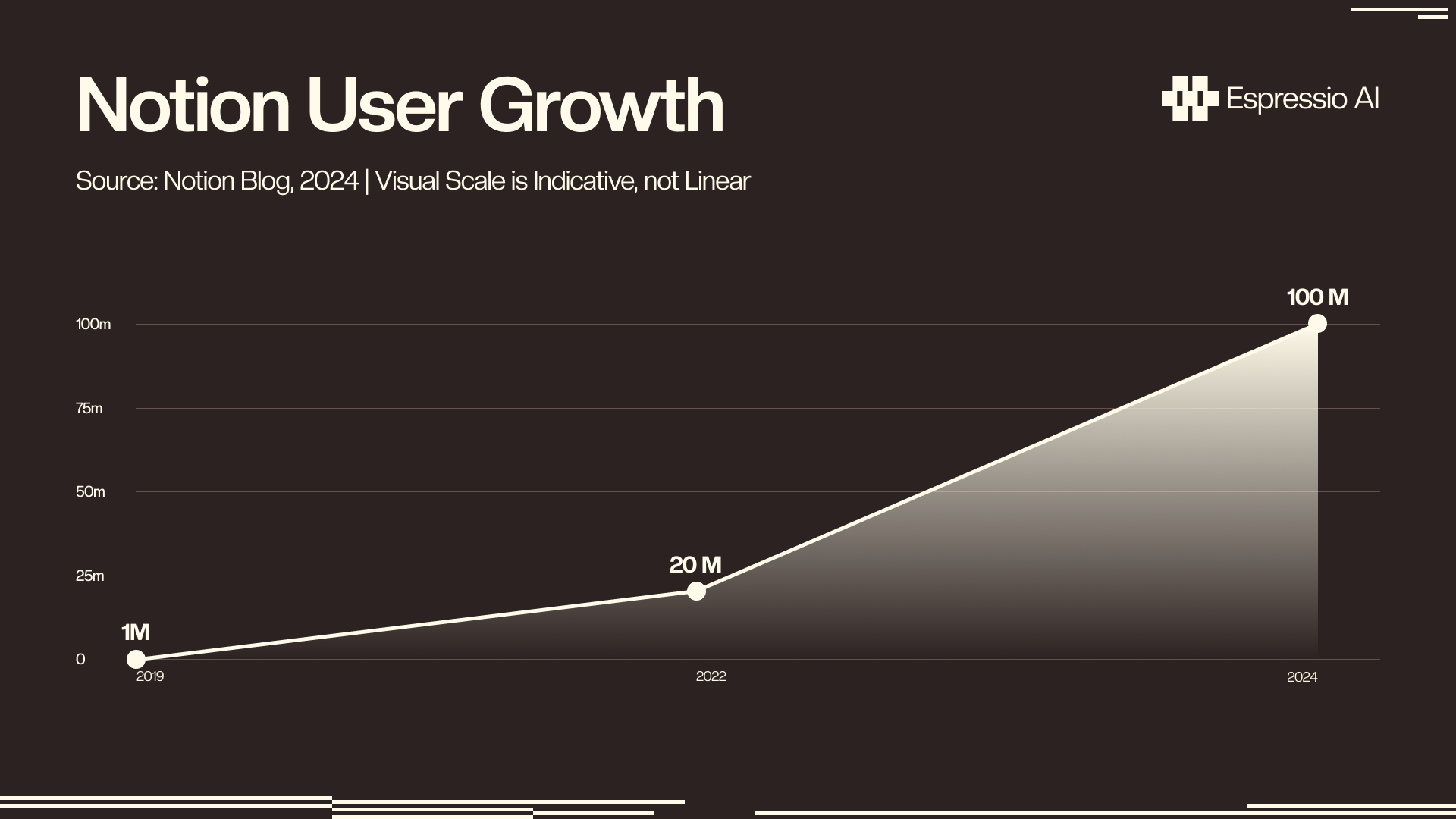
Notion passed 100 million users in August 2024, with over 50% of Fortune 500 companies now using the platform for operations including content planning (Notion, 2024). By end of 2025, more than half of Notion’s ARR came from AI-enabled customers, confirming that teams using Notion for editorial planning are already running AI alongside it. The question is whether that AI has write access to the database or just an open chat window.
What is Notion MCP and how does Claude connect to it?
Notion’s official MCP server, launched in 2025, lets Claude read and write to Notion databases without any middleware layer (Notion Help Center, 2025). MCP (Model Context Protocol) is Claude’s native tool-calling interface for external services — the same protocol that connects Claude to file systems, web browsers, and code execution environments. With the Notion MCP server running locally, Claude can query your content calendar database, read every row’s properties, and write new entries or update existing ones in a single session.
Before choosing the integration method, it helps to see the trade-offs clearly:
| Method | Setup Time | Claude Can Write to Notion | Requires Webhook/Zapier | Cost |
|---|---|---|---|---|
| Notion MCP | 15 min | Yes, directly | No | Free |
| Zapier + Claude | 45–90 min | Yes, via Zap actions | Yes | $20–$50/mo for Zapier |
| Notion API (raw) | 2–4 hrs | Yes, via code | No | Free (dev time) |
| Notion AI (native) | 0 min | Single page only | No | $10/mo add-on |
MCP wins on setup time and direct write capability. The trade-off is that it runs locally in Claude Desktop or Claude.ai; it’s not a cloud service you deploy once for a team. For collaborative teams, each member sets up their own MCP connection, or a shared Claude API key handles it via the Anthropic API.
Model Context Protocol (MCP) is Claude’s native tool-calling interface for external services. Notion’s official MCP server, launched in 2025, lets Claude read and write to Notion databases without any middleware (Notion Help Center, 2025). A setup that takes hours with Zapier or the raw Notion API takes under 15 minutes with MCP, which matters when you want to test the workflow before committing to it.
How do you set up Notion MCP for Claude in 15 minutes?
The official Notion MCP server needs four things: a Notion integration token, Node.js installed locally, the MCP server package, and a config entry in Claude Desktop (Notion Help Center, 2025). The whole process runs in under 15 minutes.
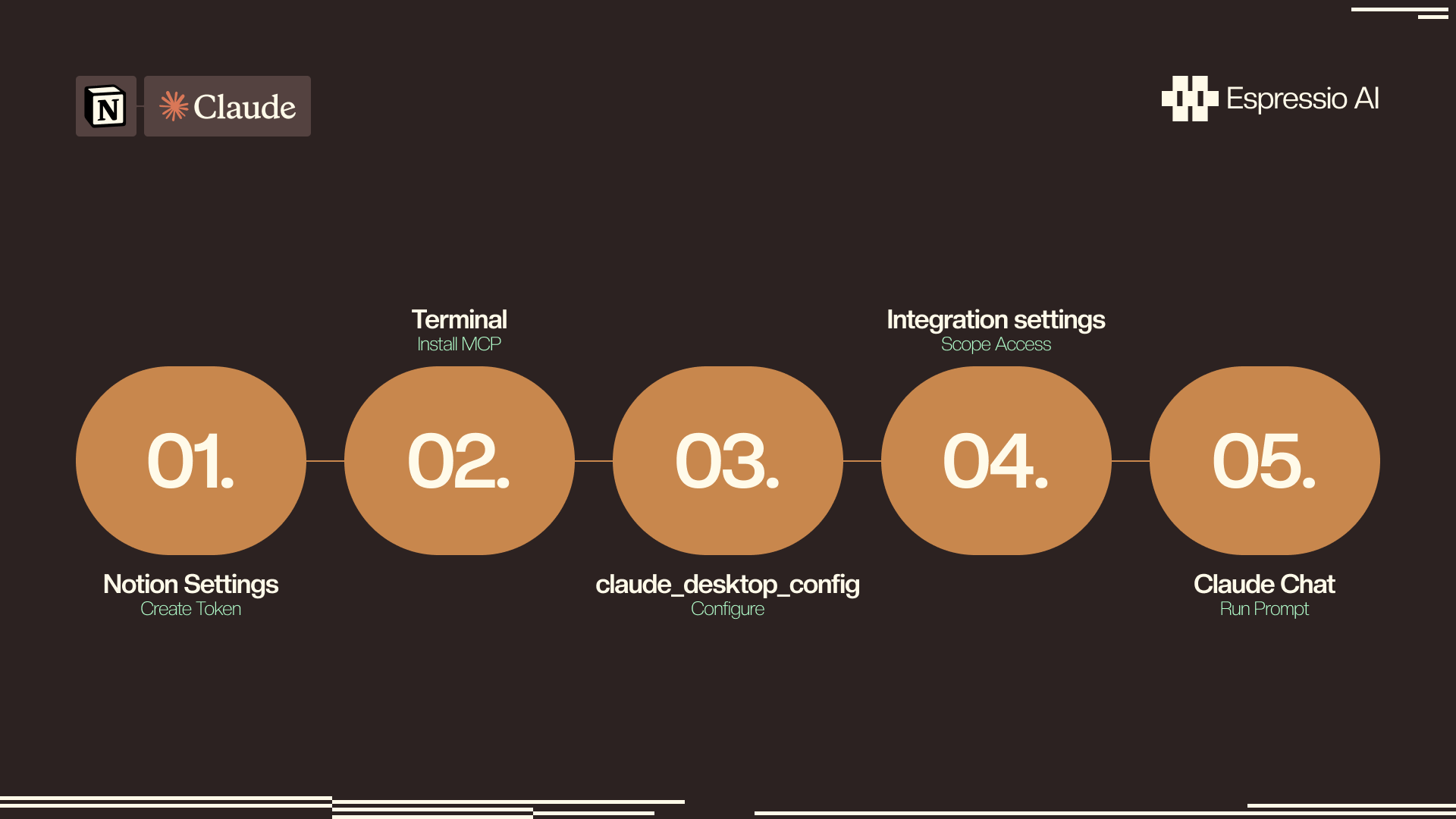
Step 1 — Create a Notion integration token. Go to Notion Settings → Connections → Develop or manage integrations → New integration. Name it (e.g., “Claude content calendar”), set it to Internal, and copy the token.
Step 2 — Install the MCP server. With Node.js installed, run:
npx @notionhq/notion-mcp-serverThis installs and starts the server. On first run, it prompts for your integration token.
Step 3 — Add the MCP config to Claude Desktop. Open ~/Library/Application Support/Claude/claude_desktop_config.json and add:
{
  "mcpServers": {
    "notion": {
      "command": "npx",
      "args": ["-y", "@notionhq/notion-mcp-server"],
      "env": {
        "NOTION_API_KEY": "your_integration_token_here"
      }
    }
  }
}
Restart Claude Desktop. The Notion tool appears in Claude’s toolbar.
Step 4 — Connect the integration to your content calendar database. In Notion, open the content calendar database → click the three-dot menu → Connections → Add connection → select your integration. This grants Claude access to that specific database.
The permission step at Step 4 is where most tutorials go wrong by omission. Creating a Notion integration token grants Claude access to every page and database that integration is later connected to — meaning if you connect it to your content calendar and then accidentally also connect it to your financial projections, Claude can read both. Connect the integration to one database at a time, starting only with the content calendar. Other databases stay private unless you explicitly add the connection.
How do you build the content calendar database schema in Notion?
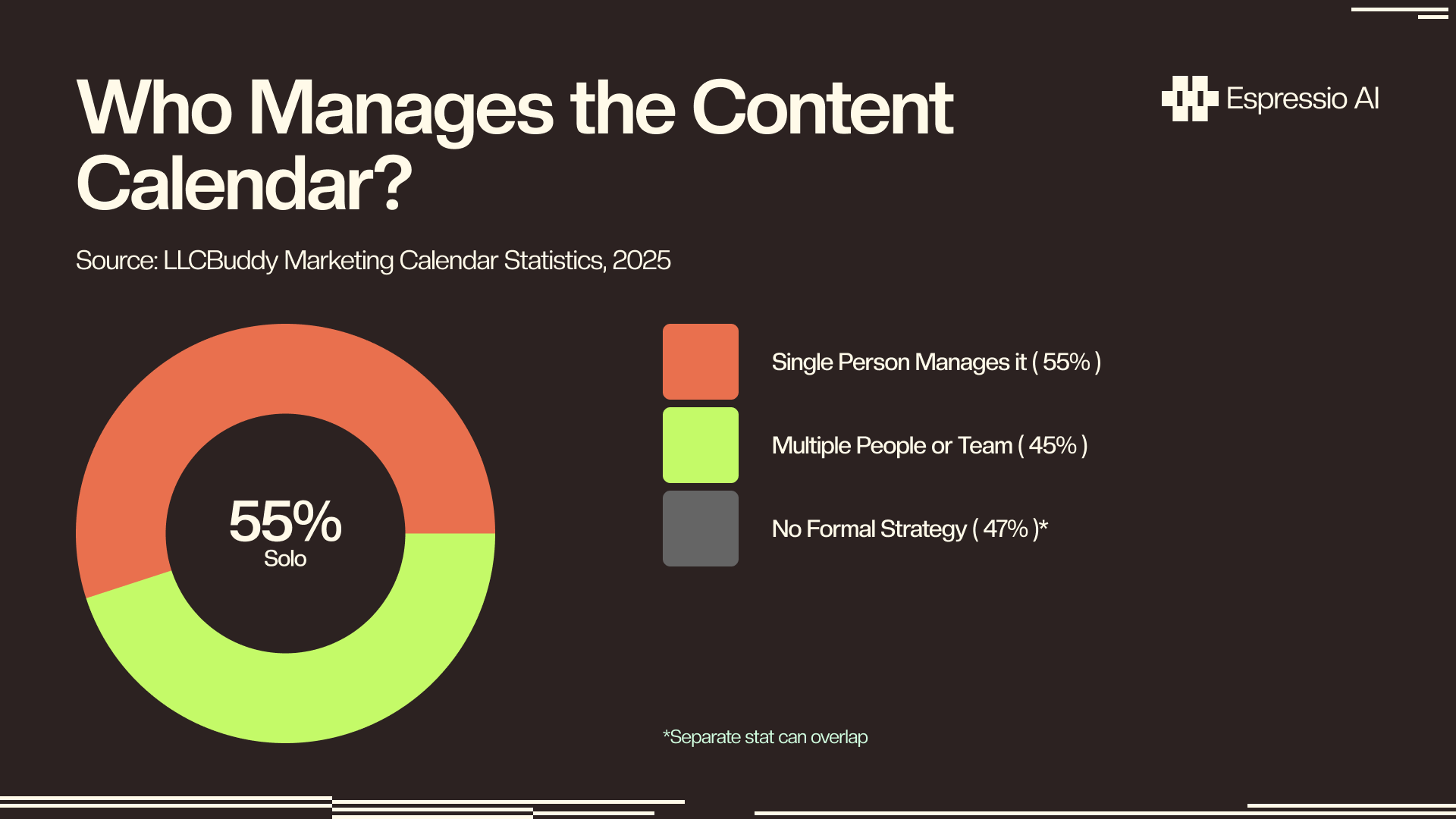
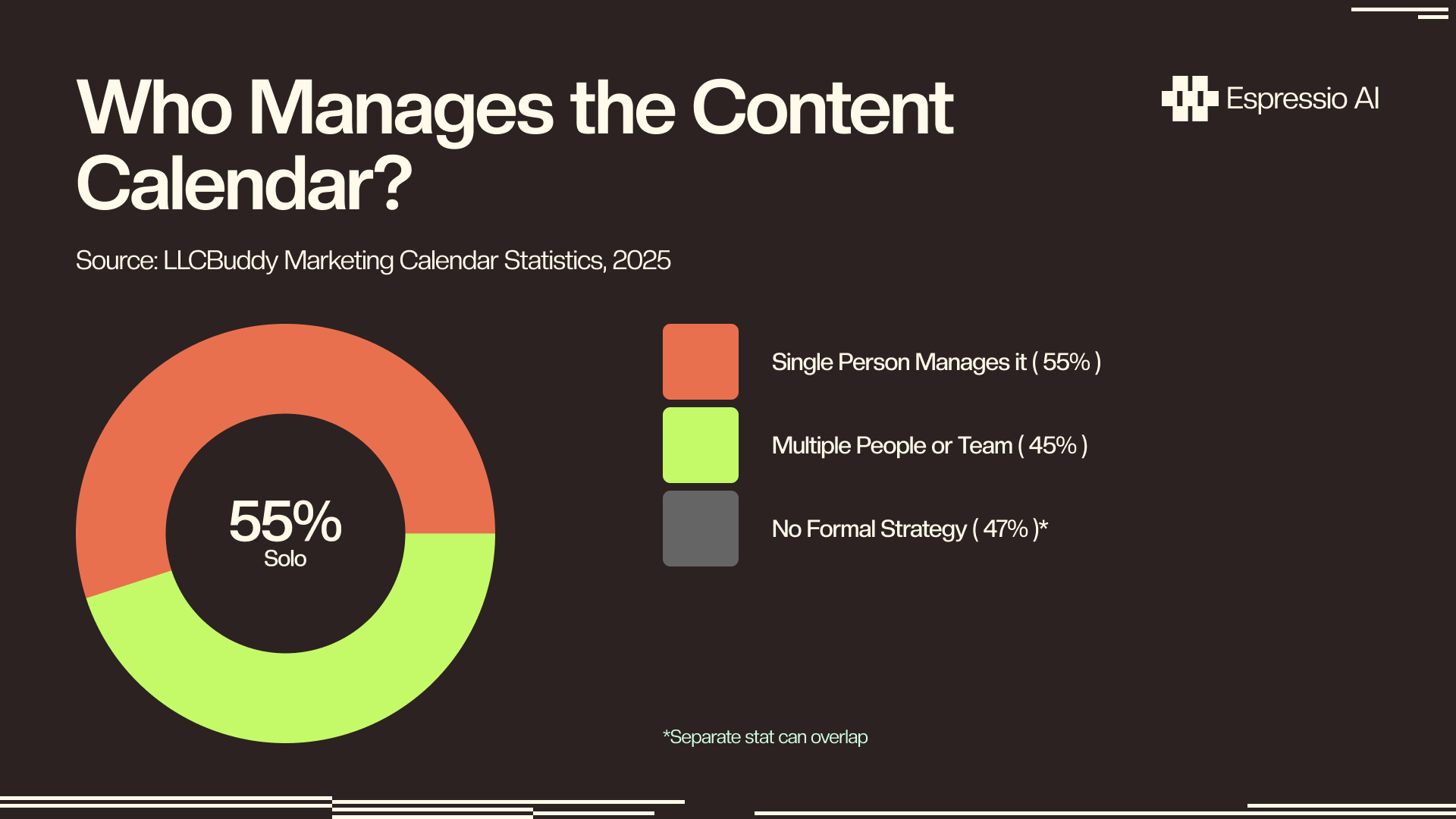
55% of firms have a single person managing the content calendar, and 47% operate without a formal content workflow strategy (LLCBuddy, 2025). That’s the gap this database closes: a structured schema that one person can hand to Claude, so Claude handles the repetitive population work.
The eight properties that produce reliable Claude output:
| Property | Type | Claude fills this? | Notes |
|---|---|---|---|
| Title | Text | Yes | Claude generates or suggests |
| Topic Cluster | Select | Yes, from existing options | Set options in advance: SEO, Product, Thought Leadership |
| Format | Select | Yes | Blog, Video, LinkedIn, Newsletter |
| Target Keyword | Text | Yes | Claude pulls from context or suggests |
| Status | Select | Reads to decide what to do | idea → briefed → drafted → published |
| Publish Date | Date | Yes, on assignment prompt | Claude schedules across available slots |
| Word Count | Number | Optional — Claude estimates | Useful for planning |
| Notes | Text | Yes, writes brief summary | Claude populates this from context |
Once built, share the database URL with the Claude session and test: “Read my content calendar database and tell me how many rows have Status = idea.” If Claude returns an accurate count, the connection is working.
65% of content marketers say consistently producing material is their biggest challenge (Optimizely, 2024). A Notion content calendar database with the right schema gives Claude structured fields to read and write, converting that challenge into a 4-minute prompt session. The difference between a schema that works and one that doesn’t comes down to using typed Notion properties rather than plain text fields for everything.
What prompts make Claude populate your content calendar automatically?
Marketers using AI write long-form posts in under 1 hour, compared to 2–3 hours without AI assistance (Semrush, 2024). The Notion MCP connection extends that productivity gain from individual articles to the entire editorial calendar. Three prompts cover 90% of the weekly planning work.
Prompt 1 — Topic generation:
Read my Notion content calendar database. Look at the existing Topic Cluster
values. Suggest 12 new content ideas for [month], balanced across the clusters
I have. For each, write a title and a one-line description. Add each as a new
row with Status = "idea".
Prompt 2 — Brief writing:
In my Notion content calendar database, find every row where Status = "idea".
For each one, write a 3-sentence brief in the Notes field covering: the target
audience, the main argument, and one statistic to anchor the post. Set Status
to "briefed" when done.
Prompt 3 — Publish date assignment:
In my Notion content calendar database, find all rows where Status = "briefed"
and Publish Date is empty. Assign publish dates spreading these evenly across
the next 4 weeks, starting [Monday's date]. Avoid weekends.
Run these three prompts in sequence and Claude generates topics, writes briefs, and schedules everything in a single session. What previously took 2–3 hours on Monday morning takes about 8 minutes total.
The prompt structure matters more than the MCP setup. Teams that connect Notion MCP but keep using vague prompts (“help me with my content calendar”) get vague results. The prompts above work because they reference specific Status values Claude can read, specific fields Claude can write to, and a specific date anchor Claude can calculate from. Mirroring the database schema in the prompt language is what makes Claude’s writes reliable rather than approximate.
Marketers using AI write long-form posts in under 1 hour versus 2–3 hours without it (Semrush, 2024). With the Notion MCP connection and a structured prompt library, that same productivity gain extends from individual posts to the full calendar; one session generates a month of topics, briefs, and scheduled publish dates without a human typing a single database row.
How do you keep your content calendar current with weekly Claude sessions?
Businesses publishing 16 or more blog posts per month generate 4.5 times more leads than those publishing fewer (Semrush, 2024). Hitting that cadence requires a calendar that stays stocked. A 10-minute Claude session each Monday replaces the traditional planning meeting.
The weekly workflow runs three passes:
Audit pass. Ask Claude: “Read my content calendar and flag any rows where Publish Date is in the next 14 days and Status is still ‘idea’ or ‘briefed’.” This surfaces pieces that are behind schedule before they become urgent.
Replenishment pass. If the “idea” count drops below 8, run Prompt 1 again. Claude reads the existing Topic Cluster distribution and fills the gap without duplicating recent entries.
Gap analysis. Ask Claude: “Look at my content calendar for the past 3 months. Which Topic Clusters have fewer than 3 posts? Suggest 5 ideas to fill those gaps.” This keeps the content mix balanced rather than defaulting to whatever topics are easiest.
For teams running more infrastructure alongside Notion, automating content pipelines with Claude and AWS shows how the same Claude prompts run as serverless Lambda functions triggered by S3 events — the Notion integration as front-end planning, AWS as back-end generation.
Businesses publishing 16+ posts per month generate 4.5 times more leads than infrequent publishers (Semrush, 2024). A 10-minute weekly Claude session running three standard prompts — audit, replenishment, gap analysis — produces enough calendar entries to sustain that publishing cadence without a dedicated content planning role.
If you’re looking to integrate AI into your content planning and production workflows, get in touch with us and we’ll map out where automation adds the most value for your team.
Frequently Asked Questions
Does Notion MCP work with Claude.ai or only Claude Desktop?
Both. Claude Desktop uses a local claude_desktop_config.json to configure MCP servers. Claude.ai supports MCP via the Integrations tab in Settings (available on Pro and Team plans). The Notion integration token and MCP package are the same for both; only the connection method differs. Claude.ai’s web integration is the simpler path for non-technical teams.
Is the Notion MCP integration free to use?
The MCP server package is free and open-source. Notion integration tokens are available on all Notion plans including free. You pay standard Anthropic pricing for the Claude API calls that populate the calendar: Claude Sonnet 4.5 at $3 per million input tokens means a typical calendar session of 50,000 tokens costs under $0.20. Running weekly, that’s under $1 per month for content planning.
Can Claude edit existing Notion pages or only database rows?
Via MCP, Claude reads and writes database entries including their properties. Full Notion page editing (body content, blocks, formatting within a page) requires the Notion API directly. For a content calendar use case, database row operations cover everything: creating new entries, updating Status, writing to the Notes field, setting publish dates. You don’t need page-level access for calendar automation.
What’s the difference between Notion AI and Claude connected via MCP?
Notion AI is built into the Notion editor for single-page tasks such as summarizing a document or drafting a paragraph. Claude via MCP operates across the entire database in bulk — reading all rows, writing to multiple entries in one session, running logic across Status values and date fields. The two serve different jobs. Notion AI edits; Claude via MCP plans. For Claude’s HubSpot integration for AI sales follow-up, the same MCP pattern routes pipeline output from the content calendar directly into CRM deal sequences.
Conclusion
The MCP connection takes 15 minutes. The database schema is the variable that determines whether the integration stays useful 6 months from now — use typed properties, not freeform text, and scope the integration token to one database at setup. The three prompts (topic generation, brief writing, date scheduling) do the actual calendar work once the plumbing is in place.
- Connect Claude via Notion MCP (Step 3 config + Step 4 scope)
- Build the 8-property database schema before running any prompts
- Run the three prompts in sequence for initial population; run the weekly 10-minute audit to keep it current
- Add a Topic Cluster select field from day one; it’s what makes the gap analysis prompt reliable
For teams building out the full brief-to-publish pipeline, automating marketing briefs with Claude and Slack handles the ideation-to-brief handoff that feeds this Notion calendar. For the full picture of how an agency wires Claude into every department including content operations, how to build an AI operating system for your agency shows what a production implementation looks like after 18 months of building.



