



Luka Mrkić
Head of BD
Insights, strategies, and real-world playbooks on AI-powered marketing.
APR 30, 2026
How to Integrate Claude with Airtable for Content Workflows
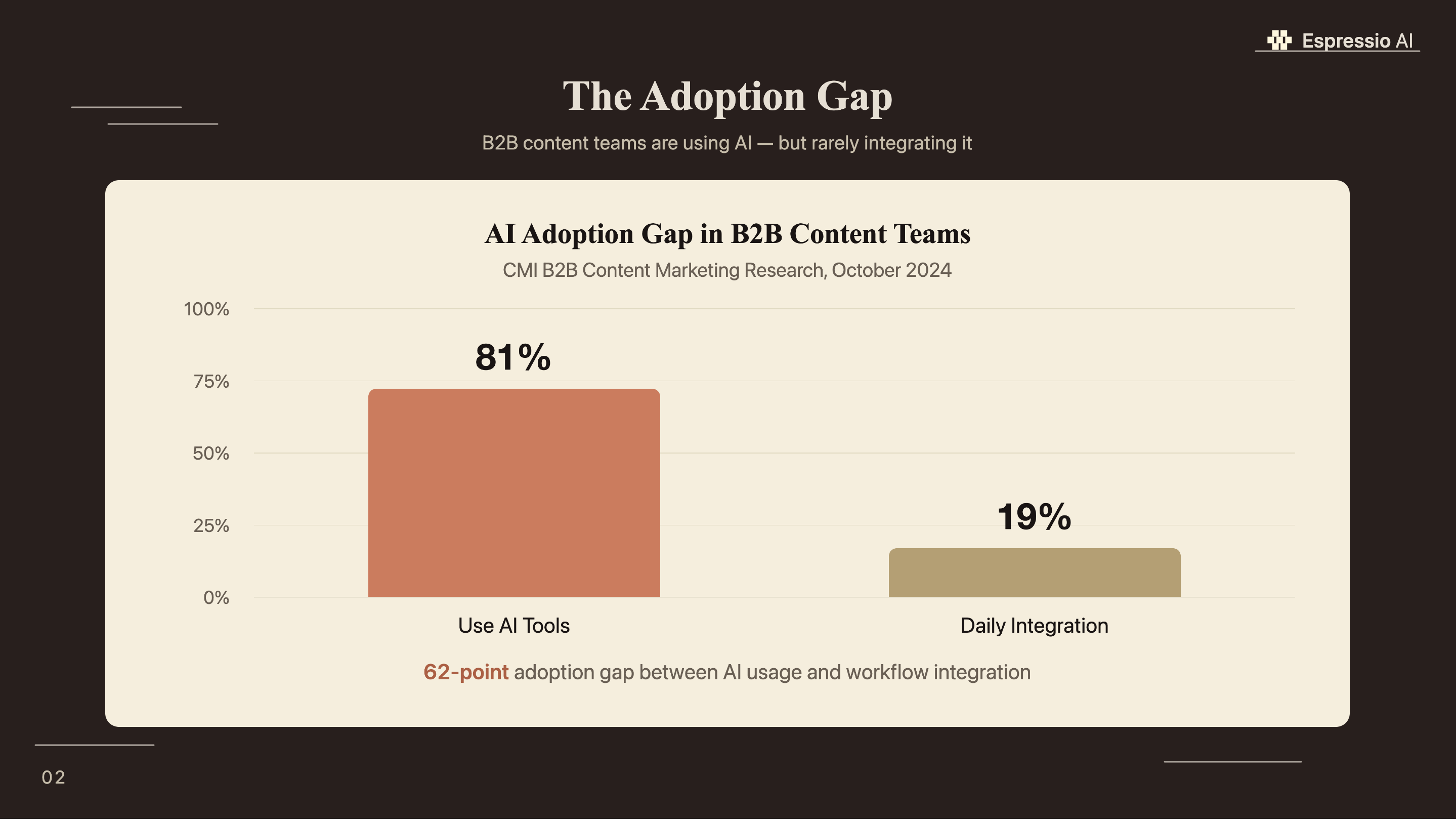
Most content teams use Claude the same way: open a browser tab, type a prompt, copy the output, paste it into Airtable. According to CMI’s B2B Content Marketing research, 81% of B2B content teams now use generative AI tools, yet only 19% have integrated AI into their daily workflows (Content Marketing Institute, 2024). The 62-point gap is structural. The teams still copying and pasting haven’t connected Claude to the system that already holds their content data.
Five integration paths close that gap. This guide covers each one, tells you which fits your team’s technical level, and gets the native Claude connector running in your Airtable base in under 5 minutes. Teams already automating marketing briefs with Claude and Slack will find Airtable is the natural next layer for storing and managing those outputs.
Key Takeaways
- 81% of B2B content teams use generative AI tools, but only 19% have integrated AI into daily workflows (CMI, 2024). The Airtable plus Claude stack is the structural fix for that gap.
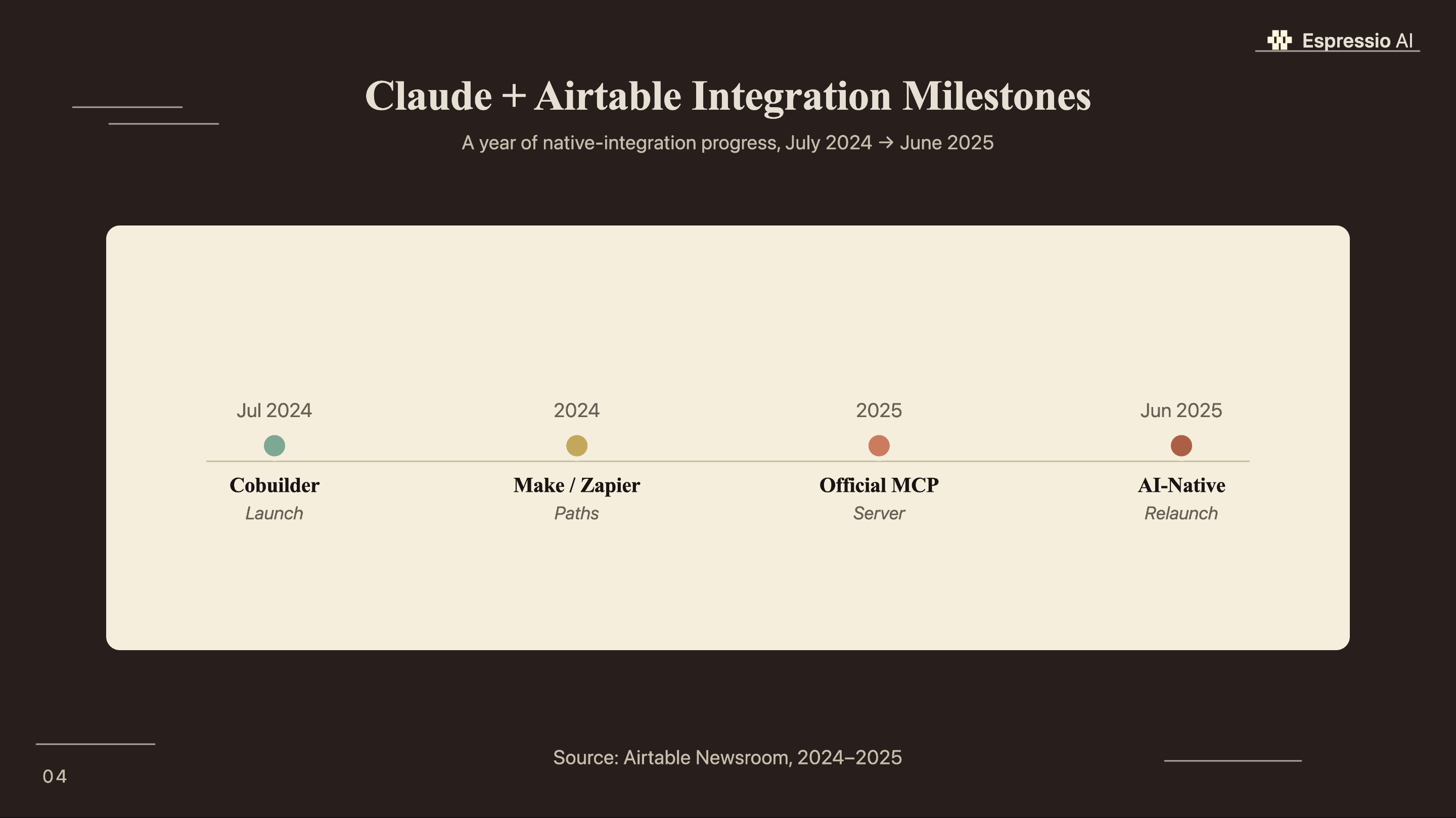
- Airtable launched an official MCP server in early 2026; the native Claude connector requires no API key and works on every Airtable plan tier.
- Five integration paths suit different team profiles: native MCP for non-technical content managers, Make.com and Zapier for scheduled pipelines, and n8n for full workflow control.
Why does Airtable work as an AI content workflow hub?
Over 450,000 organizations run operations in Airtable, and teams report up to 90% less manual data entry after standardizing workflows on the platform (Electroiq, 2025). That adoption scale is why content teams reach for Airtable when they need AI outputs to land in a structured database rather than a chat window.
Airtable stores content as structured records: a brief is a row, its fields are typed columns, and its status is a single-select value that triggers automations. When Claude reads your Airtable base, it reads actual workflow objects, not free-form documents. That structure lets AI-generated output land directly in the right field, with no human rerouting required.
Airtable’s API-first architecture integrates cleanly with every automation platform on this list. The same base Claude reads via MCP is the one Make.com queries via webhook and the one your team views in the grid editor each morning, with no duplication of data sources.
Airtable now serves over 450,000 organizations and has hosted more than 50 million apps built on its platform (Airtable Newsroom, 2024). Teams report up to 90% less manual data entry with Airtable workflow automation, making it the right operational layer to connect Claude to for structured content operations where relational data and automated triggers replace copy-paste handoffs.
For teams that also plan content in Notion, see building an AI content calendar in Notion with Claude for the database schema and weekly prompt workflow that works alongside Airtable.
What are the five ways to connect Claude to Airtable?
Airtable launched an official MCP (Model Context Protocol) server in early 2026, free on all plan tiers and requiring no API key (Airtable Support, 2026). That’s the fastest path. Four additional integration methods serve teams with different technical requirements and automation needs.
| Path | Setup Time | Technical Skill | Cost | Best For |
|---|---|---|---|---|
| Native MCP connector | Under 5 min | None | Free (all plans) | Non-technical content managers |
| Zapier | 15–30 min | None | Zapier plan + API key | Simple trigger-to-action |
| DataFetcher extension | 20–30 min | None | Extension subscription | In-Airtable field generation |
| Make.com | 30–60 min | Low | Make plan + API key | Scheduled multi-step pipelines |
| n8n (self-hosted) | 2–4 hrs | Medium–High | Free self-host | Full pipeline control |
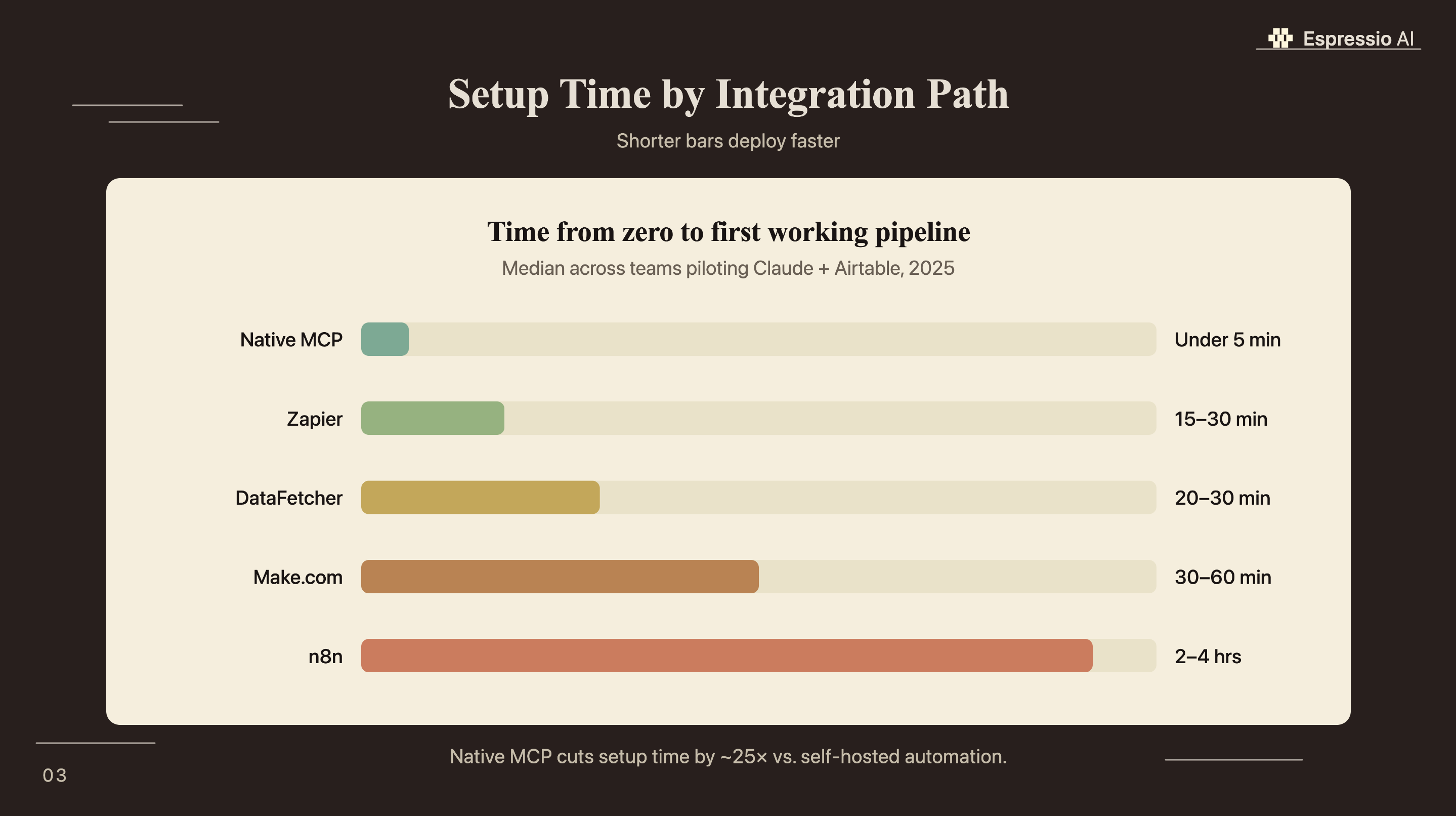
The choice of path comes down to two questions: does your workflow need to run on a schedule without a human in the loop, and does someone on your team know how to configure an automation platform? If the answer to both is no, the native MCP connector covers 80% of daily content operations without any additional tooling.
Marketing automation boosts team productivity 14.5% and reduces marketing overhead 12.2% on average, per a benchmark tracked by Kissflow from Nucleus Research data. For the teams that do need scheduled automation, Make.com and Zapier deliver measurable efficiency gains without requiring an engineering hire.
The official Airtable MCP server is the zero-friction entry point for the Claude and Airtable integration. It’s free on every plan tier, requires no API key, and connects in under 5 minutes via Claude’s built-in connector settings, removing the primary technical blocker that has kept content managers from integrating Claude into their daily Airtable workflow (Airtable Support, 2026).
How do you set up the native Claude connector for Airtable?
The native Airtable connector for Claude requires no API key, no config file, and no engineering support. It works on every Airtable plan tier through Claude’s OAuth integration (Airtable Connectors, 2026). The full setup runs in under 5 minutes.
Step 1. Open Claude.ai, go to Settings, select Integrations, find Airtable, and click Connect.
Step 2. Authorize with Airtable OAuth. Select which specific bases you want Claude to access. Scope this narrowly: grant access only to the content operations bases Claude will actually need.
Step 3. Test the connection by asking Claude: “List the tables in my [base name] Airtable base.” A successful response shows your table names.
Step 4. Run a first content operation: “Read my content calendar and tell me which records have Status equal to Ready to Publish.”
Step 5. For Claude Desktop or Claude Code, add the MCP server to your configuration file:
{
  "mcpServers": {
    "airtable": {
      "command": "claude",
      "args": ["mcp", "add", "--transport", "http", "airtable", "https://mcp.airtable.com/mcp"]
    }
  }
}
Or run directly in Claude Code:
claude mcp add --transport http airtable https://mcp.airtable.com/mcpThe OAuth scope step matters more than most tutorials acknowledge. Granting access to all Airtable bases sounds convenient, but content teams typically have bases that mix editorial data with financial or client records. A Claude session granted broad access can return sensitive data in responses that include context from unrelated bases. Scope access to editorial bases only, and if you run projects for multiple clients, create a dedicated editorial workspace and connect that one.
84.86% of marketers report that AI tools improved their content delivery speed (CoSchedule, 2025). The native MCP connector is why: it puts Claude inside the same workspace where delivery tracking already happens, removing the context-switching that slows most AI-assisted workflows.
The native MCP connector removes the primary adoption blocker for content teams: it requires no API key, no developer involvement, and no additional subscription. Any team member with Airtable access can complete the setup in under 5 minutes using Claude’s built-in connector settings (Airtable Support, 2026). It’s the fastest path from occasional AI tool use to daily workflow integration.
How do you automate Claude and Airtable with Make or Zapier?
Make.com offers around a dozen Anthropic Claude action modules and seven Airtable CRUD modules, together enabling scheduled, multi-step content pipelines that run without anyone opening a browser (Make.com, 2025). This is the path for workflows that need to run on a timer or fire automatically when a record changes.
A standard Make.com scenario for title generation looks like this:
- Trigger: Airtable watches for new records where Status = “Brief Ready”
- Action 1: Airtable retrieves the record’s Brief, Audience, and Topic fields
- Action 2: Anthropic Claude sends the prompt using field variables
- Action 3: Airtable writes Claude’s response to the “Title Options” field
- Action 4: Airtable updates Status to “Titled”
The Zapier path follows the same trigger-to-action logic with a simpler interface and fewer advanced modules. It works well for single-step automations like “when a new brief record appears, generate a summary and email it to the editor.” For multi-step scenarios with conditional routing, Make.com’s visual builder is more capable.
Every tutorial for Make.com and Claude integration shows how to connect the modules. Few explain the step that determines output quality: the field-variable injection. When you build the Claude prompt in Make.com’s module settings, you drag in Airtable field variables like {{1.fields.Brief}} and {{1.fields.TargetAudience}}. This is what makes each Claude call context-specific rather than generic. A prompt that says “Write 5 title options for this content” produces mediocre output. A prompt that says “Write 5 title options for the following brief: {{1.fields.Brief}}. The target audience is {{1.fields.TargetAudience}}” produces results that map directly to the record’s actual content. The variable injection step is where automated prompts either deliver real value or produce noise.
For teams using HubSpot alongside their content operation, see Claude’s HubSpot integration for AI sales follow-up. The same Airtable base can feed both the content pipeline and CRM deal sequences.
Make.com’s Anthropic Claude modules paired with Airtable CRUD modules enable content pipelines that run on a schedule without manual involvement (Make.com, 2025). The field-variable injection step is the quality lever: pulling Airtable’s Brief and Audience fields directly into each Claude prompt makes automated outputs as specific as interactive ones.
What content workflows run best on Claude plus Airtable?
83.82% of marketers report increased productivity from AI tools, and Airtable users report 3.4 times faster campaign launches after centralizing workflows on the platform (CoSchedule, 2025; Electroiq, 2025). These five workflow templates deliver that lift using the integration paths covered above.
Brief generation is the highest-value starting point. Claude reads each “Topic” and “Audience” field from records where Status = “Idea” and writes a 200-word brief directly into the “Notes” field. One prompt via native MCP processes an entire batch of new ideas in a single session.
Title ideation follows the same logic. Claude reads every record where Status = “Brief Ready,” generates five options per row, and writes them into a “Title Options” field. Editors pick rather than write.
Content calendar population. Claude reads the current distribution across your Topic Cluster field, identifies which clusters are underrepresented, and adds 10 new ideas balanced across the gaps. This works best as a weekly interactive session rather than an automated trigger.
Distribution variants. Claude reads published article records and generates LinkedIn excerpts, email intros, and Twitter thread starters, writing each into separate fields. The Make.com path handles this well as a scheduled weekly run.
Repurpose identification. Claude reads records with a Published Date older than 90 days and a high view count, then flags them with a “Repurpose” tag and suggests the format. This surfaces high-performers that would otherwise stay buried in the database.
Five prompt-driven workflows (brief generation, title ideation, calendar population, distribution variants, and repurpose identification) convert Airtable from a status tracker into an active content production system (CoSchedule, 2025). All five run on the native MCP connector with no additional tooling, and three can be scheduled via Make.com for fully automated operation.
How do you manage costs and rate limits with Claude and Airtable?
Claude Sonnet 4.5 costs $3 per million input tokens, and a typical brief-generation call with a 500-word brief and 200-word output runs $0.01 to $0.04 per record (Anthropic, 2025). At 500 operations per month (running all five workflow templates against a base of 100 active records weekly), total API spend stays under $20.
The native MCP connector has no additional cost layer. You pay Anthropic’s standard API pricing per call and nothing more. Make.com and Zapier add their platform subscription costs, which typically range from $9 to $29 per month for the plan tiers that support Claude API modules.
Rate limits apply at two points. Anthropic enforces token-per-minute limits at the API level, which you can monitor in the Anthropic Console usage dashboard. Airtable’s standard API rate is 5 requests per second per base when Claude reads or writes records. For high-volume Make.com scenarios processing hundreds of records in a single run, add a delay module between Airtable actions to stay under that cap.
For teams scaling to thousands of operations per month, see automating content pipelines with Claude and AWS for the architecture that handles volume beyond what the native connector and Make.com are designed for.
The native MCP connector is the lowest total cost option for teams running fewer than 1,000 Claude operations per month (Anthropic, 2025). At Claude Sonnet 4.5 pricing of $3 per million input tokens, a 500-operation monthly workflow costs roughly $5 to $15 in API fees with no additional platform subscription.
If you’re looking to integrate AI into your content workflows, get in touch with us and we’ll map out where automation adds the most value for your team.
Frequently Asked Questions
Is the Airtable MCP connector free?
Yes. The Airtable MCP connector is included on all Airtable plan tiers at no additional charge. You pay only Claude API usage at standard Anthropic pricing. Claude Sonnet 4.5 costs $3 per million input tokens, so a typical brief-generation workflow costs $0.01 to $0.04 per call (Anthropic, 2025). There is no separate Airtable charge for using the connector.
Can Claude write to Airtable records or only read them?
With edit-level OAuth permission granted during setup, Claude can read, create, update, and delete Airtable records. Read-only permission limits Claude to analysis and data retrieval. For write-back workflows (such as populating a “Title Options” field or updating a Status value), grant edit access during the OAuth authorization step in Claude’s integration settings.
Does the Claude connector work alongside Airtable’s native AI features?
Yes. The Claude MCP connector and Airtable’s native AI features (Cobuilder, Omni) are complementary. Airtable’s native features use internal LLMs for in-app tasks like app generation and field summarization. The Claude connector brings Claude’s reasoning and your custom prompt templates to the same data, running from Claude’s interface rather than from inside the Airtable grid editor.
What’s the difference between the native MCP connector and Make.com integration?
The native MCP connector is interactive: you prompt Claude in a chat session and it reads or updates Airtable records in real time. Make.com integration is scheduled and automated, running on a timer or trigger without your involvement. Make.com offers Anthropic Claude modules paired with Airtable CRUD modules (Make.com, 2025), making it the better choice for recurring pipeline workflows that run without a human in the loop.
Conclusion
The 62-point gap between AI tool usage (81%) and daily workflow integration (19%) closes one integration at a time. Start with the native Airtable MCP connector: free on every plan tier, no API key, running in under 5 minutes. Use the five workflow templates immediately: brief generation and title ideation work in the first session. Add Make.com when you need workflows to run on a schedule rather than on demand.
The five integration paths on this page cover every team profile, from a solo content manager with no engineering support to an agency running automated pipelines across 20 client bases. The right starting point is always the one you can deploy today.
For teams building a planning layer before generation, building an AI content calendar in Notion with Claude shows how the database schema and prompt workflow pair with Airtable’s operational layer. For the full-stack view of how an AI agency wires these tools together, how to build an AI operating system for your agency covers the architecture across 18 months of real implementation.



