



Luka Mrkić
Head of BD
Insights, strategies, and real-world playbooks on AI-powered marketing.
MAY 11, 2026
How to Build a Cold Email Agent with Instantly and ChatGPT
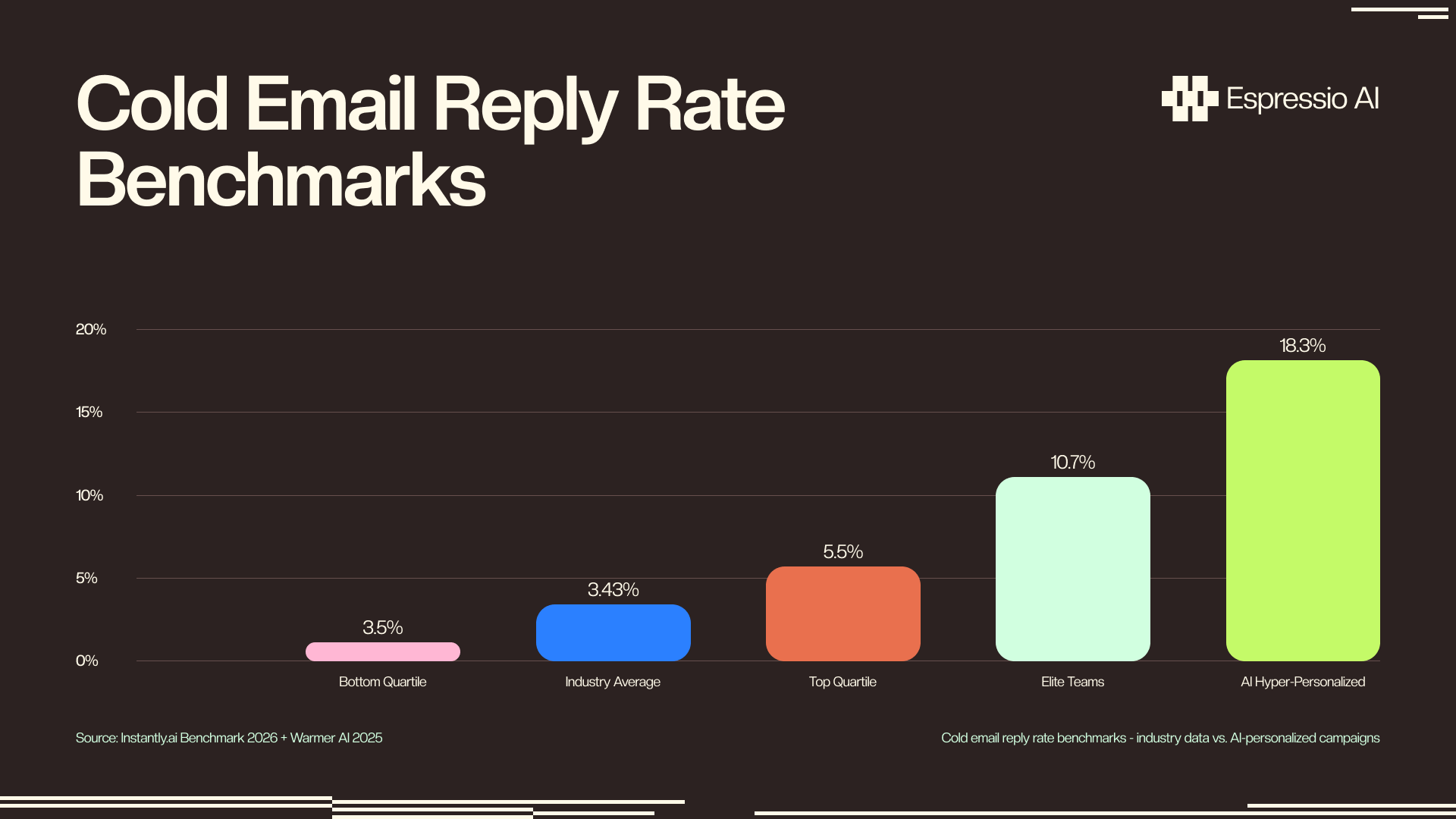
The global average B2B cold email reply rate is 3.43%, according to Instantly’s 2026 Cold Email Benchmark Report. Top-quartile teams clear 10.7%. That three-times gap comes down to personalization depth.
The two common alternatives both break down. Hiring an SDR to personalize at scale costs $60,000-$80,000 a year. Copy-pasting ChatGPT outputs one by one is slower than writing manually. Neither scales.
This tutorial builds the third path: Instantly’s native OpenAI integration, which runs ChatGPT on every lead row inside the platform. No Zapier, no middleware. You’ll get the full stack, from deliverability configuration and prompt engineering to sequence structure and the Instantly MCP Server for teams ready to push further.
Key Takeaways
- AI-personalized cold emails get 8.7x more replies than generic pitches (Warmer AI, 2025). First-name variables alone don’t move the number.
- Instantly’s native OpenAI integration runs ChatGPT per lead row inside the platform - no Zapier needed.
- Authenticated senders (SPF/DKIM/DMARC + warmup) land in the inbox 2.7x more often (Digital Bloom, 2025). Configure this before writing a single prompt.
What does a ChatGPT + Instantly email outreach agent actually do?
AI-hyper-personalized outreach, where ChatGPT writes a distinct first line per contact, averaged 18.3% reply rates versus 2.1% for generic campaigns in Warmer AI’s 2025 consultant study (Warmer AI). Across billions of sends, the global B2B average is 3.43% (Instantly Benchmark 2026). The 8.7x difference comes down to one variable: the quality of context the AI receives for each contact.
The architecture has four layers. First, a lead list in CSV format, with columns that carry personalization context beyond name and company. Second, Instantly’s native OpenAI integration reads that context and runs ChatGPT prompts on every lead row, populating custom AI Variables. Third, Instantly sequences the outreach across multiple sending mailboxes. Fourth, Instantly’s AI Reply Agent classifies inbound responses as positive, negative, or out of office, and routes them accordingly.
“Agent” is the right word for this system, with one caveat. The human still approves the prompt template and campaign settings before anything sends. What the system handles autonomously is copy generation per contact and reply classification without per-contact touchpoints. That’s a meaningful reduction in manual work, not full autonomy.
This setup differs from Zapier-based personalization workflows. The native integration runs inside the Leads tab. No external automation platform, no webhook configuration, no per-row API calls to manage outside Instantly’s UI.
How do you configure Instantly for AI-powered cold email campaigns?
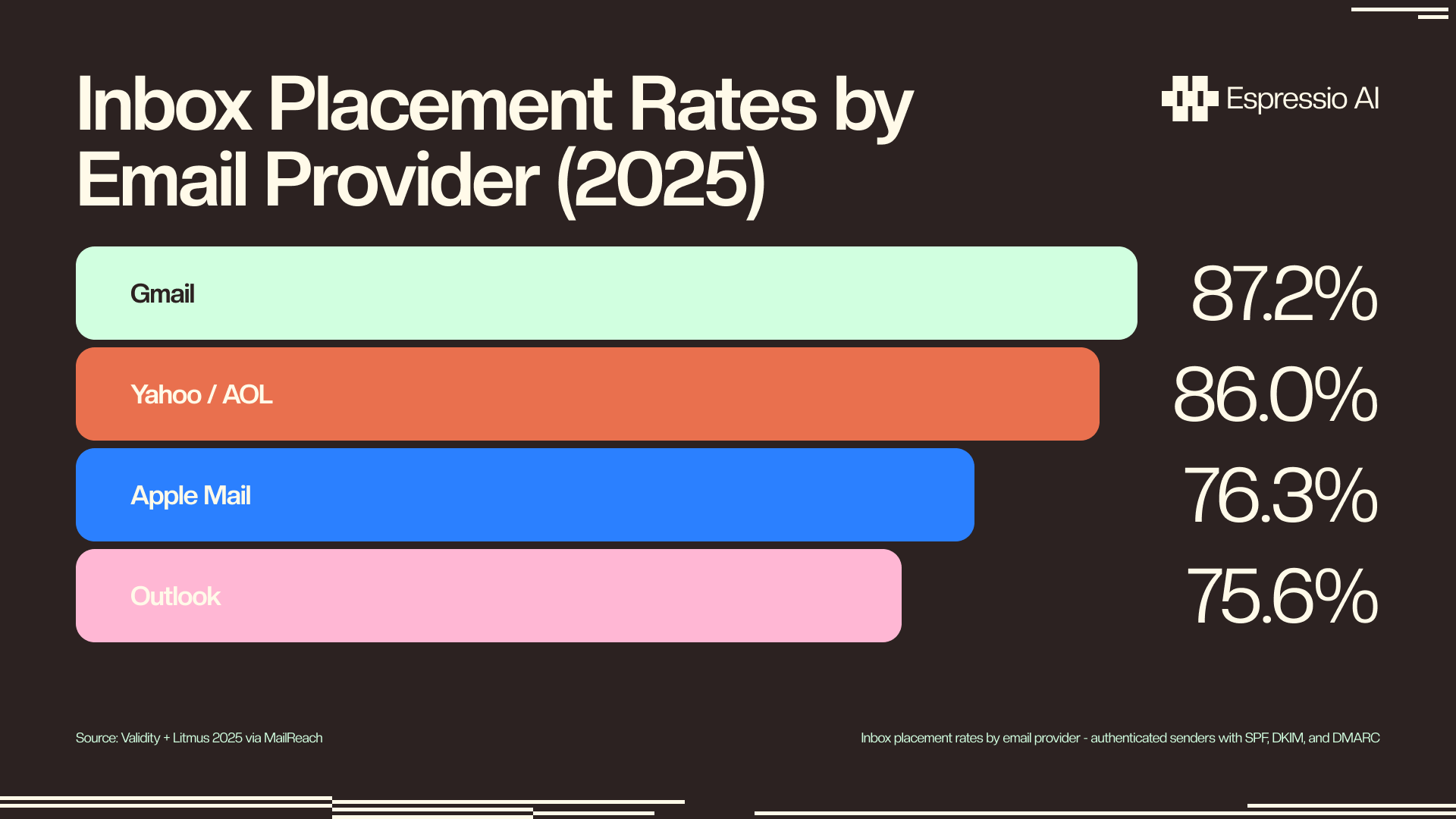
Your sending infrastructure determines whether any AI-personalized copy reaches a human eye. Senders with SPF, DKIM, and DMARC fully configured are 2.7x more likely to land in the inbox than unauthenticated senders (Digital Bloom B2B Email Deliverability Benchmarks, 2025). Set up the sending stack before touching prompt templates.
The mailbox authentication steps here follow the same credential-management patterns covered in setting up AI API credentials for marketing workflows.
Step 1: Create an Instantly account and connect sending mailboxes. Use Google Workspace or Microsoft 365 accounts only. Free Gmail and Yahoo addresses don’t support custom DNS records or warmup. Start at 30-50 emails per day per mailbox.
Step 2: Enable Instantly Warmup for each mailbox. Warmup runs automated send-and-receive activity using Instantly’s pool of 1M+ warmup accounts. This builds sender reputation before live campaigns start. Run warmup for at least 14 days. Set the warmup percentage at 30-40% of your daily send limit.
Step 3: Configure DNS records. SPF, DKIM, and DMARC must be set on each sending domain. Instantly’s Settings > Email Accounts section shows whether each record is verified with green checkmarks. DMARC at minimum p=none satisfies the authentication requirement. p=quarantine or p=reject provides stronger inbox protection.
Step 4: Prepare your lead CSV. Required columns for AI personalization: first_name, company, title, linkedin_url, personalization_hook. The personalization_hook column is what ChatGPT reads to write the first line. A weak hook (“SaaS company”) produces generic outputs. A strong hook (“recently launched Series B, hiring 12 AEs, actively building their outbound motion”) produces specific lines that read like a real SDR wrote them.
How do you connect ChatGPT to Instantly’s native AI integration?
Manual outreach prep, researching a prospect, writing a personalized first line, drafting a subject, takes roughly 20 minutes per contact. AI reduces that to 2 minutes (Outreach.ai Sales Data Report, 2025). Instantly’s native OpenAI integration automates that per-contact work inside the platform, running ChatGPT on every row in your lead list without external tools.
Step 1: Connect your OpenAI API key. In Instantly, go to Settings > Integrations > OpenAI. Paste your OpenAI API key. Select the model: use gpt-4o-mini for cost efficiency at scale ($0.002 per contact average), or gpt-4o for nuanced personalization on high-value prospects.
Step 2: Create an AI Variable. Open your lead list and click “AI Variables.” Each AI Variable is a custom field populated by a ChatGPT prompt that runs once per lead row when you generate variables. Create a variable named ai_first_line.
Step 3: Write the prompt. Paste this into the ai_first_line prompt field:
Write a single personalized opening sentence for a cold email to {{first_name}},
who works at {{company}} as a {{title}}. Use this context: {{personalization_hook}}.
Tone: direct, not flattering. Max 20 words. No questions. No filler phrases
like "I noticed" or "I came across."
Step 4: Preview before generating. Click “Preview” on 10 lead rows before running the full list. If more than 2 outputs feel generic or interchangeable, the personalization_hook column needs better data. Tighten it to a specific observation about the company or the person’s recent activity, then preview again.
In practice, the first prompt version produces generic copy roughly 30% of the time. The consistent fix: add linkedin_headline as a required input column and reference it explicitly in the prompt. A headline like “Scaling enterprise sales at Series B SaaS | ex-Salesforce” gives ChatGPT enough signal to write something a real SDR would have written. The modified prompt segment that solved it: Use this context: {{personalization_hook}}. Also note their LinkedIn headline: {{linkedin_headline}}. Do not mirror their headline back at them - reference what it implies about their current priorities.
Teams enriching leads before importing to Instantly can use an AI SDR agent for lead enrichment and personalization to populate the personalization_hook column from LinkedIn and company news signals before the CSV hits Instantly.
How do you write cold email prompts that generate replies?
Deep personalization, context beyond name and company, yields 52% higher reply rates than standard merge-tag outreach (Digital Bloom, 2025). Warmer AI’s consultant study put the contrast more precisely: hyper-personalized campaigns averaged 18.3% reply rates versus 2.1% for generic outreach, an 8.7x difference. The gap comes entirely from what you give ChatGPT as input context.
Subject line prompts: Max 6 words, no question marks, no exclamation marks. Include the company name or title as a signal rather than as flattery. Example prompt:
Write a 4-6 word subject line for a cold email to {{first_name}} at {{company}}.
Reference their role ({{title}}) or a business context ({{personalization_hook}}).
No clickbait. No questions.
First-line prompts: Observation-first, not compliment-first. Reference something specific the prospect did, wrote, or announced. Exclude “I noticed,” “I came across,” and “I wanted to reach out.” These phrases read as templates before the reader hits the second word.
SpinTax variants: Instantly supports {variation1|variation2|variation3} syntax. Use ChatGPT to generate three distinct variants of each key sentence, then wrap them in SpinTax. This prevents Gmail and Outlook from fingerprinting identical templates sent across hundreds of contacts.
The full template, with all three AI variables in place:
Subject: {{ai_subject_line}}

Hi {{first_name}},

{{ai_first_line}}

[2-sentence pitch tied to what the first line established]

[Single CTA - one ask, stated once]

[Signature]
Exclude from every prompt: compliments (“I love what you’re building”), opener clichés (“I noticed you just,” “I came across your profile”), rhetorical questions, and multi-part CTAs. One ask per email. Stated once.
How do you structure and launch your AI outreach sequence?
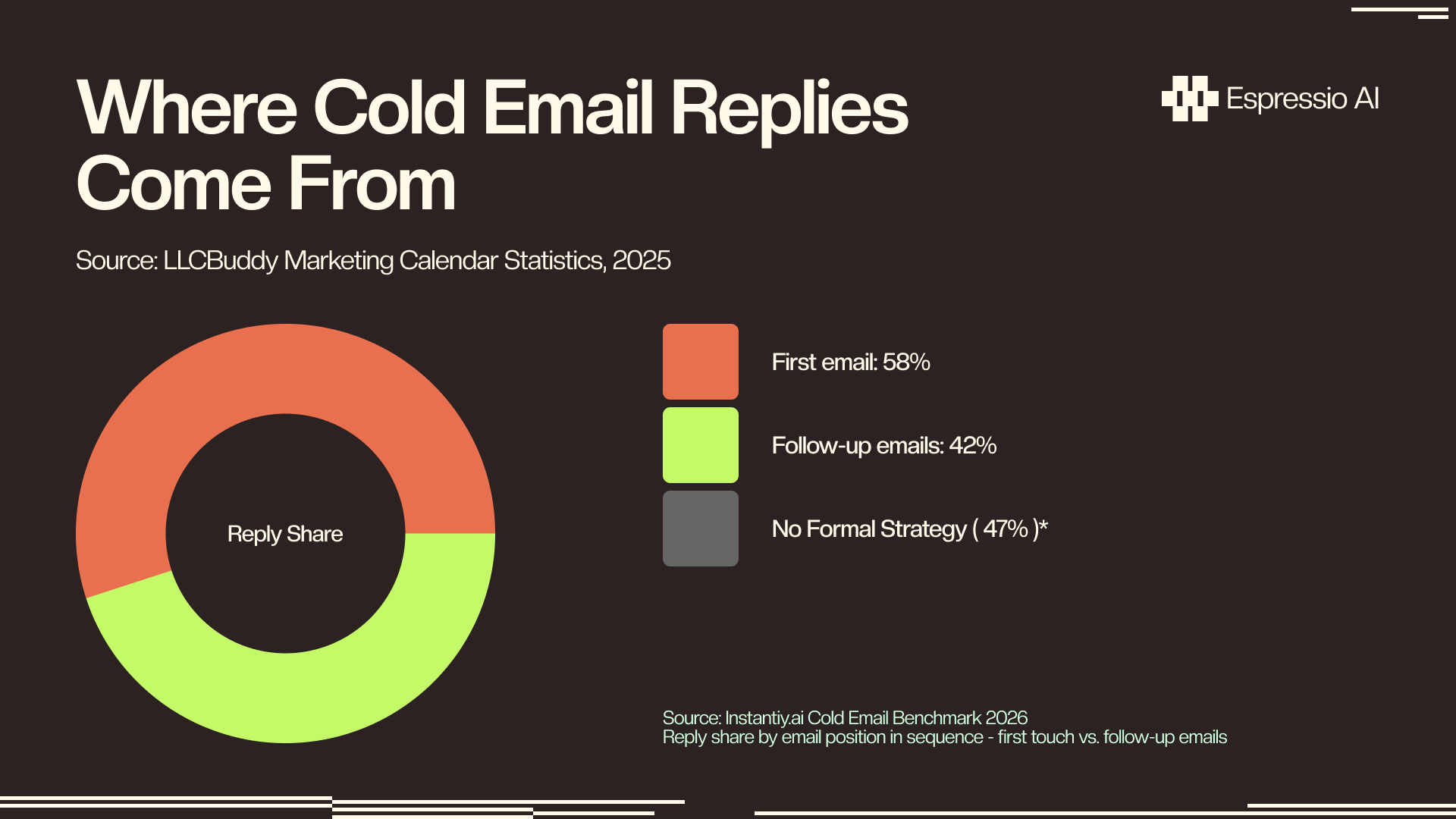
Forty-two percent of all cold email replies come from follow-up emails, not the first touch (Instantly Benchmark 2026). A single-email campaign that stops at no-reply leaves nearly half the available replies untouched. The sequence structure determines whether that follow-up pool converts, specifically through timing, angle variation, and CTA changes across all four touches.
Email 1 (Day 1): AI-personalized first line plus 2-sentence pitch plus single CTA. Keep it under 100 words. The first touch earns attention; it doesn’t close the meeting.
Email 2 (Day 3): Reference Email 1 with “Following up on my note below.” Use a different value angle. If Email 1 led with a pain point, Email 2 leads with a proof point: a case study metric, a customer name, a relevant outcome.
Email 3 (Day 7): “Last touch” framing. Offer an alternative format: a 15-minute call or a PDF case study. Two paths lower the commitment threshold without adding a second ask.
Email 4 (Day 14): Break-up email. One line: “Should I close out your file?” This converts better than another pitch, because it removes pressure rather than adding it.
Sending limits: 30-50 emails per day per mailbox in the first 30 days. Scale to 80-100 per day once inbox rates hold above 75%. Use multiple mailboxes on separate sending domains for volume above 200 emails per day.
A/B testing in Instantly: create two subject line variants, one AI-generated and one human-written as a control. Let Instantly auto-rotate between them. Declare a winner after 100 opens, not before.
Most teams generate all four follow-ups in a single ChatGPT session, which produces four emails with the same angle and the same implied CTA. The fix: prompt ChatGPT to write each follow-up with a deliberately different framing. Email 1 gets pain framing, Email 2 gets social proof, Email 3 gets ROI calculation, Email 4 gets risk reversal. Four distinct angles across the sequence improve the follow-up reply share measurably. Prompting all four at once without explicit framing instructions collapses this advantage.
What results should you expect, and what to do when they don’t appear?
ZoomInfo’s 2025 State of AI survey of 1,002 GTM professionals found AI increases sales team productivity by 47% and saves an average of 12 hours per week (ZoomInfo State of AI). For outbound specifically, AI-powered email sequences deliver 60-90% improvements in response rates, but only when deliverability and personalization depth are both in place.
| Metric | Below average | Average | Strong | Elite |
|---|---|---|---|---|
| Open rate | <30% | 40-50% | 55-65% | 70%+ |
| Reply rate | <1% | 3.43% | 5-7% | 10.7%+ |
| Positive reply rate | <0.5% | 1-2% | 3-5% | 7%+ |
Low open rate (below 30%): This is a deliverability issue. Check that mailboxes are fully warmed (14+ days), DNS records show green in Instantly, and you’re not sending to unverified addresses. Send a manual test to a Gmail account you control and check whether it lands in the primary inbox.
High opens, low replies: The copy didn’t land. The subject line worked; the first line or CTA didn’t. Tighten the personalization prompt by adding linkedin_headline as a required context variable if it’s not already present. Preview outputs on a fresh 10-row batch before re-running the campaign.
Generic AI outputs: The personalization_hook column needs richer data. Enrich with Clay or Apollo before importing. A hook like “launched new enterprise tier last month” gives ChatGPT enough specificity to write something a human SDR would recognize as genuine research.
Spam complaints: Reduce daily send volume by 30%, pause campaigns sending to prospect segments outside your ICP, and add a one-click unsubscribe link to every email.
CAN-SPAM requires a physical mailing address and unsubscribe mechanism in every commercial email. GDPR applies to EU contacts. Cold email is permissible under legitimate interest, but requires a clear opt-out and a documented data processing justification before you send.
Instantly MCP Server - connect Claude or ChatGPT directly to your outreach stack
In 2025, Instantly launched an official MCP (Model Context Protocol) server, turning a one-way “AI generates copy” workflow into a bidirectional agent loop. Claude or ChatGPT can now query live campaign data, create leads, and trigger sends through natural language commands. No dashboard interaction required.
The MCP Server opens capabilities the dashboard doesn’t expose:
- “Show me reply rates by subject line variant across all active campaigns this week”
- “Add these 50 leads to campaign X and populate the
ai_first_linevariable using their LinkedIn headline data” - “Pause all campaigns where open rates dropped below 30% in the last 7 days”
Setup takes three steps. First, install the Instantly MCP server using either the community @iflow-mcp/instantly-mcp package (npm install @iflow-mcp/instantly-mcp) or the instantly-cli package via npx instantly-cli mcp. Second, add your Instantly API key to the MCP config. Third, connect to Claude Desktop, the Claude API, or any MCP-compatible client.
The meaningful change is direction: instead of humans checking dashboards and making configuration decisions, the AI queries performance data and acts on it. The AI Variables feature automates copy generation; the MCP Server automates campaign management. Together they turn a one-way content tool into a system that can observe results and respond.
If you’re looking to integrate AI into your cold email outreach workflows, get in touch with us and we’ll map out where automation adds the most value for your team.
FAQ
How much does it cost to run an Instantly + ChatGPT email outreach agent?
Instantly Growth costs $37/month. OpenAI API for gpt-4o-mini runs approximately $0.002 per contact in personalization tokens. For 1,000-2,000 contacts per month, the combined cost is $40-60/month - versus $60,000-$80,000/year for a human SDR performing the same volume of personalized outreach.
Does Instantly have a built-in AI writing tool, or do I need my own ChatGPT API key?
Instantly includes an AI Reply Agent that classifies inbound replies (interested, not interested, out of office). For outbound personalization - generating custom first lines and subject variants per lead - you connect your own OpenAI API key through Instantly’s native integration under Settings > Integrations > OpenAI.
How many cold emails can I send per day without hitting spam?
Start at 30-50 emails per day per mailbox during the 14-day warmup period, then scale to 80-100 per day once inbox rates stabilize. Use multiple mailboxes on separate domains for higher volume. One in six emails globally never reaches the inbox without proper SPF, DKIM, and DMARC authentication (Validity, 2025).
Will AI-generated cold emails get flagged as spam?
Content is not the primary spam trigger - domain authentication and sender reputation are. Well-authenticated domains with warmed mailboxes reach Gmail inboxes 87.2% of the time (Validity + Litmus, 2025). Spam flags come from poor list quality, missing unsubscribe links, and cold sending without warmup, not from AI-generated copy.
Can I use Claude instead of ChatGPT with Instantly?
Instantly’s native AI Variables feature connects only to the OpenAI API. For Claude, use the Instantly MCP Server (covered in the advanced section of this tutorial) or route through Make.com or n8n with the Anthropic API endpoint at https://api.anthropic.com/v1/messages using the claude-haiku-4-5-20251001 or claude-sonnet-4-6 model.
Conclusion
This agent has four components: deliverability setup (DNS records, warmup, verified mailboxes), OpenAI integration (AI Variables with context-rich prompts), prompt engineering (subject lines, first lines, SpinTax variants), and sequence structure (four emails, four distinct angles, proper send limits). Each layer can undermine the others: poor deliverability kills open rates before the copy gets read, and generic prompts waste whatever inbox placement your warmup earned.
A well-configured agent with proper personalization context, a warmed sending domain, and a four-email sequence should hit 5-7% reply rates within the first two weeks, well above the global average. That assumes your personalization_hook column carries real signal, not just job titles.
Two pieces to add once the campaign is running: a lead qualification agent to score and route replies handles the inbound side of the campaign, so positive replies reach the right rep within minutes. And for upstream enrichment before the CSV hits Instantly, an AI SDR agent for lead enrichment and personalization populates the personalization_hook column from LinkedIn and company news signals automatically.



