



Luka Mrkić
Head of BD
Insights, strategies, and real-world playbooks on AI-powered marketing.
MAY 18, 2026
How to Automate SEO Content Briefs with Perplexity and Claude
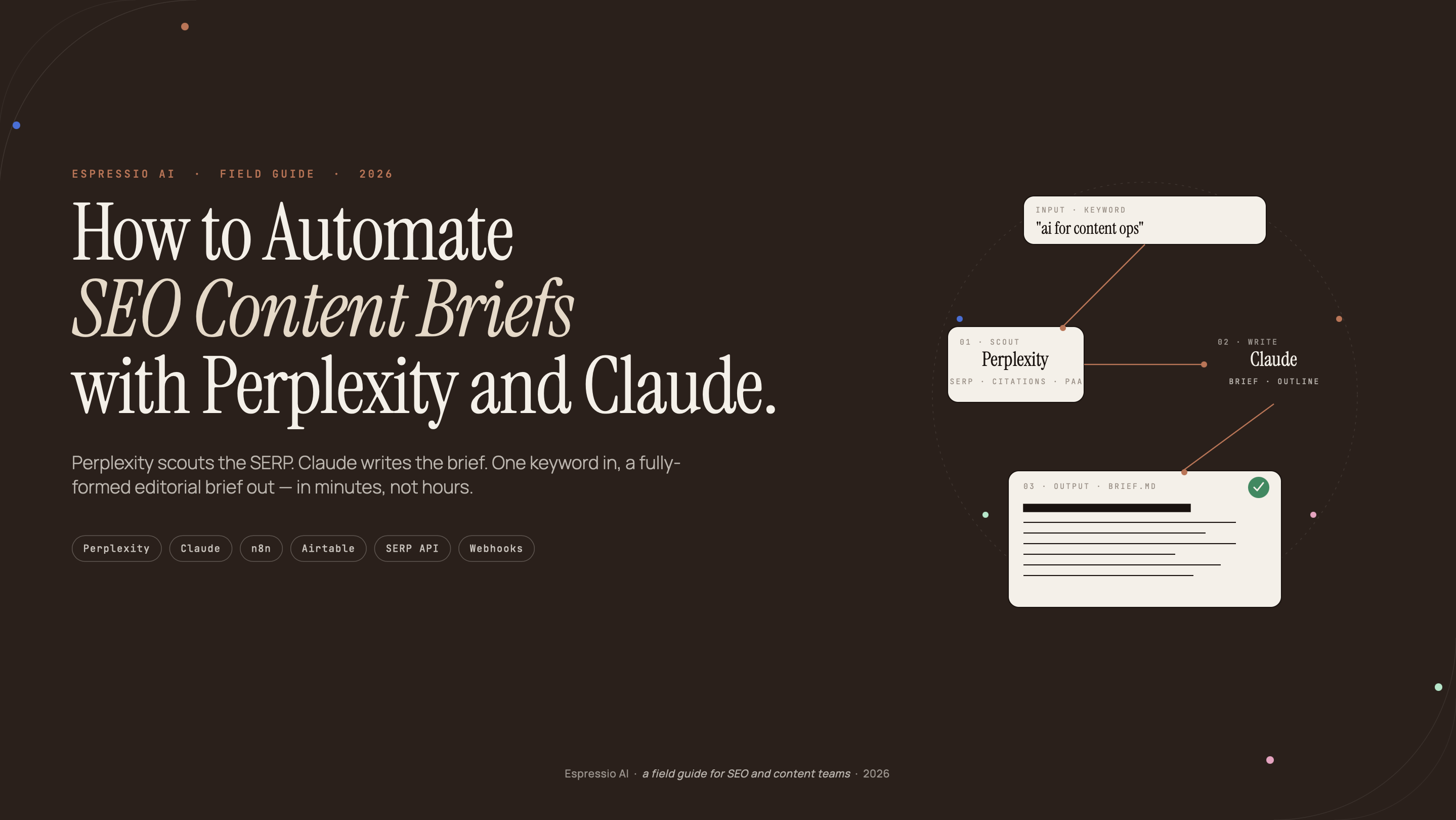
Content teams report spending 2-4 hours per brief on SERP research, competitor heading extraction, intent classification, and structural planning. Most of those teams already use AI tools for drafting, editing, and topic ideation. The brief step, which requires the most structured data collection, still runs manually.
The problem is the pipeline between tools, not the tools themselves. Most SEO teams use Perplexity for research and Claude for writing as two separate manual steps, copy-pasting findings between them. That handoff is what this guide eliminates.
This tutorial builds a complete brief automation workflow: a structured Perplexity Deep Research query that pulls SERP data and competitor insights in one call, a Claude system prompt that converts that output into a production-ready brief, and an optional Make.com or n8n layer for batch processing from a keyword spreadsheet.
Key Takeaways
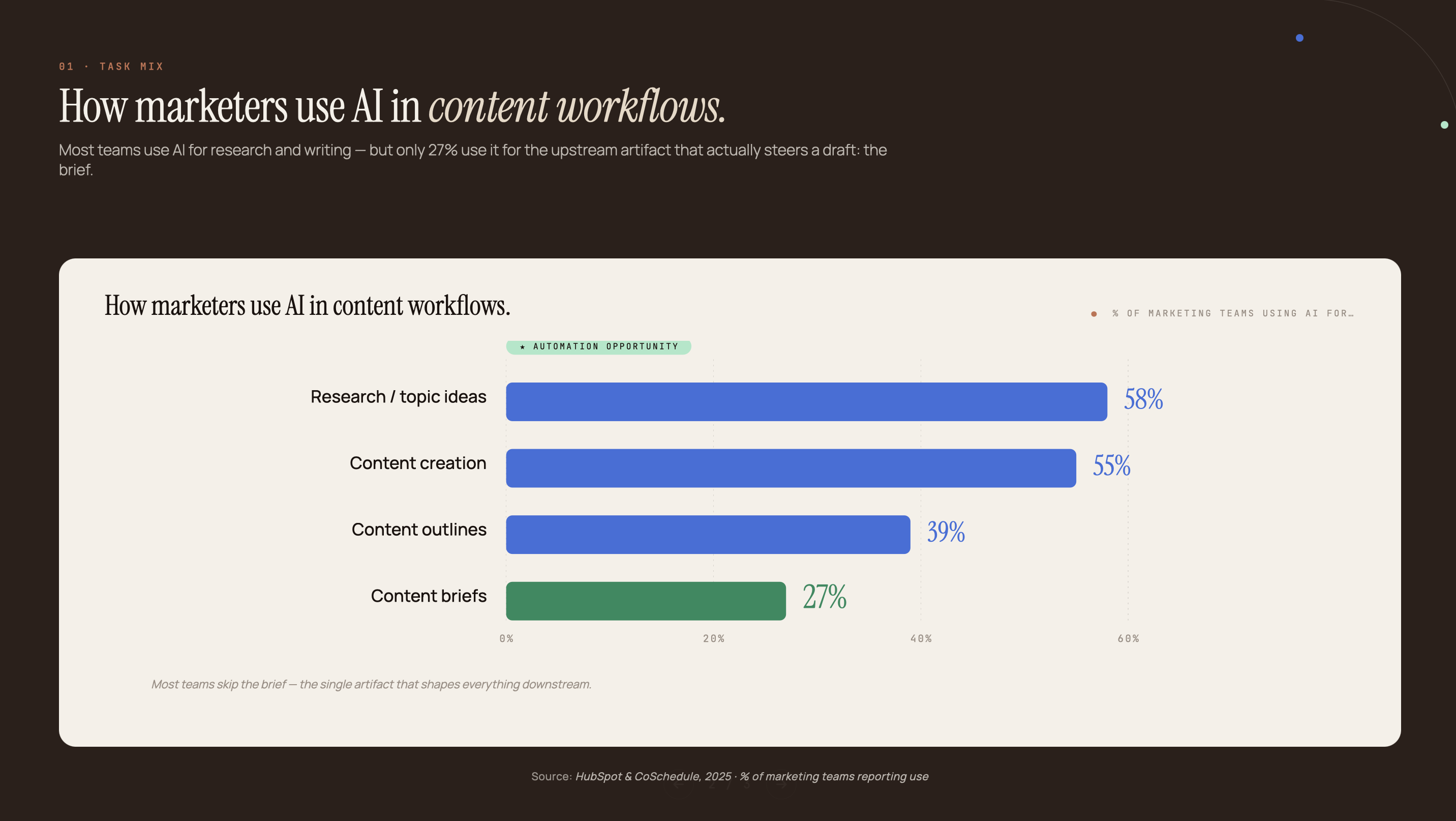
- 86% of SEO professionals use AI tools, yet only 27% have automated content brief creation. That gap costs 2-4 hours per brief (Aira State of SEO, 2025; DemandSage, 2026)
- This pipeline uses Perplexity to research the SERP and top competitors in one query, then feeds that output directly into Claude with a structured prompt that returns a complete brief: headings, word count, angle, sources, and FAQ
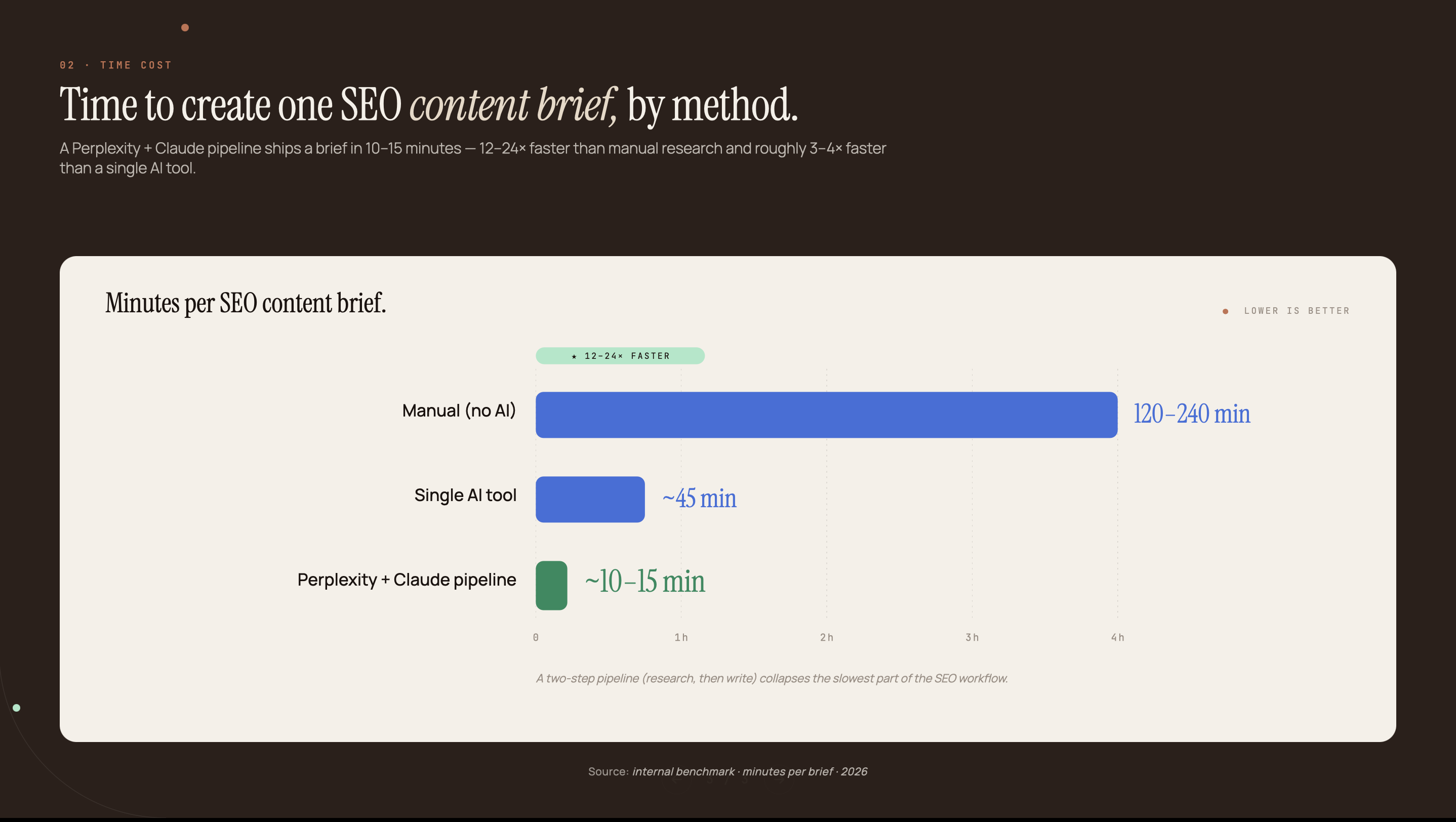
- Anthropic’s own research found a median 84% time savings across tasks completed with Claude (Anthropic, Nov 2025). Applied to brief creation, a 3-hour manual process runs in under 20 minutes
- For teams publishing at scale, the same pipeline runs unattended via Make.com or n8n from a keyword spreadsheet
Why most SEO teams are still writing briefs by hand
86% of SEO professionals have integrated AI into their workflows, yet only 27% use AI specifically for content brief creation (DemandSage, 2026). The majority apply AI to topic ideation and content drafting. The brief step, which requires the most structured research, stays manual.
Manual brief creation involves six discrete tasks: pulling the top 10 SERP results, extracting competitor H2 headings, classifying search intent, benchmarking word counts, aggregating People Also Ask questions, and identifying authority sources to cite. Each step is documented and repetitive. Content teams report it takes 2-4 hours per brief, even for experienced SEO professionals.
The “AI for briefs” guides that exist tend to recommend single-tool workflows: use ChatGPT, or use Perplexity. Neither returns structured output that a writer can immediately act on without reformatting. That reformatting step is what restores 60-80% of the manual work time.
Anthropic’s own research found a median 84% time savings across tasks completed with Claude, based on analysis of 100,000 real conversations (Anthropic, Nov 2025). Brief creation is exactly the kind of structured, repetitive task where that savings rate applies, provided the workflow is built to use Claude’s output directly.
Perplexity produces strong research output. Claude generates strong structured content. The gap is the handoff between them: a query format that forces Perplexity to return numbered sections, and a Claude prompt that treats those sections as structured input and returns a complete brief. For teams already working on AI content automation at B2B scale, brief automation is the highest-leverage starting point because it eliminates the most time-consuming research step at the front of the pipeline.
How the Perplexity + Claude pipeline works
One-third of marketers using AI save 10-14 hours per week on content tasks; another third save 15 or more hours (HubSpot 2026 State of Marketing, 2026). The Perplexity + Claude pipeline concentrates those savings at the brief stage, where the most structured manual work happens before writing begins.
The pipeline runs in two steps. First, a Perplexity Deep Research query analyzes the SERP for your target keyword and returns a structured research report: search intent, competitor H2 headings, content gaps, People Also Ask questions, authority sources, and a word count recommendation. This takes 60-90 seconds.
Second, that research output goes directly into Claude as context in a structured system prompt. Claude reads the research and returns a complete content brief formatted as JSON: title, meta description, H2 sections with per-section word counts, key angle, secondary keywords, FAQs, and a recommended CTA. No reformatting. No selective copy-paste. The Perplexity output is the Claude input.
The optional third layer is Make.com or n8n. A trigger fires when a keyword is added to a spreadsheet. The Perplexity API query runs, the output feeds to Claude, and the resulting JSON brief writes back to the spreadsheet row. Total time: under two minutes of active computation, 5-8 minutes of human review.
Step 1: Build the Perplexity research query
Perplexity reached 780 million queries in May 2025, up from 250 million in July 2024 (DemandSage, Feb 2026). Its Deep Research mode is what makes it valuable for brief automation: instead of a conversational answer, it returns a cited, structured research report that Claude can process directly.
Open Perplexity and switch to Deep Research mode. Set the Focus to “Web.” Where available, apply a date filter to the last 12 months. This ensures the SERP data and competitor headings reflect current rankings rather than historical snapshots.
We tested six different Perplexity query formats before landing on the one below. Earlier versions asked open-ended questions like “what should I write about [keyword]?” and returned narrative summaries that still required 20-30 minutes of manual structuring before Claude could use them. The numbered section format forces Perplexity to separate SERP overview from competitor headings from content gaps, which is exactly the structure Claude’s system prompt expects. That alignment between the Perplexity output shape and the Claude input format is what makes the handoff instant.
Use this query template. Replace the bracketed placeholders with your keyword and audience description:
Analyze the top 10 Google search results for the keyword "[TARGET KEYWORD]" and provide:

1. SERP OVERVIEW: Search intent (informational/commercial/transactional), dominant content format (listicle/how-to/tutorial/comparison), average estimated word count of top 3 results.

2. COMPETITOR H2 STRUCTURE: List the H2 headings from the top 3 results verbatim.

3. CONTENT GAPS: What questions or angles do all top 3 results fail to address?

4. PEOPLE ALSO ASK: List 5 PAA questions that appear for this keyword.

5. AUTHORITY SOURCES: List 3-5 URLs that appear in multiple top results as cited sources (studies, research, data).

6. WORD COUNT TARGET: Based on the top results, recommend a target word count.

Target keyword: [TARGET KEYWORD]
Target audience: [DESCRIBE YOUR READER IN ONE SENTENCE]
If Perplexity returns a narrative summary rather than numbered sections, add this line to the query and resubmit: “Respond only in numbered sections as specified. Do not summarize.” That single instruction resolves roughly 90% of unstructured output cases.
Perplexity Pro ($20/month) is required for Deep Research mode. The free tier supports search but returns conversational answers that require significant manual cleanup before the Claude step. For a full breakdown of what Perplexity’s plans include, the complete Perplexity guide covers plan differences and use cases in detail.
Step 2: Write the Claude prompt that converts research into a brief
68% of marketers are actively adapting their content strategies for AI search, but most still use Claude as a general writing assistant rather than a structured brief generator (BrightEdge, Mar 2026). The difference is prompt engineering: a system prompt that tells Claude exactly which fields to return, in which format, produces consistent output a writer can act on immediately.
The insight most “AI brief” guides miss is this: Claude does not know your brief format. A generic prompt (“write a content brief for [keyword]”) returns narrative prose that still requires 20-30 minutes of manual reformatting. A structured JSON output prompt - one that names each brief field as a key Claude must populate - eliminates the reformatting step entirely. The JSON keys map directly to columns in Notion, Airtable, or any brief template. The h2_sections array includes per-section word counts. The content_gaps_to_exploit field forces Claude to address what competitors missed. Each field does work a narrative output makes the human do instead.
Create a new Claude conversation. Paste the system prompt below into the system prompt field (or prepend it as the first message). Then paste your complete Perplexity output where indicated:
You are a senior SEO content strategist. You will receive structured research about a target keyword, including SERP analysis, competitor headings, content gaps, People Also Ask questions, and authority sources.

Using this research, generate a complete SEO content brief.

OUTPUT FORMAT: Return only valid JSON with these exact keys:
{
  "title": "Question-format title under 60 characters, includes the target keyword",
  "meta_description": "150-160 character description, includes 1 statistic, ends with a value proposition",
  "target_audience": "One sentence describing who this content is for",
  "search_intent": "Informational / Commercial / Transactional",
  "word_count_target": [number],
  "h2_sections": [
    {"heading": "H2 text", "focus": "What this section answers", "word_count": [number]}
  ],
  "key_angle": "The unique perspective this piece takes vs. the competitor content you analyzed",
  "primary_keyword": "[keyword]",
  "secondary_keywords": ["keyword 1", "keyword 2", "keyword 3"],
  "paa_to_address": ["PAA question 1", "PAA question 2", "PAA question 3"],
  "authority_sources_to_cite": ["URL 1", "URL 2", "URL 3"],
  "content_gaps_to_exploit": ["Gap 1", "Gap 2"],
  "faq_questions": ["Question 1", "Question 2", "Question 3"],
  "cta": "What action the reader should take after reading"
}

RESEARCH INPUT:
[PASTE PERPLEXITY OUTPUT HERE]
Use Claude Sonnet for this step. Claude Haiku is faster but frequently truncates the h2_sections array and omits the content_gaps_to_exploit field, requiring a follow-up prompt to complete the brief. Each brief run costs approximately $0.01-$0.02 in API tokens at Sonnet pricing. The Claude API for marketing teams guide covers API key management and rate limit configuration that applies here.
Step 3: Review the brief output before handing to writers
87% of B2B organizations using AI for content report improved productivity, but the teams maintaining quality use AI-generated output as a starting point rather than a final product (CMI + MarketingProfs, n=1,015, Oct 2025). The brief review step takes 5-8 minutes and catches the gaps the automated pipeline cannot fill.
Run four checks on every brief Claude returns before it reaches a writer.
Title check. Does the question-format title match the actual search intent? Claude occasionally writes titles that run long or sound academic. Trim to under 60 characters and confirm the primary keyword appears naturally.
H2 gap check. Compare Claude’s h2_sections array against the competitor headings Perplexity extracted. If competitors cover a subtopic that Claude’s outline skipped, add it manually. Perplexity occasionally misses secondary subtopics in dense SERPs.
Third, open each URL in authority_sources_to_cite and confirm the page is live and the content aligns with the brief’s angle. Replace broken or irrelevant links before the brief reaches a writer; dead source URLs create extra work at the drafting stage.
Finally, read the key_angle field. If it reads like a generic statement any article on the topic could make, rewrite it before handoff. That field is what separates a brief that produces a rankable article from one that produces a generic overview.
The review averages 5 minutes per brief after two or three pipeline runs. First runs take longer as you calibrate what Claude tends to miss for your specific niche and brief format.
Step 4: Scale to batch processing with Make.com or n8n
95% of B2B organizations now use AI-powered applications, and the ones scaling content production run brief generation as a triggered workflow rather than a manual two-step process (CMI + MarketingProfs, 2025). The Make.com or n8n layer removes the manual Perplexity query step entirely.
The Make.com scenario runs four modules.
Module 1: Trigger. A Google Sheets or Airtable “Watch Rows” trigger fires when a new keyword is added to your brief queue spreadsheet. Set it to watch column A for new entries.
Module 2 is an HTTP module pointed at Perplexity’s API. Inject the keyword from the trigger row into the structured query template from Step 1 and map the full research output to a variable called perplexity_output.
Module 3 is a second HTTP module for the Claude API. Send the system prompt from Step 2 in the system field. Inject perplexity_output into the user message at the [PASTE PERPLEXITY OUTPUT HERE] placeholder and parse Claude’s JSON response.
Module 4: Write brief to sheet. Map each JSON key from Claude’s response to a corresponding column: title to column B, meta description to column C, h2_sections to column D, key_angle to column E.
The result: add a keyword to the spreadsheet, wait 90 seconds, return to a completed brief row. No browser tabs. No copy-pasting.
The n8n equivalent uses the same four-node sequence: a webhook or Airtable trigger, a Perplexity HTTP node, a Claude HTTP node, and an Airtable or Sheets write node. For teams already familiar with n8n and Perplexity automation patterns, the node configuration maps directly to the pattern used in competitive intelligence workflows. For teams storing completed briefs in Airtable, the AI content calendar in Airtable guide covers the base schema that pairs naturally with a brief automation output.
API costs at scale: Perplexity’s Deep Research API requires a paid plan; Claude Sonnet runs under $0.02 per brief. A Make.com Core plan at $9/month includes 10,000 operations per month; 50 briefs fall well within that at roughly 200 operations each.
If you want us to build this pipeline for your content team, let’s chat.
Frequently asked questions about SEO content brief automation
Do I need a Perplexity Pro account to use this workflow?
Deep Research mode, which produces the structured multi-section output this pipeline depends on, requires Perplexity Pro ($20/month). The standard free tier supports search but returns conversational answers that need more manual cleanup before passing to Claude. To test the pipeline without a Pro subscription, use Perplexity’s standard search mode and manually structure the output before the Claude step; this adds 10-15 minutes but still reduces total brief time significantly.
Which Claude model works best for brief generation?
Claude Sonnet is the optimal choice for brief generation: it returns complete JSON output across all required fields at roughly 3-5× lower cost than Opus. Claude Haiku is fast but frequently returns truncated h2_sections arrays and omits the content_gaps_to_exploit field, requiring a follow-up prompt to complete the brief. Use Opus only for highly competitive keywords where the brief needs maximum depth.
How much does it cost to generate content briefs with this pipeline?
A single brief costs approximately $0.01-$0.02 in Claude API tokens: about 300 input tokens plus 800 tokens of Perplexity context plus 600 tokens of brief output at Claude Sonnet pricing. Perplexity API adds roughly $0.005 per Deep Research query. Total API cost per brief is under $0.03. For a team producing 20 briefs per month, that’s under $0.60 in API spend, plus Perplexity Pro at $20/month if you use the web interface rather than the API.
Can I use this pipeline with other AI models instead of Claude?
Yes. The JSON output system prompt works with any model that supports structured output or JSON mode. GPT-4o supports response_format: { type: json_object } natively and produces comparable brief output. Claude’s advantage is instruction-following reliability: when the system prompt specifies exactly which JSON keys must appear, it rarely omits fields. Test both on your specific brief format before committing to one.
How long does a full brief take end-to-end with this pipeline?
Manual mode (Perplexity query, copy output, Claude prompt, review) runs 12-18 minutes end-to-end including the 5-minute review step. Automated mode via Make.com or n8n reduces human-in-the-loop time to 5-8 minutes (review only), with the Perplexity and Claude calls running in the background in 60-90 seconds. A manual brief workflow without AI typically takes 2-4 hours.
What to build next
This four-step pipeline is modular by design. Run Steps 1 and 2 manually for your first three keywords to validate the output quality and calibrate what Claude tends to miss for your niche. Add Make.com or n8n once the brief format is confirmed and you’re ready to process briefs in bulk.
The brief is one piece of a larger content production system. Automating brief creation removes the bottleneck at the front of the pipeline; the content still needs to be written, edited, and published on a schedule. The broader AI content automation framework covers how teams connect brief automation to drafting, QA, and publishing workflows without losing quality control.
For teams producing 20 or more pieces per month, the ROI compounds fast. At $0.03 per brief, a 20-brief month costs under $0.60 in API spend; at the manual brief rate, the team gets back 40-80 hours. That time goes toward strategy, editing, and the work AI tools still can’t replicate.
Ready to build it for your team? Espressio AI configures and deploys Perplexity + Claude pipelines adapted to your brief format, keyword volume, and publishing cadence.



