



Luka Mrkić
Head of BD
Insights, strategies, and real-world playbooks on AI-powered marketing.
MAY 15, 2026
How to Build an AI Content Calendar in Airtable with GPT-4
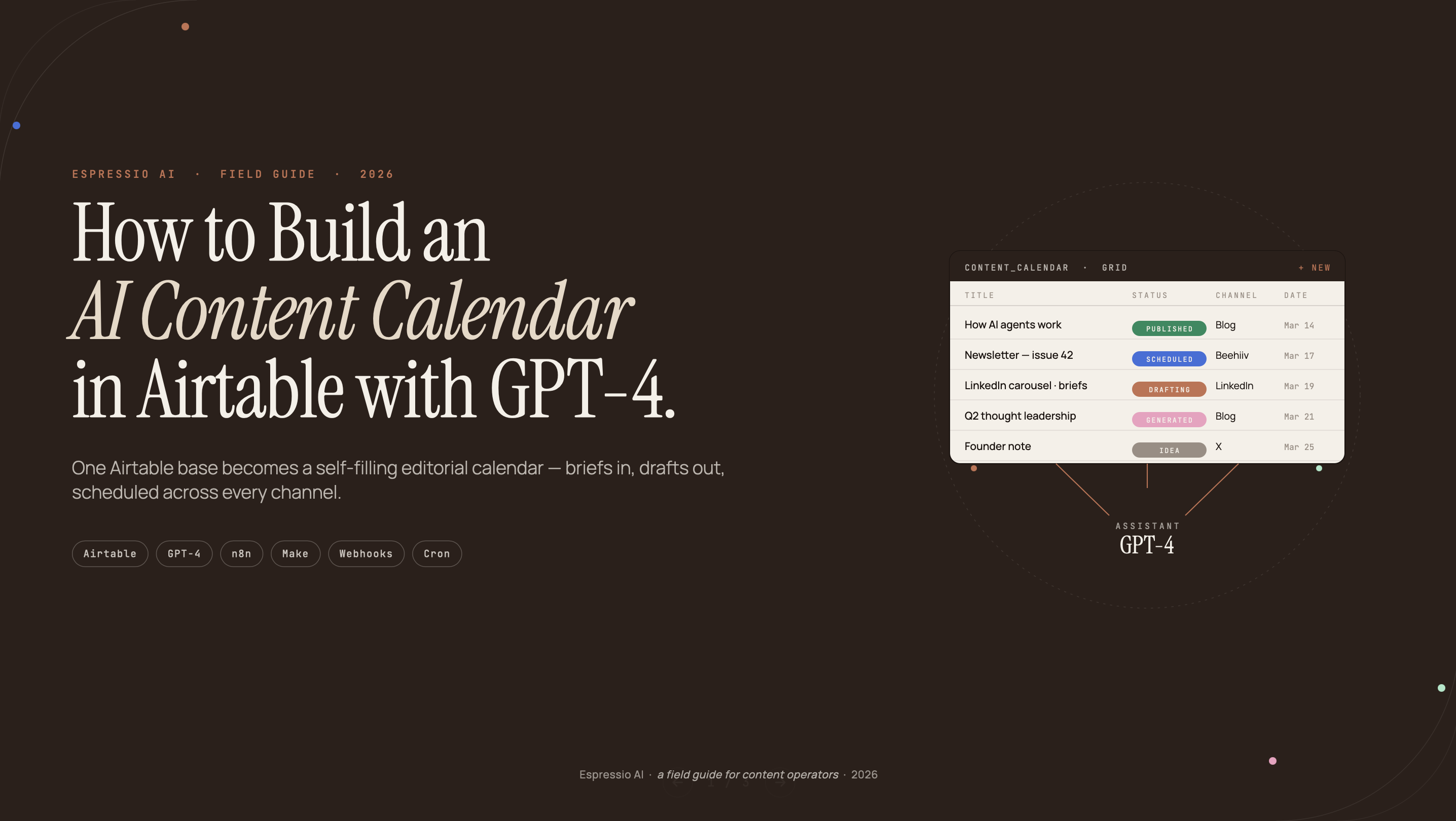
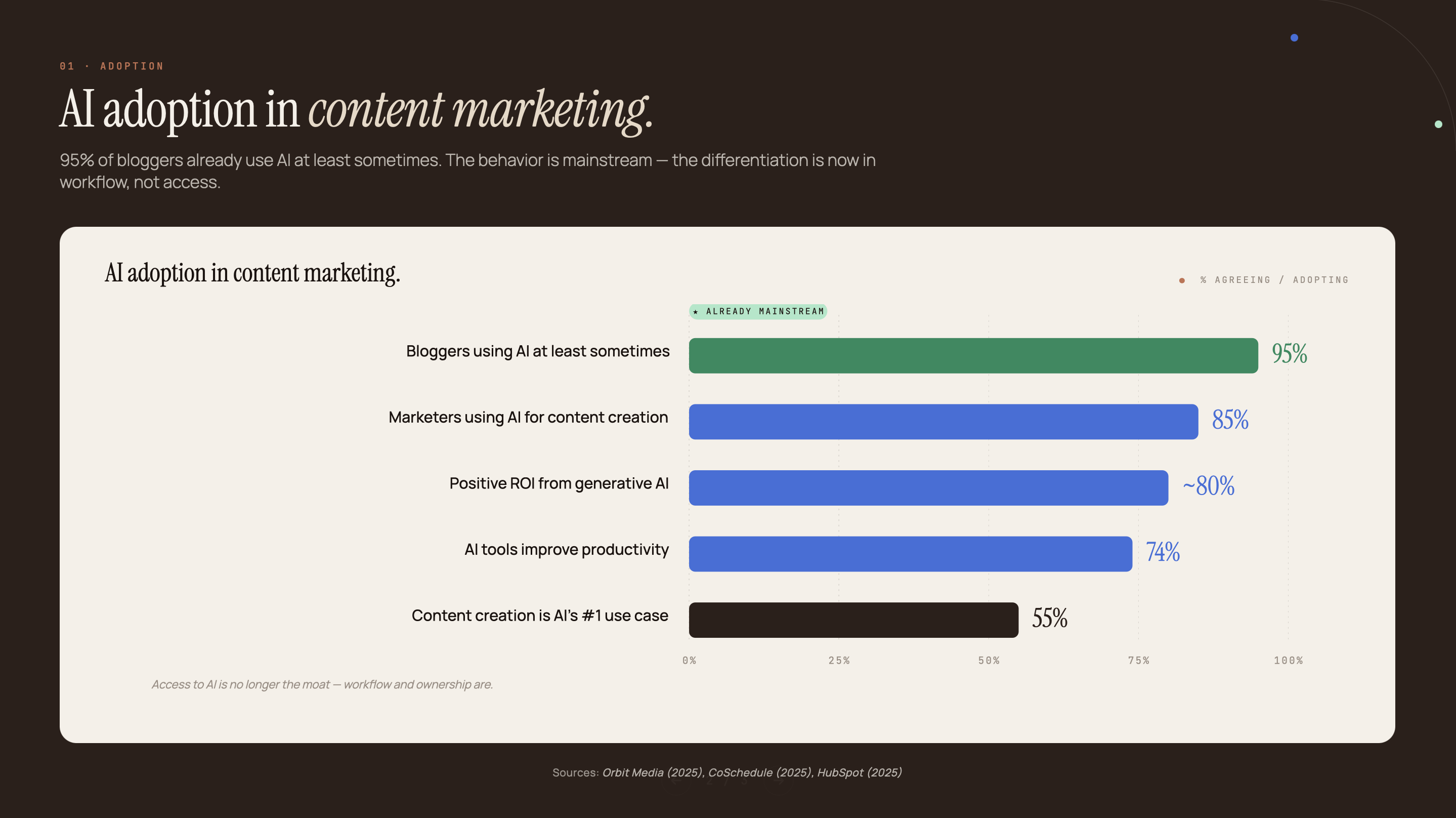
85% of marketers use AI tools for content creation (CoSchedule, 2025). But most content calendars still live in a shared Google Sheet someone updates on Friday afternoon. AI adoption is high; the planning infrastructure hasn’t followed.
Content calendar tools don’t know what your audience needs. GPT-4 does, if you wire it to the right base. This guide builds a complete system: an Airtable base that uses GPT-4 to generate content briefs, assign channels, suggest publish dates, and notify the team, all from a single topic entry. Five steps, one afternoon to build.
Key Takeaways
- 85% of marketers now use AI tools for content creation, yet most content calendars are still manually maintained spreadsheets (CoSchedule, 2025)
- This guide builds a 5-step system: Airtable base structure, GPT-4 API connection, prompt engineering, multi-channel views, and automated publishing triggers
- GPT-4 API costs fell ~90% since launch to under $3 per million tokens (Digital Applied, 2026): 50 AI-generated content briefs now cost under $0.50/month
- Airtable native AI suits single-field generation; GPT-4 API is required for multi-field workflows, branded prompts, and batch brief generation
Why AI-powered content calendars outperform manual scheduling
55% of marketers identified content creation as AI’s most popular use case in 2025, up 12% from 2024 (HubSpot, 2025), yet most content calendars remain manually maintained. The gap is in planning infrastructure, not AI adoption.
Manual content calendars break down in predictable ways. Ideas go stale between planning meetings. Deadlines slip because no one knows who owns the brief. Writers start from scratch every time because there’s no feedback loop between what performed and what to write next. The calendar itself becomes a source of friction rather than a coordination tool.
Most teams already have the tools. The gap is that AI lives in one tab and the content calendar lives in another, with no trigger connecting the two. An AI-connected calendar closes that: GPT-4 generates the brief the moment a topic is entered, status changes trigger Slack notifications to the assigned writer, and published posts feed back into a performance view so planning reflects what’s actually working.
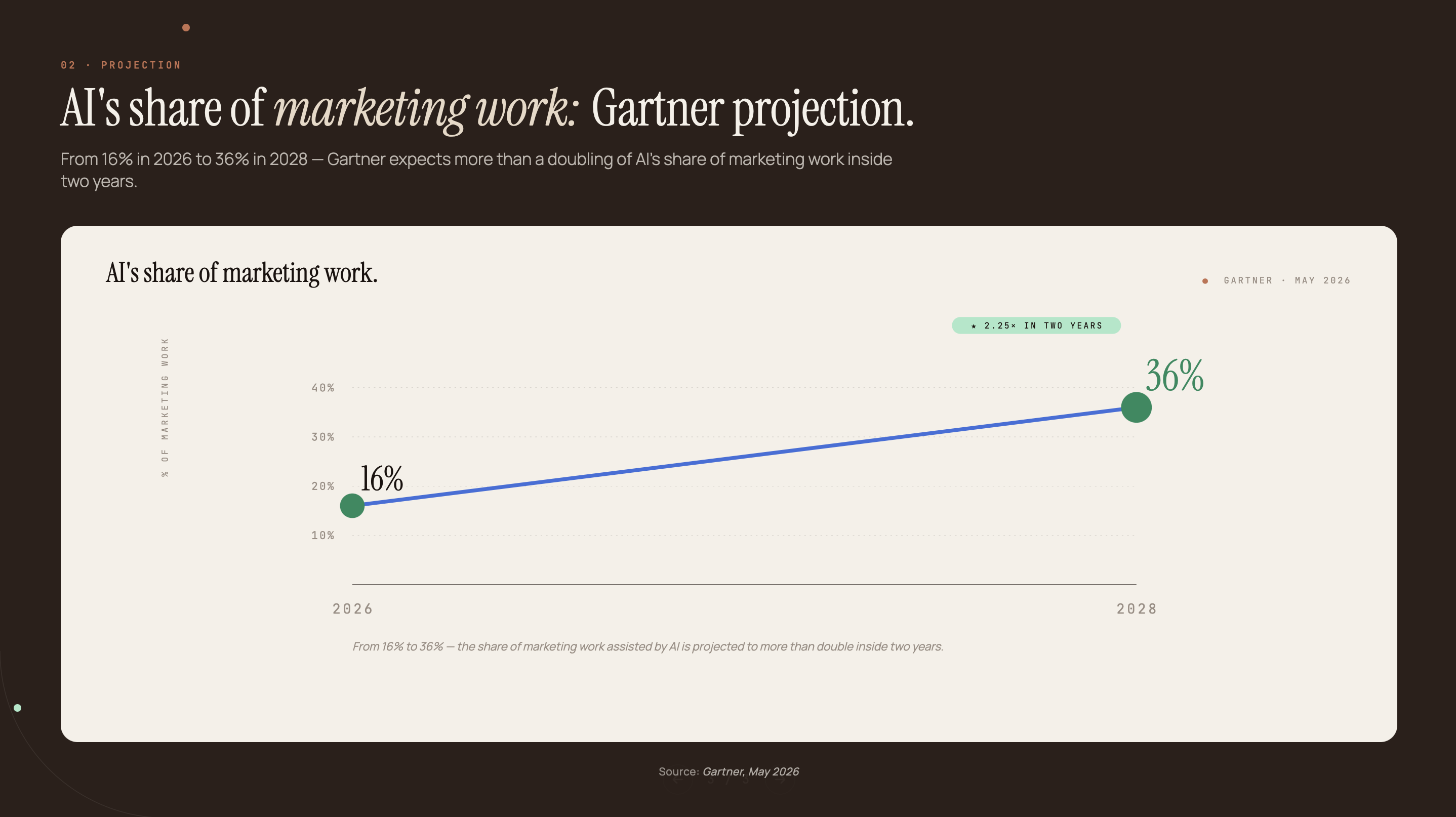
Gartner projects that AI automation will handle 16% of marketing work in 2026, rising to 36% by 2028 (Gartner, May 2026). Teams that wire AI into their planning workflow, rather than using it as a one-off writing assistant, will build a compounding advantage over teams that keep the two systems separate.
For a broader look at AI content automation at B2B scale, the patterns here apply across channels and team sizes.
Step 1: How to build the Airtable base structure
Marketing teams that centralize campaign work in Airtable consistently report faster brief turnaround and fewer missed deadlines, but only when the base is designed around workflow, not just status tracking. The structure below separates raw topic ideas from generated output, which makes it easy to re-run AI without overwriting history.
The base uses three linked tables. Content Ideas holds the raw inputs: Topic, Channel (single select: Blog, LinkedIn, Newsletter, X), Target Keyword, Audience, Assigned To, Status, Publish Date, and a Trigger AI Brief checkbox. That checkbox is the control switch. When it’s checked, the automation fires.
Content Briefs links from Content Ideas and holds the AI-generated output: Title, Meta Description, Target Audience (AI), H2 Outline, Key Angle, Suggested Word Count, and CTA. Keeping this in a separate table prevents the original topic entry from being overwritten when you re-run the brief generation.
The third table, Published, holds the live record: URL, Traffic (number field), Backlinks (number field), and a linked record back to the originating Content Brief. This is the performance layer: it’s where you compare what the brief aimed for against what the published piece actually delivered.
The field types matter as much as the structure. Use Long Text for all AI-output fields so Airtable doesn’t truncate the response. Use Single Select for Channel and Status so you can filter and group views cleanly. The linked record between Ideas and Briefs is what allows a single automation to read topic data from one table and write brief data to another.
We built this three-table structure for a content team at a B2B SaaS company that was spending six hours each week writing briefs manually. After the GPT-4 integration went live, that dropped to under 40 minutes of review time. The writers stopped dreading brief day.
For teams already using Claude and Airtable content workflows, the same three-table schema applies; you’d swap the OpenAI API endpoint for Anthropic’s.
Step 2: How to connect GPT-4 to Airtable
GPT-4 API input token cost fell roughly 90% since launch, to under $3 per million tokens as of Q1 2026 (Digital Applied, 2026). At that price, generating 50 content briefs per month via the API costs under $0.50. Cost isn’t the barrier anymore; the integration path is.
Method A: Airtable native automations (no-code path)
Set the trigger to “When record matches condition” with the condition being Trigger AI Brief checkbox equals true. The action is “Run a script,” available on Team plans and above. Inside the script, use JavaScript’s fetch() to call https://api.openai.com/v1/chat/completions. Store your OpenAI API key in Airtable’s scripting secrets manager, never hardcoded.
Parse the JSON response inside the same script, then use Airtable’s scripting API to write each key to the matching field in the linked Content Briefs record.
The fetch call body looks like this:
{
  "model": "gpt-4o",
  "messages": [
    {
      "role": "system",
      "content": "[your system prompt here]"
    },
    {
      "role": "user",
      "content": "Topic: {Topic field}\nTarget keyword: {Target Keyword field}\nAudience: {Audience field}"
    }
  ],
  "response_format": { "type": "json_object" },
  "temperature": 0.7,
  "max_tokens": 800
}
Method B: Make.com or Zapier (recommended for teams that want visual workflow and error handling)
Trigger on Airtable “Watch Records.” Add a router with a conditional branch that only continues when the checkbox is true. The OpenAI module accepts the GPT-4 prompt, returns the JSON response, and a final Airtable module writes each parsed value back to the Content Briefs record.
The advantage over native automations: built-in retry logic for failed API calls, execution logs for debugging, and error notifications when something breaks. Airtable native automations run silently; Make.com and Zapier tell you when they fail.
For a practical example of this pattern in action, see how the Make.com automation pipeline handles similar API-to-Airtable workflows.
Step 3: How to write the GPT-4 system prompt
84% of marketers who adopted AI report increased productivity (CoSchedule, 2025), but the quality of AI output in a content workflow depends almost entirely on prompt design. A generic prompt produces generic briefs; a structured prompt with brand context produces drafts writers can use immediately.
The most common mistake: prompts that ask GPT-4 to “write a content brief” return a wall of text that doesn’t match any existing brief format. The fix is a structured JSON output prompt: tell GPT-4 to return a JSON object with keys that map directly to Airtable field names. The automation then writes each value to the matching field automatically.
Use this system prompt as your starting template:
You are a senior content strategist at a B2B marketing agency.

Given a topic and target keyword, generate a structured content brief.

OUTPUT FORMAT: Return only valid JSON with these exact keys:
{
  "title": "Question-format title under 60 chars with target keyword",
  "meta_description": "150-160 char description with one statistic",
  "target_audience": "Who this post is for, one sentence",
  "search_intent": "Informational / Commercial / Transactional",
  "h2_sections": ["H2 #1 text", "H2 #2 text", "H2 #3 text", "H2 #4 text", "H2 #5 text"],
  "key_angle": "The unique perspective this post takes vs. competitors",
  "cta": "What action we want the reader to take",
  "suggested_word_count": 2000
}

INPUTS:
Topic: [AIRTABLE_FIELD: Topic]
Target keyword: [AIRTABLE_FIELD: Target Keyword]
Target audience: [AIRTABLE_FIELD: Audience]
Brand voice: [YOUR BRAND VOICE DESCRIPTION HERE]
Four things make this prompt work. The JSON output format forces structured responses that map directly to Airtable fields. Brand voice injection in the system prompt ensures consistent tone across every brief. The response_format: { "type": "json_object" } parameter in the API call prevents GPT-4 from adding prose text around the JSON. And the explicit key names in the prompt match the field names in your Airtable base, so the parsing step is trivial.
Test the prompt in the ChatGPT interface before wiring it to Airtable. Paste in a sample topic, keyword, and audience. Verify the JSON parses cleanly at jsonlint.com. If it fails, adjust the prompt before connecting the automation.
One model note: GPT-4o is the right choice here. It supports the json_object response format natively and costs less per token than GPT-4 Turbo. Use gpt-4o as the model string in your API call.
Step 4: Build multi-channel views and publishing triggers
95% of bloggers now use AI at least sometimes (Orbit Media, 2025), but the teams that maintain consistent publishing are the ones with a visual workflow, not just an AI tool. The base structure is the engine; the views and automations are the dashboard.
Set up four Airtable views. The Calendar view groups records by Publish Date and colors them by Channel: blog in blue, LinkedIn in orange, newsletter in green, X in purple. You see the whole month at a glance and spot gaps immediately. The Kanban view uses Status as the column: Idea, Brief Ready, In Draft, In Review, Scheduled, Live. Writers and editors can drag cards through the pipeline without touching any other part of the base.
The Channel grouping view is a filtered grid showing all records for a single channel, sorted by Publish Date. Assign it to specific team members so the LinkedIn writer only sees LinkedIn content. For the performance layer, add a linked view of the Published table showing traffic and backlinks per piece alongside the brief that generated it. This is the feedback loop manual calendars don’t have.
Three automations close the publishing loop. When Status changes to “Brief Ready,” a Slack notification fires to the assigned writer with a direct link to the Content Briefs record. When Status changes to “Scheduled,” a Google Calendar event is created automatically with the publish date and title. When Status changes to “Live,” the URL is written to the Published table and a follow-up reminder is scheduled 30 days out to check traffic.
Teams running multi-channel calendars will find the view structure here mirrors what’s described in the guide to building an AI content calendar in Notion with Claude; the underlying logic is the same even though the tools differ.
Airtable native AI vs. GPT-4 API: which should you use?
Nearly 80% of marketers say generative AI delivers positive ROI for content writing (HubSpot, 2025), but the tool that delivers that ROI depends on what you’re asking it to generate. Airtable’s native AI and the GPT-4 API serve different needs, and choosing the wrong one for your use case costs time rather than saving it.
The comparison below maps the decision clearly. One practical note before the table: start with Airtable native AI to validate that the workflow logic is correct, then switch to the GPT-4 API when the brief output needs to populate more than two fields or when brand voice consistency matters across the team.
| Factor | Airtable native AI | GPT-4 API |
|---|---|---|
| Setup complexity | 5 minutes (no code) | 30-60 minutes (HTTP/automation) |
| Multi-field output | Single field only | Multiple fields from one call (JSON) |
| Brand voice injection | Limited (no persistent system prompt) | Full system prompt per call |
| Cost | Included in Airtable plan tier | ~$0.01 per brief (under $3/1M tokens) |
| Best for | Quick single-field generation (taglines, meta descriptions) | Full content brief across 6-8 fields |
The decision point is the number of fields. If you need a tagline or a meta description in one field, native AI is faster to set up and costs nothing extra. If you need a full brief with title, audience, H2 outline, key angle, CTA, and word count written to six separate Airtable fields from a single trigger, the GPT-4 API path is the only one that delivers that in one call.
Teams running high-volume content operations should also look at repurposing existing content with Claude to multiply output from existing assets without additional brief generation costs.
If you want us to build this for your content team, let’s chat.
Frequently asked questions about building an AI content calendar in Airtable with GPT-4
Does Airtable have native AI for content calendars?
Yes. Airtable’s native AI field lets you generate text for a single field per automation run - useful for writing taglines, meta descriptions, or short summaries. It doesn’t support multi-field output, so building a full content brief that populates title, meta description, H2 outline, and audience in one call requires the GPT-4 API path instead.
How much does it cost to generate content briefs with the GPT-4 API?
At current GPT-4 API pricing (under $3 per million input tokens as of Q1 2026), generating 50 content briefs per month costs under $0.50. A typical brief prompt with topic, keyword, and brand voice context runs roughly 200–300 input tokens and returns 300–500 output tokens, putting the per-brief cost at approximately $0.01.
Can I use Make.com or Zapier instead of Airtable native automations?
Yes, and for most teams Make.com or Zapier is the better choice. Both platforms give you a visual workflow editor, built-in retry logic for failed API calls, execution logs for debugging, and conditional routing so the GPT-4 call only fires when a record meets specific criteria. Airtable native automations work but offer less observability.
What Airtable plan do I need to use HTTP requests in automations?
Airtable’s native automations don’t include a dedicated HTTP request action. To call the OpenAI API from Airtable, use the Run a script action, which runs JavaScript and supports fetch() calls to external APIs. This action requires a Team plan or higher (Airtable’s current plans are Free, Team, Business, and Enterprise Scale). Teams on Free plans should use Make.com or Zapier, both of which have free tiers that support Airtable and OpenAI integrations.
How is an AI content calendar different from a regular content calendar?
A regular content calendar tracks what to publish and when. An AI content calendar also generates the brief at the moment a topic is entered - title, meta description, target audience, H2 outline, and CTA - so the writer starts from a structured draft rather than a blank page. The human still handles strategy, approval, and final editing; the AI handles the brief scaffolding.
What to build next
This system covers five steps: the three-table base structure, the GPT-4 API connection via native automations or Make.com, the JSON output prompt template, multi-channel views with Kanban and Calendar, and the native AI vs. GPT-4 API decision framework.
The result is a calendar that thinks. A writer enters a topic, checks a box, and returns to a structured brief waiting in the linked record. No blank page. No brief meeting. The team spends its time on strategy, editorial judgment, and distribution: the parts that actually require human thinking.
The GPT-4 API runs the brief generation. The Airtable views run the workflow. Together they build a content operation that scales without adding headcount.
For teams that want to extend this into a broader AI content automation framework, the patterns here connect directly to audience targeting, performance feedback loops, and multi-channel distribution.
Espressio AI builds and deploys these systems. Get in touch to discuss a content calendar build for your team.



