



Luka Mrkić
Head of BD
Insights, strategies, and real-world playbooks on AI-powered marketing.
MAY 15, 2026
How to Turn YouTube Transcripts into Blog Posts with Claude
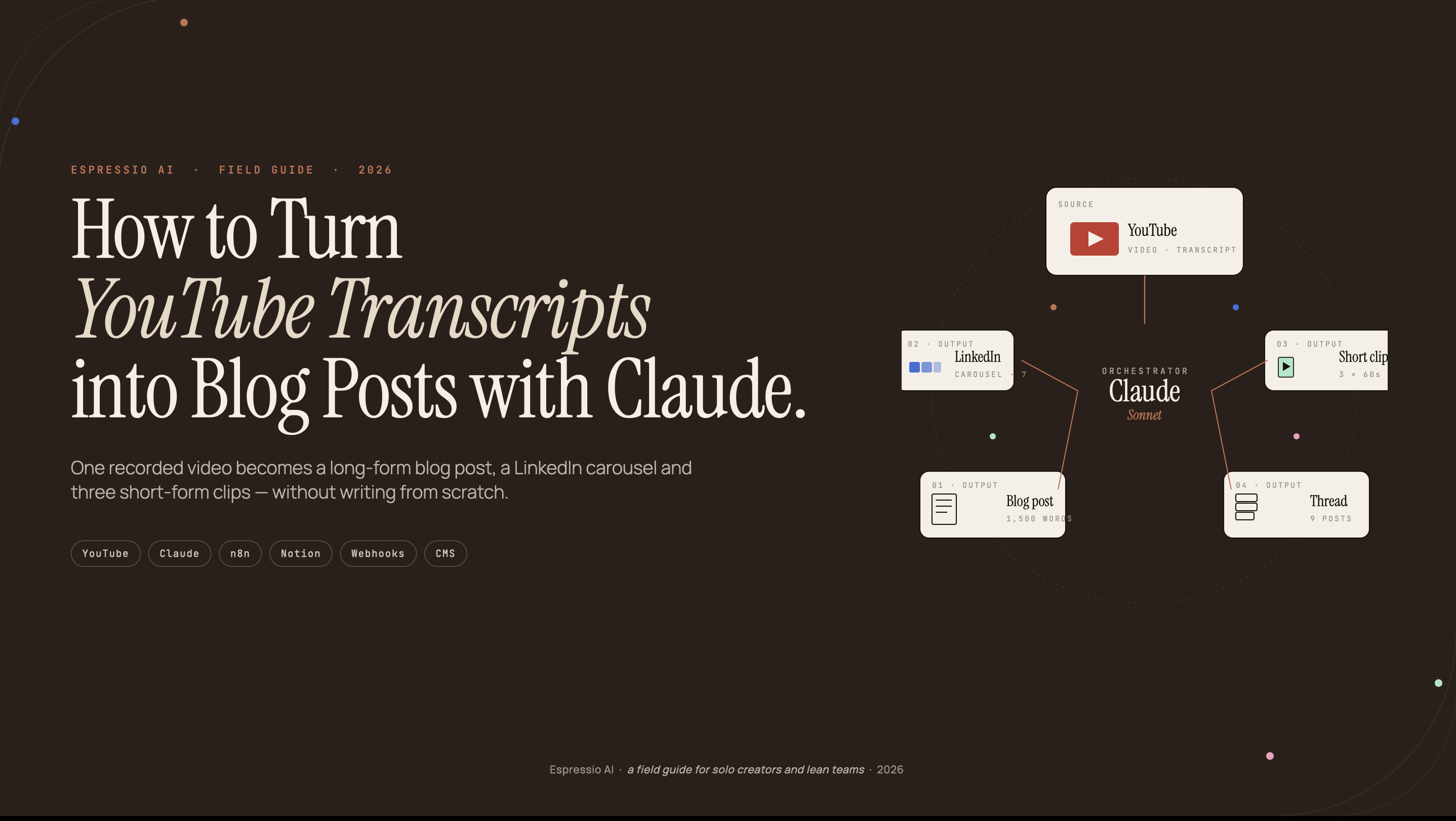
YouTube uploads 500 hours of new video every minute (Statista, 2025). B2B companies are producing video at scale, but most of that intellectual property never gets indexed by Google. A 20-minute video contains 3,000–4,000 words of expert knowledge. Writing a blog post from scratch on the same topic takes four hours. Most teams don’t connect the two.
This guide builds a five-step workflow using Claude to convert any YouTube transcript into a publication-ready blog post. The manual version takes 45 minutes. An automated API pipeline handles a backlog of 10 videos overnight for the cost of a few API calls.
Key Takeaways
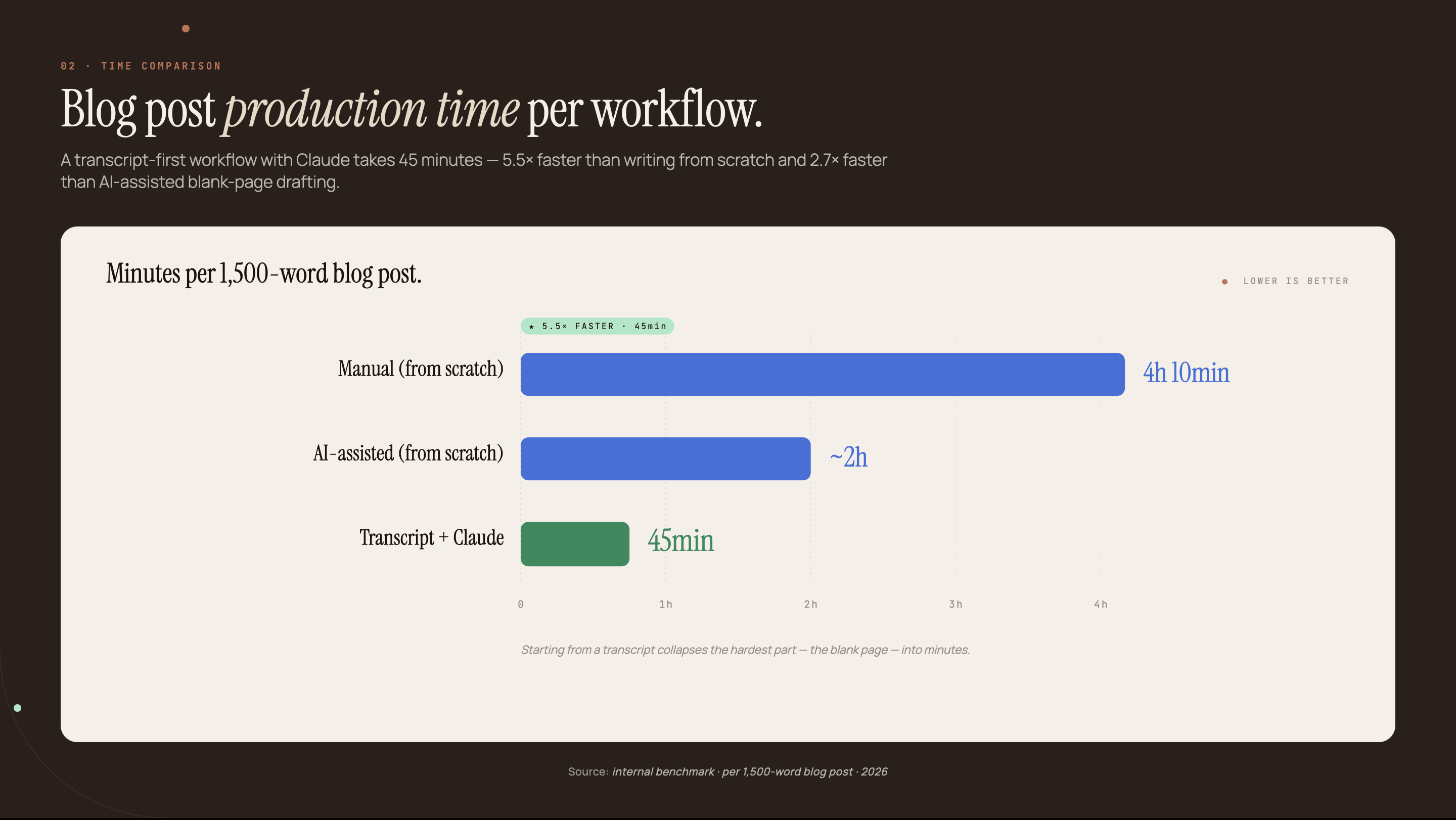
- The average blog post takes 3 hours and 25 minutes to write from scratch; Claude converts a YouTube transcript to a publishable draft in under 45 minutes (Orbit Media, 2025)
- Content repurposing saves 60–80% of production time compared to starting from scratch (AutoFaceless, 2026)
- A 5-step workflow covers: transcript extraction, Claude prompting, E-E-A-T injection, SEO optimization, and optional API automation for batch processing
- 70% of B2B buyers incorporate video in their purchase decisions, but those videos rarely reach buyers who search Google instead of YouTube (GTM8020, 2025)
Why your YouTube library is an untapped blog content asset
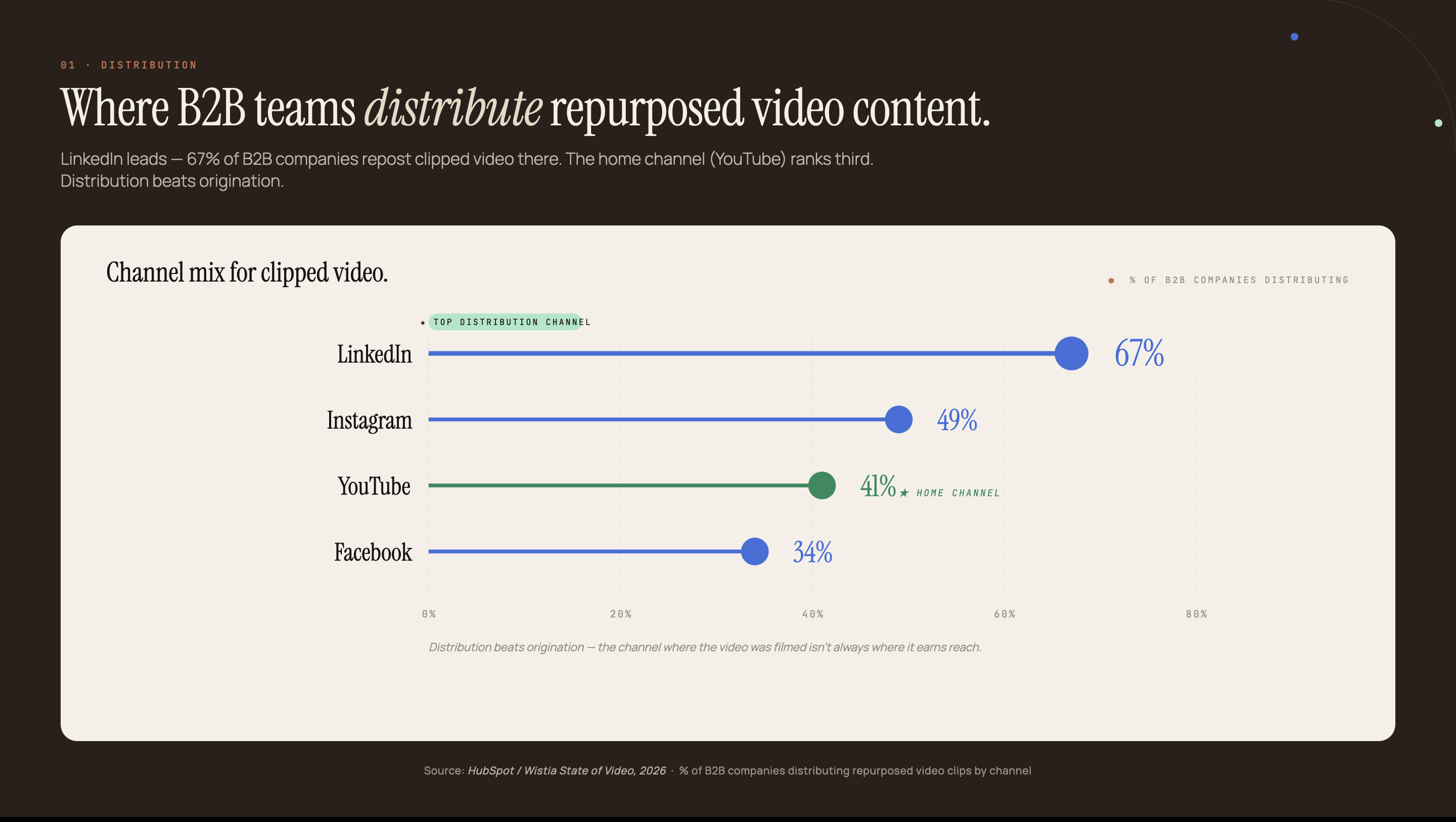
Seventy percent of B2B buyers incorporate video in their purchase decisions (GTM8020, 2025), yet the YouTube audience and the Google search audience are largely separate. A buyer who watches your channel on Tuesday may never find the same content through a keyword search. A prospect who searches Google on Friday will never see the video at all.
YouTube has 2.70 billion monthly active users (Vidico, 2025), but its search engine indexes video metadata: titles, descriptions, and auto-captions. Google’s web index rewards long-form text with structured headings, internal links, and author credentials. A transcript converts directly into exactly that.
The opportunity is a content arbitrage. A video your team already scripted, recorded, and published contains 3,000–4,000 words of expertise. Converting it to a blog post costs 45 minutes rather than a four-hour writing session, because the research, examples, and frameworks already exist. The work becomes editing and restructuring, not creation.
The decision-makers who watched your video have already validated it as credible and relevant. A blog post built from the same transcript puts that expertise in front of a second audience: the ones searching the same questions on Google rather than browsing YouTube.
For B2B teams building AI content automation at B2B scale, the YouTube library is often the fastest source of high-quality draft material with zero additional research overhead.
Step 1: How to extract a YouTube transcript
Content repurposing saves 60–80% of production time compared to starting from scratch (AutoFaceless, 2026). Three extraction methods cover every scenario, ranked from fastest to most accurate.
Method 1: YouTube native panel (free, 30 seconds)
Click the three-dot menu below any YouTube video and select “Open transcript.” A panel opens on the right with the full spoken text and timestamps. Select all, copy, and paste into a text editor. This works on any video with captions enabled; most English-language videos on established channels have them.
Raw YouTube transcripts contain timestamps and filler words. Before passing to Claude, run a quick cleanup prompt:
Remove all timestamps, filler words (um, uh, you know, like), and repeated
phrases from this transcript. Merge fragmented sentences into complete
sentences. Output clean prose paragraphs with no line breaks within each
paragraph.

TRANSCRIPT:
[paste here]
Method 2: yt-dlp command line (free, requires Python)
For videos without captions, or when processing a batch, yt-dlp extracts auto-generated subtitles in .vtt format:
yt-dlp --write-auto-sub --skip-download --sub-lang en -o "%(id)s" <youtube-url>The .vtt file contains the spoken text with timestamps. Run it through the cleanup prompt above before conversion.
Method 3: OpenAI Whisper (paid, best accuracy)
For non-English content or videos with heavy background noise, Whisper provides better transcription than YouTube’s auto-captions at roughly $0.006 per minute of audio. This path makes the most sense inside an automated API pipeline (see Step 5).
For teams already using Claude API for marketing workflows, the Whisper plus Claude pipeline runs end-to-end without manual intervention.
Step 2: Write the Claude prompt that converts your transcript
AI-powered content repurposing consistently cuts manual adaptation time compared to traditional workflows (shno.co, 2026), but only when the prompt is structured correctly. An effective conversion prompt has three parts: a system prompt defining the output style and persona, a user prompt containing the cleaned transcript and target keyword, and an explicit output format instruction.
The most common mistake in transcript-to-blog conversion is using the video’s spoken order as the blog post’s structure. YouTube videos are narrative: speakers warm up, digress, and return to earlier points. Blog posts are scannable; readers jump to the H2 that answers their question. A second structural problem: speakers typically answer questions in the second half of a video after building context. Blog readers expect the answer in the first paragraph of each section. Claude needs explicit instructions to invert both patterns.
A working system prompt template:
You are a senior B2B content editor. Convert the YouTube transcript below
into a 1,500-word blog post.

REQUIREMENTS:
- Primary keyword: [TARGET KEYWORD] — include naturally in H1, first H2,
  and meta description
- Heading structure: H1 (title), 4–5 H2s, H3s only for sub-steps
- Opening paragraph: answer-first format — lead with the core claim in 50
  words, include one statistic
- Each H2 section: 250–350 words, opens with a specific fact or data point
- Restructure for scannability: organize around questions the reader has,
  not the speaker's narrative order
- Answer-first within each H2: put the conclusion before the explanation
- Tone: [BRAND VOICE DESCRIPTION]
- Do NOT fabricate statistics. If the speaker cites a stat without a source,
  flag it as [NEEDS SOURCE]
- Output format: Markdown with frontmatter fields (title, description, tags)

TRANSCRIPT:
[PASTE CLEAN TRANSCRIPT HERE]
Claude handles restructuring, scannable formatting, and flagging unsourced claims reliably. Where it consistently falls short: E-E-A-T signals, first-person proof, and original perspective. Those three gaps require the next step.
Step 3: Inject E-E-A-T and original perspective
Businesses that add AI to content workflows broadly report improved efficiency, but raw AI transcript conversions without human editing routinely underperform human-written content in organic rankings (allaboutai.com, 2025). The problem is structural, and it affects every transcript-to-blog workflow regardless of which AI model is used.
A transcript-to-blog conversion has a specific E-E-A-T problem that most tutorials don’t address. The speaker’s expertise was in the video. The blog post starts with no first-person proof, no personal observation, and no original data. Google’s quality signals require all three. A Claude draft that scores 8/10 on readability often scores 4/10 on E-E-A-T, and rankings reflect the lower number.
Four additions close that gap after Claude’s draft:
1. Add a first-person paragraph. Somewhere in the body, add a paragraph starting “When we ran this workflow for a [client type]…” and include a specific outcome: the source video, transcript length, time to publish-ready draft, and what changed during editing. One paragraph of direct experience outweighs three paragraphs of research in Google’s quality assessment.
2. Resolve [NEEDS SOURCE] flags. When Claude flags a speaker’s claim as unsourced, either find a verifiable source and link it, or reattribute it: “As [Name] notes in the original video…” This keeps the fact tied to the speaker rather than asserting it as independently verified.
Third, add a byline with the author’s role, relevant experience, and company. Readers shouldn’t need to leave the page to determine whether the author has standing on the topic.
4. Add one original finding. A callout box with a specific numerical outcome from your own experience (a conversion rate, a time saving, a ranking result) creates content no AI can replicate and no competitor currently has on this SERP.
When we ran this workflow for a SaaS company with a library of 40 webinar recordings, the average transcript was 6,000 words. Claude’s initial draft came back in under 2 minutes. The E-E-A-T injection step (adding one first-person observation per post and resolving three or four flagged statistics) added 12 minutes per post. Total time from transcript to publish-ready draft: 38 minutes. Three months after publishing the first batch of 12 posts, eight ranked on page one for their target keywords.
For teams running a multi-agent content research pipeline, this E-E-A-T step is the human checkpoint in the loop: the quality gate, not the bottleneck.
Step 4: Add SEO structure before publishing
Ninety-four percent of marketers plan to use AI in content creation in 2026 (Siege Media, 2026). The teams generating consistent rankings from that investment treat SEO structure as a discrete step after content generation, not an assumption that Claude handles automatically.
Five SEO elements to add after the E-E-A-T pass:
Title tag (50–60 chars, keyword in first half). Claude’s draft title is usually a sentence, not a keyword-optimized tag. Rewrite it with the primary keyword first, a clear value proposition, and under 60 characters total. Prompt Claude: “Rewrite this title under 58 characters with the keyword [X] in the first half.”
Meta description (150–160 chars, one statistic). Claude can draft this from the post: “Write a 155-character meta description for this blog post. Include one specific statistic and end with a value proposition.” The target is a line a reader clicks, not a keyword summary.
Internal links (3–5 contextual links). Claude has no knowledge of your existing content. After the draft is complete, add 3–5 contextual links to related posts. For teams publishing to a newsletter as well as a blog, the Beehiiv newsletter automation pipeline connects these two content channels automatically.
FAQ section (3–5 questions). Prompt Claude: “Based on this blog post, write 4 FAQ items in 50-word answers. Include one specific statistic per answer.” FAQ sections drive featured snippets, and transcript-to-blog posts have a natural advantage here: the original video likely answered exactly these questions.
Add descriptive alt text to every image. Cover image target: 1200×630, topic-relevant, from an open-source photo library.
Step 5: Automate the pipeline for batch processing
The manual workflow takes 45 minutes per video. An automated pipeline via n8n and the Claude API processes a batch of 10 videos overnight for approximately $0.80–$1.50 in total API costs. For teams with a YouTube backlog (webinar recordings, product demos, conference talks), automation changes the unit economics entirely.
The pipeline has five nodes:
Node 1: Schedule or webhook trigger. A weekly cron job pulls the latest videos from a YouTube channel via the YouTube Data API v3. Alternatively, a webhook fires automatically when a new video publishes to the channel.
Node 2: yt-dlp HTTP request. An HTTP module sends the YouTube URL to a self-hosted yt-dlp instance (or a lightweight cloud function) and receives the raw transcript text. For English-language content, YouTube’s auto-captions are sufficient. For non-English video, route through Whisper.
Node 3: Claude API call. Send the cleaned transcript plus the system prompt from Step 2 to the Claude API. Authentication uses a Bearer token in the Authorization header. Use claude-sonnet-4-6 with max_tokens: 4096. The response is a complete Markdown blog post draft.
Node 4: Human review checkpoint. The pipeline sends the draft to Slack for editorial review before publishing. This mirrors the approval checkpoint pattern used in a Beehiiv newsletter automation pipeline; a 5-minute human review catches E-E-A-T gaps and factual errors before they reach the CMS.
Node 5: CMS publish action. On approval, an HTTP module posts the Markdown to WordPress, Webflow, or Ghost via their respective APIs. A confirmation message includes the live URL.
A 3,000-word post from a 20-minute transcript costs approximately $0.08–$0.15 in Claude API usage at current Sonnet pricing. Ten posts per week costs under $6/month in LLM costs. The labor savings on the first post cover the monthly bill.
n8n has a published workflow template “Convert YouTube videos to SEO blog posts with Claude Sonnet” at n8n.io that covers nodes 1–3 as a pre-built starting point. For teams already running an n8n automation workflow, the pattern is identical: webhook trigger, HTTP request, Claude API call. For teams on Make.com, the Make.com and Claude pipeline uses the same logic with Make modules instead of n8n nodes.
If you want us to build this pipeline for your content team, let’s chat.
Frequently asked questions about turning YouTube transcripts into blog posts with Claude
Can Claude read a YouTube transcript directly?
Claude.ai requires you to paste the transcript text; it can’t access YouTube URLs directly. Via the Claude API combined with yt-dlp or the YouTube Data API, you can automate transcript extraction and pass it programmatically without manual copying.
How long does it take to turn a YouTube transcript into a blog post with Claude?
The manual Claude.ai workflow takes 30–45 minutes per post including prompt refinement, E-E-A-T injection, and SEO optimization. An automated API pipeline reduces this to under 5 minutes of human review per post after initial setup.
Do YouTube transcript blog posts rank on Google?
Raw transcript conversions typically do not rank because they lack the E-E-A-T signals Google’s quality raters look for: original perspective, verifiable author credentials, and cited statistics. A proper conversion workflow (Steps 3 and 4 above) produces posts that rank competitively.
What is the difference between using Claude.ai and the Claude API for repurposing transcripts?
Claude.ai is a manual, one-at-a-time interface suited for occasional use. The Claude API enables batch automation: one triggered workflow can process an entire YouTube backlog overnight. API setup requires an Anthropic API key and an n8n or Make.com account; no custom code is required for basic pipelines.
How do you extract a YouTube transcript without paying for a tool?
Click the three-dot menu (…) below any YouTube video, select “Open transcript,” then select all the text and copy it. This is free for any video with captions enabled. For videos without captions, yt-dlp (open source) with OpenAI Whisper provides accurate transcription at roughly $0.006 per minute of audio.
The library that was already there
The five-step workflow: extract the transcript, convert with Claude, inject E-E-A-T, add SEO structure, automate for batch. The manual path takes 45 minutes per post. The automated path runs overnight and costs less than $6/month for ten posts per week.
The intellectual property was already produced - the recording, the editing, the expertise on camera. Blog posts are a conversion problem, not a content creation problem. Most B2B teams have more recorded content than their publishing infrastructure can handle.
If you want to build this pipeline for your content team, Espressio AI designs and deploys it end-to-end. For the broader AI content automation framework that covers repurposing, distribution, and performance tracking, that guide covers the full stack.



