



Luka Mrkić
Head of BD
Insights, strategies, and real-world playbooks on AI-powered marketing.
MAY 11, 2026
How to Automate Brand Monitoring with Make.com and Claude
Brandwatch starts at $800 per month for SMBs. Mention Pro runs $83 per month. Most small teams end up paying for one of them, under-using it, and still missing mentions on Reddit and niche news sites the tools don’t cover well. There’s a cheaper path.
This tutorial builds a brand monitoring agent with Make.com and Claude for under $45 per month: RSS and Reddit triggers pull mentions from across the web, Claude classifies sentiment and urgency in real time, and a router fires Slack alerts for negatives while logging everything else. The core build takes 2 to 3 hours.
For teams building multiple AI workflows alongside this one, the AI workflow automation guide for revenue teams covers the sequencing and governance discipline behind running these systems without them conflicting.
Key Takeaways
- Brandwatch costs $800–$5,000/month; this Make.com + Claude pipeline runs under $45/month - a 94% cost reduction at comparable alert quality.
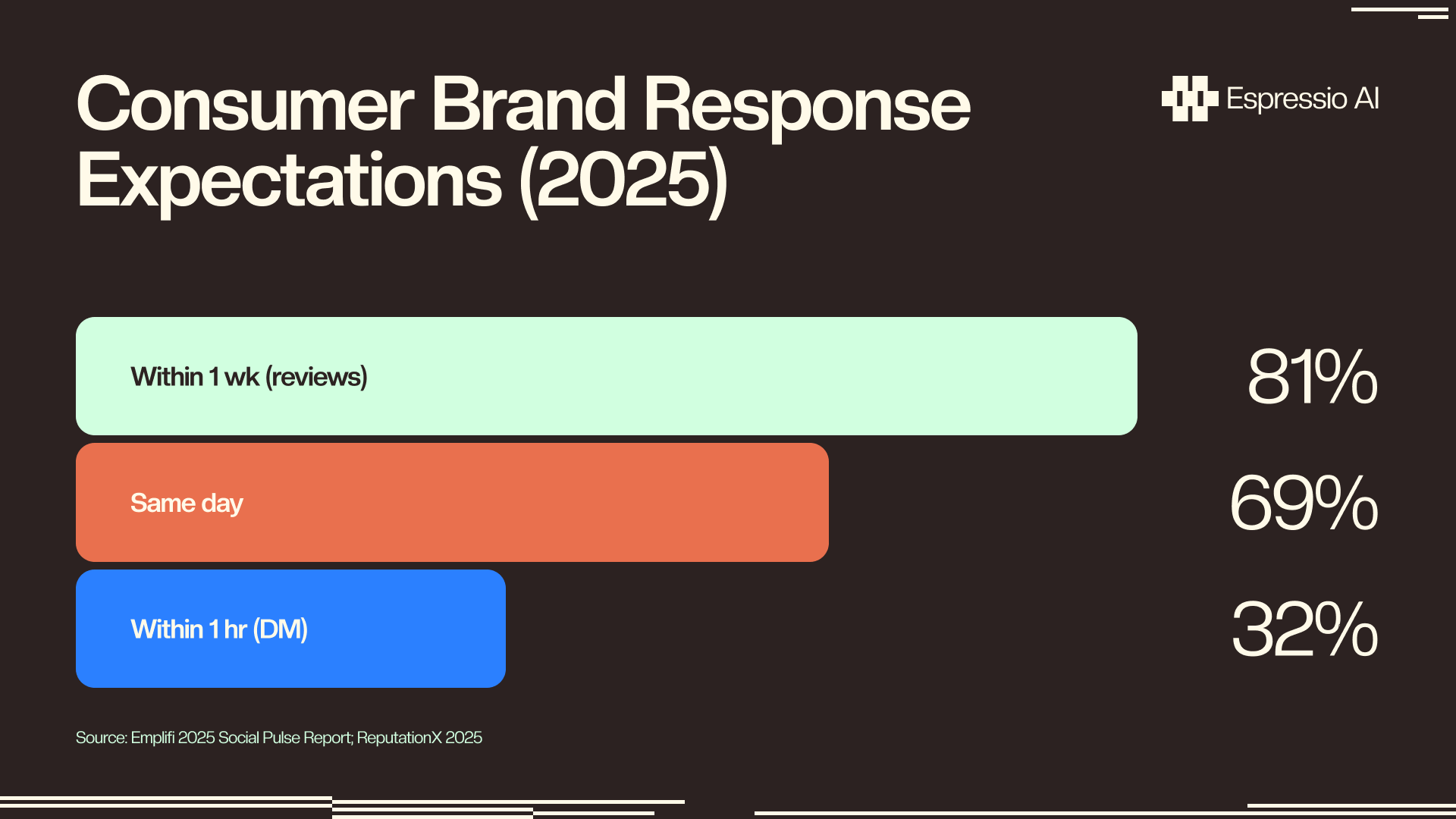
- 32% of consumers expect a brand to respond to a social DM within 1 hour (Emplifi, 2025). Manual monitoring can’t meet that window consistently.
- Build the core in 2–3 hours: Google Alerts RSS trigger, Claude HTTP module for sentiment classification, and a Slack router for negative mentions.
What does a Make.com + Claude brand monitoring agent actually do?
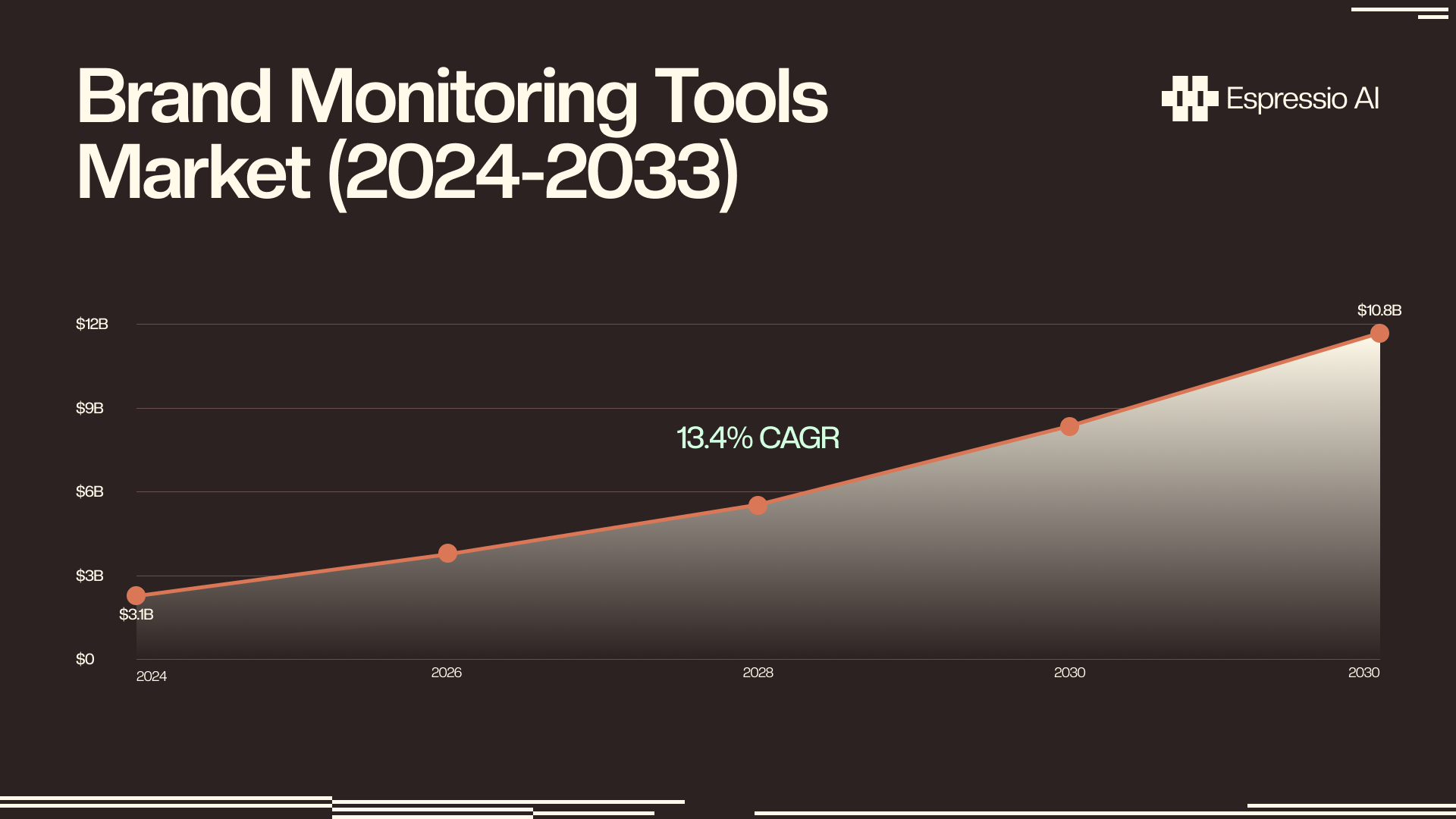
The global brand monitoring tools market hit $3.1 billion in 2024 and is projected to reach $10.8 billion by 2033 at a 13.4% CAGR (DataHorizzon Research, 2024). The market is large because the problem is real: brand mentions happen continuously across Reddit, news sites, review platforms, and social channels, and most teams only find out about them when a prospect brings one up in a sales call.
The agent built in this tutorial runs a 4-layer pipeline:
Sources. Google Alerts RSS, Google News RSS, and a Reddit search module pull new mentions on a schedule you set: every 15 minutes, every hour, or nightly depending on mention volume and response urgency.
Trigger and filter. A Make.com schedule trigger fires on the interval you set. A filter module checks that the text actually contains your brand name before passing it forward, which eliminates false positives before they reach Claude and burn API credits.
Analysis. A Make.com HTTP module calls Claude’s API with each mention. Claude returns a structured JSON object: sentiment (positive, negative, or neutral), urgency score (1 to 5), category (product complaint, PR opportunity, competitor mention, customer success, or other), and a one-sentence recommended action.
Routing. A Make.com router reads the JSON fields and sends the row down one of three paths: negative mentions trigger an immediate Slack alert; positive mentions append to a social proof log in Google Sheets; neutral mentions go into a weekly digest tab.
Make.com’s visual automation builder handles scheduling, filtering, and routing without code. A Make.com + Claude setup delivers the same core workflow as a commercial platform at under $45 per month.
How do you configure Make.com’s source and trigger modules?
Make.com reached 3.1 million users in 2024, running 5.6 billion automation scenarios, a 26% increase from 2023 (Make.com, January 2025). Its native RSS, Reddit, and Google News modules cover the three highest-signal brand mention sources without requiring code or additional API credentials.
Step 1: Create your Make.com scenario. Open Make.com, create a new scenario, and add a Schedule trigger. Set the interval: every 15 minutes for active brands, every hour for lower-volume monitoring. This trigger fires all subsequent modules on the cadence you choose.
Step 2: Add a Google Alerts RSS module. In Google Alerts (google.com/alerts), create an alert for your brand name. Under “Show options,” set delivery to RSS feed. Copy the RSS URL. In Make.com, add an RSS Feed module. Paste the Google Alerts URL. Set “Maximum number of returned items” to 10–20 to avoid processing stale mentions on each run.
Step 3: Add a Google News RSS module. Add a second RSS Feed module. Use this URL structure: https://news.google.com/rss/search?q=[YOUR+BRAND+NAME]&hl=en-US&gl=US&ceid=US:en. This catches news articles that Google Alerts sometimes misses, particularly from trade publications and blogs.
Step 4: Add a Reddit Search module (optional for first build). Make.com’s Reddit module lets you search by keyword across all subreddits or within specific ones. Set the query to your brand name. Connect it to the same scenario as your RSS modules so all three sources feed into the next step.
Step 5: Add a text aggregator. Use Make.com’s Text Aggregator or Array Aggregator to merge the output from all source modules into a single bundle before the Claude module. Map the mention text, source URL, and timestamp from each module to consistent field names: mention_text, source_url, published_at.
Step 6: Add a filter module. Before calling Claude, add a filter: condition mention_text contains [your brand name] (case-insensitive). This catches false positives from broad RSS feeds before they burn API credits. A brand with a common word in its name (like “Arc” or “Linear”) benefits most from this step.
For teams that already have Claude set up across other marketing tools, the guide on setting up Claude API for marketing workflows covers API key configuration and rate limit management this build reuses directly.
How do you connect Claude for AI sentiment analysis?
82% of marketers consider social listening an essential planning tool (Brandwatch Trends Survey via Influencer Marketing Hub, 2024–2025). The gap between having a listening tool and getting actionable signal from it comes down to analysis quality. Claude replaces the dashboard you’d otherwise check manually.
Add an HTTP module to your Make.com scenario. Configure it as follows:
Method: POST
URL: https://api.anthropic.com/v1/messages
Headers:
x-api-key: [your Anthropic API key]
anthropic-version: 2023-06-01
content-type: application/json
Body (JSON):
{
  "model": "claude-haiku-4-5-20251001",
  "max_tokens": 300,
  "messages": [{
    "role": "user",
    "content": "You are a brand monitoring assistant. Analyze this brand mention and return ONLY valid JSON (no markdown, no code fences, no additional text) with exactly these four fields:\n\n{\"sentiment\": \"positive\" OR \"negative\" OR \"neutral\",\n\"urgency\": 1 OR 2 OR 3 OR 4 OR 5,\n\"category\": \"product_complaint\" OR \"pr_opportunity\" OR \"competitor_mention\" OR \"customer_success\" OR \"other\",\n\"recommended_action\": \"[one sentence]\"}\n\nBrand mention:\n{{mention_text}}"
  }]
}
Use claude-haiku-4-5-20251001 for cost efficiency at scale. Switch to claude-sonnet-4-6 when you need more nuanced category detection on ambiguous mentions.
After the HTTP module, add a JSON Parse module. Map the content[0].text field from Claude’s response as the input. This extracts sentiment, urgency, category, and recommended_action as named variables for the router in the next step.
The first version of this prompt I tested returned valid JSON roughly 92% of the time. The failure mode: Claude wrapped the JSON in markdown code fences (```json ... ```), which the JSON Parse module rejected as non-JSON. Adding the explicit instruction “no markdown, no code fences” in the prompt brought consistency above 99%. If you skip that phrase, expect router failures on roughly 1 in 12 responses: silent failures that drop mentions without alerting you.
Test the HTTP + JSON Parse combination against 10 real mentions before connecting the router. Check that sentiment, urgency, category, and recommended_action all parse correctly and that urgency returns an integer (1–5), not a string. If it returns a string, add a data type conversion step between the JSON Parse module and the router. For teams already connecting Claude to notification tools, the approach mirrors the Claude and Slack for automated marketing alerts pattern, with the same HTTP module pattern.
How do you route mentions and send Slack alerts?
32% of consumers expect a brand to respond to a direct social message within one hour (Emplifi 2025 Social Pulse Report, 2025). A Make.com router module fires a Slack alert within 60 seconds of a negative mention being classified by Claude - no human has to monitor a dashboard to meet that window.
Add a Router module after the JSON Parse module. Configure three paths:
Path 1: Negative mentions. Filter condition: sentiment equals negative. On this path, add a Slack module set to “Send a message.” Target your #brand-alerts channel. Include in the message body: mention text, source URL, urgency score (bold the text red for urgency 4 or 5), category, and Claude’s recommended action. Teams where a product manager also needs visibility should add a second Slack notification to #product-feedback when category equals product_complaint.
Path 2: Positive mentions. Filter condition: sentiment equals positive. Add a Google Sheets module to append a row to your social proof log. Columns: mention text, source URL, published timestamp, category, recommended action. This feed becomes your input for testimonial requests, case study outreach, and review amplification campaigns.
Path 3: Neutral mentions (default). Add a Google Sheets module to append to a weekly digest tab. Set up a second Make.com scenario (a simple one that runs every Monday morning) to pull the week’s rows, format them as a summary, and send to your #brand-weekly Slack channel or email list.
Add an error handler route to the router. Condition: anything that doesn’t match the other three paths, which in practice means failed JSON Parse outputs. Route these to a Slack message: “Brand monitoring parse error. Review manually: {{source_url}}.” Without this handler, failed parses drop silently and you lose mentions with no indication they existed.
Every tutorial about brand monitoring treats the pipeline as damage control: catch bad mentions, respond fast. The same routing logic works in reverse. Positive mentions that Claude categorizes as customer_success or pr_opportunity can trigger a second Claude call on the same row: “Draft a one-paragraph social media response that amplifies this mention and thanks the author.” The output appends to your social proof sheet alongside the original mention. The same workflow that monitors for crises also generates the raw material for your next LinkedIn post or case study quote, with no additional tooling required. For teams using Zapier as an alternative orchestration layer for this same pattern, the Claude and Zapier marketing automation guide covers the equivalent routing setup.
Which sources should your brand monitoring agent cover?
The social media listening market was valued at $9.2 billion in 2024, projected to reach $20.18 billion by 2030 (Grand View Research, 2025). The market is large because mentions don’t cluster on one platform: 93% of consumers say online reviews influence whether they buy (PowerReviews via ReputationX, 2023), which means a monitoring setup that only watches Twitter misses the channels where purchasing decisions actually form.
Build source coverage in tiers based on setup time and signal quality:
Tier 1 (set up first, under 15 minutes):
- Google Alerts RSS: covers news, blogs, and some forum mentions. Free. Create one alert per brand name variant (exact match + common misspelling).
- Google News RSS:
https://news.google.com/rss/search?q=[brand]. Covers trade press and publications Google Alerts sometimes misses. - Reddit Search module: Make.com’s native Reddit module queries across all subreddits. Add your brand name, product name, and CEO name as separate search queries if any of them generate standalone conversation.
Tier 2 (add after Tier 1 is stable):
- Review sites via RSS: G2, Capterra, and Trustpilot all expose RSS feeds for new reviews. Add them as RSS modules and they’ll flow into the same Claude analysis pipeline.
- Hacker News: Algolia’s HN search API:
https://hn.algolia.com/api/v1/search?query=[brand]&tags=story. Returns JSON rather than RSS; use an HTTP module to pull it and a JSON Parse module to extract the title and URL.
Tier 3 (high-value, higher setup cost):
- Twitter/X: Make.com’s native Twitter module is rate-limited on free-tier X API access. For anything beyond a handful of mentions per day, use Apify’s Twitter scraper via the Make.com Apify module.
- YouTube comments: Apify offers a YouTube comment scraper. Worth adding if your brand appears in tutorial or review videos.
Most teams build brand monitoring and competitor monitoring as two separate projects. There’s no reason to. Duplicate the entire Make.com scenario, replace your brand name with a competitor’s name across all source modules, and add a monitoring_type: competitor field to the Claude JSON output. The sentiment and urgency logic applies identically. You end up with a competitor monitoring feed in the same Google Sheets document with no additional Claude configuration. For teams that want to extend this competitive data into a fuller intelligence workflow, the n8n and Perplexity competitive intelligence agent shows how to automate research briefings from the mentions this pipeline surfaces.
Make.com + Claude vs. Brandwatch: the cost breakdown
Brandwatch enterprise plans start at $800–$1,200 per month for SMBs; mid-tier agency setups run $2,000–$3,500 per month; enterprise deals exceed $5,000 per month (Agorapulse/Capterra, 2025). Mention Pro runs $83 per month. A Make.com + Claude brand monitoring agent covering the same core use case (real-time mention capture, sentiment classification, and Slack routing) runs $11–$24 per month, a 95% reduction at the SMB Brandwatch comparison point.
The monthly cost by component:
| Component | Monthly cost | Notes |
|---|---|---|
| Make.com Core | $9/month | 10,000 operations; covers ~3,000–5,000 mentions/month at 3 ops per mention |
| Claude API (Haiku) | $2–$15/month | ~$0.002 per 1,000-token analysis; varies with mention length and volume |
| Google Alerts / News RSS | $0 | Free |
| Reddit module | $0 | Native Make.com module, no additional cost |
| Total | $11–$24/month | Scale to Make.com Team ($16/month) for higher operation volumes |
Compared to Brandwatch, you trade pre-built dashboards with historical trend data beyond 30 days, enterprise SLA support, influencer tracking, and PDF reporting for real-time Slack alerts, Claude-quality sentiment analysis, full control over the routing logic, and data stored in your own Google Sheets rather than a vendor’s database.
If you’re looking to integrate AI into your brand monitoring workflows, get in touch with us and we’ll map out where automation adds the most value for your team.
Frequently asked questions
Can Make.com monitor Twitter/X brand mentions?
Make.com has a native Twitter module but X’s API pricing tiers changed in 2023, rate-limiting free access to low volumes. For higher mention volumes, use Apify’s Twitter scraper connected via the Make.com Apify module. Budget $5–10/month for Apify credits at moderate volume to keep costs predictable.
How many brand mentions can this workflow handle per month?
A workflow checking 3 sources every 15 minutes, with Claude analyzing 50 mentions per day, runs roughly 7,500 Make.com operations per month. Make.com Core (10,000 operations at $9/month) covers that comfortably. Scale to the Team plan at $16/month when you cross 10,000 operations monthly.
Does this work for competitor brand monitoring too?
Yes. Duplicate the scenario and swap your brand name for a competitor name. Add a monitoring_type field to the Claude JSON output to tag competitor rows separately in your tracking sheet. The same sentiment and urgency classification logic applies to competitor mentions without prompt changes.
How do I get Claude to return consistent JSON output?
The prompt must say to return ONLY valid JSON with no surrounding text or markdown code fences. Add a JSON Parse module in strict mode after the HTTP module. For the roughly 2–3% of responses where Claude returns non-JSON, add an error handler that routes to a Slack fallback alert rather than failing silently.
What’s the fastest path to a working brand monitoring agent?
Google Alerts RSS feed, Make.com HTTP module configured for Claude, Slack notification. Three modules, no paid add-ons beyond Make.com Core ($9/month) and an Anthropic API key. Set up in under an hour. Confirm the Slack alert fires on a test mention before adding Reddit or news RSS sources.
Conclusion
Start with Google Alerts RSS, a single Claude HTTP module, and one Slack notification. Get that path working first: confirm a test mention flows from the RSS trigger through sentiment classification and into your Slack channel. Once the core fires correctly, add the Reddit module, then the Google News RSS, then the router paths for positive and neutral mentions.
Those 2 to 3 build hours pay off in the first month at $11–$24 versus $800. A Make.com + Claude stack costs $11–$24 per month and processes mentions in under 60 seconds. Brandwatch at $800 per month does more, but not 36 times more for most teams at the 1 to 50 employee scale. Teams that want to close the loop on positive brand signals with a direct outreach action can extend this monitoring setup with a cold email agent built on Instantly and ChatGPT - routing high-intent mentions into a personalized sequence the same way the monitoring agent routes sentiment into Slack.
For teams that want to score and qualify the leads that come in alongside brand mentions, automated lead scoring with LangChain shows how to add a qualification layer that runs the same Claude-in-a-loop pattern on inbound contact data.



