



Luka Mrkić
Head of BD
Insights, strategies, and real-world playbooks on AI-powered marketing.
JUN 3, 2026
How to Automate Follow-Up Sequences After Sales Calls with AI
TL;DR
- An automated follow-up workflow catches every completed sales call, classifies the outcome from the transcript and CRM context, drafts a multi-step sequence with email copy, timing, and a clear exit rule, and lands the draft inside the AE’s CRM as a one-click approval before they open their inbox.
- A call transcription tool (Fireflies, Gong, Otter) handles capture. A backend handles the trigger and the routing. ChatGPT or Claude does the draft. HubSpot, Outreach, Apollo, or Instantly runs the sequence. The AE owns the send.
- A useful first build covers post-discovery follow-up for one team. It runs the minute the call ends, costs single digit cents per call on the model side, and pays back the first week a stalled deal moves because the follow-up landed within an hour.
- The pipeline is five steps: trigger, classify, draft, review, send. The hard parts are the outcome classifier and the sequence schema.
- This guide ships the architecture, the prompt that holds up in production, the six sequence shapes by call outcome, and the six checks that tell you the workflow is still working.
If you are evaluating who should build this for your team, this guide gives you both the technical blueprint and the standards to evaluate the work.
What an automated follow-up workflow actually does
An automated follow-up workflow watches every sales call as it ends, reads the transcript and the deal record, classifies the outcome, drafts the next two or three touches with the right timing, and lands the draft on the AE’s screen as an approve-and-send. The output is not one email. It is a sequence: email one with the recap and the next step, a task for the AE on day three if no reply, email two with a specific proof point, and an exit rule the moment the buyer replies.
The old way of doing this was the AE writing follow-ups from memory between calls, sometime that evening, sometimes two days later, sometimes never. The strong calls got polished sends and the medium ones got a sticky note that never moved. Pipeline conversion suffered in the middle of the funnel, where the model has the most leverage.
The automated version writes the same three-step sequence on every call within minutes of the call ending. The recap goes out the same day. The proof email goes out on day three. The exit fires the moment the buyer replies. The AE keeps the judgment call on what to send and when to step in. The model handles the writing and the timing.
Architecture
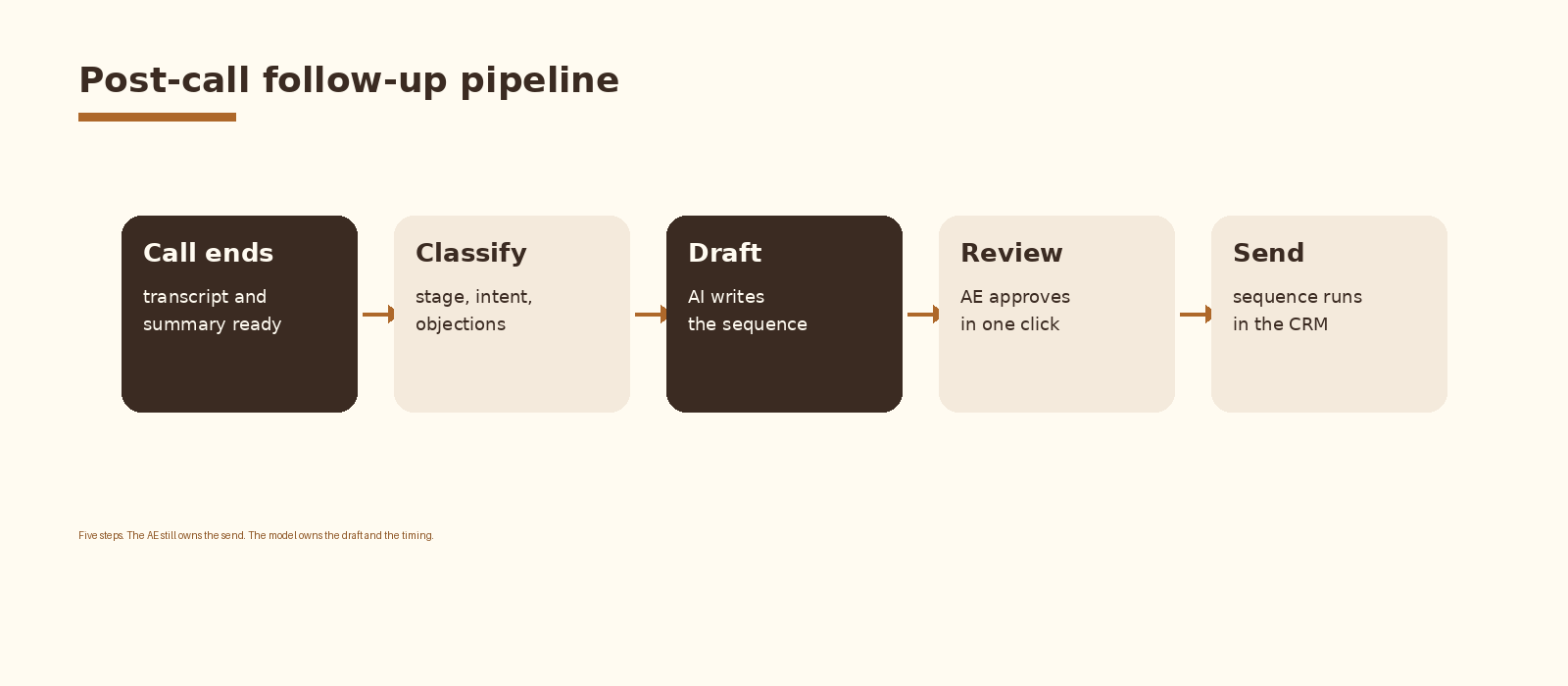
Five components inside one pipeline. A call transcription tool fires a webhook when the transcript is ready. A backend pulls the deal record from the CRM so the model sees the context alongside the transcript. The model classifies the outcome, picks the right sequence template, and drafts the emails with timing and exit rules. The draft is written into the AE’s CRM as a pending sequence or as a draft email thread. The AE reviews, edits if needed, and approves. The sequence engine handles the actual sends and the exit on reply.
Step 1. Trigger on the call end
The cleanest trigger is the call transcription tool’s transcript.ready webhook. Fireflies, Gong, Otter, and Read all expose this. The payload includes the meeting id, the participants, the duration, and a transcript URL. Subscribe a backend endpoint to that webhook. n8n, Make, Zapier, and a small serverless function on Vercel or Cloudflare Workers all work. The endpoint is the front door to the rest of the workflow.
Two filters earn their keep on day one. Skip internal-only meetings by checking the participant domain list against your own. Skip calls under five minutes because they are usually no-shows or scheduling reshuffles.
Step 2. Classify the call outcome
A follow-up is only as good as the outcome read it sits on top of. The classifier reads the transcript plus the deal record and returns one of six outcomes: strong fit with next step set, strong fit with no next step, objection raised, champion without an internal buyer, stalled or ghosted, and disqualified. Each outcome maps to a different sequence template. The same model call can produce the outcome label and the draft in one structured response.
// Classifier + drafter in one OpenAI call
const response = await openai.chat.completions.create({
  model: 'gpt-4.1',
  response_format: { type: 'json_object' },
  messages: [
    { role: 'system', content: SYSTEM_PROMPT },
    { role: 'user', content:
        `Deal context:\n${dealContext}\n\n` +
        `Call transcript:\n${transcript}\n\n` +
        `Objections logged:\n${objections.join('; ')}` }
  ]
});
const draft = JSON.parse(response.choices[0].message.content);
// draft.outcome, draft.email_1, draft.send_at, draft.task_1, draft.email_2, draft.exit_rule
Step 3. Draft with the AI engine
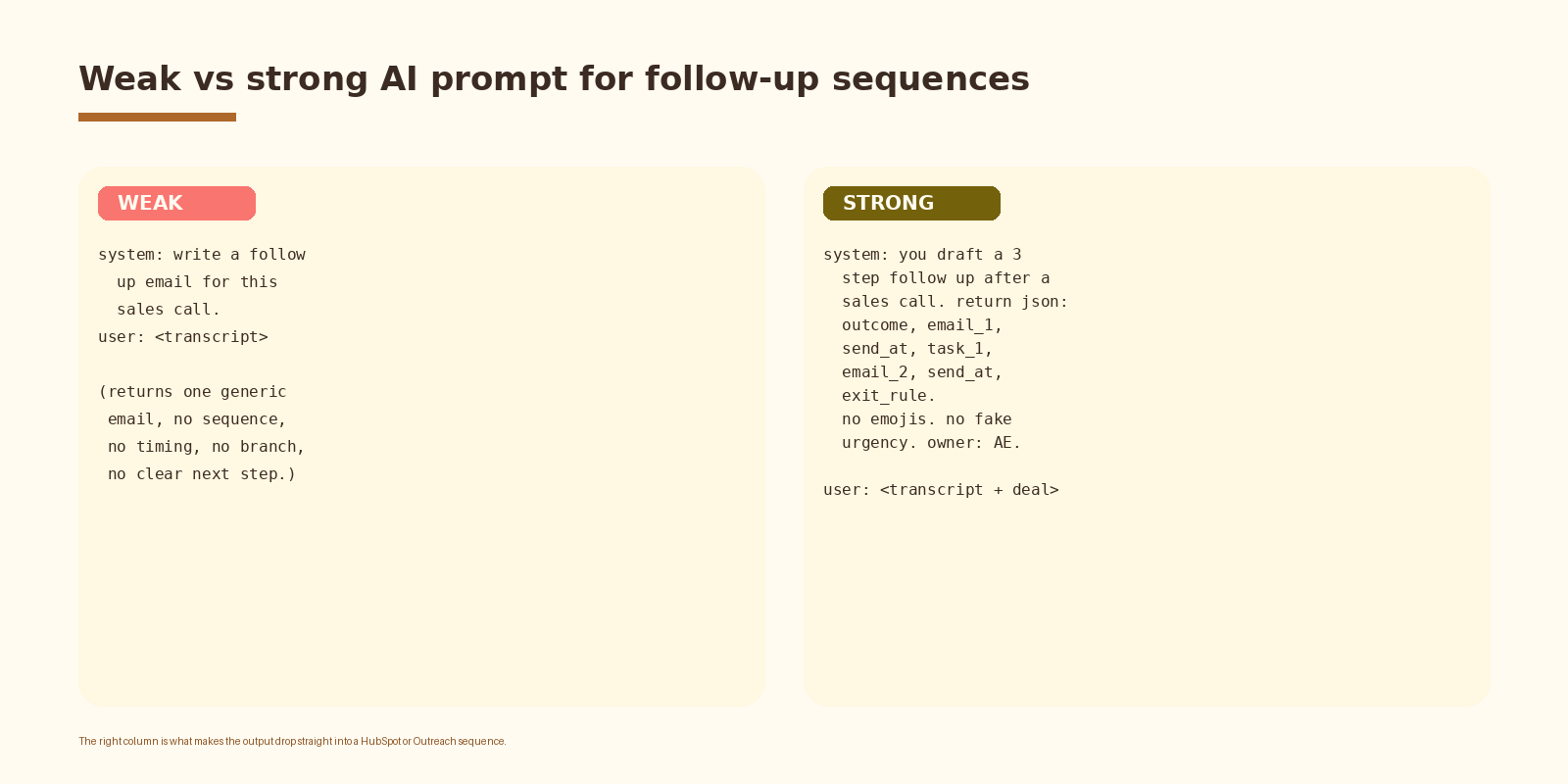
This is the step that earns the build. A weak prompt asks the model to write a follow-up email and returns one generic message the AE rewrites or skips. A strong prompt asks for a structured sequence with outcome, email one, send-at timestamp, day three task, email two, second send-at timestamp, and the exit rule. The output is something the sequence engine can read field by field.
// System prompt sketch
You draft post call follow up sequences for B2B sales.
Read the call transcript and the deal context.
Pick one outcome label and return a 3 step sequence.
Return strict JSON with keys: outcome, email_1, send_at_1,
task_1, email_2, send_at_2, exit_rule.
Rules:
  - no emojis. no fake urgency. no all caps.
  - email_1 references one specific moment from the call.
  - email_2 addresses the strongest objection by name.
  - exit_rule fires on any inbound reply or stage change.
  - all sends are drafts. the AE clicks send.
  - if the call shows disqualify signal, return a single
    polite close out email and exit. no task, no email_2.
Three details to lock in. The system prompt forces the schema and forbids the model defaults that make AI email recognizable from a distance. The email-one rule grounds the recap in a specific moment from the actual call, which is the difference between a real follow-up and a templated one. The disqualify branch saves the AE from approving five touches on a deal that should have closed in the call.
If you want this set up cleanly inside your stack with logging, retries, and a feedback loop into a CRM, that is the kind of work we ship at Espressio.
Step 4. Land the draft in front of the AE
Where the draft lands matters as much as the draft itself. Three patterns work in production. The first is a pending HubSpot sequence enrollment with the email bodies pre-filled, waiting on AE approval. The second is a draft thread in Gmail or Outlook linked to the deal record. The third is a Slack message to the AE with the recap, the draft, and an approve button. Pick the one your AEs already check. A draft that lives in a tab nobody opens is a draft that never sends.
Step 5. Run the sequence and exit cleanly
The send and exit step is mechanical and high-leverage. The sequence engine (HubSpot Sequences, Outreach, Apollo, Salesloft, Instantly) handles the actual delivery, the day three timing, and the reply detection. The exit rule fires on any inbound reply, any deal stage change, or a manual stop from the AE. A sequence that keeps emailing after a buyer replies is the single fastest way to burn a domain and a relationship.
// HubSpot sequence enrollment (pending AE approval)
await hubspot.crm.objects.notes.basicApi.create({
  properties: {
    hs_note_body: renderFollowupDraft(draft),
    hs_timestamp: Date.now(),
  },
  associations: [{ to: { id: deal.id }, types: [{ associationTypeId: 214 }] }],
});
await hubspot.crm.objects.tasks.basicApi.create({
  properties: {
    hs_task_subject: `Review AI follow-up draft for ${deal.properties.dealname}`,
    hs_task_status: 'NOT_STARTED',
    hs_timestamp: Date.now(),
    hubspot_owner_id: deal.properties.hubspot_owner_id,
  },
  associations: [{ to: { id: deal.id }, types: [{ associationTypeId: 216 }] }],
});
One design choice worth defending. The model writes the draft, the AE clicks send. The buyer-facing message goes out under the AE’s name and identity, with the AE accountable for the line that lands. A workflow that automates the send breaks the moment a model hallucinates a price or a feature, and the trust cost is far higher than the time saved.
Sequence shapes by call outcome
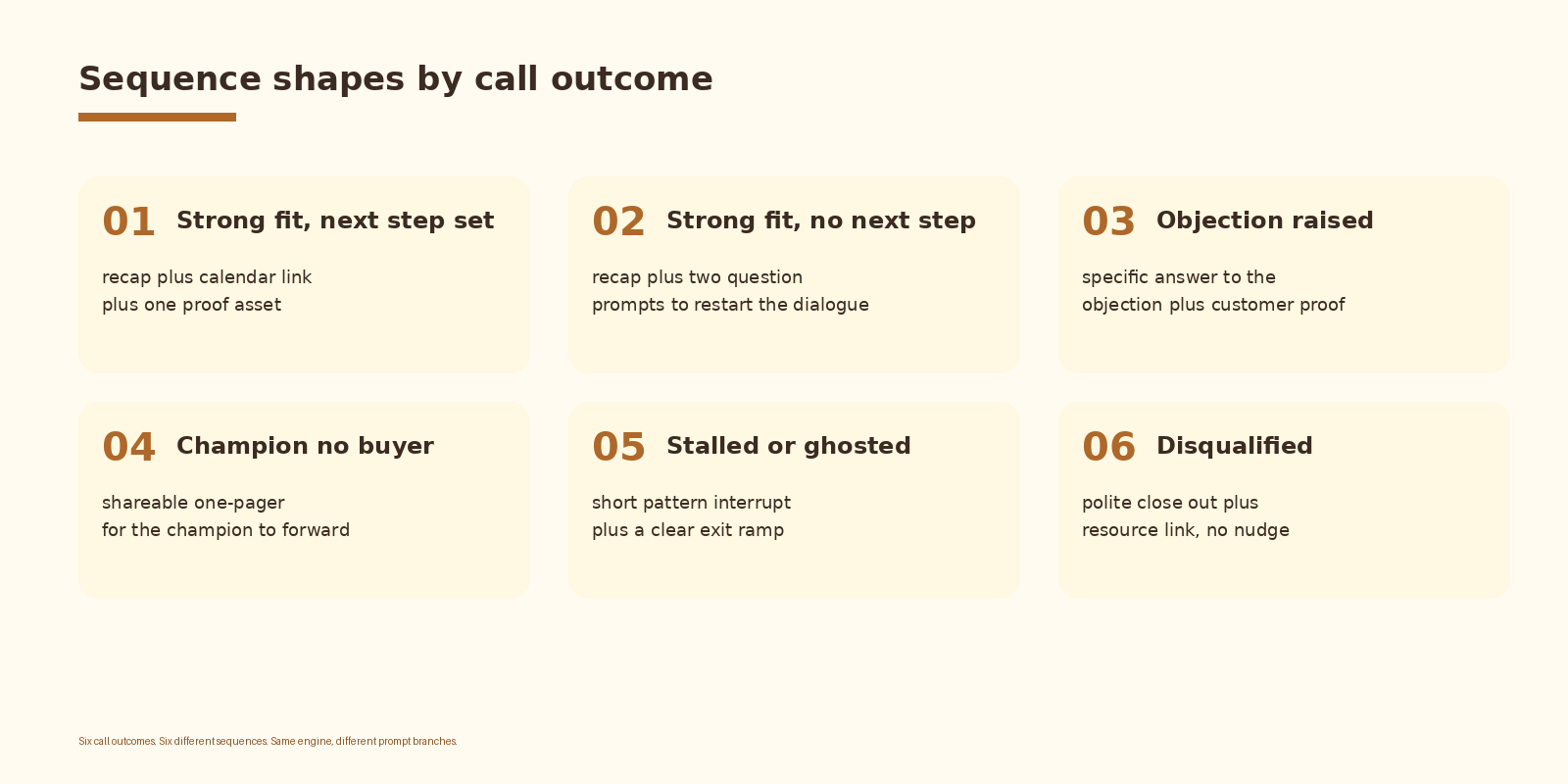
Six call outcomes drive six different sequence shapes. A strong fit with a next step set gets a recap, a calendar link, and one proof asset. A strong fit with no next step gets a recap plus two question prompts to restart the dialogue. An objection-raised call gets a sequence whose first email answers the objection directly with customer proof. A champion-without-buyer call gets a shareable one-pager. A stalled call gets a short pattern interrupt with an exit ramp. A disqualified call gets one polite close-out and stops.
Common mistakes
- Sending without AE approval. The first hallucinated price or feature destroys more pipeline than the workflow saves.
- Writing one template per outcome with no grounding. Templated recaps read like templated recaps and reply rates collapse.
- Forgetting the exit rule. Sequences that keep emailing after a reply burn domains and trust.
- Letting the model pick send timing freely. Lock send-at to a small set of options that match your team’s send windows.
- Skipping the disqualify branch. Approving five touches on a dead deal trains the AE to ignore the approval queue.
- No log of what the model saw. When reply rates drop, you need to read the input.
How to know it is working
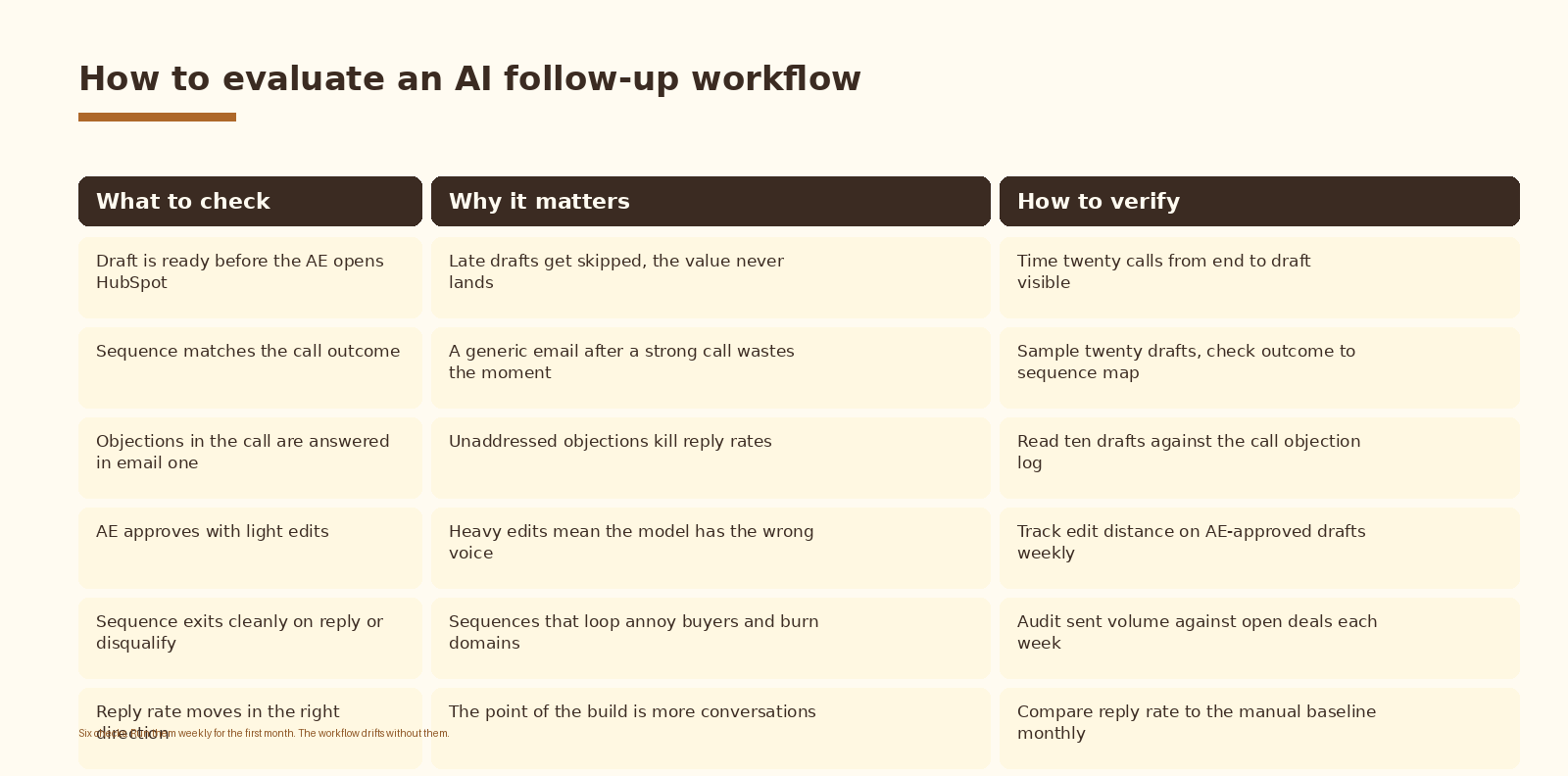
Reply rate is the headline metric. Track it weekly against the manual baseline. The second number is approval-edit distance: how heavily the AE edits the draft before sending. Low edit distance means the model has the voice; high edit distance means the prompt or the input is wrong. The third is exit-rule health: how often a sequence kept sending after a reply. Anything above zero is a bug.
FAQ
Which AI model should I use for the drafts?
GPT-4.1 and Claude Sonnet both hold up well at draft length and follow the JSON schema reliably. ChatGPT is the default when the rest of the stack is already on the OpenAI API. Claude is the right answer when the buyer-facing copy needs a softer voice out of the box. Run a side-by-side on fifty real calls and pick on edit distance.
Do we still need a human reviewer?
Yes. The AE clicks send. The model writes the draft. The moment you let the sequence run unattended on buyer-facing email, the first hallucinated price, feature, or commitment costs more than every hour the automation saved. Keep the AE in the loop on the send. Automate the draft, the timing, the routing, the exit, and the logging.
How does this integrate with HubSpot, Outreach, or Salesloft?
All three expose an API for creating pending sequence enrollments, pre-filling email bodies, and reading reply state. HubSpot Sequences works for inbound and mid-funnel motions. Outreach and Salesloft are the heavier choices for full outbound orgs. Apollo and Instantly cover the cold side. The drafter does not care which sequence engine you use; only the write step changes.
What does this cost to run?
Two cost lines: the call transcription tool and the model. The transcription tool sits at standard per-seat pricing for the team using it. The model call is one per completed call; a thirty minute transcript at GPT-4.1 or Claude Sonnet pricing lands in single digit cents per call. For a ten-rep team running forty calls a week each, list-price spend lands in the tens of dollars a month on the model side. The CRM and sequence-engine writes are free.
How do we keep AI follow-ups from looking like AI follow-ups?
Three rules go in the system prompt and they do most of the work. No emojis. No fake urgency lines. No generic openers. Add a fourth rule that forces email one to reference one specific moment from the call (a phrase the prospect used, a tool they mentioned, a constraint they named). Buyers can spot a templated AI email at a glance; a single specific reference is the line that makes the message read as written by a human who paid attention.
What to do next
- Pick one team and one call type. Post-discovery is the right starting surface because the follow-up moves the deal most.
- Stand up the transcript webhook against a staging endpoint and confirm the payload arrives within five minutes of call end.
- Wire the deal enrichment and the outcome classifier. Run them against last weeks calls and read the outcome labels by hand.
- Lock the drafter prompt with the JSON schema and the no-emoji, no-fake-urgency rules. Tune it against twenty real calls.
- Land drafts inside the AE’s existing tool. Watch the AE approve and edit for a week before changing anything else.
- Review reply rate and edit distance after thirty days. Retune the prompt before adding new call types.
If you want automation like this set up cleanly inside your revenue operations, let’s talk.
Related Espressio guides



