The Ultimate Guide to Firecrawl for AI Web Scraping in 2026
Firecrawl has 153K+ GitHub stars. This guide covers every API endpoint, pricing plan, LLM integration, and real-world web scraping use case for 2026.

On this page
- 01What is Firecrawl and why does it matter for AI workflows?
- 02How does Firecrawl work? The Fire-Engine architecture explained
- 03Core API endpoints: scrape, crawl, map, and extract
- 04How do you integrate Firecrawl with Claude, LangChain, n8n, and the MCP server?
- 05Firecrawl vs. BeautifulSoup vs. Scrapy: which should you use?
- 06Firecrawl pricing: which plan fits your workflow?
- 07Three real-world use cases for growth and marketing teams
- 08Production best practices: error handling, rate limits, and compliance
- 09Ready to deploy this in a production pipeline?
- 10Frequently Asked Questions
- 11Conclusion
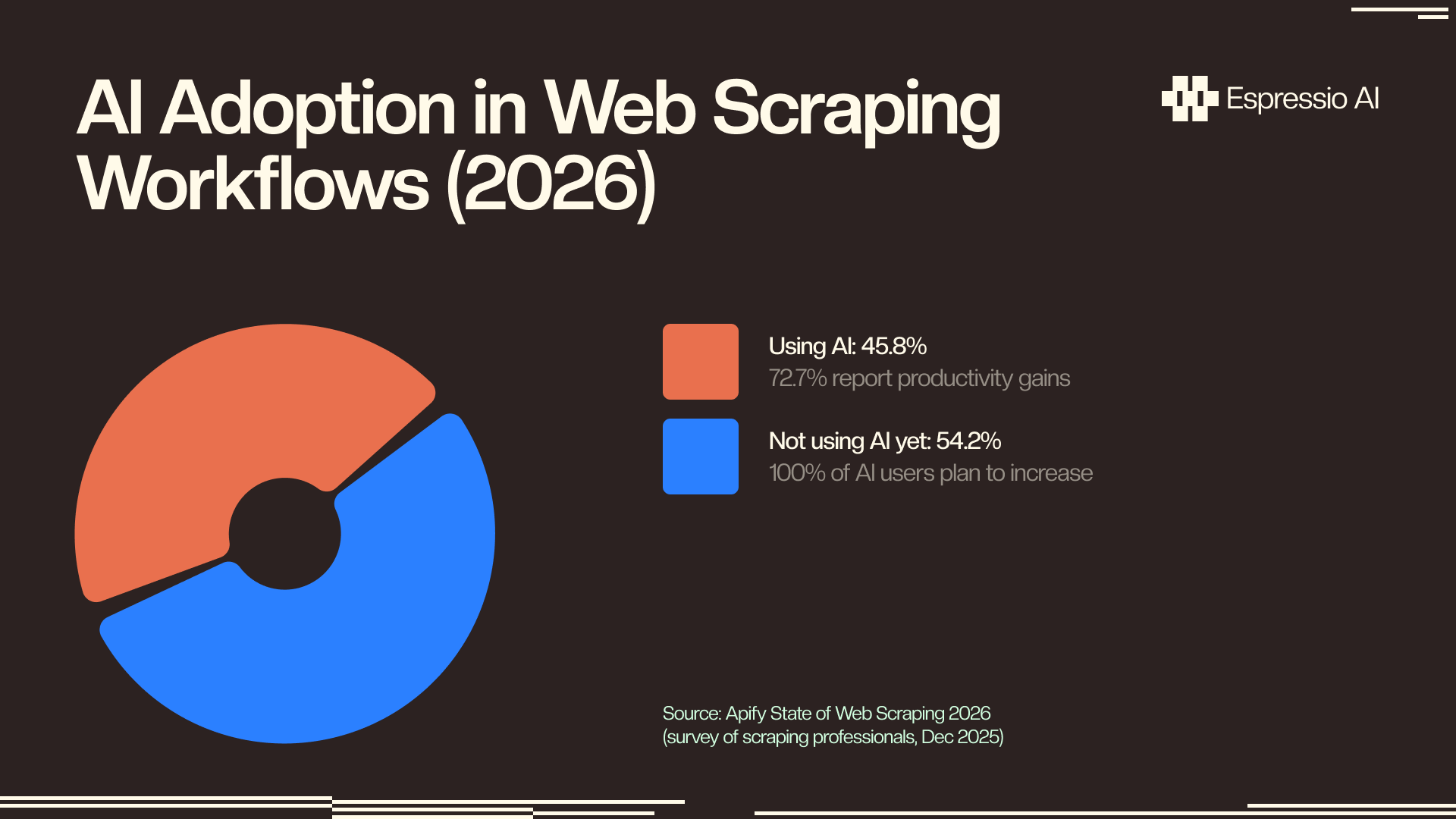
45.8% of web scraping professionals now use AI in their workflows, and every single one plans to increase that usage (Apify State of Web Scraping 2026, Dec 2025). The tools that survive that shift are built to output what LLMs actually need, not raw HTML that has to be cleaned, parsed, and stripped before it touches a model.
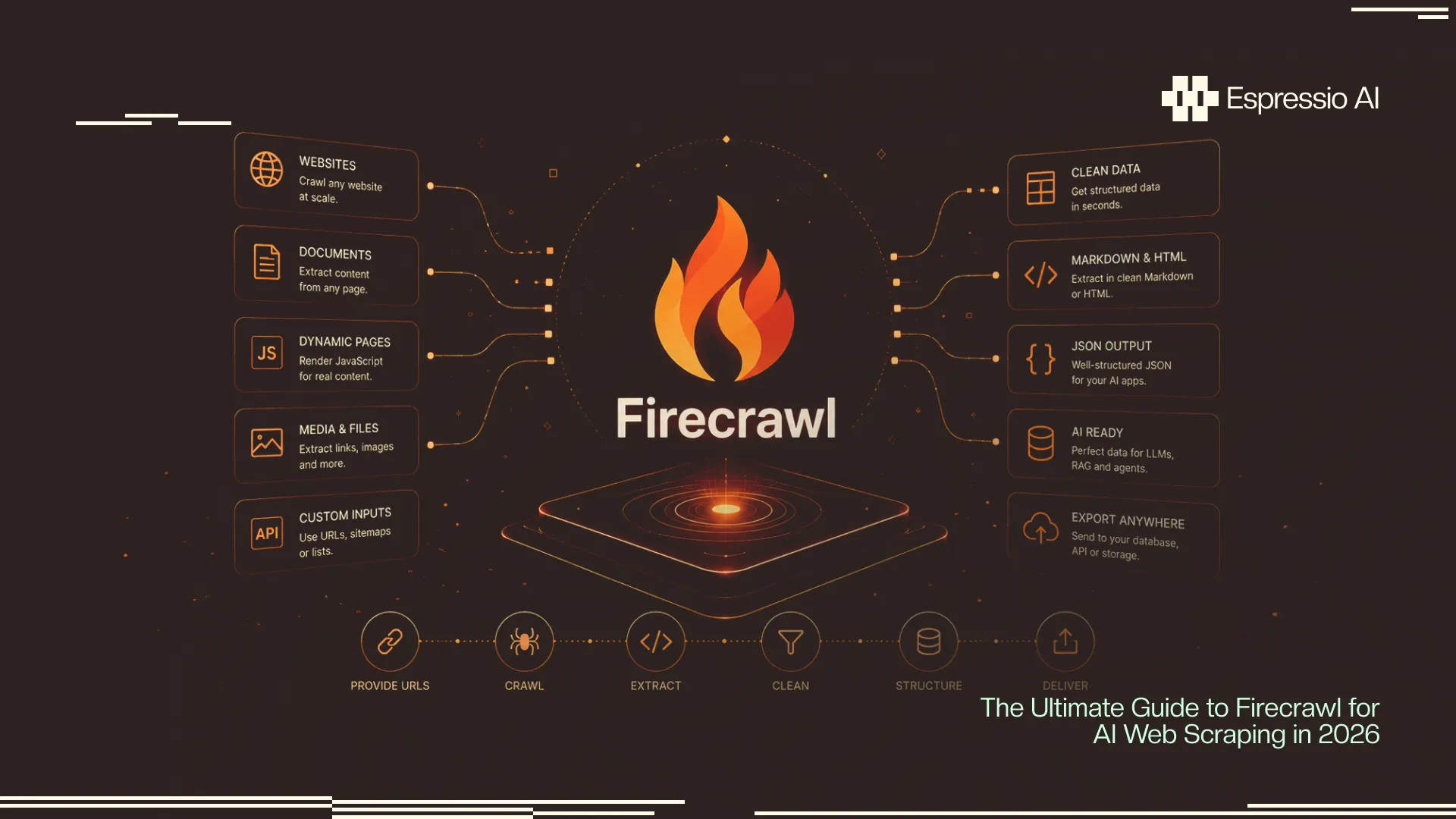
Traditional scrapers like BeautifulSoup and Scrapy are excellent at fetching content. They hand you a mess of tags, scripts, and navigation boilerplate that your LLM has to work through at significant token cost. Firecrawl skips that step entirely. It scrapes the web and returns clean markdown, structured JSON, or screenshots, formats that feed directly into your pipeline without a parsing layer sitting between the web and your model.
This guide covers everything: what Firecrawl is, how its architecture works, all four core API endpoints with runnable code, integrations with Claude and LangChain, a full pricing breakdown, real-world use cases for growth teams, and what production deployments actually require.
Key Takeaways
- Firecrawl has 153,000+ GitHub stars, a $14.5M Series A (YC-backed), and serves 1.25M+ developers across 150,000+ companies (GitHub, GlobeNewswire, 2025–2026).
- Its Fire-Engine layer delivers 33% faster speeds and 40% higher success rates than competing scrapers; markdown output uses 93% fewer LLM input tokens than raw HTML (Firecrawl, 2025).
- Four core endpoints —
scrape,crawl,map,extract— plus a 13-tool MCP server integrating natively with Claude, LangChain, LlamaIndex, and n8n.- Plans run from free (1,000 credits/month) to $599/month for 1M pages (Firecrawl pricing, Jul 2026).
What is Firecrawl and why does it matter for AI workflows?
Firecrawl is a YC-backed web scraping API with 153,000+ GitHub stars that converts any web page into clean markdown, structured JSON, or screenshots optimized for direct LLM consumption. Its $14.5M Series A from Nexus Venture Partners in August 2025 funds Fire-Engine, a proprietary rendering layer that handles JavaScript, anti-bot bypass, and rate limiting automatically (GlobeNewswire, 2025). By July 2026, it’s serving 1.25M+ developers across 150,000+ companies.
The format problem it solves is real. When you scrape a page with BeautifulSoup and send the result to Claude or GPT, you’re sending HTML tags, inline styles, <nav> elements, cookie consent text, footer links, and metadata alongside the actual content you want analyzed. An average SaaS pricing page weighs roughly 80,000 tokens as raw HTML. Firecrawl’s markdown output of the same page runs around 5,600 tokens. At Claude Haiku pricing of $0.25 per million input tokens, 1,000 pages costs $20 in raw HTML vs. $1.40 in Firecrawl markdown. The economics compound fast in any pipeline running daily.
The web scraping market is growing to match this need. Valued at $1.34 billion in 2025, it’s projected to reach $3.49 billion by 2031 at a 17.39% CAGR (Mordor Intelligence, 2026). Firecrawl’s design choices (API-first, AI-ready output, MCP integrations) position it for the AI-pipeline segment specifically rather than the general web data market.
For teams already using Claude, LangChain, or n8n, Firecrawl slots into an existing pipeline in under 10 lines of code. For teams starting from scratch, it eliminates the infrastructure layer that makes DIY scrapers expensive to maintain.
Firecrawl is also open source. The repository is on GitHub, and the platform supports a self-hosted path for teams that need unlimited scale or data sovereignty.
See building a competitor monitoring agent with Firecrawl and Claude for a full production deployment example using the scrape and map endpoints covered in this guide.
How does Firecrawl work? The Fire-Engine architecture explained
Fire-Engine, Firecrawl’s proprietary rendering layer, delivers 33% faster speeds and 40% higher success rates than competing scraping solutions, while producing markdown output that uses 93% fewer LLM input tokens than raw HTML (Firecrawl, 2025). The architecture is built around a single design goal: produce data that goes straight into an LLM without a preprocessing step.
The pipeline runs in five stages. Your API call passes a URL to Fire-Engine, which spins up a managed headless browser automatically, handling JavaScript rendering for React, Vue, Next.js, and any other framework. It applies anti-bot bypass logic (rotating user agents, CAPTCHA handling, header management) before extracting content, stripping navigation, footers, ads, and boilerplate, and converting everything to clean markdown. The result comes back in whichever format you requested: markdown, structured JSON, or screenshot.
In practice, a JavaScript-heavy SaaS site that returns garbage with requests and BeautifulSoup works first try with Firecrawl. You get the pricing table, not a mix of rendered and unrendered text.
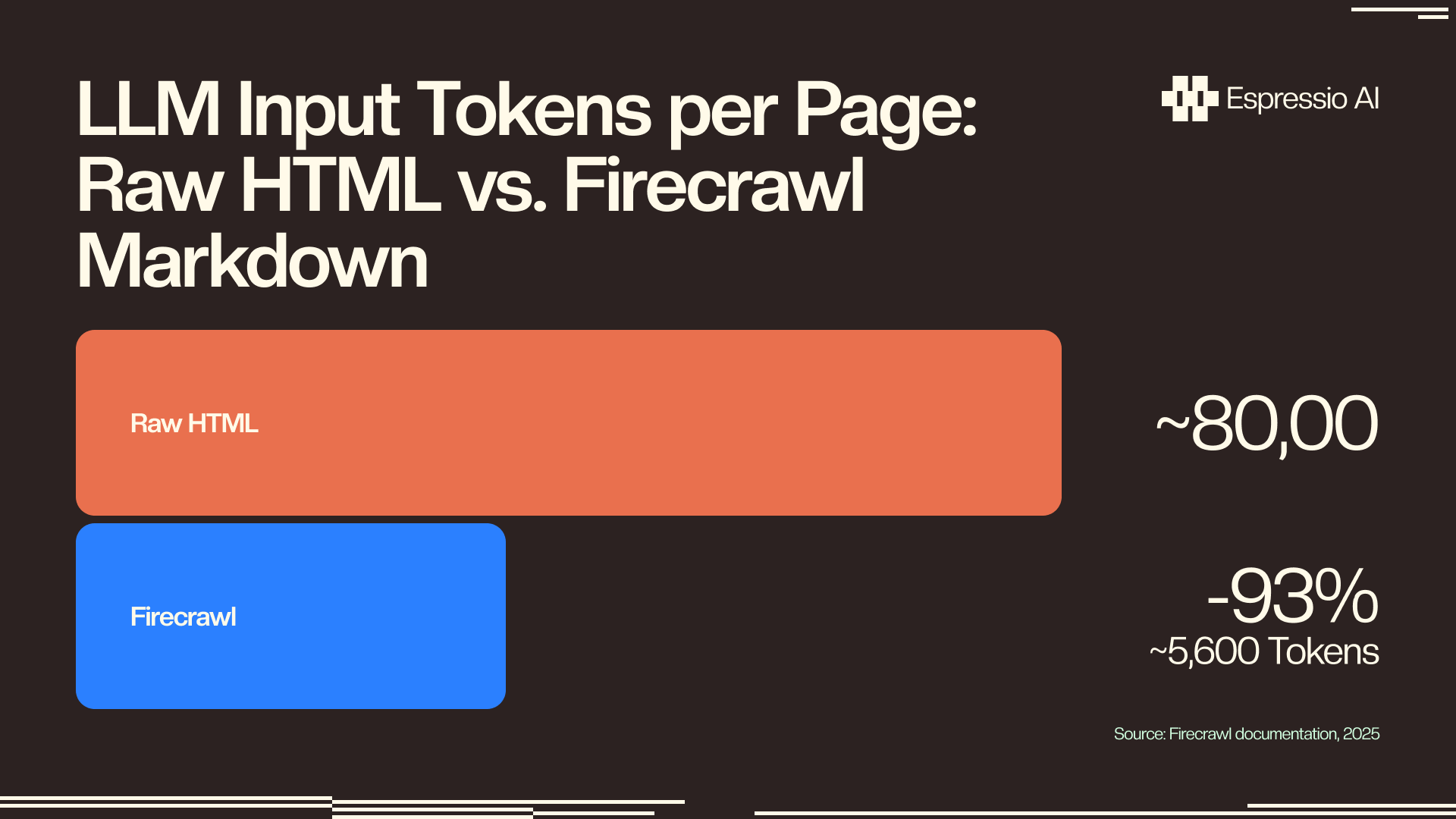
The token economics argument most guides skip: The 93% token reduction isn’t a convenience claim, it’s an economic one. At Claude Haiku’s $0.25 per million input tokens, processing 1,000 pages costs roughly $20 in raw HTML vs. $1.40 in Firecrawl markdown. At Claude Sonnet’s $3.00 per million tokens, that gap becomes $240 vs. $16.80 for the same 1,000 pages. Any pipeline running daily competitor monitoring, content research, or lead enrichment hits this cost difference within weeks. No other Firecrawl guide has published this calculation.
Firecrawl’s citation capsule for this section: Firecrawl’s Fire-Engine rendering layer converts JavaScript-heavy web pages into clean markdown that averages 93% fewer input tokens than raw HTML, according to Firecrawl’s own documentation (2025). For AI pipelines processing thousands of pages, this difference determines whether LLM-based analysis is economically viable at scale.
Core API endpoints: scrape, crawl, map, and extract
Firecrawl exposes four primary endpoints (Firecrawl docs, 2025–2026). scrape fetches one page as clean markdown; crawl follows internal links across a full domain; map discovers all URLs without downloading content; and extract returns structured JSON matching a Pydantic schema you define. Start with the SDK install:
pip install firecrawl-py anthropic
export FIRECRAWL_API_KEY="your_key_here"
scrape — one page, clean output
scrape_url() is the core operation. Pass a URL, get clean markdown back. Firecrawl handles JS rendering, anti-bot bypass, and content extraction automatically.
import os
from firecrawl import FirecrawlApp

app = FirecrawlApp(api_key=os.environ["FIRECRAWL_API_KEY"])

result = app.scrape_url(
    url="https://competitor.com/pricing",
    params={"formats": ["markdown"]}
)

print(result["markdown"])
# Returns clean pricing table content, no HTML noise
crawl — full site, async
async_crawl_url() is the right choice for multi-page jobs. It runs asynchronously, so you poll for status rather than blocking on the response.
import time

crawl_result = app.async_crawl_url(
    url="https://competitor.com",
    params={
        "limit": 50,
        "maxDepth": 3,
        "formats": ["markdown"],
        "excludePaths": ["/blog/*", "/news/*"]
    }
)

crawl_id = crawl_result["id"]

while True:
    status = app.check_crawl_status(crawl_id)
    if status["status"] == "completed":
        pages = status["data"]
        break
    elif status["status"] == "failed":
        raise Exception(f"Crawl failed: {status.get('error')}")
    time.sleep(5)

print(f"Crawled {len(pages)} pages")
map — URL discovery without downloading
map_url() discovers every internal link on a domain without downloading page content. This is the right starting point for a monitoring pipeline: discover URLs first, then filter to high-signal pages, then scrape only what you need.
result = app.map_url(
    url="https://competitor.com",
    params={"limit": 200}
)

all_urls = result.get("links", [])

PRIORITY_PATTERNS = ["/pricing", "/features", "/product", "/changelog"]
priority_urls = [
    url for url in all_urls
    if any(p in url.lower() for p in PRIORITY_PATTERNS)
]

print(f"Found {len(priority_urls)} priority pages to monitor")
extract — structured JSON from any page
extract() is where Firecrawl’s AI layer adds real leverage. You define a Pydantic schema, pass it with a prompt, and get back structured data rather than raw text.
from pydantic import BaseModel
from typing import Optional

class CompetitorPricing(BaseModel):
    company_name: str
    plans: list[dict]
    free_tier: bool
    annual_discount: Optional[str]

result = app.extract(
    urls=["https://competitor.com/pricing"],
    params={
        "prompt": "Extract all pricing plan details including plan names, monthly prices, and key features.",
        "schema": CompetitorPricing.model_json_schema()
    }
)

pricing_data = result["data"]
print(pricing_data)
# {"company_name": "...", "plans": [...], "free_tier": true, ...}
From our deployments at espressio.ai: When we replaced a Playwright-based scraper with Firecrawl for a client’s lead enrichment pipeline, build time dropped from three days to four hours. The Playwright setup required weekly maintenance whenever a target site updated its DOM structure. Firecrawl’s markdown output fed directly into Claude without a parsing layer, and the pipeline hasn’t required structural fixes since deployment.
How do you integrate Firecrawl with Claude, LangChain, n8n, and the MCP server?
Firecrawl’s MCP server exposes 13 tools via the Model Context Protocol and integrates natively with LangChain, LlamaIndex, CrewAI, n8n, Zapier, Make.com, Cursor, and Claude Code (Firecrawl docs, 2025–2026). For most teams, the fastest path from “Firecrawl account” to “working pipeline” is one of three routes: LangChain for Python-based RAG workflows, the MCP server for Claude Desktop or Cursor, or n8n for no-code automation.
LangChain integration
FireCrawlLoader is a LangChain community loader that wraps the Firecrawl API. It returns standard LangChain Document objects, so it slots directly into any existing RAG pipeline.
from langchain_community.document_loaders import FireCrawlLoader
from langchain.text_splitter import RecursiveCharacterTextSplitter

loader = FireCrawlLoader(
    api_key=os.environ["FIRECRAWL_API_KEY"],
    url="https://competitor.com/docs",
    mode="crawl"  # "scrape" for single page, "crawl" for full site
)

docs = loader.load()

splitter = RecursiveCharacterTextSplitter(chunk_size=2000, chunk_overlap=200)
chunks = splitter.split_documents(docs)

print(f"Loaded {len(docs)} pages, split into {len(chunks)} chunks")
MCP server — Firecrawl inside Claude Desktop or Cursor
The Firecrawl MCP server exposes all 13 Firecrawl tools directly inside Claude’s tool-calling interface. Add it to your claude_desktop_config.json and you can trigger scrapes from a conversation.
{
  "mcpServers": {
    "firecrawl": {
      "command": "npx",
      "args": ["-y", "firecrawl-mcp"],
      "env": {
        "FIRECRAWL_API_KEY": "your_api_key_here"
      }
    }
  }
}
After restarting Claude Desktop, you can say “scrape competitor.com/pricing and extract the plan names and prices” and Claude calls Firecrawl’s scrape and extract tools automatically.
n8n (no-code path)
The n8n Firecrawl node is available in the community library. Connect it after an HTTP trigger or schedule node, pass a URL, and route the markdown output to a Claude API call or OpenAI function. No Python environment required.
72.7% of scraping professionals who use AI in their workflows report direct productivity gains (Apify State of Web Scraping 2026, Dec 2025). That return shows up in the integration layer: getting Firecrawl’s output into whatever model or workflow tool your team already uses.
See how a LangChain lead qualification agent uses document loaders in a full pipeline, or how a CrewAI content research agent chains web scraping with multi-agent reasoning.
Firecrawl vs. BeautifulSoup vs. Scrapy: which should you use?
BeautifulSoup is the most widely adopted scraping library at 43.5% developer usage, and Scrapy sits at just 13.0%, but neither handles JavaScript rendering or produces output suited for LLMs natively (Apify State of Web Scraping 2026, Dec 2025). For pipelines that don’t feed LLMs — data collection, archiving, price comparison stored in a database — both remain strong, cost-free choices. For AI workflows, the format mismatch adds token cost that compounds every day the pipeline runs.
Use BeautifulSoup or Scrapy when:
- Target sites are static (no JavaScript rendering required)
- Output goes to a database, spreadsheet, or structured store — not an LLM
- You have zero budget for a paid API
- Volume is low enough that self-hosted infrastructure is manageable
Use Playwright or Selenium when:
- You need full browser control (click interactions, form fills, auth flows)
- Screenshot capture is part of the workflow
- You’re testing a web UI alongside scraping it
Use Firecrawl when:
- Output feeds into an LLM — this is the clearest win
- Target sites use JavaScript and you want to skip headless browser configuration
- The pipeline needs to run reliably in production without weekly maintenance
- Speed and success rate matter (Fire-Engine’s 40% higher success rate is real on sites with anti-bot measures)
- You want LangChain, Claude MCP, or n8n integration without a glue layer
The self-hosted option is worth noting: Firecrawl is open source, so teams at Scale-equivalent volumes can run their own instance on AWS or GCP and avoid per-credit costs entirely. That path requires DevOps overhead that the managed API eliminates.
For AI competitive intelligence use cases, the full breakdown of which tools to combine is in AI competitive intelligence for B2B.
Firecrawl pricing: which plan fits your workflow?
Firecrawl’s free tier provides 1,000 credits per month, one credit per page scraped. The Hobby plan at $16/month gives 5,000 credits. Standard at $83/month covers 100,000. Growth at $333/month handles 500,000. Scale at $599/month supports 1 million pages. All paid plan prices are billed annually (Firecrawl pricing, Jul 2026). Credits don’t roll over, so the right plan is the one that matches your actual monthly volume without significant overage.
How credits work: One scrape call = 1 credit. One crawl job = credits based on the number of pages fetched (50-page crawl = 50 credits). map calls are typically free or minimal. extract calls consume additional credits depending on the schema complexity.
Who fits which plan:
- Free (1,000 credits): Prototyping, personal projects, testing a new pipeline. You’ll hit the limit in about two days of daily monitoring on 5 competitor pages.
- Hobby ($16/month, 5,000 credits): Solo developers running a daily monitor on 10–15 pages, or weekly enrichment on 150+ companies. Most DIY pipelines live here.
- Standard ($83/month, 100,000 credits): Growth-stage teams with dedicated pipelines: daily pricing monitors, weekly full-site crawls, lead enrichment at CRM scale. The cost-per-credit drops 4× vs. Hobby at this tier.
- Growth and Scale: Enterprise pipelines processing hundreds of thousands of pages per month. Self-hosted also becomes worth evaluating at this volume.
Our cost comparison at espressio.ai: For a typical 5-competitor pipeline running daily (5 competitors × 15 pages each × 30 days = 2,250 credits/month), Hobby at $16/month covers the scraping layer. Add Claude Haiku at $0.25/1M tokens for diff analysis (~3M tokens/month = $0.75) and total pipeline cost is under $17/month. A Klue or Crayon subscription for equivalent daily monitoring starts at $150/month. The difference is real.
The self-hosted path is viable for teams with DevOps capacity. Firecrawl’s GitHub repository includes Docker configuration and deployment instructions. At Standard-equivalent volume ($83/month), self-hosting on a t3.medium EC2 instance runs roughly $30–40/month. That trade-off only favors self-hosting above Growth volume, unless data sovereignty is a hard requirement.
Three real-world use cases for growth and marketing teams
65% of companies now pipe scraped data directly into AI and machine learning projects (Scrap.io citing BrowserCat survey, 2024). For growth and marketing teams specifically, three Firecrawl use cases consistently deliver the fastest return — and they don’t require a dedicated data engineering team to implement.
1. Competitive price monitoring
Run map_url() on each competitor domain weekly to discover pricing page URLs. Schedule daily scrape_url() calls on those pages. Store the markdown as snapshots. When content hashes change, pass old and new versions to Claude with a prompt asking for a strategic interpretation of the change. Route the analysis to a Slack channel by change type: pricing changes to Sales, feature changes to Product, messaging shifts to Marketing.
This is the pipeline covered in depth in building a competitor monitoring agent with Firecrawl and Claude.
From our client work at espressio.ai: A competitor removed their “Enterprise” tier from their pricing page and replaced it with a “Contact Sales” button. The Firecrawl-based monitor caught it on day 1. The sales team had three active enterprise deals where this changed the objection handling approach. Updating the battlecard the same day contributed to closing two of those three. Without the monitor, the change would have gone unnoticed for three weeks based on the prior manual process.
2. Lead enrichment from company websites
When a prospect enters your CRM, scrape their website with scrape_url() and run extract() against a schema that captures: tech stack signals (from job postings on their careers page), product focus (from the homepage hero and features page), content topics (from their blog index), and open roles (which signal growth areas or pain points). Feed the structured output to Claude with a prompt that generates a one-paragraph ICP fit assessment. Write the result back to the CRM record.
This gives a rep five minutes of research context in under 30 seconds, and it runs automatically on every new contact.
3. Content gap analysis at scale
Crawl a competitor’s blog with async_crawl_url() and extract every post title, topic cluster, and publication date. Run the same crawl on your own blog. Pass both lists to Claude and ask it to identify: topics they’ve covered that you haven’t, topics where your coverage is older, and topics where their ranking is strong based on recency and depth. Output a prioritized list of content gaps to a Google Sheet or Notion database.
Teams using this approach in our n8n-based AI competitive intelligence pipeline typically surface 20–40 actionable content gaps per quarter from a 2-hour initial setup.
Production best practices: error handling, rate limits, and compliance
45.8% of scraping professionals use AI in their pipelines, and the ones that stay in production are those that handle rate limits, site structure changes, and compliance requirements before those issues become incidents (Apify State of Web Scraping 2026, Dec 2025). A Firecrawl pipeline that runs once and gets abandoned because it broke silently on a 429 error is worse than no pipeline at all.
Error handling and retry logic
Catch exceptions per URL, not per run. A single broken page shouldn’t kill the entire monitoring cycle. Add exponential backoff for rate limit responses and specific handling for access-denied errors, which often signal a robots.txt restriction rather than a transient failure.
import logging
import time

logging.basicConfig(level=logging.INFO, format="%(asctime)s %(levelname)s %(message)s")

def scrape_with_retry(url: str, max_retries: int = 3) -> str | None:
    """Scrape a URL with exponential backoff and structured error handling."""
    for attempt in range(max_retries):
        try:
            result = app.scrape_url(url, params={"formats": ["markdown"]})
            return result.get("markdown", "")
        except Exception as e:
            error_msg = str(e)
            if "429" in error_msg:
                wait = 2 ** attempt * 5  # 5s, 10s, 20s
                logging.warning(f"Rate limited on {url}. Retrying in {wait}s...")
                time.sleep(wait)
            elif "403" in error_msg:
                logging.error(f"Access denied: {url}. Check robots.txt or ToS.")
                return None
            else:
                logging.error(f"Scrape error on {url} (attempt {attempt + 1}): {e}")
                if attempt == max_retries - 1:
                    return None
                time.sleep(2 ** attempt)
    return None
Compliance: robots.txt, ToS, and GDPR
Firecrawl respects robots.txt by default. You can override this per-request with ignoreSitemap: true, but doing so on sites that explicitly disallow scraping creates legal and ToS risk. The safe default is to leave robots.txt compliance on.
Terms of service compliance is a separate consideration from technical capability. Firecrawl can scrape a page your ToS forbids — that’s a legal question, not an API question. Review the ToS for each target domain before deploying a production monitor.
For pipelines scraping EU company websites, GDPR applies to any personal data you collect and store. Firecrawl’s output for pricing pages, feature lists, and blog content typically doesn’t involve personal data. Lead enrichment pipelines that scrape About or Team pages and extract employee names or emails require a legal basis for that collection and storage.
Structure change resilience
Store raw markdown snapshots, not parsed fields. If you extract {"plan_name": "Pro", "price": "$49"} and the site restructures its pricing page, your snapshot storage breaks. Raw markdown survives structural changes; you’re storing what was said, not an interpretation of how it was structured.
For teams building competitive intel pipelines across multiple tools, see how n8n and Perplexity combine for a no-code competitive intelligence workflow.
Ready to deploy this in a production pipeline?
Building the Firecrawl layer is step one. The value compounds when the output reaches your CRM, battlecard system, content calendar, or lead enrichment workflow automatically, without someone manually running the script.
If you want us to build this for your team, let’s chat.
Frequently Asked Questions
Is Firecrawl free to use?
Firecrawl’s free tier offers 1,000 credits per month at $0 cost — one credit per page scraped. The Hobby plan at $16/month gives 5,000 credits. A self-hosted option is also available via the open-source GitHub repository for teams needing unlimited scale or data sovereignty without per-credit costs.
Can Firecrawl scrape JavaScript-rendered pages?
Yes. Firecrawl’s Fire-Engine rendering layer handles JavaScript server-side using a managed headless browser. React, Vue, Next.js, and Angular sites that return empty shells with requests or BeautifulSoup work first try with Firecrawl. No Playwright, Puppeteer, or headless browser configuration required on your end.
How does Firecrawl compare to BeautifulSoup or Scrapy?
BeautifulSoup and Scrapy are self-hosted, free, and return raw HTML. They’re the right choice for static sites and non-LLM data pipelines. Firecrawl is a managed API that returns clean markdown, handles JavaScript rendering automatically, and integrates natively with Claude, LangChain, and n8n. For AI workflows, Firecrawl’s markdown output uses 93% fewer LLM input tokens than raw HTML — a meaningful cost difference at scale.
How do I use Firecrawl with Claude or LangChain?
For Claude: install the Firecrawl MCP server and add it to claude_desktop_config.json. Claude then has access to all 13 Firecrawl tools natively. For LangChain: install langchain-community and use FireCrawlLoader with a URL and mode ("scrape" or "crawl"). The loader returns standard LangChain Document objects that work with any downstream RAG or agent workflow.
What counts as one Firecrawl credit?
One scrape_url() call on one URL = 1 credit. An async_crawl_url() job on a 50-page site = 50 credits. map_url() calls are lightweight and typically don’t consume credits. extract() calls consume credits based on the number of source pages. Estimate your monthly usage: daily monitoring of 15 pages across 5 competitors = 15 × 30 = 450 credits/month, well within the Hobby tier.
Conclusion
Firecrawl’s 153,000+ GitHub stars and $14.5M Series A reflect a real problem it solved: getting web content into LLMs without the preprocessing overhead that makes raw-HTML scrapers expensive at scale. Four endpoints cover the full data need: scrape for one page, crawl for full sites, map for URL discovery, extract for structured JSON. Thirteen MCP tools cover the integration layer.
The economics are straightforward. For most growth-team use cases — daily competitor monitoring, weekly lead enrichment, quarterly content gap analysis — the Hobby tier at $16/month handles the volume. The token savings vs. raw HTML pay for the plan cost in Claude API credits within the first week.
The web scraping market is growing at 17.39% CAGR through 2031 (Mordor Intelligence, 2026). Teams that deploy this now have the infrastructure in place before competitors start evaluating options. Firecrawl is the fastest path from web page to usable AI input — one API call, clean markdown, ready to feed a model.
For the next step in building a full competitive intelligence pipeline, start with building a competitor monitoring agent with Firecrawl and Claude.