Luka Mrkić
Head of BD
Insights, strategies, and real-world playbooks on AI-powered marketing.
MAY 27, 2026
Firecrawl + Claude Competitor Monitoring Agent
A competitor monitoring agent is a scheduled job that scrapes a fixed set of competitor URLs, diffs them against a stored baseline, asks Claude to classify what changed, and routes the alert to the right channel. Firecrawl handles the hard part of the scrape: JavaScript rendering, Cloudflare, clean markdown output. Claude handles the hard part of the read: turning a noisy diff into a category, a severity, and a one sentence summary.
This guide walks through the architecture, the prompts, the code, and the standards to evaluate the build. If you are deciding who should set this up for your team, the second half doubles as a checklist.
Key Takeaways
- The cheapest useful version runs daily on twenty URLs, costs a few dollars a month in API spend, and pays back the first week it catches a pricing change before your sales team finds it on a call.
- The build is six steps: pick targets, scrape, store, diff, classify with Claude, route alerts. The hard parts are prompt structure and alert routing, not the scraper.
- A weak prompt returns a paragraph of prose. A strong prompt returns structured JSON with category, severity, summary, and the exact source quote. The structured contract is what makes the rest of the system work.
- The metric that matters is action rate, not alert volume. If the team is not acting on alerts, retune the severity gate before blaming the model.
What an AI competitor monitoring agent actually does
A competitor monitoring agent watches a fixed set of pages on a fixed schedule and tells you when something on them changes in a way that matters. The pages are usually pricing, product, homepage, blog index, careers, and changelog. The schedule is usually daily. The thing that matters is rarely the diff itself; it is the interpretation of the diff.
The old way of doing this was a manual review every Friday afternoon. Someone on the marketing team opened ten tabs, skimmed each one, and wrote a short note in Slack if anything looked new. That process catches the obvious launches and misses everything else. Pricing rows change quietly. A new tier appears on a Tuesday and your sales team finds out about it on a call three weeks later. A competitor swaps their headline from “the platform for X” to “the agent for X” and your positioning team never sees the move.
The AI version watches the same pages every morning, returns a clean diff, and gets a model to classify the diff into a category your team can actually route. The output looks less like a research note and more like a Jira ticket: category, severity, summary, source quote, link.
Architecture
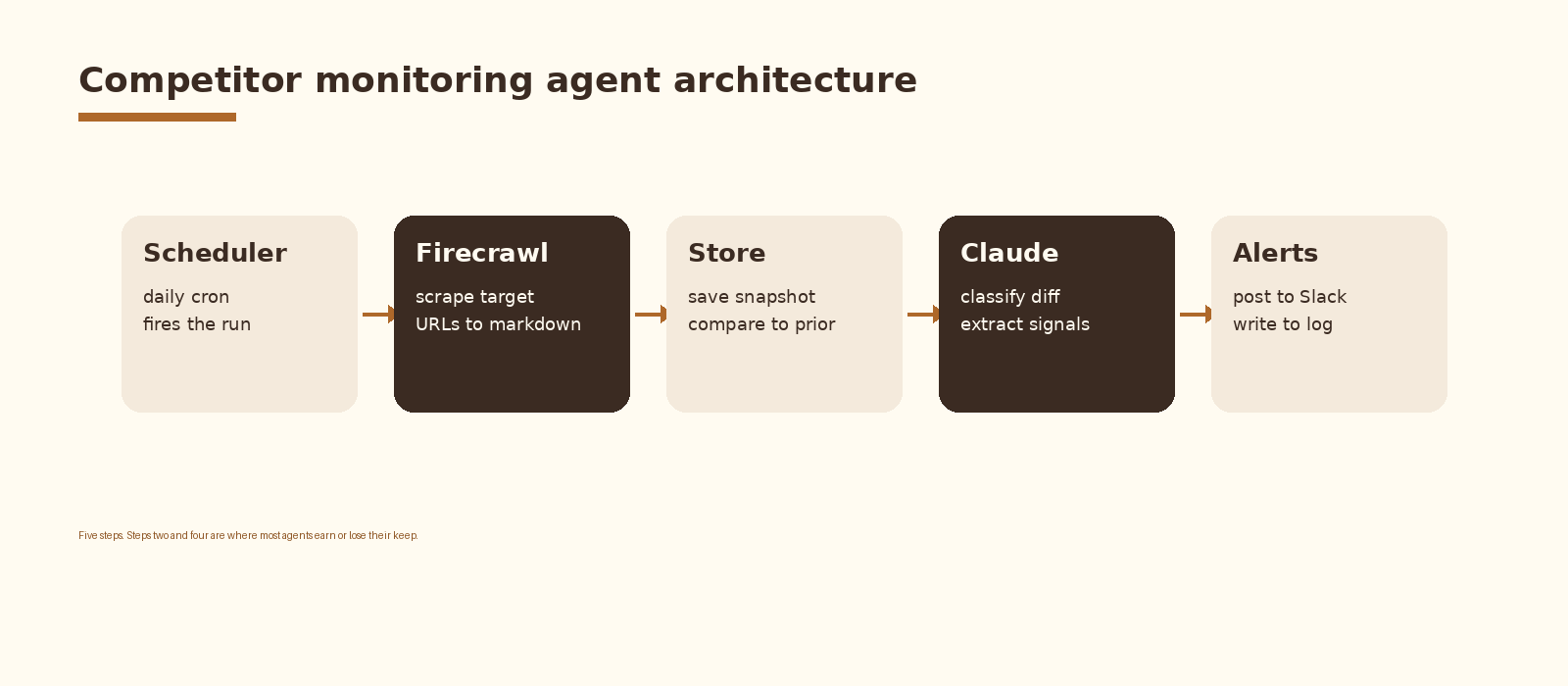
Five components. A scheduler that fires the run. A scraper that pulls the current state of each target page. A store that holds the last known state so you can diff. A model that reads the diff and classifies it. An alerting layer that posts the classified change to the right channel. Each component is replaceable; the contract between them is what holds the agent together.
Step 1. Pick the targets
Start with three to five competitors. For each, watch six URLs at most: homepage, pricing, product or features, changelog or what is new, blog index, and careers. Twenty to thirty URLs total is the sweet spot for a first build. Past that you spend more time triaging noise than reading signal.
Treat the URL list as data. Store it in a small table (a Google Sheet, an Airtable base, or a Postgres table) with columns for competitor, url, category, owner, and active. The owner column matters more than it looks: when the agent fires an alert for a pricing change, you want it to route to the person who actually decides what to do with that information.
competitor,url,category,owner,active
acme,https://acme.com/pricing,pricing,revops@example.com,true
acme,https://acme.com/changelog,product,pmm@example.com,true
acme,https://acme.com/careers,people,founders@example.com,true
beta,https://beta.com/pricing,pricing,revops@example.com,true
Step 2. Scrape with Firecrawl
The single biggest reason in-house competitor monitoring projects die is that the scraper breaks. Most competitor sites are React or Next.js apps behind Cloudflare. A plain requests.get returns either an empty shell or a 403. You can solve this yourself with Playwright and a residential proxy pool, but you are now running a scraping infrastructure project, not a competitor monitoring project.
Firecrawl is the boring path. You hand it a URL, it returns clean markdown plus metadata, it handles the JS rendering and the anti-bot layer, and you pay per page. For a twenty URL daily run the cost is small enough that the question is no longer whether to use a managed scraper but which one.
# scrape.py
import os
import requests

FIRECRAWL_KEY = os.environ["FIRECRAWL_API_KEY"]

def scrape(url: str) -> dict:
    r = requests.post(
        "https://api.firecrawl.dev/v1/scrape",
        headers={"Authorization": f"Bearer {FIRECRAWL_KEY}"},
        json={
            "url": url,
            "formats": ["markdown"],
            "onlyMainContent": True,
        },
        timeout=60,
    )
    r.raise_for_status()
    data = r.json()["data"]
    return {
        "url": url,
        "markdown": data["markdown"],
        "title": data.get("metadata", {}).get("title", ""),
    }
Two flags carry their weight. onlyMainContent strips navs, footers, and cookie banners so the diff is not dominated by noise from a header redesign. The markdown format gives Claude a clean structured input, which matters for the classification prompt later.
Step 3. Store the baseline
You need somewhere to put yesterday so today has something to compare against. Three storage choices, in order of how much engineering you want to do.
- Filesystem. Save each scrape to disk as
<competitor>-<slug>-<date>.md. Cheap, durable, easy to read by hand when an alert looks wrong. - Postgres. One row per scrape with columns for url, scraped_at, markdown, sha256. Lets you query for the last seen state in one statement and keeps a full history for free.
- Airtable or Google Sheets. Fine for a first build, painful past a few hundred rows. Useful when non engineers need to inspect the raw data.
Whichever you choose, hash the markdown and store the hash. The first thing the agent does each run is hash the new scrape and compare to the last hash. If they match, you skip the diff and the model call entirely. On most days, on most URLs, nothing has changed. Skipping the model call on a no op run is what makes the monthly bill stay small.
# store.py
import hashlib
from datetime import datetime

import psycopg

def save(conn, url: str, markdown: str) -> tuple[str, bool]:
    sha = hashlib.sha256(markdown.encode()).hexdigest()
    with conn.cursor() as cur:
        cur.execute(
            "select sha256 from scrapes where url=%s order by scraped_at desc limit 1",
            (url,),
        )
        row = cur.fetchone()
        changed = row is None or row[0] != sha
        cur.execute(
            "insert into scrapes (url, scraped_at, markdown, sha256) values (%s, %s, %s, %s)",
            (url, datetime.utcnow(), markdown, sha),
        )
    conn.commit()
    return sha, changed
Step 4. Detect changes
When the hash changes, run a diff between the previous markdown and the current markdown. Python’s difflib.unified_diff is enough; you do not need anything fancier. Cap the diff at a few thousand characters before you hand it to Claude, otherwise a homepage redesign blows up the token bill and the model loses focus.
The diff is the input to the model. Do not send the model the whole new page and the whole old page. Send it the diff plus a small header that names the URL, the page category, and the competitor. The model performs better and the spend stays predictable.
Step 5. Ask Claude to classify the change
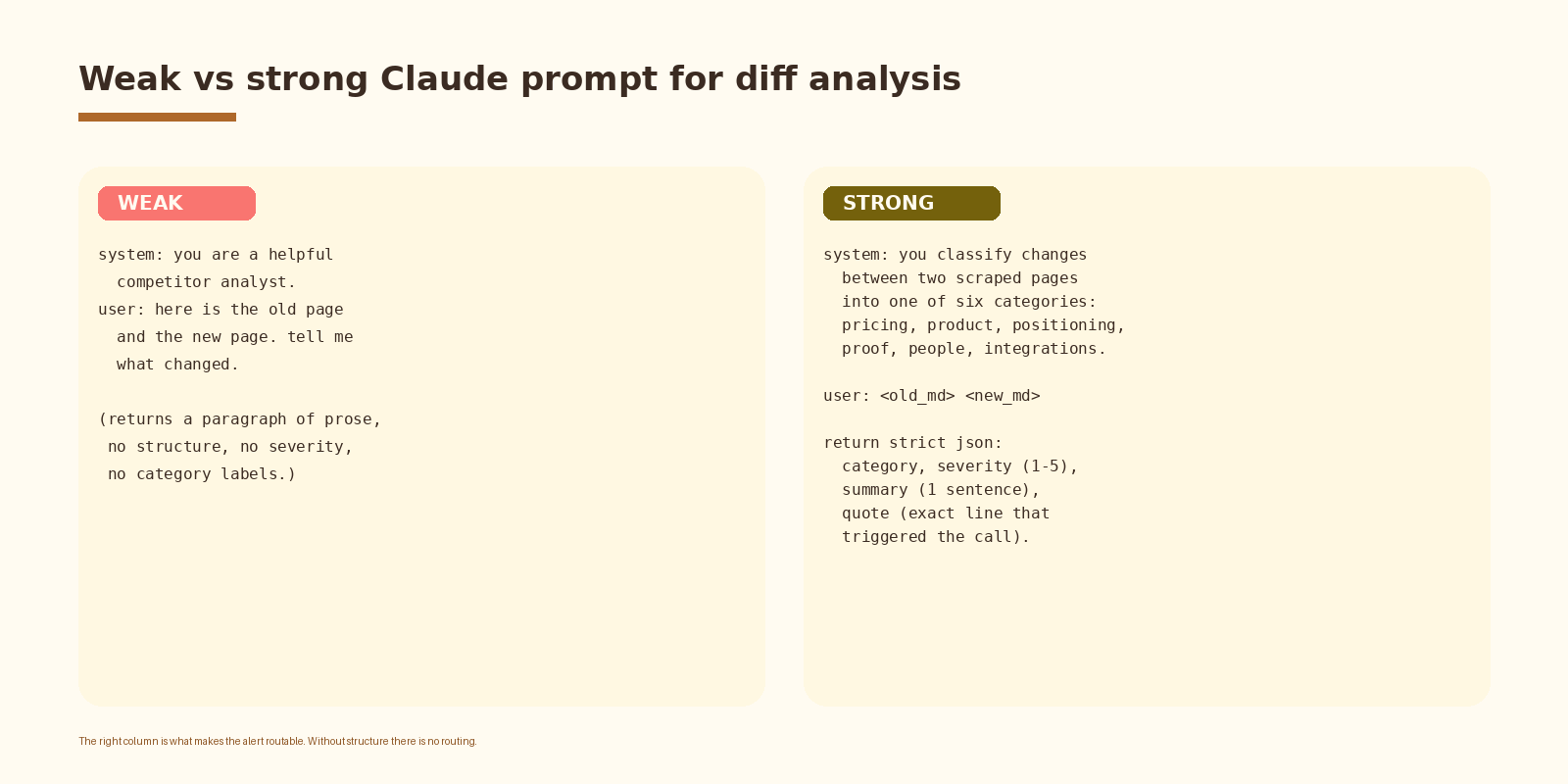
This is where the agent earns its keep. A weak prompt returns a paragraph of prose and you are back to the manual review problem, just with extra steps. A strong prompt returns structured JSON your downstream code can route on without parsing English.
# classify.py
import json
import os
import anthropic

client = anthropic.Anthropic(api_key=os.environ["ANTHROPIC_API_KEY"])

SYSTEM = """You classify changes between two scraped versions of a competitor page.

Categories: pricing, product, positioning, proof, people, integrations, other.

Return strict JSON with these keys:
- category: one of the categories above
- severity: integer 1 to 5 (1=cosmetic, 5=material market move)
- summary: one sentence, max 25 words, describing what changed
- quote: the exact line from the new version that triggered the call
- confidence: low, medium, high

If nothing meaningful changed (typo fix, layout tweak, cookie banner copy), return
category="other" and severity=1."""

def classify(url: str, category: str, diff: str) -> dict:
    msg = client.messages.create(
        model="claude-sonnet-4-5",
        max_tokens=600,
        system=SYSTEM,
        messages=[{
            "role": "user",
            "content": f"URL: {url}\nCategory hint: {category}\n\nDIFF:\n{diff}",
        }],
    )
    text = msg.content[0].text
    return json.loads(text[text.find('{'):text.rfind('}')+1])
The category hint matters. The URL list already labels each page (pricing, product, careers, and so on), so the model does not have to infer the category from the diff. That single hint cuts misclassifications meaningfully and keeps the routing layer clean.
If you want this set up cleanly inside your stack with logging, retries, and a feedback loop into a CRM, that is the kind of work we ship at Espressio.
Step 6. Route the alert
The agent does not need to be smart about routing. The URL list already has an owner column. The model returned a category. The router is a switch statement and a Slack webhook.
# route.py
import os
import requests

SLACK_HOOKS = {
    "pricing":      os.environ["SLACK_REVOPS"],
    "product":      os.environ["SLACK_PMM"],
    "positioning":  os.environ["SLACK_PMM"],
    "proof":        os.environ["SLACK_PMM"],
    "people":       os.environ["SLACK_FOUNDERS"],
    "integrations": os.environ["SLACK_PMM"],
    "other":        os.environ["SLACK_LOG"],
}

def route(alert: dict, url: str) -> None:
    if alert["severity"] < 2:
        return  # drop cosmetic
    hook = SLACK_HOOKS.get(alert["category"], SLACK_HOOKS["other"])
    requests.post(hook, json={
        "text": (
            f"*{alert['category'].upper()}* (sev {alert['severity']})\n"
            f"{alert['summary']}\n"
            f"> {alert['quote']}\n"
            f"{url}"
        ),
    })
Two design choices in that router matter. Severity gating means cosmetic changes never reach a human channel; they only land in the log. And channel by category means a pricing change reaches the person who can do something about it on the same day, not after Friday’s roundup.
Signals worth tracking
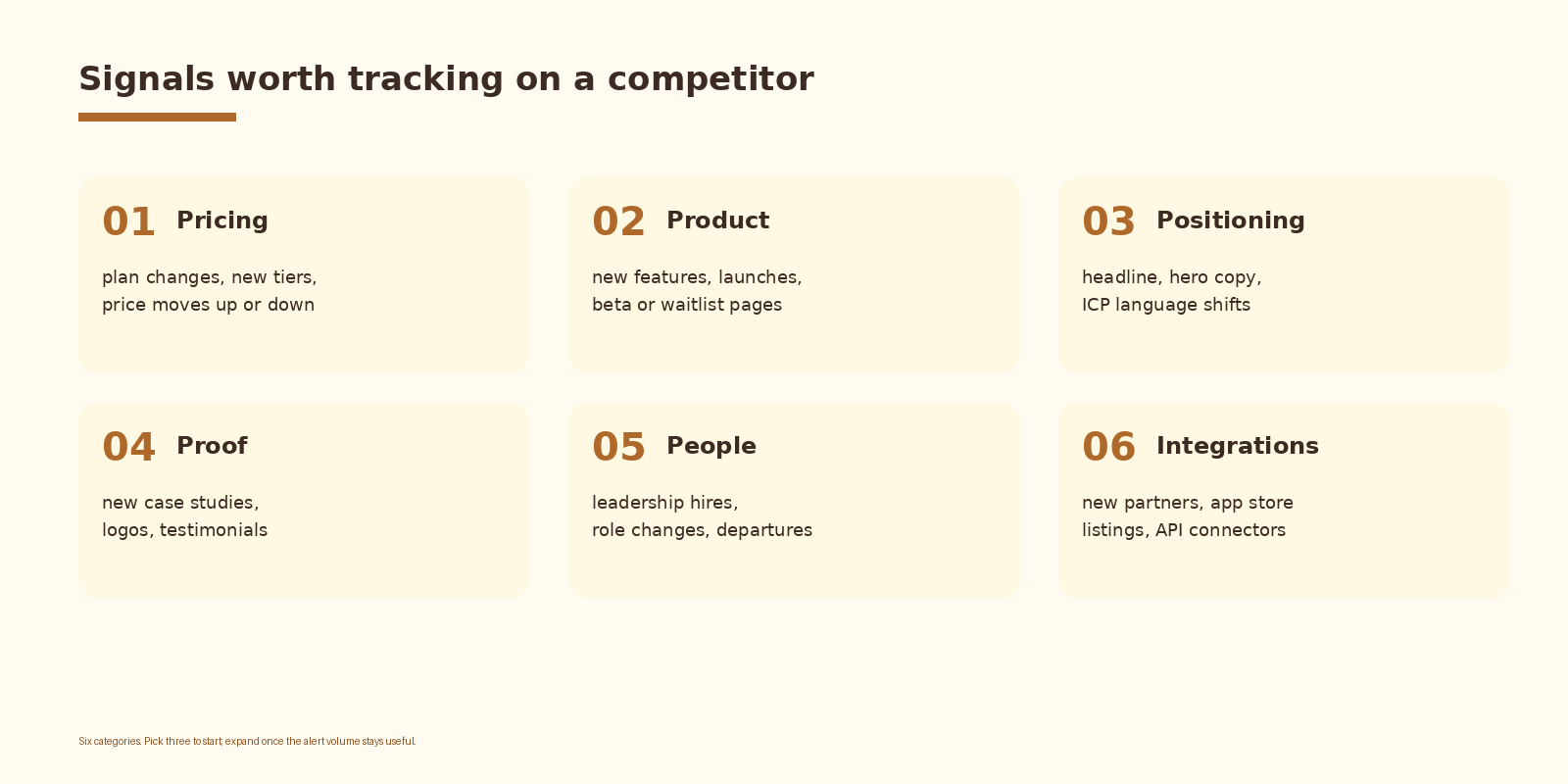
Pick three of the six to start. Pricing and product are the two that almost always pay back the build. Positioning is the third one that quietly drives the most strategic value over time because it tells you what your competitor thinks the market is becoming. The other three are useful once the first three are reliable.
Common mistakes
- Watching too many URLs. Forty competitor URLs sounds thorough; in practice it generates enough noise that the team turns off notifications by week three. Twenty is the right starting number.
- Letting the model freelance. A free form prose answer is unroutable. The structured JSON contract is what makes the rest of the system work.
- No severity gate. Every cosmetic tweak becomes an alert and the channel becomes wallpaper. Drop severity 1 before the Slack post.
- No owner column. An alert with no owner is just a notification. Wire each category to a real owner before you turn the agent on.
- Skipping the hash check. Calling the model on a no-op diff burns budget and adds nothing. Compare hashes first and short circuit when they match.
How to know it is working
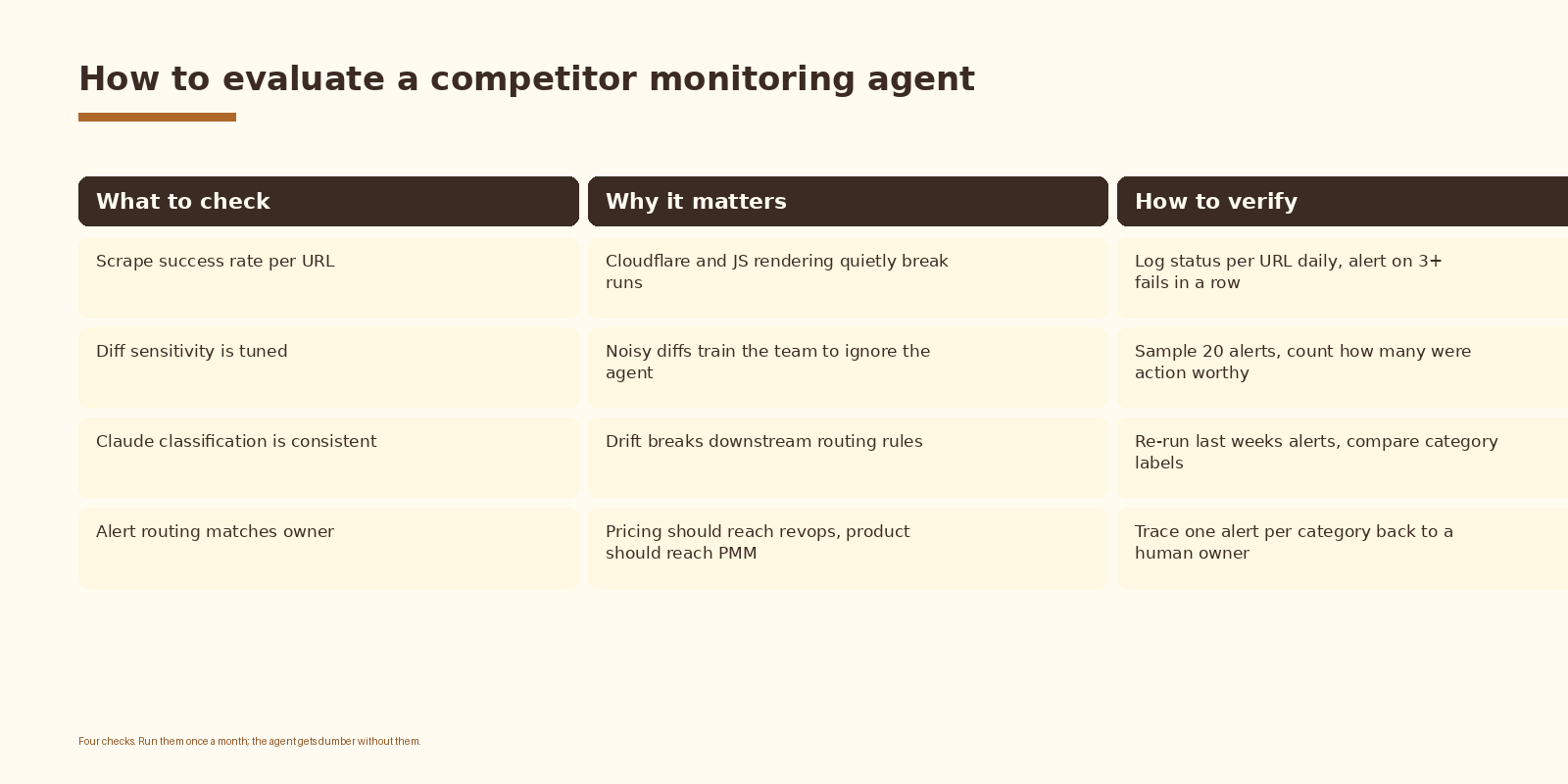
An agent that runs every day for a month and never produces a usable alert is not necessarily broken; the market might just be quiet. An agent that produces ten alerts a day, none of which lead to action, is broken. The metric that matters is not alert volume; it is action rate. Track how many alerts the team acted on, weekly. If the answer trends to zero, retune the severity gate before you blame the model.
FAQ
Do I need Firecrawl or can I just use requests and BeautifulSoup?
You can start with plain HTTP for a few competitors whose sites are server rendered. Most modern SaaS marketing sites are not. The day one of your targets ships behind Cloudflare, your scraper breaks silently and you stop noticing. Using a managed scraper from day one removes that failure mode.
Which Claude model should I use?
Sonnet handles this workload well at a reasonable price. Haiku is fast and cheap but gives up consistency on the JSON contract under load. Opus is overkill for diff classification. Sonnet is the default until you have a reason to switch.
How often should the agent run?
Daily is the default. Hourly is rarely worth the spend; competitor pages do not change that often, and the noise floor goes up. Weekly is too slow because you miss the pricing change before your next sales call.
Can the same agent monitor my own pages for regressions?
Yes, and it is a useful side effect. Add your own pricing, blog index, and changelog to the URL list and route alerts to a private channel. The agent now tells you when your own copy changed in a way you did not expect, which is the cheapest QA layer you will ever set up.
What does this cost to run?
Two cost lines: the scraping API and the model. For twenty URLs daily, with hashes short circuiting most no-op days, monthly spend lands in the low tens of dollars. The compute cost is dominated by how aggressive you are about caching hashes and how chatty your model prompt is.
What to do next
- Pick three competitors and write down five URLs each. Owner column gets filled in before you write a line of code.
- Stand up the scraper for one URL end to end. Confirm you get clean markdown.
- Add the hash check and the storage layer. Run it for a week and watch how many days are no-ops.
- Add the Claude classification call. Tune the prompt against ten real diffs from your store.
- Wire the router and the severity gate. Turn on Slack only after the first dry run looks sane.
- Review the action rate after thirty days. Retune severity or URL list before adding more competitors.
If you want automation like this set up cleanly inside your competitive intelligence stack, let’s talk.
Related Espressio guides