Kimmo Hakonen
Chief Innovation Officer
Insights, strategies, and real-world playbooks on AI-powered marketing.
JUL 13, 2026
The Ultimate Guide to Clay for B2B Lead Generation in 2026
Sales reps spend only 28-30% of their week on actual selling (Salesforce State of Sales, 2025). The rest goes to research, data cleanup, and admin work. Meanwhile, B2B contact data decays at 22.5% per year (HubSpot / Marketing Sherpa via Cognism, 2024), and single-source data providers cover only 40-60% of any given target list. The math works against every SDR who still runs manual enrichment.
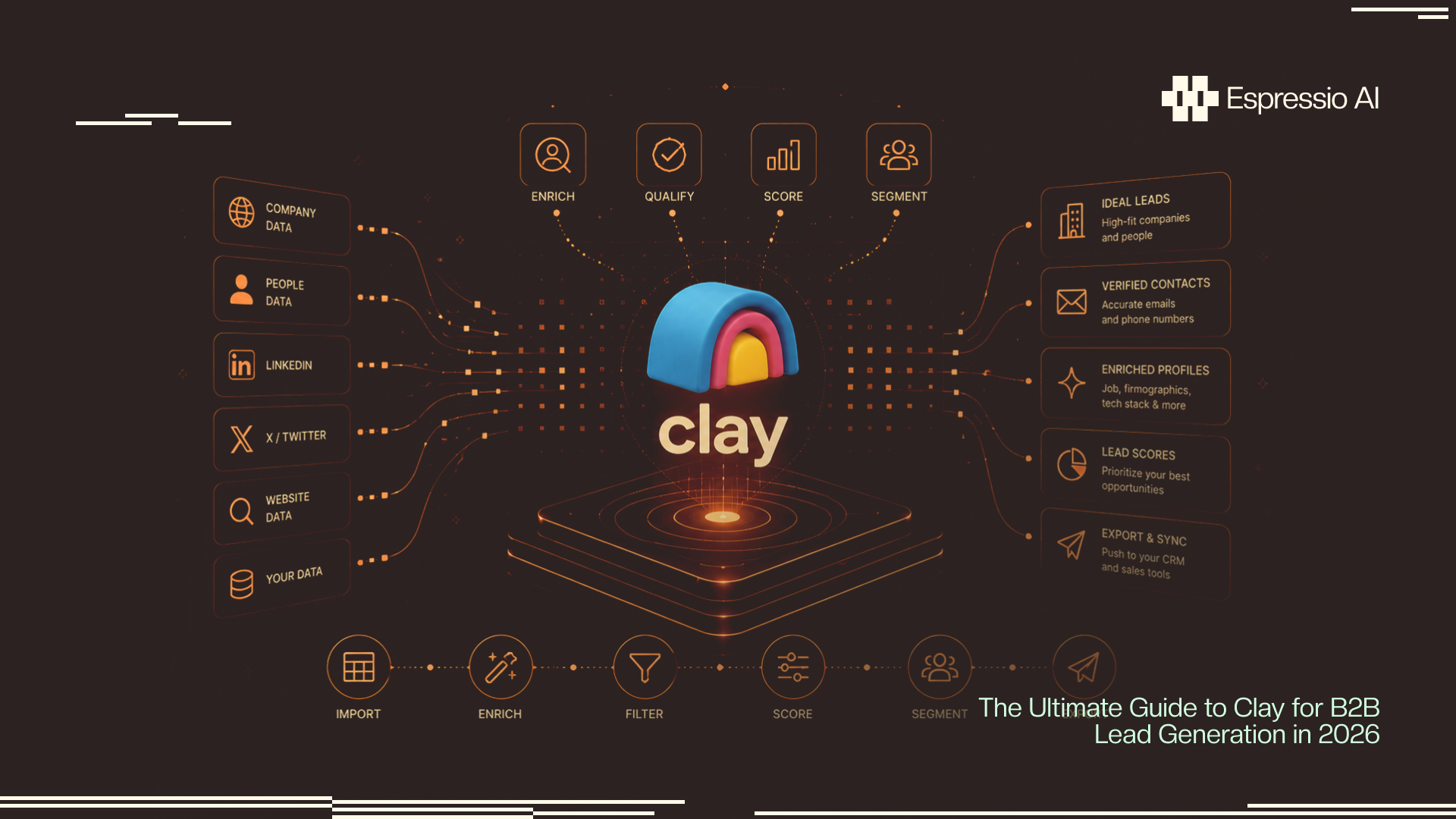
Clay changes those numbers. It’s a data enrichment and workflow automation platform that connects 150+ providers through a waterfall logic layer, then layers an AI agent on top to write personalized outreach at the lead level. The platform went from $1M to $100M ARR in two years, reaching that milestone in December 2025 (Clay.com blog; Sacra, 2026).
This guide covers everything: how Clay’s waterfall enrichment works, a step-by-step workflow for building a lead generation table, how Claygent personalizes outreach at scale, buying signal triggers, honest ROI math by ACV, and how Clay compares to Apollo and ZoomInfo.
Key Takeaways
- Clay reached $100M ARR in December 2025, growing from $1M in just two years, and is valued at $5B as of January 2026 (Clay.com blog; Sacra, 2026).
- A 5-provider waterfall reaches 85-95% data coverage vs. 40-60% from a single source. That coverage gap is the single biggest structural advantage Clay has over point solutions (Cleanlist, 2025).
- Claygent, Clay’s built-in AI agent, surpassed 1 billion cumulative executions in June 2025 (Salesdorado, 2025).
- Teams with $100K+ ACV report 143x ROI from Clay; sub-$5K ACV teams see negative ROI vs. Apollo (Hackceleration, 2026). ACV is the clearest predictor of whether Clay makes financial sense.
- Personalized cold emails achieve 17-18% reply rates vs. a 3.4% platform average across 20M+ emails (Woodpecker, 2025).
What Is Clay and How Does It Work for B2B Lead Generation?
Clay is a browser-based data enrichment and workflow automation platform that connects to 150+ data providers. It hit $100M ARR in December 2025, grew from $1M ARR in two years, and reached a $5B valuation in January 2026 (Clay.com blog; Sacra, 2026). It also raised a $100M Series C at a $3.1B valuation led by CapitalG (Alphabet’s growth fund) in June 2025.
The architecture is three layers. First, a spreadsheet-style table interface where each row is a lead and each column is a data enrichment step. Second, a waterfall enrichment engine that routes each lookup across providers in sequence until a verified result returns. Third, an AI layer called Claygent that can scrape any web source, pull context from LinkedIn or news, and generate personalized copy per lead.
Clay has three primary use cases for B2B lead generation: outbound prospecting enrichment, inbound lead scoring, and buying signal monitoring. The platform connects directly to sequencers like Instantly, Smartlead, and Outreach, and pushes enriched data into HubSpot or Salesforce.
Who is Clay actually for? RevOps leads, SDR team leaders, and growth engineers who want to build custom enrichment workflows. It’s not for beginners who want an all-in-one database with built-in sequences. The configuration depth is real, and the learning curve rewards teams that invest the setup time. If you want to build a full AI SDR agent on top of Clay, the platform is purpose-built for that kind of compound workflow.
Citation Capsule: Clay reached $100M ARR in December 2025 after growing from $1M ARR in two years, and raised a $100M Series C at a $3.1B valuation from CapitalG in June 2025, before reaching a $5B valuation in January 2026 (Clay.com blog, clay.com/blog/100m-arr; Sacra, sacra.com/c/clay, 2026). The growth rate makes it one of the fastest-scaling revenue tools in the outbound sales category.
How Does Clay Waterfall Enrichment Work, and Why Does Coverage Matter?
Waterfall enrichment is the core reason Clay outperforms single-source providers on data coverage. A 5-provider waterfall achieves 85-95% coverage vs. 40-60% from a single source (Cleanlist, 2025). The logic is sequential: Provider 1 attempts the lookup, returns a result, and Clay stops. If Provider 1 fails, Clay routes to Provider 2, then 3, then 4, stopping only when a verified result comes back.
How the waterfall routing works in practice
Each column in your Clay table can be set up as a waterfall. For email enrichment, a common sequence looks like this: Apollo first (broad database, low cost), then Hunter.io (strong domain-level coverage), then Clearbit (better for enterprise domains), then Datagma (catches European contacts that North American providers miss). Clay tries each in order and marks the column complete when one returns a verified result.
The practical effect is coverage you can’t buy from any single vendor. A 2,354-prospect waterfall test documented by ColdOutreachStack (2026) hit 79% coverage. A well-configured 5-provider stack pushes that to 85-95%. Any single provider on the same list would land at 40-60% on a good day.
The March 2026 credit policy change
As of March 2026, failed lookups no longer charge credits (Warmly.ai, 2026). This was the most common complaint about Clay’s credit model: you’d burn credits on providers that returned nothing. With failed lookups now free, the economics of multi-provider waterfalls shifted in the user’s favor. You only pay when Clay finds something.
Real-world waterfall results
Intercom used Clay’s waterfall enrichment and reported a 140% increase in outbound pipeline (Clay.com, 2025). The gains came from coverage: Intercom already had a large outbound motion, but single-provider lookups had been missing 40-50% of their target list.
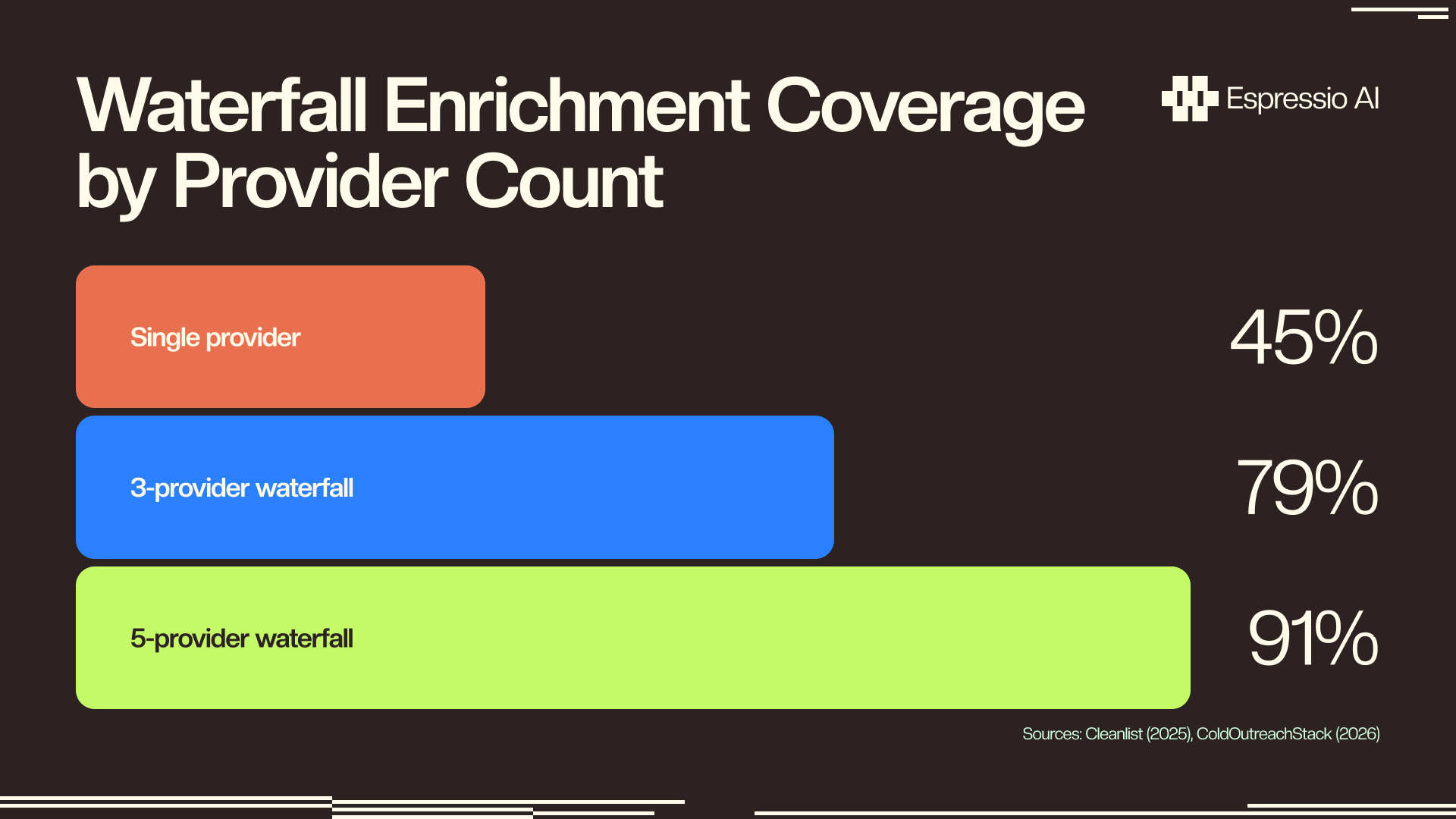
Citation Capsule: Single-source B2B data providers cover only 40-60% of a target prospect list. A 5-provider Clay waterfall reaches 85-95% coverage (Cleanlist, cleanlist.ai, 2025). A documented 2,354-prospect test using a multi-provider waterfall achieved 79% coverage (ColdOutreachStack, coldoutreachstack.com, 2026). As of March 2026, failed lookups no longer consume credits, which materially improves the cost efficiency of deep waterfall stacks.
How Do You Build a Clay Lead Generation Workflow Step by Step?
A Clay lead generation workflow has four stages: list building, waterfall enrichment, AI personalization, and push to sequencer. Done right, you can process 1,000 leads in under 30 minutes. The average B2B CPL from outbound email runs $25-$80 vs. $840 for trade shows and a $198 average across all channels (Sopro, 2025). Clay is the primary tool that gets outbound CPL to the low end of that range.
Step 1: List building
You need a source list before enrichment starts. The three most common inputs for Clay tables are LinkedIn Sales Navigator CSV exports, Apollo bulk exports filtered by ICP criteria, and real-time webhooks from inbound form submissions or CRM record creation events.
The ICP filter is where most teams cut corners. Before you build a single enrichment column, define your ideal customer profile as a set of hard rules: industry, employee count range, funding stage, tech stack requirements, geo. Everything that doesn’t pass the ICP filter should never touch the enrichment waterfall. Running enrichment on unfiltered lists is the fastest way to burn your monthly credit budget on leads you’ll never contact.
Step 2: Waterfall enrichment
With your filtered list loaded, set up enrichment columns in sequence. The typical stack for a fully enriched lead covers: verified email (waterfall of 3-4 providers), direct phone (optional, provider-dependent), LinkedIn profile URL, company tech stack (BuiltWith or Clearbit reveal), company headcount (from LinkedIn or Apollo), and funding stage (from Crunchbase or Datagma).
Order your waterfall cheapest-first. Apollo and Hunter are lower-cost providers that handle a large percentage of lookups. Clearbit and Datagma are premium providers that fill in what Apollo misses, especially for European contacts and enterprise accounts. You want the expensive providers firing only when the cheap ones come up empty.
Step 3: AI enrichment with Claygent
Once the waterfall returns verified contact data, Claygent runs on each lead. A typical prompt pulls the lead’s company website, their recent LinkedIn posts, and any news mentions in the past 30 days. Claygent synthesizes that into a personalized first line: something specific to that account rather than a generic opener.
The credit cost for a Claygent call is 4-8 credits on top of whatever the waterfall consumed. Gate this step behind an email-verified filter. If the waterfall didn’t return a verified email, there’s no point paying for Claygent to personalize a lead you can’t reach.
Step 4: Push to sequencer
The final column in the table is a push action: Clay sends the enriched, personalized record to your sequencer. The most common integrations are Instantly and Smartlead for cold email, Outreach or Salesloft for enterprise sequences, and HubSpot or Salesforce for CRM routing. Clay’s native integrations handle this with a single column configuration. No middleware required.
When we set up Clay workflows for B2B clients targeting Series A-B founders, a well-structured waterfall table cuts manual research time from around 4 hours per batch to under 30 minutes. The time savings don’t come from the enrichment itself. They come from not having to cross-reference three different tools manually to piece together a complete lead record.
[INTERNAL-LINK: AI workflow automation playbook for revenue teams → /posts/ai-workflow-automation-playbook]
Citation Capsule: A four-stage Clay workflow (list building, waterfall enrichment, Claygent AI personalization, and sequencer push) can process 1,000 leads in under 30 minutes when properly configured. Average B2B CPL from outbound email runs $25-$80 vs. a $198 all-channel average and $840 for trade shows (Sopro, sopro.io/resources/blog/b2b-cost-per-lead-benchmarks, 2025). Clay’s waterfall enrichment is the primary mechanism that gets outbound CPL to the low end of the email range.
What Is Claygent and How Does It Personalize B2B Outreach at Scale?
Claygent is Clay’s built-in AI agent that scrapes any web source, analyzes LinkedIn activity, pulls news events, and generates personalized outreach copy at the lead level. It surpassed 1 billion cumulative executions in June 2025 (Salesdorado, 2025). That volume reflects genuine production use across real outbound workflows.
What Claygent can actually do
The agent scrapes company websites for positioning and pain points, pulls a prospect’s recent LinkedIn posts to surface what they publicly care about, and fetches news from the past 30-60 days to flag funding rounds or press coverage. On the data side, Claygent identifies which tools a company currently runs from their tech stack. All of that feeds a persona-aware first-line generator that produces something a mail-merge template can’t replicate.
Claygent synthesizes across multiple sources per lead and produces a context-aware sentence. A well-prompted Claygent column produces first lines that reference something specific: a product launch, a LinkedIn post, a recent hire announcement. That specificity is what drives reply rate.
A real Claygent prompt template
A prompt structure that works for SaaS outbound targeting VP-level buyers:
You are writing a personalized cold email first line for {{firstName}} at {{companyName}}.

Context sources:
- Company website homepage and about page: {{websiteContent}}
- LinkedIn headline and most recent post: {{linkedinActivity}}
- Recent company news (last 60 days): {{newsContext}}

Instructions:
Write ONE sentence (max 25 words) that references something specific about their
company or their recent public activity. Don't mention our product. Don't use
phrases like "I noticed" or "I came across." Write in a direct, peer tone.

Output: Just the sentence. No quotes, no preamble.
The expected output is a single sentence like “Your Q2 launch into mid-market security looks like the kind of ICP shift that creates real sequencing headaches for the SDR team.” That sentence didn’t come from a template. Claygent pulled the product launch from news and inferred the operational implication.
Credit cost and when to gate Claygent
Each Claygent call costs 4-8 credits. At Explorer plan rates, that’s roughly $0.03-$0.06 per call. Doesn’t sound like much until you run it on 5,000 unfiltered leads. The cost adds up, and half those leads don’t pass ICP anyway.
The reply rate payoff makes the math work, but only on the right leads. Personalized cold emails achieve a 17-18% reply rate vs. a 3.4% platform average across a 20M+ email dataset (Woodpecker, 2025). That’s a 5x improvement, which justifies the Claygent credit spend on leads that are actually worth reaching. It doesn’t justify spending those credits on leads that would never convert.
Most teams waste Claygent credits by running it on every lead. The right approach is to gate Claygent behind an ICP-fit filter. Only run the AI enrichment on leads that pass company size, funding stage, and tech stack filters first. A simple conditional column setup — “if company headcount is between 50-500 AND verified email returned AND funding stage is Series A or B, then run Claygent” — can cut your Claygent credit spend by 60-70% while keeping 95% of the personalization value. The leads that don’t pass that filter weren’t going to reply anyway.
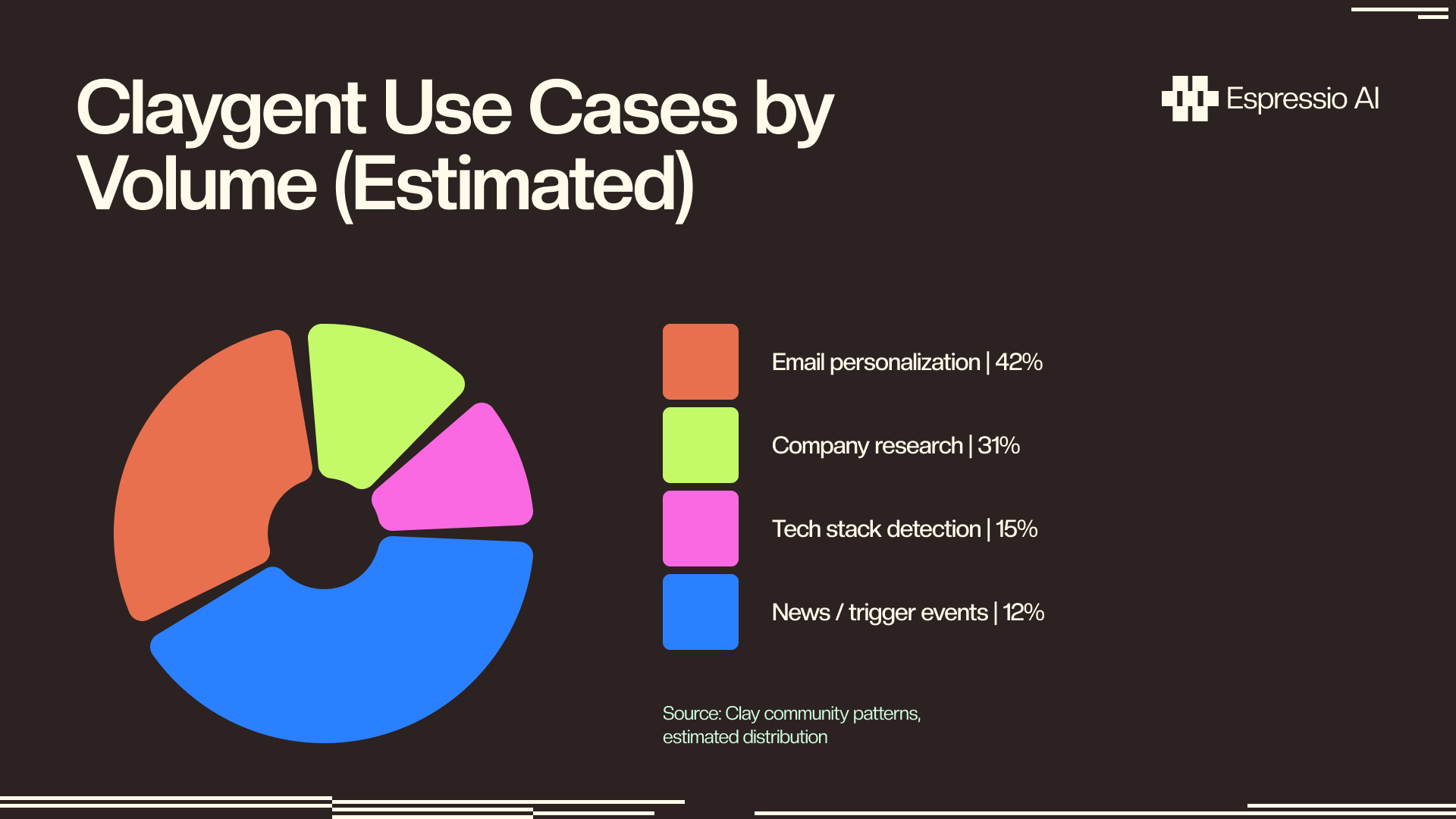
Citation Capsule: Claygent is Clay’s built-in AI agent for web scraping, LinkedIn post analysis, news pull, and personalized first-line generation. It surpassed 1 billion cumulative executions in June 2025 (Salesdorado, salesdorado.com/en/lead-generation/review-clay/, 2025). Personalized cold emails generated by AI agents like Claygent achieve a 17-18% reply rate versus a 3.4% platform average across a 20M+ email dataset (Woodpecker, woodpecker.co/blog/cold-email-statistics, 2025).
How Do You Set Up Buying Signal Triggers in Clay?
Buying signals are real-time events at target accounts (funding rounds, job changes, new SDR hires, tech stack switches) that indicate a company is in a moment of motion. Clay can monitor these signals and auto-enrich a new table row when one fires, turning an event into a sequenced outreach within minutes. AI adoption in sales rose from 24% in 2023 to 43% in 2024, and weekly AI users report 76% improved win rates (ZoomInfo State of AI in Sales and Marketing, 2025, n=1,002).
The 4 most impactful buying signals
When a champion you’ve worked with moves to a new company, Clay surfaces the job change automatically via LinkedIn activity monitoring or tools like UserGems or Champify. That’s a warm outreach window most teams miss because they’re not watching.
A Series A or B funding round signals budget availability and a mandate to buy growth tooling. Crunchbase and Harmonic both support webhook-based funding alerts that drop new rows directly into a Clay table.
Hiring signal (SDR or BDR job posts). A company posting for 3-5 SDR roles is signaling outbound investment. They’re building a team that needs the exact stack you might sell. This signal comes from LinkedIn job search APIs or Theirstack, which indexes hiring patterns by role and company.
Tech stack change. A company that just dropped Salesloft for Outreach, or added HubSpot Sales Hub, is mid-motion in their sales tech stack. BuiltWith and Wappalyzer track install and removal events that can trigger Clay table rows.
The signal-to-sequence flow
The setup looks like this: configure a webhook source (Crunchbase funding alert, LinkedIn job change monitor, or a Builtwith API event). That webhook fires a new row into a Clay table. Clay runs the waterfall enrichment on the contact, then routes the lead to Claygent. Claygent writes a first line that explicitly references the trigger event, something like “Saw the Series B announcement last week, congrats on the raise.” That personalized, context-aware record then pushes to a priority sequence in Instantly or Outreach.
The sequence priority matters. Signal-triggered leads should go into a faster-cadence sequence than cold outbound, because the trigger event has a short relevance window. A funding round is worth referencing for about 30-60 days. A job change is worth referencing for 2-3 weeks at most. Beyond those windows, the trigger loses its specificity.
Citation Capsule: AI adoption in B2B sales rose from 24% in 2023 to 43% in 2024; sales professionals who use AI weekly report 76% improved win rates (ZoomInfo State of AI in Sales and Marketing, pipeline.zoominfo.com/sales/state-of-ai-sales-marketing-2025, 2025, n=1,002). Buying signal triggers in Clay (firing on funding rounds, job changes, hiring posts, and tech stack events) represent the highest-leverage application of this AI infrastructure: outreach timed to a moment of account motion rather than arbitrary prospecting cadence.
What Does Clay Cost, and Is the ROI Math Right for Your Team?
Clay pricing runs from Starter at $149/month with 2,000 credits to Explorer at $349/month with 10,000 credits to Pro at $800/month with 50,000 credits (Warmly.ai, 2026). At 8-12 credits per enriched lead, that works out to $0.60-$0.90 per lead on Starter, $0.28-$0.42 on Explorer, and $0.13-$0.19 on Pro. Failed lookups don’t consume credits as of March 2026, which keeps actual cost-per-verified-lead lower than those ranges suggest.
Pricing table
| Plan | Monthly Price | Credits | Cost per Enriched Lead (8-12 credits) |
|---|---|---|---|
| Starter | $149 | 2,000 | $0.60–$0.90 |
| Explorer | $349 | 10,000 | $0.28–$0.42 |
| Pro | $800 | 50,000 | $0.13–$0.19 |
Where the ROI math holds, and where it doesn’t
High-ACV teams with $100K+ average contract values report 143x ROI from Clay. Sub-$5K ACV teams see negative ROI compared to Apollo’s flat-rate model (Hackceleration, 2026). The gap is structural: Clay’s per-credit cost model rewards teams where each closed deal justifies significant prospecting investment. If your ACV is $2K and your close rate is 5%, you need to be very careful about how many credits you spend per booked meeting.
The ACV threshold isn’t the only variable. Deal complexity matters too. Teams selling one-size-fits-all, high-volume transactional products do better with Apollo’s unlimited database model. Teams selling complex solutions to a specific, researchable ICP get far more value from Clay’s targeted enrichment.
Based on implementing Clay for growth-stage clients, the break-even threshold typically falls around $15K-$20K ACV at Explorer plan volume, assuming 8-10 credits per fully enriched lead. Below that ACV, the credit economics only work if your team’s conversion rate on Clay-enriched leads is measurably higher than on raw Apollo exports. It often is, but the gap needs to be quantified before committing to Pro plan spend.
Citation Capsule: Clay pricing in 2026 runs from Starter at $149/month with 2,000 credits to Pro at $800/month with 50,000 credits (Warmly.ai, warmly.ai/p/blog/clay-pricing, 2026). At 8-12 credits per enriched lead, per-lead cost ranges from $0.13 on Pro to $0.90 on Starter. High-ACV teams ($100K+ ACV) report 143x ROI; sub-$5K ACV teams see negative ROI vs. Apollo (Hackceleration, hackceleration.com/clay-review/, 2026).
If you want us to build this for your team, let’s chat.
How Does Clay Compare to Apollo, ZoomInfo, and Other B2B Data Tools?
Clay is a workflow engine: it connects 150+ providers through waterfall logic and layers AI personalization on top. Apollo and ZoomInfo are static databases with built-in sequences. Understanding that difference shapes how you evaluate them. Average B2B CPL runs $198 across all acquisition channels (Sopro, 2025), and where you sit on that curve depends heavily on which tools you’re combining.
The comparison at a glance
| Clay | Apollo | ZoomInfo | Lusha | |
|---|---|---|---|---|
| Data model | 150+ provider waterfall | Proprietary database | Proprietary database | Proprietary database |
| AI layer | Claygent (web scraper + copywriter) | AI prospecting filters | Copilot (intent + scoring) | None native |
| Workflow automation | Full table automation, webhooks | Sequences built-in | Engage sequences + OperationsOS | Basic export |
| Pricing model | Credit-based per enrichment | Flat rate subscription | Annual enterprise contract | Credit-based |
| Coverage strength | 85-95% via waterfall | 40-60% (single source) | 40-60% (single source) | 40-60% (single source) |
| Best-fit use case | RevOps-led, complex ICP, AI personalization | Simpler teams, lower ACV, all-in-one need | Enterprise compliance, intent data, Chorus | SMB teams, quick lookups |
When Apollo wins
Apollo makes more sense than Clay when your team is smaller, your ACV is under $10K, and you want a single tool that handles prospecting database, email sequences, and basic reporting in one interface. Apollo’s flat-rate subscription is also more predictable for teams that can’t forecast credit consumption reliably. If you’re just getting an outbound motion started, Apollo’s all-in-one model removes the configuration overhead that Clay requires.
When ZoomInfo wins
ZoomInfo is the right choice when enterprise compliance requirements govern your data sourcing, when you need intent data layered with contact data at scale, or when you want Chorus conversation intelligence bundled into the same vendor contract. It’s also a better fit for teams that buy through large enterprise procurement processes, where a single vendor relationship simplifies legal and billing.
When Clay wins
Clay wins for RevOps-led teams with a complex, well-defined ICP, multiple enrichment sources needed to hit acceptable coverage, and a commitment to AI-personalized outreach at scale. The workflow automation depth is unmatched: no other tool lets you build conditional enrichment logic across 150+ providers with an AI personalization layer on top.
The hybrid stack many top teams run: Apollo or ZoomInfo as the source database for list building, Clay for waterfall enrichment and Claygent personalization, and Instantly or Smartlead as the sequencing layer. Each tool does what it’s best at. Clay doesn’t try to be the database or the sequencer. It sits between them and makes both work better.
Citation Capsule: Clay is a workflow engine connecting 150+ data providers via waterfall logic. Apollo and ZoomInfo are static databases with built-in sequences. Average B2B CPL is $198 across all acquisition channels, with outbound email CPL running $25-$80 and trade shows at $840 (Sopro, sopro.io/resources/blog/b2b-cost-per-lead-benchmarks, 2025). Clay’s waterfall model reaches 85-95% coverage vs. 40-60% for single-source providers. That coverage gap is the structural reason many RevOps teams run Clay alongside their existing database tool rather than replacing it.
How Do You Optimize Clay Credits and Avoid Cost Bleed?
The most common Clay mistake is running enrichment on unfiltered lists. One poorly scoped table can consume a month of credits in an afternoon. At Pro plan rates, a 5,000-lead table running 10 enrichment steps at 10 credits each costs 50,000 credits: your entire monthly allocation in a single run. B2B contact data decays at 22.5% per year (HubSpot / Marketing Sherpa via Cognism, 2024), which means a large share of those credits go toward enriching contacts who have since changed roles or left the company.
5 credit optimization tactics
1. Filter before enriching. Apply ICP rules (company size, industry, funding stage, tech stack) before any waterfall column runs. This is the highest-impact change any Clay user can make. If 70% of your raw list fails ICP, you just cut your credit spend by 70% before touching a single enrichment provider.
2. Sequence your waterfall cheapest-first. Put Apollo and Hunter at the top of every waterfall. They cover a large share of lookups at low cost. Clearbit and Datagma fire only when cheaper providers come up empty. This sequencing alone can reduce your average per-lead credit cost by 30-40%.
3. Gate Claygent behind email-verified leads only. Don’t run AI personalization on leads where the waterfall didn’t return a verified email. There’s no one to send the personalized email to.
4. Use conditional columns. Clay’s conditional logic lets you say “only trigger the next enrichment step if the previous column returned a non-null result.” Chain these across your waterfall columns. A lead that fails the Apollo lookup shouldn’t be sent to Clearbit. It should stop at the column that returned nothing.
5. Set monthly credit alerts and hard caps per table. Clay’s settings allow credit consumption notifications. Set an alert at 70% of your monthly allocation and a hard cap per table to prevent runaway enrichment from consuming your full budget. Most teams set these once and forget them. Don’t.
The credit math in plain numbers
An unfiltered 5,000-lead table at 10 credits per lead consumes 50,000 credits, which is the full Pro plan budget in one run at $800. Filter that same list down to 500 ICP-fit leads with verified potential, run the same enrichment, and you’re at 5,000 credits: roughly $17.50 at Explorer plan rates. Same pipeline output, 94% less spend. The filter step is the ROI lever, not the enrichment itself.
Citation Capsule: B2B contact data decays at 22.5% per year (HubSpot / Marketing Sherpa via Cognism, cognism.com/blog/data-decay, 2024). Running Clay enrichment on unfiltered lists compounds the decay problem: you spend credits on contacts that are wrong before the waterfall even starts. A five-tactic credit optimization framework (ICP filter before enriching, cheapest-first waterfall sequencing, email-gated Claygent calls, conditional column logic, and monthly credit caps) can reduce effective per-lead credit spend by 60-80% without reducing the quality of the enriched output.
Frequently Asked Questions
Is Clay a CRM?
No. Clay is a data enrichment and workflow automation platform, not a CRM. It doesn’t store deal stages or manage pipeline. Clay enriches lead records and pushes them into your CRM of choice — HubSpot, Salesforce, or Pipedrive — where contact and opportunity management actually happens.
How many credits does Clay use per lead?
Basic email and phone enrichment runs 8-12 credits per lead. Adding a Claygent AI personalization call costs 4-8 credits on top of that. A fully enriched and personalized lead typically costs 12-20 credits total, which translates to $0.13-$0.90 per lead depending on whether you’re on the Starter, Explorer, or Pro plan (Warmly.ai, 2026).
Can Clay replace Apollo or ZoomInfo?
Clay replaces the data enrichment layer but not the sequence or engagement layer. Most high-performing outbound teams use Clay to enrich leads sourced from Apollo or LinkedIn Sales Navigator, then push those enriched records to Instantly or Smartlead for sequencing. Clay and Apollo are more often complementary than competing tools.
What is the difference between Clay and Claygent?
Clay is the platform — a browser-based data enrichment and workflow automation tool connecting 150+ data providers. Claygent is Clay’s built-in AI agent that scrapes web sources, analyzes LinkedIn posts, and generates personalized copy at the lead level. Claygent surpassed 1 billion cumulative executions in June 2025 (Salesdorado, 2025).
Does Clay work for inbound leads?
Yes. You can trigger a Clay table from a new HubSpot form submission or CRM record via webhook. Clay auto-enriches the record, runs an ICP-fit score, and routes high-fit inbound leads to a priority sequence within minutes of signup — turning your form into an instant-qualification pipeline without manual SDR triage.
Conclusion
Clay grew from $1M to $100M ARR in two years. That pace reflects how acutely RevOps teams needed what the platform does. The underlying mechanics explain it. Waterfall enrichment solves a coverage problem no single-source provider can fix. Claygent drives reply rates 5x above average by replacing template openers with account-specific sentences. And buying signal triggers turn a batch enrichment tool into a live outreach engine that fires on funding rounds and job changes.
Five things worth holding onto from this guide:
- Coverage is the foundation. A 5-provider waterfall reaching 85-95% of your target list beats a polished single-source database that covers 45%. Start here.
- Claygent ROI depends entirely on gating. Run it on ICP-qualified, email-verified leads only. Don’t run it on everything.
- ACV is the clearest ROI predictor. Clay makes strong financial sense above $15K-$20K ACV at Explorer plan volume. Below $5K ACV, Apollo’s flat-rate model is probably a better fit.
- The hybrid stack wins. Apollo or ZoomInfo for the database, Clay for enrichment and personalization, Instantly or Smartlead for sequencing. Each tool stays in its lane.
- Buying signals multiply outreach relevance. Funding rounds, job changes, and hiring signals give you a reason to reach out that isn’t “we found you on LinkedIn.” That specificity is what changes reply rates.
The logical next step is moving from a static Clay table to a full AI-driven outbound system. See how to build a Clay AI SDR agent that runs enrichment, personalization, and sequencer pushing as a continuous pipeline rather than a one-time batch process.
If you want us to build this for your team, let’s chat.