Kimmo Hakonen
Chief Innovation Officer
Insights, strategies, and real-world playbooks on AI-powered marketing.
JUL 13, 2026
The Ultimate Guide to Cursor AI for Marketing Teams in 2026

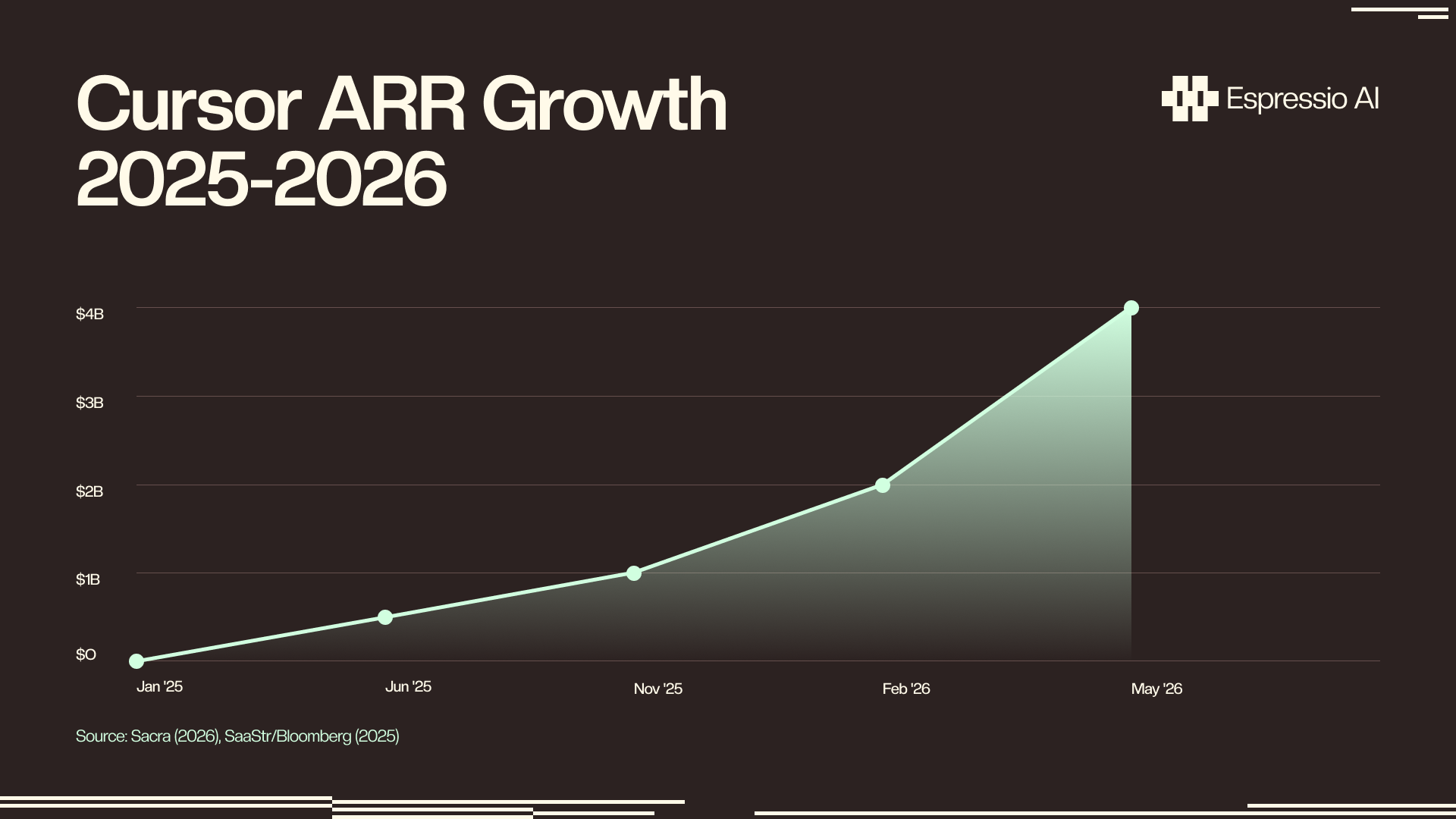
Cursor AI hit $4B in annualized revenue in May 2026, up from $1.2B at the end of 2025 — growing from $1M to $4B in 28 months, the fastest B2B SaaS scaling on record (Sacra, May 2026). It now counts 1M+ daily active users converting at 36% freemium-to-paid vs. a 2–5% SaaS industry average. Non-developers are the growth driver.
Sixty percent of marketers use AI tools daily, up from 37% in 2024 (Social Media Examiner, 2025, n=730). Most are using prompt-only tools (ChatGPT for copy, Claude for analysis) that still need a developer when something functional is required: API connectors, custom reports, UTM builders, automated dashboards. Cursor fills that gap by letting non-developers generate, run, and iterate on real code without a developer queue.
This guide covers who on a marketing team can realistically use Cursor AI, what to build in the first 60 days, how to configure a .cursorrules file for non-developers, when no-code tools are the better call, and how Cursor fits into a full AI marketing stack.
Key Takeaways
- Cursor reached $4B ARR in May 2026, the fastest B2B SaaS growth ever (Sacra, 2026)
- 60% of marketers use AI tools daily, but most still need a developer for functional automation (Social Media Examiner, 2025)
- A
.cursorrulesfile encoding your team’s stack, UTM conventions, and CRM fields eliminates 15 minutes of re-briefing per session- A METR controlled study found experienced developers were 19% slower on complex tasks when using AI coding tools; the tasks that trip up developers are exactly where marketers excel with Cursor
- At $40/user/month (Business plan), a 3-person marketing ops team breaks even after 1–2 automation scripts saving 4+ hours each per month
What is Cursor AI, and what makes it different for marketers?
Cursor is an AI-powered code editor built on VS Code. It now supports 50,000+ engineering teams and appears in approximately 70% of Fortune 1000 companies’ tech stacks (Sacra, Apr 2026). Where ChatGPT and Claude operate as chat interfaces, Cursor maintains persistent project files, runs code directly in-editor, reads multiple files simultaneously, and debugs output in context. That makes it far more useful for building functional tools than any chat window.
The distinction that matters for marketers: Cursor is natural language-first. You describe what you want in plain English, and Cursor generates the full implementation. GitHub Copilot, by contrast, autocompletes as you type inside an existing IDE; it’s built for developers who already know the code they want to write. For a marketing ops manager starting from a blank screen, Composer mode in Cursor is the right starting point.
Three Cursor features matter most to marketing teams. Composer generates multi-file projects from a single plain-English description: describe your HubSpot export script, and Cursor writes all of it. Chat lets you ask questions about existing code (paste in a script you don’t understand and ask what it does). Agent mode handles autonomous multi-step tasks: connect to an API, process the data, write the output to a CSV, all from one instruction.
What Cursor is not: a no-code tool. You don’t drag and drop. You will see code, even if you’re not writing it. The right mental model is “AI writes the code, you direct the process and verify the output.” That’s a realistic role for a marketing ops manager. It’s a steep role for a pure copywriter.
Citation Capsule: Cursor is an AI-powered code editor with 1M+ daily active users, 360,000 paying customers, and a 36% freemium-to-paid conversion rate vs. 2–5% SaaS industry average. It reached $1B ARR in 17 months, the fastest in B2B SaaS history, and $4B annualized by May 2026. Approximately 70% of Fortune 1000 companies are represented in its customer base. (Sacra, May 2026; SaaStr/Bloomberg, Nov 2025)
Who on your marketing team can actually use Cursor AI?
Gartner forecasts that citizen developers will outnumber professional developers 4:1 in enterprises by 2026, with 80% of low-code users coming from non-IT roles (Gartner via Kissflow). Cursor works best for marketers already touching data, APIs, or automation tools. It’s a poor fit for complete beginners with zero data tool interaction.
The honest breakdown runs like this:
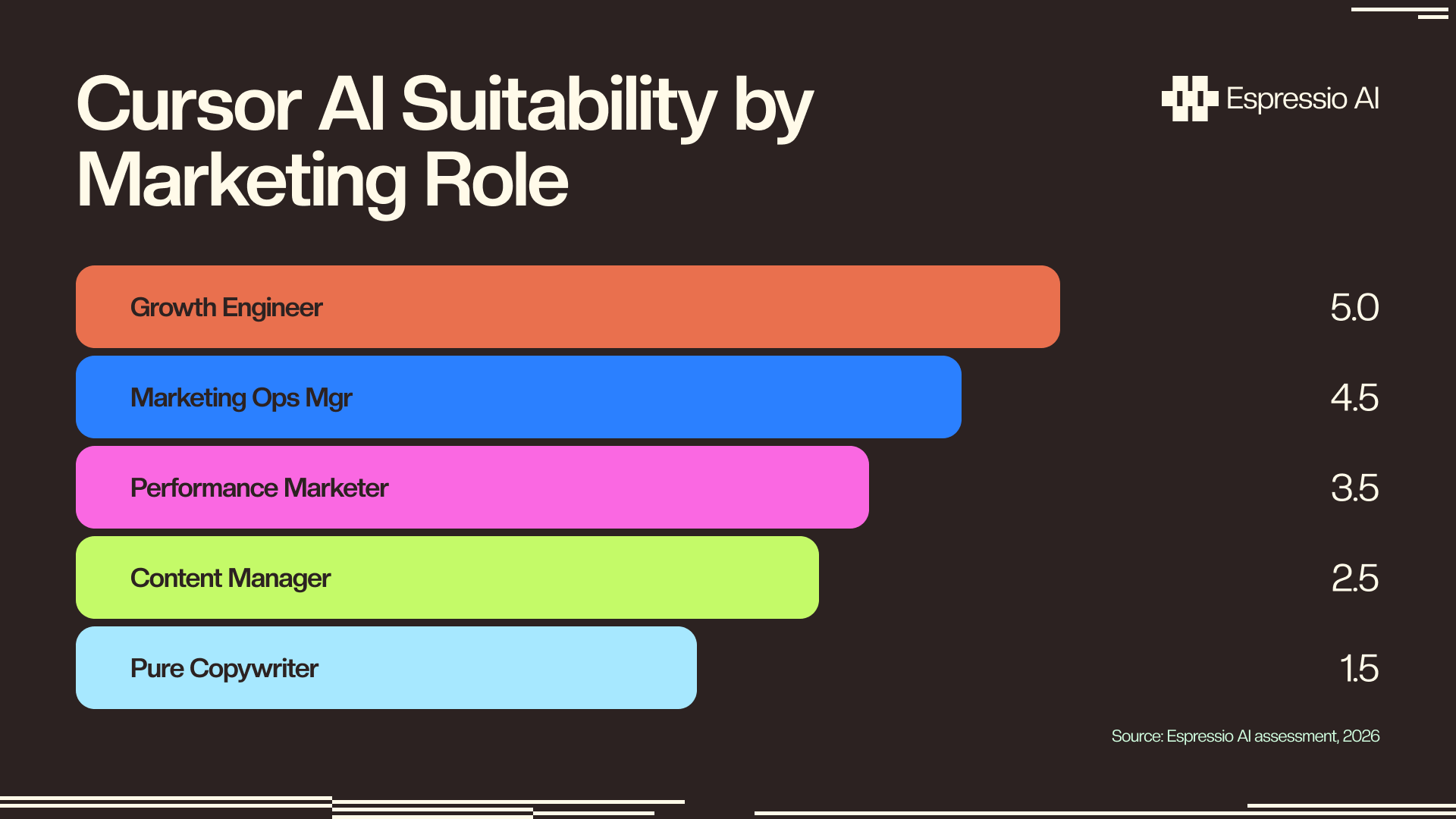
Marketing Ops Managers are the best fit. They already export CRM data, build automation rules, and know what an API endpoint is even if they’ve never called one. Cursor does the things they’ve always had to queue a developer for: HubSpot API scripts, CRM data exports, attribution model scripts, UTM validators.
Growth Engineers and Performance Marketers are the second-best fit. These roles already interact with GA4, paid media dashboards, and experiment data. Cursor handles GA4 custom reports, A/B test result parsers, paid media data connectors, and lead scoring scripts. If you’re already in Google Sheets writing complex formulas, you’re closer to Cursor-ready than you think.
Content Managers sit in the middle. Cursor handles bulk content transforms, SEO audit scripts, and transcription processing, but the learning curve is steeper for roles that rarely open a data tool. It works with patience, not frustration-free.
Pure Copywriters aren’t the right audience. Cursor is a code editor, not a writing tool. If your entire role is drafting words, a chat-based tool will serve you better and waste far less time.
Who should wait entirely: teams operating under strict IT compliance policies that restrict third-party code editors, and any role with zero data tool interaction. Forcing Cursor on roles that aren’t ready will produce frustration, not automation.
Citation Capsule: Gartner forecasts citizen developers will outnumber professional developers 4:1 in enterprises by 2026, with 80% of low-code users coming from outside IT departments (Gartner via Kissflow). In parallel, 87% of B2B marketers report improved productivity through AI-assisted workflows (Flint, 2025). Marketing ops managers and growth engineers, roles already handling data exports and API connectors, are the best-fit adopters.
What are the 8 real use cases marketing teams are building with Cursor AI today?
Marketers saving 5+ hours per week with AI tools (CoSchedule, Jan 2025, n=1,005) are increasingly building scripts that connect the gaps between their existing tools. Cursor does this well because most MarTech gaps are repetitive data transformations, API calls, and format conversions, not complex engineering problems. Eight use cases come up consistently.
1. UTM parameter builder. Validates UTM naming conventions, prevents duplicates, and auto-populates a tracking spreadsheet. This is the first script most marketing ops managers build: well-defined, low risk, and saves an hour a week immediately.
2. GA4 custom report puller. A Python script that calls the GA4 Data API and writes output to Google Sheets on a schedule. Cursor handles the full implementation from a single plain-English prompt. The only requirement: a Google Cloud service account and basic familiarity with enabling APIs.
3. HubSpot list export with custom filters. HubSpot’s export UI doesn’t handle complex multi-condition filters. Cursor generates the API call that pulls segmented contacts by any custom property combination and exports to CSV.
4. Email sequence personalizer. Reads a CSV of leads, generates personalized email variants from a template using an OpenAI or Claude API call, and writes outputs to a new sheet. Replaces copy-paste personalization that takes hours per campaign.
5. Competitive intelligence scraper. Monitors competitor pricing pages or job boards for changes and sends a Slack alert when content shifts. Pair this with the pattern covered in AI competitive intelligence for B2B teams.
6. A/B test result calculator. A statistical significance calculator that reads raw experiment data (control/variant visitor counts, conversion counts) and returns confidence intervals and significance scores. No more spreadsheet templates inherited from three jobs ago.
7. Landing page performance audit. Give Cursor a list of URLs and a prompt describing the report format you want. It calls the PageSpeed Insights API, pulls Core Web Vitals scores, and sorts output by worst performers first, no spreadsheet template needed.
8. SEO content brief automation. Connects a Perplexity or OpenAI API call to a Google Sheet, generating structured briefs at scale. Full pipeline detail in automating SEO content briefs with Perplexity and Claude.
When we built the first GA4 report puller for a marketing ops team, the initial Cursor session produced working code in 40 minutes. That same task previously required a two-week developer ticket queue. The team ran it unchanged for six weeks before asking for modifications. The bottleneck was never the code. It was access to the code.
Citation Capsule: Marketing automation delivers $5.44 in ROI per $1 invested over three years (The CMO via SAP Emarsys, 2025). Marketers saving 5+ hours per week with AI tools (CoSchedule, Jan 2025, n=1,005) are building scripts that automate the connective tissue between stack tools: UTM builders, GA4 report pullers, HubSpot exports, and email personalizers. Cursor generates all of these in a single prompt-to-working-script session.
How do you set up Cursor AI for a marketing team?
Most Cursor setup guides assume a developer audience. Marketing teams need three specific configurations that no competitor guide covers: a .cursorrules file encoding marketing context, a privacy layer blocking PII from prompts, and team-level file organization. Setting these up in the first session determines whether the tool sticks.
Step 1 - Choose the right plan. Three tiers exist: Hobby (free, 2,000 completions/month), Pro ($20/user/month, unlimited completions), and Business ($40/user/month, unlimited completions plus privacy mode, admin controls, and shared context). Business is the right choice for any team. Privacy mode is non-negotiable for marketing teams handling customer data. Don’t start individuals on Hobby and expect to upgrade later. Start on Business.
Step 2 - Write your .cursorrules file. This is the highest-ROI setup investment available. It’s a plain-text file in your project root that Cursor reads automatically at the start of every session. Without it, you re-brief Cursor on your stack, naming conventions, and preferences every time you open a new session. With it, that context loads automatically.
A copy-paste starting point for a marketing team:
# Marketing Team Context
Brand: [Company Name]
Stack: HubSpot CRM, GA4, Google Sheets, Airtable, Make.com
UTM convention: utm_source=channel, utm_medium=format, utm_campaign=YYYY-MM-initiative
Output format preference: CSV for exports, JSON for API payloads
CRM fields: contact_id, email, lifecycle_stage, lead_source, last_activity_date
Never include PII in prompts — use synthetic data for testing
Always add error handling and print status updates to console
Update the brand name, your actual tech stack, your real UTM naming convention, and the CRM field names from your system. That’s the whole setup. Each additional line you add pays back in fewer clarification prompts every session.
Step 3 - Set up your folder structure. Four folders handle 90% of marketing team work: /reports/ for recurring output scripts, /exports/ for one-off data pulls, /automation/ for scripts that run on a schedule, and /one-time/ for everything else. This lets you find anything a teammate built six months ago without opening every file.
Step 4 - Establish privacy rules. Define what never goes into Cursor prompts: email lists with PII, customer names paired with company names, and API keys in plaintext. Use environment variables for all credentials. Use synthetic test data when developing scripts that will eventually touch real customer records. Write these rules into your .cursorrules file too.
Step 5 - Share via Git and build a prompt library. Push .cursorrules to a shared Git repo so every team member starts from the same context. Build a Notion page with the prompts that produced working scripts. A prompt library typically cuts session time on follow-on scripts from 2 hours to under 30 minutes.
When we configured Cursor for a 4-person marketing ops team, the .cursorrules file cut session setup time from 15 minutes of re-briefing to zero. Writing the first version took an afternoon. It’s been the highest-ROI setup investment in the entire tooling stack.
Citation Capsule: 83.82% of marketers report increased productivity since adopting AI tools (CoSchedule, n=1,005, Jan 2025). A
.cursorrulesfile is a plain-text context file Cursor reads automatically each session, eliminating per-session re-briefing on stack, naming conventions, and CRM field names. Marketing teams that configure.cursorruleson day one reduce session overhead from 15 minutes to zero. (Espressio AI, 2026)
What does Cursor AI cost, and is the ROI right for a marketing team?
Cursor’s Business plan is $40/user/month, less than 30 minutes of freelance developer time at typical rates of $75–$150 per hour. For a 3-person marketing ops team running 10–15 automation scripts per month, break-even typically falls at one script saving 4+ hours per month (Cursor pricing, 2026).
Full pricing breakdown:
| Plan | Price | Completions | Best For |
|---|---|---|---|
| Hobby | Free | 2,000/month | Solo exploration |
| Pro | $20/user/mo | Unlimited | Individual power users |
| Business | $40/user/mo | Unlimited + privacy mode | Marketing teams |
The ROI frame is more useful than the raw price. Compare $120/month (3 Business seats) against these common alternatives: Zapier Team runs $299/month and handles only pre-built connectors. A freelance developer at $100/hour for 10 hours per month is $1,000. A marketing ops specialist hire is $80,000–$120,000 per year, or roughly $8,000 per month pro-rated. Cursor doesn’t replace any of those entirely. It lets a team do more of the work internally before those resources are needed.
When Cursor is not the right answer: highly complex enterprise middleware with SOC 2 requirements beyond Business privacy mode, one-off tasks faster to do manually than to script, and any integration requiring real authentication edge-case handling (OAuth refresh flows, rate-limit retry logic) that still needs a technical review layer.
Based on Cursor implementations for marketing ops teams, break-even typically falls at 1–2 automation scripts each saving 4+ hours per month. Teams that build their first three scripts within 60 days sustain adoption. Those without a structured first-session guide (a .cursorrules file, a prompt library, a clear starting use case) rarely reach that threshold.
Citation Capsule: Cursor Business costs $40/user/month, less than 30 minutes of freelance developer time at $75–$150/hr. GitHub Copilot holds 42% of the $12.8B AI coding assistant market (IdeaPlan, Apr 2026) vs. Cursor’s approximately 18–20%, but Copilot is developer-first. For a 3-person marketing ops team, Cursor Business at $120/month breaks even after 1–2 scripts saving 4+ hours each per month. (Cursor pricing, 2026; IdeaPlan, Apr 2026)
How does Cursor AI compare to GitHub Copilot and no-code tools for marketers?
GitHub Copilot holds 42% of the AI coding assistant market vs. Cursor’s approximately 18–20% in a market now worth $12.8B in 2026 (IdeaPlan, Apr 2026, citing JetBrains survey). Copilot is developer-first, built for autocomplete inside existing IDEs. The comparison that matters for marketers is Cursor vs. the no-code tools they already use.
| Tool | Learning curve (non-dev) | Monthly cost (3 seats) | Best for | Dev oversight needed | Native marketing integrations |
|---|---|---|---|---|---|
| Cursor Business | Medium | $120 | Custom logic, API integrations | Recommended for complex tasks | 150+ via MCP |
| GitHub Copilot | High | $190 | Developer teams with existing IDE | Yes | Limited |
| Zapier Team | Low | $299 | Pre-built connector automations | No | 6,000+ apps |
| Make.com Team | Low-Medium | $99 | Visual workflow automation | No | 1,000+ apps |
When each wins: Cursor takes the lead for custom logic, multi-step data transforms, and APIs that aren’t in Zapier’s connector library. Zapier and Make.com win for simple trigger-action automations between pre-connected tools; if both tools are already in their libraries, don’t write code. GitHub Copilot wins for developer teams working inside JetBrains or VS Code on existing codebases.
The hybrid stack is what mature marketing ops teams actually run. Zapier or Make.com handle simple triggers and pre-built connections. Cursor handles the custom logic that sits in the gaps: the transformation step that doesn’t have a native module, the API endpoint that isn’t in any connector library. The two tools don’t compete. They fill different layers.
For a full picture of how these tools fit into a revenue team’s automation workflow, see the AI workflow automation playbook for marketing and revenue teams.
Citation Capsule: GitHub Copilot holds 42% of the $12.8B AI coding assistant market vs. Cursor’s approximately 18–20% (IdeaPlan, Apr 2026, citing JetBrains survey). Copilot is built for developers who already know what code to write. Cursor’s Composer and Agent modes generate full implementations from plain-English descriptions, a meaningful difference for non-developers. Mature marketing ops teams run Zapier/Make.com for pre-built connectors and Cursor for custom logic.
What are the honest limitations of Cursor AI for marketing teams?
A METR controlled study found that experienced developers believed AI tools made them 20% faster, but objective measurement showed they were 19% slower on complex, unfamiliar tasks (METR, 2025). For marketing teams, that finding is actually useful. The tasks where AI coding assistance performs most reliably are repetitive, well-defined scripts with predictable output formats: exactly the tasks Cursor does best for marketers.
Five real limitations, no hedging:
1. The learning curve is real. Community benchmarks suggest 40–60 hours to produce a first functional tool from zero coding background (The Vibe Marketer). The first session will feel slow. That’s normal. It gets faster quickly, but not instantly.
2. Cursor hallucinates. It writes plausible-looking code that sometimes doesn’t work. Every script needs a test run against real (or synthetic) data before touching live records. Build verification into your process, not as an afterthought.
3. PII risk exists at the prompt level. Pasting customer data into prompts puts that data in Cursor’s context window. Business plan privacy mode means your code isn’t used for training, but it doesn’t make the input disappear. Use synthetic data during development.
4. Complex integrations still need a developer. Cursor typically gets you 80% of a HubSpot API connection. Authentication edge cases, OAuth refresh flows, rate-limiting logic, and error handling in production environments often still need technical review. Know where that line is before you promise a timeline.
5. Context window limits affect complex data models. Cursor can’t hold an entire CRM schema in context. For scripts that touch complex data models, be deliberate about what context you include per session. Feed it the specific fields and endpoints relevant to the current task.
The METR finding actually cuts in marketers’ favor. Developers get slower because AI gives them false confidence on complex, novel problems, exactly the types they’re usually working on. Marketers assign Cursor repetitive, well-defined tasks with predictable outputs. That’s the scenario where AI coding assistance consistently delivers, and it’s the reason marketing ops adoption is outpacing developer skepticism.
Citation Capsule: A METR controlled study (2025) found experienced developers were 19% slower on complex tasks when using AI coding tools, despite believing they were 20% faster. AI coding assistance underperforms on novel, complex problems. Marketing ops use cases (UTM builders, API report pullers, data exports) are repetitive and well-defined, the exact profile where AI coding assistance performs most reliably. (METR, 2025)
How does Cursor AI fit into a full AI marketing stack?
Cursor isn’t a standalone tool. It’s the code-writing layer in a marketing AI stack that also needs a data layer, an orchestration layer, and an AI reasoning layer. Sixty percent of marketers now use AI tools daily (Social Media Examiner, n=730, 2025), but daily use of chat tools and daily use of a connected stack are different things.
The pattern that works: Cursor writes the script, Make.com or n8n schedules and triggers it, Airtable or Google Sheets stores the output, and Claude or GPT-4o handles analysis and summarization. Each layer does what it’s best at. Cursor fills the gaps that no-code tools can’t reach: the custom API format, the multi-step data transformation, the conditional business logic that doesn’t fit any pre-built module.
Where does Cursor sit specifically? When Make.com or Zapier hit a wall (an API not in their connector library, a data format needing transformation logic, a report structure requiring calculation steps), that’s when you open Cursor. You write the script once, call it from your automation tool on a schedule, and store the output in your data layer.
One capability that separates Cursor from every competitor guide for marketing teams: Model Context Protocol integrations. Cursor connects directly to Notion, HubSpot, and Linear via MCP, which means those tools appear in Cursor’s context window without any copy-paste. You can ask Cursor to read your HubSpot contact properties and write a script referencing the actual field names, no documentation lookup required. This is a 2025-2026 capability that most Cursor guides haven’t covered yet.
The full stack pattern for a marketing ops team: Cursor handles custom scripts and API integrations, Make.com owns scheduling and trigger logic, Airtable stores structured outputs, and Claude handles analysis, summaries, and content generation. For building the Claude and Airtable layer of that stack, see Claude and Airtable content workflows. For social media automation built on the same pattern, see automating social media workflows with AI.
If you want us to build this for your team, let’s chat.
Citation Capsule: 60% of marketers use AI tools daily, up from 37% in 2024 (Social Media Examiner, n=730, 2025). The marketing teams extracting measurable ROI run a connected stack: Cursor for custom scripts, Make.com or n8n for orchestration, Airtable or Google Sheets for data storage, and Claude or GPT-4o for analysis. Cursor’s Model Context Protocol integrations with HubSpot, Notion, and Linear allow direct context access without copy-paste, a 2026 capability that removes a significant friction point for non-developer users.
Frequently asked questions about Cursor AI for marketing teams
Is Cursor AI free for marketing teams?
The Hobby plan is free and includes 2,000 completions per month, which is sufficient for solo exploration. Teams need the Business plan at $40 per user per month for privacy mode, shared context, and admin controls. A 3-person team runs $120 per month, less than 2 hours of freelance developer time at typical rates.
Do I need to know how to code to use Cursor AI?
Some technical tolerance is required. Cursor generates code from plain-English prompts, but you need to run scripts, read error messages, and adjust prompts when output fails. Marketing ops managers and growth engineers adapt fastest. Pure content writers face a steeper curve; community benchmarks suggest 40–60 hours to a first functional tool from no coding background (The Vibe Marketer).
Is Cursor AI safe for marketing team data?
The Business plan includes privacy mode, meaning your code is not used for model training. Never paste email lists, customer PII, or API keys directly into prompts. Use environment variables for credentials and synthetic data for testing. Business plan privacy mode mitigates but does not eliminate all data risk; treat Cursor prompts like any third-party SaaS.
How long does it take a non-developer to get productive in Cursor?
Community benchmarks suggest most marketing ops managers produce a first functional script within 40–60 hours of practice. A shared .cursorrules file and team prompt library shortens subsequent scripts to 1–4 hours each. Teams that build their first three scripts within 60 days sustain adoption; those without a structured onboarding guide rarely reach that threshold.
What’s the difference between Cursor AI and GitHub Copilot for marketing teams?
Cursor is natural language-first: describe what you want in plain English, and Cursor generates the full implementation. Copilot is primarily autocomplete-as-you-type inside an existing IDE; it’s built for developers who already know what to write. Cursor’s Composer and Agent modes are a better fit for non-developers starting from scratch. GitHub Copilot holds 42% of the AI coding assistant market vs. Cursor’s approximately 18–20% (IdeaPlan, Apr 2026).
Conclusion: Is Cursor AI worth it for your marketing team?
Cursor AI is worth it for marketing teams with the right profile: marketing ops managers, growth engineers, and performance marketers who already interact with data exports, API tools, or automation platforms. It’s not worth it for teams expecting a no-code experience or for pure content roles.
Five things to take away from this guide:
- The entry cost is low. At $120/month for a 3-person team, break-even is one script saving 4 hours a month. Most teams get there in the first 60 days.
- The
.cursorrulesfile is the highest-ROI setup step. Write it on day one. It eliminates 15 minutes of re-briefing from every subsequent session. - Start with repetitive, bounded tasks. UTM builders, GA4 report pullers, and HubSpot exports are the right first scripts. Save custom OAuth integrations for later.
- Cursor is the custom-logic layer in a stack that still uses Zapier or Make.com for pre-built connectors. The tools complement each other.
- The METR finding works in your favor. Developers struggle with Cursor on complex, novel problems. Marketing ops tasks are the opposite of that.
The next logical step is automating SEO content briefs with Perplexity and Claude, a related pipeline that pairs well with the GA4 and HubSpot scripts covered here.
If you want us to build this for your team, let’s chat.