Luka Mrkić
Head of BD
Insights, strategies, and real-world playbooks on AI-powered marketing.
MAY 28, 2026
Weekly Competitor Brief: Perplexity API + Notion
A weekly competitor brief is a scheduled job that asks the Perplexity API for cited research on a fixed set of competitors, parses the response into a structured schema, and writes one row per competitor per week into a Notion database. Perplexity handles the research layer with real-time web access and citations. Notion handles the storage and review layer with one database, one row per competitor per week, and a single rollup view for the team.
This guide walks through the architecture, the prompts, the code, and the standards to evaluate the build. If you are deciding who should set this up for your team, the second half doubles as a checklist.
Key Takeaways
- The cheapest useful version covers three to five competitors, runs once a week, costs a few dollars a month in API spend, and lands in a Slack digest before Monday standup.
- The build is five steps: pick competitors, design the Notion schema, write the Perplexity prompt, run the weekly job, ship the digest. The hard parts are the prompt schema and the Notion rollup, not the API calls.
- A weak prompt returns prose with a few links. A strong prompt returns strict JSON with category, severity, evidence URL, and a one-sentence summary. The structured contract is what makes the database routable.
- The metric that matters is reference rate, not row count. If nobody references a row in a meeting or strategy doc that week, retune severity or the digest format before blaming the model.
What a weekly competitor brief actually does
A weekly competitor brief watches a small set of competitors and tells you, every Monday morning, what changed about them in the previous seven days. The output is a Notion database where each row is one competitor for one ISO week, and each column is a category your team cares about: positioning, product, pricing, content cadence, hiring and AI posture, funding and news.
The old way of doing this was a Friday afternoon swivel-chair exercise. Someone in marketing opened ten tabs, skimmed each competitor’s homepage and blog index, and dropped a paragraph in Slack. That process catches the loud moves and misses the quiet ones. A new pricing tier appears on Tuesday and sales finds out about it on a call three weeks later. A competitor’s careers page lights up with six MLE roles and your positioning team never connects the dots.
The AI version watches the same competitors every week, returns cited research from Perplexity, parses the response into a strict schema, and writes one routable row to Notion per competitor. The brief reads less like a research note and more like a status board.
Architecture
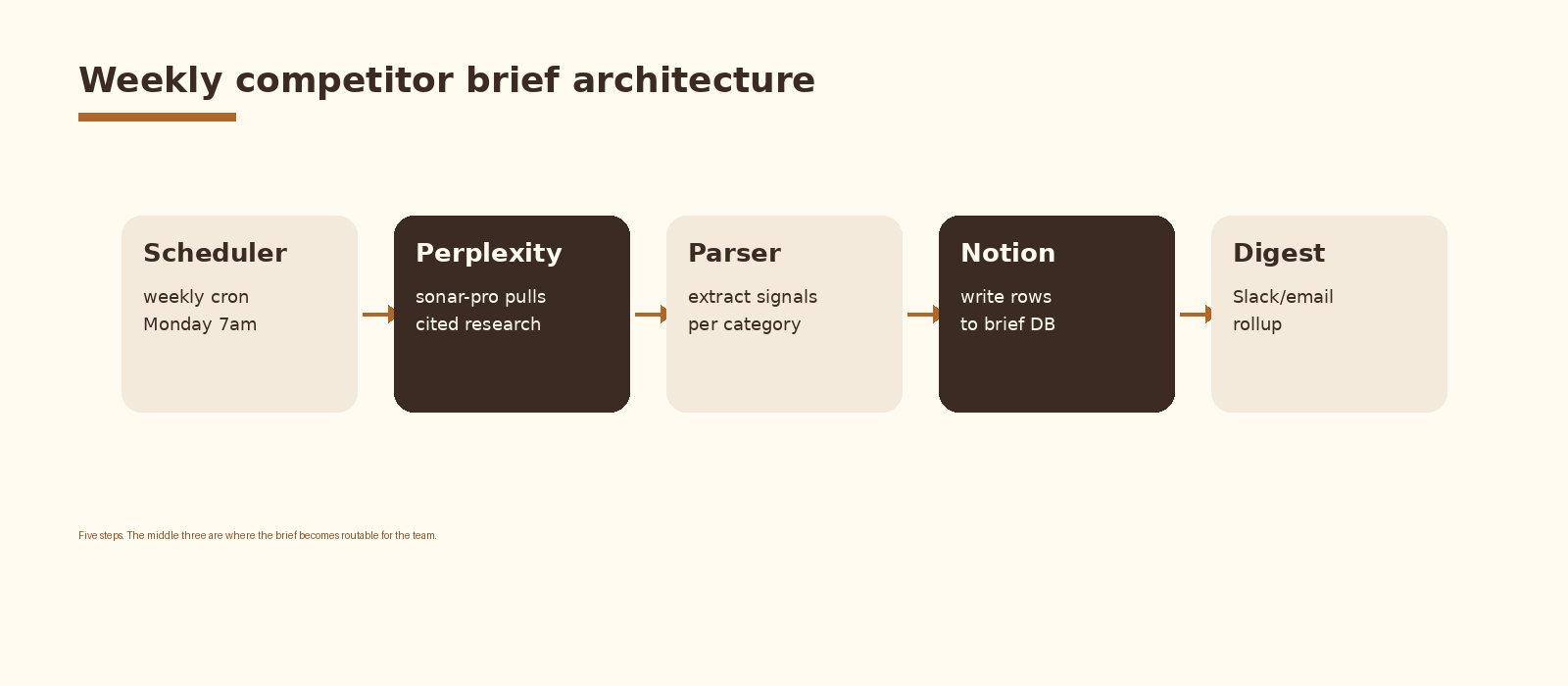
Five components. A scheduler that fires the run once a week. A Perplexity call per competitor that returns cited research scoped to the previous seven days. A parser that turns the response into a schema your downstream code can route on. A Notion writer that creates one row per competitor in the brief database. A digest layer that posts the rollup to Slack or email on Monday morning. Each component is replaceable; the schema between them is what holds the brief together.
Step 1. Pick the competitors
Start with three to five competitors. More than five and the brief becomes a wall of text nobody reads. Fewer than three and you miss the comparative pattern that makes the brief useful in the first place. Pick the ones your sales team actually loses to, your buyers actually compare you against, and the one or two emerging entrants you suspect will matter in six months.
Treat the competitor list as data, not code. A small Notion database with columns for name, website, sales_priority, and active is enough. The active flag lets you mute a competitor for a quarter without losing their history.
Step 2. Design the Notion schema
The Notion database is the contract every other component honors. Get this right first and the rest of the build is plumbing. Get it wrong and you spend the next month rewriting the parser.
One database, named something like Weekly Competitor Brief. One row per competitor per ISO week. The properties are stable so a six-month-old row looks the same as today’s. Recommended columns:
- Competitor (relation to the competitor list database).
- Week (date, set to the Monday of the ISO week).
- Positioning (rich text, one sentence plus a quote and a URL).
- Product (rich text, same shape).
- Pricing (rich text, same shape).
- Content (rich text, same shape).
- Hiring and AI posture (rich text, same shape).
- Funding and news (rich text, same shape).
- Severity (number 1 to 5, the highest severity across all categories that week).
- Sources (URL list, deduped citations from Perplexity).
- Status (select: draft, reviewed, shipped).
Two views on top of that database. A status board grouped by week, sorted by severity descending, is the Monday digest. A timeline view per competitor is the quarterly review. You do not need a third view to start.
Step 3. Write the Perplexity prompt
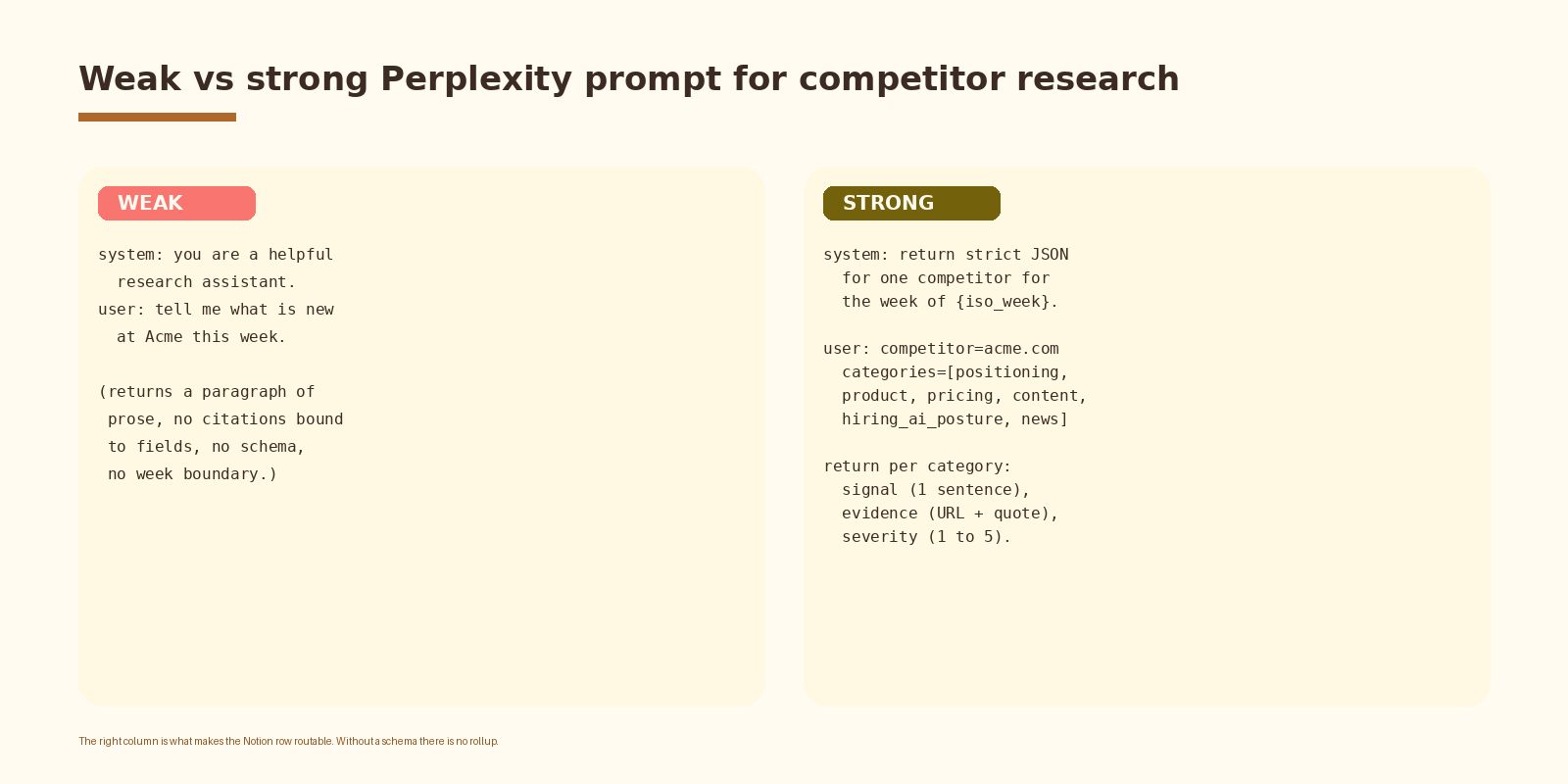
This is where the brief earns its keep. A weak prompt returns a paragraph of prose with a few links at the bottom and you are back to the manual review problem with extra steps. A strong prompt returns strict JSON the Notion writer can drop straight into properties.
Use the sonar-pro model on the Perplexity API. It gives you better citation density and more reliable schema adherence than the cheaper sonar tier for this workload. Bind the response to a single ISO week so signals from earlier or later weeks do not leak in.
# perplexity.py
import os, json, requests
from datetime import date

PPLX_KEY = os.environ["PERPLEXITY_API_KEY"]

SYSTEM = """You research one competitor for one ISO week.

Return STRICT JSON only, no prose, with these keys:
- positioning, product, pricing, content,
  hiring_ai_posture, news

Each value is an object with:
- signal (string, one sentence, max 25 words, or null)
- evidence_url (string or null)
- evidence_quote (string or null)
- severity (integer 1 to 5, 1 = cosmetic, 5 = material move)

If a category had no meaningful signal in the week, set signal to null
and severity to 1. Do not fabricate citations."""

def research(competitor: str, domain: str, iso_week: str) -> dict:
    monday = date.fromisocalendar(*[int(x) for x in iso_week.split('-W')] + [1])
    user = (
        f"Competitor: {competitor} ({domain}). "
        f"Week: {iso_week} (Monday {monday.isoformat()}). "
        "Research changes from the previous seven days only. "
        "Categories: positioning, product, pricing, content, "
        "hiring_ai_posture, news. Return JSON."
    )
    r = requests.post(
        "https://api.perplexity.ai/chat/completions",
        headers={"Authorization": f"Bearer {PPLX_KEY}"},
        json={
            "model": "sonar-pro",
            "messages": [
                {"role": "system", "content": SYSTEM},
                {"role": "user", "content": user},
            ],
            "temperature": 0.2,
        },
        timeout=120,
    )
    r.raise_for_status()
    body = r.json()
    text = body["choices"][0]["message"]["content"]
    citations = body.get("citations", [])
    data = json.loads(text[text.find('{'):text.rfind('}')+1])
    data["_citations"] = citations
    return data
Three flags carry their weight. The system prompt fixes the schema so the parser does not have to guess. The user prompt binds the research to a single ISO week so the model does not pull last quarter’s launch into this week’s row. And temperature 0.2 keeps the response close to deterministic, which matters when you re-run a competitor after a transient API error.
Step 4. Write the Notion row
Once the Perplexity response is parsed, the rest is a single Notion API call per competitor. Map each category in the JSON to its rich text property. Set the Week property to the Monday date. Push the citations into the Sources URL list. Set Severity to the highest severity across the six categories.
# notion.py
import os, requests

NOTION_KEY = os.environ["NOTION_API_KEY"]
BRIEF_DB   = os.environ["NOTION_BRIEF_DB"]

HEADERS = {
    "Authorization": f"Bearer {NOTION_KEY}",
    "Notion-Version": "2022-06-28",
    "Content-Type": "application/json",
}

def fmt(cat: dict) -> str:
    if not cat or not cat.get("signal"):
        return "—"
    out = cat["signal"]
    if cat.get("evidence_quote"):
        out += f"\n> {cat['evidence_quote']}"
    if cat.get("evidence_url"):
        out += f"\n{cat['evidence_url']}"
    return out

def write_row(competitor_page_id: str, iso_monday: str, data: dict) -> None:
    cats = ["positioning", "product", "pricing", "content",
            "hiring_ai_posture", "news"]
    severity = max(int(data.get(c, {}).get("severity", 1)) for c in cats)
    props = {
        "Competitor": {"relation": [{"id": competitor_page_id}]},
        "Week": {"date": {"start": iso_monday}},
        "Severity": {"number": severity},
        "Status": {"select": {"name": "draft"}},
        "Sources": {"url": ", ".join(data.get("_citations", []))[:2000]},
    }
    for c in cats:
        prop = c.replace("_", " ").title()
        props[prop] = {"rich_text": [{"text": {"content": fmt(data.get(c, {}))}}]}
    requests.post(
        "https://api.notion.com/v1/pages",
        headers=HEADERS,
        json={"parent": {"database_id": BRIEF_DB}, "properties": props},
        timeout=30,
    ).raise_for_status()
If you want this set up cleanly inside your stack with logging, retries, and a feedback loop into a CRM, that is the kind of work we ship at Espressio.
Step 5. Ship the Monday digest
The Notion database is useful on its own, but the team still needs a nudge. On Monday morning, after the weekly job finishes, query the database for rows where Week equals last Monday and Severity is 3 or higher. Format them into a Slack message: one section per competitor, one line per category that fired, the source URL inline.
Two design choices in that digest matter. The severity gate means cosmetic weeks never reach the channel; they only sit in the database. And the per-competitor sections let the team scan the digest in under two minutes.
Signals worth tracking
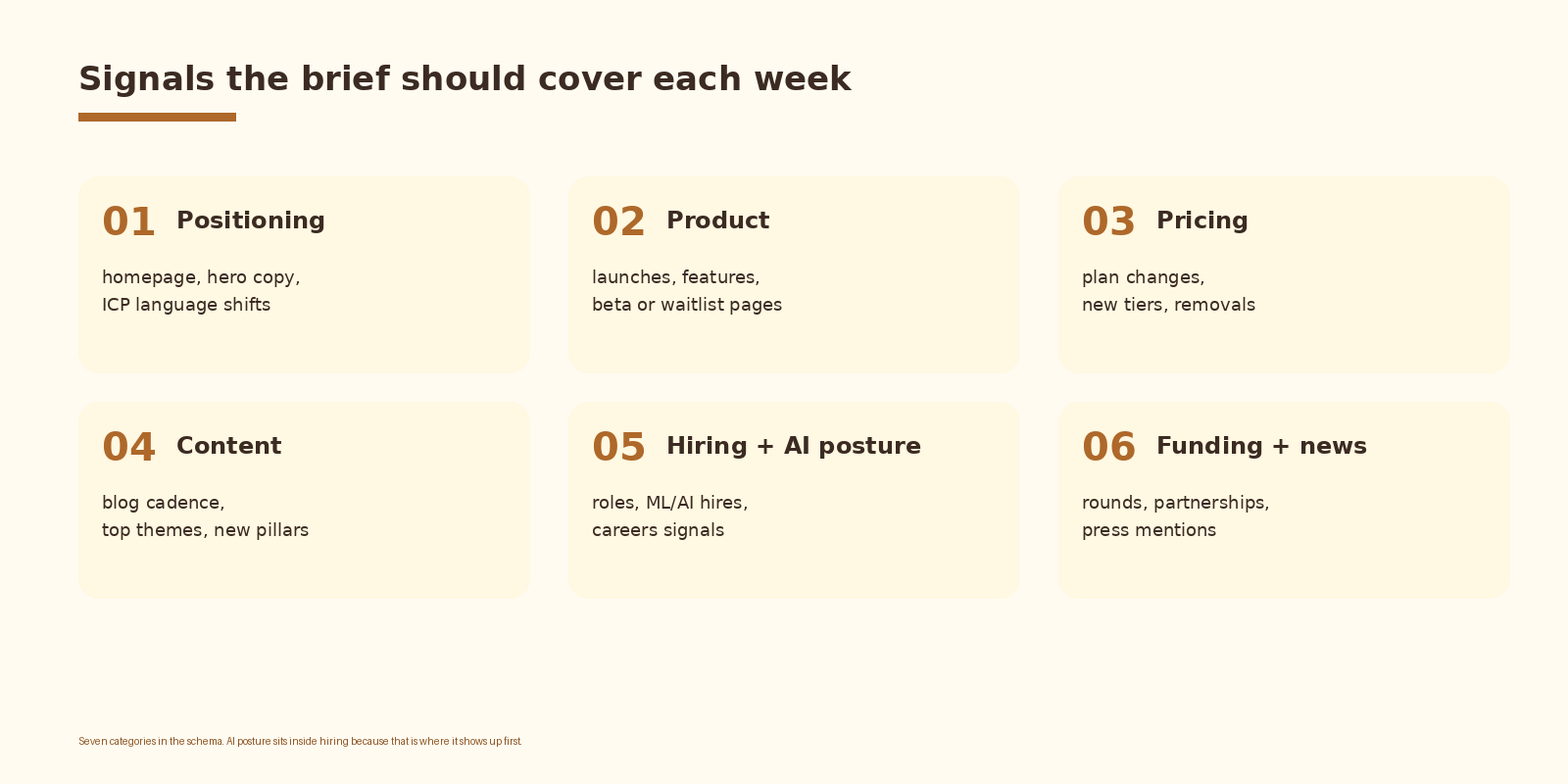
Six categories in the default schema. Positioning, product, and pricing are the three that almost always pay back the build. Content cadence is the one that tells you what your competitor is investing in this quarter. Hiring and AI posture is the leading indicator: a company hiring three applied AI engineers is shipping AI features in six months whether they have announced it or not. Funding and news is the noise-prone one; keep severity calibration tight on that column.
Common mistakes
- Watching too many competitors. Ten competitors becomes a wall of text and the digest gets muted by week three. Three to five is the right starting number.
- Letting Perplexity freelance. A free form prose answer is unroutable. The structured JSON contract is what makes Notion and the digest work.
- No week boundary. Without binding the prompt to a single ISO week, the model pulls in last quarter’s launch and severity gets meaningless fast.
- Trusting every citation. Perplexity sometimes returns a paraphrased or stale URL. Spot check five citations per brief; log dead links and feed them back into the prompt.
- No severity gate on the digest. If every week’s digest contains every category, the team stops opening it. Cut to severity 3 and above for the Slack post; keep everything in the database.
How to know it is working
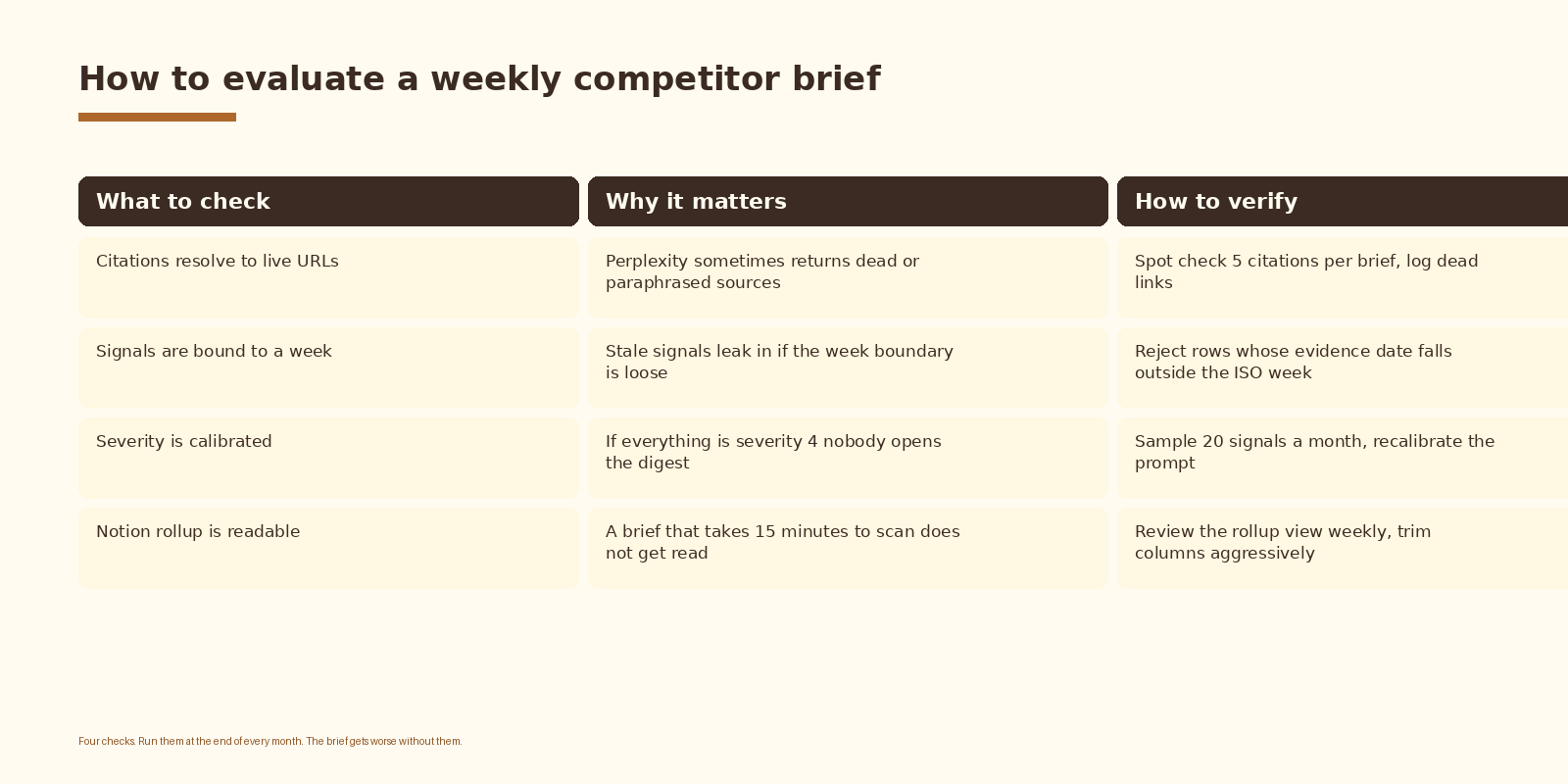
The metric that matters is not how many rows the brief produced; it is how many times someone on the team referenced a specific row in a meeting or a strategy doc that week. Track that count for a month. If it trends to zero, the problem is almost always severity calibration or the digest format, not Perplexity.
FAQ
Why Perplexity API instead of OpenAI or Anthropic with web search?
Perplexity is purpose-built for cited web research and returns a citations array on every response. You can build the same pattern with another model plus a search tool, but you end up writing the citation-stitching layer yourself and spending more time tuning the search step than the analysis step. Perplexity is the boring path for this workload.
Which Perplexity model should I use?
Sonar-pro is the default for this build. The cheaper sonar tier works for a quick prototype but gives up schema consistency under load and returns thinner citations. Sonar-reasoning is overkill for weekly research that is closer to retrieval than reasoning.
How often should the brief run?
Weekly is the default and the sweet spot. Daily produces noise because most competitors do not change daily. Monthly is too slow because pricing and product moves age out before the next brief. Weekly lines up with most sales and marketing rhythms.
Can the brief replace a competitive intelligence analyst?
No, and it should not try to. The brief replaces the busywork of opening twenty tabs and skimming. An analyst still adds the strategic interpretation layer: what does this pattern mean for our roadmap, where is the market moving, which signals do we mute and which do we double down on. The brief makes the analyst faster.
What does this cost to run?
Two cost lines: the Perplexity API and Notion. For five competitors weekly with sonar-pro, monthly Perplexity spend lands in the low single digits of dollars. Notion is free for a small team or already on the existing plan. The compute cost is dominated by Perplexity, not Notion or the orchestration layer.
What to do next
- Pick three competitors and the sales owner who decides what to do with their moves. Owner gets filled in before you write a line of code.
- Create the Notion brief database with the schema above. Build the two views before adding any data.
- Stand up one Perplexity call end to end against one competitor for the current week. Confirm the JSON validates and the citations resolve.
- Wire the Notion writer. Run the full pipeline against all three competitors for one week and review the rows manually.
- Add the severity gate and the Monday Slack digest. Turn it on for the team.
- Review the reference rate after thirty days. Retune severity or competitor list before adding more competitors or categories.
If you want automation like this set up cleanly inside your competitive intelligence stack, let’s talk.
Related Espressio guides