



Luka Mrkić
Head of BD
Insights, strategies, and real-world playbooks on AI-powered marketing.
MAY 19, 2026
How to Use Opus Clip and Claude for Video Repurposing
AI-generated video clips grew 2,903% in 2024 (Goldcast, 2025). That figure tracks clip volume. It says nothing about the manual layer that follows: writing captions, hashtags, and calls to action for LinkedIn, Instagram, YouTube Shorts, and X, one platform at a time, after every clip.
Most teams use Opus Clip to select their best moments and then write captions by hand. That approach recovers the bulk of the time they saved during clip selection. This tutorial covers the two-phase workflow that closes that gap: Claude before Opus Clip (clip-ready scripts), Claude after Opus Clip (platform captions), plus an optional Make.com or n8n layer for batch automation at scale.
Key Takeaways
- AI-generated video clips grew 2,903% in 2024, but most teams still write captions by hand after clip selection (Goldcast, 2025)
- The pipeline runs in two phases: Claude before recording (clip-ready hooks and structure) and Claude after clipping (platform captions per clip)
- Opus Clip’s Virality Score (0-99) measures Hook, Flow, Value, and Trend. The pre-production Claude prompt is designed to optimize all four before the camera rolls
- Make.com or n8n automates the caption step for teams producing 10+ clips per week, using Opus Clip’s webhook output to trigger Claude via API
Why video repurposing teams are still writing captions by hand
Short-form videos under one minute achieve a 50% engagement rate, compared with 38% for videos running five to thirty minutes (Wistia via Goldcast, 2025). Despite that gap, most teams invest in clip selection tools and leave caption writing manual, which restores the bulk of the time they saved.
The clip selection problem had a clear solution: AI identifies the strongest moments in a long recording at a fraction of the time an editor would spend. The caption problem is less obvious. There’s no single tool that selects clips, writes LinkedIn copy, formats a Twitter thread, and adds Instagram-appropriate emoji in one pass. So teams adopted Opus Clip and kept the writing step in a Google Doc.
The downstream cost is real. When teams reuse identical captions across LinkedIn, Instagram, and YouTube Shorts, engagement drops. Each platform’s algorithm and audience expect different things. A LinkedIn caption that performs at 5-8% engagement will often land below 2% on Instagram if it’s copied word for word. The format is the same; the context isn’t.
Short-form video posts grew 70% among Metricool users in 2024, across over 5 million videos from 582,000 accounts (Metricool, 2025). That volume makes manual per-platform caption writing unsustainable for teams producing content at any real cadence.
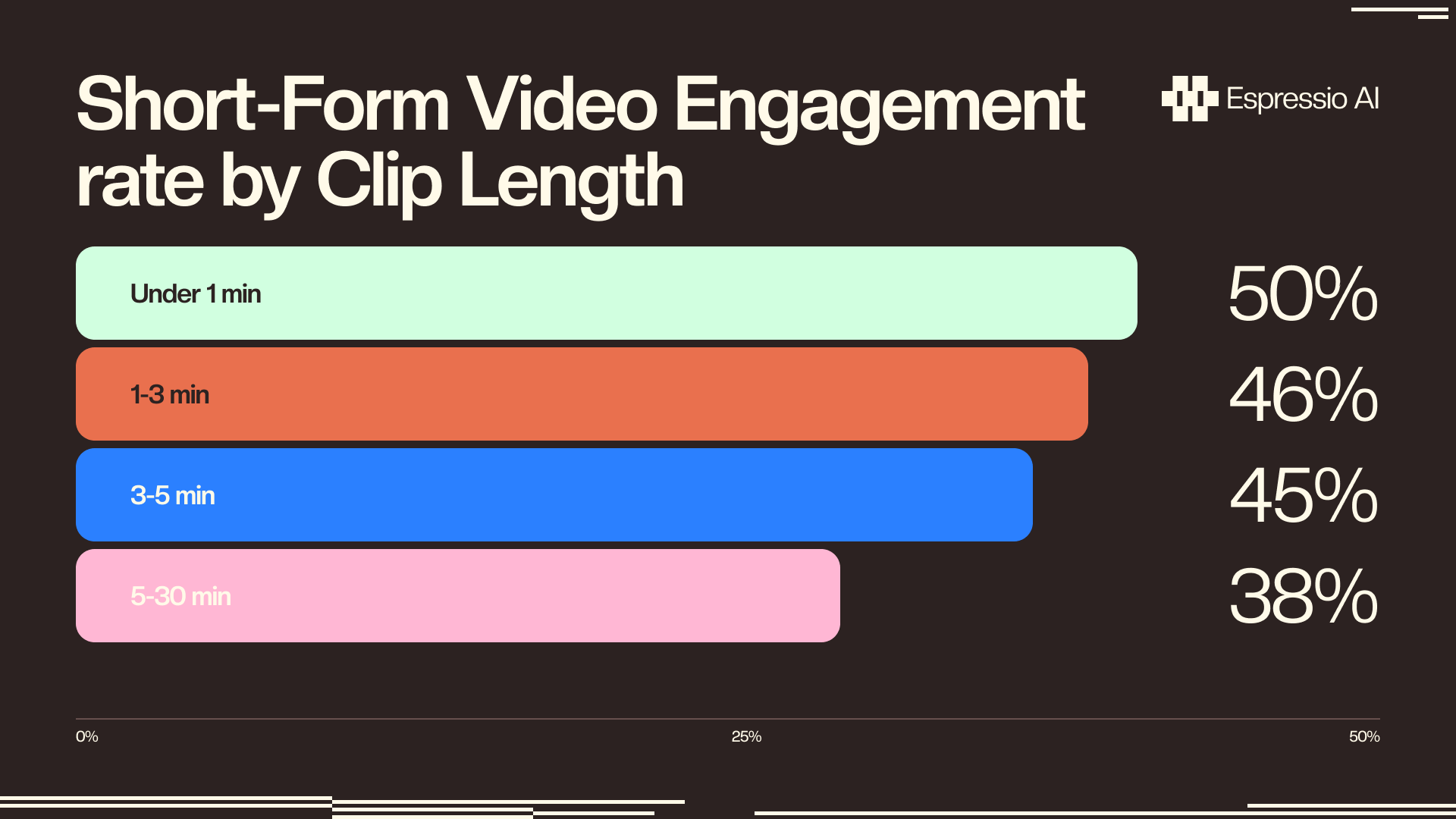
Videos under one minute achieve a 50% engagement rate on average, 12 percentage points above the 38% recorded for the five-to-thirty-minute range (Wistia via Goldcast, 2025). Teams that generate clips but reuse the same caption across LinkedIn, Instagram, and YouTube Shorts leave that advantage unrealized.
How the Opus Clip and Claude pipeline works
Opus Clip reached 10 million users and 172 million clips by March 2025, with those clips generating 57 billion total social media views (OpusClip, 2025). The tool does one thing well: identify the strongest 45-90 second moments inside a longer recording. Writing the captions, hashtags, and CTAs those clips need to perform on each platform is a separate job.
The pipeline runs in two phases. Phase 1 happens before you record. Claude receives the video topic, target audience, and rough agenda, then returns clip-ready hooks and a structural brief the speaker uses during the session. Phase 2 happens after Opus Clip finishes cutting. Claude receives the transcript export from each clip and returns a JSON object with platform-specific captions for LinkedIn, Twitter/X, Instagram, and YouTube Shorts.
An optional third phase wraps both Claude calls around Opus Clip’s webhook output using Make.com or n8n. This layer makes sense for teams producing 10 or more clips per week, where running the Claude prompts manually adds up to a meaningful time cost.
Opus Clip’s Virality Score rates clips after they’ve been cut. It’s a post-hoc quality signal, not a recording guide. The pre-production Claude brief flips that logic. By structuring the video around Hook, Flow, Value, and Trend before recording starts, the speaker already optimizes for the dimensions Opus Clip will score. Teams that run this step consistently report fewer low-scoring clips and less time spent re-recording or discarding footage.
Step 1: Brief Claude before you hit record
Opus Clip’s Virality Score ranks clips on four dimensions: Hook (does the intro grab attention and connect to the core subject), Flow (logical progression and satisfying conclusion), Value (emotional resonance and meaningful benefit), and Trend (alignment with current audience interests) (OpusClip, 2025-2026). A 10-minute pre-production brief with Claude addresses all four before the recording begins.
The speaker provides three inputs: the video topic, the target audience in one sentence, and a rough agenda or list of talking points. Claude returns three hook variations for the opening 10 seconds and a structural suggestion for where natural clip breaks will occur across the recording. This gives the speaker a map, not a script.
The first prompt we used asked Claude to “write a strong opening for a webinar on AI content pipelines.” It returned three decent hooks but nothing that would score above 70 on Opus Clip’s Hook dimension. They introduced the topic, but didn’t connect the subject to a problem the viewer already had. The fix was adding one field to the prompt: target_viewer_pain_point. Once Claude knew the viewer was a content manager frustrated by the volume of work per video, every hook variant led with that pain point instead of with the topic itself.
Use this template as your starting point:
You are a video content strategist. The speaker is recording a [FORMAT: webinar / podcast / tutorial] on the following topic.

TOPIC: [Enter topic here]
TARGET AUDIENCE: [One sentence describing the viewer and their main challenge]
AGENDA: [Paste the rough outline or talking points]

Return:
1. THREE hook openings for the first 10 seconds of the video. Each hook must: name the viewer's pain point, promise a specific outcome, and run under 30 words.
2. CLIP BREAK SUGGESTIONS: List 3-4 moments in the agenda where a natural 60-90 second standalone clip could begin and end without losing context.
3. HIGH-VALUE MOMENTS: Identify which 2-3 agenda items are most likely to score high on emotional resonance (Value) and audience relevance (Trend).
This step is optional for one-off videos. For recurring formats like weekly podcasts or monthly webinars, running it once and reusing the output structure saves more time than it adds.
Step 2: Upload to Opus Clip and configure your session
OpusClip supports three input types: a direct video file upload, a YouTube URL, or a Zoom/Loom recording link (OpusClip, 2026). The platform reached 10 million users by March 2025, processing 172 million clips with 57 billion combined social media views (OpusClip, 2025).
Four configuration settings determine output quality before Opus Clip starts processing. Getting them right takes two minutes; getting them wrong means a re-upload.
Video type selector. Choose “Talking head” for interviews and podcasts. “Presentation + Speaker” works for webinars with slides. The wrong selection degrades clip boundary detection.
Set the clip length range to 45-90 seconds for B2B content. LinkedIn’s algorithm rewards this window. Shorter clips often cut off the setup before the payoff arrives.
For the Virality Score threshold, use clips scoring 70 or above. Clips under 70 typically have a Hook or Flow problem; the FAQ section covers how to recover low-scoring clips with Claude before discarding them.
Caption accuracy. OpusClip claims 97%+ accuracy (vendor claim, unaudited). In practice, accuracy runs around 95% on clean audio from a single speaker. Accented speech or overlapping voices drops this to 85-88%. Always review captions before publishing.
Opus Clip’s API is restricted to Business and enterprise plan users. Starter ($15/month) and Pro ($29/month) plan users run through the web interface. The automation in Step 4 wraps that web workflow via Make.com or n8n, not via a direct API connection.
Step 3: Feed clip transcripts into Claude for platform-specific copy
One company reduced video editing time from two to five hours per hour of footage down to five minutes using AI repurposing tools, a 6x efficiency gain (Goldcast customer case study, 2025). The same compression applies to caption writing once Claude handles the per-platform variation that teams currently do by hand.
Getting the transcript out of Opus Clip takes two steps. Download the SRT file from the clip editor, or copy the caption text directly from the caption overlay panel. Paste it into the Claude prompt below at the [PASTE CLIP TRANSCRIPT HERE] placeholder.
The first version of our caption prompt returned one block of text and said “adapt this for each platform.” The captions were nearly identical. LinkedIn got the same punchy language as Twitter, and Instagram got no emoji. The fix was replacing the freeform instruction with a structured JSON output field for each platform, each with its own platform_tone constraint. After that change, LinkedIn captions ran 800-1,000 characters with a statistic in the first line. Twitter threads opened with a one-sentence hook under 20 words. Instagram captions led with a question and closed with a call to save the post.
Use this system prompt for the caption step:
You are a social media content strategist. You will receive a video clip transcript and metadata. Generate platform-specific captions for each channel listed below.

OUTPUT FORMAT: Return only valid JSON with these exact keys:
{
  "linkedin_caption": "Professional tone, statistic in first sentence, 800-1000 characters, ends with a question or call to action",
  "twitter_thread": [
    "Tweet 1: Hook under 20 words that names a specific insight from the clip",
    "Tweet 2: Supporting evidence or data point",
    "Tweet 3: Practical takeaway or call to action with link placeholder"
  ],
  "instagram_caption": "Opens with a question, conversational tone, 150-220 characters, ends with save-worthy CTA, 3-5 relevant emoji",
  "youtube_shorts_description": "Primary keyword in first line, 2-3 sentences, subscribe CTA in final line",
  "hashtags": {
    "linkedin": ["#ContentMarketing", "#VideoMarketing", "[topic-specific tag]"],
    "instagram": ["#ContentCreator", "#VideoContent", "[topic-specific tag]"],
    "youtube": ["#Shorts", "[topic keyword]"]
  },
  "cta": "The specific action the viewer should take after watching (matches the CTA from the original video)"
}

CLIP METADATA:
- Topic: [Enter topic]
- Target audience: [Enter audience description]
- Original CTA: [Enter the CTA from the source video]

TRANSCRIPT:
[PASTE CLIP TRANSCRIPT HERE]
The JSON keys map directly to columns in Airtable, Notion, or Buffer. For teams storing content in Airtable, this structure pairs with the content calendar base schema covered in the AI content calendar in Airtable guide.
For teams already working with turning video transcripts into written content with Claude, this caption prompt fits into the same API workflow with a different output target.
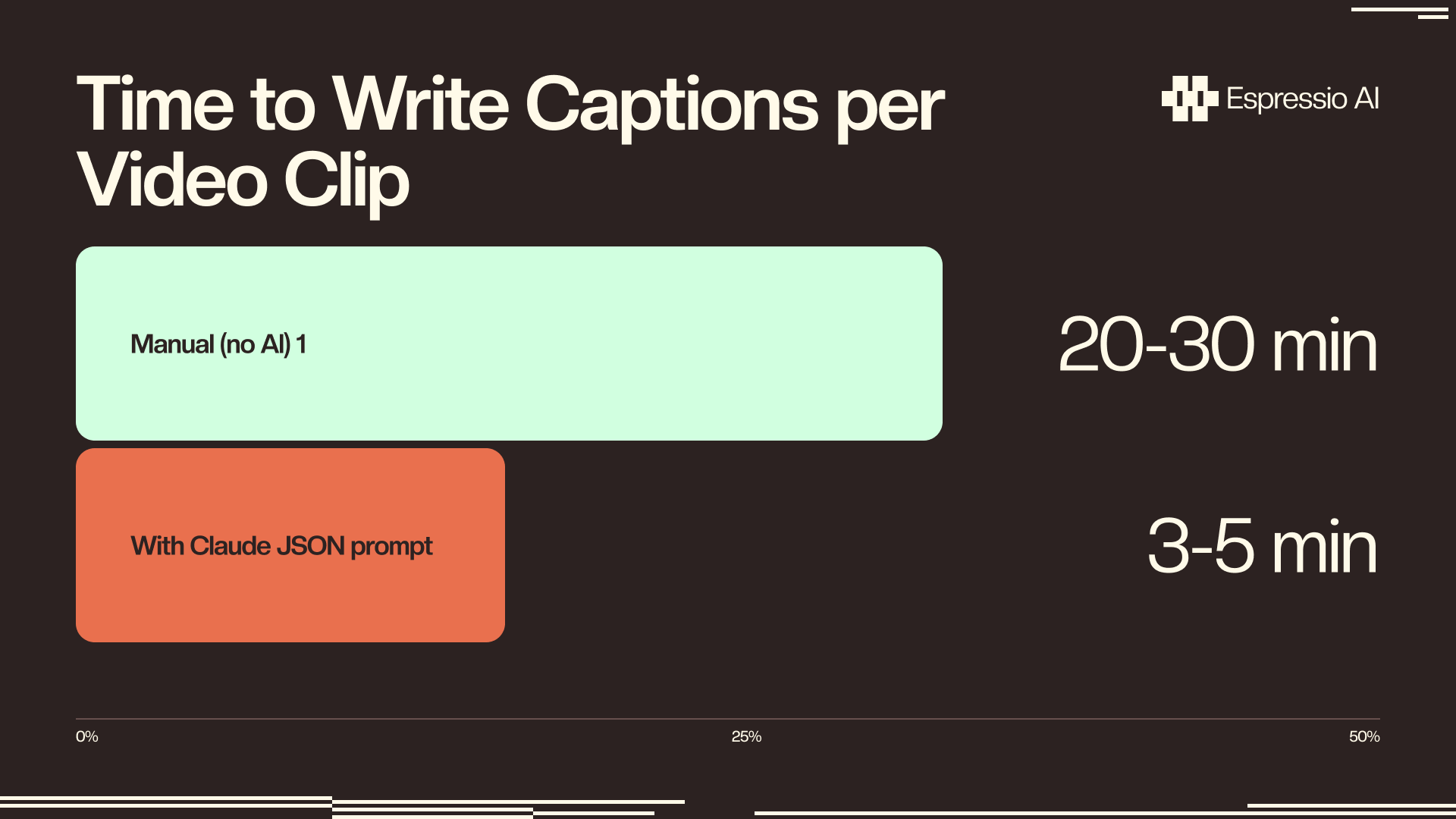
AI-assisted video repurposing compresses editing time by 6x at the clip selection level (Goldcast, 2025). Applying structured JSON output prompts to the caption step produces a comparable reduction: one Claude call per clip generates ready-to-publish copy for four platforms simultaneously, replacing 20-30 minutes of per-platform writing.
Step 4: Automate caption writing at scale with Make.com or n8n
63% of video marketers now use AI tools for video creation or editing, up from 51% the prior year (Wyzowl, n=266, late 2025). The teams producing the highest volume of repurposed content have automated the caption step, not only the clip selection step.
Opus Clip’s API requires the Business plan. Starter and Pro users connect via Opus Clip’s webhook, which fires when a clip export completes. That webhook output triggers Claude through Make.com or n8n, keeping the workflow intact for most plan levels.
Module 1: Trigger. A webhook trigger fires when Opus Clip completes a clip export. Configure the webhook URL in Opus Clip’s export settings. Alternatively, use a Google Drive “Watch Files” module pointed at the folder where Opus Clip exports SRT files.
Module 2 is an HTTP module pointed at the Anthropic API. Send the system prompt from Step 3 in the system field and map the transcript from Module 1 into the user field at the [PASTE CLIP TRANSCRIPT HERE] placeholder. Parse Claude’s JSON response.
Module 3: Write to content calendar. Map each JSON key from Claude’s response to a column in an Airtable base or Notion database: linkedin_caption to the LinkedIn column, twitter_thread to the Twitter column, and so on. One row per clip.
The n8n setup follows the same pattern: Opus Clip webhook trigger, Claude HTTP node, Airtable Write node. The node configuration mirrors the Make.com and Claude automation workflows used for brand monitoring.
For teams already automating LinkedIn content with Claude and Make.com, this caption pipeline plugs into the same scenario with a different trigger.
Cost breakdown: Make.com Core at $9/month includes 10,000 credits. A 3-module scenario per clip uses roughly 6 credits, covering around 1,650 clips per month before the limit. Claude Sonnet costs under $0.01 per caption set. Opus Clip Pro runs $29/month. Total pipeline cost for 50 videos per month: under $40.
Marketing teams that extend automation to the caption step can generate platform-ready copy for four channels per clip without proportional labor (Wyzowl, late 2025). One recorded session can produce 15-20 publishable assets.
If you want us to build this pipeline for your team, let’s chat.
Frequently asked questions about Opus Clip and Claude
Do I need a paid Opus Clip plan to use this workflow?
The free plan produces watermarked clips with limited export options. The Starter plan ($15/month) unlocks the Virality Score, full captions, and clean exports (the minimum needed for Step 2 and Step 3). Pro ($29/month) adds team seats and a social media scheduler. API access requires the Business/enterprise plan.
Which Claude model should I use for video captions?
Claude Sonnet handles caption-length output well at roughly 3-5x lower cost than Claude Opus. Use Sonnet for standard caption batches and Haiku for high-volume automation where per-clip cost matters. Reserve Opus for long transcripts (60+ minute recordings) where output completeness and precision are the priority.
Does Opus Clip have a native Claude integration?
OpusClip’s product blog references Claude Sonnet 4.6 in the context of AI video generation workflows (OpusClip, 2025), but there is no user-facing native integration as of May 2026. The pipeline in this tutorial connects the two tools through Claude’s API, triggered manually or via Make.com/n8n.
Can I use this pipeline with non-English videos?
Opus Clip supports caption generation in 20+ languages, and Claude handles caption writing in the same language when the transcript is provided in that language. Caption accuracy drops on accented speech or overlapping audio regardless of language, so budget extra review time for multilingual content or recordings with multiple speakers.
What should I do when a clip scores below 70 on the Virality Score?
Low scores typically indicate a Hook or Flow problem. Paste the clip transcript into Claude and ask it to score the clip against each Virality Score dimension (Hook, Flow, Value, Trend) and rewrite the opening 10 seconds to strengthen the weakest dimension. This takes 3-5 minutes per clip and often recovers usable content from otherwise discarded footage.
What to build next
Run Steps 1 through 3 manually on your next three recordings before building the automation. The pre-production prompt calibrates to your topic and audience after a few iterations. The caption prompt calibrates to your brand voice after the first two or three runs.
The clip-and-caption pipeline is one layer of a larger content production system. The AI content automation framework for B2B teams covers how teams connect video repurposing to written content, email, and publishing schedules without losing quality control. For teams that haven’t configured Claude API access yet, the Claude API setup guide for marketing teams is the prerequisite step.
Espressio AI builds Opus Clip + Claude pipelines configured for your team’s video volume and content calendar. Talk to us.



