



Luka Mrkić
Head of BD
Insights, strategies, and real-world playbooks on AI-powered marketing.
MAY 12, 2026
How to Automate LinkedIn Content with Claude and Make.com
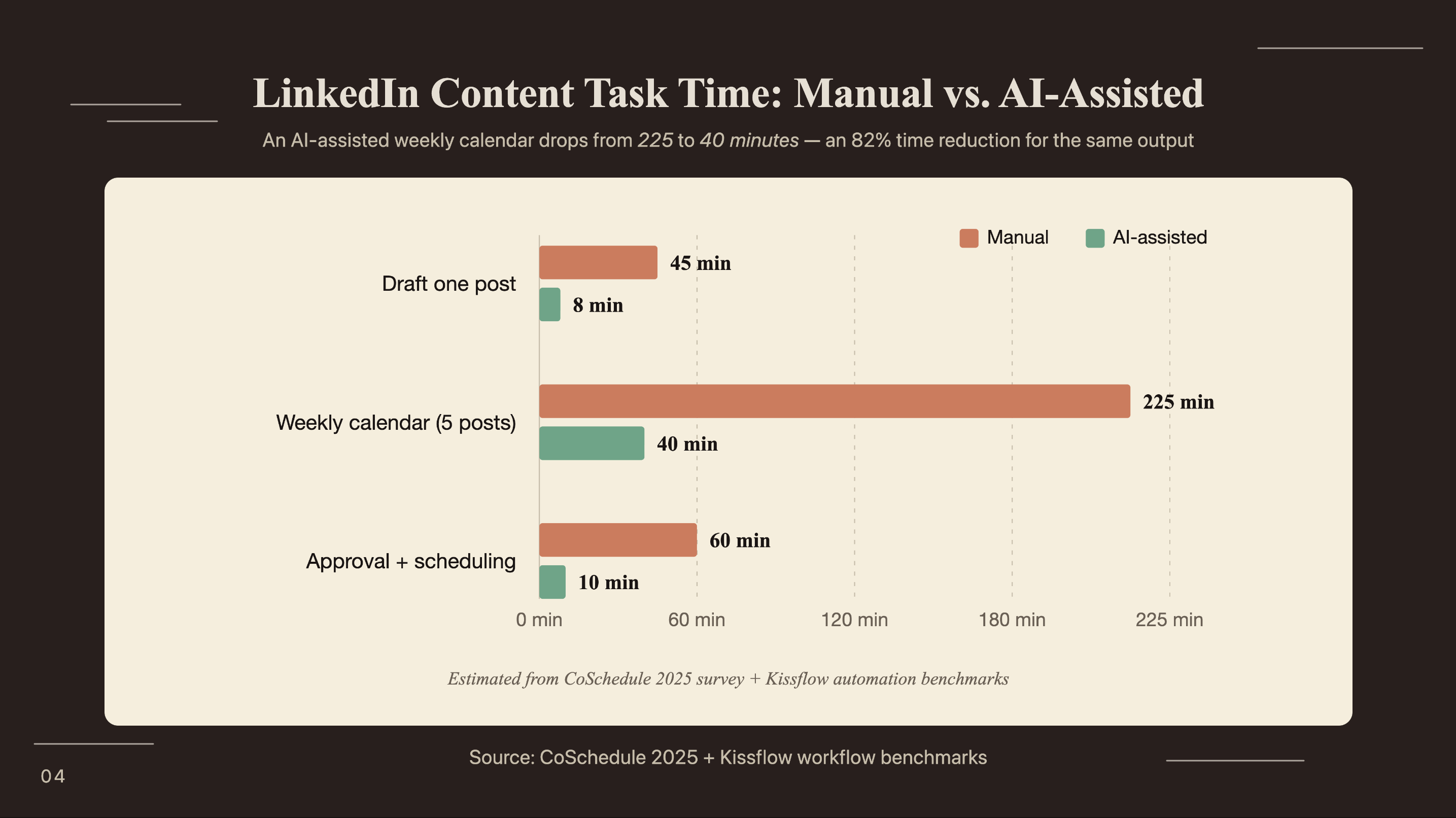
80% of B2B social leads come from LinkedIn (DigitalApplied, 2026). Yet only 3% of users publish more than once a week (ConnectSafely, 2026). The gap is production bandwidth. Writing, editing, and scheduling a single post manually takes 45 minutes. Most content plans break down in week four, not because the strategy failed but because the daily habit did.
This tutorial builds a Make.com scenario that handles the production step: Claude drafts a post in your voice from a scheduled topic list, routes the draft to your inbox for a one-reply approval, and publishes to LinkedIn once you reply “approve.” Three modules, one email, and a content calendar that runs without your daily attention.
Key Takeaways
- 80% of B2B social leads come from LinkedIn, yet only 3% of users post more than once weekly (ConnectSafely, 2026) - consistency is a direct revenue lever for B2B teams.
- A Make.com scenario connects a Google Sheet content calendar to Claude for drafting, routes each post to your email for approval, then publishes via the LinkedIn API automatically.
- LinkedIn’s OAuth token expires every 60 days and breaks most automation setups - this tutorial covers the scheduled refresh fix that competing guides skip entirely.
Why LinkedIn consistency is harder to maintain than it looks
Personal LinkedIn profiles generate 8× more engagement than company pages (DigitalApplied, 2026), and the platform’s average engagement rate reached 5.20% in Q1 2026, up 8% year-over-year (Social Insider). For B2B teams, those numbers translate directly: a consistently active founder or account executive generates more qualified inbound than a well-managed company page. Consistency, though, is where most individuals stall.
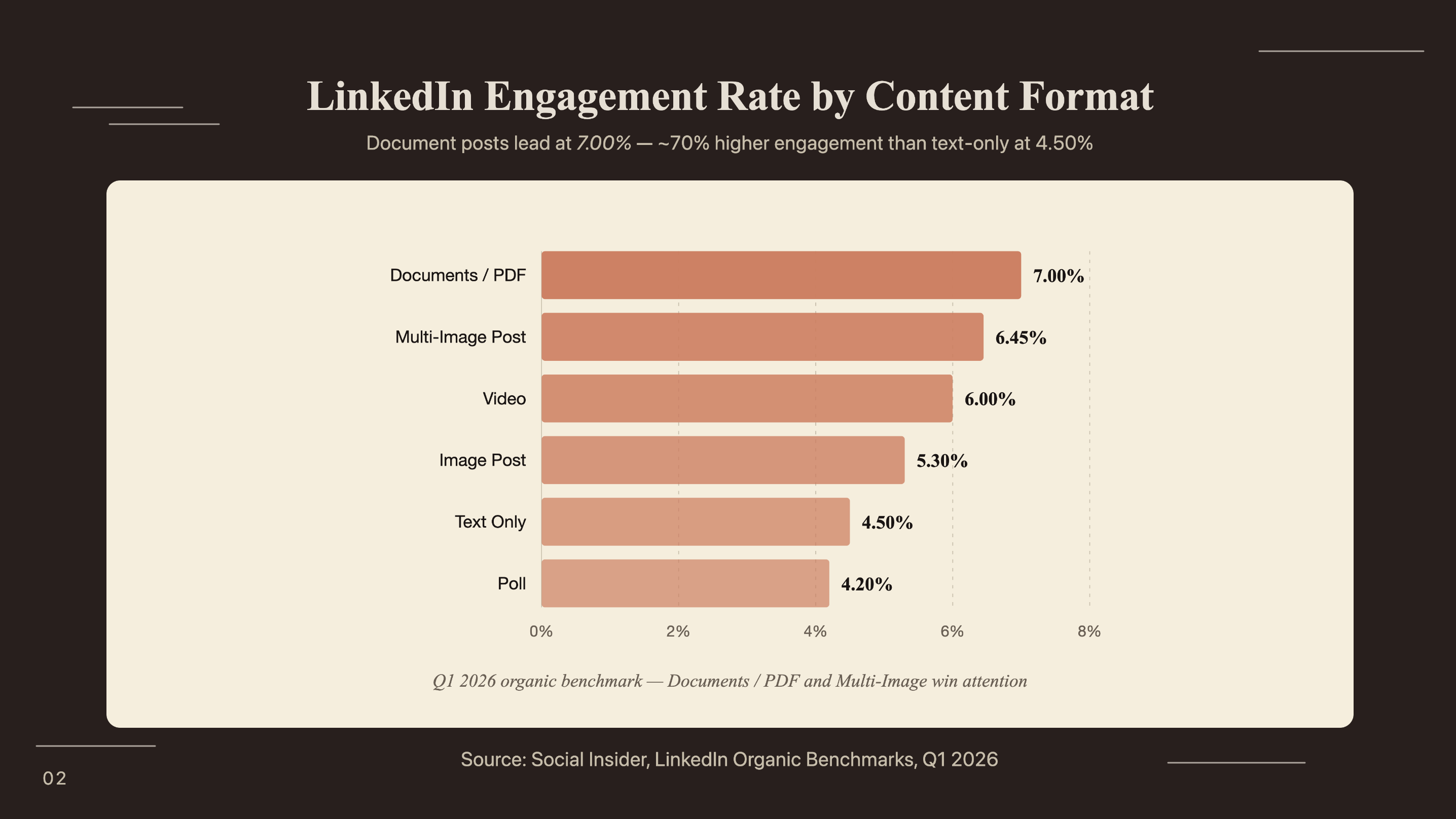
The format you choose matters as much as how often you post. Document posts hit 7.00% average engagement - the highest of any content type - while link posts average just 3.25% (Social Insider Q1 2026). Text-only posts, the easiest format to produce manually, land at 4.50%. Automating the formats that perform is worth the configuration time; automating mediocre-performing formats isn’t.
Marketing automation delivers $5.44 ROI per $1 spent over three years (Nucleus Research, 2021, via inBeat, 2025). The combination of LinkedIn’s 5.20% engagement baseline and the platform’s 80% share of B2B social leads makes it one of the highest-return automation targets available to B2B marketing teams. Building a repeatable production system is the decision that separates a LinkedIn strategy that compounds from one that burns out after six weeks.
How does the Make.com + Claude LinkedIn automation work?
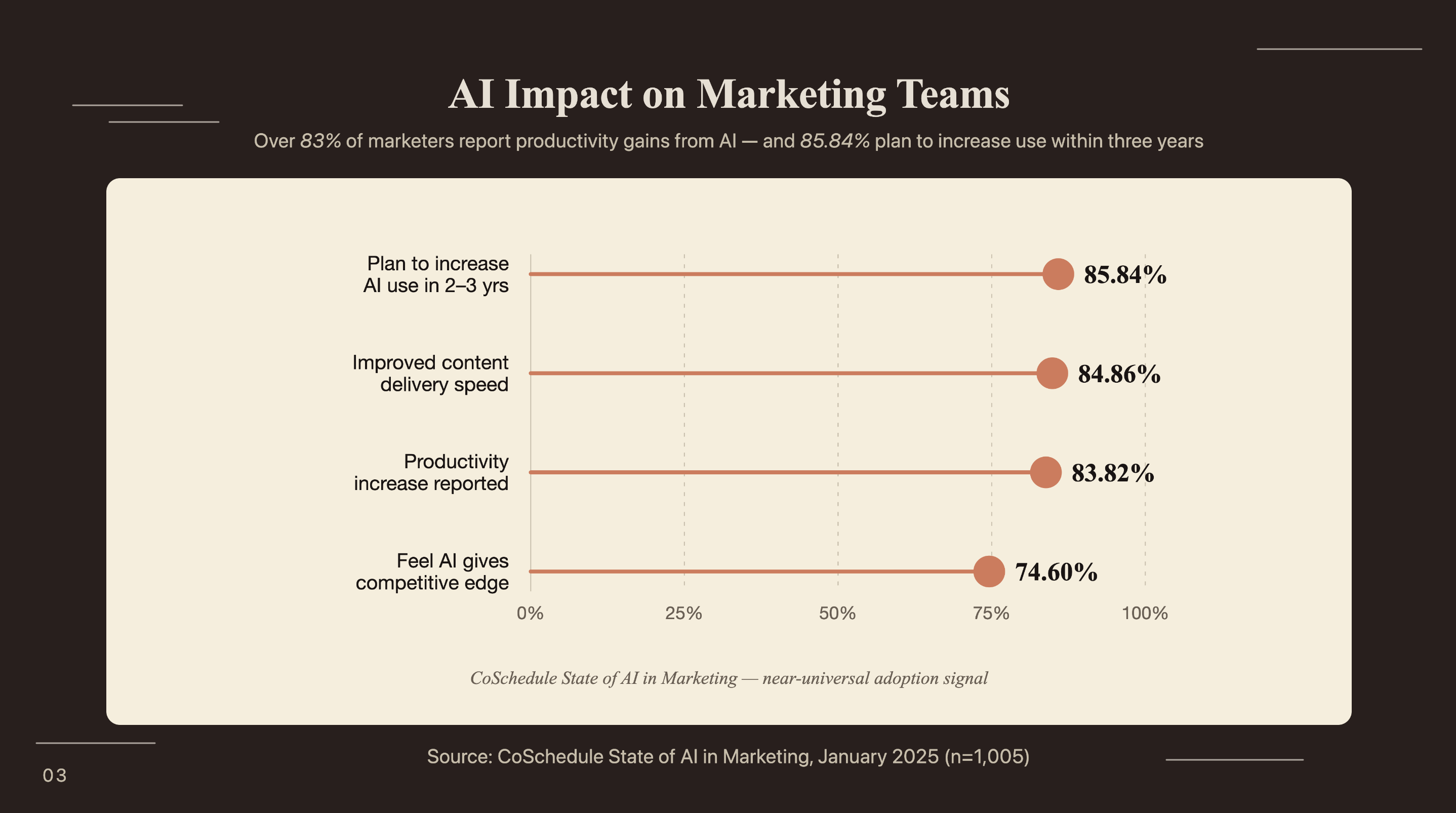
83.82% of marketers report increased productivity after adopting AI tools, with the average saving reaching 5+ hours per week (CoSchedule State of AI in Marketing, 1,005 professionals, Jan 2025). The Make.com + Claude workflow captures most of that saving specifically for LinkedIn by compressing four manual steps into a single scheduled scenario that runs every morning without input.
The scenario has five modules connected in sequence:
- Trigger: A scheduled watch on a Google Sheet row - one row per post topic, with columns for tone, format type, and target date
- Claude module: Reads the topic row and a voice-trained system prompt, returns a complete post draft
- Email module: Sends the draft to your address with a plain subject line and two reply options
- Wait module: Pauses the scenario until Make.com detects a reply to the approval email
- LinkedIn module: On receiving an “approve” reply, publishes the draft via the LinkedIn API at the scheduled time
Most LinkedIn automation setups work for exactly 60 days, then stop publishing silently. The cause is LinkedIn’s OAuth token - it expires every two months and requires re-authorization. You can work around it with a second Make.com scenario scheduled to run on day 55 of every cycle: it calls the LinkedIn module with a lightweight “keep alive” request that triggers OAuth re-authorization before the token goes stale. Without this, you discover the problem when reviewing two months of missing posts.
For teams already using Make.com to monitor brand mentions and signals across the web, the Make.com brand monitoring agent with Claude uses the same authentication setup - the Claude module and LinkedIn connection configure identically across both scenarios.
How do you set up the Claude API module in Make.com?
73% of IT leaders say automation helps employees save 10–50% of time previously spent on manual tasks (Kissflow, 2025). Getting Claude into a Make.com scenario is the step that makes that saving concrete for content work - the full configuration takes under 10 minutes once you have an API key.
Step 1: Go to console.anthropic.com and create an API key under the API Keys section. Copy it immediately; it won’t display again.
Step 2: In your Make.com scenario, click the + button to add a module. Search for “Anthropic” and select Create a Message.
Step 3: Click Add a connection, paste your API key, and name the connection (e.g., “Claude Content”). Make.com stores it for all future scenarios.
Step 4: Set the model. Use claude-opus-4-6 for high-value drafts where voice accuracy matters most. Use claude-haiku-4-5-20251001 if you’re running high volume and want minimal API spend.
Step 5: Set max_tokens to 600–800. A LinkedIn post runs 250–400 words; the extra headroom lets Claude complete a draft without truncating mid-sentence.
Step 6: Wire the System prompt and User message fields - covered in the next section. Map the User message to the topic cell from your Google Sheet trigger module.
A 5-posts-per-week workflow with this setup uses approximately 120 Make.com operations per month - well within the free tier’s 1,000-operation limit. API cost runs around $0.002 per post with Claude Haiku, putting the total spend for a full weekly calendar under $0.50 per month. No additional SaaS subscription required.
For teams who need more depth on API key management, model selection, and rate-limit handling across multiple marketing workflows, the Claude API setup guide for marketing teams covers all three in detail.
How do you write Claude prompts that match your LinkedIn voice?
84.86% of marketers who use AI report improved content delivery speed, and 74.6% say AI gives them a competitive advantage over peers who don’t use it (CoSchedule, Jan 2025). But that advantage only materializes when the output sounds like you. A post that reads like a press release from a chatbot loses the 8× engagement advantage LinkedIn’s algorithm gives personal voices. Voice training is the step between a demo that impresses and a setup you actually use.
The system prompt has three components:
Role and voice rules: “You write LinkedIn posts for [name], a [title] at [company]. Write in first person, present tense. Use short sentences averaging 10–12 words. Never use bullet lists. Open the first sentence with an observation or data point. Use contractions.”
Examples: Paste 8–10 of the person’s best-performing LinkedIn posts directly into the system prompt, labeled [POST EXAMPLE 1] through [POST EXAMPLE 8]. Claude uses these as style anchors, not as content to reproduce.
Do-not-use list: Words the person never writes. Build this from the example posts. Most founders’ lists include: “thrilled to announce,” “excited to share,” “the journey,” “learnings,” “ecosystem,” and any word ending in “-ize.”
The user message is simple: “Write a LinkedIn post about: [TOPIC FROM GOOGLE SHEET]. Target length: 280–350 words. Format: observation → evidence → takeaway. No CTAs.”
When we set this up for a B2B SaaS founder, the first five Claude drafts were technically correct - right topic, right length - but they read nothing like the founder. The word “leverage” appeared in three of five posts. The fix took two steps: we added “leverage” to the do-not-use list, then replaced two generic example posts with the founder’s two most-commented posts from the prior six months. The next batch passed a blind review - the founder’s team couldn’t tell which posts were AI-drafted without checking the timestamp.
How do you connect Make.com to the LinkedIn API?
LinkedIn is approaching 1.3 billion registered members and has an estimated 310 million monthly active users (ConnectSafely, 2026). Its official API supports automated posting for personal profiles and company pages, and Make.com’s LinkedIn module connects through that API directly - meaning this is platform-approved automation, not browser bots or scraping tools that risk account suspension.
Step 1: Go to developer.linkedin.com, click Create app, and fill in the basic details. Linking the app to a LinkedIn company page is required even for personal profile posting.
Step 2: Under Products, request access to Share on LinkedIn. This grants the w_member_social permission scope for personal profile posts. For company page posts, also request Marketing Developer Platform to add w_organization_social.
Step 3: In your Make.com scenario, add a LinkedIn module and select Create a Post (Personal) or Create a Post (Company Page). Click Add a connection and complete the OAuth authorization flow with your LinkedIn credentials.
Step 4: Set Content to map to the output text from the Claude module. Set Visibility to “Anyone” for live posts or “Connections Only” for a conservative initial rollout.
Step 5: For your first test, set Visibility to “Only Me.” Run the scenario manually to confirm the full chain executes cleanly before setting it to public.
Step 6: Enable the OAuth refresh scenario described in the architecture section. Schedule it to run on day 55 of every 60-day cycle - either update the date manually each cycle or use a Make.com date-calculation module to automate the scheduling.
Step 7: Run the full end-to-end test: add a row to your Google Sheet, wait for the scheduled trigger, receive the approval email, reply “approve,” and confirm the post appears on your LinkedIn profile. The chain completes within 3–5 minutes.
For teams evaluating Zapier as an alternative platform, the Claude and Zapier marketing automation guide covers the equivalent routing setup - the logic is similar but module naming, authentication, and operation limits differ between the two platforms.
How do you add an approval gate and scale to a full content calendar?
LinkedIn professionals who use AI tools daily are 2× as likely to exceed their targets compared to non-users (LinkedIn, The ROI of AI, 2025, via Cirrus Insight). That advantage compounds only when posts actually get published. An approval gate that requires a dashboard login kills the posting habit faster than no automation at all. Zero friction means one email reply - nothing more.
The Gmail module in Make.com has a Watch Emails trigger that monitors for replies containing specific text. Connect it to the outgoing approval email address. Set it to watch for messages where the body contains “approve” and route them to the LinkedIn publish step. If it detects “revise:” followed by any text, route that to a second Claude module call with the feedback appended to the user message.
Add a fallback: if no reply arrives within 6 hours, trigger a Slack DM with the draft and a direct reply link. A slow morning doesn’t then mean a missed publication window.
To scale to a full calendar, use a Google Sheet with five columns: Topic, Tone (professional / conversational / analytical), Format (standard / observation-led / data-led), Target Date, and Status (draft / approved / published). The scenario reads the next row where Status = “draft” each morning, generates the post, and writes “pending approval” back to the Status cell. When the post publishes, a final step updates it to “published.”
Batch your topic planning once a week - 20 minutes on Sunday evening to fill in the next five rows. The automation covers everything from there.
If you’re looking to integrate AI into your LinkedIn content workflows, get in touch with us and we’ll map out where automation adds the most value for your team.
Frequently Asked Questions
Can you automate LinkedIn posts without violating terms of service?
Make.com’s LinkedIn integration uses the official LinkedIn API with OAuth authentication, making automated posting fully compliant with platform rules. LinkedIn’s API allows up to 10 posts per day for personal profiles, far above what any realistic content calendar needs. The key distinction is using the official API rather than browser bots or scraping tools, which violate LinkedIn’s terms and risk account suspension.
How long does it take to set up this Make.com LinkedIn automation?
Initial setup takes 60–90 minutes: 15 minutes for API key creation and Make.com authentication, 20 minutes building the five scenario modules, 20 minutes writing and testing the Claude voice-training system prompt, and 10 minutes running an end-to-end test with Visibility set to “Only Me.” Ongoing maintenance is minimal - the scenario runs automatically once configured, with a monthly OAuth refresh taking under 5 minutes.
Does this automation work for LinkedIn company pages as well as personal profiles?
Yes. LinkedIn’s API supports both personal profiles using the w_member_social permission scope and company pages using w_organization_social. The Make.com LinkedIn module lets you select the target account when building the scenario. Company page automation requires admin access to the page in your LinkedIn developer app setup.
What happens if Claude drafts something off-brand?
The email approval gate catches off-brand drafts before anything goes live. When Claude completes a draft, Make.com sends it to your inbox. Replying “approve” triggers publication; replying “revise: [your feedback]” sends the notes back to a second Claude module call that redrafts with your input incorporated. Personal profiles generate 8× more engagement than brand pages precisely because of authentic voice - the approval gate protects that.
How is this different from LinkedIn’s native content scheduling tool?
LinkedIn’s native scheduler handles timing but not creation: every post still requires manual drafting. This Make.com workflow does three things the native tool cannot: drafts posts using Claude trained on your specific writing voice, pulls topics automatically from a Google Sheet content calendar each morning, and routes every draft through an email approval gate before it appears on your profile. It also works across both personal profiles and company pages from a single scenario.
Build the workflow, then protect the habit
Only 3% of LinkedIn users post more than once a week. The 97% who don’t post weekly are running the same bottleneck: production time. The Make.com + Claude workflow in this tutorial compresses a 45-minute manual task into a 90-second approval email. The compound effect is a LinkedIn presence that runs continuously without becoming a daily obligation.
Key takeaways:
- Claude voice training on 8–10 example posts produces drafts that pass blind review
- The email approval gate keeps you in control without adding friction
- The OAuth refresh scenario prevents the 60-day drop-off that kills most LinkedIn automations
For teams managing content automation as part of a broader revenue workflow - LinkedIn, email, CRM, and outbound in one connected pipeline - the AI workflow automation guide for revenue teams covers how these individual channel automations integrate and scale together.



