



Luka Mrkić
Head of BD
Insights, strategies, and real-world playbooks on AI-powered marketing.
MAY 21, 2026
LinkedIn Sales Nav + Clay + ChatGPT 5.5: 100 Leads/Week
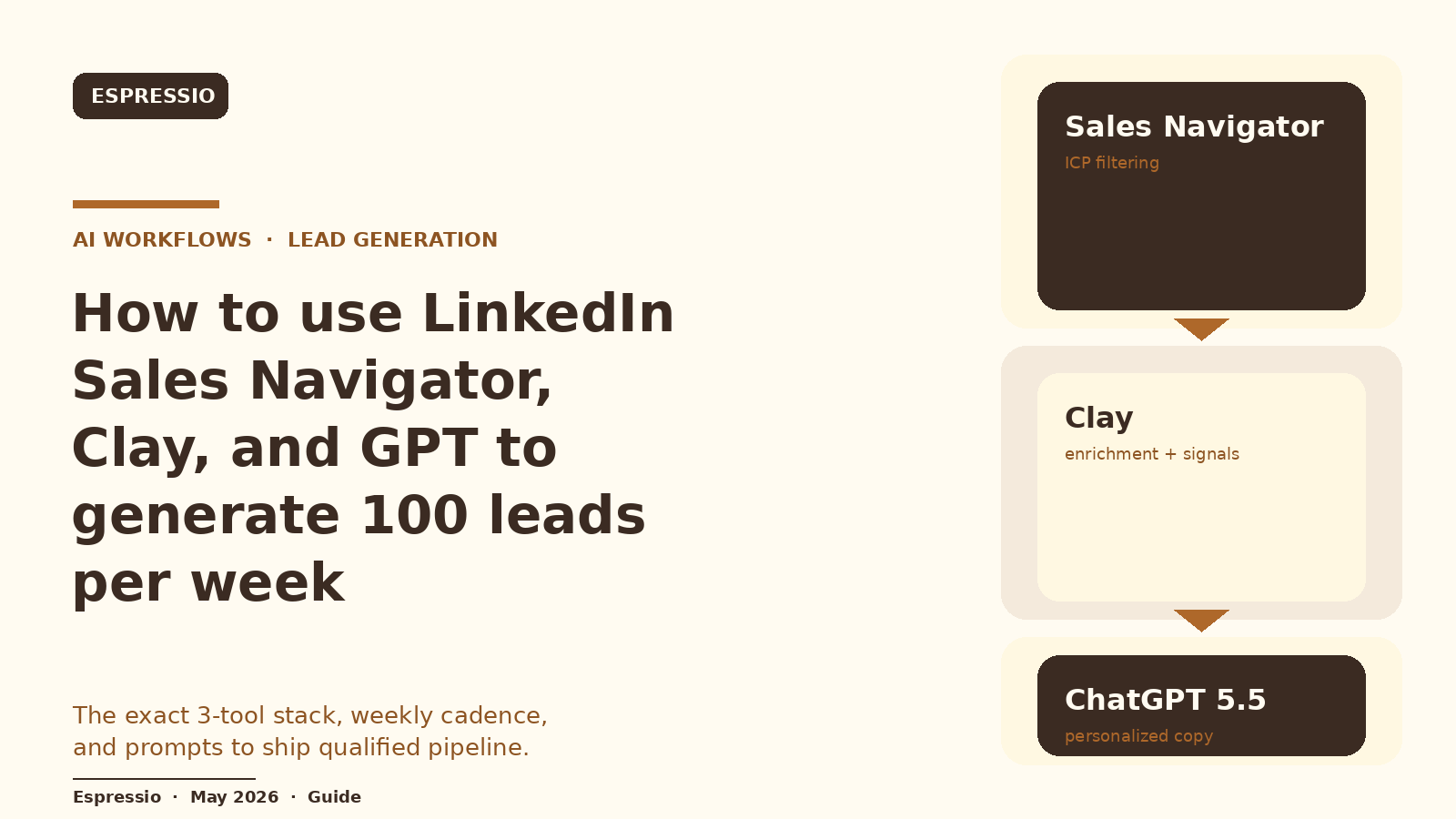
Stack three tools. LinkedIn Sales Navigator finds the right accounts and people, Clay enriches them with verified emails and buying signals, and ChatGPT 5.5 (via the OpenAI API or a Clay AI column) writes a personalized opener for every lead. Push the output into Instantly or HubSpot. Run weekly, this gives you a steady flow of personalized outbound at the volume you choose to target.
Setup takes a focused afternoon. Steady state takes about 90 minutes of operator time per week. Tool cost lands at roughly $379 per month on list prices. Yield depends on your ICP, signals, and prompt discipline.
TL;DR
- LinkedIn Sales Navigator is the ICP filter, Clay is the data layer and signal engine, ChatGPT 5.5 is the writer.
- The single largest determinant of reply rate is who you message, then what signal you feed the model, then the prompt.
- 100 leads per week is the volume this guide is sized for. Pick the number that fits your team capacity.
If you are evaluating who should build this for your team, this guide gives you both the technical blueprint and the standards to evaluate the work.
What this stack actually does
Each tool has one job. Sales Navigator is the ICP filter. Clay is the data layer and signal engine. ChatGPT 5.5 is the writer. Putting them together gives you a pipeline that turns a saved search into personalized outbound at the end of every week.
The flow runs in five steps:
- Sales Navigator returns a fresh batch of accounts and contacts that match your filter.
- A scraper (Phantombuster or Clay’s built-in HTTP module) pulls profile and company URLs into a Clay table.
- Clay waterfalls enrich each lead with work email, mobile, firmographics, and buying signals.
- A ChatGPT 5.5 column writes
ai_first_lineandai_subjectfor each row based on the signal data. - The cleaned table syncs to Instantly (for cold email) or HubSpot (for SDR-driven outreach).
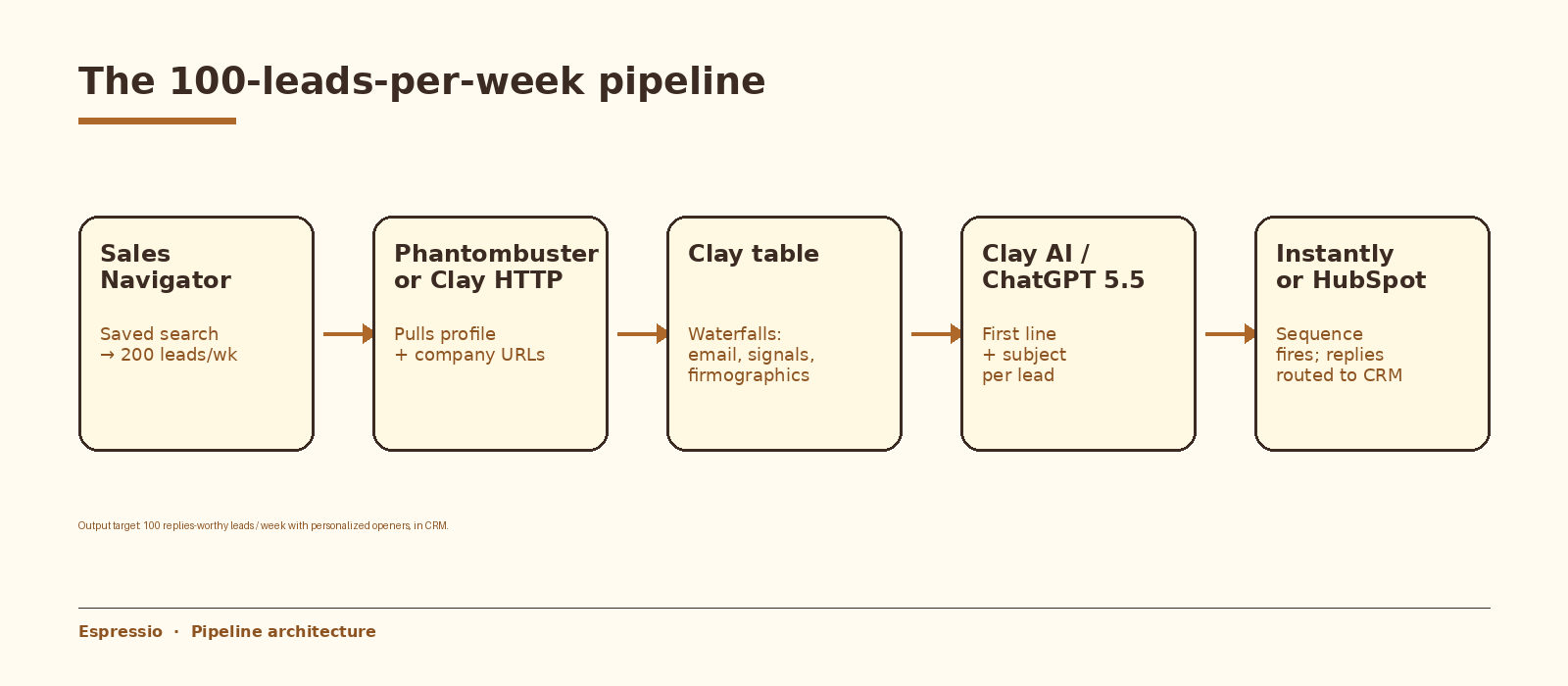
100 leads per week is the volume this guide is sized for. It is enough to read reply patterns each week and small enough to keep quality high. Pick the number that fits your team capacity.
What you need before you start
- Sales Navigator Core (about $99/month). Advanced and Advanced Plus add team and CRM features that you do not need yet.
- Clay Starter plan or higher (about $149/month for 2,000 credits). Credits are the right mental model: each enrichment provider costs credits per row.
- OpenAI API key with ChatGPT 5.5 access. See GPT-5.5 in ChatGPT for current availability.
- Instantly Growth plan for cold email at scale, or HubSpot for SDR-driven outreach.
- A clearly defined ICP. Title, company size, industry, region, and at least one buying signal. Specific in, specific out.
- Optional: Phantombuster (about $69/month) if you want a separate scraping layer. Clay can scrape directly via HTTP for most cases.
Step 1: Build a sharp Sales Navigator search
The single largest determinant of reply rate is who you message. Sales Navigator filtering has more leverage than any prompt you will write later. Most teams set their filter too broad, which dilutes everything downstream. Sales Navigator filtering has more leverage than any prompt you will write later.
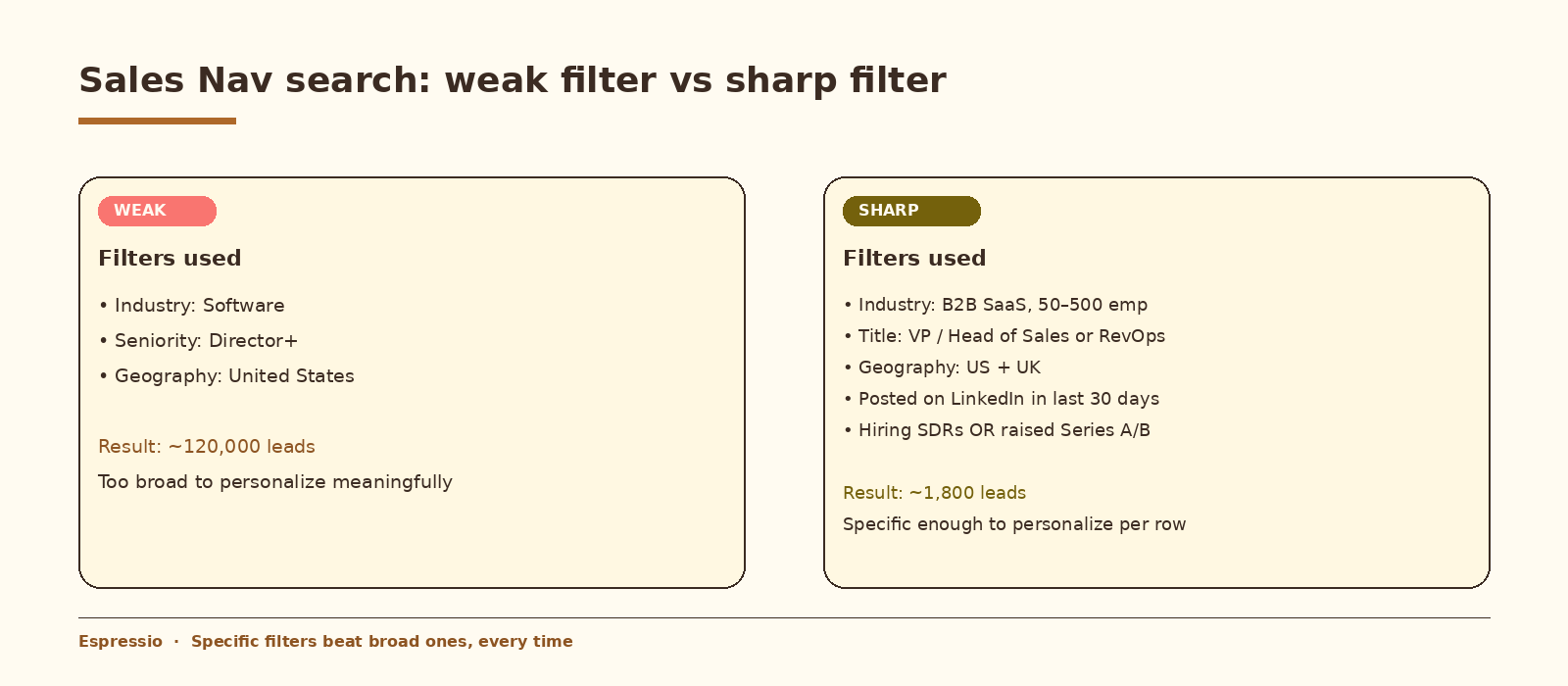
Use these filter dimensions in combination:
- Industry plus headcount band. “B2B SaaS, 50 to 500 employees” is sharper than “Software”.
- Title plus seniority. “VP of Sales” or “Head of RevOps” with “Director and above” beats “Director plus, all functions”.
- Geography with intent. United States plus United Kingdom for English-language sequences.
- Engagement signals: posted on LinkedIn in the last 30 days, changed jobs in the last 90 days, mentioned in news.
- Company-level signals: hiring on a relevant role, raised funding, listed on a specific job board.
Save the search. Sales Navigator will surface new matches every week, which is the engine of your weekly cadence.
Target list size for one week: about 200 to 300 leads coming out of the saved search. After Clay enrichment drops the unverified and the role mismatches, you will land at roughly 100 to 140 qualified leads ready for personalization.
Step 2: Pull leads from Sales Navigator into Clay
Sales Navigator does not have a public API. There are two reliable paths.
Option A: Phantombuster (no-code, recommended)
Phantombuster has prebuilt LinkedIn Sales Navigator Search Export and Profile Scraper agents. Connect your LinkedIn account once, paste the saved-search URL, and schedule it weekly. Output is a CSV with LinkedIn profile URL, name, title, company, and company URL.
From Phantombuster, send the CSV to a Clay table via webhook or a scheduled CSV import. Clay’s “From Phantombuster” source is the fastest path.
Option B: Clay native (direct)
Clay has a built-in Sales Navigator integration that calls the search directly. It is faster to set up but has tighter rate limits on free-tier LinkedIn accounts. For one operator on a paid Sales Nav seat, this is the cleanest path.
Either way, your Clay table should end up with one row per lead with these starter columns: linkedin_url, first_name, last_name, title, company, company_domain.
Step 3: Enrich with Clay waterfalls
Clay’s strength is the waterfall: stack multiple providers per data point so the row finds an email even if one provider misses. Add these columns to the table in order:
- Work email: stack Findymail, Datagma, ZeroBounce verifier, Anymail. Mark the row as verified or risky.
- Mobile (optional): Datagma or LeadMagic for SDR-driven outreach.
- Company firmographics: Apollo or Clearbit for employee count, revenue, tech stack, and industry.
- LinkedIn post history: pull the last 5 posts from the prospect using Clay’s LinkedIn Posts column.
- Funding and hiring signals: Crunchbase for funding rounds, Predict Leads or Coresignal for active job postings.
- Tech stack flags: BuiltWith or similar for confirming a relevant tool in use.
Filter the table after enrichment. Drop rows with no verified email, drop rows where company size fell outside your filter, drop rows where the role no longer matches. This is where 200 to 300 raw leads typically become about 100 to 140 cleaned ones.
Step 4: Personalize with ChatGPT 5.5
Two ways to run ChatGPT 5.5 against the cleaned table. Both work; pick based on volume and prompt-iteration speed.
Option A: Clay AI column (recommended for under 1,000 leads/week)
Clay has a native AI column powered by ChatGPT 5.5. Add a new column, pick “AI > Use AI to write a message,” and write the prompt inline. The column reads from any other column in the table by referencing it like {{title}} or {{recent_post}}.
Use this system prompt as a starting point. Tune it after you read 10 outputs.
You write one-sentence cold email openers that reference a specific
recent fact about the prospect.

Rules:
- Maximum 22 words.
- Reference the fact directly. Do not say "I noticed" or "I came across".
- Lowercase, casual, no flattery, no questions.
- Start with the fact itself.

Prospect: {{first_name}}, {{title}} at {{company}}.
Recent signal: {{signal}}.
Recent LinkedIn post (if any): {{recent_post}}.
Generate ai_first_line as one column. Generate ai_subject as a second column with a separate prompt that returns a 3 to 5 word lowercase subject line.
Option B: Direct OpenAI API (for higher volume or custom logic)
When you want full control over retries, logging, model versioning, or batching, run a short Python job over the cleaned Clay CSV export. This is what shipping teams do at 1,000+ leads per week.
import openai, csv, time

openai.api_key = "sk-..."

SYSTEM = """You write one-sentence cold email openers referencing a specific
recent fact about the prospect. Max 22 words. Avoid 'I noticed', no flattery.
Lowercase casual tone. Start with the fact itself."""

rows_out = []
with open("clay_export.csv") as f:
    for row in csv.DictReader(f):
        resp = openai.chat.completions.create(
            model="chatgpt-5.5",
            messages=[
                {"role": "system", "content": SYSTEM},
                {"role": "user", "content":
                    f"Prospect: {row['first_name']}, {row['title']} at {row['company']}. "
                    f"Signal: {row['signal']}. Recent post: {row.get('recent_post','')}"}
            ],
            temperature=0.7,
        )
        row["ai_first_line"] = resp.choices[0].message.content.strip()
        rows_out.append(row)
        time.sleep(0.3)

with open("personalized.csv","w") as f:
    w = csv.DictWriter(f, fieldnames=rows_out[0].keys())
    w.writeheader(); w.writerows(rows_out)
If you want this set up cleanly inside your stack with logging, retries, and a feedback loop into a CRM, that is the kind of work we ship at Espressio.
Step 5: Push to Instantly or HubSpot
Where the leads go depends on the motion. Cold email sequences go to Instantly. SDR-driven outreach (calls, LinkedIn DMs, manual emails) goes to HubSpot. Many teams run both.
Path A: Instantly for cold email
From Clay, sync the cleaned table to Instantly using the native Instantly integration. Map ai_first_line and ai_subject to custom variables. In your Instantly campaign body, reference them like this:
subject: {{ai_subject}}

hey {{firstName}},

{{ai_first_line}}

quick one. we help {{role}}-style teams ship {{value_prop}} in weeks not quarters.
worth a 15 min look next week?

[you]
Run on 3 to 5 warmed-up sending mailboxes. Cap at about 30 to 40 sends per mailbox per day. That puts you between 100 and 200 first touches per day, which is the right range for a 100-leads-per-week pipeline including follow-ups.
Path B: HubSpot for SDR-driven outreach
From Clay, sync the cleaned table to HubSpot contacts and companies using the native HubSpot integration. Map ai_first_line and ai_subject to custom contact properties. Build a HubSpot sequence that pulls those properties into the email template. SDRs can review and edit before sending, which is the right pattern for higher-ACV motions.
The weekly cadence that makes 100 leads sustainable
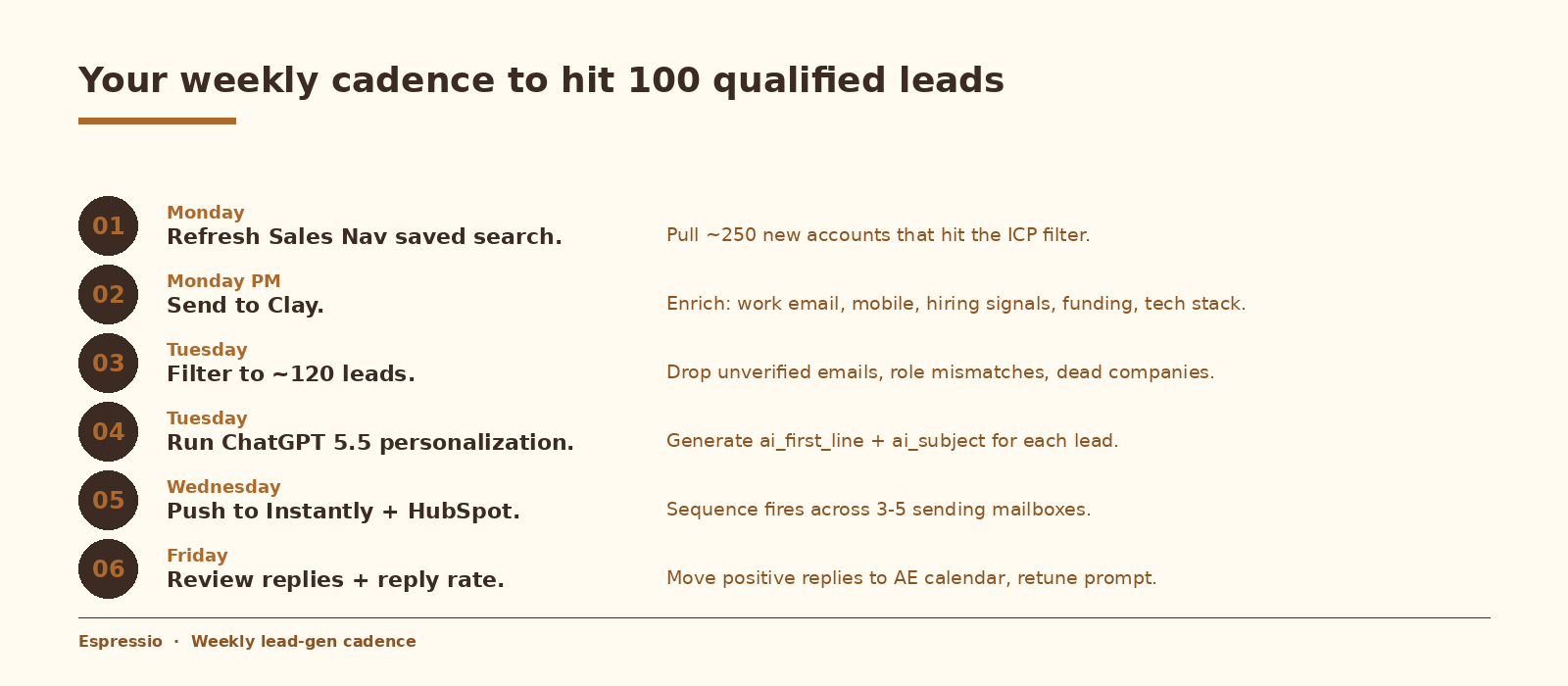
The pipeline is a weekly operating rhythm. Block these slots on your calendar and protect them.
About 90 minutes of operator time per week, plus replies handled by sales as they come in. Anything less than this cadence and the pipeline goes stale: signals decay quickly, and a Tuesday opener referencing a Monday funding round lands harder than the same line sent two weeks later.
Prompt engineering: the part most guides skip
Wiring the integration is the easy part. Reply rate is a function of three things: the sharpness of the Sales Nav filter, the quality of the Clay signal, and the prompt that turns that signal into an opener.
Three rules that consistently work:
- Forbid the tells. Add explicit “do not use” lines for the phrases “I noticed,” “I came across,” “I hope this email finds you well,” “I was browsing,” and “saw your post about.” ChatGPT defaults to these. Ban them.
- Force specificity. The phrase “saw you raised a Series B” stays generic. The phrase “the $40M Series B last month for the AI agent platform” lands as specific. Feed in signals that are specific enough that the output can be too.
- Constrain length. Cap at 22 words for openers and 60 for full short emails. Length is the strongest single predictor of perceived spam.
Read the first 20 outputs from every new prompt version before scaling. If 4 out of 20 feel generic, fix the prompt or the input data before increasing volume.
Cost at this scale
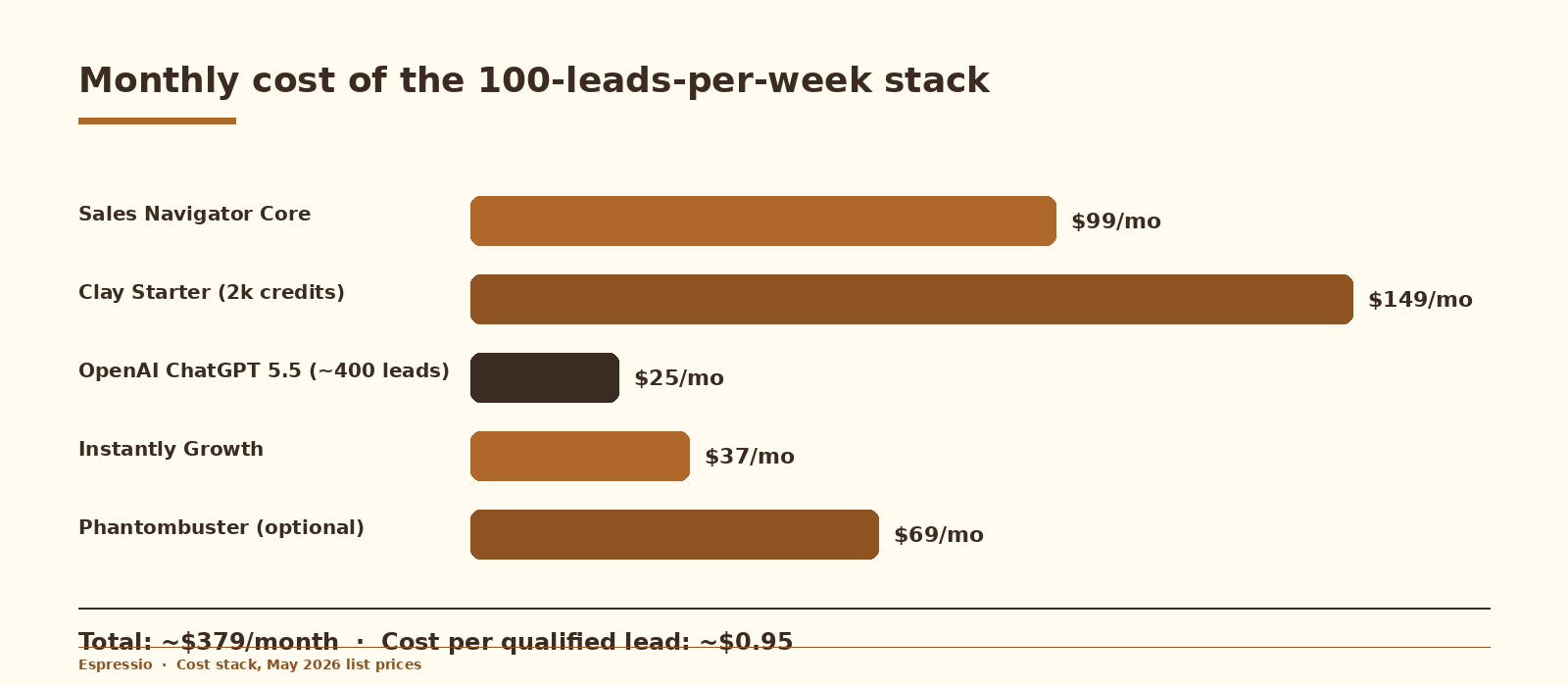
Total tool cost on list prices is roughly $379 per month. A manual VA doing the same enrichment work typically costs more per lead and produces less consistent data because no one provider covers every prospect; Clay’s waterfalls handle that gap.
Two ways to lower the bill once the pipeline is steady. Move Clay enrichments to cheaper providers per data point where coverage allows (Findymail before Datagma, for example). And drop Phantombuster if Clay’s native scraping covers your search reliably.
Common mistakes (and how to avoid them)
- Setting the Sales Nav filter too broad. “Director+, US, Software” is a category, not a filter. Add at least two specific dimensions before you save.
- Skipping email verification. Bounces above 3 percent kill deliverability fast. Always stack a verifier as the last step in the email waterfall.
- Personalizing leads with no signal. ChatGPT will hallucinate a generic flattering line. Filter out rows where the signal column is empty before the AI column runs.
- Using a cheaper or older model to save money. Reply quality drops visibly. The $45 saved on 10K openers is small change against a halved response rate.
- Skipping the preview. Always read 10 rendered sends in Instantly or HubSpot before scaling. The campaign preview shows actual variable substitution.
- Using one “AI” opener pattern across the whole list. If every email starts with “the recent funding caught my attention,” it stops looking personalized. Vary the prompt per segment.
- Treating the pipeline as a one-time build. The Sales Nav saved search, the Clay enrichments, and the prompt all need a weekly review pass.
How to know it is working
Track these in Instantly’s analytics or HubSpot sequence reports:
- Reply rate. The number that matters most. Track it weekly and watch how it moves as you tighten the ICP filter and the prompt. Cold-email benchmarks vary widely by industry, list quality, and offer.
- Positive reply rate. Personalization should move this more than it moves total replies. Watch the ratio, not the absolute number.
- Bounce rate. Stay under 3 percent.
- Meetings booked per 100 leads. The metric that closes the loop. Track it as your steady-state number and compare it across prompt versions and ICP tweaks.
- Sales-accepted opportunity rate from those meetings. If meetings book but never become opportunities, the issue lives upstream in the ICP filter.
FAQ
Why not just use Apollo for everything?
Apollo bundles search, enrichment, and sending in one tool, which is convenient but flattens the stack. Sales Navigator surfaces more accurate role and engagement data than Apollo’s database. Clay outperforms Apollo as an enrichment layer because of waterfalls. The three-tool stack costs more but produces meaningfully better leads.
Can I run this with just Clay (no Sales Navigator)?
You can. Clay has its own People Search backed by multiple databases. The result is broader and less reliable than a Sales Nav saved search because LinkedIn data is more current than aggregator databases. For a 100-leads-per-week motion focused on quality, Sales Navigator is worth the seat.
How long until this pipeline produces booked meetings?
First sends should go out within 7 to 10 days of starting the build. Booked meetings typically begin in week 2 to week 3, because cold sequences take 2 to 4 touches before most positive replies arrive. Treat the first 30 days as the calibration window.
What is the best GPT model in 2026 for this?
ChatGPT 5.5 for the cost and quality balance. Claude 4.5 Sonnet writes slightly more natural prose at higher cost. A smaller OpenAI tier is fine for openers on a tight budget but produces worse subject lines. Avoid older 3.5-tier models for anything customer-facing.
Will LinkedIn rate-limit my Sales Navigator searches?
Sales Nav has per-account daily search limits. A single operator running one saved search weekly stays well inside the limit. Phantombuster scraping a saved-search URL also stays inside the limit if scheduled once per week. Aggressive scraping (multiple searches per day from one account) is what triggers warnings.
Is this compliant for sending into the US, UK, or EU?
Cold email to a business contact at a business email is generally compliant under CAN-SPAM (US) and PECR (UK) provided the message includes a clear identity, business purpose, and an opt-out. GDPR (EU) is stricter: you need a documented legitimate-interest assessment and a low-friction opt-out. Always check your jurisdiction with counsel before scaling EU sends.
Can the same pipeline drive LinkedIn DMs instead of email?
Yes. Replace Instantly with a LinkedIn outreach tool such as HeyReach or Expandi. Use ai_first_line as the first DM. Keep daily volumes lower for LinkedIn (about 15 to 25 connections plus DMs per day per account) because LinkedIn restrictions are tighter than email.
What to do next
- Block one focused afternoon to build the Sales Nav saved search, the Clay table, and the AI column.
- Generate 10 personalized openers and read every one. Tune the prompt until 8 out of 10 feel right.
- Wire the sync to Instantly or HubSpot. Send a 10-lead test batch from one mailbox.
- Schedule the weekly cadence on the calendar. Treat the 90 minutes as a fixed slot.
- After 30 days, review reply rate by signal type. Double down on the signals that produce the most positive replies.
The integration work is the easy part. Pipeline quality is a function of filter sharpness, signal quality, and prompt discipline. Those are the right places to spend your time.
If you’re curious how AI fits into your cold outreach systems, let’s talk.



