



Luka Mrkić
Head of BD
Insights, strategies, and real-world playbooks on AI-powered marketing.
JUN 1, 2026
How to Automate G2 and Capterra Review Monitoring with n8n
TL;DR
- A review monitoring workflow is a scheduled n8n run that pulls new G2 and Capterra reviews for your product and your top competitors, dedupes them against a store, asks Claude to classify each review into a theme with sentiment and severity, and routes the result to the team that should act on it.
- n8n handles the scheduling, the HTTP fetches, the storage hooks, the branching, and the Slack and HubSpot writes. Claude handles the read: turning a free form review into a theme, a sentiment score, a one sentence summary, and a clean quote to lift.
- A useful first build watches both your own G2 and Capterra pages plus three competitor pages. It runs every six to twelve hours, costs single digit dollars a month in API spend, and pays back the first week it surfaces a churn signal before the CSM picks it up.
- The workflow is six nodes: schedule, fetch, dedupe, classify, route, log. The hard parts are dedupe and routing.
- The article ships with the n8n architecture, the Claude prompt that survives in production, the six themes worth routing, and the six checks that tell you the workflow is still working.
If you are evaluating who should build this for your team, this guide gives you both the technical blueprint and the standards to evaluate the work.
What an automated review monitoring workflow actually does
A review monitoring workflow watches a fixed set of public review pages on a fixed schedule and tells you when a new review lands, what it is about, how negative or positive it reads, and who on your team should see it. The pages are usually your own G2 and Capterra listings plus the top three or four competitors in your category. The schedule is usually every six to twelve hours. The output is rarely the raw review text. It is the classified, deduplicated alert that drops into the right channel.
The old way of doing this was a Friday review of the G2 inbox and a quarterly competitor sweep. That cadence misses the review where a prospect explains exactly why they bounced from your free trial. It misses the moment three reviews on a competitor list the same missing feature. It misses the champion quote that should have been in the sales deck the day it was published.
The automated version of this runs while you sleep, catches every new review within hours, and turns each one into a Slack post, a HubSpot note, or a product board entry. The team sees themes emerge in real time.
Architecture
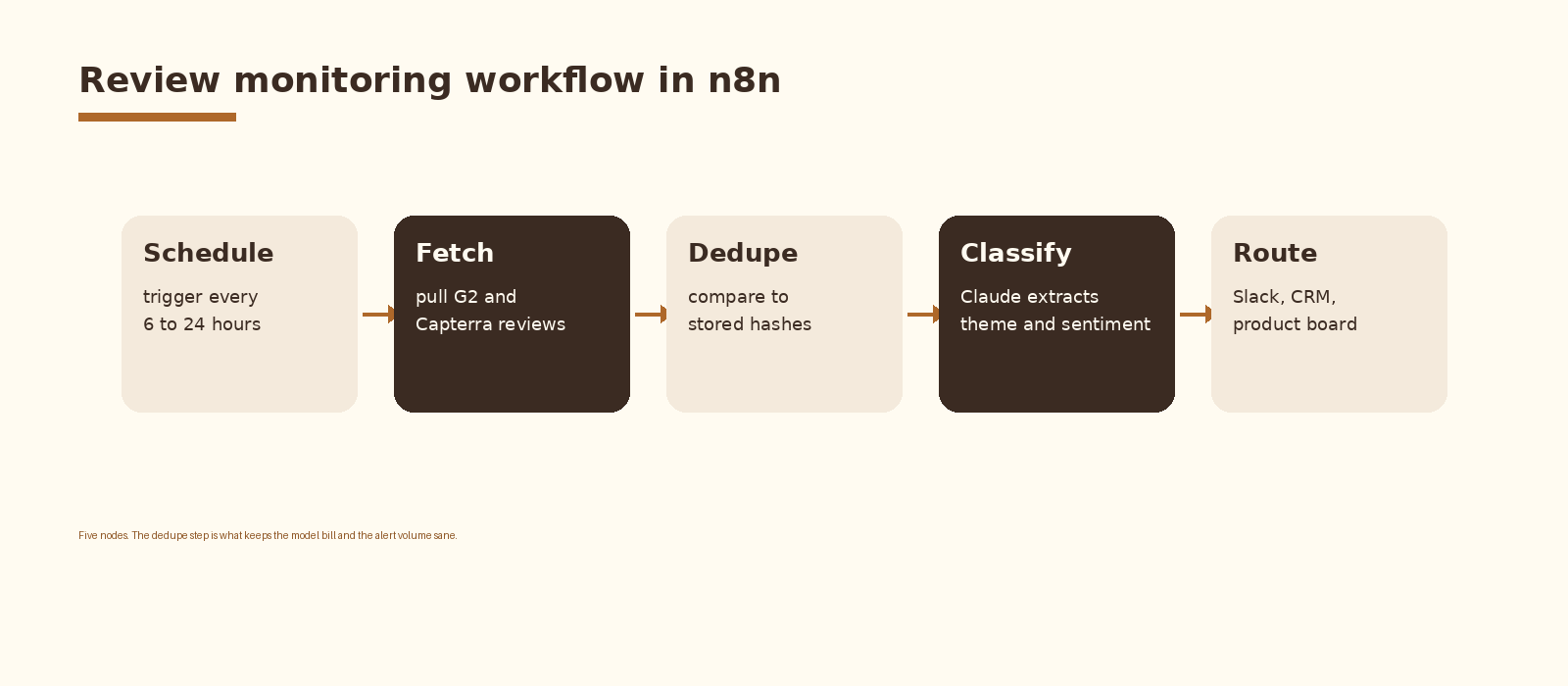
Five nodes inside a single n8n workflow. A schedule trigger that fires the run. A fetch group that pulls reviews from G2 and Capterra for each tracked listing. A dedupe step that compares each review id to the store and drops what has already been processed. A Claude classification call that returns structured JSON. A router that sends the alert to Slack, HubSpot, and a product board based on theme and severity. A small log node closes the loop so you can audit what fired and what did not.
Step 1. Pick the listings to watch
Start with your own G2 and Capterra pages plus three competitor pages on each platform. Six to eight listings total is the right starting size. Past that, alert volume climbs faster than usable signal and the team learns to ignore the channel by week two.
Treat the listing list as data. Store it in a Google Sheet or an Airtable base with columns for vendor, source, url, category, owner, and active. The owner column is the single most important column in the entire workflow. Every alert downstream resolves to a name through this table.
listings.csv
vendor,source,url,category,owner,active
acme,g2,https://www.g2.com/products/acme/reviews,own,pmm@example.com,true
acme,capterra,https://www.capterra.com/p/12345/acme/,own,pmm@example.com,true
beta,g2,https://www.g2.com/products/beta/reviews,competitor,ci@example.com,true
gamma,g2,https://www.g2.com/products/gamma/reviews,competitor,ci@example.com,true
Step 2. Fetch reviews on a schedule in n8n
n8n gives you two viable fetch paths. The first is an HTTP Request node hitting a managed scraping API (Firecrawl, Bright Data, ScrapingBee) that returns the listing page as clean markdown or JSON. The second is a Code node that drives a headless browser through n8n’s execution environment. The HTTP path is the boring default. Public review pages render heavily on the client, sit behind anti-bot layers, and change markup often. Operating your own scraper is a project; you want this build to stay one workflow.
Respect the source terms of service and the rate limits of whatever scraping layer you use. Six to twelve hour intervals are enough to catch everything without putting pressure on either platform. Hourly polling is rarely worth the spend or the risk of throttling.
// n8n HTTP Request node config
{
  "method": "POST",
  "url": "https://api.firecrawl.dev/v1/scrape",
  "authentication": "genericCredentialType",
  "sendHeaders": true,
  "headerParameters": {
    "Authorization": "=Bearer {{$credentials.firecrawl.apiKey}}"
  },
  "sendBody": true,
  "bodyParameters": {
    "url": "={{$json.url}}",
    "formats": ["markdown"],
    "onlyMainContent": true
  }
}
Parse the returned markdown with a small Code node. You are looking for review blocks. Each block has a review id (or a stable hash of author plus date plus first sentence), a rating, a date, a title, a body, and sometimes pros and cons fields. Normalize all of that into a flat array of review objects before the next step.
Step 3. Dedupe against the store
A review monitoring workflow that fires every six hours will pull the same review hundreds of times across its lifetime. Without dedupe, the alert channel becomes wallpaper and the model bill grows linearly with how often the workflow runs. Dedupe is the single highest leverage step in the build.
Two storage choices. A Postgres table with one row per review id and a timestamp is the durable answer. A Google Sheet with a review_id column is fine for a first build and lets non engineers inspect the store by eye. Either way, the contract is the same. For each incoming review, check whether the id already exists. If yes, drop it. If no, insert it and pass it to the classify step.
// n8n Code node: dedupe against Postgres
const pg = require('pg');
const client = new pg.Client({ connectionString: $credentials.pg.connectionString });
await client.connect();

const fresh = [];
for (const review of items.map(i => i.json)) {
  const r = await client.query(
    'select 1 from reviews where review_id = $1 limit 1',
    [review.review_id]
  );
  if (r.rowCount === 0) {
    await client.query(
      'insert into reviews (review_id, vendor, source, seen_at) values ($1, $2, $3, now())',
      [review.review_id, review.vendor, review.source]
    );
    fresh.push({ json: review });
  }
}
await client.end();
return fresh;
Only what survives this step reaches Claude. On most runs, on most listings, nothing is new and the model is not called. That is what makes the monthly bill stay small even on a six hour cadence.
Step 4. Classify each new review with Claude
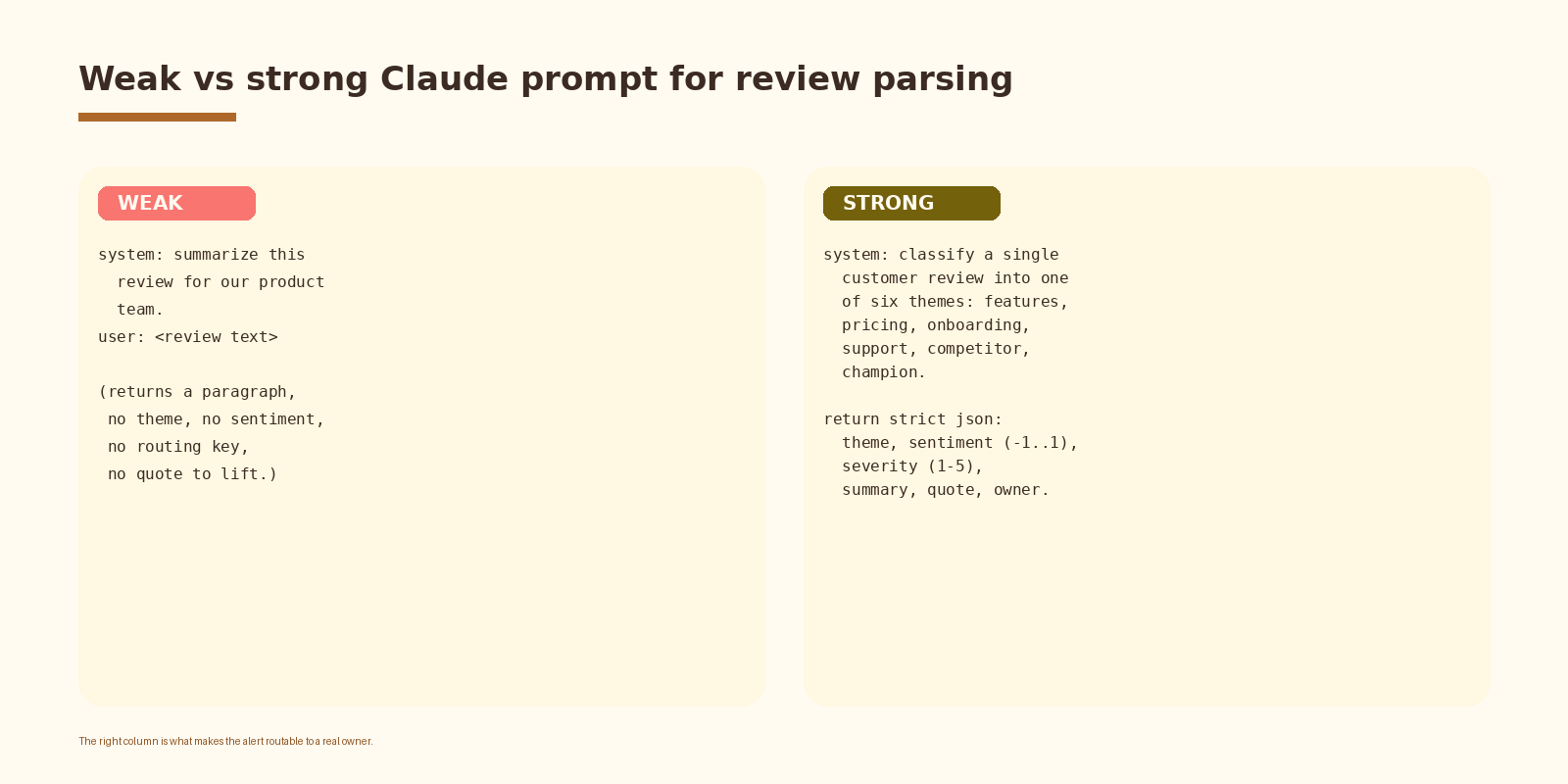
This is where the workflow earns its keep. A weak prompt returns a paragraph of prose and you are back to the manual triage problem with extra steps. A strong prompt returns structured JSON that the router can read without parsing English.
// n8n HTTP Request node: Claude classify
{
  "method": "POST",
  "url": "https://api.anthropic.com/v1/messages",
  "sendHeaders": true,
  "headerParameters": {
    "x-api-key": "={{$credentials.anthropic.apiKey}}",
    "anthropic-version": "2023-06-01"
  },
  "sendBody": true,
  "bodyParameters": {
    "model": "claude-sonnet-4-5",
    "max_tokens": 600,
    "system": "You classify a single customer review. Themes: features, pricing, onboarding, support, competitor, champion, other. Return strict JSON with keys theme, sentiment (-1.0 to 1.0), severity (1-5), summary (one sentence, max 25 words), quote (exact sentence to lift), owner_hint (one of: pmm, revops, support, product, founders).",
    "messages": [{
      "role": "user",
      "content": "=Vendor: {{$json.vendor}}\nSource: {{$json.source}}\nRating: {{$json.rating}}\nTitle: {{$json.title}}\n\nReview:\n{{$json.body}}"
    }]
  }
}
Parse the message content with a Code node and store the structured fields on the item. The owner_hint field is what bridges into the routing step; you map hint to channel and to CRM owner in a single small table.
If you want this set up cleanly inside your stack with logging, retries, and a feedback loop into a CRM, that is the kind of work we ship at Espressio.
Step 5. Route the alert
The router does not need to be smart. The listing table already labels each page as own or competitor. The classifier returned a theme, a severity, and an owner hint. The router is a Switch node feeding three or four destinations: Slack for human channels, HubSpot for CRM notes when the review touches a known account, and an Airtable or Linear node for the product board when the theme is features or onboarding.
# Slack message template
*{{theme.upper()}}*  ·  sev {{severity}}  ·  {{vendor}} on {{source}}
{{summary}}
> {{quote}}
{{url}}
Two design choices in this router matter. Severity gating drops cosmetic alerts (sev 1 typo praise, throwaway one-liners) before they ever post. And channel by theme means a pricing complaint reaches RevOps the same day, a feature gap reaches Product on the same day, and a champion quote reaches PMM with the quote already pulled.
Step 6. Log every run
A small append node into a log table closes the loop. Each row records the run timestamp, listings polled, new reviews found, alerts fired, and alerts dropped by the severity gate. The log table is what you read when somebody asks why the channel went quiet for two days. Most of the time the answer is that nothing new was published; sometimes the answer is that the scraper started failing on one source and you need to fix it.
Signals worth tracking
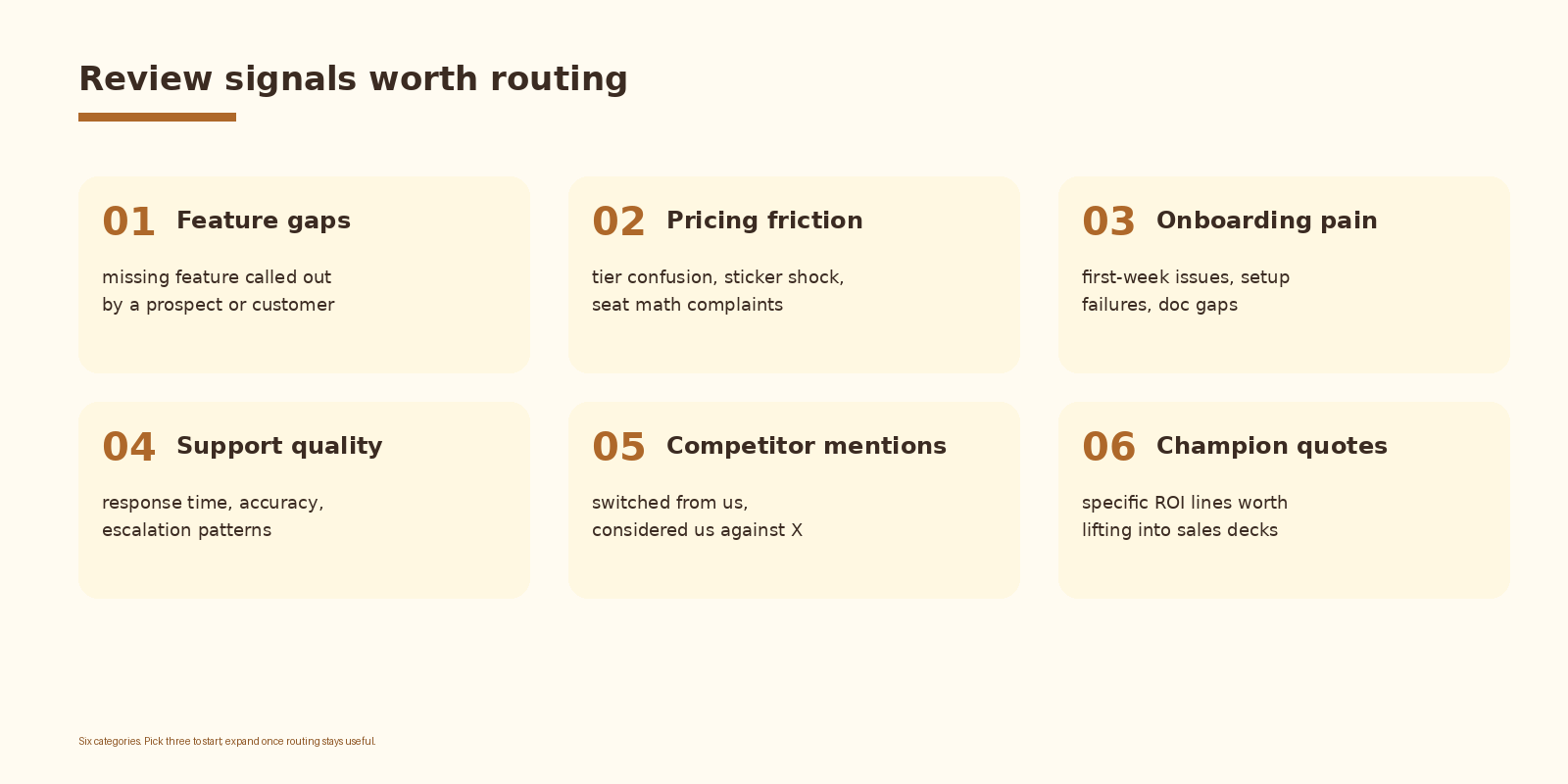
Six themes are enough for the first version. Feature gaps and pricing friction are the two that pay back the build fastest because they feed directly into the next sales call and the next pricing review. Champion quotes are the third because the best lines on G2 and Capterra are worth more than any quote a copywriter can draft. The other three are useful once routing on the first three is reliable.
Common mistakes
- Polling too often. Every-hour schedules generate three times the noise and add nothing useful. Six to twelve hours is the right starting cadence.
- Letting the model freelance. A free form prose answer is unroutable. The structured JSON contract is what makes the rest of the workflow useful.
- No severity gate. Every five star one-line review becomes an alert and the Slack channel becomes wallpaper.
- No owner column on the listing table. An alert with no owner becomes background noise inside a week.
- Skipping the dedupe step. Calling Claude on the same review every six hours burns budget and trains the team to mute the channel.
- Mixing own reviews and competitor reviews into one channel. The teams who need each are different; split the routing.
How to know it is working
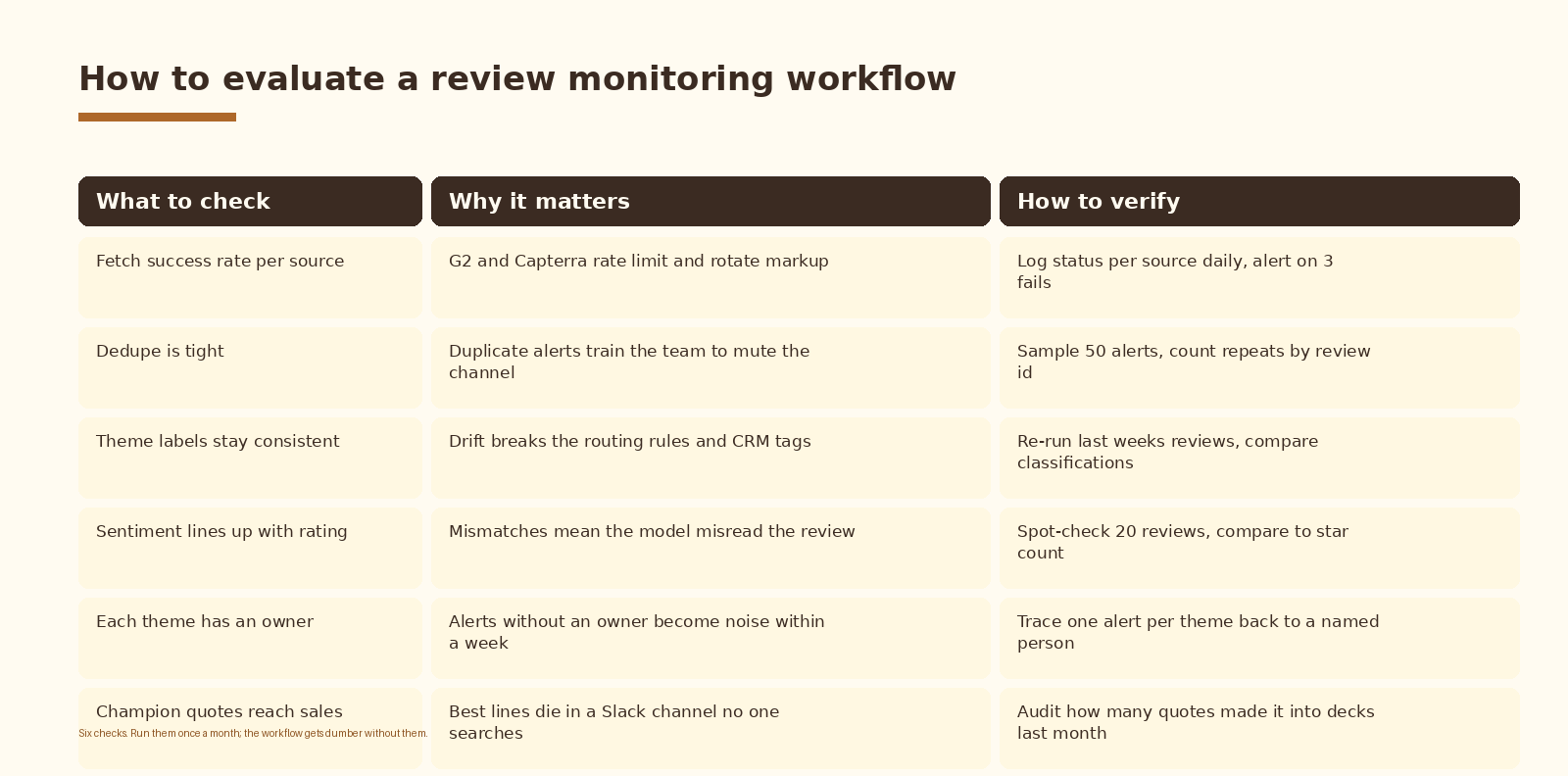
An alert volume metric on its own does not tell you whether the workflow is useful. The number that matters is action rate: how many alerts in the last week led to a CRM note, a sales deck edit, a product ticket, or a customer follow up. Track action rate weekly. If it trends to zero, retune the severity gate and the theme list before you blame the model.
FAQ
Is it allowed to scrape G2 and Capterra?
Both platforms publish public review pages and both have terms of service that govern automated access. Read each platform’s terms before you turn the workflow on, use a managed scraping layer that respects robots and rate limits, and watch your fetch cadence. For higher volume needs, both platforms offer official partner programs and data feeds. If your account or a customer relationship depends on the platform, use the official feed.
Why n8n and not Zapier or Make?
n8n gives you Code nodes, native Postgres and HTTP nodes, self hosted runs, and per execution pricing that stays predictable at scale. Zapier is faster to start but the code and storage primitives get expensive once dedupe and per-theme routing are in the loop. Make is in between. The workflow translates one for one to either of the other two if you already standardized on them.
Which Claude model should I use for review classification?
Sonnet handles single review classification well at a reasonable price. Haiku is fast and cheap but gives up consistency on the JSON contract under load. Opus is overkill. Sonnet is the default until you have a reason to switch.
How do I extend this to other review sites like TrustRadius or Gartner Peer Insights?
Add the source as another row in the listing table and reuse the same fetch, dedupe, classify, and route nodes. The only thing that changes is the parsing step, because each source publishes review blocks in a slightly different markdown shape. Write a small per-source parser and keep the rest of the workflow shared.
What does this cost to run?
Two cost lines: the scraping layer and the model. For six to eight listings polled every six hours, with dedupe short circuiting most runs, list-price spend lands in the low tens of dollars a month. n8n cloud or self hosted runs add a fixed line; the workflow’s variable cost stays small because Claude is only called for genuinely new reviews.
What to do next
- Pick your two own listings and three competitor listings. Write the owner column before you build a single node.
- Stand up the fetch step end to end for one listing. Confirm you get a clean list of new review blocks.
- Add the Postgres or Sheet dedupe layer. Run the workflow for two days and watch how many fresh reviews actually appear.
- Add the Claude classification call. Tune the prompt against ten real reviews from your store.
- Wire the router and the severity gate. Turn on Slack and HubSpot only after the first dry run looks sane.
- Review action rate after thirty days. Retune severity, theme list, or owners before adding more listings.
If you want automation like this set up cleanly inside your customer intelligence stack, let’s talk.
Related Espressio guides



