Luka Mrkić
Head of BD
Insights, strategies, and real-world playbooks on AI-powered marketing.
MAY 26, 2026
How to Build an AI Cold Email Workflow with Smartlead and GPT-5.5
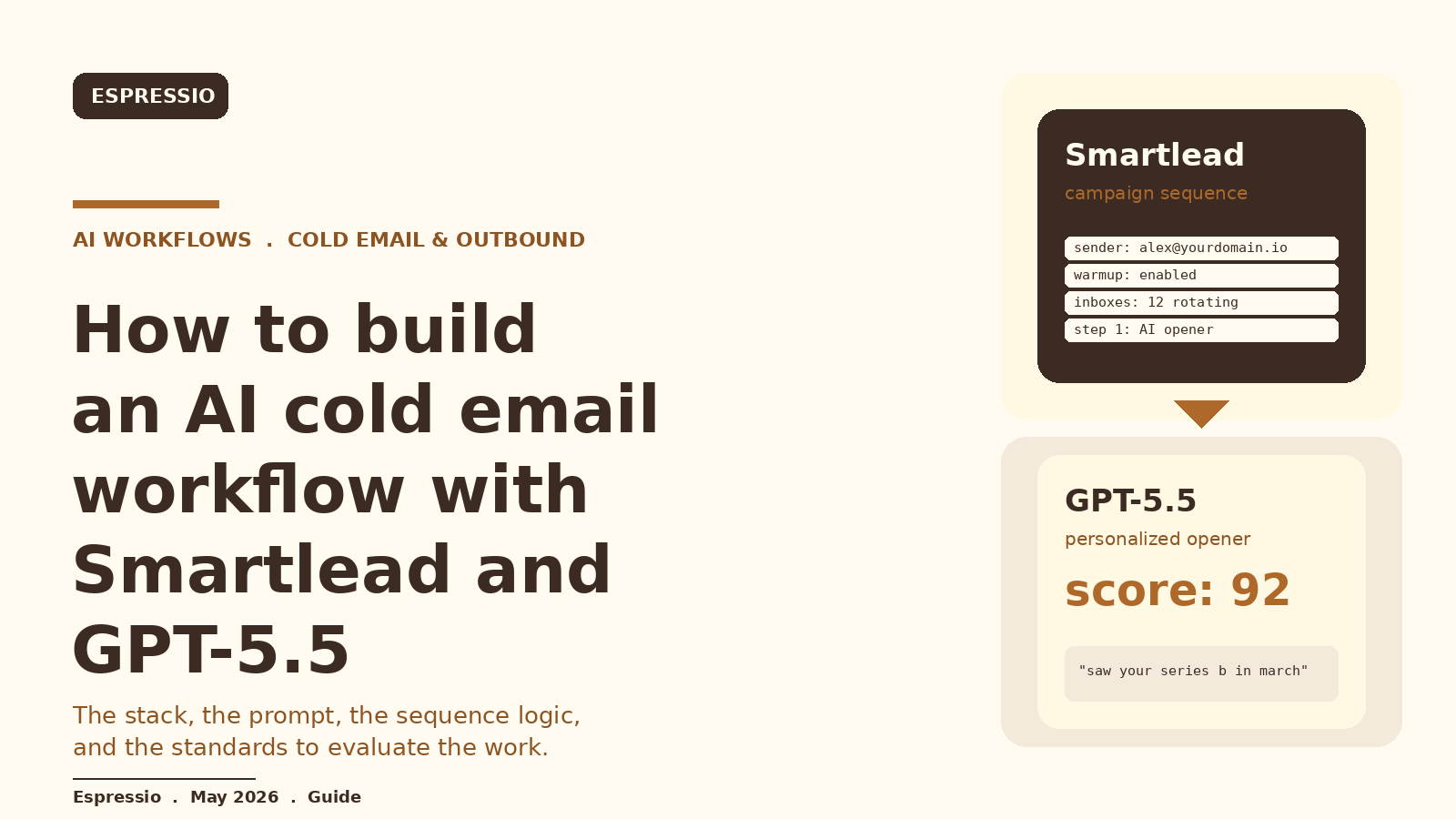
Smartlead handles the deliverability work. GPT-5.5 handles the personalization work. Together they cover the two jobs that break most cold email programs: getting messages into the inbox at volume without burning sender reputation, and writing openers that read like a real person did the reading.
This guide walks through the architecture, the prompt, the orchestration script, and the standards to evaluate the build. If you are deciding who should set this up for your team, the second half doubles as a checklist.
Key Takeaways
- Smartlead handles deliverability, inbox rotation, warmup, and sequence logic. GPT-5.5 handles per-lead personalization.
- The workflow has five layers: ICP list, enrichment, GPT-5.5 personalization, Smartlead sending, reply routing back to a human and the CRM.
- The opener is only as sharp as the data you feed the model. Real signal means recent news, tech stack, and role context, fed in as structured JSON per lead.
- Track deliverability, reply rate, positive reply rate, and cost per personalized lead. Watch how they move as you tighten the ICP and the prompt.
- Most teams fail on warmup discipline, opener quality, and reply handling. The model is rarely the bottleneck.
Why Smartlead and GPT-5.5 are a strong pairing
Smartlead is built for one thing: getting cold email into the inbox at volume without burning sender reputation. It runs warmup across pooled mailboxes, rotates inboxes per send, monitors per-inbox health, and exposes a clean API for injecting leads and per-lead custom fields. That last part is what makes the AI layer practical.
GPT-5.5 is the personalization engine. It reads a structured profile of one lead and returns a sharp opening line plus a follow-up sentence. The job of the engineer is to feed it clean signal and to constrain the output so the prose does not drift into generic AI cadence.
Pair these two and you get a system that ships hundreds of personalized emails per week from healthy inboxes, with a feedback loop the team can actually inspect.
The architecture in one picture
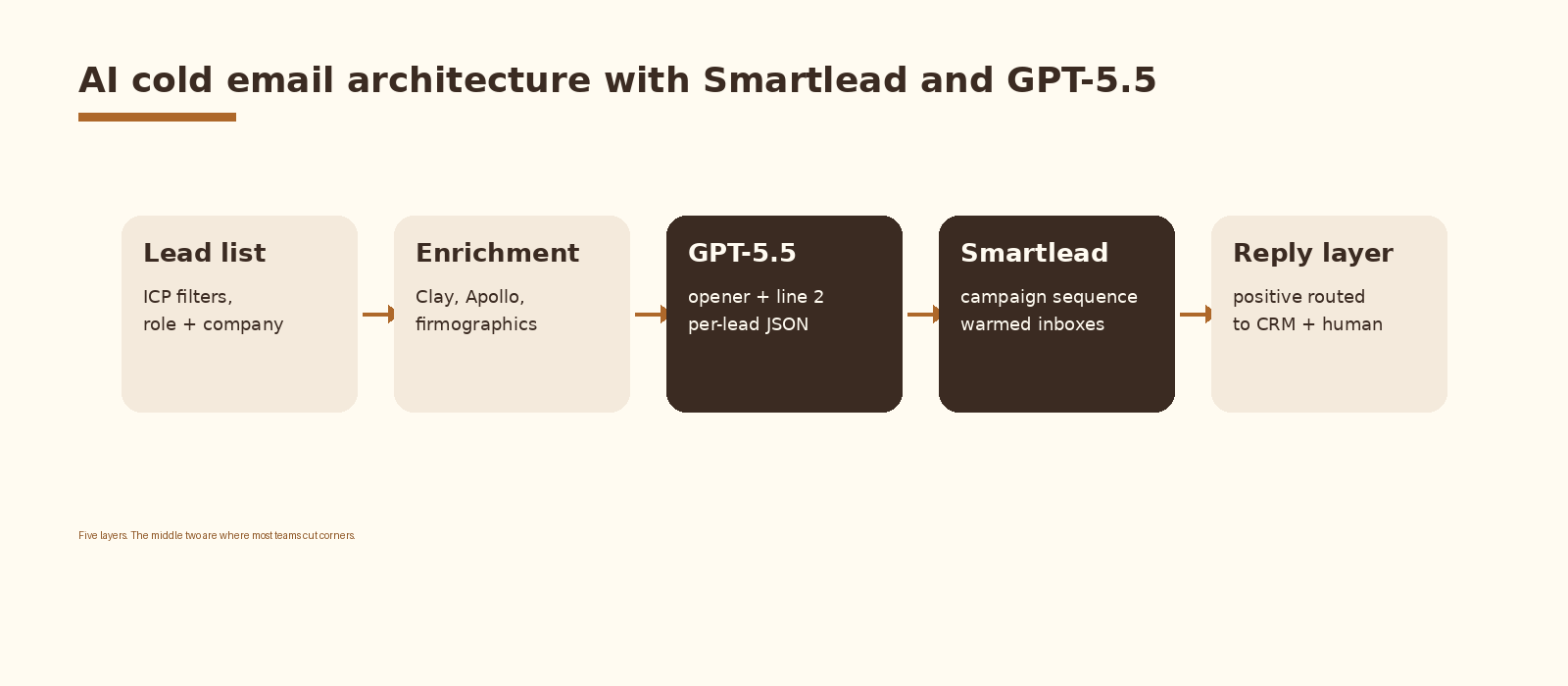
Five layers. Lead list defines who you talk to. Enrichment turns a row into a profile. GPT-5.5 turns a profile into copy. Smartlead sends it. The reply layer decides what a positive reply does next.
The middle two layers are where most teams cut corners. They feed the model a job title and a city, then wonder why the opener reads like every other AI cold email in the inbox. The architecture in this guide treats enrichment and personalization as first-class work.
Step by step
1. Define the ICP and pull the lead list
Start narrow. A workflow that fires on a vague ICP burns inboxes and reply quotas. Pick one segment, one offer, one outcome. For example, Series A and B B2B SaaS companies in fintech, 50 to 300 employees, with a HubSpot and Snowflake stack.
Pull the list from Sales Navigator, Apollo, or your own CRM export. Strip rows with missing email, no LinkedIn URL, or obviously stale company data. A bad row burns the API call and also a slot in the daily send cap that should have gone to a real prospect.
2. Enrich the list before the model sees it
Enrichment is where the workflow earns its quality. Pass each lead through Clay or Apollo and pull these fields at minimum: company industry, employee count, revenue band, funding stage, recent news, recent hires, technographics, the prospect’s title, seniority, team size, and their public LinkedIn or X activity in the last 90 days.
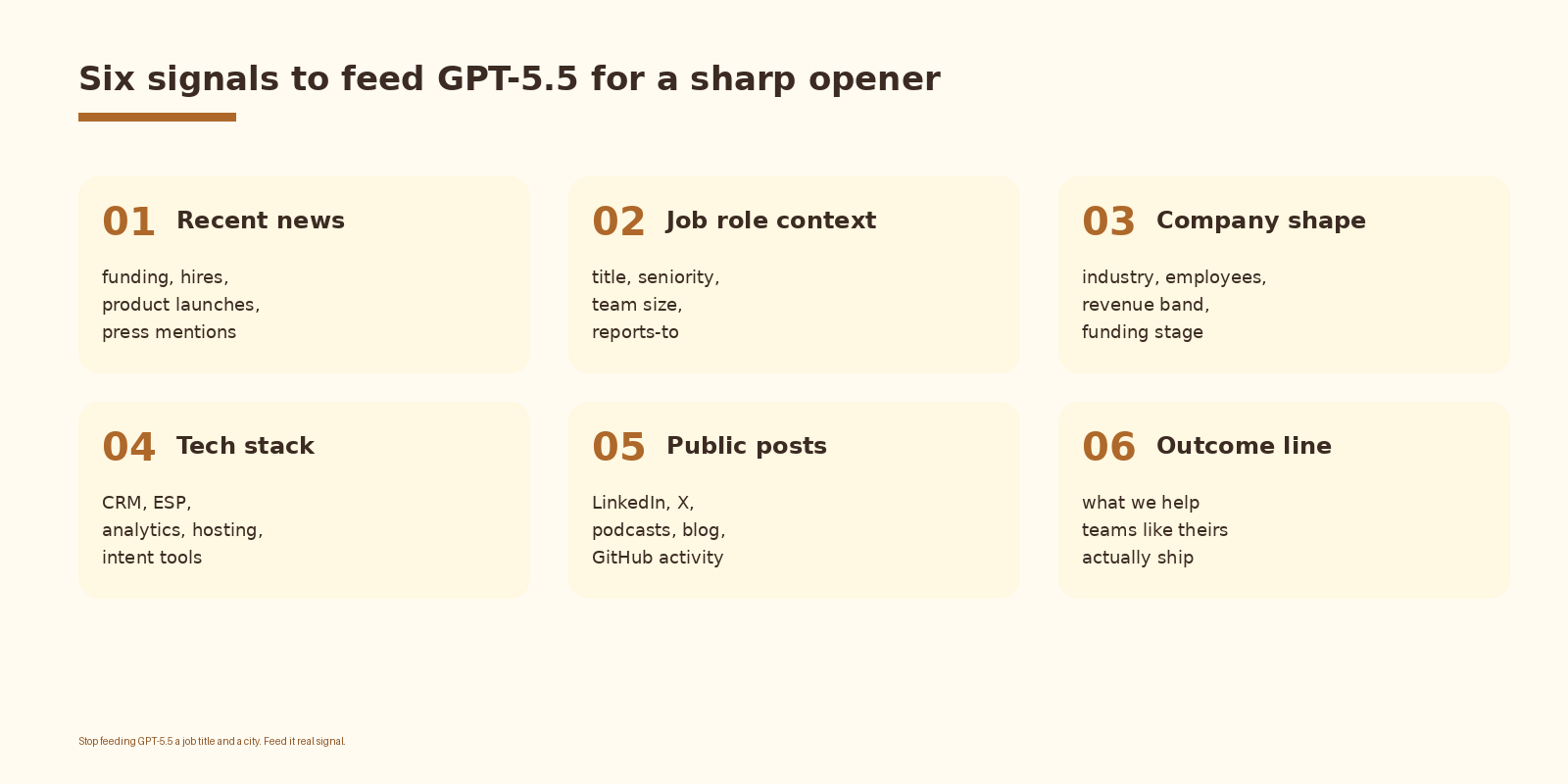
Save the enriched profile as a single JSON object per lead. That object is the only thing GPT-5.5 will see. If a signal is not in the JSON, it cannot show up in the opener. That is by design. It is also what stops the model from making things up.
3. Write the GPT-5.5 system prompt
The prompt is the contract. It tells GPT-5.5 the format, the length, the tone, and the hard rules. Keep it short, explicit, and JSON-constrained. Here is a working baseline:
SYSTEM_PROMPT = """
You write opening lines for cold B2B emails.

Input is a JSON object describing one prospect. Output is JSON with two fields:
  opener     : one sentence, max 22 words, no greeting, no name.
  line_two   : one sentence, max 28 words, explains why we are reaching out.

Rules:
  1. Use at least one concrete signal from the input. News, hire, stack, role.
  2. Do not invent facts. If a field is missing, do not write it.
  3. No exclamation points. No "I hope this finds you well". No "quick question".
  4. Sound like a sharp operator who actually read about this company.
  5. Never reference the prospect's first name. Smartlead handles that.

Return only JSON. No prose around it.
"""
Three things are doing the heavy lifting. The JSON output format makes the result safe to parse and inject into Smartlead custom fields. The length caps stop the model from rambling. The rule against inventing facts is what keeps the workflow credible at volume.
4. Write the orchestration script
This is the glue. A small Python script reads enriched leads, calls GPT-5.5, parses the JSON, and pushes the lead plus the AI custom fields into Smartlead. Keep it boring: a function per layer, logging on every call, retries on the API, and a webhook back to the CRM when a reply lands.
import json, os, requests
from openai import OpenAI

oai = OpenAI(api_key=os.environ["OPENAI_API_KEY"])
SMARTLEAD = os.environ["SMARTLEAD_API_KEY"]
CAMPAIGN_ID = os.environ["SMARTLEAD_CAMPAIGN_ID"]

def write_opener(lead: dict) -> dict:
    resp = oai.chat.completions.create(
        model="gpt-5.5",
        messages=[
            {"role": "system", "content": SYSTEM_PROMPT},
            {"role": "user", "content": json.dumps(lead)},
        ],
        response_format={"type": "json_object"},
        temperature=0.4,
    )
    return json.loads(resp.choices[0].message.content)

def push_to_smartlead(lead: dict, copy: dict) -> None:
    payload = {
        "lead_list": [{
            "first_name":   lead["first_name"],
            "last_name":    lead["last_name"],
            "email":        lead["email"],
            "company_name": lead["company"],
            "custom_fields": {
                "ai_opener":   copy["opener"],
                "ai_line_two": copy["line_two"],
            },
        }],
    }
    requests.post(
        f"https://server.smartlead.ai/api/v1/campaigns/{CAMPAIGN_ID}/leads",
        params={"api_key": SMARTLEAD},
        json=payload,
        timeout=30,
    ).raise_for_status()

for lead in load_enriched_leads():
    copy = write_opener(lead)
    push_to_smartlead(lead, copy)
If you want this set up cleanly inside your stack with logging, retries, and a feedback loop into a CRM, that is the kind of work we ship at Espressio.
5. Design the Smartlead campaign and sequence
In Smartlead, create the campaign, attach 8 to 12 warmed inboxes across two or three sending domains, set a daily send cap per inbox of 30 to 40, and turn on inbox rotation. Build a four-step sequence: opener, value follow-up, social proof, breakup. Each step pulls the AI custom fields into the body using Smartlead’s template variables.
Step one is where GPT-5.5 earns its keep. The opener custom field becomes the first sentence and the line_two custom field becomes the second. Everything after that is templated: the offer, the call to action, the signature.
What a real opener looks like
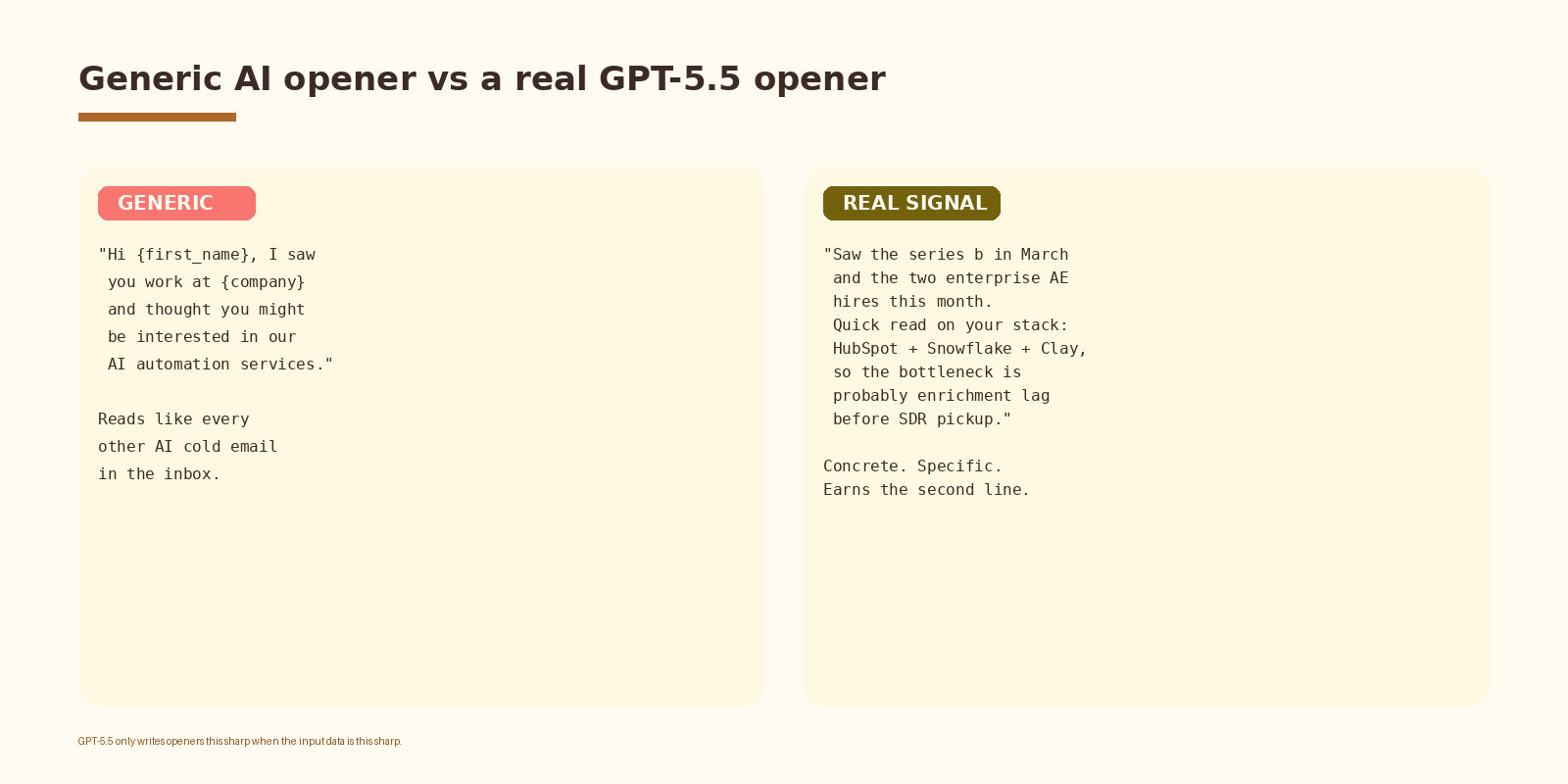
The left side is what teams ship when they hand the model a job title and a city. The right side is what GPT-5.5 produces when it has a real profile. Same model, different input, different result.
This pattern compounds when you pair it with a reply classifier built on Clay and Claude so the LinkedIn opener, the cold email, and the follow-up sequence all speak the same language.
6. Route replies back to a human and the CRM
A reply is the entire point. Smartlead’s unified inbox is fine for triage, but every positive reply should land in two places: an SDR’s inbox for the human response, and the CRM as a fresh opportunity with the lead’s enriched profile attached. A simple webhook from Smartlead into your CRM does the job.
Run a reply classifier on the way through. GPT-5.5 can label each reply as positive, neutral, objection, or out of office, and that label drives the route. Positive goes to the AE. Objection goes to a follow-up sequence. Out of office gets a polite resume in two weeks.
How to know it is working
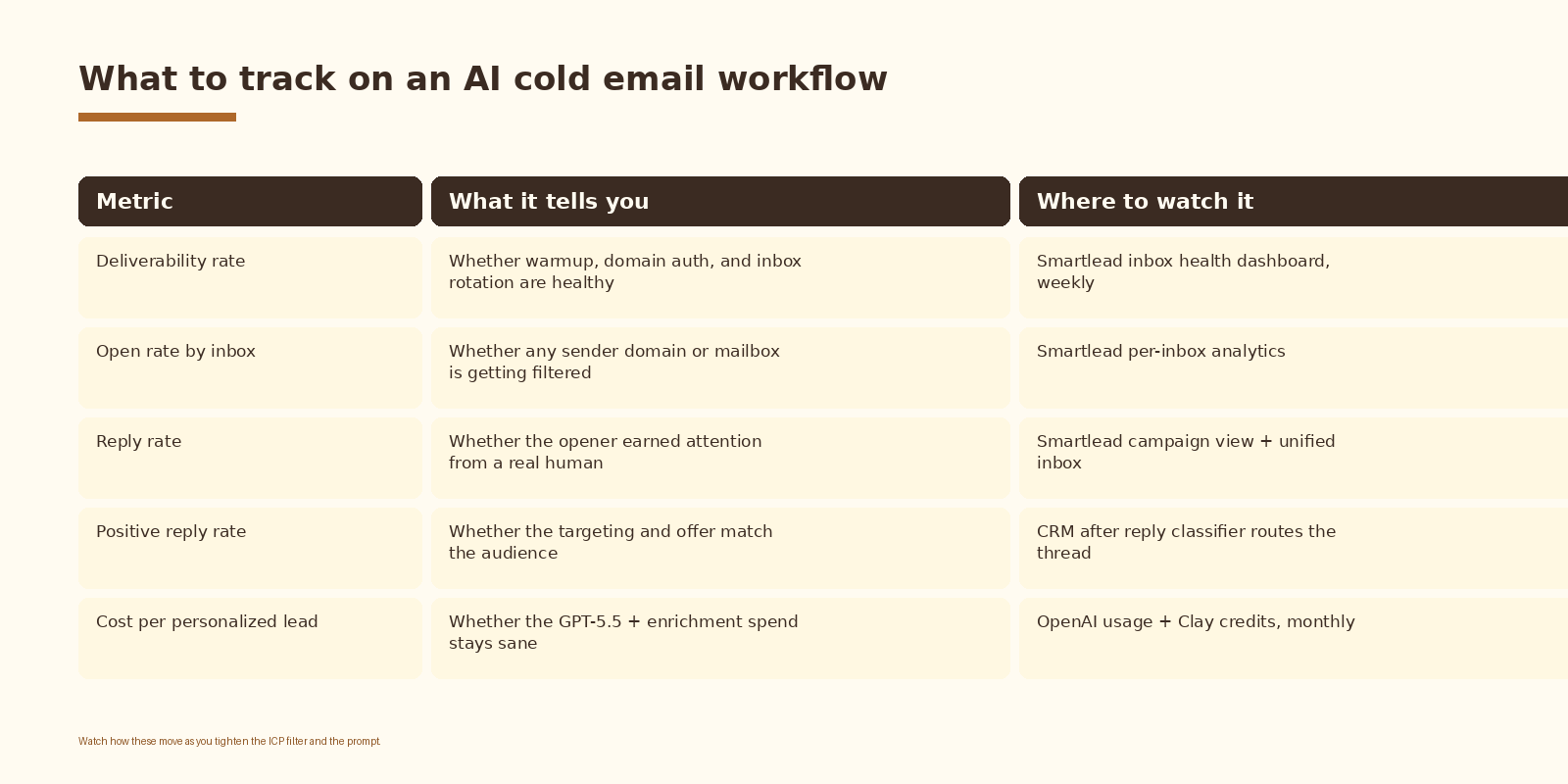
Read these together. A high open rate with a low reply rate means the opener is not earning attention. A high reply rate with a low positive reply rate means the targeting is off. A low deliverability rate means the warmup or the domain setup needs work, and no amount of clever prompting will fix that.
Common mistakes
- Skipping enrichment and feeding GPT-5.5 a name and a company. The output reads generic because the input is generic.
- Hardcoding the opener into the email template. You lose the per-lead specificity that was the entire reason for the AI layer. Inject the opener as a Smartlead custom field.
- Treating warmup as a one-time setup step. Warmup is a daily discipline, especially as daily sends climb.
- Sending from one domain. One Google complaint can take the whole sender out. Run two or three domains in rotation, with SPF, DKIM, and DMARC set up correctly on each.
- Routing replies only to a unified inbox. They need to land in the CRM with the enriched profile, or the next conversation starts from zero.
- Letting the model write the call to action. The CTA stays a business decision, hand-written per campaign.
Frequently asked questions
Can I use GPT-4o or Claude instead of GPT-5.5?
Yes. The architecture is model-agnostic. GPT-5.5 is the current default for personalization work because of its instruction-following on structured output, but Claude 4 and GPT-4o produce strong openers when the prompt is tight and the input data is clean.
How many leads per week can this workflow handle?
It depends on inbox count, warmup state, and your daily send cap per inbox. A healthy 12-inbox campaign at 30 sends per inbox per day is roughly 360 sends per day, before reply pauses. The model layer scales further than the sending layer, so Smartlead’s deliverability budget is almost always the ceiling.
Does Smartlead support custom fields from an external script?
Yes. The Smartlead API accepts a custom_fields object on the lead create endpoint, and the values are available inside the campaign template using the variable syntax. That is the integration point that makes the AI layer practical.
What about compliance and unsubscribe handling?
Smartlead handles unsubscribe links and suppression lists at the platform level. Your job is to honour them and to keep the sending domains aligned with CAN-SPAM and GDPR rules. Set up SPF, DKIM, and DMARC on every sending domain before the first send.
Is this better than Instantly.ai?
Smartlead and Instantly are close peers. Smartlead has stronger per-inbox controls and a cleaner API for custom fields, which matters for AI personalization. Instantly has a slightly more polished UI. Pick the one whose API and reporting fit how your team already works.
If your team is already running a Sales Navigator, Clay, and GPT lead generation motion, Smartlead slots in as the sending layer with very little rework.
What to do next
- Pick one ICP segment and one offer. Resist the urge to launch three campaigns at once.
- Pull 200 enriched leads with the six signals in the personalization grid above.
- Write the GPT-5.5 system prompt, run it against 20 leads, and read every opener by hand before sending anything.
- Set up Smartlead with two domains, 8 to 12 inboxes, and warmup running for at least 14 days before the first send.
- Push the leads through the orchestration script and start the campaign at a quarter of the daily send cap.
- Watch deliverability and reply rate daily for the first two weeks. Tune the prompt and the ICP filter as the data comes in.
If you want automation like this set up cleanly inside your outbound stack, let’s talk.