Luka Mrkić
Head of BD
Insights, strategies, and real-world playbooks on AI-powered marketing.
MAY 25, 2026
Phantombuster + Claude for LinkedIn Prospecting
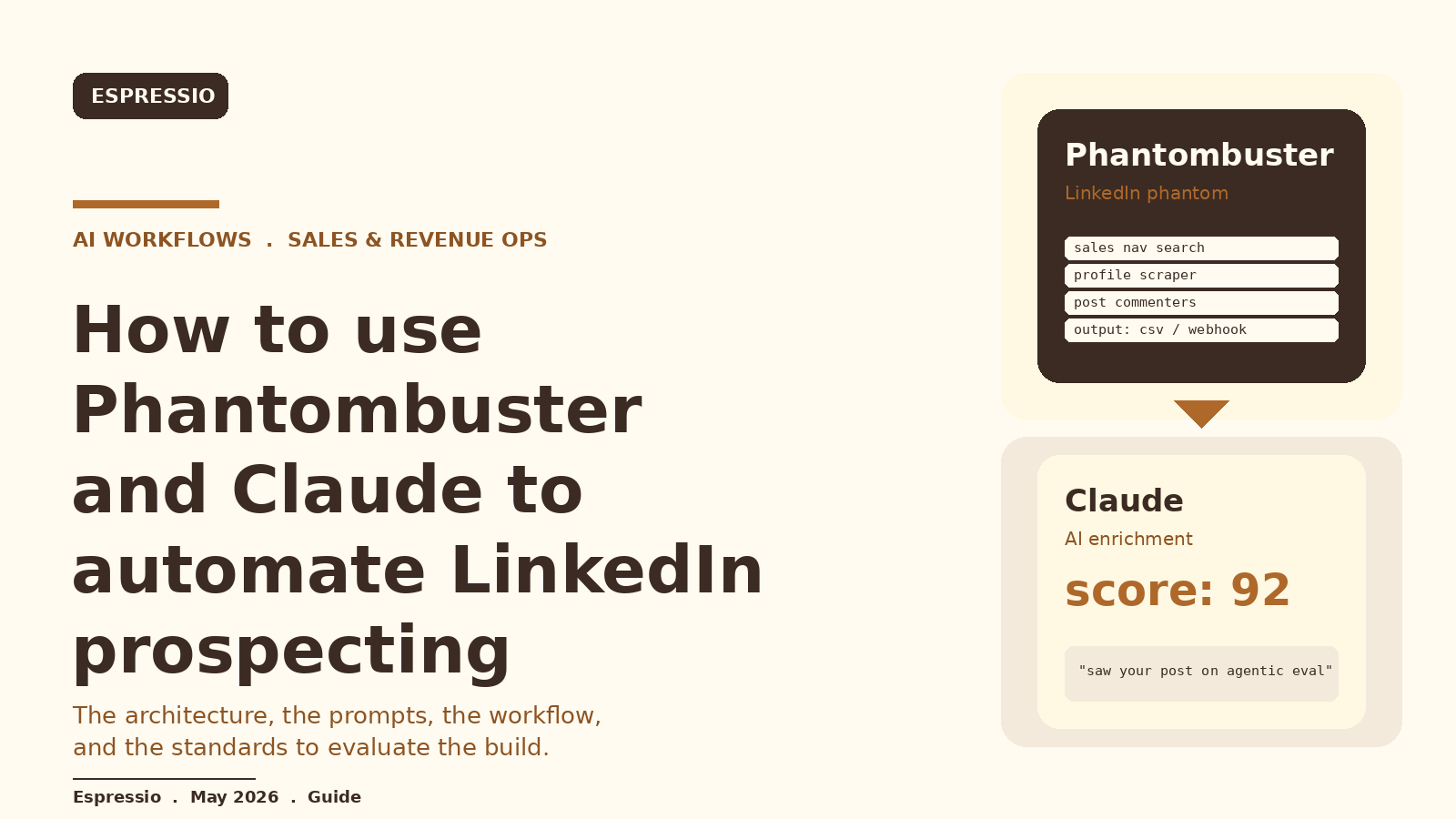
Phantombuster runs the LinkedIn scraping work safely. Claude runs the reading and writing work. Together they cover the two jobs that break most LinkedIn outreach: getting reliable data without burning an account, and turning that data into messages a buyer will actually open.
This guide walks through the architecture, the prompts, the workflow, and the standards to evaluate the build. If you are deciding who should set this up for your team, the second half doubles as a checklist.
Key Takeaways
- Phantombuster handles LinkedIn sessions, proxies, and pacing. Claude handles ICP scoring and personalized opener writing.
- The pipeline is five steps: Sales Navigator search, Phantom scrape, webhook, Claude scoring and opener, push to outreach.
- Personalization comes from feeding the lead’s last 5 to 10 posts into Claude. Variable spinning is not personalization.
- Treat LinkedIn rate limits as the hard constraint. Volume is a function of how clean your ICP filter is.
- If a vendor cannot show you the prompt, the scoring rubric, and the rate-limit policy, the build is not production-ready.
What this stack actually is
Phantombuster is a hosted automation platform. You point one of its LinkedIn “phantoms” at a Sales Navigator search, a list of profile URLs, or a target post, and it returns structured rows of profile data, post text, and engagement signals. It handles the LinkedIn session, the proxy, and the pacing.
Claude is Anthropic’s model family. In this pipeline Claude does the reading and writing: it scores each lead against your ICP, explains the score in one sentence, and writes a personalized opener that references something real from the person’s profile or recent posts.
Together they cover the two jobs that break most LinkedIn outreach. Phantombuster gets you reliable data without burning a LinkedIn account. Claude turns that data into outreach a buyer will actually open.
The architecture in one picture
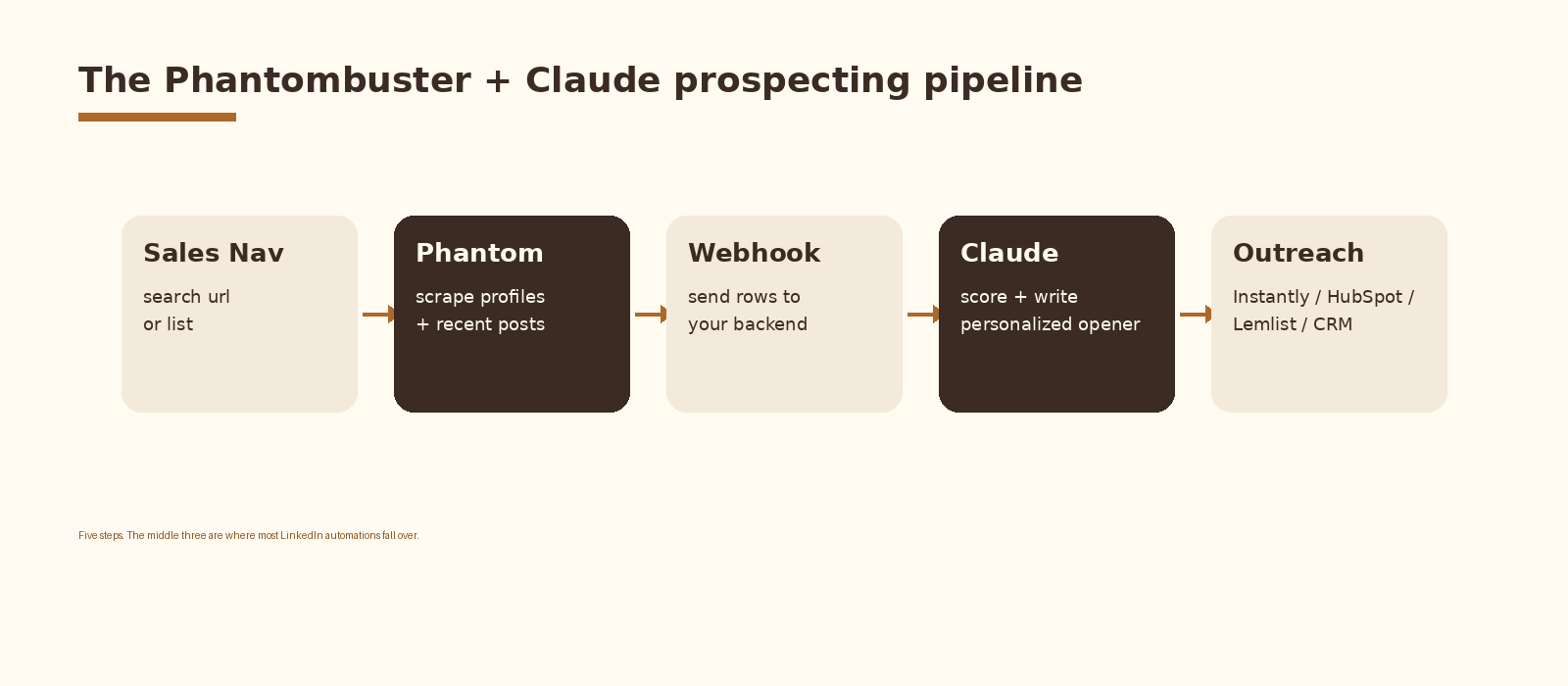
Five steps. The Phantom pulls profiles and recent posts. A webhook hands the rows to your backend. Claude scores and writes. Your outreach tool sends. Your CRM tracks replies.
Step by step
1. Define the ICP filter first
The biggest lift in this whole pipeline is not the AI. It is the search query. Open Sales Navigator and build a saved search that hits your tightest ICP definition: industry, headcount band, title seniority, geography, and a posted-content recency filter where it makes sense.
Save the search. The URL of that saved search is what you give Phantombuster.
2. Pick the right Phantom
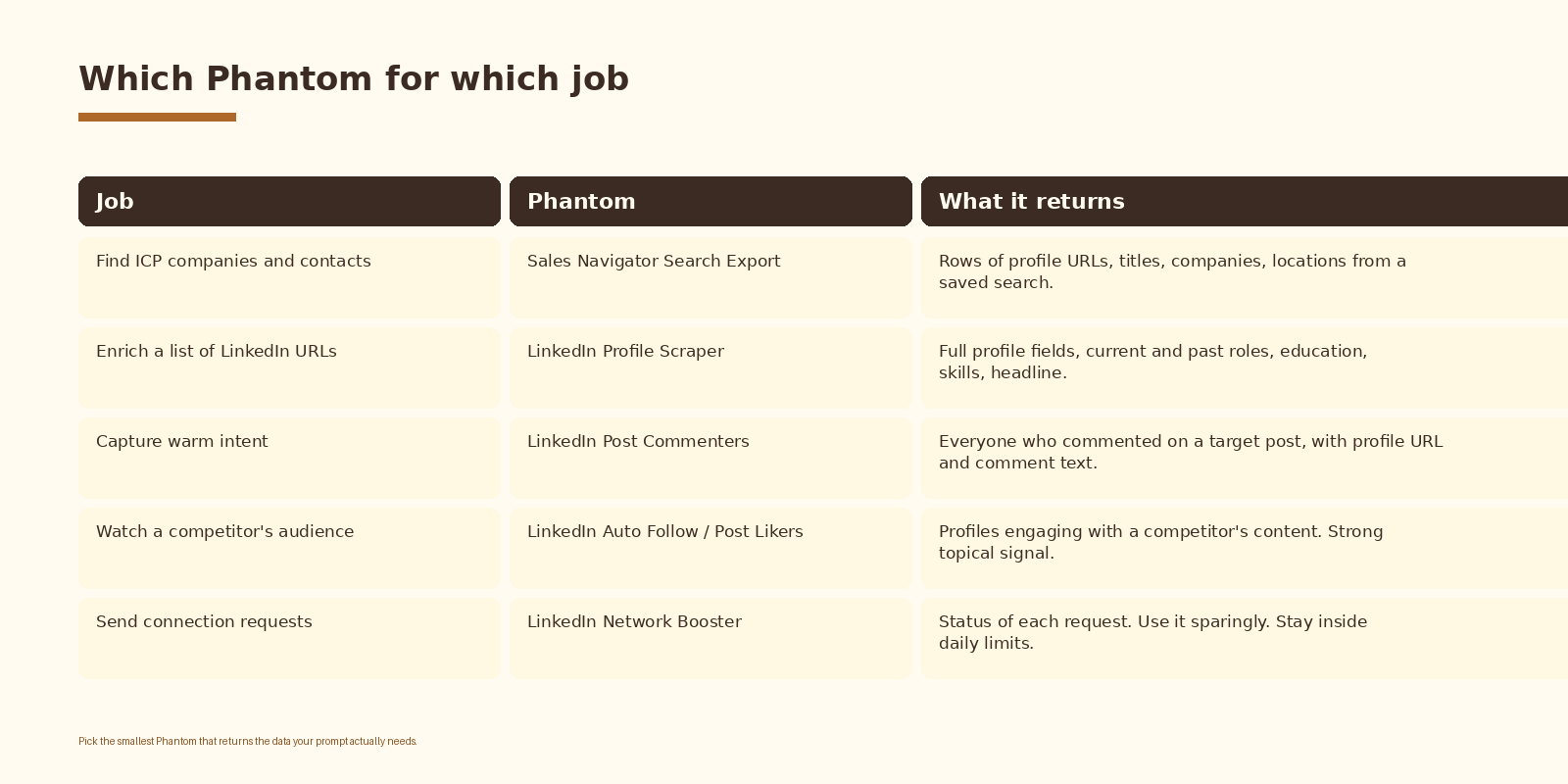
For most prospecting runs you will use two Phantoms in sequence. “Sales Navigator Search Export” pulls the list. “LinkedIn Profile Scraper” enriches each row with the fields and recent posts you need for personalization.
3. Wire the Phantom output to a webhook
Phantombuster can deliver results as a CSV, a JSON file, or a webhook POST. Use the webhook. It is the only option that lets you stream rows into a backend that can call Claude per row, with retries and logging.
POST /webhooks/phantombuster
Content-Type: application/json

{
  "phantom_id": "1234567890",
  "results": [
    {
      "profile_url": "https://www.linkedin.com/in/maria-...",
      "first_name": "Maria",
      "title": "VP RevOps",
      "company": "Northwind",
      "recent_posts": [ ... ]
    }
  ]
}
Your backend receives the rows, deduplicates against the CRM, and queues each new lead for the Claude step.
If you want this set up cleanly inside your stack with logging, retries, and a feedback loop into a CRM, that is the kind of work we ship at Espressio.
4. Write the Claude prompt once, well
The prompt is the part of the build that earns or burns the reply rate. The job is to score the lead against your ICP and write a short opener that references something real from the lead’s profile or recent posts.
SYSTEM: You are an SDR at Espressio. You write short, specific LinkedIn opener
lines for B2B founders and revenue leaders. You never invent facts. You only
reference what is in the input.

INPUT (JSON):
{
  "first_name": "Maria",
  "title": "VP RevOps",
  "company": "Northwind",
  "headline": "...",
  "recent_posts": [
    {"text": "We rebuilt our attribution model in HubSpot...", "likes": 47},
    {"text": "Hiring a senior RevOps analyst...", "likes": 12}
  ]
}

TASK: Return strict JSON:
{
  "icp_score": <0-100>,
  "score_reason": "<one sentence, plain English>",
  "opener": "<2 short sentences. Reference one specific post or detail. No questions yet.>",
  "ask": "<one short question, optional, 12 words max>"
}
Three things to notice. The model returns strict JSON so your backend can parse it without a regex. The score has a one-sentence rationale a human can audit. The opener is capped at two sentences and forbidden from asking the meeting in the first line.
The personalization that actually moves replies
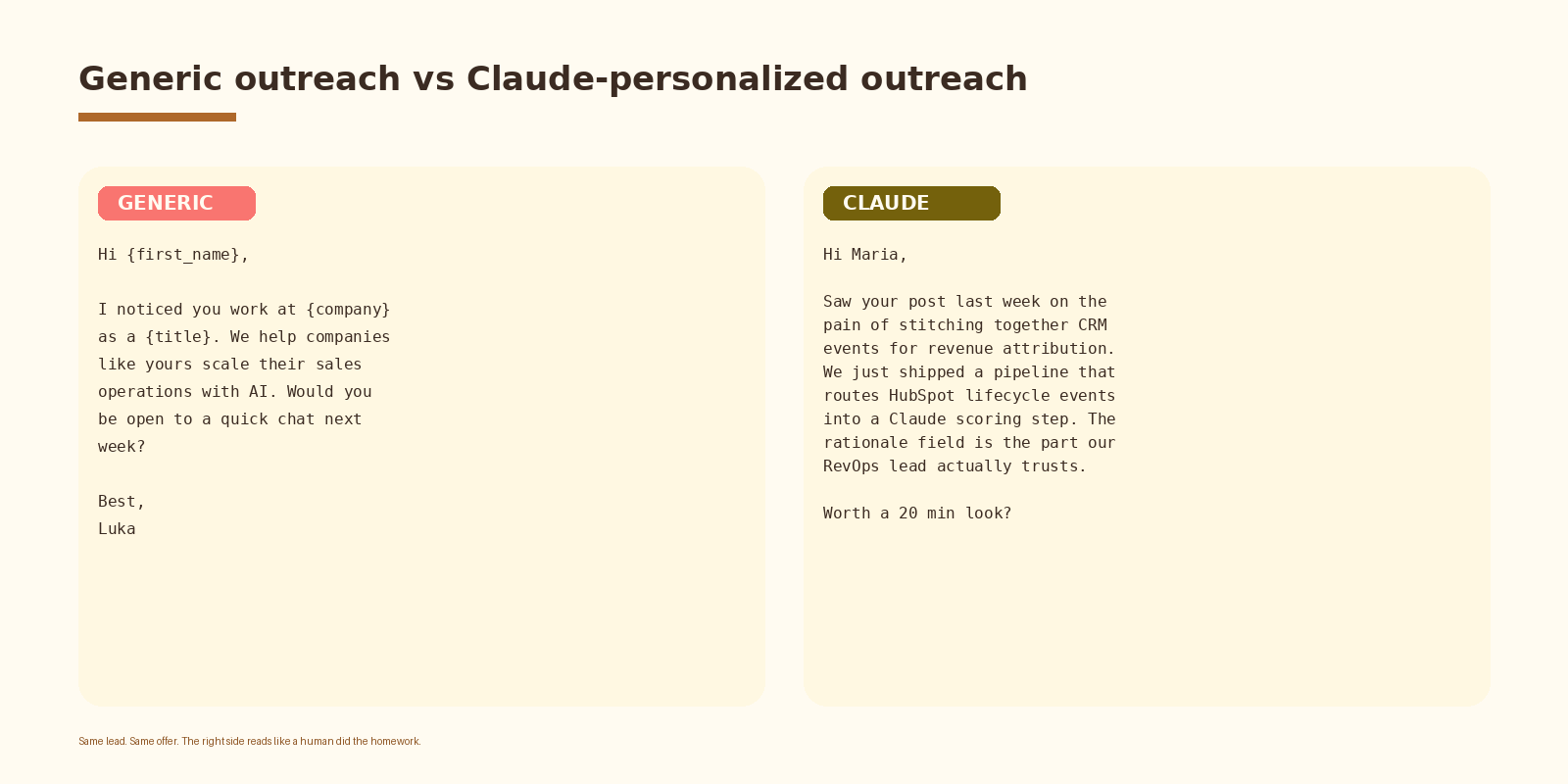
Generic openers reference public fields. Title, company, industry. Buyers can spot them in a second because every other vendor sends the same thing. Claude personalization references the lead’s last few posts and writes one sentence that sounds like a colleague did the reading.
Two rules keep this honest. Reference one thing per opener, not three. Never invent facts. If a profile has no recent posts, fall back to a softer headline-based opener or skip the lead entirely.
This pattern compounds when you pair it with Clay and Claude for cold outreach personalization on the email side, so the LinkedIn opener and the cold email speak the same language.
Six jobs this pipeline handles cleanly
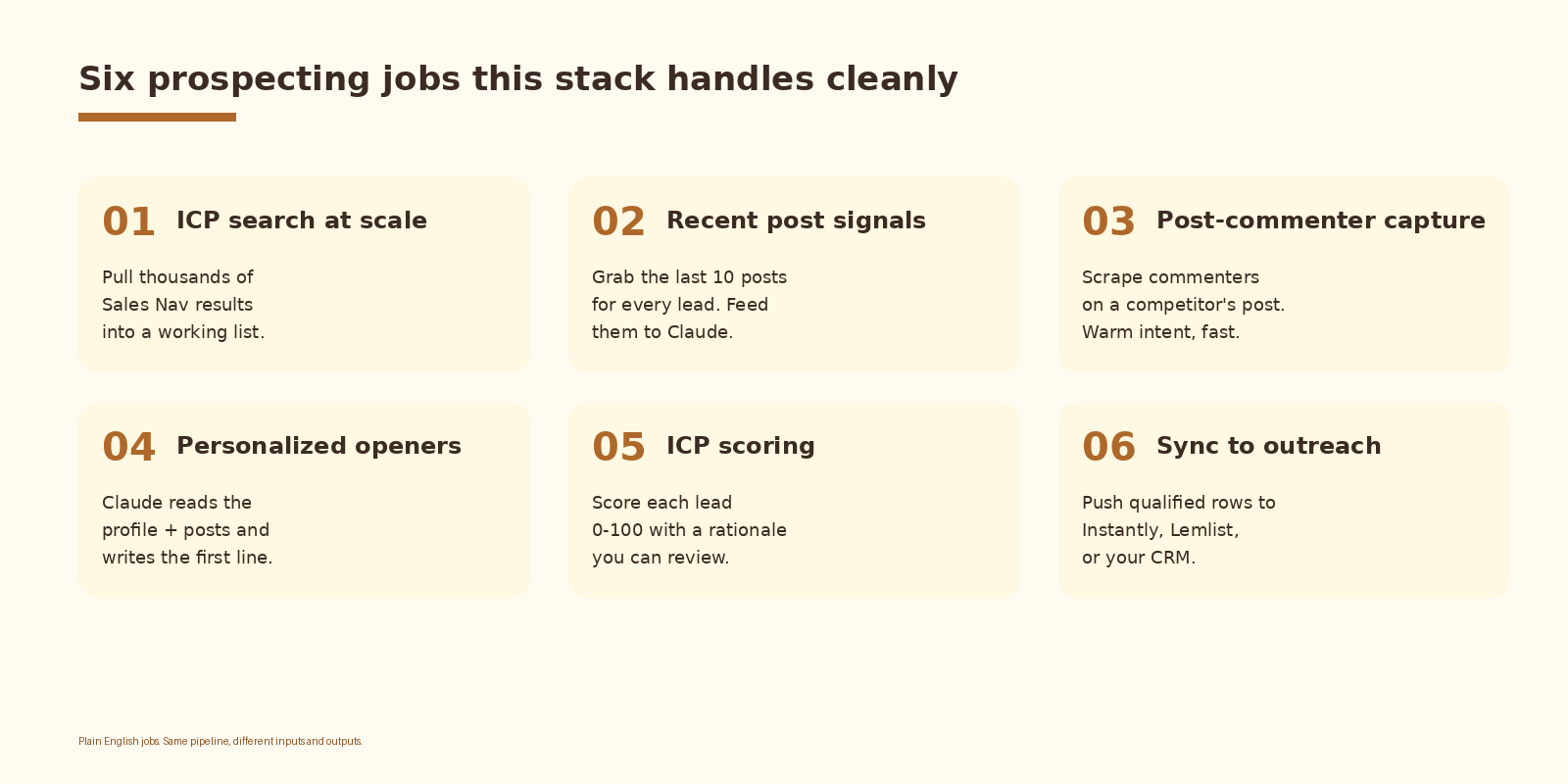
Same pipeline, different inputs. ICP search at scale and ICP scoring are the bread and butter. Post-commenter capture is the warm-intent play, where you scrape everyone who commented on a competitor or thought-leader post and treat that engagement as a signal worth a follow-up.
Teams that already run a Clay AI SDR agent can use Phantombuster as the LinkedIn data layer and route enriched rows through the same Claude scoring step.
Common mistakes
- Treating the prompt as set-and-forget. Review 20 to 30 Claude outputs per week and tune the prompt against the ones that read like a robot.
- Running the Phantom too aggressively. LinkedIn rate limits are not negotiable. Stay inside the daily action limits Phantombuster recommends per phantom.
- Sending the lead to outreach before scoring. The whole point of the Claude step is to drop the bottom-tier leads before you pay for an outreach slot.
- Personalizing on stale data. If the most recent post is older than 90 days, the opener will feel like a stalker. Filter for recency.
- Skipping the score rationale. The one-sentence reason field is what lets a human spot-check the model. Without it the score is a black box.
- Forgetting to feed replies back. The outreach tool’s reply data is the single best signal for whether your ICP filter and prompt are working. Pipe it back into the same dashboard.
How to know it is working
Look at these numbers weekly. Do not turn any of them into a quota. They are diagnostics, not targets.
- ICP score distribution. If 80 percent of your leads are scoring above 80, your filter is too loose or your rubric is too generous.
- Opener pass rate. The share of Claude openers a human reviewer would send without editing. Track it as a quality signal on the prompt.
- Reply rate by score band. Replies should skew toward the higher-scored leads. If they do not, the scoring rubric is not predictive.
- Phantom session health. Phantombuster surfaces session warnings when LinkedIn pushes back. Watch that signal more than you watch volume.
- Cost per qualified lead. List-price tool costs are knowable. Divide by the count of leads that scored above your threshold and made it to outreach.
Frequently asked questions
Is this allowed under LinkedIn’s terms of service?
LinkedIn’s user agreement restricts automated scraping. Phantombuster operates in a grey area that many teams use day to day, but the risk sits on the LinkedIn account that runs the phantom. Use a dedicated account, stay inside Phantombuster’s recommended daily limits, and never run more than one automation against the same session at the same time.
Why Claude and not GPT or another model?
Any frontier model can do the reading-and-writing job in this pipeline. Claude tends to write openers that read less like marketing copy and more like a person, which matters when the whole point is to not sound like a sequence. If your stack is already on OpenAI or Gemini, the same pattern works with a different model name.
How much does the stack cost?
Phantombuster plans start in the low double digits per month for light usage and scale up with execution time. Claude API costs are usage-based and small on a per-lead basis for prompts this size. The two together are typically the cheapest part of a prospecting motion. The bigger cost is the time spent tuning the prompt and the ICP filter.
Can we run this without a backend?
You can wire Phantombuster directly to a no-code tool like Make or n8n, call Claude from there, and push the result into Instantly or HubSpot. That works for the first hundred leads. Past that you will want a real backend so you can log, retry, deduplicate, and feed replies back into the same place. The LinkedIn content automation with Claude and Make guide covers the no-code variant on the content side.
What replaces this if Phantombuster goes down?
The pipeline is tool-shaped, not vendor-shaped. The Phantom layer is replaceable with Phantombuster alternatives like Captain Data, Bardeen, or a self-hosted Puppeteer setup. The Claude layer is replaceable with any frontier model. The webhook and backend stay the same. If your team is already on a Sales Navigator and Clay setup, the LinkedIn Sales Navigator, Clay and GPT lead generation walkthrough shows the same pattern with a different stack.
What to do next
- Write the ICP filter in Sales Navigator and save the search. This is the highest-leverage step in the whole build.
- Pick one Phantom and run it manually first. Look at the raw output before you wire anything to a webhook.
- Draft the Claude prompt with strict JSON output and a one-sentence score rationale. Test it on 20 real leads before you scale.
- Stand up the webhook and the scoring step. Log every Claude call so you can audit later.
- Connect the scored leads to your outreach tool and your CRM. Pipe replies back into the same dashboard.
- Review the first 100 leads as a human. Edit the prompt against the openers that read like a robot.
If you want this set up for your team end to end, with Phantombuster running the LinkedIn layer, Claude scoring and writing, a webhook backend doing the routing, and your CRM closing the loop, let’s talk.