Luka Mrkić
Head of BD
Insights, strategies, and real-world playbooks on AI-powered marketing.
MAY 14, 2026
How to Automate X (Twitter) Content with n8n and Claude
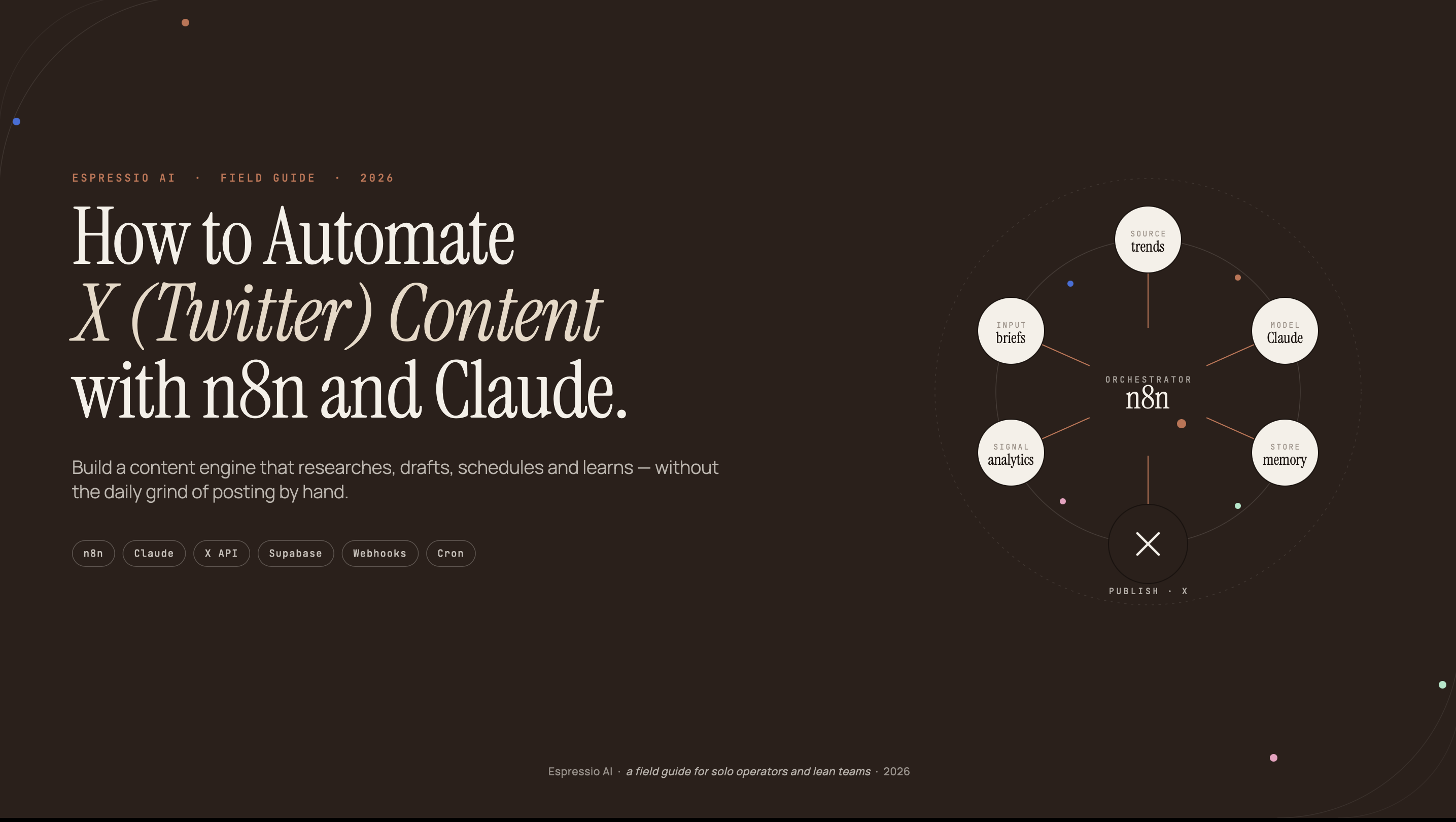
n8n grew from $7.2M ARR in 2024 to $40M ARR in 2025 (Sacra, Oct 2025). That growth signals something concrete: workflow automation has crossed from developer tool to marketing infrastructure. The teams acting on that signal are posting consistently, algorithmically, and at scale. The teams ignoring it are watching their reach erode.
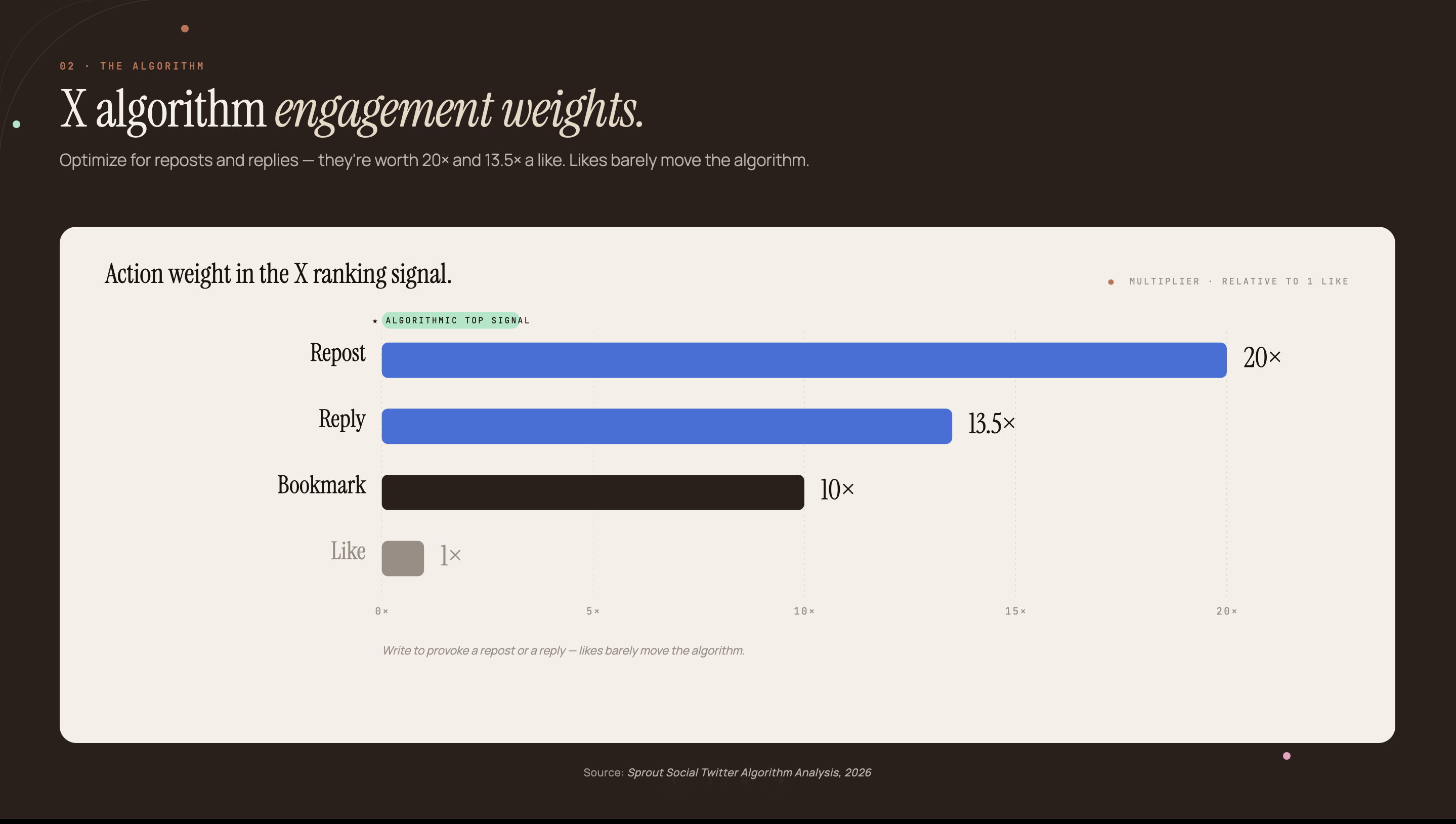
X’s algorithm weights Reposts at 20× a Like and Replies at 13.5× a Like (Sprout Social, 2026). Teams posting manually, inconsistently, and without algorithm intent are invisible. Teams posting consistently, with algorithm intent and AI-generated content, are not.
This guide builds a complete n8n workflow connecting Claude Sonnet to X and publishes algorithm-aware posts on autopilot. You’ll get the full workflow structure, the 2026 X API access reality, and a Claude system prompt you can copy immediately.
Key Takeaways
- n8n reached $40M ARR in 2025 with 230,000+ active users and 500+ integrations, making it the leading open-source automation platform for AI-powered posting pipelines (Sacra, Oct 2025).
- X ended free API access in 2023; in February 2026 it launched pay-as-you-go at $0.01 per post, a pricing shift no competing tutorial covers clearly.
- A 4-node workflow (Schedule Trigger, Claude HTTP Request, Code, X Post) can publish algorithm-optimized X content on autopilot in under two hours to build.
What you’ll build: the n8n + Claude X automation workflow
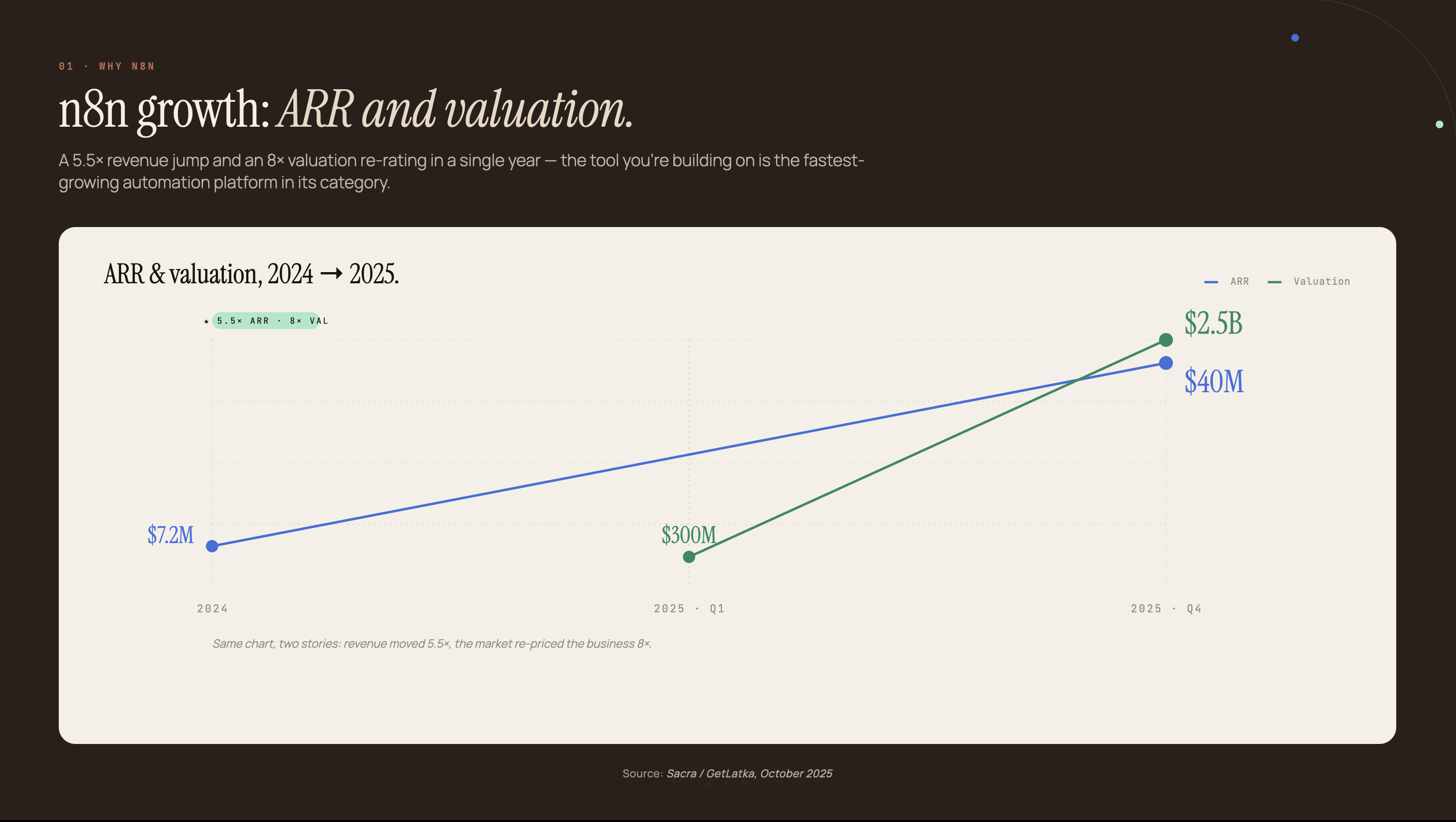
n8n’s 500+ integrations include a dedicated X node, a built-in HTTP Request node for Claude’s API, and a Code node for JSON parsing. Everything this pipeline needs is already there. The workflow has five nodes: Schedule Trigger, HTTP Request (Claude API), Code (extract and trim), X Post, and an optional Slack notification for team visibility.
Each node does one job.
- Schedule Trigger: fires on your chosen days and times
- HTTP Request (Claude API): sends a topic seed to Claude Sonnet and returns a tweet draft
- Code: extracts the text from Claude’s JSON response and trims it to 280 characters
- X node (Create Post): publishes the tweet using your X OAuth2 credential
- Slack (optional): posts the live tweet URL to a team channel
Prerequisites: an n8n account (Cloud or self-hosted), a Claude API key from console.anthropic.com, and an X developer account with a configured app.
We’ve deployed this stack for client accounts across B2B teams. The first build takes under two hours; ongoing maintenance is negligible.
X API access in 2026: what actually works
X ended free API access in February 2023. In February 2026 it replaced its legacy fixed-tier plans with pay-as-you-go pricing: $0.01 per post created is now the entry point for most automation builders. At 100 posts a month, that’s $1 in API costs. Workable for any team. The enterprise API, by contrast, starts at $42,000 per month (xpoz.ai, Feb 2026), so the options are binary: pay-as-you-go or enterprise.
Three options are worth knowing before you build:
- Pay-as-you-go ($0.01 per post created): the right choice for teams posting under 1,000 times a month. No monthly commitment.
- X Basic Tier ($100/month, 100 posts/day): legacy plan for existing subscribers - not available to new developers as of February 2026.
- twitterapi.io ($0.15 per 1,000 tweets): an unofficial but functional alternative that some teams use for read-heavy workflows like monitoring and competitor tracking.
To create an X developer app, go to developer.twitter.com, create a project, and add an app under it. You’ll need OAuth 2.0 enabled. When you create the app, set the app type to “Web App” so OAuth 2.0 is available. The n8n callback URL format is:
https://<your-n8n-instance>/rest/oauth2-credential/callbackThe OAuth callback URL mismatch is the single most common setup failure in this workflow. When the callback URL in your X developer app settings doesn’t exactly match the URL n8n shows in its credential creation screen (including protocol, subdomain, and whether there’s a trailing slash), the OAuth flow fails silently. You get a generic “authorization failed” message with no useful debug info. Fix it by copying the callback URL directly from the n8n credential creation screen and pasting it verbatim into the X app settings. Don’t type it manually.
Setting up credentials in n8n: Claude API and X OAuth
Both credentials live in n8n’s built-in Credentials manager, with no plugins or external config files required. 75% of n8n customers already use AI tools in their workflows (TechCrunch, March 2025). The Anthropic credential type ships natively with every n8n installation - no extra configuration needed.
Claude API credential setup:
- In n8n, go to Credentials and click New
- Search for “Anthropic” and select it
- Paste your API key from console.anthropic.com
- Name it something recognizable, like “Claude Sonnet Production”
- Click Test to verify the key before saving
X OAuth2 credential setup:
- In n8n, go to Credentials and click New
- Search for “X (Twitter) OAuth2” and select it
- Paste the Client ID and Client Secret from your X developer portal app settings
- Set the Authorization URL to
https://twitter.com/i/oauth2/authorize - Set the Token URL to
https://api.twitter.com/2/oauth2/token - Set Scope to
tweet.read tweet.write users.read offline.access - Copy the Callback URL displayed on this screen and paste it verbatim into your X app’s “Callback URLs” field in the developer portal
- Click Connect and complete the OAuth browser flow
For a full Claude API key walkthrough, see our guide on Claude API setup for marketing teams.
Building the workflow node by node
The core workflow is 4 nodes, and the entire build takes under two hours. The X algorithm weights Reposts at 20× a Like and Replies at 13.5× a Like (Sprout Social, 2026). That gap is why prompt engineering, not posting frequency alone, determines whether automation translates to real reach.
Node 1: Schedule Trigger
Set the trigger to fire Tuesday through Thursday between 12 PM and 6 PM local time. That window comes from Sprout Social’s analysis of approximately 2 billion engagements across 307,000 profiles. Configure 3-5 daily executions by adding multiple cron expressions. A reasonable starting set: 0 12 * * 2-4, 0 14 * * 2-4, 0 16 * * 2-4.
Node 2: HTTP Request (Claude API)
- Method:
POST - URL:
https://api.anthropic.com/v1/messages - Headers:
x-api-key:{{ $credentials.anthropicApi.apiKey }}anthropic-version:2023-06-01content-type:application/json
- Body (JSON):
{
  "model": "claude-sonnet-4-5",
  "max_tokens": 150,
  "system": "<your system prompt — see Section 5>",
  "messages": [
    {
      "role": "user",
      "content": "Write a tweet about: {{ $node['Set'].json['topic'] }}"
    }
  ]
}
Node 3: Code (extract and trim)
This node pulls the tweet text out of Claude’s response JSON and enforces the 280-character limit as a hard safety net:
const text = $input.first().json.content[0].text;
return [{ json: { tweet: text.slice(0, 280) } }];
Node 4: X node, Create a Post
Connect this node to your X OAuth2 credential. Set the Text field to {{ $json.tweet }}. The node handles the API call, rate limiting, and error surfacing automatically.
The fifth node is optional: a Slack Post Message that sends the live tweet URL to a team channel. Pull the tweet ID from the X node’s response and construct the URL: https://x.com/i/web/status/{{ $json.id }}.
Node sequencing matters for error handling. Put the Code node between the Claude HTTP Request and the X Post node, not after. If Claude returns malformed JSON or a non-string, the Code node catches it before it reaches the X API and throws an authentication error you’ll spend an hour debugging. The Code node is your circuit breaker, not just a formatter.
The Claude prompt that writes X-native content
Most automation tutorials skip prompt engineering entirely. That’s why their outputs read like trimmed blog paragraphs. At 280 characters, the format rewards specificity and punishes hedging. On this platform, structure that invites a reply outperforms structure that merely informs. The system prompt is the highest-leverage variable in the workflow.
Four rules make the difference between a prompt that produces AI-sounding filler and one that produces posts people actually engage with.
Rule 1: State the 280-character limit explicitly. The max_tokens setting constrains token count, not character count. Include “Maximum 280 characters including spaces” in the system prompt itself. Claude responds differently when the constraint appears in the instructions versus when it’s only an API parameter.
Rule 2: Require a question or contrarian ending. Every post should close with something that makes a reader stop and react. “Do you agree?” is weak. “Most teams are doing this backwards. Are you?” is not. The ending is where Reply-weight lives.
Hashtag discipline is the third variable. X’s algorithm downranks hashtag-heavy posts in 2026 (per Sprout Social’s analysis) because they signal broadcast, not conversation. Set a default of no hashtags and override only when a topic is explicitly trending.
The fourth is voice matching: first-person for personal brands, third-person for company accounts. Without this instruction, Claude defaults to a generic editorial tone that fits neither.
Copy this system prompt directly into the HTTP Request node body:
You are an X (Twitter) content strategist for [BRAND].
Write ONE tweet on the topic provided.

Hard rules:
- Maximum 280 characters including spaces
- End with a question OR a contrarian statement that invites disagreement
- No hashtags unless the topic is explicitly trending
- No em dashes. No buzzwords (leverage, delve, crucial, game-changer)
- Write in first-person if the account is a personal brand

Output ONLY the tweet text. No preamble, no labels, no explanation.
Replace [BRAND] with your account name or a 1-2 sentence voice description. The “Output ONLY the tweet text” line is critical. Without it, Claude prepends labels like “Tweet:” or “Here’s a post:” that the Code node won’t strip cleanly.
Posting frequency and scheduling logic
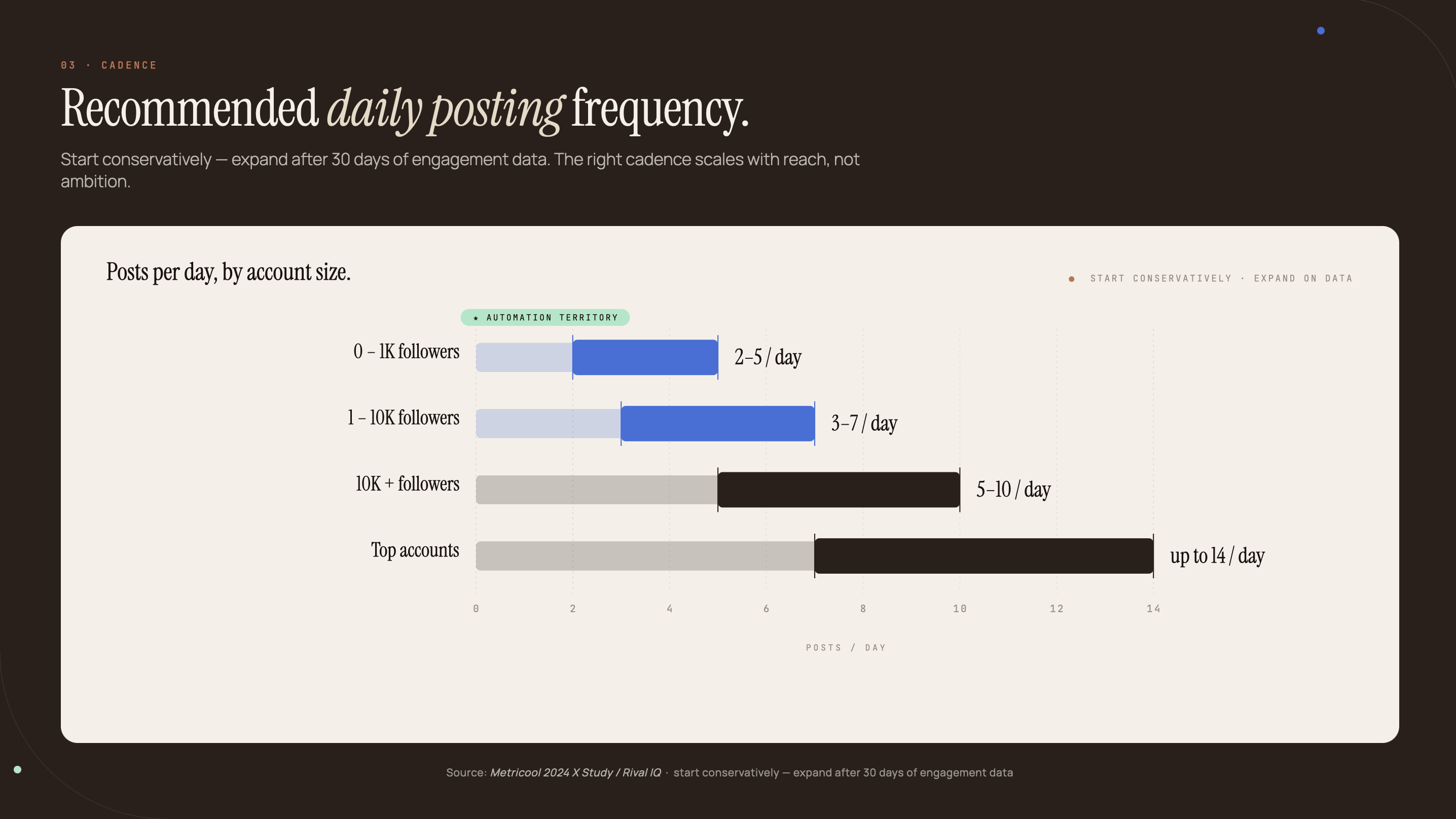
The best X engagement window is Tuesday through Thursday, 12-6 PM local time, based on analysis of approximately 2 billion engagements across 307,000 profiles (Sprout Social, March 2026). Start with 3-5 posts in that window, on three days per week. That gives you meaningful engagement data without overwhelming your account’s early-stage algorithm signals.
The global average for active accounts is 12 posts per week. Top-performing accounts post around 95 times per week (Metricool 2024 X Study). Those numbers sound far apart, but the gap closes fast once topic rotation is automated and the Claude prompt is tuned.
Recommended starting cadence: 3-5 posts per day, Tuesday through Thursday only. Expand to seven days after 30 days of baseline engagement data.
Topic rotation in n8n: Add a Set node before the HTTP Request node. Store an array of 10-15 topic seeds in the node’s values. Reference them in the HTTP Request body using:
{{ $node["Set"].json["topics"][$runIndex % 15] }}This cycles through all 15 topics before repeating any. The rotation is deterministic, not random, which means you can predict and audit what posts when.
For evening coverage, add a second Schedule Trigger at 4-6 PM with cron expressions 0 16 * * 2-4, 0 17 * * 2-4. Connect it to the same HTTP Request node. n8n supports multiple triggers feeding a single workflow branch.
Extending the workflow: threads, images, and analytics
The 4-node workflow is the minimum viable pipeline. 50% of marketers now use AI for social media (HubSpot 2025 Social Media Report, n=1,100+), and the adoption gap between early movers and everyone else is compounding. Three extensions take the pipeline further.
Thread automation
Add a second HTTP Request node after the first X Post. Pass in_reply_to_tweet_id from the first post’s response to chain tweets into a thread. Claude handles each tweet in the thread separately. Pass the thread position as part of the user message: “Tweet 1 of 3: intro. Tweet 2 of 3: supporting detail. Tweet 3 of 3: CTA or question.” The thread structure triggers the Reply weight repeatedly as readers respond to individual tweets within it.
Image generation
Insert a Stability AI or DALL-E HTTP Request node before the X Post node. Generate an image from the tweet topic string. Pass the returned image URL to X’s media_ids parameter in the post creation call. Posts with images receive higher initial distribution in the X algorithm. The generation call costs approximately $0.03 per image at current Stability AI Core pricing.
The real multiplier is the analytics feedback loop. Add a weekly Schedule Trigger that calls the X Get Tweet Metrics node, writes results to Airtable or Google Sheets, and feeds the top-performing topic categories back into Claude’s next-week brief via the Set node. By month two, Claude is drawing from a proven topic list instead of running the same seeds repeatedly.
The analytics loop is what turns month-one automation into month-six compounding. The first month, you’re guessing at topic seeds. By month three, you’re feeding Claude the actual topic categories that generated replies and Reposts. The engagement numbers show it.
For the data-gathering pattern that powers this loop, see our n8n competitive intelligence pipeline. The same Airtable write pattern applies here.
If you want us to build and maintain this pipeline for your team, let’s chat.
FAQ
How much does it cost to automate X posts with n8n and Claude in 2026?
The X API pay-as-you-go tier costs $0.01 per post created. Claude Sonnet runs roughly $0.003 per tweet generated. n8n Cloud starts at $20/month. At 100 posts per month, total API costs stay under $2, making the full pipeline cost $22-$25/month. 50% of marketers now use AI for social media (HubSpot 2025 Social Media Report, n=1,100+).
Does n8n have a native X (Twitter) node?
Yes. n8n has a native X (Twitter) node that supports Create Post, Search Tweets, Get User, and more. It requires an X OAuth2 credential: Client ID and Client Secret from the X Developer portal. As of n8n v1.x, the node appears under ‘X’ in the node panel, not ‘Twitter.’ n8n has 500+ integrations total.
Can Claude write tweets that don’t sound like AI?
Yes, with the right system prompt. The constraints that matter: a 280-character hard limit instruction, an explicit directive to end with a question or contrarian statement, no-hashtag discipline, and brand voice calibration. Generic prompts produce generic output. The copy-paste system prompt in this guide is designed specifically for X-native format.
What happens if Claude returns more than 280 characters?
Add a Code node after the HTTP Request node. The one-line fix: const text = $input.first().json.content[0].text; return [{ json: { tweet: text.slice(0, 280) } }];, which trims output to 280 characters. Best practice: include the 280-char hard limit in the Claude system prompt AND use the Code node as a fallback safety layer.
How do I avoid posting the same X content repeatedly?
Store 10-15 topic seeds in an n8n Set node values array. Reference them with {{ $node["Set"].json["topics"][$runIndex % 15] }} to cycle through them automatically. For larger-scale rotation, store topics in Airtable with a ‘used’ boolean field and filter for unused topics at the start of each workflow run.
Conclusion
The 4-node workflow solves the manual posting problem. The X API access section in this guide covers the setup blockers that trip up nearly every team: the free tier discontinuation and the OAuth callback URL mismatch. The system prompt solves the quality problem: it’s what separates posts that get Reposts from posts that get ignored.
Put these three pieces together and you have a pipeline that publishes algorithm-aware X content on a predictable schedule, with near-zero ongoing maintenance.
The same pipeline logic applies across platforms. For LinkedIn, see how to automate LinkedIn content with Claude and Make.com. For the broader case that automation doesn’t have to mean generic content, read our guide on AI content automation at B2B scale.