



Luka Mrkić
Head of BD
Insights, strategies, and real-world playbooks on AI-powered marketing.
JUN 2, 2026
How to Automate Sales Call Summaries with Fireflies and Claude
TL;DR
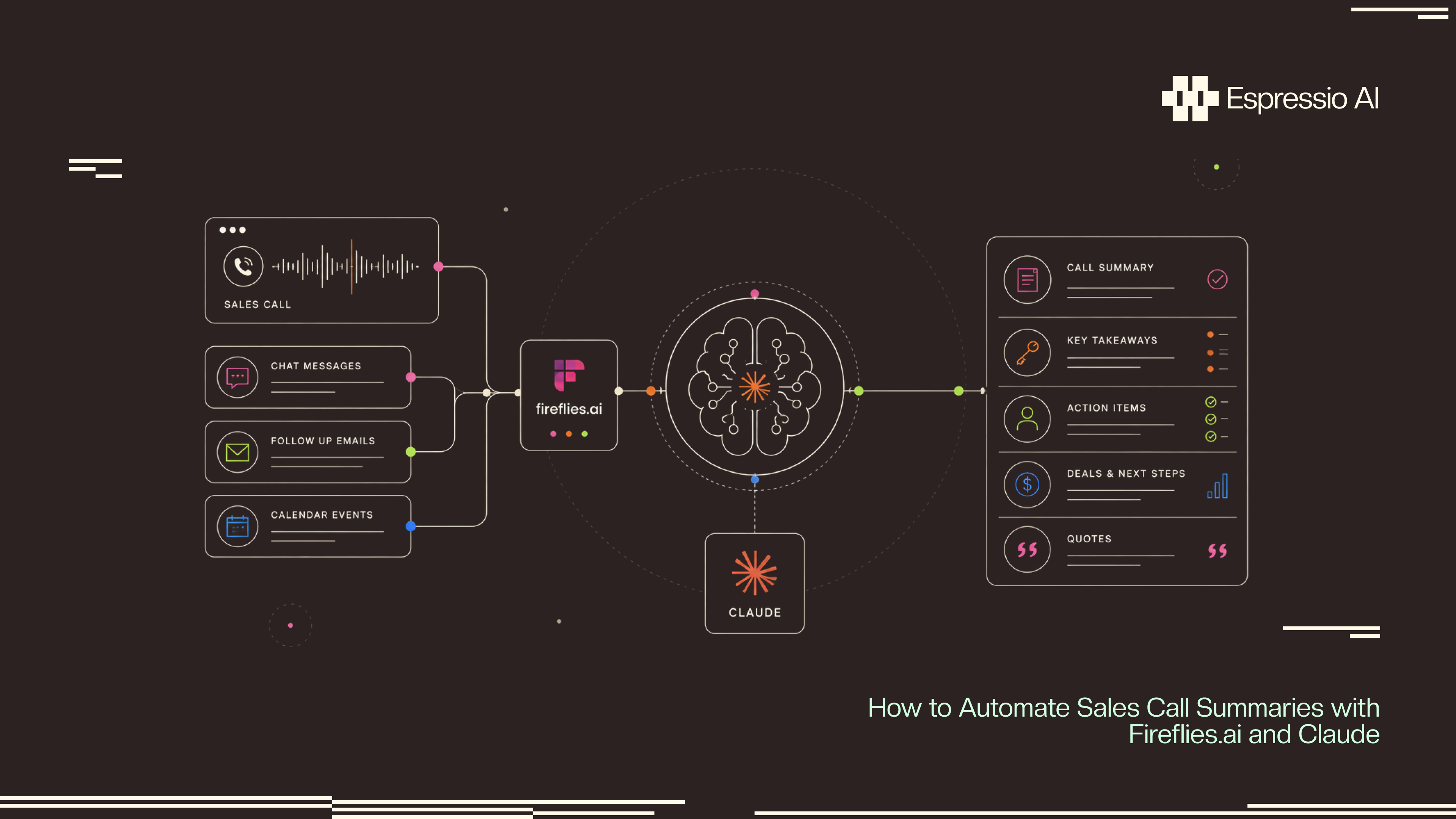
- An automated call summary pipeline catches the end of every Fireflies meeting, pulls the deal context from the CRM, asks Claude to return a structured summary with next step, owner, risk, objections, and lift-worthy quotes, then writes that summary back to the right deal record.
- Fireflies handles capture and transcription. A small backend (n8n, Make, or a serverless function) handles enrichment and routing. Claude does the read: turning a forty-minute transcript into the six fields a CRM can actually act on.
- A useful first build covers discovery and demo calls for one team. It runs every time a call ends, costs single digit dollars per rep per month, and pays back the week the first stuck deal moves because someone saw the risk flag in HubSpot the same afternoon.
- The pipeline is five steps: capture, webhook, enrich, classify, write. The hard parts are the structured prompt and the CRM write.
- This guide ships the architecture, the Claude prompt that holds up in production, the six summary fields worth returning, and the six checks that tell you the workflow is still working.
If you are evaluating who should build this for your team, this guide gives you both the technical blueprint and the standards to evaluate the work.
What an automated call summary workflow actually does
A call summary workflow watches every sales meeting that runs through Fireflies, waits for the transcript to land, and turns that transcript into a structured summary the CRM can read. The summary is not a paragraph of prose. It is six to ten named fields. Call type. Next step. Owner. Due date. Deal risk with a one-line reason. Champion signal. Objections heard. Two or three quotes worth lifting. One paragraph of human-readable summary.
The old way of doing this was the rep typing a CRM note after the call, sometime that evening, sometimes two days later, sometimes never. That cadence loses the next step, loses the objection that should have been in the deck, and loses the verbatim line that would have made the case study.
The automated version writes the same six fields on every call within minutes of the call ending. The deal record stays current. The pipeline review reads itself. Enablement gets a real list of objections to work on. The rep keeps the judgment call. The model handles the typing.
Architecture
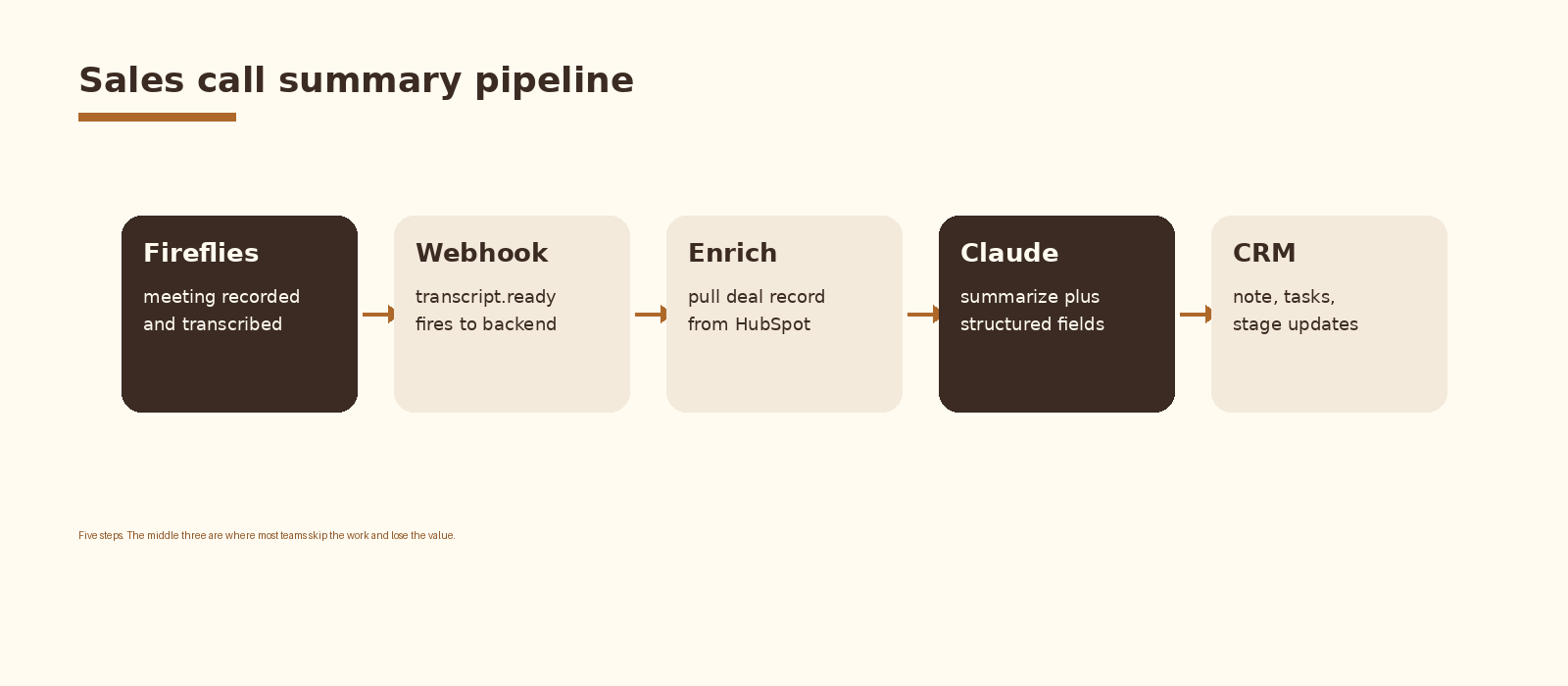
Five components inside one pipeline. Fireflies records and transcribes the meeting. A webhook fires on transcript.ready and posts the payload to your backend. The backend pulls the matching deal record from the CRM so the model sees the context alongside the transcript. Claude reads transcript plus context and returns structured JSON. A CRM write step appends the note, creates the next-step task with an owner, and updates the deal risk field. A small log row closes the loop so you can audit what fired and what did not.
Step 1. Capture the call with Fireflies
Fireflies joins the meeting as a bot, records the audio, and produces a speaker-labeled transcript within minutes of the call ending. The bot can be added to calendar events automatically through the Fireflies calendar integration so reps do not have to remember. Storage and transcript quality are good enough for downstream classification; you do not need to layer a second transcription service on top.
Two settings matter for this build. Speaker identification stays on so the summary can attribute objections and champion lines correctly. Auto-join on the calendar covers discovery and demo meetings without requiring a manual invite each time.
Step 2. Catch the transcript with a webhook
Fireflies fires a webhook when a meeting transcript is ready. The payload includes the meeting id, the title, the duration, the participants, and a transcript URL. Subscribe a backend endpoint to that webhook. n8n, Make, and a small serverless function on Vercel or Cloudflare Workers all work. The endpoint is the front door to the rest of the pipeline.
// Webhook handler sketch (Vercel / Node)
export default async function handler(req, res) {
  const { meetingId, title, transcriptUrl } = req.body;
  const transcript = await fetch(transcriptUrl).then(r => r.text());
  const deal = await findDealForMeeting({ title, meetingId });
  const summary = await summarizeCall({ transcript, deal });
  await writeToCRM({ deal, summary });
  res.status(200).json({ ok: true });
}
Validate the webhook signature on every request. Reject anything without a matching meeting id in your store. The endpoint is internet-facing and a sales call summary is exactly the kind of payload you do not want someone else writing to your CRM.
Step 3. Enrich with the deal record
A transcript without context is a long monologue. The model needs to know which deal the call belongs to, what stage the deal is in, what product was being sold, and which competitor came up last time. The enrichment step is a single API call into the CRM to fetch the deal that matches the meeting.
Matching the meeting to the deal is the part most teams underestimate. The cleanest signal is the meeting title; reps usually include the company name. The fallback is the attendee list; match the external email domain against the company associated with the deal. The last resort is a manual mapping table for the calls that match neither.
// HubSpot deal lookup by domain
async function findDealForMeeting({ title, attendees }) {
  const domains = attendees
    .map(a => a.email && a.email.split('@')[1])
    .filter(d => d && !INTERNAL_DOMAINS.includes(d));
  for (const domain of domains) {
    const company = await hubspot.crm.companies.searchApi.doSearch({
      filterGroups: [{ filters: [{ propertyName: 'domain', operator: 'EQ', value: domain }] }],
      limit: 1,
    });
    if (company.results.length) {
      const deals = await hubspot.crm.companies.associationsApi
        .getAll(company.results[0].id, 'deals');
      if (deals.results.length) return deals.results[0];
    }
  }
  return null;
}
Step 4. Summarize with Claude
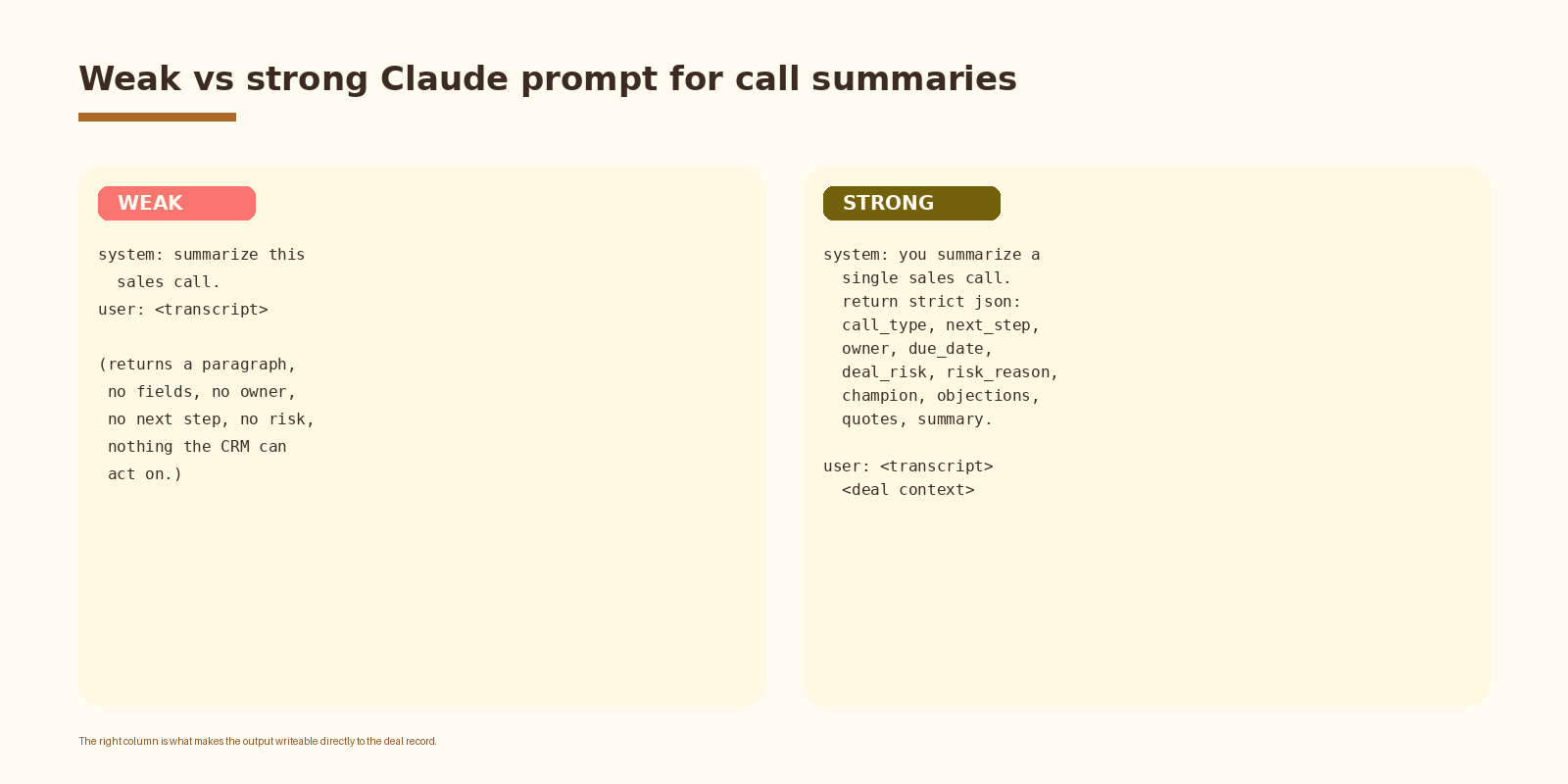
This is the step that earns the build. A weak prompt asks Claude to summarize the call and returns a paragraph the rep skims and ignores. A strong prompt asks for strict JSON with six to ten named fields and returns something the CRM write step can read field by field.
// Claude messages payload
{
  "model": "claude-sonnet-4-5",
  "max_tokens": 1500,
  "system": "You summarize a single B2B sales call. Return strict JSON with keys: call_type (discovery|demo|pricing|technical|renewal|churn), summary (1 paragraph, 80 words max), next_step (one specific action), owner (rep or prospect), due_date (ISO date or null), deal_risk (low|medium|high), risk_reason (one sentence), champion (name plus one-line read of their influence), objections (array of verbatim concerns), quotes (array of up to 3 lift-worthy sentences). If a field is unknown, return null. Do not invent.",
  "messages": [{
    "role": "user",
    "content": "Deal context:\n" + dealContext + "\n\nTranscript:\n" + transcript
  }]
}
Three details to lock in. The system prompt names the field types explicitly. The user message ships the deal context above the transcript so the model reads it first. The unknown-field rule blocks the model from inventing a champion or a due date when the call did not actually surface one. Without that rule, the CRM fills up with confident-sounding fiction.
If you want this set up cleanly inside your stack with logging, retries, and a feedback loop into a CRM, that is the kind of work we ship at Espressio.
Step 5. Write to the CRM
The write step is mechanical and high-leverage. Append a note to the deal with the human-readable summary, the objections list, and the lifted quotes. Create a task for the next step with the owner and due date pre-filled. Update the deal risk field. Tag the call type so pipeline reports can filter by stage. Done.
// HubSpot write
await hubspot.crm.objects.notes.basicApi.create({
  properties: {
    hs_note_body: renderNoteBody(summary),
    hs_timestamp: Date.now(),
  },
  associations: [{ to: { id: deal.id }, types: [{ associationTypeId: 214 }] }],
});
if (summary.next_step && summary.owner) {
  await hubspot.crm.objects.tasks.basicApi.create({
    properties: {
      hs_task_subject: summary.next_step,
      hs_task_status: 'NOT_STARTED',
      hs_timestamp: new Date(summary.due_date || tomorrow()).getTime(),
      hubspot_owner_id: resolveOwner(summary.owner),
    },
    associations: [{ to: { id: deal.id }, types: [{ associationTypeId: 216 }] }],
  });
}
await hubspot.crm.deals.basicApi.update(deal.id, {
  properties: { deal_risk: summary.deal_risk, last_call_type: summary.call_type },
});
One design choice worth defending. Write the summary as a note on the deal record. Meeting records get pulled into the activity timeline but most pipeline reviews read the notes panel. Putting the summary where the AE actually looks is the difference between a workflow that gets used and one that gets ignored.
Fields a useful summary always returns
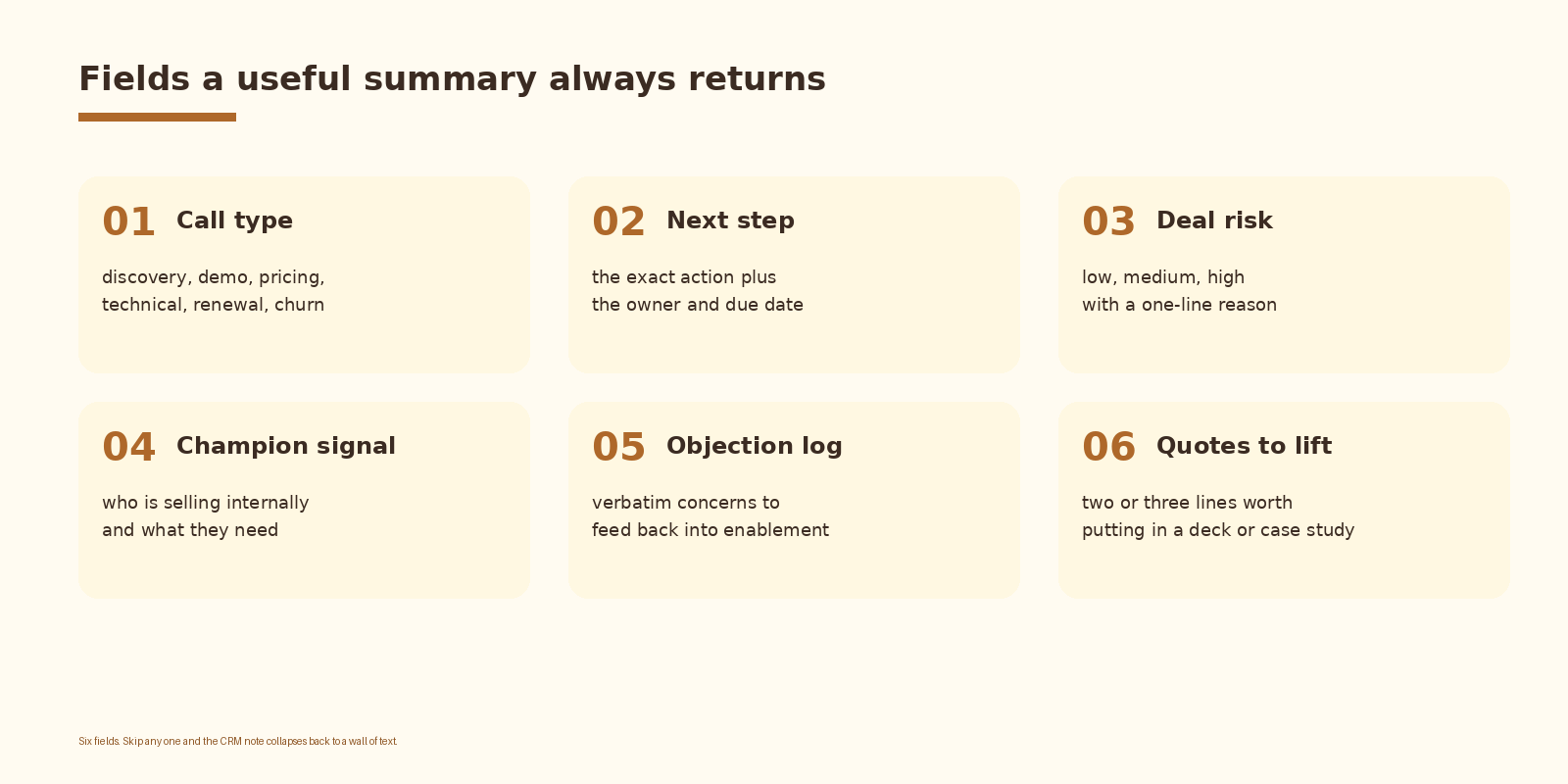
Six fields are enough for the first version. Call type and next step are the two that pay back the build fastest because they drive the same-day task list and the weekly pipeline review. Deal risk is the third because a model that flags a stuck deal before the AE does is the cleanest proof of value. The other three earn their keep once the first three are reliable.
Common mistakes
- Asking for a free-form paragraph. The CRM cannot read prose. Lock the schema and require strict JSON.
- Skipping the deal enrichment step. A summary that does not know the deal stage will not catch the risk signal.
- Letting the model invent fields. Without an explicit unknown-is-null rule, the CRM fills up with plausible fiction.
- Writing the next step without an owner or a date. Headless tasks pile up and nobody runs them.
- Putting the summary somewhere reps do not look. Notes get read. Meeting records mostly do not.
- No log. When the channel goes quiet for two days, you need to know whether the calls stopped or the pipeline broke.
How to know it is working
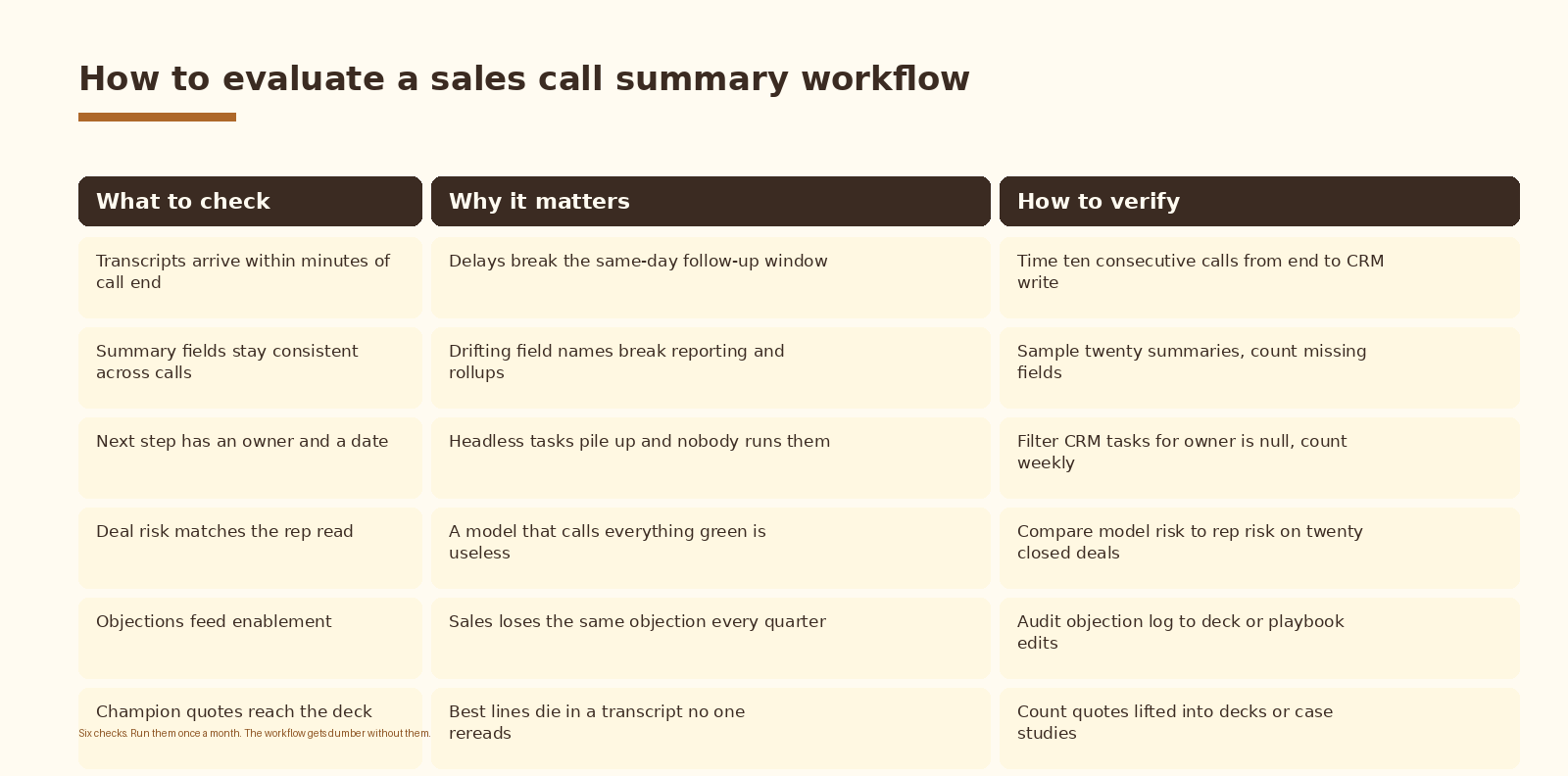
An automation rate metric on its own is not the answer. The number that matters is task completion: how many of the next-step tasks the model wrote actually got done in the next seven days. Track task completion weekly. If it trends to zero, the model is writing tasks no one is willing to own. Retune the owner field and the next-step prompt before you blame the rep.
FAQ
Why Fireflies and not Gong, Otter, or Read?
Fireflies has the cleanest webhook surface, calendar auto-join, and an export-friendly transcript format at a price that lets a single team start without procurement. Gong is the heavier enterprise option and the right answer once a revenue org standardizes on conversation intelligence at scale. Otter is fine for transcription only. The summary pipeline in this article translates one for one to any of the three: only the webhook payload shape changes.
Which Claude model should I use?
Sonnet handles full-call transcripts well at a reasonable price and keeps the JSON contract under load. Haiku is fast and cheap but drops fields on longer calls. Opus is overkill for summary work; save it for the call coaching workflow that reads ten calls at once. Sonnet is the default until you find a reason to switch.
How do we handle calls that span multiple deals or accounts?
Most discovery and demo calls map to a single deal. Multi-account calls (partner intros, expansion calls into a parent company) are the exception. Two options. The first is to route ambiguous matches into a review queue for the RevOps lead. The second is to write the same summary to each matched deal with a flag noting the call was shared. The review queue is the safer default until the volume forces the automated split.
What does this cost to run?
Two cost lines: Fireflies seats and the model. Fireflies sits at standard per-seat pricing for the team using it. Claude is called once per call; a forty minute transcript at Sonnet pricing lands in cents per call. For a five-rep team running thirty calls a week, list-price spend lands in the low tens of dollars a month on the model side. The CRM writes themselves are free.
Is the recording legal in our region?
Recording laws vary by state and country. Two-party consent jurisdictions require every participant to be notified. Fireflies handles the disclosure automatically when the bot joins, but compliance still sits with you. Check the rules for the regions your reps and prospects sit in, and document the consent posture before turning the workflow on for customer-facing calls.
What to do next
- Pick one team and one call type. Discovery is the right starting surface because the next step matters most there.
- Stand up the Fireflies webhook against a staging endpoint and confirm the payload arrives within five minutes of call end.
- Wire the deal enrichment step. Run it against last weeks meetings and check how many matched a deal cleanly.
- Lock the Claude prompt with the six-field schema. Tune it against ten real transcripts before you turn writes on.
- Turn on the CRM write to notes only. Watch reps read the notes for a week before adding task creation.
- Review task completion after thirty days. Retune the next-step prompt or the owner mapping before adding call types.
If you want automation like this set up cleanly inside your revenue operations, let’s talk.
Related Espressio guides



