Luka Mrkić
Head of BD
Insights, strategies, and real-world playbooks on AI-powered marketing.
JUN 4, 2026
How to Automate Marketing for SaaS Startups with AI in 2026

TL;DR
- Marketing automation for SaaS startups in 2026 is built around seven workflows: SEO briefs, lead routing, cold outreach, newsletter ops, competitor watch, customer expansion, and reporting.
- The stack is small: an input layer (GSC, GA4, CRM, Clay), a routing layer (n8n or Make), a model layer (Claude, GPT-4o, Perplexity), a review layer (Slack or Notion), and an output layer (send, publish, update).
- Pick two workflows to start. Ship them with a human review point. Measure for two weeks. Then add the next two.
- The failure mode is volume without review. The pattern that works is small, reviewed, and measured.
- Evaluate every workflow on six criteria: owner, review point, measurable output, time saved, failure handling, and cost transparency.
If you are evaluating who should build this for your team, this guide gives you both the technical blueprint and the standards to evaluate the work.
Why this changed in 2026
Three things shifted. Long-context models like Claude 3.5 Sonnet and GPT-4o can now hold an entire account, a full transcript, and a brand guideline in one call without losing the thread. Workflow tools like n8n and Make have native AI nodes that handle structured output and retries. And small SaaS teams are now expected to ship marketing systems that ten people used to run.
The result is a different operating posture. A four-person SaaS marketing team in 2026 is not writing more content. It is running seven workflows, each with a human review point, that produce the volume an old ten-person team produced manually.
The stack
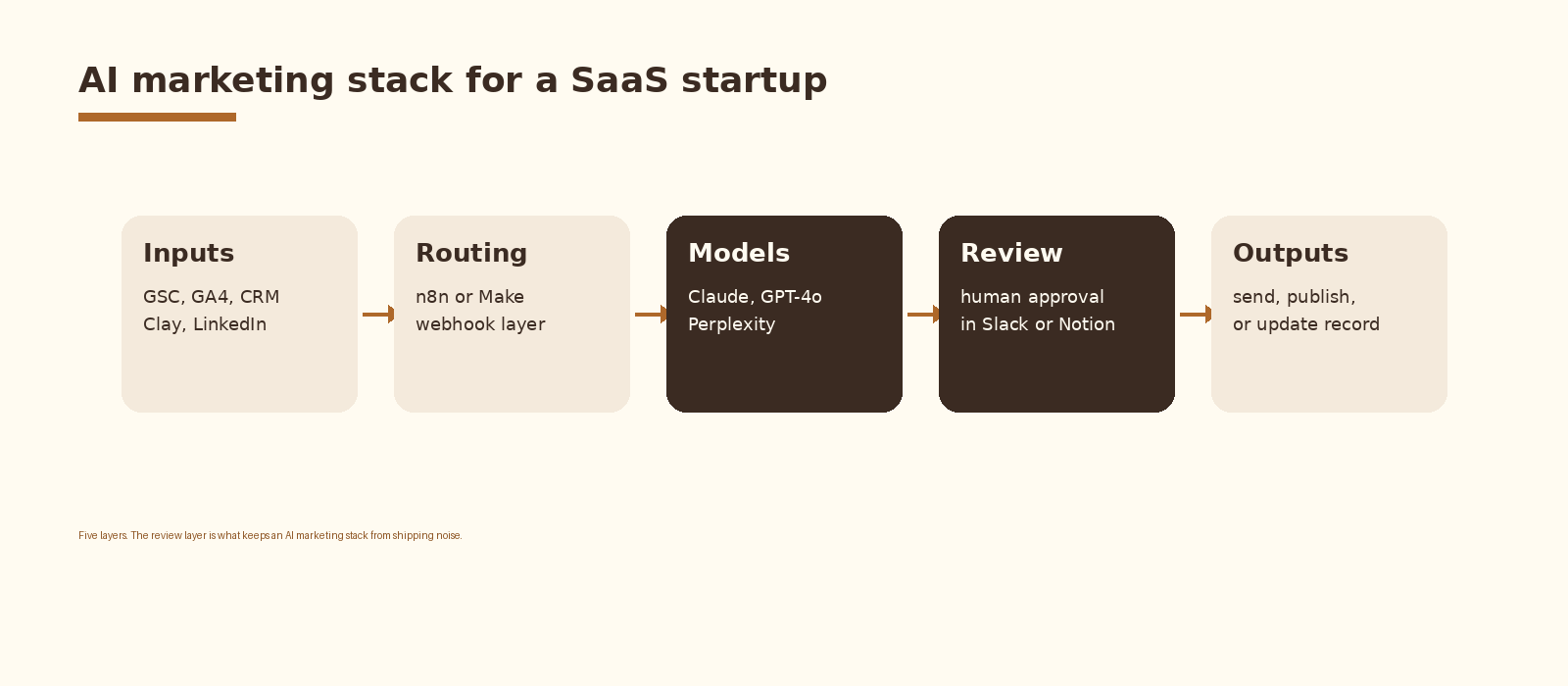
Five layers, each chosen for a reason. The input layer is whatever the company already pays for: GSC and GA4 for organic signals, HubSpot or Salesforce for the CRM, Clay for enrichment, LinkedIn Sales Navigator for outbound. The routing layer is n8n or Make. The model layer is Claude 3.5 Sonnet, GPT-4o, and Perplexity for anything that needs current web data.
The review layer matters more than any other choice. Every customer-facing workflow needs a human approval step in Slack or Notion before the output leaves the system. A draft email goes to a marketer’s inbox, a competitor brief lands in a Notion database, a blog post sits in HubSpot as a draft. The model writes the first 80 percent. The human owns the last 20 percent.
The output layer is whatever the rest of the stack already does: Beehiiv for newsletters, HubSpot or Salesforce for CRM updates, Webflow or the blog CMS for publishing, Instantly or Smartlead for email sends.
Seven workflows worth automating
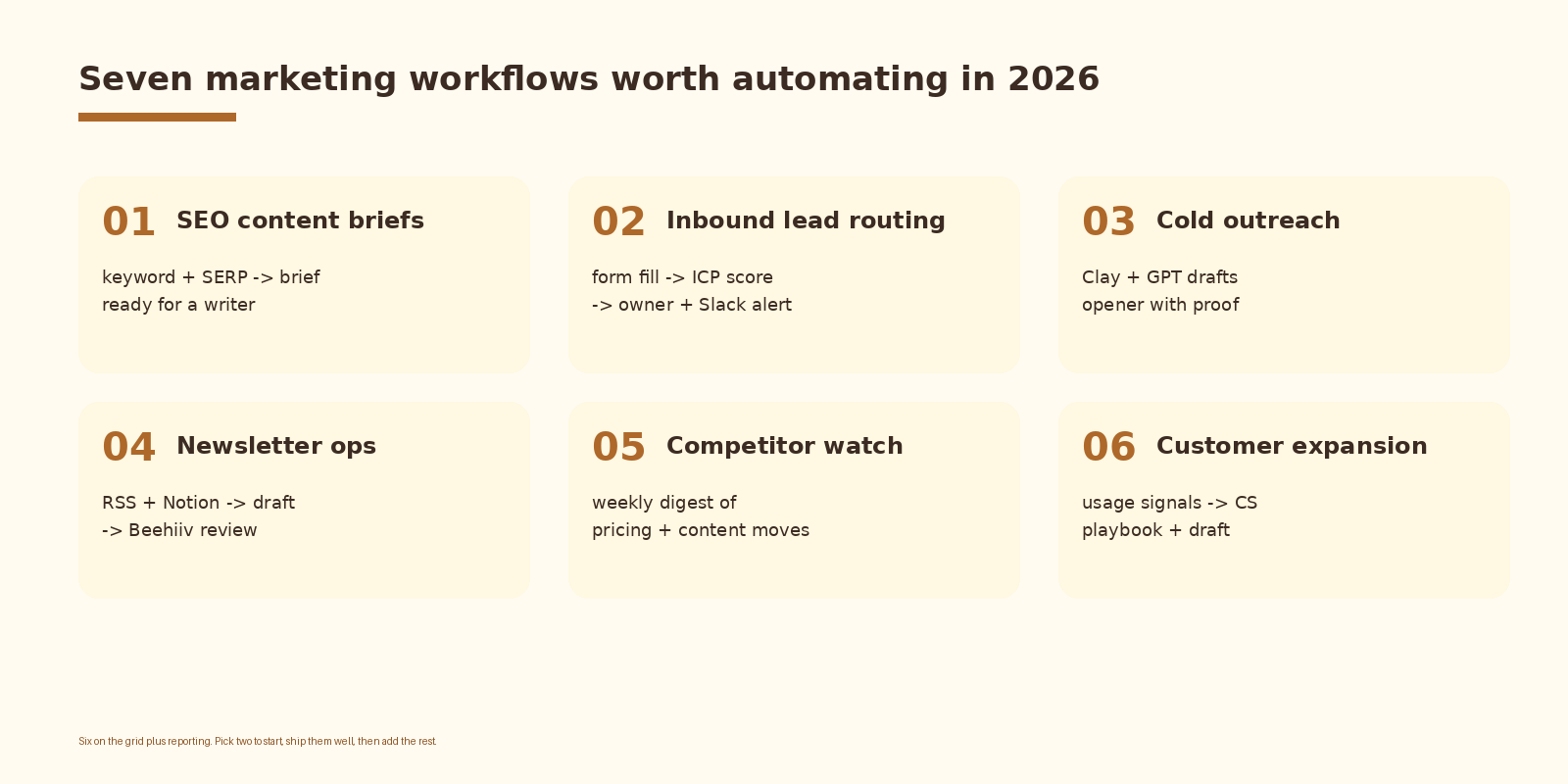
Each of these earns its keep when it saves three or more hours a week and produces output the marketing team would have shipped anyway. Workflows that save under an hour rarely survive a quarter.
1. SEO content briefs
Input: a target keyword. Output: a content brief in Notion with title options, an outline, entities to cover, internal links, and a success metric. The workflow pulls live SERP data, extracts the dominant ranking format, and asks Claude to write a brief that beats the top three results. A writer takes the brief from Notion and produces the article.
# n8n workflow: SEO content brief
# Trigger: webhook with {keyword, intent}
# 1. HTTP GET DataForSEO Live SERP for the keyword
# 2. Function: extract top 10 titles, H1s, meta descriptions
# 3. HTTP POST Perplexity for current-year statistics on the topic
# 4. Anthropic Claude 3.5 Sonnet: write brief with this schema:
#    - target keyword, intent, target audience
#    - title options (3)
#    - outline (H2/H3)
#    - entities to cover
#    - internal links from /blog/ sitemap
#    - success metric (rank within 90 days)
# 5. POST brief to Notion database "Content briefs", status = "ready for review"
# 6. Slack alert to #marketing: "Brief ready: {keyword}"
2. Inbound lead routing
Input: a form fill or a demo request. Output: a deal in HubSpot, an owner assigned by ICP fit, and a Slack alert to that owner. The workflow enriches the company through Clay, scores against the ICP using a prompt with your buyer profile baked in, and routes the lead to the right rep within minutes.
# Inbound lead routing (FastAPI + Claude + HubSpot)
@app.post("/leads/inbound")
async def route_lead(payload: dict):
    company = await enrich_company(payload["email"])
    score = await score_against_icp(company)
    deal_id = await create_hubspot_deal(payload, company, score)

    owner = pick_owner_by_score(score)
    await assign_hubspot_owner(deal_id, owner)
    await slack_alert(owner, deal_id, score)
    return {"ok": True}

def pick_owner_by_score(score: int) -> str:
    if score >= 85: return "ae_senior"
    if score >= 65: return "ae_mid"
    return "sdr_queue"
3. Cold outreach
Input: a lead list from Clay. Output: a personalized opener for each lead based on their LinkedIn activity, their company news, and your offer. Clay handles enrichment, GPT-4o or Claude writes the opener with a proof line, and the sequence ships through Instantly or Smartlead. A human reviews the first 50 sends before the sequence goes wide.
4. Newsletter ops
Input: an RSS feed of your blog plus a Notion database of internal updates. Output: a weekly newsletter draft in Beehiiv with the right subject lines and a working preview. The model writes the draft. A marketer reviews and sends. Beehiiv handles deliverability.
5. Competitor watch
Input: a list of competitors. Output: a weekly digest in Notion covering pricing changes, new pages, blog post velocity, and LinkedIn activity. Firecrawl or Perplexity handles the crawl. Claude writes the digest. The marketing team uses it for messaging and the sales team uses it for objection handling.
6. Customer expansion
Input: usage signals from your product database. Output: a CS playbook draft for accounts that hit an expansion trigger, with a recommended next step and a draft email to the account owner. The CS lead reviews and sends. The agent never sends customer-facing email directly.
7. Reporting
Input: GA4, GSC, HubSpot, and your billing system. Output: a weekly executive digest covering pipeline, MQLs, organic traffic, top content, and a short narrative of what changed. Five minutes to read on Monday morning.
What fails and what works
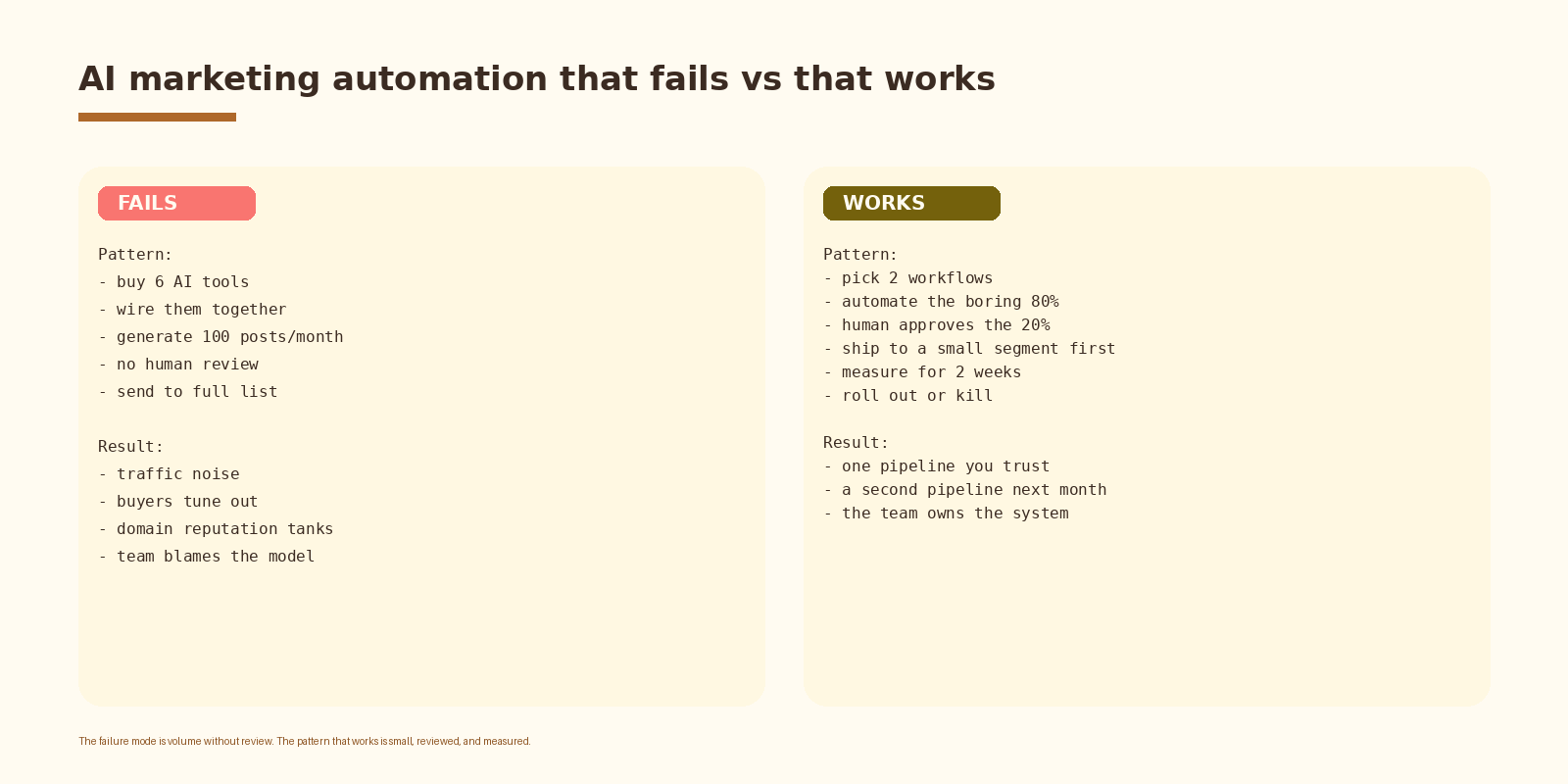
The failure pattern is recognizable: a SaaS team buys six AI tools, wires them together, generates 100 posts a month, and skips the human review step because review is the bottleneck. The result is traffic noise, buyers tune out, domain reputation drops, and the team blames the model.
The pattern that works starts smaller. Pick two workflows. Automate the boring 80 percent of each. Keep a human approval step for the 20 percent that matters. Ship to a small segment first. Measure for two weeks. Roll out or kill. Then repeat with the next two workflows.
If you want this set up cleanly inside your stack with logging, retries, and a feedback loop into the CRM, that is the kind of work we ship at Espressio.
How to evaluate a workflow
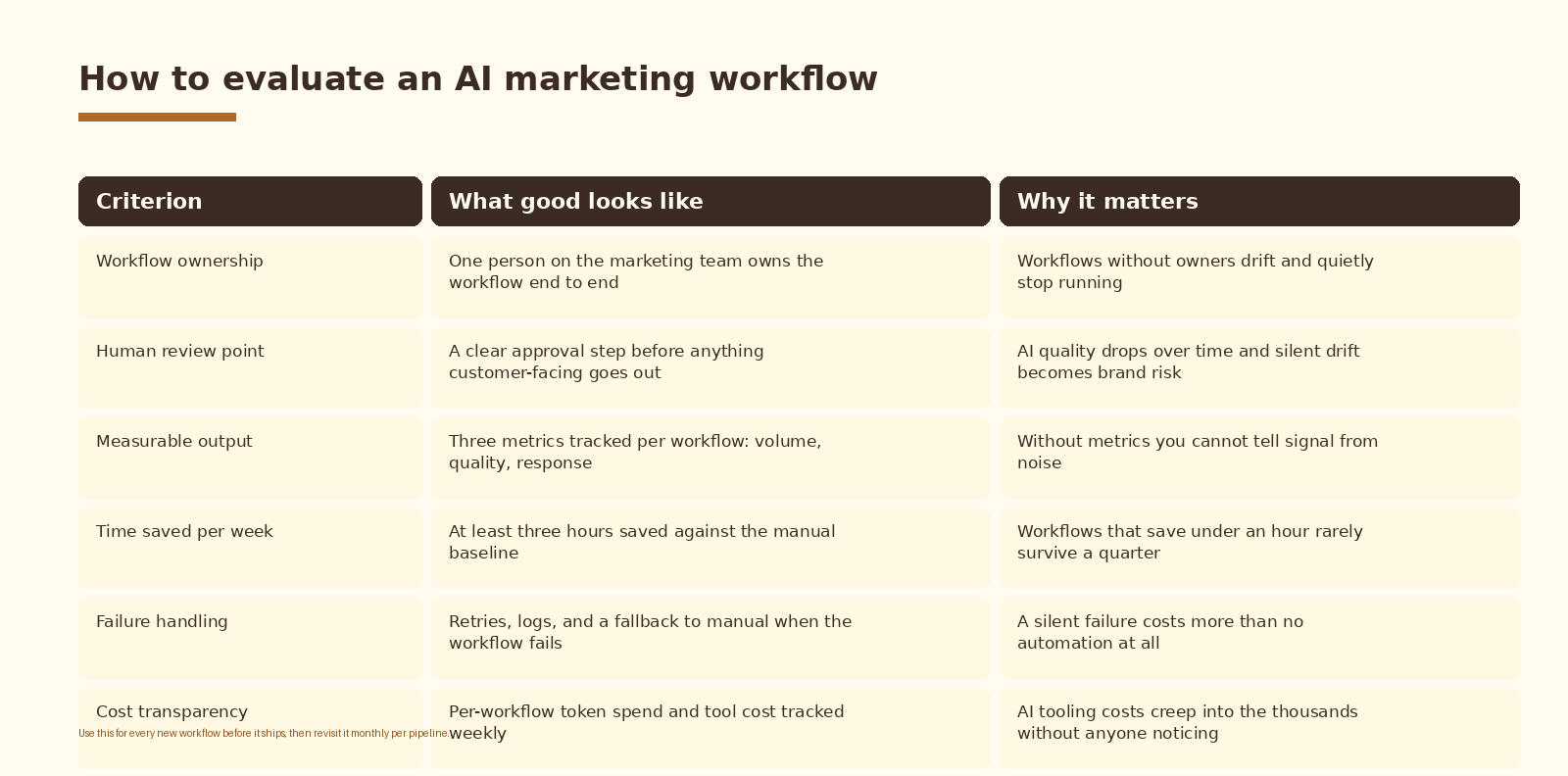
Use this rubric before any workflow ships and revisit it monthly per pipeline. A workflow that scores well on five criteria and fails on review point is not shippable. A workflow that saves under three hours per week stays a side project.
Common mistakes
- Starting with five workflows at once. Pick two, ship them well, then add the next two.
- Skipping the human review step on customer-facing outputs. Quality drifts, brand risk grows.
- Generating volume without measuring response. A workflow without metrics is a workflow you cannot defend.
- Treating the model choice as the project. The schema, the prompts, and the review loop matter more.
- Buying every new AI marketing tool. The stack should fit on one page and most of it is already paid for.
How to know it is working
Three signals tell you the AI marketing stack is paying back. The marketing team’s calendar opens up by 8 to 12 hours per person per week within 60 days. The volume of qualified output (briefs shipped, leads routed, newsletters sent) doubles without new headcount. And the quality scores on sampled outputs stay flat or improve, measured by a weekly review pass against the same rubric.
If any of those three lines flatten or reverse, something in the stack drifted. Most often it is the prompt against a new model release, the schema against a CRM property change, or the routing layer against a renamed webhook field.
FAQ
Where should a SaaS startup start?
Pick the two workflows where the team is losing the most hours right now. For most early-stage SaaS, that is SEO content briefs and inbound lead routing. Both have clear human review points, both produce measurable output, and both pay back inside 30 days.
n8n or Make?
Either works. n8n is closer to code and easier to self-host, which matters if you have sensitive data or want to run the routing layer inside your VPC. Make is more polished and faster to start with for a non-engineering marketing team. Pick the one your team will actually maintain.
Claude or GPT-4o?
Both are production-grade in 2026. Claude 3.5 Sonnet has the edge for long-form content briefs and structured summaries. GPT-4o has the edge for fast routing decisions and tool use. Many teams run both and pick the model per workflow.
How much budget should a SaaS startup put toward AI marketing tooling?
Most of the cost is model spend and existing SaaS tools. A two-workflow stack runs in the low hundreds per month at list prices for a startup with 1,000 to 5,000 leads through it. The bigger budget line is the engineering or operator time to build and tune the workflows over the first quarter.
Do we still need a marketing team if we automate seven workflows?
Yes. The team shifts from producer to operator. The marketers running the system spend their time on positioning, message-market fit, review of AI output, and the strategic calls that the model cannot make. The team gets smaller in headcount and stronger in influence on the company.
What to do next
-
- Audit how the marketing team spends its hours over one week. Find the two highest-cost workflows where AI review and approval can save three or more hours each.
-
- Map the input, model, review point, and output for each of those two workflows on one page.
-
- Pick the routing layer (n8n or Make) and stand it up against one test workflow.
-
- Build the first workflow with a human review step. Ship to a 10 percent segment. Measure for two weeks.
-
- If the metrics hold, roll it out. If they do not, debug the prompt and the schema before adding the next workflow.
-
- Add the second workflow only after the first one is running clean for 30 days.
If you want automation like this set up cleanly inside your marketing stack, let’s talk.
Related Espressio guides
- How to Build a Deal Briefing Agent with Fireflies and LangChain -> https://espressio.ai/blog/deal-briefing-agent-fireflies-langchain/
- How to get started with AI automation -> https://espressio.ai/blog/how-to-get-started-with-ai-automation/
- Automate SEO content briefs with Perplexity and Claude -> https://espressio.ai/blog/automate-seo-content-briefs-perplexity-claude/
- Claude + Zapier marketing automation -> https://espressio.ai/blog/claude-zapier-marketing-automation/
- LinkedIn content automation with Claude and Make -> https://espressio.ai/blog/linkedin-content-automation-claude-make/
- Beehiiv newsletter automation with AI -> https://espressio.ai/blog/beehiiv-newsletter-automation-ai/