



Luka Mrkić
Head of BD
Insights, strategies, and real-world playbooks on AI-powered marketing.
JUN 4, 2026
How to Build a Deal Briefing Agent with Fireflies and LangChain
TL;DR
- A deal briefing agent listens to your sales calls through Fireflies, then writes a one-page brief that the AE reads before the next meeting.
- The build has four parts: a Fireflies webhook, a transcript fetch, a LangChain summarization chain with structured output, and a CRM write-back.
- The brief schema is fixed at six blocks: snapshot, buyer context, last call summary, open questions, risk signals, next step.
- The brief lands on the deal record in HubSpot or Salesforce within five minutes of the call ending.
- Quality comes from the schema and the eval loop. The model choice is secondary.
If you are evaluating who should build this for your team, this guide gives you both the technical blueprint and the standards to evaluate the work.
What a deal briefing agent actually does
An account executive walks into a second call with a buyer. The first call happened nine days ago. The AE has six other deals in flight. The CRM has a transcript link, two action items, and a note that says “follow up on pricing”. That is the starting point for most teams.
A deal briefing agent closes that gap. It listens to the call through Fireflies, reads the transcript the moment the meeting ends, pulls the matching deal from HubSpot or Salesforce, and writes a single page that the AE can read in two minutes before the next meeting.
The brief sits on the deal record where reps already look. It names the open questions in the buyer’s own words, flags risk signals like pricing pushback or sudden silence, and gives the next step an owner, a date, and a success criterion.
Architecture
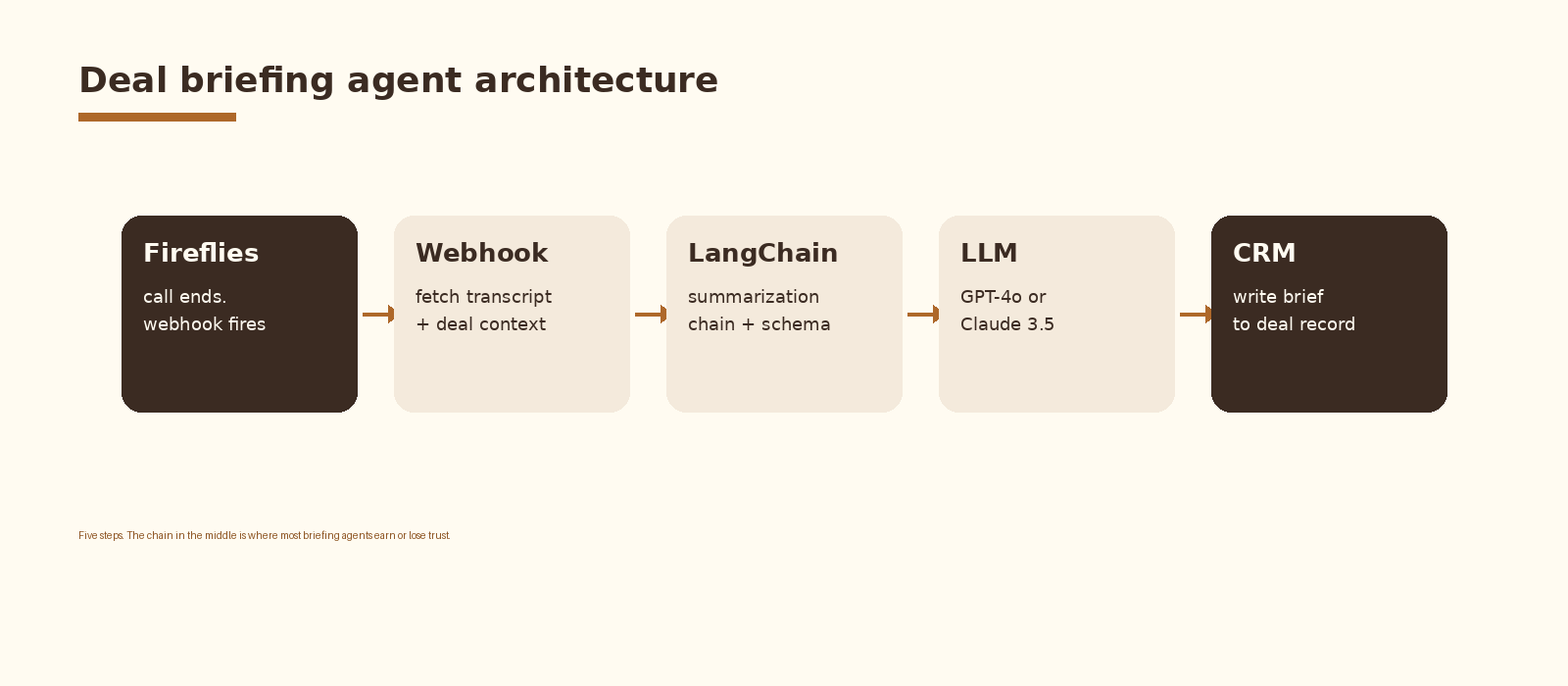
The pipeline has five moving parts. Fireflies fires a webhook when a transcript is ready. A small webhook service fetches the transcript and the matching deal context from the CRM. A LangChain summarization chain runs against the transcript, with the deal context and the brief schema as inputs. The chain calls an LLM (GPT-4o or Claude 3.5 Sonnet by default) and returns a structured object. The webhook service writes that object back to the deal record as a note.
Latency budget is roughly five minutes from call end to brief on the deal. The webhook fires within seconds, the transcript fetch takes 1 to 3 seconds, and the LangChain call runs in 20 to 40 seconds depending on transcript length. The rest is network and CRM write.
What goes in a useful brief
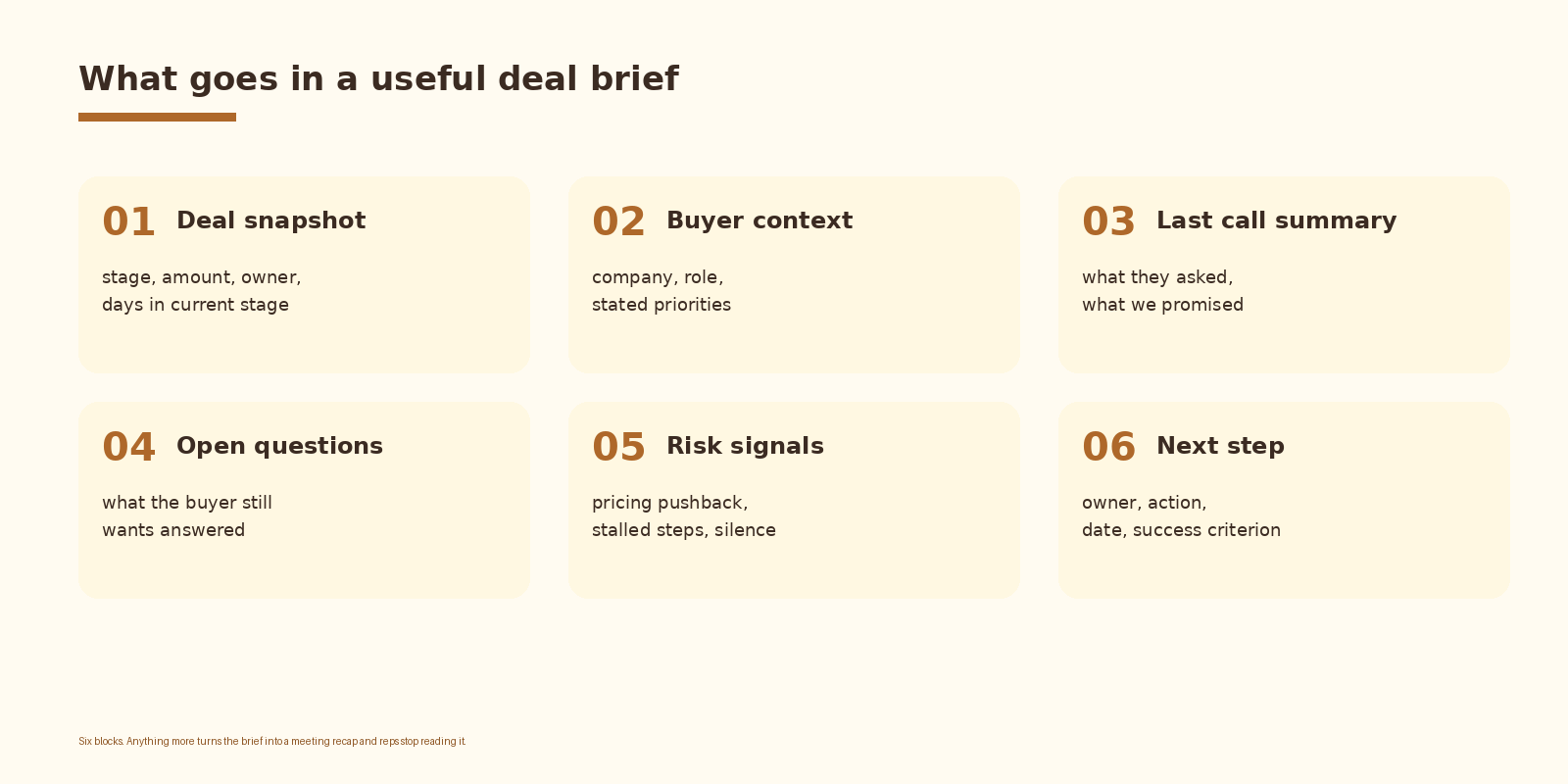
The brief has six blocks. Snapshot is the deal at a glance: stage, amount, owner, days in current stage. Buyer context names the company, the buyer’s role, and their stated priorities. Last call summary captures what the buyer asked and what your team promised.
Open questions is the part reps actually use. Pull each question from the buyer’s own words in the transcript. Risk signals call out pricing pushback, stalled steps, champion silence, or owner changes. Next step is one action with an owner, a date, and a success criterion the AE can hold themselves to.
Anything beyond these six blocks turns the brief into a meeting recap and reps stop reading it. The whole point of the brief is that it fits on one screen and answers the question “what do I need to do on this call?”
Step 1: Set up the Fireflies webhook
Fireflies fires a webhook when transcription completes. Register the endpoint in the Fireflies settings under integrations. The webhook payload includes the meeting ID, the event type, and the timestamp. Pull the full transcript through the Fireflies GraphQL API using the meeting ID.
from fastapi import FastAPI, Request
import httpx, os

app = FastAPI()
FF_KEY = os.environ["FIREFLIES_API_KEY"]

@app.post("/fireflies/webhook")
async def fireflies_webhook(req: Request):
    payload = await req.json()
    if payload.get("eventType") != "Transcription completed":
        return {"ok": True}
    meeting_id = payload["meetingId"]

    query = """query($id: String!) {
      transcript(id: $id) {
        id title duration
        sentences { speaker_name text }
        meeting_attendees { email name }
      }
    }"""
    async with httpx.AsyncClient() as c:
        r = await c.post(
            "https://api.fireflies.ai/graphql",
            headers={"Authorization": f"Bearer {FF_KEY}"},
            json={"query": query, "variables": {"id": meeting_id}},
        )
    transcript = r.json()["data"]["transcript"]
    await run_briefing_pipeline(transcript)
    return {"ok": True}
Guard the endpoint with a shared secret or a signature header. The Fireflies docs cover signature verification in the webhook reference. Drop any payload whose event type is not “Transcription completed” so demo recordings and partial events do not trigger a brief.
Step 2: Build the LangChain summarization chain
The chain has three inputs: the system prompt with the brief schema and the writing rules, the deal context pulled from the CRM, and the transcript text. The output is a structured DealBrief object validated by Pydantic.
from langchain_openai import ChatOpenAI
from langchain_core.prompts import ChatPromptTemplate
from pydantic import BaseModel, Field
from typing import List

class NextStep(BaseModel):
    action: str
    owner: str
    due_date: str
    success_criterion: str

class DealBrief(BaseModel):
    snapshot: str = Field(..., description="stage, amount, owner, days in stage")
    buyer_context: str
    last_call_summary: str
    open_questions: List[str]
    risk_signals: List[str]
    next_step: NextStep

system = """You write deal briefs for B2B account executives.
Read the transcript and the deal context. Fill the schema exactly.
Quote the buyer's own words when capturing open questions.
Never invent names, amounts, or commitments that are not in the transcript.
If a field is unknown, say "unknown"."""

prompt = ChatPromptTemplate.from_messages([
    ("system", system),
    ("human", "DEAL CONTEXT:\n{deal}\n\nTRANSCRIPT:\n{transcript}"),
])

llm = ChatOpenAI(model="gpt-4o", temperature=0.1)
chain = prompt | llm.with_structured_output(DealBrief)

brief = chain.invoke({"deal": deal_context_json, "transcript": transcript_text})
Structured output is the lever that makes this reliable. LangChain’s with_structured_output binds the Pydantic schema to the LLM call, so the model returns JSON that already matches the brief format. No regex cleanup, no string parsing, no missing sections.
Temperature stays low (0.1 by default) because the goal is faithful summarization. Quote the buyer’s own words for open questions, mark unknown fields as “unknown”, and never invent names, amounts, or commitments. These three rules in the system prompt do most of the work of preventing hallucinations.
If you want this set up cleanly inside your stack with logging, retries, and a feedback loop into a CRM, that is the kind of work we ship at Espressio.
Step 3: Write the brief back to the CRM
The brief belongs on the deal record. In HubSpot, post a note associated with the deal using the CRM v3 API. In Salesforce, post a Chatter feed item or a Note record attached to the Opportunity. Render the structured brief as plain HTML with six section headings so it shows up cleanly in the CRM UI.
import httpx, os, json

HUBSPOT_TOKEN = os.environ["HUBSPOT_PRIVATE_APP_TOKEN"]

async def write_brief_to_deal(deal_id: str, brief: DealBrief):
    note_html = render_brief_html(brief)  # plain HTML with six headings
    async with httpx.AsyncClient() as c:
        note = await c.post(
            "https://api.hubapi.com/crm/v3/objects/notes",
            headers={"Authorization": f"Bearer {HUBSPOT_TOKEN}"},
            json={
                "properties": {
                    "hs_note_body": note_html,
                    "hs_timestamp": int(time.time() * 1000),
                },
                "associations": [{
                    "to": {"id": deal_id},
                    "types": [{"associationCategory": "HUBSPOT_DEFINED",
                               "associationTypeId": 214}],
                }],
            },
        )
    return note.json()["id"]
Salesforce is the same shape with different endpoints. Use the Connect REST API for Chatter posts, or sObject Notes for static attachments. Either way, the brief lands on the Opportunity record where the AE is already going to look.
Weak summary vs strong brief
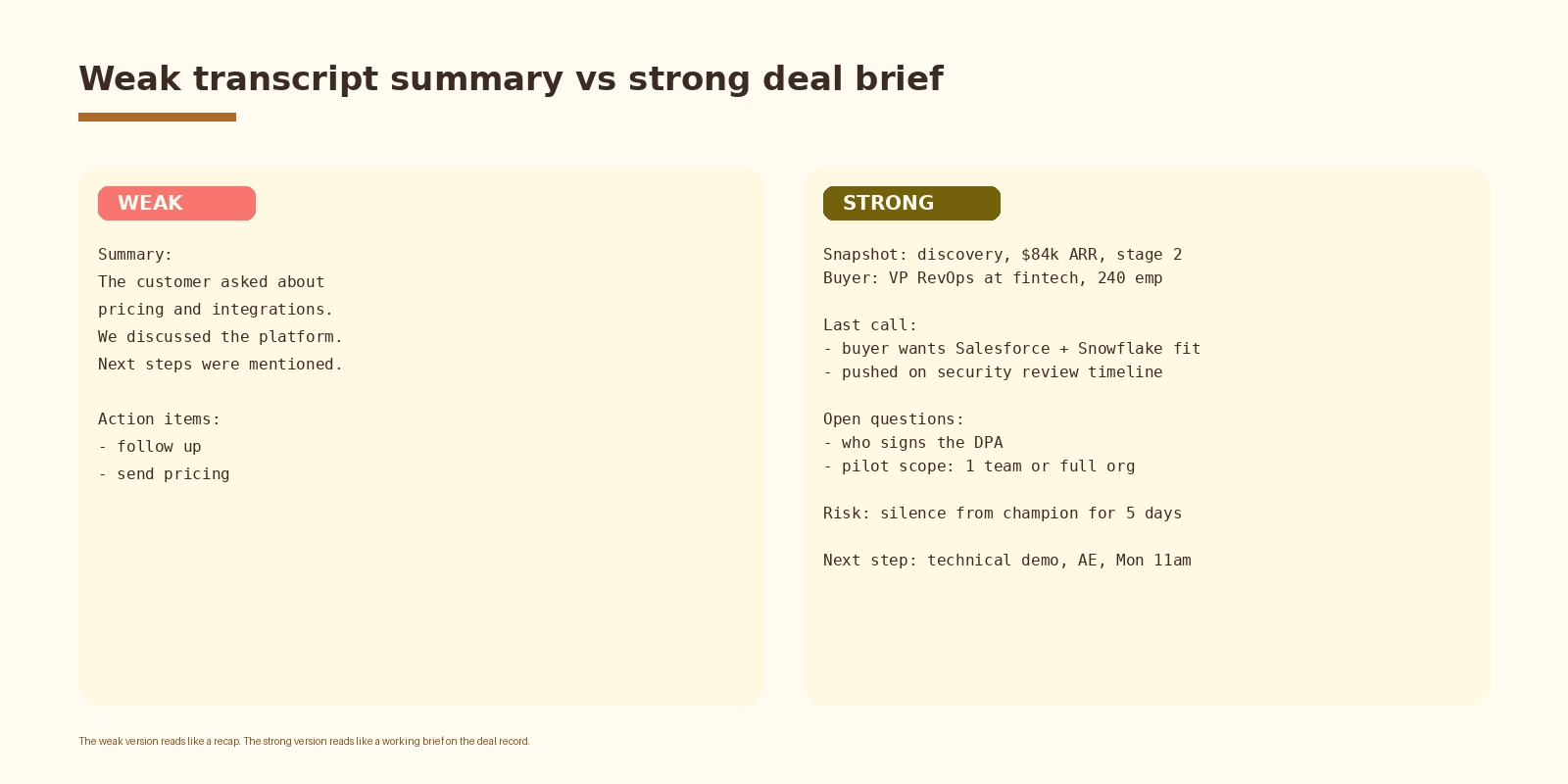
The difference is not the model. Both versions can come out of the same GPT-4o call. The difference is the schema and the rules in the system prompt. The weak version is what you get when the prompt says “summarize this call” and nothing else. The strong version is what you get when the prompt names six fields, tells the model to quote the buyer, and forbids inventing details.
How to evaluate the build
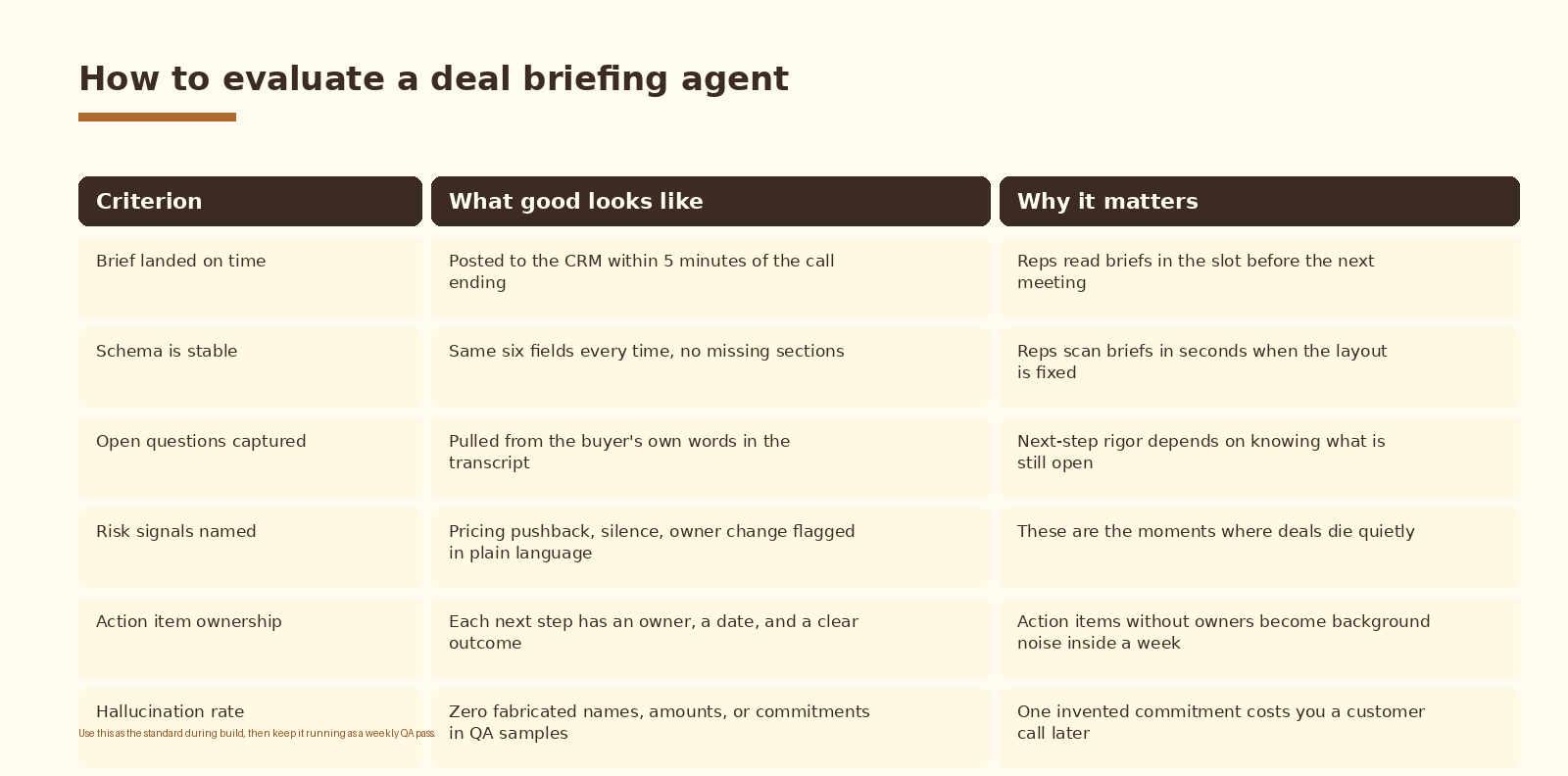
Use this scorecard during the build and as a weekly QA pass after the agent is live. Sample 5 to 10 briefs per week, compare each one against the source transcript, and score against the six criteria. A brief that scores well on five and fails on hallucination rate is not shippable. One invented commitment costs you a customer call later.
Common mistakes
- Letting the brief grow past six blocks. Once it stops fitting on one screen, reps stop reading it.
- Summarizing in the model’s voice on open questions. Reps need the buyer’s own words to keep the signal.
- Skipping the CRM write-back and emailing the brief instead. The deal record is where reps already look.
- Running the LangChain call without structured output. JSON parsing breaks on every fourth call and the agent silently drops briefs.
- Scoring vendors on demo polish when the deciding signals are eval cadence and hallucination rate on real transcripts.
How to know it is working
Three signals tell you the agent is earning its keep. Time-to-brief stays under five minutes on the median call. Hallucination rate on sampled briefs stays at zero. AE next-step quality, measured by the share of next steps that have an owner, a date, and a success criterion, climbs above 80 percent within the first month.
Track these in a weekly QA dashboard. The agent will quietly drift when Fireflies changes a payload field, when a new LLM model rolls out, or when the CRM schema gains a new required property. Weekly QA catches that drift before it becomes a sales-floor problem.
FAQ
Can I use Otter or Gong instead of Fireflies?
Yes. The webhook and transcript fetch change, but the LangChain chain and the CRM write-back stay the same. Gong’s API returns richer call metadata including topic spotlights and deal warnings, which can feed straight into the risk signals block. Otter is the closest drop-in for a Fireflies replacement on the webhook side.
Why LangChain and not a plain OpenAI call?
Two reasons. Structured output through Pydantic is a one-line change in LangChain and keeps the schema enforcement clean. And the chain primitive makes it straightforward to swap models, add a retry, log each step, or insert an eval node without rewriting the call site.
How do you handle long calls that exceed the context window?
Chunk the transcript by speaker turn into roughly 8k-token blocks, summarize each block into a compact intermediate brief, then run a final summarization pass over the intermediate briefs with the same schema. LangChain’s map-reduce pattern handles this with a few extra lines.
What about privacy and consent?
Fireflies handles meeting recording disclosure at the call level. The deal briefing agent inherits that consent posture. If you operate in the EU or under HIPAA, route the LangChain call through a model endpoint that meets your data residency requirements (Azure OpenAI in the EU region, Anthropic on AWS Bedrock, or a self-hosted model) and document the data flow in your DPA.
How much does the agent cost to run?
Most of the cost is the LLM call. A 40-minute call yields a transcript of roughly 6,000 to 9,000 tokens. At GPT-4o list pricing, each brief costs in the cents range. Fireflies and CRM API calls are negligible. The bigger cost is the eng time to build, monitor, and iterate the chain over the first three months.
What to do next
-
- Confirm Fireflies is recording the calls you want briefed. Trial accounts skip some integrations.
-
- Pick a CRM target object and write the six-block HTML template by hand for one real deal. Show it to two AEs and get reactions.
-
- Stand up the FastAPI webhook on a small instance, log payloads for a day, and confirm the Fireflies event types you see in production.
-
- Build the LangChain chain locally against three saved transcripts. Score the outputs against the rubric before wiring up the CRM write.
-
- Ship the CRM write-back behind a feature flag. Let one AE see the briefs for a week before rolling out to the team.
-
- Stand up the weekly QA pass. Sample 5 briefs, score them, and tune the system prompt against the failures.
If you want automation like this set up cleanly inside your sales and revenue ops stack, let’s talk.
Related Espressio guides
- How to Automate Marketing for SaaS Startups with AI in 2026 -> https://espressio.ai/blog/automate-marketing-saas-startups-ai-2026/
- Fireflies + Claude sales call summaries -> https://espressio.ai/blog/fireflies-claude-sales-call-summaries/
- LangChain lead qualification agent -> https://espressio.ai/blog/langchain-lead-qualification-agent/
- Automate follow-up sequences from sales calls with AI -> https://espressio.ai/blog/automate-followup-sequences-sales-calls-ai/
- Claude + HubSpot sales follow-up -> https://espressio.ai/blog/claude-hubspot-sales-followup/
- HubSpot AI ICP scoring model -> https://espressio.ai/blog/hubspot-ai-icp-scoring-model/



