



Luka Mrkić
Head of BD
Insights, strategies, and real-world playbooks on AI-powered marketing.
JUN 3, 2026
How to Build a CRM Enrichment Pipeline with HubSpot and ChatGPT
TL;DR
- A CRM enrichment pipeline catches every new HubSpot contact or company, fetches firmographic and web signals from outside sources, asks ChatGPT to structure and classify the data into named HubSpot properties, scores ICP fit, and writes the result back to the record with the routing owner attached.
- HubSpot handles capture, storage, and routing. A small backend (n8n, Make, or a serverless function) handles dedupe, source fetches, and writes. ChatGPT does the read: turning a sparse contact into the eight or so fields the GTM team actually uses to segment, score, and route.
- A useful first build covers inbound contacts for one segment. It runs the moment a contact is created, costs single digit cents per record, and pays back the first week when a real ICP-fit lead lands on the right rep within minutes.
- The pipeline is five steps: trigger, validate, fetch, classify, write. The hard parts are the source mix and the field schema.
- This guide ships the architecture, the ChatGPT prompt that holds up in production, the six fields worth writing back, and the six checks that tell you the pipeline is still working.
If you are evaluating who should build this for your team, this guide gives you both the technical blueprint and the standards to evaluate the work.
What a CRM enrichment pipeline actually does
A CRM enrichment pipeline watches every new contact and company that lands in HubSpot, gathers outside signals about that record, and writes back the fields the revenue team uses to qualify, segment, and route. The output is not a long text note. It is six to ten named HubSpot properties. Industry. Segment. Headcount band. Revenue band. ICP fit score. Fit reason. Tech stack signals. Buying intent signals. Routing owner.
The old way of doing this was a sales rep or SDR opening a new contact, switching tabs to LinkedIn, scrolling the company website, guessing the industry, picking a fit rating from gut, and typing the answer into HubSpot if they remembered. The cadence was uneven, the data was thin, and most lists were unsegmentable within two quarters.
The automated version writes the same eight fields on every contact within minutes of creation. The CRM stays segmentable. The fit score routes the lead before the next morning standup. The rep keeps the conversation. The model handles the typing and the lookup.
Architecture
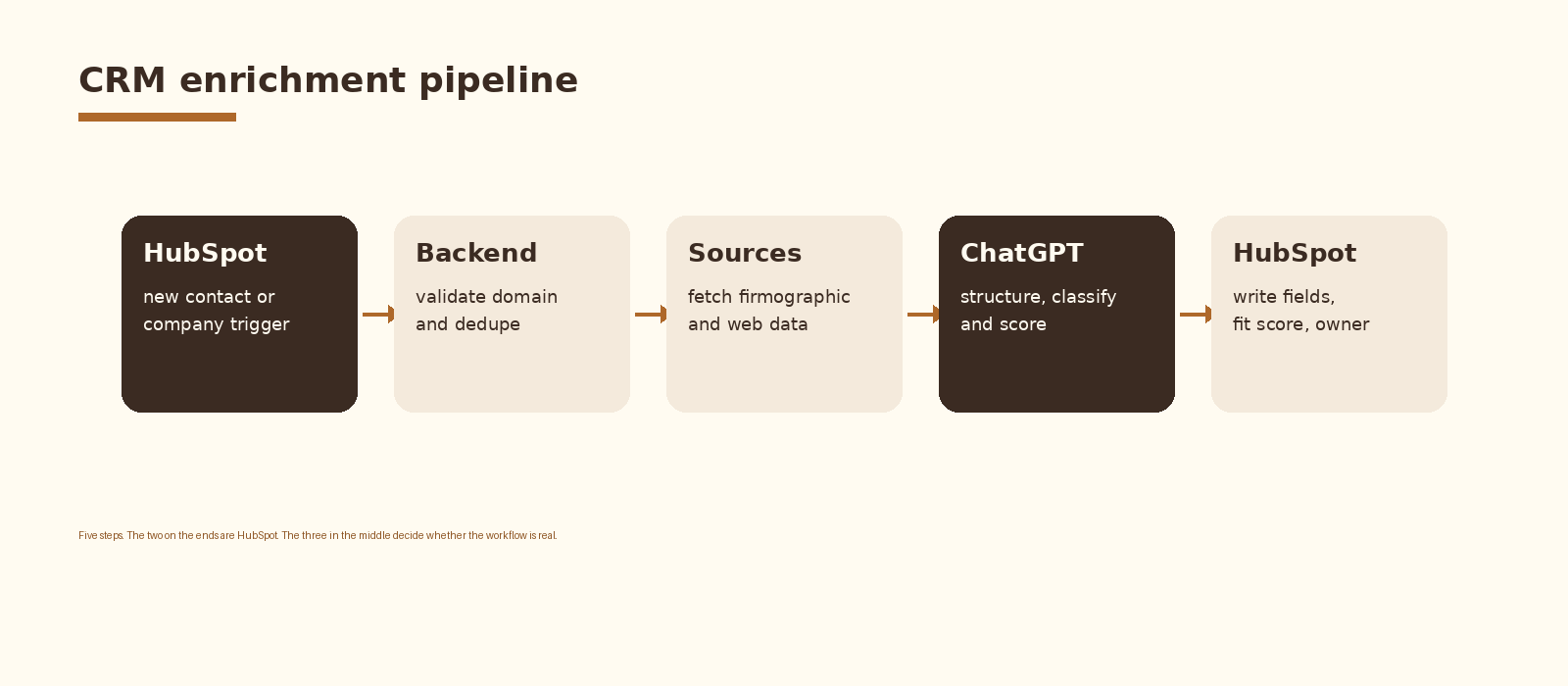
Five components inside one pipeline. HubSpot fires a webhook when a new contact or company is created. The backend validates the email domain, deduplicates against existing records, and decides whether the record is worth enriching. A source-fetch step pulls firmographic data, website content, and recent web signals into one bundle. ChatGPT reads that bundle and returns structured JSON. A HubSpot write step updates the named properties, sets the fit score, and assigns the routing owner. A log row closes the loop so you can audit which records were enriched and which were skipped.
Step 1. Trigger on the right HubSpot events
HubSpot supports webhooks for contact and company creation and for property changes. Subscribe to contact.creation and company.creation as the default. Add property change subscriptions later, once the create path is stable, so you can re-enrich on signals like a fresh email_domain or a new job title. The webhook payload includes the object id, the create timestamp, and the changed properties. The id is the only field the rest of the pipeline needs.
Two filters earn their keep on day one. Skip records whose email domain is on the free-mail list. Skip records whose company already has a recent enrichment timestamp. The cost saved per skipped record is small, but the noise reduction in the audit log is enormous.
Step 2. Validate the domain and dedupe
A contact without a real domain is not a candidate for enrichment. Pull the email, take the domain, reject free-mail providers and anything that does not resolve. Then look up the existing company in HubSpot by domain. If a company record exists, attach the contact to it and read its existing enrichment fields. If not, create the company record so the enrichment writes have a clean target.
// Webhook handler sketch (Vercel / Node)
export default async function handler(req, res) {
  for (const evt of req.body) {
    if (evt.subscriptionType !== 'contact.creation') continue;
    const contact = await hubspot.crm.contacts.basicApi.getById(
      evt.objectId, ['email', 'firstname', 'lastname', 'jobtitle']
    );
    const domain = (contact.properties.email || '').split('@')[1];
    if (!domain || FREEMAIL.has(domain)) continue;
    const company = await upsertCompanyByDomain(domain);
    const sources = await fetchSources({ domain, company });
    const enriched = await classifyWithGPT({ contact, company, sources });
    await writeBackToHubSpot({ contact, company, enriched });
  }
  res.status(200).json({ ok: true });
}
Step 3. Fetch firmographic and web signals
The model needs evidence to classify. The cleanest source mix for a first build is three layers. The first is a firmographic provider for industry, headcount, and revenue band. Clearbit, Apollo, Crustdata, and ZoomInfo all expose this through a single domain lookup. The second is the company website itself: a Firecrawl or simple HTTP fetch of the homepage and the about page gives you the company’s own framing. The third is a recent-signals layer: job posts, funding announcements, and product launches scraped from LinkedIn or pulled from a signals API.
Treat each source as a labeled block in the prompt input. The model needs to know which claim came from which source so the output can preserve provenance. Source attribution is the single field most enrichment pipelines skip, and it is the field that lets the team trust the data three months later.
Step 4. Classify with ChatGPT
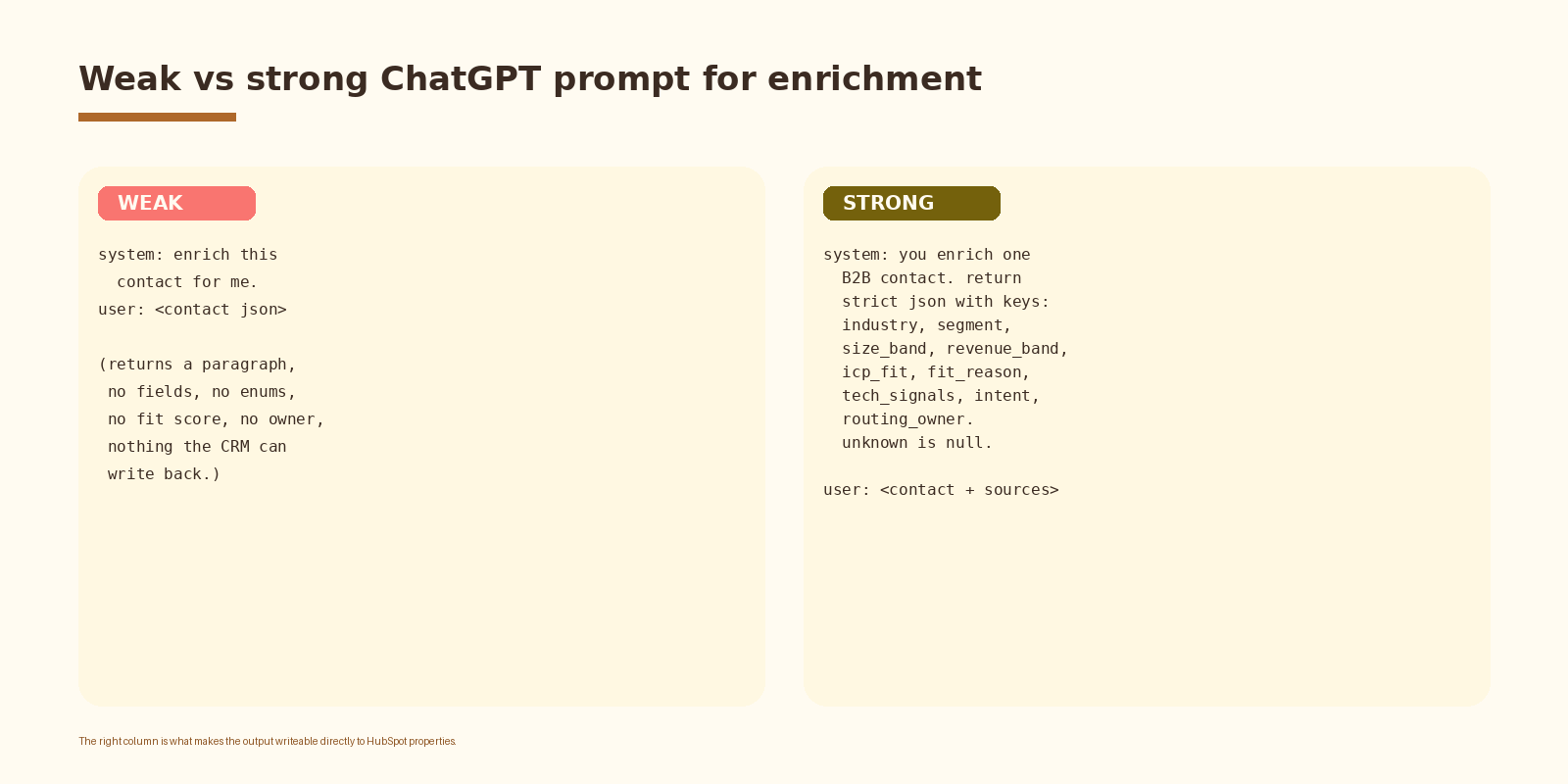
This is the step that earns the build. A weak prompt asks ChatGPT to enrich the contact and returns a paragraph the rep skims and ignores. A strong prompt asks for strict JSON with eight to ten named fields, uses the OpenAI structured outputs feature, and returns something the HubSpot write step can map directly to properties.
// OpenAI chat completions payload
{
  "model": "gpt-4.1",
  "response_format": { "type": "json_object" },
  "messages": [
    {
      "role": "system",
      "content": "You enrich one B2B contact. Return strict JSON with keys: industry (normalized), segment (smb|mid|ent), size_band (1-10|11-50|51-200|201-1000|1000+), revenue_band (<1m|1-10m|10-50m|50-250m|250m+), icp_fit (low|medium|high), fit_reason (one sentence), tech_signals (array), intent_signals (array), routing_owner (sales|founder_led|disqualify). If a field is unknown, return null. Do not invent. Cite the source label for each non-null field in a sources object."
    },
    {
      "role": "user",
      "content": "Contact: " + JSON.stringify(contact) + "\n\n" +
        "Company: " + JSON.stringify(company) + "\n\n" +
        "[firmographic]\n" + firmographic + "\n\n" +
        "[website]\n" + websiteText + "\n\n" +
        "[signals]\n" + signalsText
    }
  ]
}
Three details to lock in. The system prompt names the enum values for every constrained field so the model cannot drift to a new segment label next month. The user message labels each source block so the model can attribute claims. The unknown-is-null rule blocks the model from inventing a revenue band when the firmographic provider returned nothing. Without that rule, the CRM fills up with confident-sounding fiction and the segmentation breaks quietly.
If you want this set up cleanly inside your stack with logging, retries, and a feedback loop into a CRM, that is the kind of work we ship at Espressio.
Step 5. Write back to HubSpot
The write step is mechanical and high-leverage. Map each JSON key to a HubSpot property on the contact and the company. Set the ICP fit score and the fit reason on the contact. Update the routing owner so the lead lands on the right rep. Stamp an enriched_at timestamp so a future re-enrichment skips fresh records. Done.
// HubSpot write
await hubspot.crm.contacts.basicApi.update(contact.id, {
  properties: {
    icp_fit: enriched.icp_fit,
    icp_fit_reason: enriched.fit_reason,
    routing_owner: enriched.routing_owner,
    enriched_at: new Date().toISOString(),
  },
});
await hubspot.crm.companies.basicApi.update(company.id, {
  properties: {
    industry_normalized: enriched.industry,
    segment: enriched.segment,
    size_band: enriched.size_band,
    revenue_band: enriched.revenue_band,
    tech_signals: (enriched.tech_signals || []).join(';'),
    intent_signals: (enriched.intent_signals || []).join(';'),
  },
});
One design choice worth defending. Store the source label for every non-null field in a separate property or a structured note. Three months in, when a rep asks why the company is tagged as enterprise, the answer needs to be one click away. A pipeline that cannot explain its own fields is a pipeline the team will stop trusting.
Fields a useful enrichment pass always writes
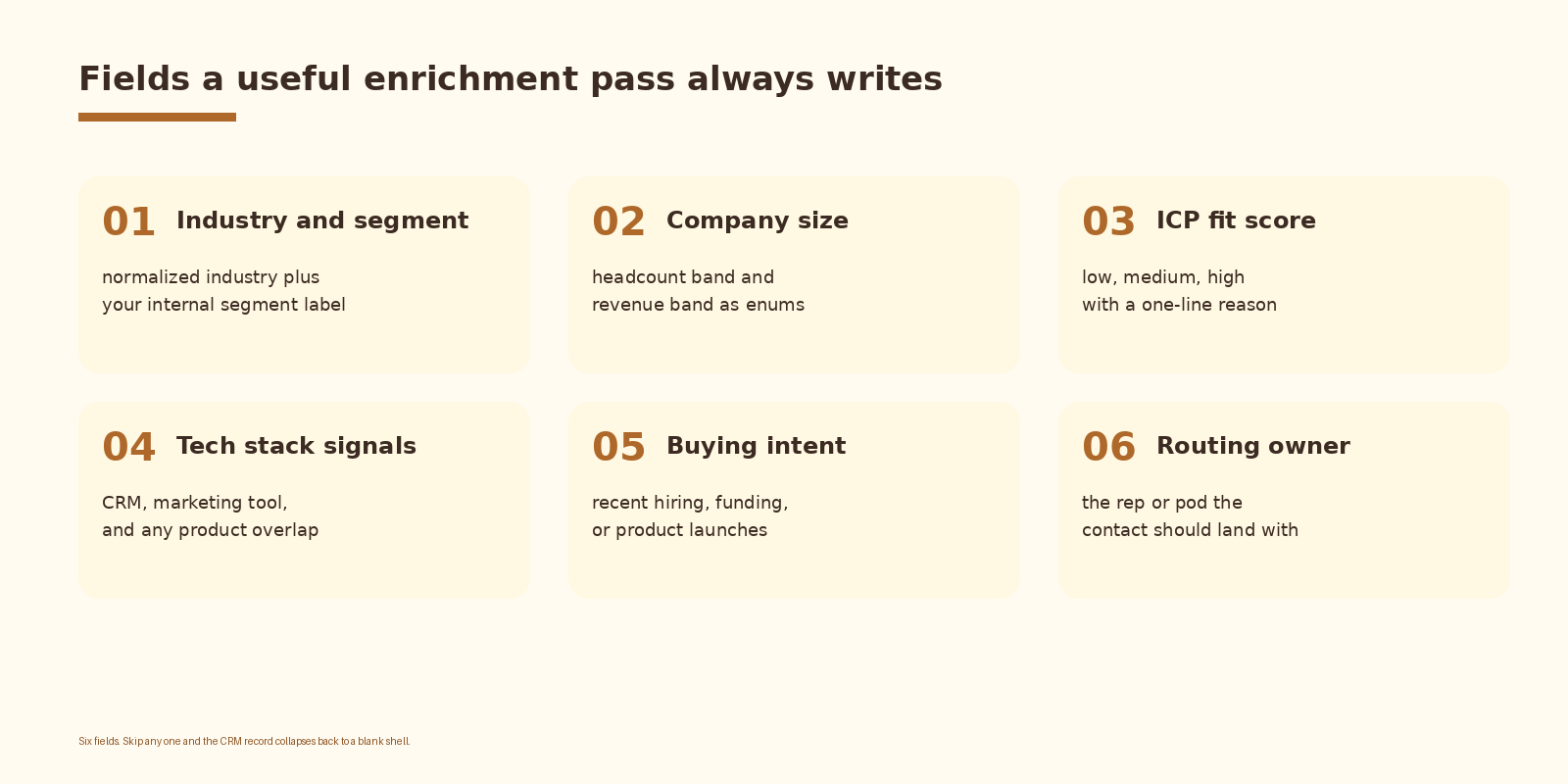
Six fields are enough for the first version. Industry and segment are the two that pay back the build fastest because they drive every list, every report, and every routing rule. ICP fit is the third because a score that predicts deals is the cleanest proof of value. The other three earn their keep once the first three are reliable and stable.
Common mistakes
- Asking for a free-form paragraph. HubSpot properties cannot read prose. Lock the schema and require strict JSON.
- Skipping the dedupe step. Without it, the same company gets enriched five times and the writes race each other.
- Letting the model invent fields. Without an explicit unknown-is-null rule, the CRM fills up with plausible fiction.
- Writing without source attribution. Three months later, nobody trusts a field they cannot explain.
- Picking enum values the model can drift away from. Constrain the segment, size band, and revenue band to a fixed list.
- No log. When the enrichment quality slips, you need to read the input the model saw.
How to know it is working
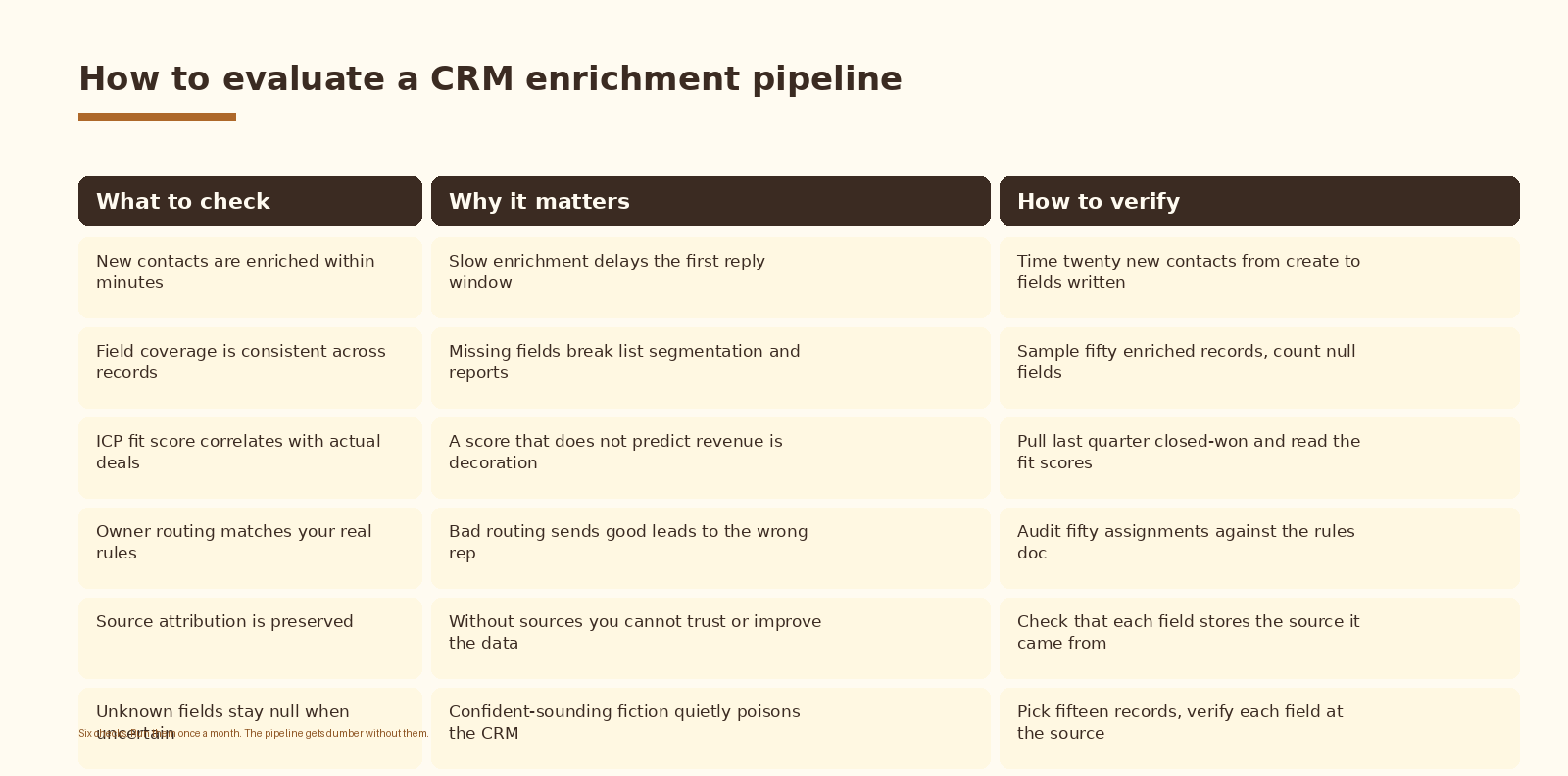
Coverage is the first metric: what fraction of new contacts get all six core fields written within ten minutes of creation. Track it weekly. The second is ICP fit predictive accuracy: pull last quarter’s closed-won deals and read the fit scores the model assigned at the time. If a high share of closed-won was tagged low, the prompt is wrong about the ICP. Retune the system message before you blame the data.
FAQ
Why ChatGPT and not Claude, Gemini, or a fine-tuned model?
ChatGPT (the OpenAI API) has the cleanest JSON mode, strong function calling, and reliable enum constraint behavior at a price that lets a single team start without procurement. Claude is the right answer when the input bundle gets long or when the JSON contract gets nested; the prompt translates one for one. Gemini is fine and cheaper at scale; the integration shape is the same. A fine-tuned model is overkill for first-version enrichment and adds an evaluation loop most teams are not ready to run yet.
Which OpenAI model should I use?
GPT-4.1 handles the full source bundle reliably and keeps the JSON contract under load. GPT-4o-mini is fast and cheap and is usually enough once the prompt is stable and the source layers are clean. Start on the larger model, lock the prompt, then run a side-by-side on a hundred records and switch to the smaller one when the outputs match. Save the smarter model for the records where the firmographic source returned nothing.
How do we handle records the model is unsure about?
Two options. The first is to write null for the uncertain fields and route the record to a review queue for the RevOps lead. The second is to write a low confidence flag alongside the field and let the rep see it on the record. The review queue is the safer default until volume forces an automated split. Either way, never let an unsure model write a high-confidence-looking value into HubSpot.
What does this cost to run?
Two cost lines: the firmographic source and the model. Firmographic providers sit at list-price per lookup; Clearbit and Apollo both expose per-record pricing on their public pages. The OpenAI call lands in single digit cents per enriched record on GPT-4.1 with a typical source bundle. For a team enriching three hundred new contacts a week, list-price spend lands in the tens of dollars a month on the model side. The HubSpot writes themselves are free.
What about GDPR and data residency?
Enrichment touches personal data the moment the contact email enters the pipeline. The safe posture is to keep the source-fetch and model-call steps inside a region that matches your CRM’s residency, log the legal basis for processing on the contact record, and honor deletion requests by purging both HubSpot properties and the audit log. The OpenAI API supports a zero-retention setting for enterprise accounts; turn it on before processing EU personal data at scale.
What to do next
- Pick one HubSpot segment and one trigger. Inbound contact creation is the right starting surface because the routing decision matters most there.
- Stand up the HubSpot webhook against a staging endpoint and confirm the payload arrives within seconds of contact creation.
- Wire one firmographic source first. Run it against last weeks new contacts and read how often it returned a usable industry.
- Lock the ChatGPT prompt with the eight-field schema and the source-attribution rule. Tune it against fifty real records before you turn writes on.
- Turn on the HubSpot write to a hidden property set first. Watch the data for a week before exposing the fields to reps.
- Review coverage and ICP-fit accuracy after thirty days. Retune the system message or the source mix before adding new fields.
If you want automation like this set up cleanly inside your revenue operations, let’s talk.
Related Espressio guides



