X Clipping: How the New Native Video Clip Feature Works
X launched native video clipping on November 9, 2026. How it works, the 5–60 second limits, creator credit, Original Content Rewards, and what it means for launch campaigns.

On this page
TL;DR
- X launched native video clipping on 9 November 2026 (21:37 Europe/Stockholm). You can cut a moment from a video, add your commentary, and post it without leaving the app.
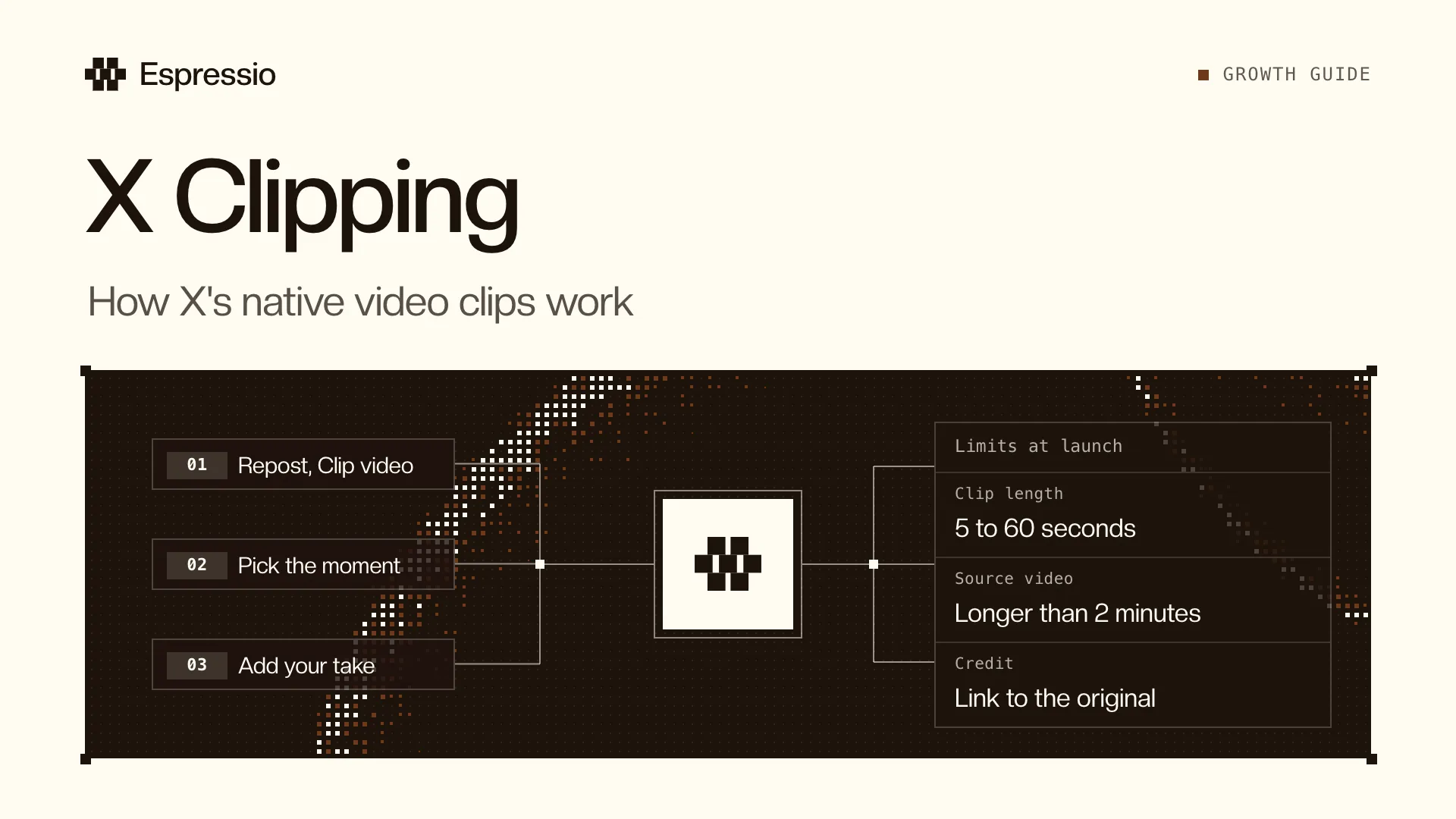
- Official how-to, from @XCreators: tap Repost, then Clip video, pick your moment, add commentary, and post.
- Availability at launch: iOS and Android, on videos longer than 2 minutes. Clips can run from 5 to 60 seconds. X has not announced a web client in the launch posts.
- Every clip credits the original video and links back to it. Both the original creator and the clipper can earn from views on the clip through Original Content Rewards, if they are eligible for that program.
- Live streams are not included yet. When asked to extend clipping to live, X creator product lead Allegra Jacchia replied “It’s coming :)”.
- For AI and tech teams running creator or clipper campaigns, this changes the brief: ask partners to clip natively on X, keep long source videos clip-ready, and send people back to your original rather than off-platform edits.
What X clipping is
X clipping is a built-in way to take a short moment from someone else’s (or your own) video, add your take, and post that clip on X.
Until this launch, Allegra Jacchia, Creator Product at X, wrote that clipping usually meant downloading a video, editing it in an outside tool, and reuploading it. Original creators often didn’t get credit, and even when a clip went viral, they didn’t earn from it. Native clipping is meant to fix both sides: clippers get a few-tap flow in the app, and creators get a credit, a link back, and a path to earn from the clip.
The official @XCreators announcement (full text):
Clipping is here 🎬
Grab your favorite moment from any video, add your take, and post it without leaving X.
Creators: every clip credits your original video and links back to it, so new viewers can find your work and keep watching.
Clippers: you now have an easy, native way to share moments from your favorite creators directly on X.
The best part? Both the original creator and the clipper can earn from views on the clip through Original Content Rewards.
Everyone wins when great moments travel. Clipping is one more step toward making X the best place to create, grow and earn.
X also published a Help Center article, About clipping on X. We could not read the full page at the time of writing (the Help Center returned a block to our fetch), so the limits below are taken from the official posts, not from a line-by-line reading of that article.
How to clip a video on X
From the official follow-up:
- Open a video that is longer than 2 minutes.
- Tap Repost.
- Tap Clip video.
- Pick your moment.
- Add your commentary.
- Post.
Digital Trends, reporting on the same launch, describes the trimmer as drag handles, with a warning if you exceed a length cap, then Next, commentary, and Post. That UI detail is from the press write-up, not from a screenshot we captured ourselves.
Limits and availability
What X has stated in official posts:
| Rule | Source |
|---|---|
| Platforms: iOS and Android | @XCreators |
| Source video must be longer than 2 minutes | @XCreators, Allegra Jacchia |
| Clip length: 5 to 60 seconds | Same posts |
| Credit and a link back to the original video | @XCreators, Allegra Jacchia |
| Live streams: not at launch | Allegra, asked to extend clipping to live: “It’s coming :)” |
What we have not confirmed from an official X post:
- Web. The launch posts only name iOS and Android.
- A clip length cap relative to the original. Digital Trends reports that a clip cannot exceed a percentage of the original video’s length, but we could not confirm that rule in the official posts or by reading the Help Center.
- Who can clip. Official posts do not say the feature is limited to Premium, or to a follower count. On the day of launch, some users replied that they did not see Clip yet on Android or iOS. Treat that as a possible staggered rollout, not as a published eligibility rule.
- Clipping your own videos, Spaces recordings, or ads. Not confirmed in official posts.
- Whether creators can turn clipping off on a video. Not confirmed in official posts.
How credit and Original Content Rewards work
Two things are now attached to a native clip:
- Attribution. The clip credits the original video and links back to it, so a viewer can open the full video and keep watching.
- Payouts. For the first time, both the clipper and the original creator can earn from that clip through Original Content Rewards.
X has not published a clip-specific revenue split or a per-view rate for how earnings are divided between the two accounts.
What we can say about the program itself, from X’s Original Content Rewards help page (as reported when the program was introduced in August–September 2026, and from contemporaneous coverage such as Engadget and NetInfluencer):
- Eligible creators are paid on qualified impressions: unique Home timeline impressions from Premium users where at least 50% of the post is visible.
- Duplicate, paid, promoted and fraudulent impressions do not count.
- Eligibility has included an active Premium (or higher) subscription, a minimum of verified followers, and a trailing-90-day verified Home impression threshold, plus age, country and account-standing rules.
- Payouts have been described as every two weeks, with a minimum payout threshold.
Those program rules predate this clipping launch. Do not assume every clip automatically pays. An ineligible clipper can still post a clip and send viewers to the original; only eligible accounts earn through the program. Confirm current thresholds in Creator Studio and the live Help Center before you brief a campaign.
Downloading a video, trimming it off-platform and reuploading it is the old path this feature is meant to replace. Under Original Content Rewards, X has also treated downloaded-and-reuploaded material as not original. Native clipping is the route that keeps credit and payouts attached.
Why this matters for AI and tech launch campaigns
Most product launches on X still lean on long founder videos, demo recordings, podcasts and Spaces recaps. The people who actually spread those videos are often clippers: operators, niche creators and fans who cut one moment and put their own line on it.
That used to happen off X. The clip might do well, and the company would never see the click back, the credit, or a share of the impressions. Native clipping gives you a cleaner chain:
long source video on X → native clip with commentary → credit and link back to the original → more viewers on the full video
If you already run creators in waves, as in our 90-day product launch marketing plan, clipping belongs in the brief for waves 1 to 3. Ask people to clip the official video on X, not to download it. Give them the timestamps you want clipped, and a line they can adapt rather than a script they have to copy.
Two practical constraints follow from the official limits:
- The source video has to be longer than 2 minutes. A 45-second teaser cannot be clipped natively. Keep the launch demo, the founder walkthrough or the customer story long enough to be clip-eligible, and put the hook moments inside it.
- Each clip is 5 to 60 seconds. That is the length that already works on a scrolling timeline. Write the source video so a 20- to 45-second stretch can stand on its own: one claim, one proof point, one moment.
The X algorithm still rewards replies, quotes and link copies far more than likes. A clip is a new original post with the clipper’s commentary on it. If people reply to and quote the clip, that is useful in its own right, and the credit link is how you recover viewers for the full video. Stay in the replies on both the original and the clips in the first 2 hours.
Do not treat clipping as a paid-media substitute, and do not invent a “clipper ROI” you have not measured.
What to change in a creator or clipper brief
A short brief you can copy and adapt:
- Link to the official video on X (not an unlisted YouTube file or a Drive download).
- Confirm the video is longer than 2 minutes.
- List 3 to 5 moments with start times, each of which can be cut to 5–60 seconds.
- Ask them to use Repost → Clip video, add their own take, and post from their account.
- Tell them not to download, trim off-platform, or reupload.
- Ask them to keep the native credit and link intact.
- If they are in Original Content Rewards, they may earn from the clip, and so may you; do not promise a payout you cannot verify.
- Agree what they should say, and leave room for their angle. Identical copy from ten clippers reads like an ad.
If you work with a clip factory or an agency that has been downloading X videos, update the workflow this week. The native path is the one that keeps you in the credit and rewards graph.
Common mistakes
- Shooting only sub-2-minute videos. Those cannot be clipped natively, based on the launch limits.
- Briefing creators to download and cut in CapCut or a similar tool. That is the old method, and it breaks credit and rewards.
- Assuming every viewer of a clip becomes a payout. Original Content Rewards has its own eligibility and qualified-impression rules.
- Publishing one long video with no clip-able moments. If the good 30 seconds are buried in a rambling 12 minutes, clippers have nothing clean to cut.
- Ignoring the first 2 hours. A clip is still a post. Replies and quotes matter; posting and disappearing wastes the window.
- Claiming rules that are not confirmed. Web support, percentage-based length caps, and exact revenue splits are not in the official launch posts.
FAQ
When did X launch native clipping?
9 November 2026. @XCreators posted the announcement at 20:37 UTC (21:37 Europe/Stockholm). Allegra Jacchia’s product post followed a few minutes later.
How do you clip a video on X?
On iOS or Android, open a video longer than 2 minutes, tap Repost, then Clip video, pick a 5- to 60-second moment, add commentary, and post. Details: XCreators’ how-to and the Help Center article.
Can I clip any video?
Official posts say any video longer than 2 minutes, on iOS and Android. Live streams are not included at launch. Account-level limits, web support, and ads are not confirmed in the launch posts.
Do the original creator and the clipper both get paid?
They can both earn from views on the clip through Original Content Rewards, according to X. X has not published a split or a rate. Payouts still depend on program eligibility and qualified impressions.
Is clipping available on the web?
The launch posts only mention iOS and Android. Check the Help Center article for current availability.
Can I still download a video and reupload a clip?
You can still do that technically, but it is the workflow X is trying to replace, and it typically drops credit and Original Content Rewards eligibility for the original creator. Use the native clip flow.
Does this replace tools like Opus Clip?
No. Native X clipping is for cutting a moment from a video that is already on X, with credit and a link back. Tools like Opus Clip are for turning a long recording (a webinar, a podcast, a demo) into short assets you then publish. You may still cut a launch film off-platform, post the long version to X, and ask creators to clip that X video natively. See our Opus Clip and Claude workflow for the off-platform side.
What to do next
- Post at least one launch or product video longer than 2 minutes on X, with two or three moments that work as 5- to 60-second clips.
- Update creator and clipper briefs to require Repost → Clip video, and drop download-and-reupload instructions.
- If you are in Original Content Rewards, check Creator Studio so you know whether clip views can count for you.
- Read the official Help Center article on clipping for any limits not covered in the launch posts.
- Watch replies and quotes on both the original and the clips in the first 2 hours. Our X algorithm guide explains why that window matters.
If you want a creator and clipper plan for an AI or tech launch, including briefs, source-video structure and a posting window your team can actually keep, book a call.
Related Espressio guides
- X Algorithm November 2026: How X Ranks Posts, From the Code
- How to Build a Product Launch Marketing Plan in 90 Days
- How to Use Opus Clip and Claude for Video Repurposing
- How to Automate X (Twitter) Content with n8n and Claude
- Acquisition Channels: 24 Ways to Build Distribution
Sources checked on 10 November 2026 (Europe/Stockholm): @XCreators announcement and how-to, Allegra Jacchia’s product post and follow-ups, X Help: About clipping on X (URL confirmed; body not retrieved), X Help: Original Content Rewards, Digital Trends.
Get the latest AI workflows, tools and news
Sign up for the Espressio newsletter. We want to make you AI-native.
You're on the list.
The next issue goes to your inbox.