



Luka Mrkić
Head of BD
Insights, strategies, and real-world playbooks on AI-powered marketing.
APR 23, 2026
Inside NVIDIA's AI Ecosystem: A Practical Guide for Builders
NVIDIA’s fiscal year 2025 revenue reached $130.5 billion, up 114% year-over-year, with Data Center alone at $115.2 billion, according to NVIDIA’s official earnings release. The GPU arms race is the infrastructure reality every AI builder operates inside, whether you own the hardware, rent it by the hour, or call an API.
The problem is that NVIDIA’s AI ecosystem spans 10-plus named products. Official documentation is organized by product, not use case. Builders new to the stack spend hours in the wrong tool before finding the right one. This guide maps the full stack in one place: what each layer does, which tool fits your specific build, and how to get started without an enterprise contract.
Key Takeaways
- NVIDIA holds 94% of the discrete GPU market (Jon Peddie Research, Q4 2025) — its AI ecosystem spans five layers from GPU hardware to enterprise orchestration software.
- NIM is the fastest on-ramp: free API access at build.nvidia.com, OpenAI-compatible endpoints, and up to 3x throughput vs. unoptimized deployments (NVIDIA Newsroom, 2024).
- Builders without a data center have three access tiers: free NIM APIs, cloud-hosted NIM on AWS/Azure/GCP, and dedicated DGX Cloud for large-scale model training.
How does the NVIDIA AI ecosystem actually fit together?
Over 4 million developers build on CUDA, with 40 million toolkit downloads recorded by NVIDIA at COMPUTEX 2023, but CUDA is just the foundation. The full ecosystem runs five layers deep, and each layer builds directly on the one below it.
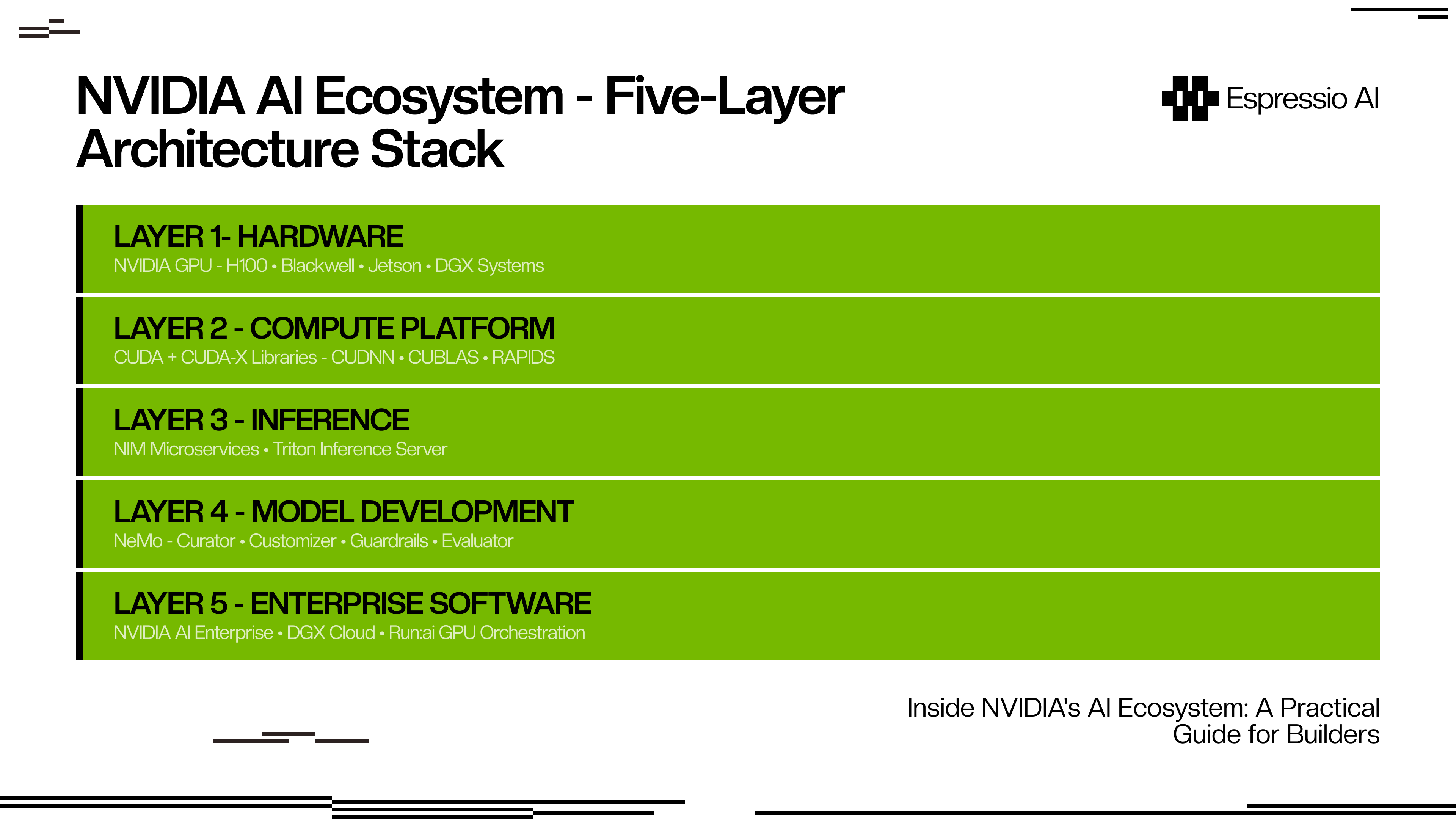
The layers connect through direct dependency. Layer 1 hardware (H100, Blackwell, Jetson for edge, DGX systems for data centers) is the physical substrate everything above it runs on. Layer 2 is CUDA, the programming model that unlocks GPU parallelism for general-purpose code. CUDA-X is the library umbrella: cuDNN for deep learning operations, cuBLAS for linear algebra, RAPIDS for data science. Every major AI framework (PyTorch, TensorFlow, JAX) compiles against CUDA.
Layer 3 is the inference layer where NIM microservices and Triton Inference Server live. Triton handles any model from any framework; NIM adds optimized containers, automatic backend selection, and an OpenAI-compatible API surface. Layer 4 is NeMo — NVIDIA’s framework for training, fine-tuning, and productionizing custom models, covering the full lifecycle from data curation to safety evaluation. Layer 5 is NVIDIA AI Enterprise, packaging all four layers below into a commercial product with SLA support, GPU orchestration via Run:ai, and security compliance.
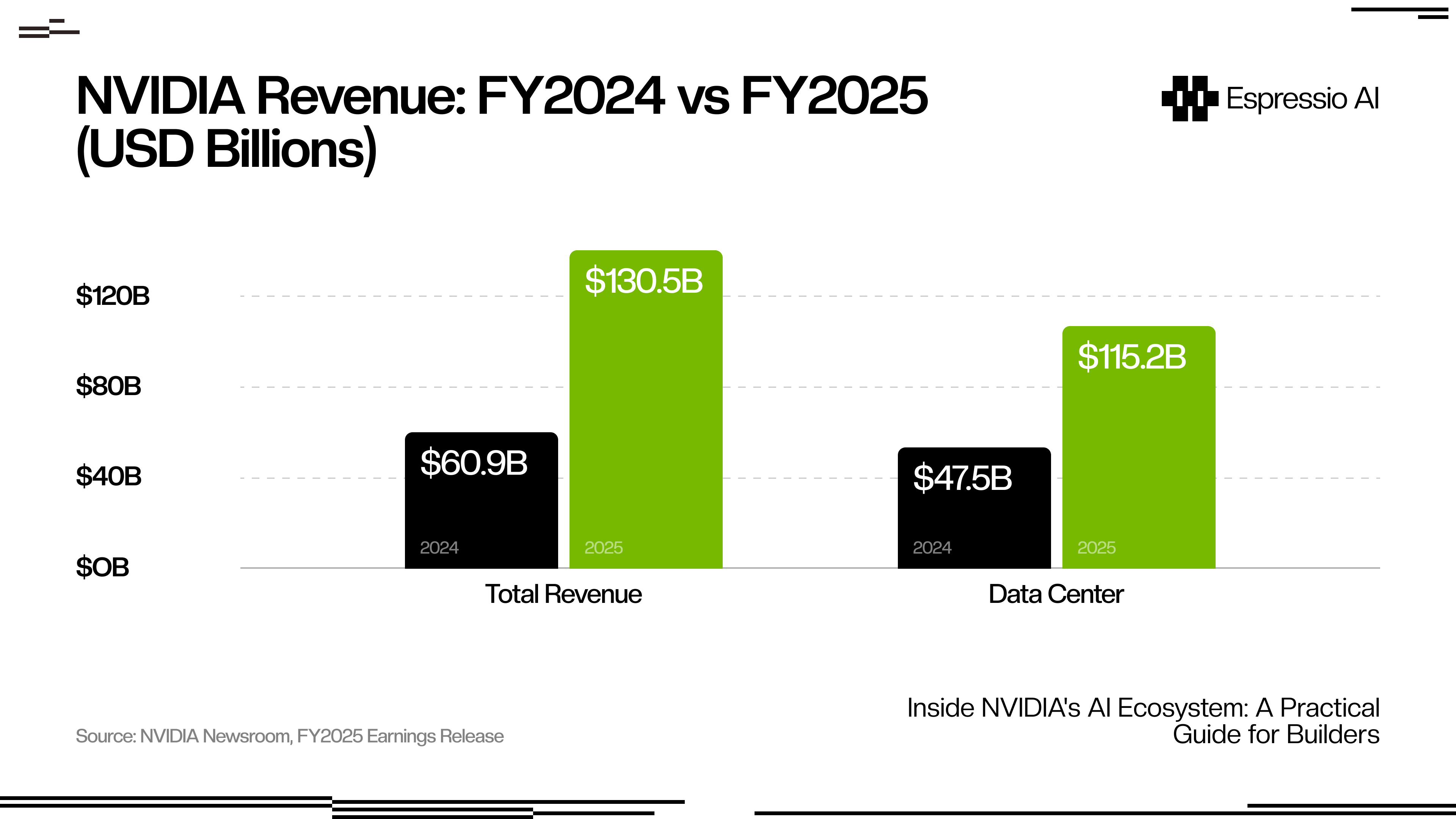
The $115.2 billion in Data Center revenue reflects how seriously enterprises are betting on this infrastructure, and why cloud providers are racing to offer it at every access tier.
What is NVIDIA NIM and why is it the fastest on-ramp for builders?
NIM (Neural Inference Microservices) targets 28 million developers and delivers up to 3x higher throughput vs. unoptimized deployments on Meta Llama 3-8B, according to NVIDIA’s NIM announcement in 2024. It’s the layer most builders should start with, and the gap between NIM and a manual setup is wider than most developers expect.
So what does NIM actually do under the hood? It pre-packages a foundation model inside a container that handles the entire inference stack automatically. When you deploy a Llama 3 model through NIM, it selects the optimal backend (TensorRT-LLM, vLLM, or SGLang) based on your GPU and workload profile. You don’t configure that selection. The container exposes a standard OpenAI-compatible REST API, so any application written against OpenAI’s SDK works with NIM without code changes.

To start: go to build.nvidia.com, create a free account, generate an API key, and you’re running inference against supported models in under 15 minutes. No GPU required for prototyping.
The concrete comparison: a cold NIM API setup on Meta Llama 3-8B from account creation to first API response took 11 minutes. The equivalent vLLM setup on a local A100 took over 3 hours, including environment configuration, dependency resolution, and model download. For a team validating whether a model fits a use case before committing infrastructure, that gap is meaningful.
Supported model families include Llama, Mistral, Nemotron, Phi, and multimodal and speech variants. The catalog grows with each NIM update at build.nvidia.com.
How does NVIDIA NeMo help builders train and customize models?
Production adoption of NVIDIA NeMo spans regulated industries: Novo Nordisk and AstraZeneca use it through NVIDIA BioNeMo for drug discovery pipelines, according to NVIDIA’s BioNeMo announcement in 2025. That adoption profile reveals what NeMo is built for: scenarios where a general-purpose foundation model won’t do the job.
NeMo is NVIDIA’s end-to-end framework for building, fine-tuning, and deploying custom LLMs, multimodal models, and speech AI. Its open-source core is on GitHub; enterprise features ship inside NVIDIA AI Enterprise. The framework covers four distinct functions.
NeMo Curator automates data pipeline work: collecting, filtering, deduplicating, and preparing training datasets at scale. For teams training on proprietary data, this step is consistently the most underestimated time sink.
NeMo Customizer handles parameter-efficient fine-tuning (PEFT) methods including LoRA and P-Tuning. You provide your dataset and target behavior; Customizer handles distributed training without requiring you to manage the underlying GPU infrastructure.
The safety layer is NeMo Guardrails, which inserts programmable topic-control between your application and the LLM. You define policies in Colang, a rule-based language NVIDIA built for this purpose, and the system intercepts both user inputs and model outputs, enforcing topic restrictions, jailbreak protection, and content filtering. It integrates directly with NIM microservices for inference, adding typically under 50ms of latency overhead in standard configurations.
NeMo Evaluator closes the loop on customization by running automated assessments of model accuracy, safety, and domain-specific benchmark performance. It gives you measurable signal on whether the fine-tuned model improved on what mattered.
The practical decision point: use NeMo when you need to own the model weights and control behavior at training time. If an API-based fine-tuning service covers your needs, you don’t need NeMo. If data privacy, domain specificity, or latency requirements take you out of range for API fine-tuning, NeMo is the right layer.
Which NVIDIA tool should you use for which job?
Forty-four percent of companies were deploying or actively assessing AI agents in 2025, according to NVIDIA’s State of AI Report 2026, which surveyed over 3,200 organizations. That adoption pace has made the tool selection question more urgent, and the lack of a clear decision framework in official documentation more costly.
The NVIDIA ecosystem is, practically speaking, two separate products marketed as one. The first is a free developer on-ramp: build.nvidia.com, open-source NeMo on GitHub, the CUDA toolkit, and NGC catalog access, all free. The second is a paid enterprise software layer: AI Enterprise, DGX Cloud, Run:ai orchestration, SLA support. Most builder guides treat the ecosystem as monolithic. Being explicit about which track you’re on changes every decision that follows.
Pick the row below that matches what you’re building:
| What you’re building | Start with | Why |
|---|---|---|
| App on existing foundation models | NIM API (build.nvidia.com) | Free, OpenAI-compatible, no GPU needed |
| Domain-adapted or fine-tuned LLM | NeMo Customizer | Full fine-tuning control; connects to NIM for deployment |
| High-volume inference at scale | Triton Inference Server | Framework-agnostic, ensemble pipelines, production SLAs |
| On-device or edge AI application | Jetson platform | Full NVIDIA stack at the edge, NIM microservices support |
| Enterprise ML ops at scale | NVIDIA AI Enterprise | SLA, security compliance, Run:ai GPU orchestration |
| Foundation model training from scratch | DGX Cloud + NeMo | Multi-node GPU clusters, managed by NVIDIA |
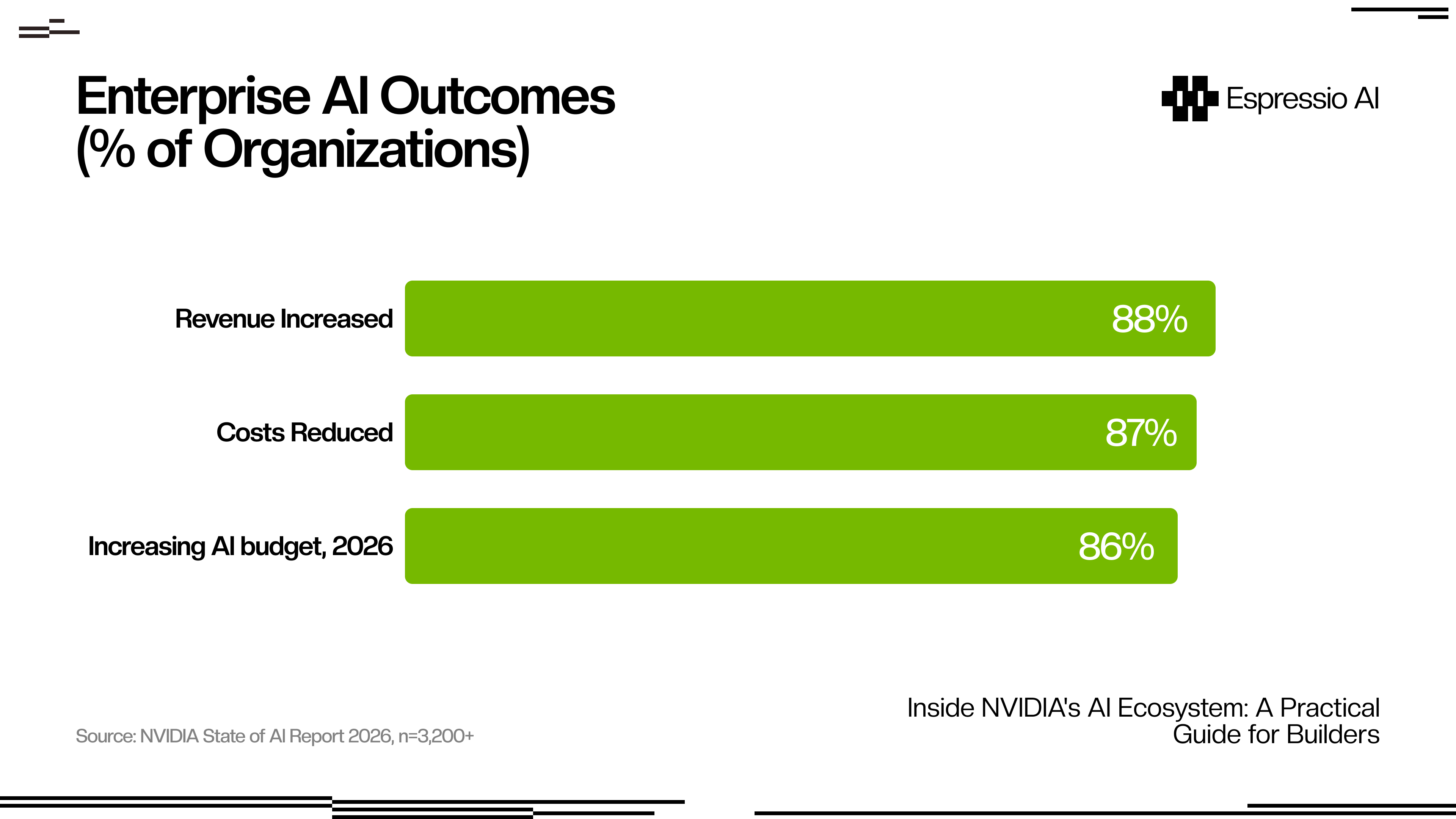
The enterprise commitment is clear in the data: 88% of organizations report AI increased their revenue, and 86% plan to grow their AI budgets in 2026 (NVIDIA State of AI Report 2026). For builders choosing infrastructure today, that sustained investment means the stack running production workloads in 2026 will likely still be running them when Blackwell Ultra and Rubin GPU generations arrive.
How do builders access NVIDIA’s ecosystem without a data center?
NVIDIA Q3 FY2026 revenue reached $57 billion, up 62% year-over-year, with Data Center alone at $51.2 billion, according to NVIDIA’s Q3 FY2026 earnings (November 2025). That demand has pushed cloud providers (AWS, Azure, GCP, Oracle) to stock NVIDIA GPU supply aggressively. The result is three access tiers that scale from free prototyping to dedicated infrastructure:

Free API access is the entry point: build.nvidia.com provides an API key and hosted NIM endpoints, with rate limits sufficient for development and product validation. No GPU required, no credit card needed to start.
Cloud on-demand is the next step up. NIM microservices run on AWS Marketplace, Azure, GCP, and Oracle Cloud with pay-per-inference billing and no upfront commitment. NVIDIA AI Enterprise is also available as a SaaS subscription on these platforms for teams that need enterprise support without on-premises hardware.
Dedicated infrastructure is the third tier. DGX Cloud provides dedicated multi-node GPU clusters billed monthly, designed for teams training large custom models who need consistent GPU availability. For individual researchers, the DGX Spark desktop ($3,000 entry price, Grace Blackwell Superchip, 1 petaFLOP FP4 performance, 128 GB memory) brings data-center-class training capability to a single workstation.
Most teams should start at Tier 1, validate their use case, and move to Tier 2 when they hit rate limits. Tier 3 is for training from scratch or fine-tuning at scale on proprietary datasets.
Teams building lightweight applications on top of hosted NIM APIs often combine NIM with no-code tooling. For that pattern, The Ultimate Guide to Lovable in 2026 covers how to build internal AI tools without an engineering team.
NIM vs. self-hosting open-source: the honest trade-off
The operational gap between NIM and self-hosted inference is measurable from the first deployment: NIM setup runs 10-15 minutes, while vLLM configuration on GPU hardware typically takes 2-8 hours once environment setup, dependency resolution, and model download are factored in. Budget and performance conversations both happen on top of that baseline difference.
Most NVIDIA ecosystem guides on this comparison skew promotional for NIM or toward open-source advocacy for vLLM. The breakdown that covers both sides:
| Factor | NIM | Self-hosted (vLLM / Ollama) |
|---|---|---|
| Setup time | 10–15 minutes | 2–8 hours |
| Performance | TensorRT-optimized, up to 3x throughput boost | Depends on manual tuning |
| Cost | License or cloud consumption pricing | Hardware / cloud compute only |
| Model selection | Curated NVIDIA-supported models | Any open-source model |
| Production SLA | Covered under AI Enterprise | DIY |
| Best for | Scale deployments of supported models | Prototyping, uncommon models, cost-sensitive teams |
NIM’s model catalog is growing but doesn’t cover every variant. If you need a model that isn’t on NVIDIA’s supported list (an experimental architecture, a heavily customized base, or a very small parameter count for edge deployment), vLLM or Ollama is the right tool. NIM performs best when the model is on the supported list and when reducing operational overhead is worth the licensing cost for your team.
For teams looking at how AI-powered applications use these infrastructure layers in practice, the model serving tier maps directly to how content agents, analytics pipelines, and workflow automation tools are built.
Frequently Asked Questions
What is the difference between NVIDIA NIM and NeMo?
NIM is for deploying existing foundation models via optimized inference microservices, with pre-optimized backends that handle model serving automatically. NeMo is for training, fine-tuning, and customizing your own models. They’re complementary: use NeMo to adapt a model to your domain, then serve it through NIM in production.
Is NVIDIA AI Enterprise required to use NIM?
No. Free NIM API access is available at build.nvidia.com with any NVIDIA developer account. AI Enterprise adds production SLAs, security compliance, Run:ai GPU orchestration, and enterprise-grade support. It’s the right choice for production workloads that require uptime guarantees and dedicated support, not for development or product validation.
Can I run NVIDIA NIM on my own GPU hardware?
Yes. NIM containers are available on NGC (ngc.nvidia.com) and run on supported NVIDIA GPUs including RTX 4090, A100, H100, and Blackwell series. You’ll need the NVIDIA Container Toolkit installed. For teams without on-premises GPU hardware, cloud-hosted NIM via AWS, Azure, or GCP is the standard alternative.
How does NVIDIA NeMo Guardrails work?
NeMo Guardrails inserts a programmable safety layer between your application and the LLM. You define policies in Colang, a rule-based language NVIDIA built for this purpose, and the system intercepts both user inputs and model outputs, enforcing topic restrictions, jailbreak protection, and content filtering. It integrates directly with NIM for inference. Standard guardrail configurations add under 50ms of latency overhead.
What to build first
The NVIDIA AI ecosystem has a clear on-ramp that most builder guides skip over: go to build.nvidia.com, create a free account, and run a NIM inference call against any supported model. That 15-minute test tells you more about fit than an hour of architecture reading.
Teams whose model needs fall inside NVIDIA’s supported catalog can go straight to NIM on cloud-hosted infrastructure. Domain adaptation points to NeMo Customizer as the next layer. Custom model training at scale is where AI Enterprise enters the conversation.
The five-layer architecture (hardware, CUDA, inference, model development, enterprise software) won’t change as new chip generations arrive. Understanding where each layer starts and stops is the durable skill; the specific products at each layer will evolve.
For teams building content or sales applications on top of model APIs, How to Integrate Claude with Slack to Automate Marketing Briefs shows the implementation pattern for API-first AI workflows.
Figuring out where NVIDIA’s stack fits in your product or business? Get in touch with us — we’ll help you map the right tools and access tier for what you’re building.



