



Luka Mrkić
Head of BD
Insights, strategies, and real-world playbooks on AI-powered marketing.
JUN 2, 2026
How to Build an AI Pricing Calculator for B2B Service Agencies
TL;DR
- An AI pricing calculator for a B2B service agency is a small internal tool that takes a structured intake (service line, scope, timeline, risk factors, engagement type), references past projects, asks Claude to return a price range with a rationale, and routes the result through a human approval gate before anything reaches a buyer.
- The intake form is more important than the model. A six-field form anchored in how the agency actually scopes work returns better pricing than the smartest LLM run on a one-paragraph brief.
- A useful first build covers one service line, references the last twelve to twenty projects, and lives behind an internal page. It saves the partner a draft cycle on every quote and exposes which intakes carry the most risk.
- The pipeline is five steps: intake, normalize, reference, model, approve. The hard parts are the reference store and the approval gate.
- This guide ships the schema for the intake form, the Claude prompt that survives in production, the reference structure that keeps the model grounded, and the six checks that tell you the calculator is still useful.
If you are evaluating who should build this for your team, this guide gives you both the technical blueprint and the standards to evaluate the work.
What an AI pricing calculator actually does
An AI pricing calculator for a services agency is not a public landing page that returns a number to a stranger. It is an internal tool that takes a structured scope intake from a sales rep, an account exec, or a delivery lead, and returns a price range plus a written rationale. The calculator references past projects, surfaces the assumptions the model used, lists the risks worth pricing in, and routes the draft quote through an approval gate before it ever reaches a buyer.
The old way of pricing B2B services was the partner pulling a number out of recent memory, the AE writing a SOW that drifted from the partner number by twenty percent, and the kickoff revealing scope nobody priced in. The cycle eats hours per quote and produces a quote variance that erodes margin one project at a time.
The automated version writes the same draft on every intake in minutes. The partner reviews and adjusts. The AE sends a quote that matches how the agency actually delivers. The reference store grows with each project that closes, which means the model gets calibrated to the agency’s real numbers.
Architecture
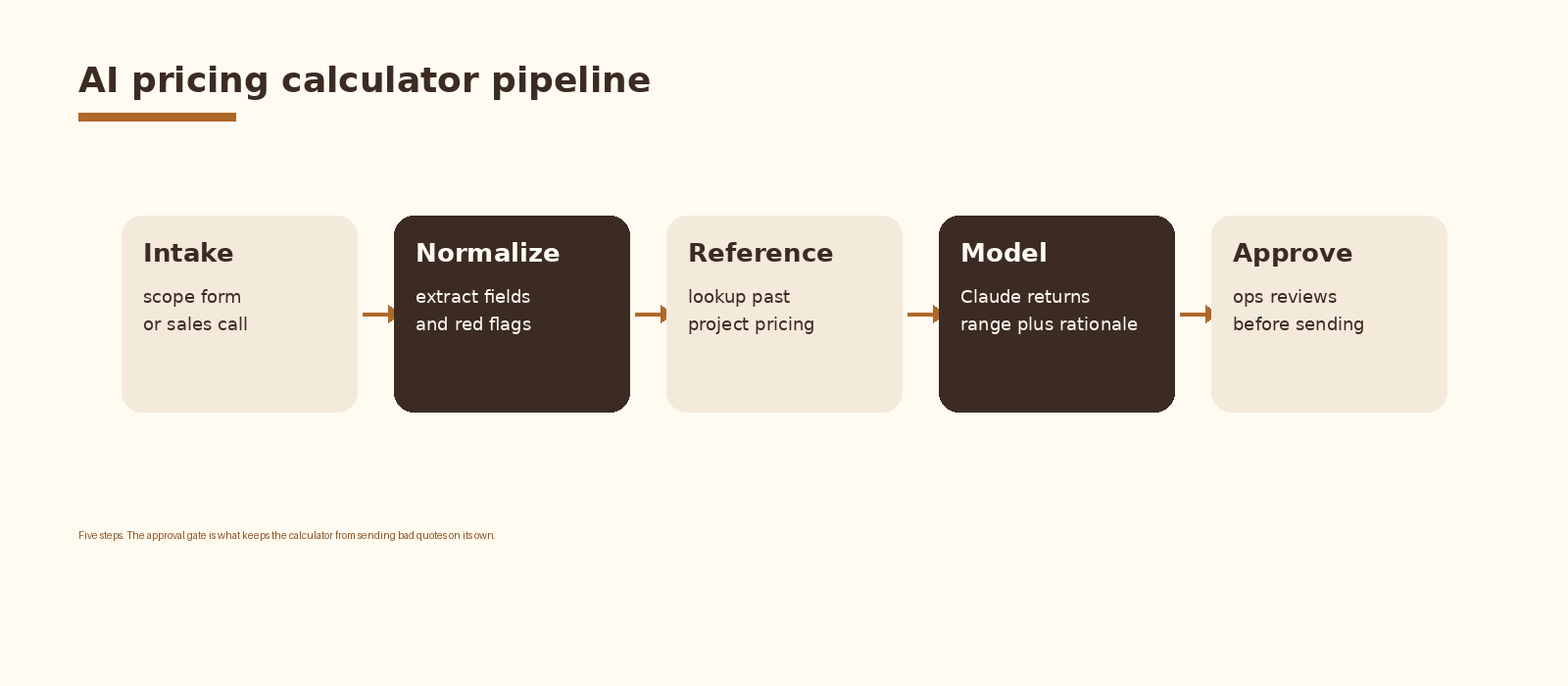
Five components inside one internal tool. An intake form (Tally, Typeform, or a small React form on Vercel) collects the structured fields. A normalize step extracts the intake into a clean JSON payload and tags red flags. A reference lookup pulls comparable past projects from the agency’s project store. A Claude call returns the price range, the assumptions, and the rationale. An approval gate routes the draft into a Slack channel or a notion review board so the partner signs off before the AE sends anything to a buyer.
Step 1. Design the intake form
The intake form is the single highest leverage piece of the build. A model run on a one-sentence brief returns a one-sentence brief priced. A model run on a six-field form returns the kind of quote an experienced partner would write. Spend a week on the form before writing a line of model code.
Six fields are enough for a first build. Service line. Scope (deliverables, integrations, user counts, training sessions). Timeline (weeks to delivery and any hard deadlines). Risk factors (vendor APIs, data quality concerns, stakeholder count, custom UI). Buyer context (industry, team size, budget signal if shared). Engagement type (fixed fee, retainer, milestone, time and materials).
Step 2. Normalize the intake
A clean JSON payload makes the rest of the pipeline simple. The normalize step takes the raw form submission, extracts each field into a typed value, and tags red flags before the model ever sees the input. Red flags are the things you would not let a junior pricer ignore. Unknown vendor API. Data quality unconfirmed. More than five external stakeholders. Timeline under three weeks. Custom UI on a six-week build.
// Normalize sketch (Node)
function normalize(intake) {
  const payload = {
    service_line: intake.service_line,
    deliverables: parseList(intake.deliverables),
    integrations: parseList(intake.integrations),
    timeline_weeks: parseInt(intake.timeline_weeks, 10),
    engagement_type: intake.engagement_type,
    buyer_context: {
      industry: intake.industry,
      team_size: parseInt(intake.team_size, 10),
      budget_signal: intake.budget_signal || null,
    },
    risks: [],
  };
  if (payload.timeline_weeks < 3) payload.risks.push('tight_timeline');
  if (payload.integrations.length > 3) payload.risks.push('integration_surface');
  if (!intake.data_quality_confirmed) payload.risks.push('data_quality_unknown');
  return payload;
}
Red flags do not change the price by themselves. They route the draft into the approval queue regardless of what the model returns. A high-risk intake never auto-publishes, even if the model is confident.
Step 3. Reference past projects
A model with no reference store hallucinates a price. A model with a small reference store hallucinates within a tighter band. A model with a real store of past projects, tagged by service line, scope, and outcome, writes quotes that look like the agency wrote them.
The reference store is a small structured table. One row per closed project. Columns for service line, scope summary, integrations, timeline weeks, final price, engagement type, and a short note on what went well or badly. Twelve to twenty rows is enough to ground the model. Pull the top three to five rows by service line match into the prompt context for each new intake.
// reference_projects.csv
service_line,scope_summary,integrations,weeks,price,engagement_type,note
ai_system_build,lead routing agent,3,8,52000,fixed_fee,tight handoff with rev ops
ai_system_build,rfp drafting agent,2,6,38000,fixed_fee,scope creep on templates
ai_implementation,claude crm setup,4,10,72000,milestone,vendor api held us up two weeks
ai_advisory,strategy plus prototype,1,4,28000,fixed_fee,smooth single stakeholder
ai_system_build,sales call summarizer,2,5,32000,fixed_fee,fireflies plus hubspot
Step 4. Call Claude with a structured prompt
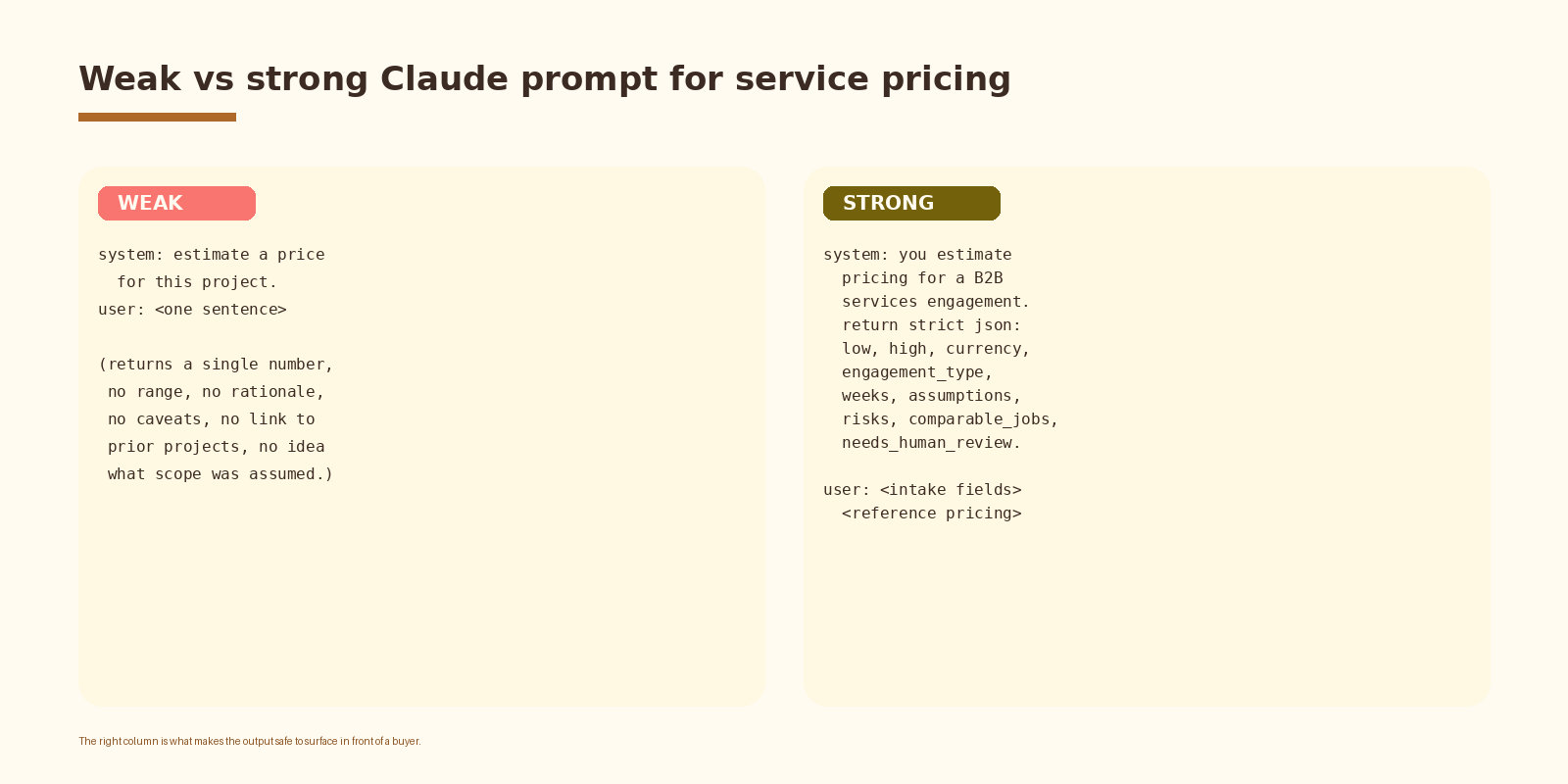
A weak prompt returns a single number with no rationale. A strong prompt returns strict JSON: a low and high range, the engagement type assumed, the weeks assumed, the explicit assumptions, the risks the model flagged, the comparable jobs it referenced, and a needs_human_review flag that the approval gate reads directly.
// Claude messages payload
{
  "model": "claude-sonnet-4-5",
  "max_tokens": 1200,
  "system": "You estimate pricing for a B2B services engagement. Return strict JSON with keys: low (int), high (int), currency, engagement_type (fixed_fee|retainer|milestone|time_and_materials), weeks (int), assumptions (array of one-line strings), risks (array of one-line strings), comparable_jobs (array of past project ids), needs_human_review (bool), rationale (one paragraph, 80 words max). If the intake is missing a critical field, set needs_human_review to true and explain in rationale. Do not invent past projects.",
  "messages": [{
    "role": "user",
    "content": "Intake:\n" + JSON.stringify(payload) + "\n\nReference projects:\n" + referenceRows
  }]
}
Four details matter. The schema is locked. The reference rows ship in the user message so the model sees concrete numbers alongside the system guidance. The needs_human_review flag is a structured field the approval gate reads directly. The do-not-invent rule keeps the model from cooking comparable jobs out of thin air.
If you want this set up cleanly inside your stack with logging, retries, and a feedback loop into a CRM, that is the kind of work we ship at Espressio.
Step 5. Route through an approval gate
An AI pricing calculator that auto-sends quotes is the version that loses a deal. The approval gate is the line between a fast internal tool and an embarrassing mistake. Every draft quote drops into a Slack channel or a Notion review board with the intake, the model output, and the comparable jobs visible. The partner approves, edits, or rejects in two minutes.
# Slack approval message
*New quote draft*  ·  {{service_line}}  ·  needs review: {{needs_human_review}}
Buyer: {{industry}}, {{team_size}} ppl
Scope: {{deliverables_summary}}
Range: ${{low}} - ${{high}}  ·  {{weeks}} wks  ·  {{engagement_type}}
Risks: {{risks_joined}}
Comparable: {{comparable_jobs_joined}}
Rationale: {{rationale}}
Approve  /  Edit  /  Reject
Two design choices in this gate matter. The approve action writes the quote to the CRM as a draft so the AE still owns the buyer-facing send. The reject action logs the reason; the reason file is what trains the next iteration of the prompt.
Inputs that drive a real services quote
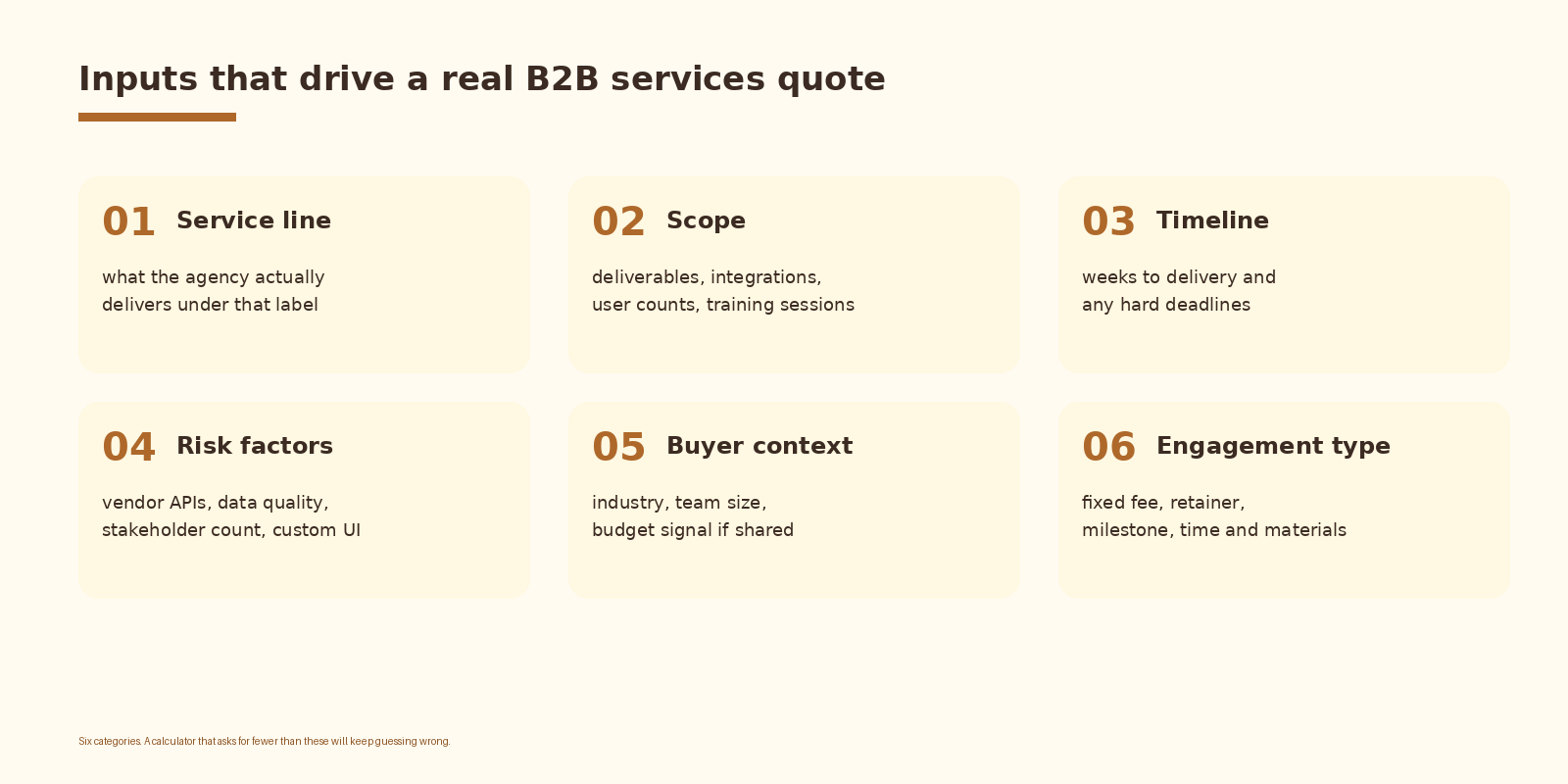
Six categories of input cover most of what an experienced partner asks before quoting. Service line and scope are non-negotiable. Timeline is what turns a comfortable build into a risky one. Risk factors are how the agency protects margin on the projects that look easy and are not. Buyer context shapes the engagement type. Engagement type changes the structure of the number itself.
Common mistakes
- Putting the calculator on the public site. A live quote in front of a stranger is anchoring against you in the first sales conversation.
- Asking the model for a single number. A point estimate kills negotiation room and reads as overconfident.
- Skipping the reference store. Without past projects, the model invents a price that has nothing to do with how the agency delivers.
- No approval gate. An auto-sent draft will eventually go out wrong on a deal that mattered.
- Letting the model invent comparable projects. The do-not-invent rule has to be explicit in the system prompt.
- Never re-tuning. Win rate and margin drift quietly. Review the calculator against actuals once a month or it stops being useful.
How to know it is working
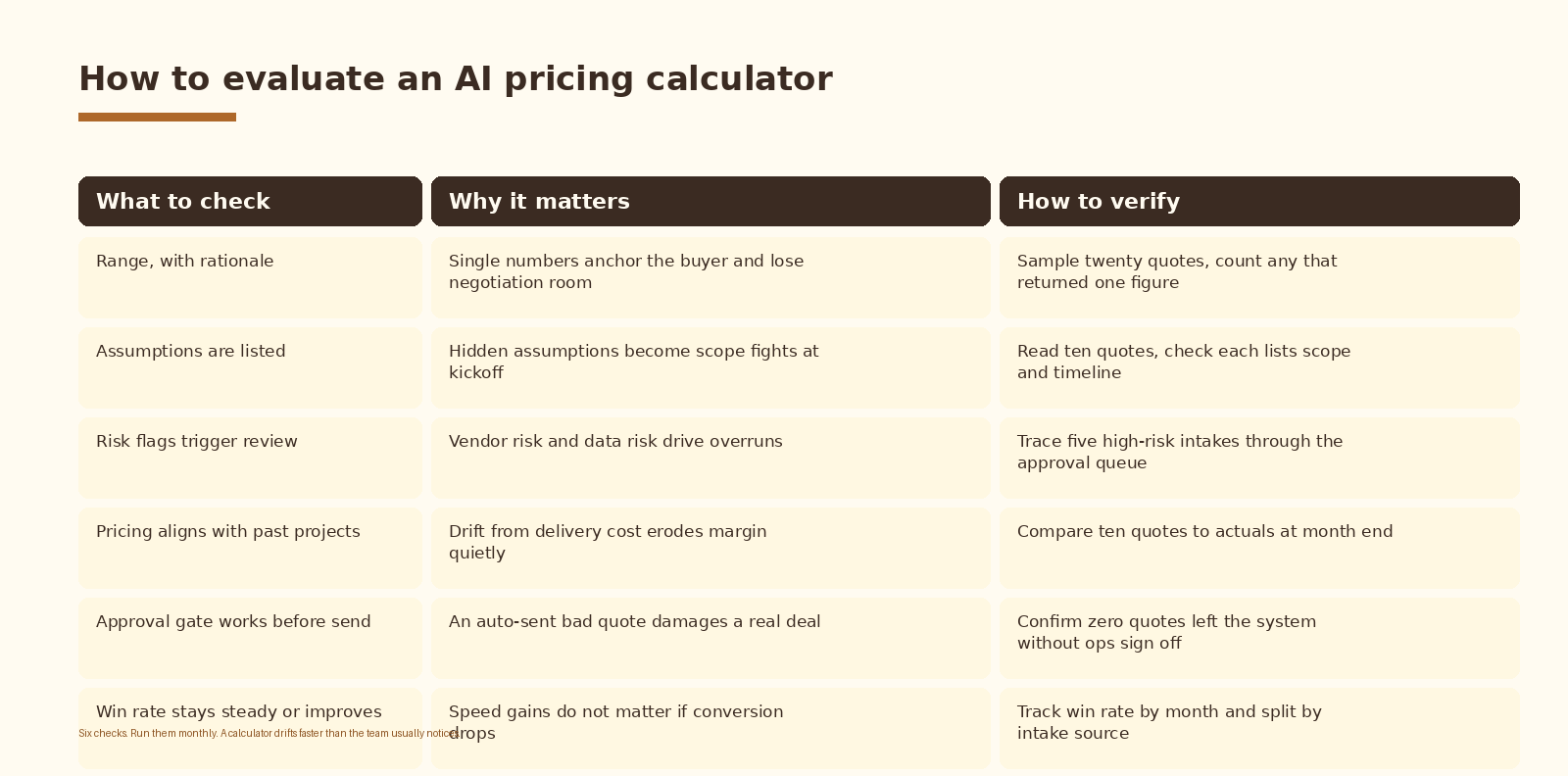
A draft volume metric on its own is meaningless. The number that matters is approval rate and quote-to-actual variance. Approval rate is the share of drafts the partner sends without major edits. Quote-to-actual is the variance between the quoted range and what the project actually cost to deliver. Track both monthly. If approval rate trends down, the prompt drifted from how the partner actually thinks. If variance trends up, the reference store needs new rows.
FAQ
Should the calculator be public or internal?
Internal by default for B2B services. Public pricing pages work well for productized offers (a fixed audit, a one-off teardown, a standard package) where the scope does not move. Custom services engagements have too many inputs that change the price. A public calculator there either oversimplifies and loses margin or asks too many questions and loses leads. Keep the calculator internal, and publish a separate productized-services page if buyers expect to see numbers somewhere on the site.
Which LLM should I use?
Sonnet is the default. It handles structured JSON under load, references the project store cleanly, and respects the do-not-invent rule when the rule is in the system prompt. Haiku gets faster and cheaper but trades consistency on the schema. Opus is overkill for single-quote drafting. Switch only if the schema starts failing on Sonnet, and reach for a fine-tuned smaller model only once volume justifies the operational cost.
How do I handle pricing for retainer or milestone work?
Add engagement_type as an explicit input on the intake form. The model returns a different structure for each type. Fixed fee returns a low-high range. Retainer returns a monthly amount and a minimum term. Milestone returns a per-milestone breakdown and a total cap. Time and materials returns an hourly range and a not-to-exceed cap. Lock the schema per engagement type so the approval gate can render the right preview.
What does this cost to run?
Two cost lines: the form host and the model. Tally or Typeform sits at standard subscription pricing. Claude is called once per intake; a six-field form plus reference rows runs in cents per call on Sonnet. For a team running ten to twenty quotes a week, list-price spend lands in low double digits a month on the model side. The reference store and approval gate are free if they live in Notion or Slack.
What happens when our pricing changes?
Two updates. Add new closed projects to the reference store as they happen so the model sees current numbers. Re-read the system prompt every quarter to catch language that no longer matches how the agency talks about scope. The reference store does most of the work; the prompt does the rest. Avoid hard-coding price floors or ceilings into the prompt because they drift fastest and the reference store handles the same job more cleanly.
What to do next
- Pick one service line. AI system builds, AI advisory, AI implementation. Build the calculator for one before generalizing.
- Draft the six-field intake form with the partner who actually prices that service line today.
- Pull twelve to twenty past projects into a reference table. One row per project, columns for the fields the model will need.
- Stand up the Claude call against the locked JSON schema. Run it against ten real intakes and compare to what the partner would have written.
- Wire the Slack or Notion approval gate. Run for two weeks with the partner approving every draft.
- Review approval rate and quote-to-actual variance after the first month. Retune the prompt or add reference rows before opening the tool to more reps.
If you want automation like this set up cleanly inside your agency operations, let’s talk.
Related Espressio guides



