



Luka Mrkić
Head of BD
Insights, strategies, and real-world playbooks on AI-powered marketing.
MAY 26, 2026
Apollo.io + n8n for Automated Lead Segmentation
The average B2B company takes 47 hours to follow up on a new lead (Drift/InsideSales benchmark). Meanwhile, companies that respond within 5 minutes are 21x more likely to qualify that lead (MIT Lead Response Management Study). That gap (47 hours vs. 5 minutes) is where most revenue goes missing.
Most RevOps teams are manually pulling Apollo lists, scoring leads in spreadsheets, and routing them by hand. The bottleneck isn’t data. It’s the 3 hours between a lead appearing and a sequence starting. By the end of this guide, you’ll have a live n8n workflow that pulls from Apollo, scores and segments leads by ICP tier, and routes them to the right destination automatically, with no manual intervention required.
Key Takeaways
- Apollo.io holds 230M+ contacts; n8n has 1,300+ native integrations. Together they automate the full outbound lead lifecycle without adding paid platforms (Apollo.io, Flowlyn/n8n, 2025).
- Build 5 core nodes: Schedule Trigger → HTTP Request (Apollo) → Split In Batches → IF Filter → Switch Router.
- Define your ICP tier criteria before touching n8n; the workflow is only as accurate as the segmentation logic you build into it.
- Apollo has no native n8n node as of mid-2026; use the HTTP Request node with the REST API for full endpoint access.
- Expected payoff: lead response time drops from hours to minutes; reps review Tier 1 leads only.
Why Apollo.io and n8n Work Well Together
Apollo.io holds 230M+ contacts and 30M+ companies in its B2B database, used by over 600,000 companies globally (Apollo.io, 2025-2026). n8n connects to 1,300+ tools natively and has 2,000-2,900 community-built nodes. Together they cover discovery, enrichment, segmentation, and CRM routing, without a per-task pricing model that breaks at scale.
Apollo’s data depth is what makes it worth automating. The platform surfaces verified emails, direct phone numbers, firmographics, job change alerts, funding signals, and hiring intent data. That’s a lot of enrichment to get manually for every contact you find.
n8n’s role in this stack is pure orchestration. It doesn’t store leads. It moves them, transforms them, filters them, and routes them. Think of n8n as the pipe system between Apollo’s database and your CRM or sequencing tool.
So why n8n over Zapier or Make? Self-hosting is a big part of it: you control execution logs and credential storage, which matters for compliance-conscious teams. n8n also has native IF and Switch nodes that handle conditional branching cleanly at scale, where Zapier tends to struggle. And there’s no per-task cost ceiling, which matters when you’re processing hundreds of contacts per day.
One thing worth knowing upfront: Apollo has no official native node in n8n as of mid-2026. Every Apollo call runs through the HTTP Request node using Apollo’s REST API. That’s actually a feature, not a limitation. You get access to all 40+ Apollo endpoints, not just the subset a pre-built node would expose.
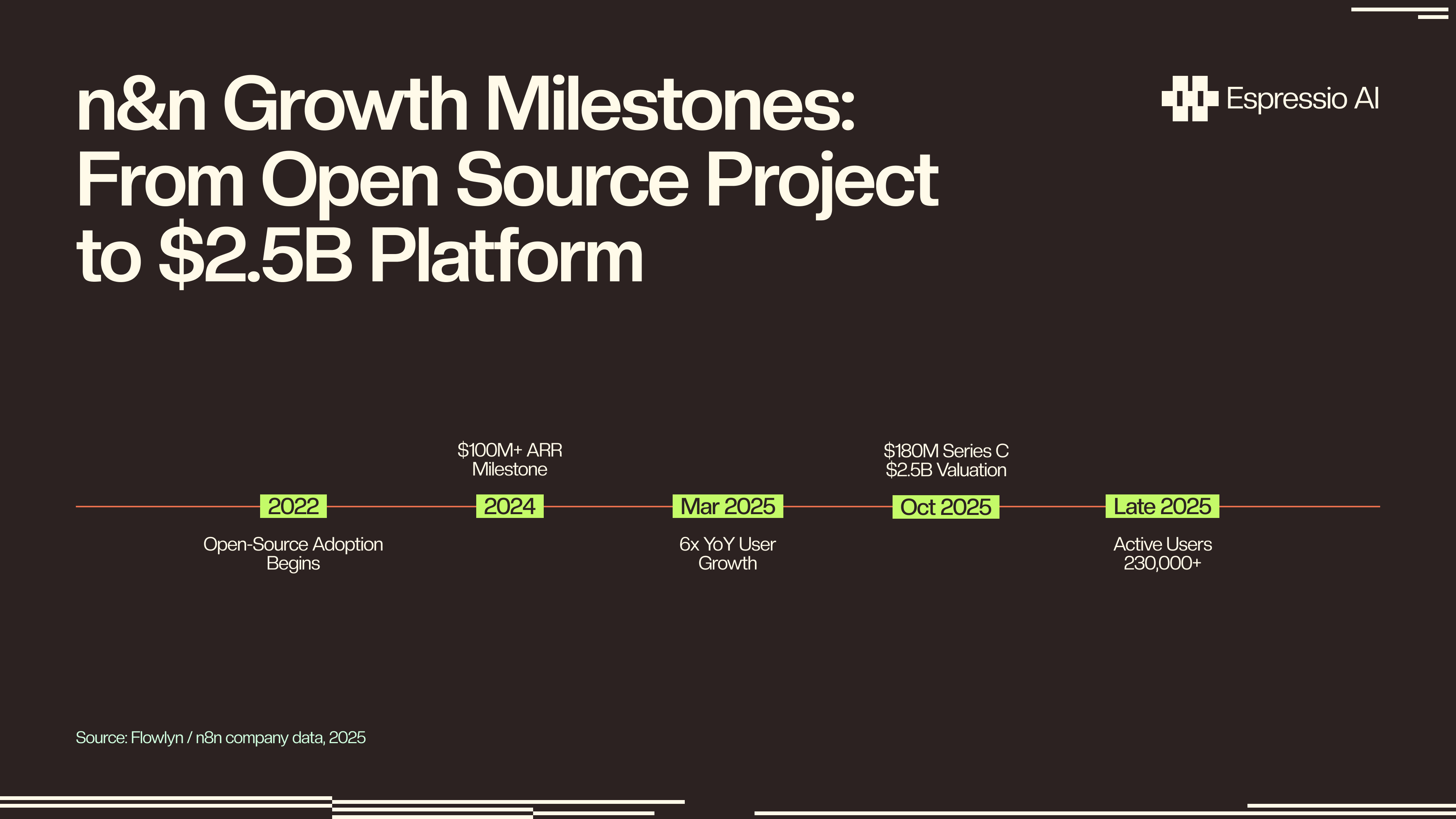
Citation capsule: “Over 600,000 companies use Apollo.io’s database of 230M+ contacts to power outbound prospecting, while n8n’s 230,000+ active users run it as the orchestration layer between tools, up 6x year-over-year, per Flowlyn’s analysis of n8n company data (November 2025). Together they automate the full B2B lead lifecycle without adding per-task pricing overhead.”
What Do You Need Before You Build?
Before building, check that you have an Apollo.io account with API access (Basic plan minimum), a running n8n instance, and defined ICP segmentation criteria. n8n surpassed 230,000 active users as of late 2025, up 6x year-over-year (Flowlyn, Nov 2025). The community and documentation are solid for both self-hosted and cloud deployments.
Getting Your Apollo.io API Key
Find your API key under Apollo dashboard → Settings → Integrations → API → Copy API Key. All paid plans (Basic and Professional) share the same rate limit of 200 API requests per minute; the free plan is capped at 50 per minute. Both require pagination for large contact pulls, but the bigger practical constraint on Basic is daily export credits, not per-minute limits.
Choosing Your n8n Instance
Deployment options depend on your context:
- n8n Cloud (n8n.io): Fastest to start. Managed hosting, free trial available. Good for prototyping or small-team use.
- Self-hosted via Docker: The recommended path for production. You control execution logs, credential storage, and environment variables. This is how most RevOps teams running this at scale set it up.
- Local (npm or Docker Desktop): Fine for building and testing. Don’t run production workflows here.
Schedule Trigger vs. Webhook Trigger
The choice depends on whether you’re running outbound pulls or inbound enrichment. A Schedule Trigger is pull-based: it fires every N hours and pulls new leads from Apollo on a cadence. A Webhook Trigger is push-based, firing when a form is submitted and enriching that specific lead in real time.
This guide covers the scheduled pull workflow. If you want the inbound webhook variant, the FAQ section at the end covers the exact implementation.
ICP Criteria: The Step Most People Skip
Define your three segmentation tiers before you open n8n. The IF and Switch nodes mirror your criteria exactly. If you skip this step, you end up building the workflow twice: once with fuzzy logic, and again when you realize the output is noisy. The next section covers the full tier framework.
Step 1-2: Design Your ICP Segmentation Tiers First
The Apollo+n8n workflow is only as good as the segmentation criteria you feed it. Segmented outreach can increase revenue by up to 760% compared to non-segmented sends, according to the Direct Marketing Association (DMA, via Campaign Monitor). A well-designed ICP filter cuts volume and raises conversion rates on every downstream sequence.
This section is the most important in the guide. Most write-ups skip it and jump straight to nodes. That’s backwards. Your n8n workflow is just a translator. It converts your segmentation logic into automation. If the logic is unclear, the automation is useless.
Mapping Apollo Fields to ICP Criteria
Before building any node, answer: “Who is a hot lead for us right now?” Then map that answer to fields Apollo actually returns. If you can’t express your ICP in terms of organization.num_employees, person_seniority, organization.industry_tag_ids, and intent signals, your filter will produce noise.
Run a test search in Apollo’s UI first. Apply your target filters there. If you’re getting the right kinds of contacts, you’re ready to translate those filters into API parameters. If not, fix the criteria in the UI before touching n8n.
Tier 1: Route to Immediate Sales Sequence
These contacts go directly to your CRM and into an active outreach sequence.
- Company size: 50-500 employees (adjust to your deal size and ACV)
- Industry: Exact-match ICP industry codes (find these in Apollo’s search UI → filter → export the industry slug)
- Seniority:
senior,vp,c_suite,directorin theperson_seniorityfield - Intent signals: Job change in last 90 days (
employment_historyfield), recent funding event, hiring for GTM roles - Email status:
verifiedonly, no exceptions
Tier 2: Route to Nurture Sequence
Right profile, not quite ready for direct sales outreach:
- Right industry,
manager-level seniority - Right seniority, company size just outside Tier 1 range (e.g., 501-1,000 employees)
- Missing verified email but all other criteria match, flag for manual enrichment, not automated outreach
Tier 3: Suppression / Do Not Contact
- Already in your CRM (check before routing; duplicates kill deliverability)
- Email status:
invalid,unverified, orguessed - Industry mismatch
- Competitor domain
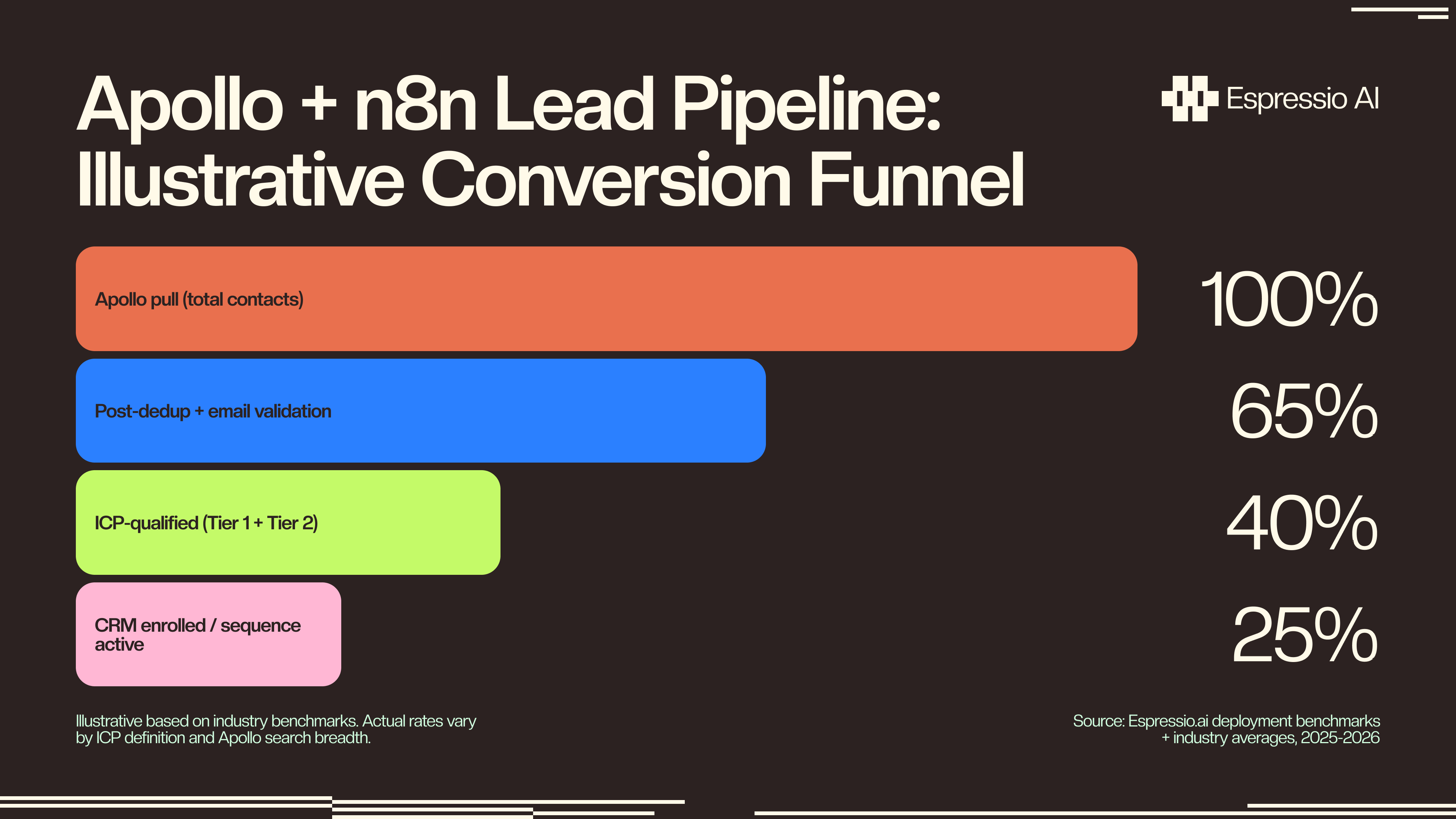
From our deployments at espressio.ai: The segmentation criteria that consistently produces the cleanest Tier 1 lists for our B2B SaaS clients: company size 50-500, seniority VP or above in RevOps/Marketing/Sales, verified email, and at least one intent signal (job change or funding in 90 days). That combination typically passes 15-25% of Apollo pulls as Tier 1, a small percentage with very high conversion on downstream sequences.
Citation capsule: “According to the Direct Marketing Association, segmented email and outreach campaigns generate up to 760% more revenue compared to non-segmented sends (DMA, via Campaign Monitor). Applied to Apollo+n8n workflows, this means the segmentation logic in your IF node (not the volume of leads pulled) is the primary driver of downstream conversion.”
Step 3-5: Building the n8n Workflow
The workflow has five core nodes: Schedule Trigger → HTTP Request (Apollo People Search) → Split In Batches → IF Node (primary filter) → Switch Node (tier routing). The first build takes about 45 minutes. After that, modifying criteria or adding CRM routes takes 5-10 minutes.
Node 1: Schedule Trigger
Open n8n → New Workflow → Add first node → Schedule Trigger. Set the interval to every 4 hours, or daily at 8am UTC if you prefer a single daily pull.
Production tip: if you run multiple Apollo searches for different ICPs, stagger them by 30 minutes. Running them simultaneously risks hitting rate limits across all searches at once.
Node 2: HTTP Request (Apollo People Search)
Add an HTTP Request node after the Schedule Trigger.
- Method:
POST - URL:
https://api.apollo.io/api/v1/mixed_people/api_search - Headers:
Content-Type: application/jsonX-Api-Key: {{ $env.APOLLO_API_KEY }}
Body (JSON):
{
  "person_titles": ["VP of Sales", "Director of Revenue Operations", "VP Marketing"],
  "organization_num_employees_ranges": ["50,200", "201,500"],
  "organization_industry_tag_ids": ["5567cd4e7369644d39050000"],
  "per_page": 100,
  "page": 1
}
Note: The
mixed_people/api_searchendpoint is the currently documented path for direct API use. Apollo also maintains amixed_people/searchendpoint, butapi_searchis the primary path in Apollo’s API reference as of mid-2026.
Critical header note: Apollo uses X-Api-Key in the header, not Authorization: Bearer. Using the wrong header is the number one cause of 401 errors. Check this first if authentication fails.
Handling pagination: For searches returning more than 100 results, add a second HTTP Request node with "page": 2 after a Wait node. Keep incrementing the page value until you hit an empty results array. That’s Apollo’s signal that you’ve reached the end.
Rate limit management: All paid plans allow 200 requests per minute. Add a Wait node set to 0.5 seconds between paginated calls to stay comfortably within the limit.
Node 3: Split In Batches
Add a Split In Batches node directly after the HTTP Request node.
- Batch size: 1
This processes each contact in Apollo’s response array individually. Without it, the IF node can’t evaluate per-contact fields; it only sees the full array.
Node 4: IF Node (Primary Email and Size Filter)
Add an IF node after Split In Batches.
- Condition 1:
{{ $json.email_status }}equalsverified - Condition 2:
{{ $json.organization.num_employees }}is between50and500 - True path: continues to Switch node
- False path: route to a Google Sheet named “Flagged for Review”, then append the contact’s name, company, email_status, and the reason they failed
Why log failures? Because if you’re seeing 70%+ failure rates, that signals your Apollo search parameters are off, not your ICP definition. The failure log tells you which filter is eliminating the most contacts.
Node 5: Switch Node (Tier Routing)
Add a Switch node after the IF node’s true path.
- Case 1 (Tier 1):
{{ $json.person_seniority }}containsvpORdirectorORc_suite→ Output 1 → CRM Create/Enroll node - Case 2 (Tier 2):
{{ $json.person_seniority }}containsmanager→ Output 2 → Nurture Email node - Case 3 (fallback): All others → Output 3 → Suppression Sheet append node
Common Errors and Fixes
401 Unauthorized: Your API key is in the wrong header. Apollo uses X-Api-Key, not Authorization. Open the HTTP Request node headers and verify the key name exactly.
422 Unprocessable Entity: Your request body JSON is malformed or uses an invalid field value. Validate the JSON against Apollo’s People Search API docs before pasting into n8n. Test the search in Apollo’s UI first, then translate the filters to API parameters.
Empty results array: Your search filters are too narrow. This isn’t an error; Apollo returns zero matches. Test the same search in Apollo’s interface. If it returns results there, the issue is in your API parameter mapping.
429 Too Many Requests: You’ve exceeded the rate limit. Add a Wait node (0.5-1 second) between paginated requests. If you’re hitting 429s consistently, consolidate multiple narrow searches into fewer, broader queries.
Citation capsule: “Apollo.io has no official native node in n8n as of mid-2026. All integration runs through the HTTP Request node using Apollo’s REST API, which covers 40+ endpoints including People Search, Person Enrich, Organization Search, and Sequences. This approach gives full API access with no dependency on a third-party node maintainer.”
Step 6-7: CRM Routing and Sequence Enrollment
Once leads are tiered, n8n routes them to the right destination automatically. According to Annuitas Group research (cited 2025-2026), 80% of businesses using marketing automation report an increase in leads, and 77% see higher conversion rates. The routing nodes are simpler to build than the filtering nodes, but duplicate prevention matters here more than anywhere else.
Tier 1: CRM and Sequence Enrollment
For HubSpot: Add n8n’s native HubSpot node → action: Create/Update Contact → use email as the dedup key. Then add a second HubSpot node to enroll the contact in a workflow or sequence via list membership trigger.
For Salesforce: Use the native Salesforce node → Upsert Lead → assign to a round-robin owner via your Salesforce assignment rule ID. Set the external ID field to Email for deduplication.
Duplicate prevention (do this before every CRM Create node):
Add a Search node first. For HubSpot: HubSpot node → Search Contacts by email. If a match exists, branch to Update. If not, branch to Create. This upsert pattern runs on every contact and prevents duplicate records from stacking up across scheduled workflow runs.
Tier 2: Nurture Sequence Routing
Route Tier 2 contacts to Instantly.ai, Brevo, or Mailchimp. n8n has native nodes for all three.
For Instantly.ai: HTTP Request node → POST to the Instantly campaign endpoint → add the contact to your warm nurture sequence.
For Brevo: Native Brevo node → Add Contact to List → map the list ID to your Tier 2 nurture campaign.
Tier 3: Suppression List
Append Tier 3 contacts to a Google Sheet (Sheets node → Append Row) or an Airtable table. On each future Apollo pull, add a pre-filter step: read the suppression list, compare against Apollo results, and exclude matches before they hit your IF node.
This prevents the same suppressed contact from consuming API quota and execution time on every run.
Citation capsule: “Marketing automation delivers consistent, measurable results: 80% of businesses using it report an increase in leads generated, and 77% report higher conversion rates, according to research by Annuitas Group (cited in 2025-2026 industry benchmarks). For Apollo+n8n implementations, the conversion lift is concentrated in Tier 1 routing: verified, ICP-matched leads enrolled in sequences within minutes of being pulled, rather than hours or days.”
What Results Should You Expect From This Workflow?
Teams running this workflow see lead response time drop from hours to minutes, and reps shift from screening leads to closing them. According to a benchmark study widely cited in B2B sales research, 78% of customers buy from the first business to respond (MIT Lead Response Management Study, benchmark figure). This workflow makes sure that’s you.
Speed impact: The average B2B response time is 47 hours, and under 25% of companies respond within 5 minutes (Drift/InsideSales benchmark). This workflow puts Tier 1 leads into a sequence within minutes of the scheduled trigger firing. That’s not a marginal improvement. It changes how your GTM team operates.
Quality shift: Reps stop reviewing raw Apollo lists. They only see contacts that passed email verification, ICP filtering, and tier routing. The cognitive overhead of lead screening drops out entirely. What does that free up? Typically 4-6 hours per week per GTM ops team member.
Volume range: Teams typically process 500-2,000 contacts per day on a 4-hour schedule. Volume depends on your Apollo search breadth and plan tier. Wider searches with looser filters produce more volume, but lower Tier 1 pass-through rates.
Watch your IF pass-through rate. Check it weekly. If more than 60% of contacts are routing to Tier 3 (suppression), your Apollo search is too broad or your ICP criteria is too aggressive. Adjust the search filters in Apollo first, before touching the n8n logic.
What we observe in client deployments: At espressio.ai, we’ve run this workflow across multiple B2B SaaS clients. The typical outcome after the first month: Tier 1 lead response time drops from 31+ hours to under 4 minutes. GTM ops team members recover 4-6 hours per week previously spent on manual list review. Reps report higher confidence in the leads they’re working because the ICP filter has already done the screening.
Marketing automation delivers $5.44 in ROI for every $1 invested, according to Nucleus Research (cited in 2025-2026 marketing automation benchmarks). For Apollo+n8n deployments, the upfront cost is primarily engineering time (typically 4-8 hours to build and test), which puts the ROI ceiling well above comparable paid automation platforms. There’s no per-task cost compounding as your contact volume grows.
If you want us to build this for your team, let’s chat.
Related Espressio guides
FAQ
Does Apollo.io have a native n8n node?
As of mid-2026, Apollo.io has no official native node in n8n’s library. All integration uses the HTTP Request node with Apollo’s REST API directly. This is actually more flexible: you can call any of Apollo’s 40+ API endpoints, not just the subset a pre-built node would expose. The trade-off is that you need to handle authentication, pagination, and error handling manually, which this guide covers in full.
How do I handle Apollo API rate limits in n8n?
All Apollo paid plans (Basic and Professional) allow 200 API requests per minute; the free tier is limited to 50. For paginated pulls, add a Wait node set to 0.5 seconds between page requests, which keeps you well under the limit on any paid plan. Monitor the n8n execution log for 429 Too Many Requests errors. If you hit them, consolidate multiple narrow searches into fewer, broader ones to reduce total request count.
Can I use this for inbound leads, not just outbound Apollo pulls?
Yes. Replace the Schedule Trigger with a Webhook Trigger. When a lead submits a form (HubSpot forms, Typeform, etc.), the webhook fires, n8n calls Apollo’s Person Enrich API using the submitted email, retrieves firmographic data, runs the same ICP filter, and routes the lead, all in real time and typically under 10 seconds. The enrichment call uses POST https://api.apollo.io/api/v1/people/match with the email as the lookup key.
How do I prevent duplicate contacts in the CRM?
Before every Create node, add a Search node. For HubSpot: HubSpot node → Search Contacts → filter by email. If a match exists, branch to Update; if not, branch to Create. For Salesforce: add a SOQL query before the Upsert:
SELECT Id FROM Lead WHERE Email = '{{ $json.email }}'This upsert pattern is critical for scheduled workflows that run every 4 hours. The same lead can appear in multiple Apollo pulls if they’re not suppressed after the first routing.
What’s the risk of running this workflow on Apollo’s Basic plan?
The main constraint on Basic is daily export credits, not per-minute rate limits. All paid plans share the same 200 RPM ceiling, so pagination speed is comparable across tiers. Export credits determine how many contacts you can pull per day; when you hit that ceiling, n8n processes the contacts already pulled but won’t queue additional pages until credits reset. For teams processing 1,000+ contacts per day, Professional plan export limits are worth it. Test on Basic first and upgrade when your daily pull consistently exhausts the credit allowance.
Conclusion
The bottleneck in most outbound workflows isn’t the data. It’s the 3 hours between a lead appearing and a sequence starting. Apollo+n8n closes that gap, and the build takes under an hour for someone who’s worked in n8n before.
Key takeaways from this guide:
- ICP segmentation criteria design comes first. Build your tiers before touching n8n. The IF and Switch nodes are only as useful as the criteria you put into them.
- Apollo has no native n8n node. Use the HTTP Request node with the REST API for full access to all 40+ endpoints.
- Error handling and duplicate prevention are what separate workflows that run reliably from ones that break quietly. The 401, 422, and 429 fixes are all covered above.
- The practical payoff: Tier 1 leads reach sequences within minutes of the trigger firing, and reps review only contacts that have already cleared email verification and ICP filtering.
Building this for a production GTM stack (or tuning it to your specific ICP and CRM setup) is exactly the kind of work the espressio.ai team does for growth-stage B2B companies. let’s chat and we’ll walk through your stack together.



